The main difference between shared hosting and VPS hosting is how server resources are allocated: shared hosting divides one server’s resources among many websites, while VPS hosting gives each website its own dedicated slice.
That difference shapes everything else – cost, performance, and how much control you have.
With shared hosting, multiple websites use the same server and share its CPU, memory, and storage. The hosting provider manages the server environment, making shared hosting an affordable, low-maintenance option for blogs, portfolios, and small business websites.
VPS hosting divides a physical server into independent, virtualized environments, each with dedicated resources. Each VPS operates like its own server, giving you full root access, greater control over the software stack, and more predictable performance as your website grows.
Here is a quick shared hosting vs. VPS hosting comparison:
Feature | Shared hosting | VPS hosting |
Best for | Blogs, portfolios, personal and small business websites | Growing websites, ecommerce stores, web apps, and custom projects |
Resources | Shared with other websites on the same server | Dedicated virtual CPU, RAM, and storage allocation |
Performance | Suitable for low to moderate traffic | Consistent performance under heavier workloads |
Control | Standard hosting environment with limited customization | Full root access and complete server control |
Technical expertise | Beginner-friendly | Requires server administration knowledge |
Scalability | Limited by the hosting plan | Easy to scale resources as your website grows |
Maintenance | Managed by the hosting provider | Managed by you, with optional setup templates and tools |
Cost | Lower monthly price | Higher price for greater resources and flexibility |


What is shared hosting?
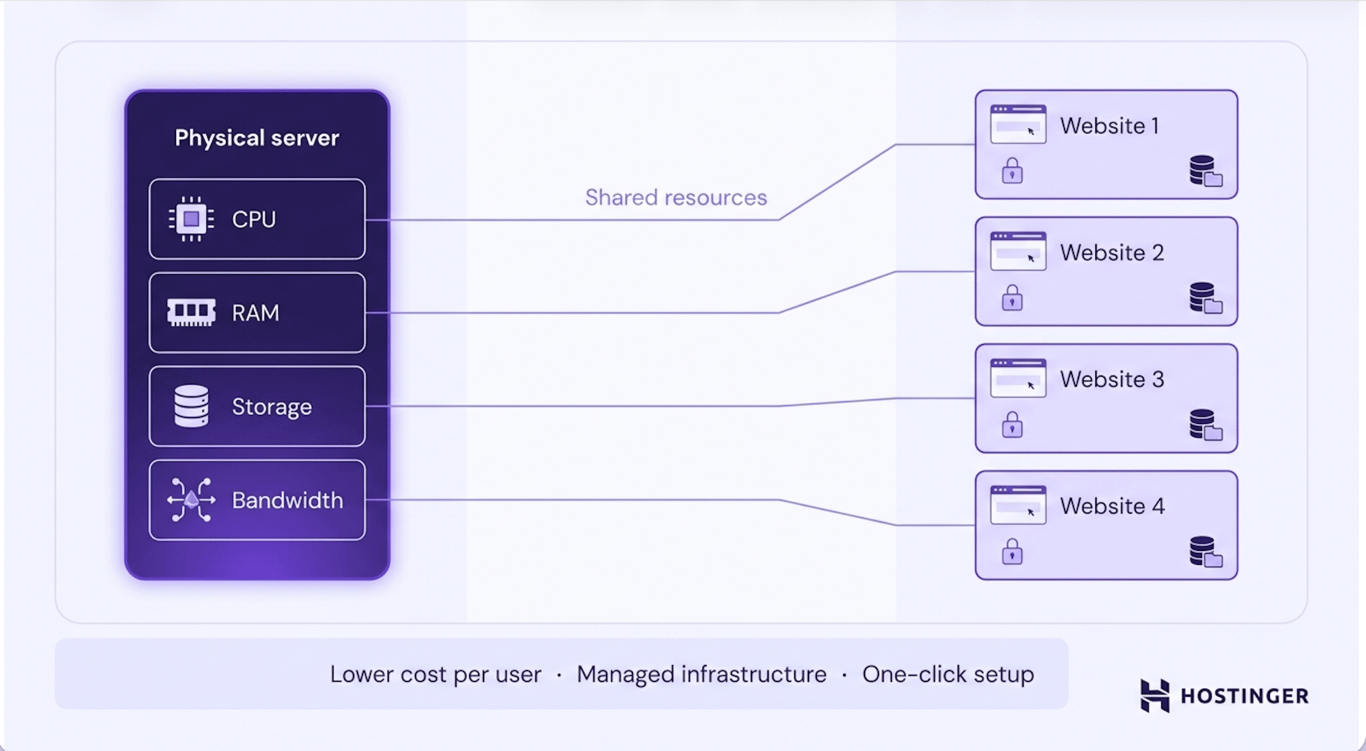
Shared hosting is a type of web hosting where multiple websites use the same physical server and share its resources, including CPU, RAM, and storage, though bandwidth is often unlimited even on shared plans.
The hosting provider allocates those resources across all websites on the server and manages the underlying infrastructure, operating system, and server maintenance.
Each website has its own files, databases, and hosting account, but all websites run within the same server environment.
Because the cost of the server is shared among multiple users, shared hosting is one of the most cost-effective hosting options.
Most shared hosting plans include a preconfigured hosting environment, a control panel, SSL certificates, email hosting, and one-click installers for popular applications such as WordPress.
Users can launch and manage a website without configuring the server or performing routine maintenance.
Advantages of shared hosting over VPS hosting
Shared hosting is a good choice for users who want to launch a website quickly without managing a server.
Compared to VPS hosting, it offers the following advantages:
- Lower cost – Shared hosting plans are more affordable because multiple websites share the same server and its resources.
- Beginner-friendly – Most plans include a preconfigured hosting environment, allowing you to launch a website without server administration skills.
- Minimal maintenance – The hosting provider manages server updates, security patches, hardware maintenance, and infrastructure monitoring.
- Faster setup – Features such as one-click installers, a control panel, SSL certificates, and email hosting help you get a website online quickly.
- Suitable for smaller websites – Shared hosting provides enough resources for blogs, portfolios, personal websites, and many small business websites with moderate traffic.
Disadvantages of shared hosting compared to VPS hosting
Sharing a server with other websites limits the level of performance, flexibility, and control you can achieve.
When compared to VPS hosting, shared hosting has the following disadvantages:
- Shared resources – CPU, RAM, and bandwidth are shared with other websites on the same server, which can affect performance during periods of high resource usage.
- Limited customization – You can’t install a custom operating system, modify server-level settings, or run software that requires root access.
- Less consistent performance – Websites with growing traffic or resource-intensive applications may experience slower response times than they would on a VPS with dedicated resources.
- Restricted scalability – Scaling beyond the limits of a shared hosting plan usually requires upgrading to a more powerful hosting solution, such as VPS or cloud hosting.
- No root access – Without root access, you can’t fully control the server environment or configure it for specialized workloads and custom applications.
What is VPS hosting?
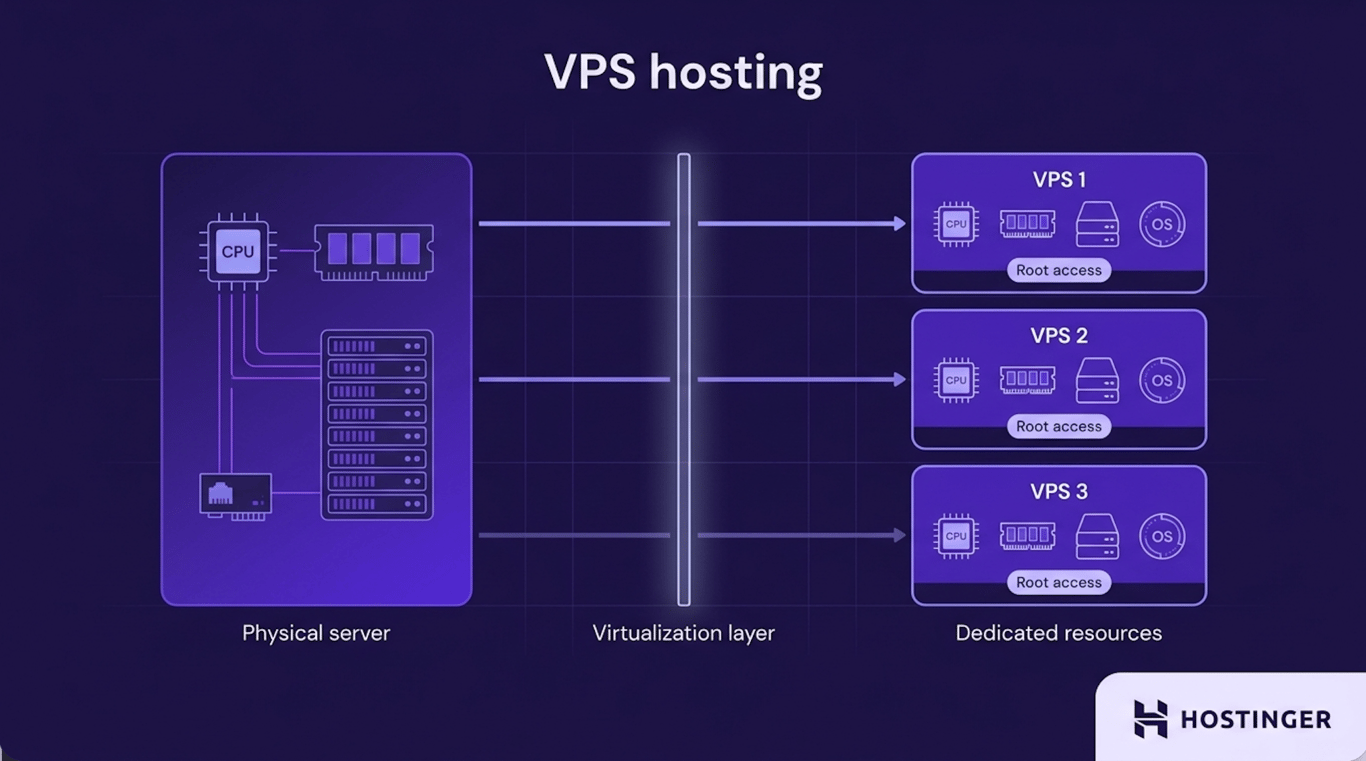
VPS (Virtual Private Server) hosting divides a physical server into multiple independent virtual servers using virtualization technology.
Each virtual server has its own allocated CPU, RAM, storage, and operating system, allowing it to operate independently from the others.
A VPS also supports full root access, allowing users to install custom operating systems, software, and applications, as well as configure the server to meet their requirements.
Advantages of VPS hosting over shared hosting
VPS hosting unlocks several capabilities that shared hosting doesn’t offer:
- Dedicated resources – CPU, RAM, and storage are allocated to your VPS, resulting in more consistent performance and reducing the impact of other users on the same physical server.
- Full root access – You have complete control over the server, allowing you to install a custom operating system, configure server settings, and run specialized software.
- Greater flexibility – A VPS supports a wider range of applications, development environments, and server configurations than shared hosting.
- Better scalability – Resources such as CPU, RAM, and storage can be increased as your website or application grows.
- Handles higher workloads – VPS hosting is better suited for websites with growing traffic, ecommerce stores, web applications, and other resource-intensive projects.
Disadvantages of VPS hosting compared to shared hosting
The additional control and dedicated resources that VPS hosting provides also come with a few trade-offs, including:
- Higher cost – VPS hosting plans are more expensive than shared hosting because they include dedicated resources and greater server control.
- Requires technical knowledge – Managing a VPS typically involves working with the command line, configuring server software, and troubleshooting technical issues.
- More maintenance – Users are responsible for tasks such as installing updates, securing the server, and maintaining the software stack unless they use a managed VPS service.
- Longer setup time – Configuring a VPS usually takes more effort than launching a website on a preconfigured shared hosting plan.
- More responsibility – Full root access gives you complete control over the server, but it also means you’re responsible for keeping the server stable, secure, and optimized.
Shared hosting vs. VPS hosting: Which one is more secure?
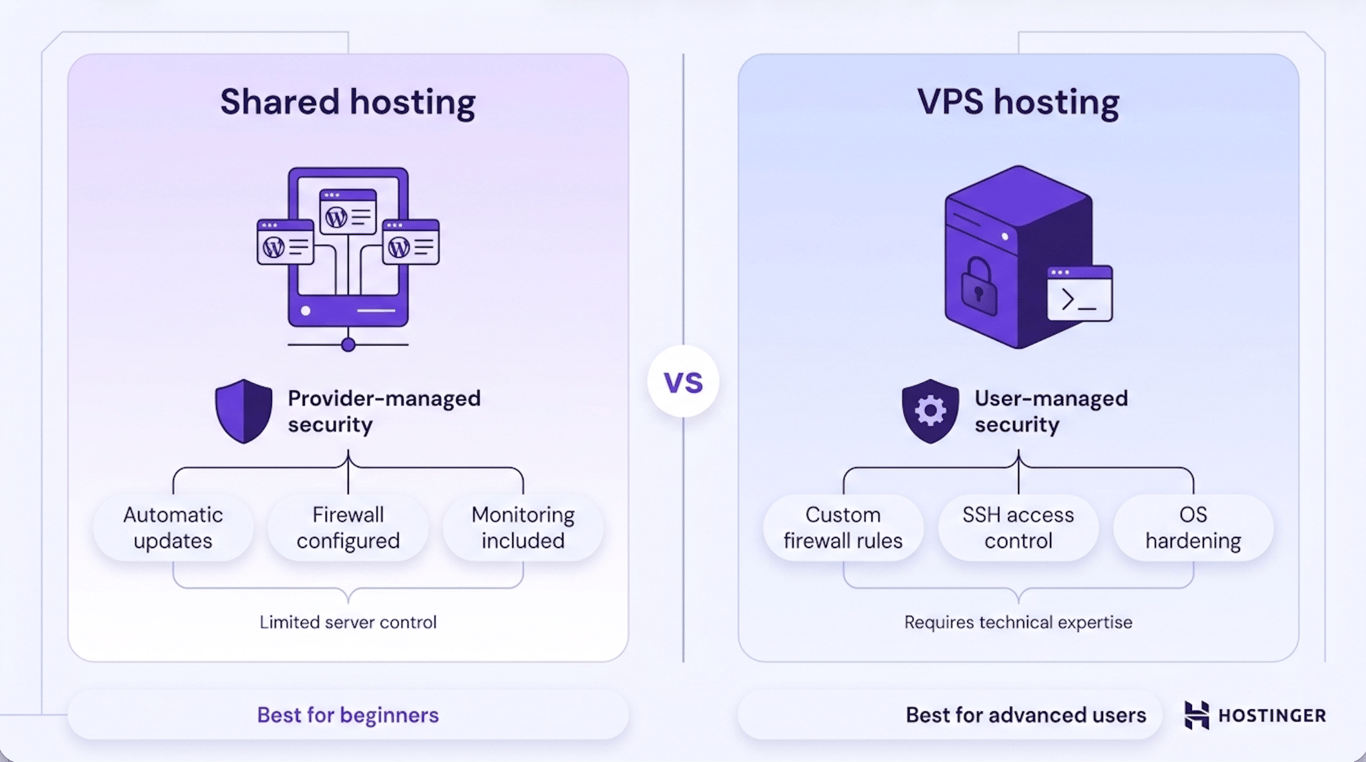
Both shared hosting and VPS hosting can provide a secure environment for your website, but they approach security differently.
With shared hosting, multiple websites share the same server environment, while the hosting provider is responsible for securing the host and maintaining the underlying infrastructure.
Server updates, security patches, firewall configuration, and monitoring are typically handled for you, reducing the risk of security issues caused by misconfiguration.
The trade-off is that you have limited control over the server’s security settings.
A VPS isolates each virtual server from the others on the same physical machine, reducing the risk that activity on another VPS will affect your environment.
Full root access also allows you to implement custom security measures, such as configuring a firewall, restricting SSH access, installing intrusion detection tools, or hardening the operating system to meet your requirements.
Greater control, however, also means greater responsibility. Keeping a VPS secure requires regularly applying software updates, configuring security settings, monitoring for vulnerabilities, and following server security best practices.
A poorly configured VPS can be more vulnerable than a properly managed shared hosting plan.
Common VPS security mistakes include leaving the default SSH port (22) open to the public, running services as the root user, and skipping firewall configuration after setup. These oversights are among the leading causes of VPS compromises.
Overall, VPS hosting offers greater security potential because of its isolated environment and extensive customization options.
Shared hosting, however, can be the more secure choice for users who lack the technical knowledge to manage a server, as the hosting provider handles most security-related tasks.
Shared hosting vs. VPS hosting: Which one performs better?
VPS hosting generally delivers more consistent performance than shared hosting because it provides dedicated resources that aren’t shared with other websites on the same server.
In a shared hosting environment, multiple websites use the same pool of CPU, RAM, and storage.
Hosting providers allocate resources to ensure stable performance, but websites with sudden traffic spikes or resource-intensive workloads can temporarily consume more resources than other websites on the same server.
This phenomenon, often referred to as the noisy neighbor effect, may slow down other websites sharing the same server.
A VPS avoids this issue by allocating dedicated CPU, RAM, and storage to each virtual server.
Since those resources are reserved for a single VPS, other users on the same physical server can’t consume them.
This results in more predictable performance, especially during traffic spikes or periods of increased resource usage.
The difference becomes more noticeable as a website grows. Shared hosting provides sufficient performance for blogs, portfolios, and small business websites with moderate traffic.
However, ecommerce stores, web applications, membership sites, and other resource-intensive projects often benefit from the dedicated resources and consistent performance that VPS hosting provides.
Overall, VPS hosting is the better choice for websites that require reliable performance under varying workloads, while shared hosting remains a practical and cost-effective solution for smaller websites with predictable traffic.
Shared hosting vs. VPS hosting: Which one offers more control?
VPS hosting offers significantly more control than shared hosting by giving users full access to the server environment.
With a shared hosting plan, the hosting provider manages the operating system, server software, and configuration.
Users can manage their website through a control panel and use tools such as SSH and cron jobs within their own account, but they can’t modify server-level settings, choose a different operating system, or install software that requires root access.
This managed approach simplifies website management but limits customization.
A VPS includes full root access, allowing users to configure the server according to their needs. They can choose the operating system, install and configure web servers, databases, and programming environments, and deploy software that isn’t available on shared hosting plans.
A VPS also supports technologies such as Docker and Node.js, making it suitable for hosting custom applications, development environments, APIs, and other workloads that require greater flexibility.
For users who only need to host a website, the additional control of a VPS may not be necessary.
However, developers, businesses running custom applications, and website owners who need complete control over the server environment will benefit from the flexibility that VPS hosting provides.
Shared hosting vs. VPS hosting: Which one is easier to maintain?
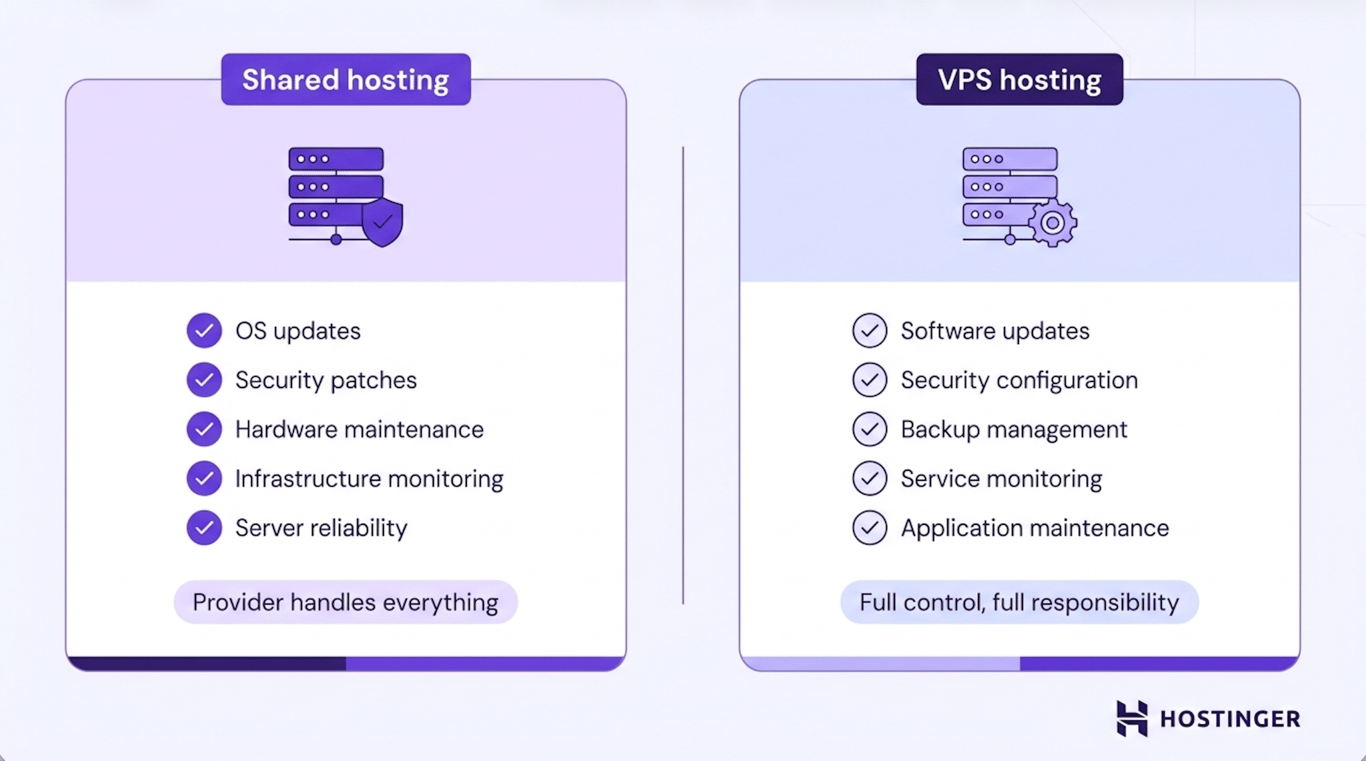
Shared hosting is easier to maintain because the hosting provider handles ongoing server maintenance for you.
With a shared hosting plan, the provider is responsible for operating system updates, security patches, hardware maintenance, infrastructure monitoring, and keeping the server running reliably. You only need to manage your website and its content.
With a VPS, you’re responsible for maintaining the server environment unless you choose a managed VPS service.
Regular tasks include installing software updates, applying security patches, monitoring server health, configuring backups, and maintaining the applications and services running on the server.
If you prefer a hands-off hosting experience, shared hosting requires less ongoing maintenance. A VPS involves more administrative work but gives you complete control over how the server is configured and maintained.
Shared hosting vs. VPS hosting: Which one scales better?
VPS hosting scales more easily than shared hosting because you can increase server resources as your website grows.
Shared hosting plans are designed for websites with relatively stable resource requirements. As traffic increases or applications become more demanding, a website may begin to reach the CPU, RAM, or storage limits included in the hosting plan.
When choosing a web hosting plan, it’s worth considering how much room you have to grow.
Higher shared hosting tiers can provide additional resources, but customization options remain limited.
A VPS allows you to scale resources more gradually. As your website grows, you can increase the allocated CPU, RAM, or storage without moving to a different hosting environment.
Dedicated resources also make it easier to accommodate seasonal traffic spikes, expand product catalogs, or add new application features without affecting overall performance.
For many websites, shared hosting provides enough capacity for years of growth. However, businesses expecting steady traffic increases, running resource-intensive applications, or planning to host multiple websites will benefit from the flexibility and scalability that VPS hosting offers.
Shared hosting vs. VPS hosting: Which one costs less?
Shared hosting costs less than VPS hosting because multiple websites share the same server and its resources.
Sharing CPU, RAM, storage, and infrastructure allows hosting providers to spread the web hosting costs across many customers, making shared hosting one of the most affordable ways to host a website.
Since the provider also manages the server environment, users don’t need to invest time or expertise in server administration.
VPS hosting costs more because each virtual server receives dedicated resources. Virtualization also gives users greater control over the server environment, allowing them to install a custom operating system, configure server settings, and run specialized software.
Those additional capabilities require more server resources and, in many cases, more powerful hardware.
The higher price of VPS hosting reflects its greater performance, flexibility, and scalability rather than a difference in how providers price the service.
For small websites with modest resource requirements, shared hosting often provides the best value.
As a website grows or requires dedicated resources and greater control, the additional cost of VPS hosting becomes easier to justify.
Shared hosting vs. VPS hosting: Which one requires more technical expertise?
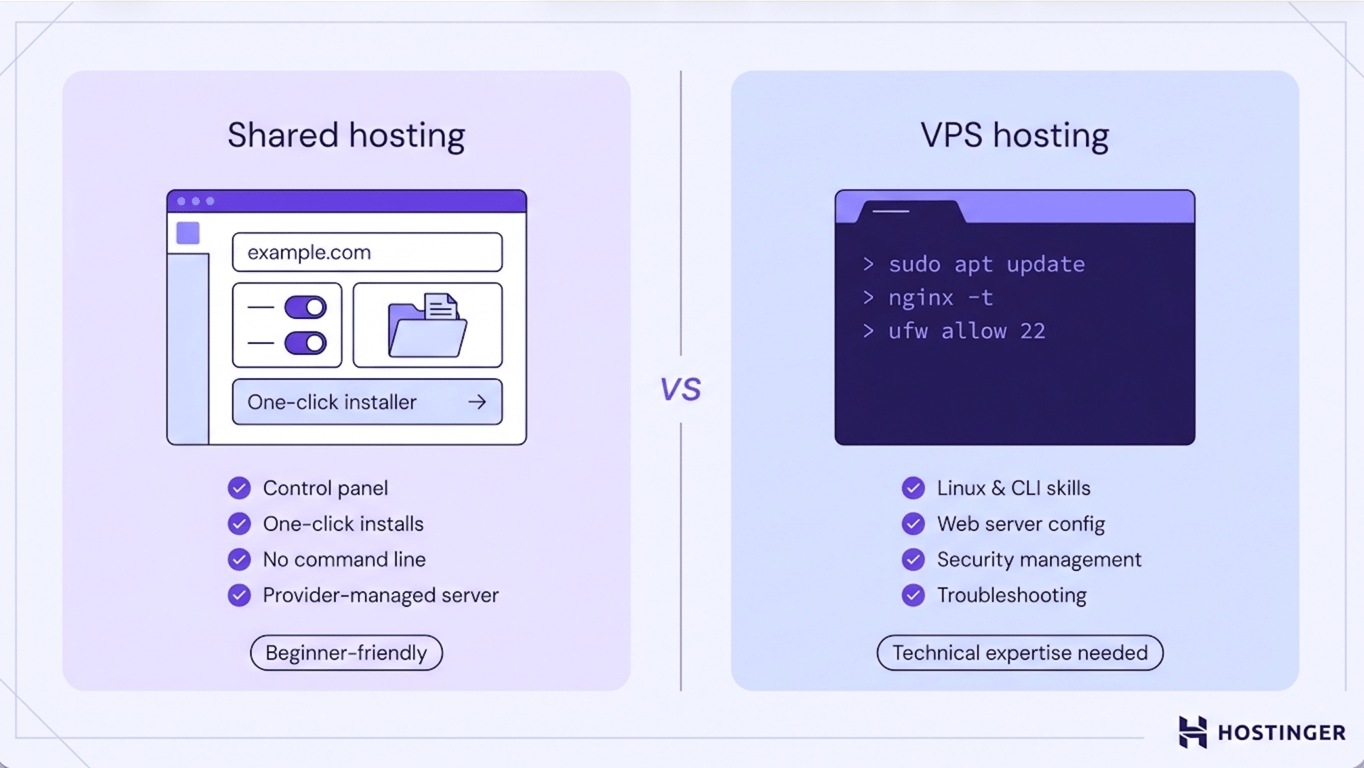
Shared hosting requires less technical expertise than VPS hosting because the hosting provider manages the server environment for you.
With a shared hosting plan, you can install applications, manage files, configure domains, and administer your website through a control panel without interacting with the underlying server. The hosting provider handles server administration, allowing beginners to launch and manage a website without Linux or command-line experience.
A VPS gives you much greater control over the server, but using that control effectively requires server administration skills.
Depending on your project, you may need to install software, configure web servers and databases, manage networking and security settings, and troubleshoot server issues.
Managed VPS plans can reduce the learning curve, but a basic understanding of server management is still beneficial.
Pro tip
If you're new to VPS management, start by familiarizing yourself with basic Linux commands, SSH access, and package managers like apt or yum. Free resources such as the Linux command line documentation and community forums can help you build confidence before managing a live server.
Shared hosting vs. VPS hosting: Which one should you choose?
The right hosting option depends on your website’s requirements, technical expertise, and long-term growth plans.
Choose shared hosting if you:
- Are launching your first website.
- Run a blog, portfolio, or brochure website.
- Want an affordable hosting solution with minimal maintenance.
- Prefer a provider-managed environment instead of managing a server.
- Expect low to moderate traffic.
Host a website on a VPS if you:
- Run a WooCommerce store or another resource-intensive website.
- Build web applications using Laravel, Node.js, Docker, or similar technologies.
- Host APIs or custom applications.
- Manage multiple websites from a single server.
- Need full root access and greater control over the server environment.
- Expect steady traffic growth or require dedicated resources for consistent performance.
When should you upgrade to VPS hosting?
Common signs that it’s time to upgrade to VPS include:
- The website slows down during traffic spikes or busy periods.
- You frequently reach your plan’s CPU, RAM, or storage limits.
- Resource usage continues to increase as your website grows.
- You need more predictable performance during periods of high demand.
- Your current hosting plan no longer provides enough resources to support new features or increased traffic.
- You’re planning for future growth and want a hosting environment that can scale more easily.
If you’ve reached this point, Hostinger VPS provides a straightforward next step. Dedicated CPU, RAM, and NVMe SSD storage deliver more consistent performance than shared hosting, while KVM virtualization lets you scale resources as your website grows.
Full root access gives you complete control over the server environment, and features such as free weekly backups, snapshots, and Kodee AI for server management help simplify ongoing administration.

If your website is still performing well on shared hosting, there’s no need to upgrade yet. Hostinger’s web hosting plans remain an excellent choice for blogs, portfolios, and small business websites.
This article is a localized version of Shared hosting vs VPS hosting: which one is for you, originally published in English.

Ksenija is a digital marketing enthusiast with extensive expertise in content creation and website optimization. Specializing in WordPress, she enjoys writing about the platform’s nuances, from design to functionality, and sharing her insights with others. When she’s not perfecting her trade, you’ll find her on the local basketball court or at home enjoying a crime story. Follow her on LinkedIn.