Claude email integration: What it is and how to set it up
Sep 15, 2026
/
By Bruno S.
/
9 min Read

Claude email integration connects Claude’s reading, searching, and drafting abilities directly to your inbox, turning email into another source of context instead of a separate app you keep switching into. Native connectors bring Gmail and Microsoft 365 into a normal conversation, useful for catching up on a thread or getting a reply drafted in seconds.
Automation platforms like Zapier and Make take the same abilities further, running Claude against every message an inbox receives instead of waiting for someone to ask. For AI agents that need to send, receive, and react to email on their own, that calls for programmable infrastructure like webhooks and isolated inboxes rather than a chat-based connector.
Getting the setup right starts with knowing which category your use case falls into, and how much a person still needs to approve before anything goes out.
What is Claude email integration?
Claude email integration is the connection between Claude and an inbox, set up so Claude can read, search, and draft messages using context that already exists in your email.
Three paths make this possible, each solving a different problem:
- Native connectors put Gmail or Microsoft 365 inside a Claude conversation, for one-off questions and drafts.
- Automation platforms such as Zapier and Make run Claude against inbox events without a chat open.
- Custom builds with Claude Code, email APIs, and MCP servers give developers control over both the trigger and the action.
The right path depends on whether you want a faster way to work through your own inbox, or a system that keeps working while you’re not there.
What can Claude do with your email?
Once connected, Claude handles a specific set of inbox tasks well.
- Summarize threads. Claude turns long back-and-forth conversations into the decisions made and the items still open, with citations pointing back to the source messages.
- Search email context. Claude answers plain-language questions, like which vendor quoted the lower price, without you building a Gmail or Outlook search query manually
- Draft replies. Claude writes a response in your voice and saves it as a draft, matching your usual sentence length and sign-off.
- Prepare follow-ups. Claude flags threads that have gone quiet, and drafts a nudge for each one that still needs an answer.
- Extract tasks. Claude pulls action items and deadlines out of a thread and lists who owes what.
- Process incoming messages. Claude sorts new mail into what needs your attention, what it can draft a response to, and what’s safe to ignore.
- Support automated workflows. Paired with Zapier, Make, or a custom script, Claude becomes the step that reads, classifies, or writes the email content inside a larger process.
What Claude can’t do without a connector or automation tool
Claude’s Gmail connector cannot send email messages: every draft it writes waits in Gmail for a person to review and send.
The Microsoft 365 connector can send, but only once an administrator turns on write tools for the organization. They’re off by default, and personal Microsoft accounts can’t use the connector at all.
Neither connector reacts to new mail by itself. There’s no built-in trigger for instructions like “when an email arrives, do this” – Claude only acts inside a conversation someone starts, which is exactly the gap automation platforms and Hostinger Agentic Mail exist to close.
Pro tip
Start with read-only tasks, like summaries and searches, before turning on any write permissions. It's the fastest way to see what Claude gets right before actually sending anything to your colleagues or clients.
Inbox assistance vs. email automation vs. email marketing
Inbox assistance, email automation, and email marketing solve three different problems: working through your own messages, reacting to events without a person managing each step, and letting Claude send emails and campaigns to a subscriber list.
Inbox assistance is what Claude’s connectors do. You open a conversation, ask a question, and approve every action before it happens, keeping a person in control of the process.
Email automation runs without that first step. An agentic mail workflow reacts to an event, like a new booking request or a support ticket, and handles it within limits you set ahead of time. Hostinger Agentic Mail is built exactly for that, with a programmable inbox that gives an AI agent its own address with instant webhook callbacks and allow/block lists you control.
Email marketing sends newsletters or campaigns to a list of subscribers instead of replying to individual threads. The rules and tools for that are different too.
Category | What it means | Who takes action | Example tool |
Inbox assistance | Claude reads, searches, and drafts inside a chat you start | You, approving each step | Claude’s Gmail and Microsoft 365 connectors |
Email automation | A workflow reacts to inbox events on its own | The system, inside limits you set | Zapier, Make, Hostinger Agentic Mail |
Email marketing | Campaigns go out to a list of subscribers | You, or a scheduled send | Hostinger Reach |
Pro tip
If newsletters or branded campaigns are the actual goal, an AI-powered email marketing tool like Hostinger Reach fits better than an agentic email setup.
These three concepts call for different tools, and picking the right one starts with thinking about which job you’re actually trying to do – whether that means comparing the best AI email marketing tools for a campaign or setting up a webhook-driven inbox for an agent.
How to connect Claude to Gmail and Outlook
Claude connects to Gmail and Microsoft 365 through official connectors, each with its own setup path and its own limits on what it’s allowed to touch.
Connecting Claude to Gmail
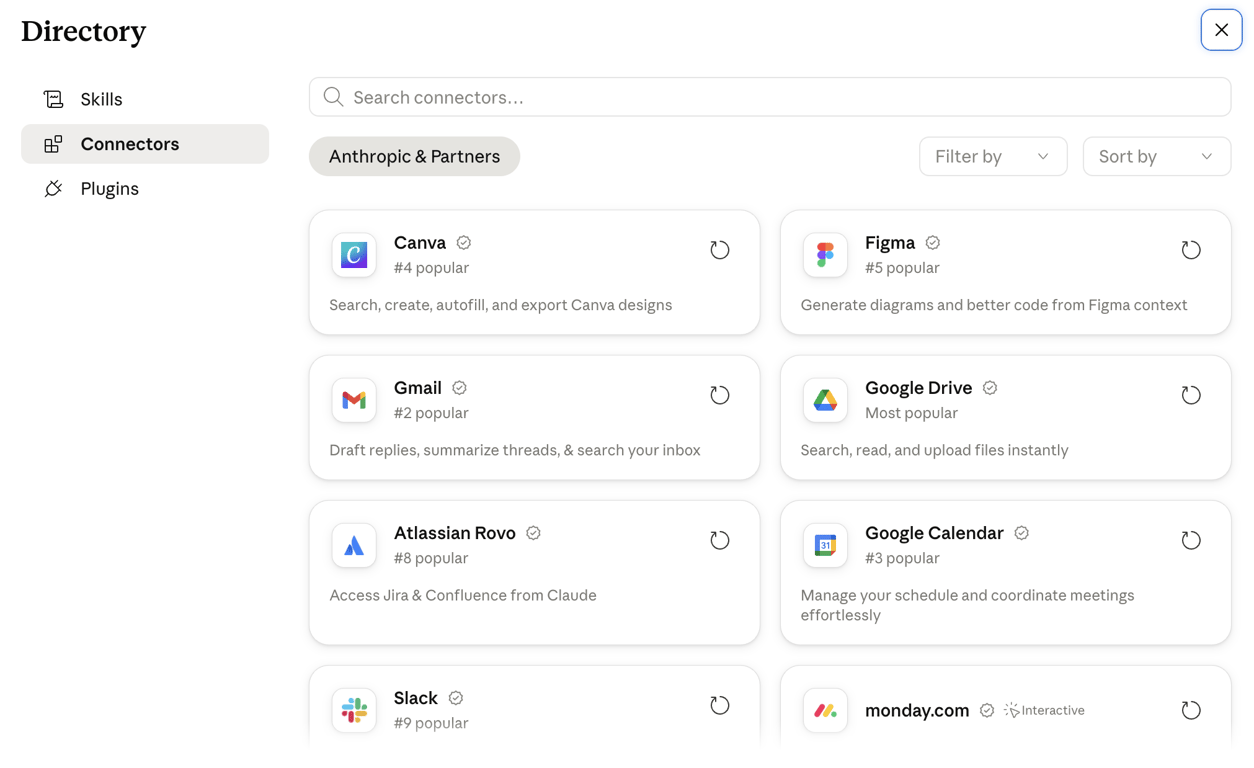
Claude’s Gmail connector is available on every Claude plan, including Free. Team and Enterprise organizations need an Owner to enable it before individual members can authenticate.
To connect it:
- Open Claude and go to Settings → Connectors.
- Find Gmail and click Connect.
- Sign in with the Google account and approve the requested permissions.
Once connected, Claude detects when a question needs Gmail and reaches for it automatically, no special phrasing required.
Two limits carry over from the connector itself: attachment content stays out of reach, with only filenames and other metadata coming through. Also, a few advanced Gmail search operators don’t translate into Claude’s queries.
Connecting Claude to Microsoft 365 and Outlook
Outlook access comes through two separate paths: the Microsoft 365 connector and the Claude for Outlook add-in.
The Microsoft 365 connector needs a Microsoft Entra business tenant, so personal accounts like @outlook.com or @hotmail.com won’t work.
A Global Administrator grants one-time consent for the tenant; on Team and Enterprise plans, an Owner also has to enable the connector for the organization first. After that, each person connects individually under Setting → Connectors.
Read and search work as soon as it’s connected. Sending mail and managing calendar events sit behind write tools, which stay off until an administrator turns them on separately.
Claude for Outlook is a different product: it’s an add-in from Microsoft AppSource that lives inside Outlook’s ribbon instead of a Claude conversation. It’s in beta, available on Pro, Max, Team, and Enterprise plans. It drafts replies and meeting invites straight into Outlook’s compose pane, but everything stays unsent, regardless of what write tools are enabled on the connector.
The Microsoft 365 connector, the Claude for Outlook add-in, and Microsoft’s own Copilot are three separate products. Only the first two involve Claude directly, and neither one sends anything without your explicit action.
How to automate Claude email workflows with Zapier and Make
Zapier and Make turn Claude into a step inside a bigger workflow, triggered by an inbox event. The pattern is the same on both platforms:
- A trigger starts the workflow, like a new email in Gmail or a new message in a shared parser inbox.
- An Anthropic (Claude) action, connected with an API key rather than your regular Claude login, receives the email content and returns a summary, a classification, or a drafted response.
- A final step routes that output somewhere: a created draft, an applied label, a row in a spreadsheet, or a different path depending on what Claude decided.
Both platforms share one limit: they poll for new mail on an interval rather than reacting the instant it arrives. Depending on the plan, that gap can run from one to 15 minutes.
For workflows where a short delay doesn’t matter, like tagging incoming invoices, that’s fine. For anything time-sensitive, it’s the reason teams eventually look at webhook-based options instead.
Pro tip
Point a new Zap or scenario at a test label or folder first, not your main inbox. It's much easier to catch a bad prompt before Claude drafts 50 replies you didn't ask for.
How to build custom Claude email workflows with Claude Code, APIs, and MCP
For workflows that connectors and no-code platforms can’t handle, building directly with Claude Code, email provider APIs, and Model Context Protocol (MCP) servers hands over full control of both the trigger and the action.
Running Claude Code on a VPS for email tasks
Claude Code is Anthropic’s command-line coding agent, and running it on a persistent VPS instead of a laptop that sleeps keeps it available to poll a mailbox or process files around the clock.
Claude Code VPS hosting provides a preconfigured environment for exactly this. From there, Claude Code can run scripts, watch folders, or call any API you point it at, well beyond what a single chat conversation allows.
Then, you can test a new email automation against a secondary mailbox before pointing it at a production inbox. Mistakes made through an API are harder to undo than a bad chat reply, and if you’re setting up from scratch, the walkthrough to install Claude Code on a VPS covers the install script, login, and basic commands in order.
Connecting Claude to email APIs and webhooks
Gmail and Microsoft Graph both expose email APIs that let custom code read, search, and send mail without going through Claude’s built-in connectors at all.
Pairing that access with a push notification, Gmail’s Pub/Sub-based watch feature, or a Microsoft Graph webhook subscription lets a script react to a new message the moment it lands. That removes the polling delay built into no-code automation platforms.
Claude’s role in this setup is generating the content: reading the payload a webhook delivers, deciding what the message needs, and returning a draft or a classification for the script to act on.
Using MCP servers for Claude email workflows
MCP (Model Context Protocol) is Anthropic’s open standard for connecting Claude to external tools through one consistent interface, instead of custom code for every service it needs to reach.
Hostinger’s own Hostinger dashboard actions become available to Claude this way too, through the Hostinger API MCP server, and the same pattern applies to any MCP server built around an email provider: Claude Code connects once and gains a fixed set of email tools it can call directly.
The tradeoff is setup time: an MCP server takes more effort than a no-code Zap, but it removes both the polling delay and the per-task API calls that come with automation platforms.
MCP-compatible email services can still differ substantially in how the underlying mailbox is managed. For example, Hostinger Agentic Mail and LobsterMail both support MCP, but differ in areas such as custom-domain access, mailbox creation, SDK support, security controls, and whether people can also access the inbox through webmail.
What makes Agentic Mail different from a regular inbox
Regular email assumes a person is reading. Agentic Mail works differently in a few specific ways:
- Instant webhook callbacks fire the moment a message arrives, instead of the polling or fragile IMAP IDLE connections automation platforms rely on.
- Allow and block lists restrict which recipients a mailbox is permitted to send to, keeping an automated agent from emailing outside an approved list.
- Isolated inboxes give each agent its own address, separate from your main inbox and from every other agent’s.
- A REST API and a dedicated MCP server give code and AI agent frameworks like Claude direct control over sending, receiving, and managing mail, without stitching together SMTP and IMAP by hand.
- Prebuilt integrations connect it to OpenClaw, n8n, Make, LangChain, and Zapier in a few clicks rather than a manual setup for each one.
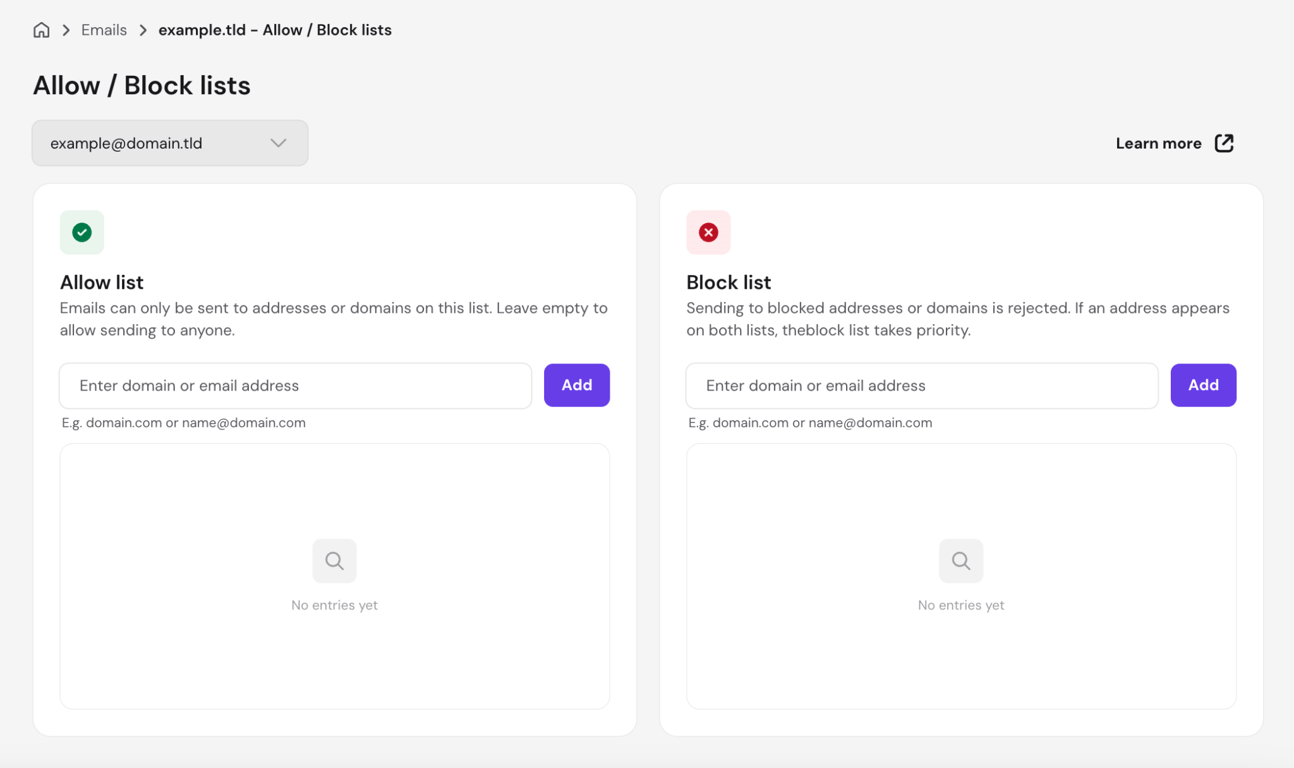
Agentic Mail isn’t a separate purchase: it comes with every Hostinger Business Email plan, at no extra cost.
Agentic Mail use cases for Claude-powered workflows
Automated outreach works well with a dedicated agent driving it, like OpenClaw, sending a sequence of introduction emails and pausing the moment a reply comes in.
Support handling follows the same pattern. An incoming message triggers the webhook, Claude reads it and drafts a response or a routing decision, and the agent sends or hands it to a person depending on how it’s configured.
Booking and scheduling, inbox automation, and account verification all run on the same pattern: an event fires, an agent decides, and the inbox stays isolated from the rest of your email the whole time.
Is it safe to let Claude access your email?
Yes, as long as three things are actually in place: permissions scoped to what Claude needs, a person reviewing anything before it’s sent, and block lists catching what shouldn’t get through. Skip any of those, and the risk isn’t Claude; it’s the setup around it.
Every connector uses delegated permissions, meaning Claude can only see what the signed-in account can already see. Nothing more is exposed just because Claude is asking.
Sensitive data gets handled narrowly by design. The Gmail connector reads attachment metadata only, never the content.
Microsoft 365’s write tools reject any message with an attachment outright. Everything moves encrypted, and Microsoft 365 activity lands in your organization’s own audit log regardless of what Claude does with it.
Allow and block lists add another layer for agentic setups, though in the opposite direction: they restrict which addresses a mailbox can send to, not which addresses can reach it.
A support inbox built on Agentic Mail can be locked to a company domain and a short list of vendor addresses, so a misconfigured or compromised agent can’t email outside those approved addresses.
Human review is the last checkpoint. Microsoft 365 doesn’t allow “always allow” on sending, forwarding, or updating calendar events, so Claude has to ask again each time, even after previous approval. Gmail drafts sit untouched until a person opens Gmail and sends them.
Incoming email is untrusted by default: anyone can send a message worded to look like an instruction, and an agent acting on email without a human checkpoint can be steered by exactly that kind of message. Review what an automated workflow is about to send before it goes out, every time, not just the first time.
Next steps
Connect Gmail or Microsoft 365 first, and run it read-only for a few days before turning on anything that sends. Ask Claude to summarize a messy thread or search for a specific vendor quote, then check the drafts it writes against what you’d actually send yourself. That gap tells you how much review each draft still needs before you trust it with more.
If a single task needs to run without you, build the first Zap or Make scenario against a test label or a secondary inbox, not your live one. Feed it a batch of real but low-stakes email first, tagged invoices or newsletter signups work well, and watch what happens when Claude misreads one before you point it at customers or leads.
For agent-driven work, set up a Hostinger Agentic Mail address and lock down its outbound allow list before connecting anything to it. Restrict it to only the domains and addresses it should ever send to, then wire it into Zapier, Make, or an agent like OpenClaw, in that order, not the reverse. Testing the inbox in isolation first catches a bad webhook before it reaches a real conversation.
If the workflow outgrows what a no-code platform can build, that’s when Claude Code, a direct email API, or an MCP server earns its setup time. And if what you actually need is newsletters or branded campaigns instead of automated replies, stop here and compare dedicated email marketing tools instead. Retrofitting a campaign tool on top of an agent workflow built for one-to-one replies costs more time than starting over.

This article is a localized version of Claude email integration: What it is and how to set it up, originally published in English.

Bruno is a Content Writer at Hostinger, focused on creating and optimizing helpful, engaging articles about web development and marketing. With a background in journalism, he combines storytelling with practical insights to make complex topics easier to understand. He has also contributed to publications like MacMagazine and Jornal A Tarde. Outside of work, Bruno enjoys exploring art, cooking, and technology.