What is shared hosting and how does it work?
Oct 22, 2026
/
By Ksenija
/
7 min Read
Shared hosting is a web hosting service where multiple websites share a single physical server and its resources, including CPU, RAM, storage, and bandwidth.
Each website runs in its own separate account, but all accounts draw from the same server capacity, and the hosting provider manages maintenance, updates, and security so customers only need a control panel to run their site.
This makes shared hosting one of the most affordable and beginner-friendly ways to host a website, though it offers less performance, resource control, security isolation, and scalability than VPS or dedicated hosting.
It works best for new websites, small businesses, blogs, portfolios, and other sites with low to moderate traffic.
What is shared hosting?
Shared hosting is a type of web hosting in which many websites run in separate accounts on the same physical server, drawing from a shared pool of CPU, RAM, storage, and bandwidth.
These resources aren’t permanently divided between accounts – the hosting platform distributes them based on demand, while enforcing limits on the CPU time, memory, disk activity, and bandwidth each account can use.
Although resources are shared, accounts stay isolated. File permissions, separate processes, database credentials, and operating-system-level controls prevent customers from accessing each other’s files, databases, and settings.
That isolation also defines what customers can and can’t control.
Customers manage their own files, databases, domains, email accounts, and applications through tools such as a control panel, file manager, database interface, and application installer.
The provider, on the other hand, retains control of the operating system, server software, hardware, and low-level configuration.
This is what makes shared hosting an entry-level model: customers can run a website without administering the server it runs on.
How does shared hosting work?
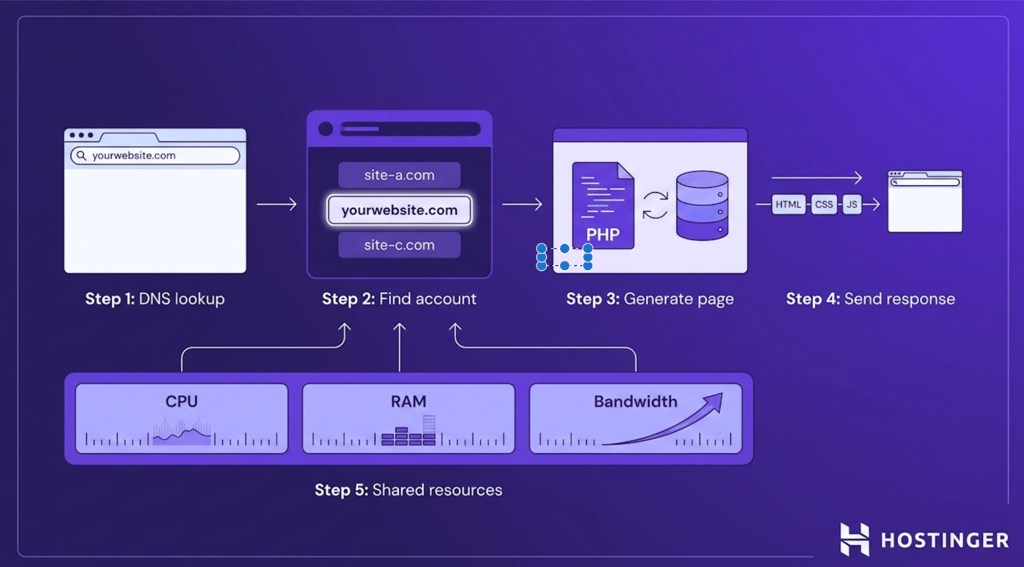
Every time someone visits your website, the shared hosting server processes the request and returns the correct page.
Although hundreds or even thousands of websites may run on the same server, each request follows the same sequence of steps.
1. A visitor opens your website
The process begins when a visitor enters your domain name, such as yourwebsite.com, into a browser.
The browser first asks the Domain Name System (DNS) which server hosts that domain. DNS returns the server’s IP address, allowing the browser to send the request to the correct physical server.
2. The server finds the right hosting account
When the request reaches the server, the web server software (such as Apache or NGINX) checks the requested domain name and matches it to the correct hosting account.
Even though many websites share the same server, each domain points to its own files, databases, and configuration, so the server knows exactly which website to load.
3. The website generates the page
The server reads the requested files and, if the website uses a dynamic application such as WordPress, executes the necessary PHP code.
The application retrieves content from its own database, assembles the page, and prepares it for delivery.
Static websites skip this step because the requested HTML files already exist.
4. The server sends the page back
After the page is generated, the server sends the HTML, CSS, JavaScript, images, and other assets back to the visitor’s browser.
The browser then renders the content, allowing the visitor to interact with the website.
This entire sequence – from DNS lookup to page delivery – draws on the server’s shared pool of CPU, RAM, storage, and bandwidth, with the hosting platform distributing capacity across accounts throughout.
That’s what allows many independent websites to run on the same server without interfering with one another under normal conditions.
Pros and cons of shared hosting
Shared hosting’s trade-offs come down to cost and control: it’s cheap and beginner-friendly, but you get fewer resources and less flexibility than other hosting types.
Advantages of shared hosting
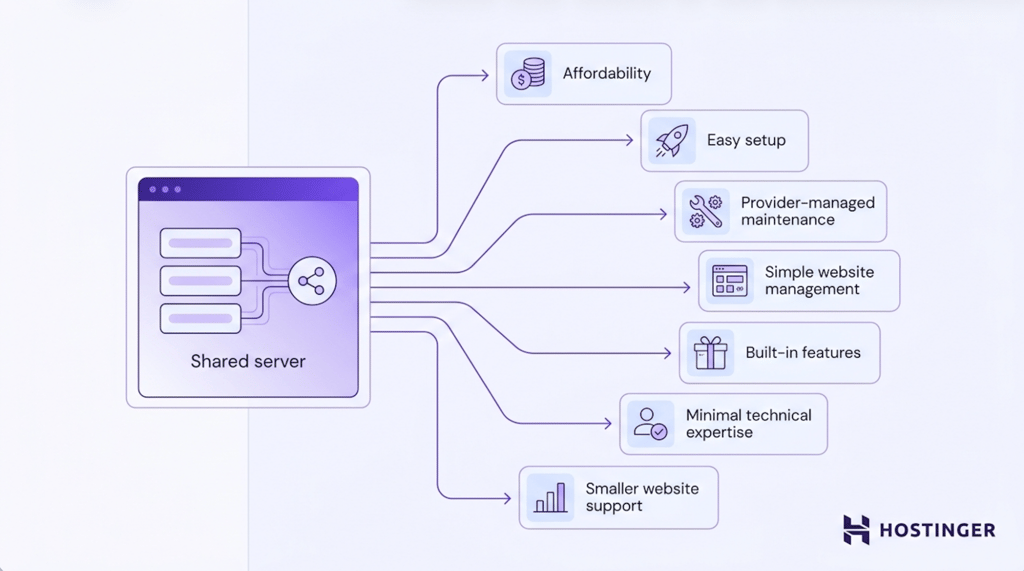
- Affordability. Server costs are shared across multiple hosting accounts, making shared hosting one of the most budget-friendly hosting options.
- Easy setup. The hosting provider takes care of setting up the server, so you can launch a website without configuring server software or infrastructure.
- Provider-managed maintenance. Software updates, security patches, hardware maintenance, and server monitoring are handled by the hosting provider.
- Simple website management. Most shared hosting plans include a hosting control panel that lets you manage files, databases, email accounts, domains, and website settings from one place.
- Built-in features. Many providers include free SSL certificates, email hosting, domain management tools, automatic backups, and one-click installers for applications such as WordPress.
- Minimal technical expertise required. Since the hosting provider manages the server, you don’t need server administration or Linux experience to run a website.
- Support for smaller websites. Shared hosting provides enough resources for blogs, portfolios, small business websites, and other projects with low to moderate traffic.
Disadvantages of shared hosting
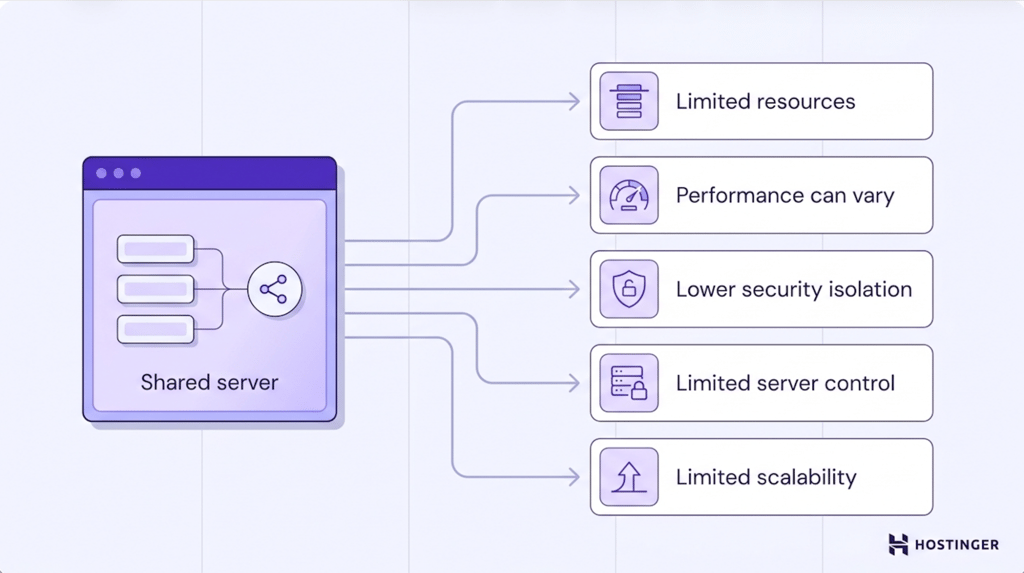
- Limited resources. CPU, RAM, storage, and bandwidth are shared among all hosting accounts, so your website can use only a limited amount of server resources. If your website exceeds those limits, it may slow down or temporarily restrict certain processes.
- Variable performance. Hosting providers enforce resource limits, but unusually high resource usage from other websites on the same server can still affect your website’s performance.
- Lower security isolation. Shared hosting isolates accounts at the operating system level, but websites still share the same underlying server. A vulnerability affecting the shared environment can potentially impact multiple hosting accounts, making isolation less robust than on VPS or dedicated hosting.
- Limited server control. Shared hosting doesn’t include root access, so you can’t modify the operating system, install custom server software, or change low-level server settings.
- Limited scalability. As traffic, content, and resource demands increase, shared hosting may no longer provide enough CPU, RAM, or flexibility to support your website efficiently.
Important! Shared hosting is susceptible to the ‘noisy neighbor’ effect, where one website consuming unusually high server resources degrades performance for others on the same server. If your website is sensitive to performance fluctuations, consider VPS or cloud hosting for more consistent resource allocation.
Important! Shared hosting is susceptible to the ‘noisy neighbor’ effect, where one website consuming unusually high server resources degrades performance for others on the same server. If your website is sensitive to performance fluctuations, consider VPS or cloud hosting for more consistent resource allocation.
Who should use shared hosting?
Shared hosting is a good choice for anyone who wants an affordable, low-maintenance way to get a website online.
Shared hosting is best suited for:
- New websites that don’t need many server resources.
- Small business websites, such as company pages, service websites, or local business sites.
- Personal blogs and content-driven websites.
- Portfolios for freelancers, designers, photographers, and other professionals.
- Hobby projects, personal websites, and landing pages.
- Simple WordPress websites that use standard themes and plugins.
- Websites with low to moderate traffic that don’t require extensive computing resources.
Shared hosting may not be the right choice if your website regularly receives high traffic, runs a large ecommerce store, hosts a resource-intensive application, or requires custom server software and root access.
In those cases, VPS, cloud, or dedicated hosting offers more resources, greater flexibility, and stronger isolation.
How much does shared hosting cost?
Shared hosting costs between $2 and $15 per month, making it the most affordable type of web hosting.
When comparing shared hosting plans, pay attention to more than just the advertised monthly price. The following factors can have a significant impact on how much a website hosting will cost you:
- Renewal pricing. Many hosting providers offer discounted introductory prices for the first billing term. Before choosing a plan, check the standard renewal rate, so you know what you’ll pay after the initial subscription ends.
- Number of websites. Lower-priced plans often support a single website, while higher-tier plans let you host multiple websites under the same hosting account.
- Email hosting. Some plans include free email accounts with custom domain addresses, while others limit the number of mailboxes or require a higher-tier plan.
- Security and backups. Features such as free SSL certificates and automatic backups can save you from having to purchase additional services.
What are the alternatives to shared hosting?
The main alternatives to shared hosting are VPS hosting, cloud hosting, and dedicated hosting.
- VPS hosting divides a physical server into multiple virtual servers, giving each customer dedicated resources and root access. It’s a good choice for growing websites that need more control and consistent performance than shared hosting can provide.
- Cloud hosting runs websites across a network of connected servers instead of relying on a single machine. This makes it easier to scale resources and handle traffic spikes without affecting performance.
- Dedicated hosting gives you an entire physical server for your website or application. It offers the highest level of performance, control, and isolation, making it suitable for large websites and resource-intensive workloads.
Shared hosting compared to other hosting types
The table below highlights the main differences between shared hosting and VPS hosting and other common alternatives.
Use it as a quick reference to understand which hosting type best matches your website’s requirements.
| Hosting type | Best for | Resource control | Technical skill | Scalability | Cost level |
| Shared hosting | New websites, blogs, portfolios, and small business websites | Low | Low | Limited | Low |
| VPS hosting | Growing websites, ecommerce stores, and custom applications | High | Medium | Good | Medium |
| Cloud hosting | High-traffic websites and applications with changing resource demands | High | Medium | Excellent | Medium to high |
| Dedicated hosting | Enterprise websites, resource-intensive applications, and organizations with strict performance or security requirements | Full | High | High | High |
How to choose a shared hosting provider
A good hosting plan should provide reliable performance, the features your website needs today, and a straightforward path to upgrade as your website grows.
When comparing and choosing shared hosting providers, pay attention to the following:
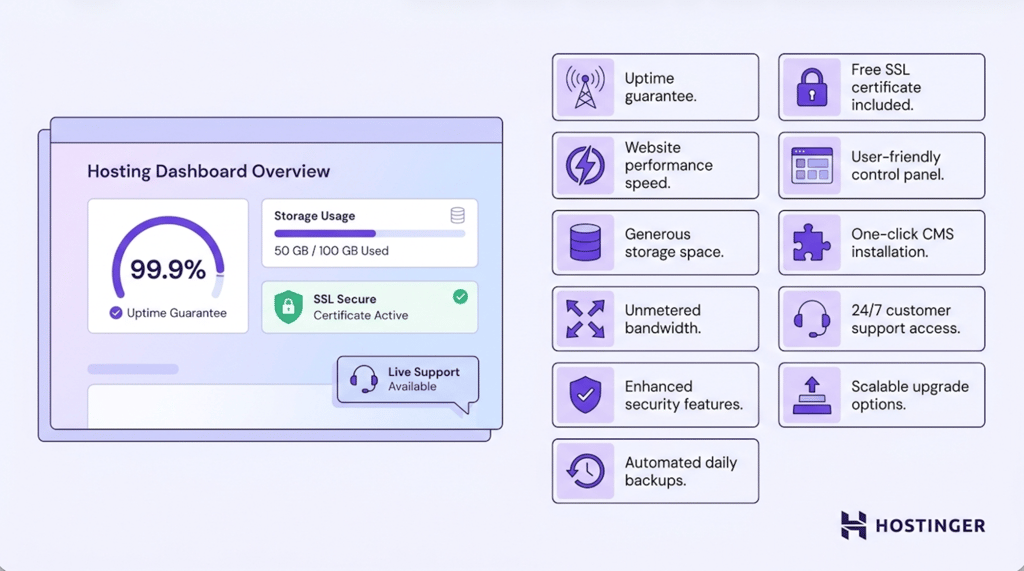
- Uptime. Choose a provider with a strong uptime guarantee and a reliable infrastructure to minimize website downtime.
- Performance. Look for modern technologies such as SSD or NVMe storage, the latest PHP versions, and caching features that help websites load faster.
- Storage. Make sure the plan offers enough storage for your website’s files, databases, images, and future growth.
- Bandwidth. Check whether the plan can comfortably support your expected traffic without performance issues or restrictive limits.
- Security features. Built-in protections such as malware scanning, DDoS mitigation, firewalls, and account isolation help keep your website secure.
- Backups. Automatic backups allow you to restore your website quickly if you accidentally delete content or encounter technical issues.
- SSL certificate. A free SSL certificate enables HTTPS and encrypts data exchanged between your website and its visitors.
- Control panel. An intuitive control panel makes it easier to manage domains, files, databases, email accounts, and other hosting settings.
- CMS installation. One-click installers or managed setup tools simplify installing WordPress and other popular content management systems.
- Customer support. Responsive 24/7 support can be invaluable when you need help troubleshooting hosting or website issues.
- Upgrade options. Choosing a provider that offers VPS, cloud, and dedicated hosting.
Pro tip
When evaluating uptime guarantees, look for a minimum of 99.9% — this translates to less than 9 hours of downtime per year. Anything below this threshold can meaningfully impact your website's availability and visitor experience.
If you’re comparing shared hosting providers, Hostinger’s web hosting includes most of the features covered above.
Plans start at £1.49/month on a 48-month subscription and include a free domain for the first year, a free SSL certificate, managed hosting, 24/7 expert support, and automatic backups, depending on the plan.
Hostinger also uses SSD or NVMe storage, LiteSpeed web servers, and a built-in CDN on eligible plans to help deliver fast page loading times.
As your website grows, you can upgrade to cloud or VPS hosting without switching providers, making it easier to scale your hosting as your requirements change.

Is shared hosting right for your website?
Shared hosting is the right fit if you want an affordable, low-maintenance way to host a website, and the wrong fit once your traffic, resource needs, or need for server control outgrow what a shared environment can offer. At that point, VPS, cloud, or dedicated hosting are the natural next step.
Once you’ve chosen the right hosting plan, the next steps are straightforward: register a new domain or connect an existing one, install a content management system such as WordPress if needed, build your website with an AI builder, and publish your first pages.
This article is a localized version of What is shared hosting and how does it work?, originally published in English.
All of the tutorial content on this website is subject to Hostinger's rigorous editorial standards and values.

Ksenija is a digital marketing enthusiast with extensive expertise in content creation and website optimization. Specializing in WordPress, she enjoys writing about the platform’s nuances, from design to functionality, and sharing her insights with others. When she’s not perfecting her trade, you’ll find her on the local basketball court or at home enjoying a crime story. Follow her on LinkedIn.