AI agents vs. chatbots: What’s the difference?
Sep 11, 2026
/
By Alma
/
8 min Read
The difference between AI agents and chatbots comes down to how much they can do on their own. A chatbot handles a conversation or follows a predefined process. An AI agent takes a goal and figures out how to get it done, completing multiple steps with less guidance from you.
A chatbot is software that answers questions through text or voice, using either scripted rules or a large language model (LLM). It’s built for tasks like answering FAQs and looking up basic account details.
An AI agent goes further. It uses memory, planning, and connected tools to complete a multi-step task – gathering the required information, taking action, checking the result, and deciding what to do next.
AI agents | Chatbots | |
Main role | Work toward a completed outcome | Manage a conversation or predefined process |
Execution | Chooses and completes multiple steps | Responds or performs predefined actions |
Memory | Can retain context across sessions | Often limited to the current session |
Tool use | Selects between connected tools as needed | Uses fixed integrations or none |
Best for | Work involving decisions, several steps, or systems | Predictable questions and simple workflows |
Cost per task | Usually higher (more processing involved) | Usually lower |
Main risk | Taking an incorrect action | Giving an incorrect answer or reaching a dead end |
What is a chatbot?
A chatbot is software that communicates with your customers or employees through text or voice. Someone sends it a message, and it figures out what they’re asking and gives them an answer.
The simplest chatbots are rule-based. They follow decision trees: if a customer types “shipping status,” for example, the bot matches the keyword and returns a tracking link or a scripted answer.
More advanced ones use an LLM, the AI technology behind tools like ChatGPT, to generate responses. These can handle a wider range of questions and sound more natural, but the core job is the same: get a request, answer it, wait for the next one.
Chatbots work best when the task is simple, and the answers don’t change much, like:
- Answering questions about store hours or shipping policies.
- Booking appointments.
- Collecting lead information through a form.
- Routing customers to the right department.
- Looking up an order status through a fixed integration.
Because chatbots follow fixed paths, their permissions are usually narrow. They can only perform actions configured in advance, which makes them easier to control and audit.
The main tradeoff is that most chatbots forget. They can follow the context within one conversation, but unless they’re connected to stored customer data, that context is usually lost when the chat ends. A returning customer often has to start over.
How can chatbots help small businesses?
Small businesses often have fewer people handling customer inquiries, sales, and day-to-day operations. A chatbot can act as the first point of contact, responding immediately when no one is available and collecting the information a team needs to follow up.
This helps small teams avoid repeated interruptions while still giving customers a quick response. It can also make service more consistent by providing the same approved information across every conversation and passing more complex requests to the right person.
What is an AI agent?
An AI agent is an AI tool that can complete tasks with limited human guidance. It takes a goal, plans the steps, and works through them using connected business tools and context from past conversations. It decides what to do next within the rules and permissions you set. This is what agentic AI refers to.
A common AI agent setup combines four capabilities:
- LLM – the language model works out which steps the task needs.
- Memory – retains useful context from earlier interactions, so the agent doesn’t start from zero each time.
- Planning – divides a larger goal into smaller tasks and sequences them.
- Tool use (also called function calling) – lets the agent carry out actions in your systems, like looking up a record in your CRM (customer relationship management software), sending an email, or processing a payment.
For example, a customer asks for a refund. An AI agent can check the customer’s order history, confirm that the request meets your refund rules, ask for approval when required, process the refund, and send a confirmation.
The task spans several steps and systems, and the agent decides what to do next.
But that independence comes with risk. An AI agent that can write systems can also make mistakes, like issuing the wrong refund amount or messaging the wrong customer.
AI agents need safety checks like:
- Confirmation prompts before risky actions.
- Limited permissions so the agent can access only the data and tools it needs.
- Built-in limits that stop the agent if it gets stuck in a loop.
How can AI agents help small businesses?
AI agents can help small businesses handle work across strategy, content, SEO, customer communication, and sales. Hostinger Agent is one example, providing access to a team of specialized AI experts rather than a single general-purpose chatbot.
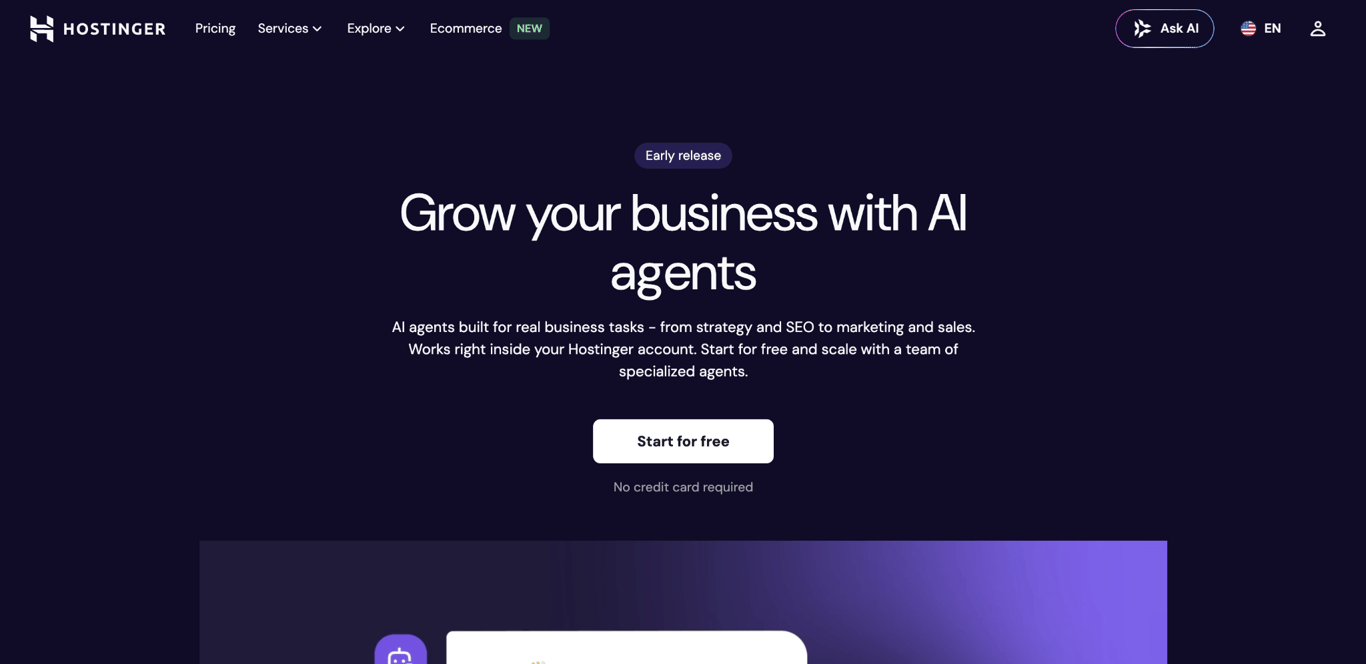
Each AI expert comes with pre-built task templates called skills. Instead of writing a prompt from scratch, you pick an assistant and a skill, and it guides you toward a specific output, like a blog post draft, a keyword research report, or a privacy policy draft. You can also use open-ended chat for brainstorming or working through complex problems.
Hostinger Agent connects to over 1,000 apps through integrations, including Google Sheets, Slack, Gmail, Notion, and HubSpot. Each assistant maintains a single, persistent conversation, so you can close the app and return later to continue exactly where you left off.
For solo business owners managing strategy, content, SEO, and outreach themselves, this setup reduces the need to switch between separate tools or work out how to prompt each one.
You get this kind of agentic AI as a ready-made platform, rather than assembling memory, tools, and planning yourself.
What are the key differences between AI agents and chatbots?
AI agents and chatbots differ most in how they remember information, which tools they can use, how they plan tasks, how much they can do without your input, what they cost, and what happens when they get something wrong.
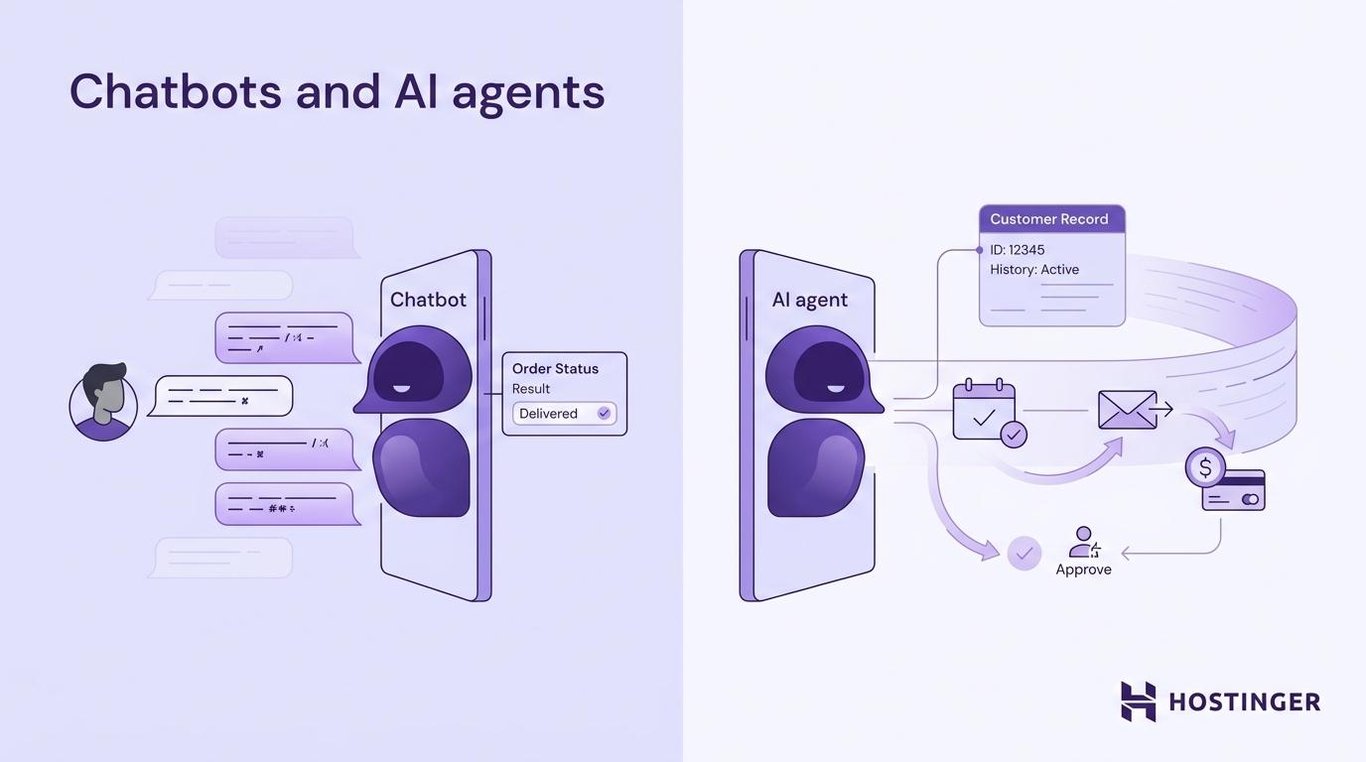
Memory. Chatbots usually remember only what was said during the current conversation. Unless they’re connected to a CRM or customer database, that context is typically lost when the session ends. AI agents can retain useful information across sessions, such as previous requests, support history, past decisions, and customer preferences.
Tool use. Chatbots can perform predefined actions, such as looking up an order or creating a support ticket. AI agents can choose between several connected tools based on what the task requires, while staying within the permissions and limits you set.
For example, an AI agent might retrieve a customer’s details from your CRM, create a support ticket, and notify your team in Slack within the same workflow.
Planning. Chatbots usually follow a fixed conversation flow. AI agents can divide a goal into smaller tasks, complete them in order, check the results, and adjust their approach when something goes wrong.
This is sometimes called the ReAct pattern: reason, then act. It’s how agentic workflows allow agents to handle new tasks within the limits of their available tools, permissions, and safeguards.
Autonomy. A chatbot waits for you to guide each exchange. An AI agent can continue working after receiving a clear objective, choosing the next action until it completes the task or reaches a limit you’ve set.
Cost. Chatbots are usually cheaper per interaction because they require fewer processing steps and fewer tool calls. AI agents tend to cost more because they plan, use several tools, and check results before completing a task.
But the cost per interaction only measures the price of a single exchange, not whether the issue was actually resolved. In one case study published by Heym, replacing a chatbot with an AI agent on the same support channel produced these results:
Metric | Chatbot | AI agent |
Cost per interaction | ~$0.04 | ~$0.21 |
Issues resolved without human support | 38% | 71% |
Tickets escalated to humans | No change | Dropped by 50% |
In that case, the AI agent cost more per interaction but resolved more issues without human support. That reduced the support team’s workload and helped customers get answers faster.
Risk. A chatbot error typically results in an incorrect answer or a conversation that reaches a dead end. An agent, however, can also take the wrong action in a connected system, such as issuing an incorrect charge, deleting a record, or contacting the wrong customer.
The higher risks and implementation challenges help explain why some agent projects are canceled before delivering clear value. Gartner projects that more than 40% of agentic AI projects will be canceled by the end of 2027 because of rising costs, unclear business value, or inadequate safeguards.
If you’re considering an AI agent, start with one clearly defined task, such as processing standard refunds or qualifying inbound leads. Track whether it saves time, reduces errors, or improves completion rates before giving it access to more workflows.
How to tell if an “AI agent” is really an agent
Gartner estimates that only a small fraction of the thousands of vendors marketing “AI agents” actually deliver real agent capabilities. Most are chatbots or older automation tools with a new label, a practice they call “agent washing.”
Before you commit to a product, test whether it can:
- Remember useful information from a previous conversation.
- Connect to more than one external tool.
- Decide which tool a task needs.
- Break a broad goal into smaller steps on its own.
- Check whether an action worked before moving on.
- Ask for your approval before doing something risky.
- Show you a log of what it did.
A product doesn’t need every one of these to help your business. But if it can’t do any of them, it’s probably just a chatbot with a new label.
When should you use an AI agent vs. a chatbot?
Choose a chatbot for predictable conversations and an AI agent for tasks that require decisions across several steps or tools.
Scenario | Best fit | Why |
You answer the same support questions every day. | Chatbot | The replies are predictable and low-risk. |
Customers need quick answers about shipping, returns, or sizing. | Chatbot | These questions usually have clear, repeatable answers. |
A refund requires checking eligibility, issuing credit, and sending a confirmation. | AI agent | The task involves several steps and systems. |
Your sales team needs to qualify leads and update the CRM. | AI agent | The system must assess information and choose the next action. |
You manage strategy, SEO, content, and outreach alone. | Specialized AI agents | Guided workflows can support several areas of the business. |
You handle healthcare, financial, or other sensitive workflows. | Chatbot or AI agent with human review | Sensitive actions need strict permissions and approval steps. |
You’re not sure where to start. | Chatbot | Begin with a simple, repetitive task and expand when needed. |
In the solo business owner scenario, a product like Hostinger Agents gives you dedicated agents for each area, rather than prompting a single general-purpose assistant from scratch.
Sometimes neither a chatbot nor an AI agent is the right fit. A workflow automation tool is often a better choice when the process is completely fixed. For example, adding every form submission to a CRM in the same way doesn’t require an AI agent. A tool like Zapier or Make can handle it at a lower cost and with less complexity.
You also don’t have to choose one or the other permanently. Start with a chatbot whose task is simple, add agent capabilities when the task requires decisions and actions, and let your results tell you when to expand.
Can a chatbot become an AI agent?
Yes, a chatbot can become an AI agent. The chat window doesn’t determine whether a product is a chatbot or an agent. What matters is the system behind it.
A chatbot starts becoming an agent when you add three layers: long-term memory, tool access, and planning. You don’t need all three at once – products that are now marketed as AI agents often started out as chatbots and added these layers over time.
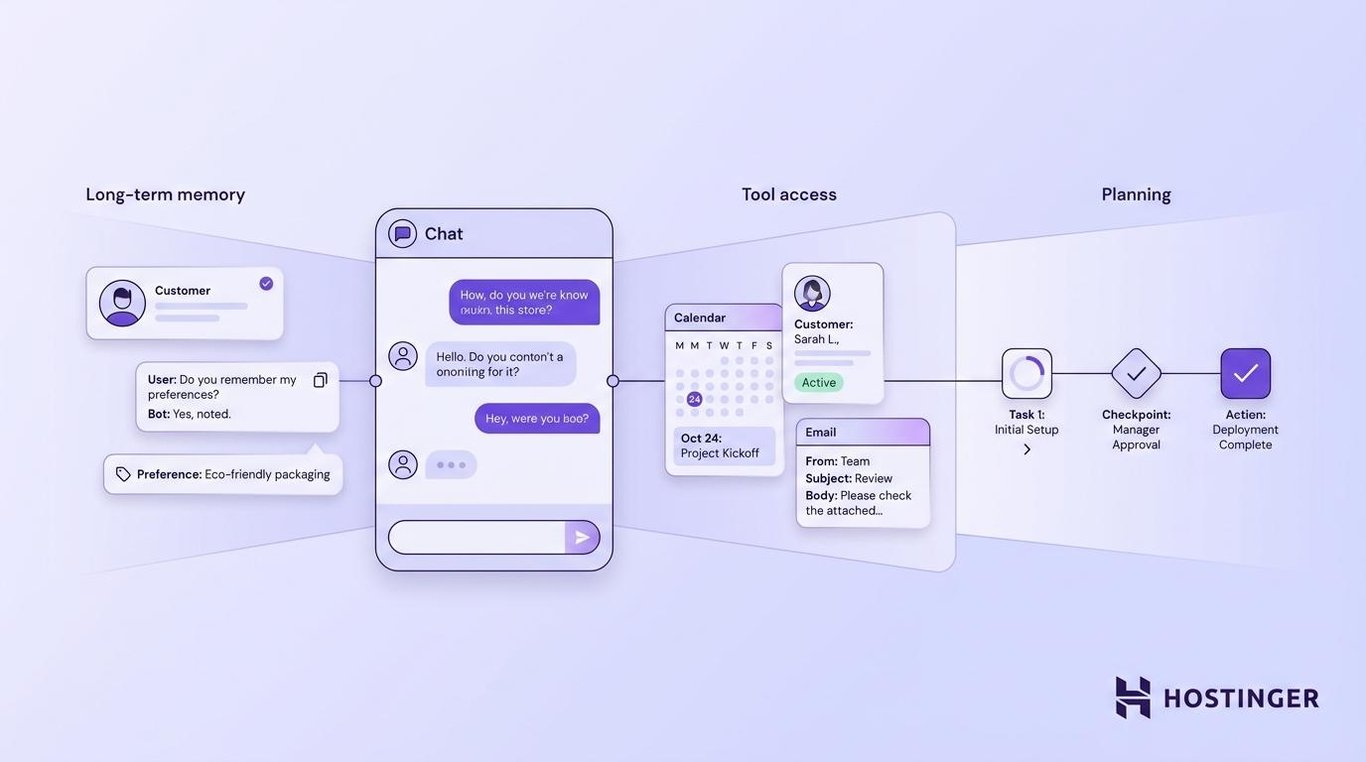
Real-world AI agent examples include customer support bots that now handle complete return processes and marketing tools that plan and run campaigns across several channels.
If you’re already running a chatbot, here’s how to start adding each layer:
- Add memory so it can recognize returning customers and use relevant conversation history. Connect the chatbot to your CRM or customer database, then set up a secure way to identify each customer and retrieve the data they have permission to access. Platforms like HubSpot can use CRM data and previous conversations, although the available features depend on your plan and setup.
- Connect it to your business tools so it can retrieve information and take actions. Platforms like Zapier and Make, along with native APIs, can connect the chatbot to order systems, email tools, and customer records. This lets it check an order, update a record, start a return, or send a follow-up email. Limit its permissions and require confirmation before sensitive or irreversible actions.
- Add an agent orchestration layer when the system needs to decide how to complete multi-step tasks. This is where the planning layer comes in. Frameworks like LangChain, LangGraph, or CrewAI can connect a language model to tools, memory, and workflows. This allows the system to choose its next action based on the goal and previous results rather than following only a fixed conversation script.
If you’d rather skip the gradual upgrade and start with agent capabilities already in place, Hostinger AI Agents includes built-in memory, tool connections, and guided workflows.
This article is a localized version of AI agents vs. chatbots: What’s the difference?, originally published in English.
All of the tutorial content on this website is subject to Hostinger's rigorous editorial standards and values.

Alma is an AI Content Editor with 9+ years of experience helping ideas take shape across SEO, marketing, and content. She loves working with words, structure, and strategy to make content both useful and enjoyable to read. Off the clock, she can be found gaming, drawing, or diving into her latest D&D adventure.