How to make a digital art portfolio in 8 steps
Dec 19, 2025
/
By Simon L. & Auksė Ž.
/
10 min Read
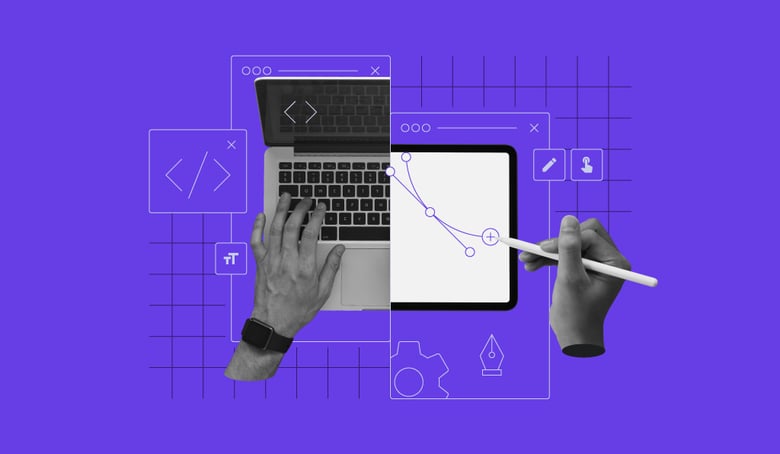
A digital art portfolio is a curated online collection of your best creative work. It serves as your professional resume, builds credibility with potential clients and employers, and is the most effective way to showcase your skills.
Having a dedicated portfolio allows you to justify your pricing, attract commission work, and connect with peers for collaborations.
Create a strong digital art portfolio by following these eight essential steps:
- Clarify your goals. Determine who you’re trying to reach, such as gallery owners, game studios, or private commission clients, so you can tailor your work selection and presentation accordingly.
- Prepare your best pieces. Select only your strongest and most relevant works and prepare them for display.
- Find the right platform. Choose an online website platform that aligns with your technical skills and portfolio goals to host your artwork.
- Build the initial site structure. Use an AI builder to quickly generate the foundational pages and layout, saving you time on initial setup and structure.
- Personalize the design. Customize your design elements, such as colors and fonts, so the website’s look and feel authentically match your unique artistic style.
- Add all your content. Upload your prepared images and pair them with engaging descriptions that tell the story behind your art.
- Structure your collection logically. Group your work into logical categories, such as style, project, or medium, to ensure a professional and smooth experience for visitors.
- Launch and promote the site. Take your portfolio live, and actively promote the link across all your professional and social channels to drive traffic and attract opportunities.
1. Define your purpose and audience
The purpose of your portfolio, whether it’s for landing a job at a design firm, attracting private commissions, or gaining acceptance into an art program, determines everything. It influences which pieces you select, what design template you use, and how you arrange your work.
To identify your target audience, consider the industry, client type, and visual style they prefer. If you want a job at a game studio, your portfolio should feature relevant character or environment art. If you’re looking for commissions, focus on pieces that showcase a flexible and appealing style.
Ask yourself these questions to determine the true purpose of your digital art portfolio:
- What impression do I want my viewer to have in the first 10 seconds? Do you want them to see professionalism, a distinct style, or technical versatility?
- Which skills matter most for the opportunities I’m targeting? If you’re aiming for animation, ensure you prominently showcase your character rigging or modeling skills.
- Which artworks best represent my identity as an artist? Only include pieces you genuinely love and that align with the kind of work you want to attract.
2. Select and prepare your artwork digitally
Artwork selection is the foundation of a strong digital art portfolio, as potential clients primarily judge your skills based on what you choose to show them.
A focused portfolio should only include artwork relevant to your specific career goal, and you should always lead with your strongest piece.
To create a strong portfolio, prioritize quality over quantity – showing 10 excellent pieces is always better than 30 average ones. This immediately grabs attention and sets the quality standard.
After selecting your pieces, prepare your artwork files so they look professional and present well online. This preparation is entirely technical.
For example, optimize image sizes, as uploading large files will slow down your site. Also, always check that colors appear the same in your portfolio as they do in your editing software.
Here’s a checklist you can use to prepare and organize your digital files:
- Create organized project folders for easy batch uploading to your platform.
- Select your strongest 10–15 relevant pieces.
- Export the images in high resolution (72 PPI for web display), striking a balance between quality and file size.
- Ensure consistent aspect ratios or use a clean cropping method to prevent awkward alignment issues when using gallery grids.
- Standardize all file names and formats, for example, ProjectName-ArtTitle-Date.jpg.
- Check the color accuracy and brightness across multiple screens.
3. Choose a platform for your digital art portfolio
Choosing the right platform determines how effectively your artwork is presented online and how easily visitors can find it. You need a visually appealing space that can handle high-resolution images and deliver a seamless user experience.
Select a platform that aligns with your specific goals, current technical skill level, and the type of work you plan to showcase.
When evaluating portfolio platforms, look for a few key features, such as professional templates and responsive designs that ensure your site appears well on both mobile and desktop devices.
Strong gallery layouts and easy navigation are also vital, as is the ease of customization so that you can match your portfolio to your unique brand.
Here are the three main types of platforms that offer distinct advantages:
- Community platforms. Platforms like Behance and DeviantArt are excellent for starting and building an audience. They’re ideal for general sharing and hobbyists focused on broad community interaction.
- Niche options. ArtStation is a dedicated professional hub that’s excellent for artists in the game or film industry, offering built-in networking. These are best for industry exposure and securing specialized commissions.
- Website builders. Tools like the site maker built with Hostinger AI give you maximum control over design, branding, and ecommerce features, letting you build a truly custom portfolio.
If you’re looking for an all-in-one solution that offers flexible customization and includes helpful AI and marketing tools, website builders are a great choice.
Read more about which option is right for you in our guide on the best portfolio website builders.
4. Create the structure of your portfolio website with an AI builder
An AI website builder is the fastest way to generate the basic structure of a professional digital art portfolio.
Using a platform like Hostinger’s AI website maker, you describe your artwork and the type of portfolio you want, and the AI generates the foundation for you. This base structure acts as your starting point, saving time on initial setup.
The AI creates all necessary components in minutes, including:
- A professional homepage layout.
- Dedicated gallery and project pages.
- Key informational pages, such as About and Contact.
- A base color scheme and placeholder text.
This layout acts as a basic framework that you can then refine and personalize in the next step instead of starting with a blank canvas.

5. Customize your portfolio
The AI builder gives you a great starting point, but you still need to personalize the design and structure to reflect your unique style. Your portfolio should feel like an extension of your artistic identity, not just a generic template.
Focus on these essential visual elements to ensure your portfolio truly reflects your brand:
- Color scheme: Pick a color palette that perfectly resonates with your art. For example, a dark background often suits dramatic digital paintings, while a light background is better for clean vector or technical work.
- Typography: Select complementary fonts. Use one clean, highly legible font for body text and a distinctive font for headings to give the site character.
- Visual consistency: Keep a single, consistent style for layout, element spacing, and graphic accents throughout all pages.
- Layout refinement: Move beyond the AI-generated structure by adjusting gallery grids or optimizing the flow between sections to prioritize your strongest work.
- Brand identity: Design and integrate a simple, professional logo and a unique favicon (the small icon in the browser tab) to reinforce your brand identity across the web.
With your portfolio’s visual identity now in place, the next crucial step is filling it with compelling content that showcases both your technical skills and creative vision.
6. Add artwork, descriptions, and project details
This is where you showcase your best work and tell the story behind it. Instead of just placing images on a page, you need to create an experience that captivates the viewer.
Here are actionable tips for adding content:
- Display quality over quantity. Upload only your highest-quality images in the correct sizes for optimal display, prioritizing your latest and proudest pieces.
- Use storytelling. Craft descriptions that engage the reader by explaining the concept, inspiration, and process behind each piece, providing context and depth.
- Include keywords. Incorporate relevant keywords into your titles and descriptions to help optimize your portfolio for search engines and drive traffic.
- Keep the tone consistent. Ensure your tone of voice in the text descriptions reflects your personality and consistent artistic style.
- List achievements. Clearly highlight the tools and media used for the piece and list any awards or notable achievements related to the project.
- Show process shots. If applicable, include sketches, wireframes, or work-in-progress images alongside the final piece. This demonstrates your methodology and problem-solving skills.
- Clearly state your role. For professional or client projects, state your specific role, such as the character designer or lead illustrator, and what the project brief required you to deliver.
7. Organize your portfolio
Categorizing your portfolio is important to provide visitors with a pleasant experience and help potential clients quickly find the exact type of work they can hire you for.
Think of your portfolio structure as a guided gallery walk-through:
- Start strong. Design a compelling homepage or landing page that immediately introduces the viewer to your general style and best work.
- Group strategically. Organize your artwork into distinct collections. The most common methods are grouping by project (Client X Campaign), medium (Digital Painting, 3D Modeling), or theme (Character Design, Editorial Illustration).
- Use clear labels. If you create diverse work, like children’s book art and product designs, make separate, clearly labeled collections for each.
- Control the flow. Decide the order of your collections. Placing the work most relevant to your target job or commission at the top is always recommended.
- Enhance context. This organization helps viewers understand the context of each piece, showing them the full scope and breadth of your ideas across different projects.
8. Publish, refine, and share your portfolio
Once you’re satisfied with the look and feel, it’s time to take your portfolio live. This step combines launching your site with ongoing maintenance and active promotion.
Here are the essential actions you need to take:
- Final review. Before hitting publish, always preview the entire site on different devices (phone, tablet, desktop). Ensure all layouts are responsive and images look seamless.
- Submit to search engines. Once your portfolio is live, submit your site to major search engines using their respective webmaster tools, such as Google Search Console. This tells search engines that your site is official and ready to start appearing in search results.
- Promote actively. Start sharing your art portfolio across all relevant social media platforms. Use direct links to your best project pages, not just your homepage, and engage with your followers.
- Routine maintenance. Remember that publishing is just the start. Routinely update your portfolio with new, stronger work as you complete it.
- Track performance. Connect marketing tools, such as Google Analytics, to track which projects get the most attention and where your visitors are coming from.
Inspiring digital art portfolio examples
Here are five examples to inspire your art portfolio. The first three portfolios were created using Hostinger Website Builder, showcasing the range of possibilities available with the tool.
1. Rhienon
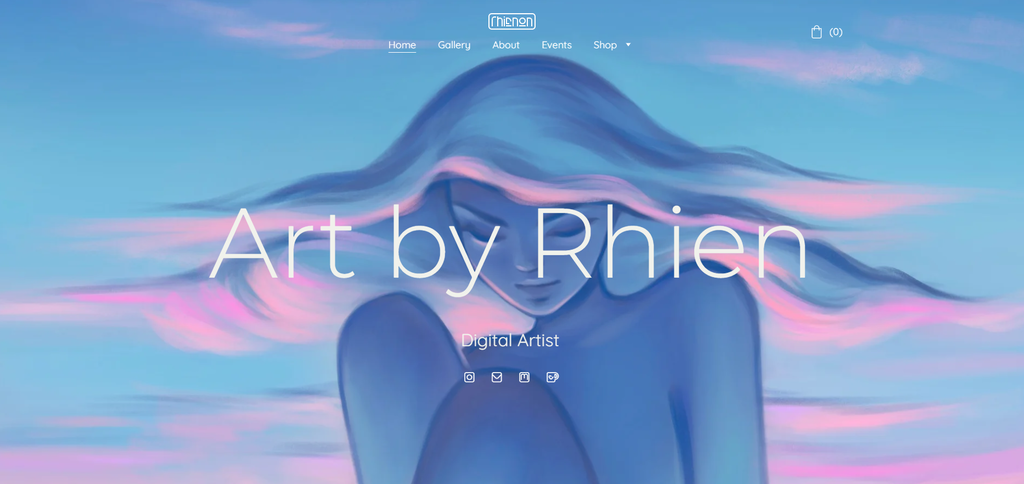
A simple yet effective digital art portfolio, Art by Rhien serves as excellent inspiration for digital artists.
Digital artist Rhianna makes a strong first impression by using a large, eye-catching piece of her artwork as the background for her portfolio. She instantly draws visitors in with her style and skill.
Rhianna’s portfolio gallery is sleek and simple, using a white background that emphasizes her artwork without distractions.
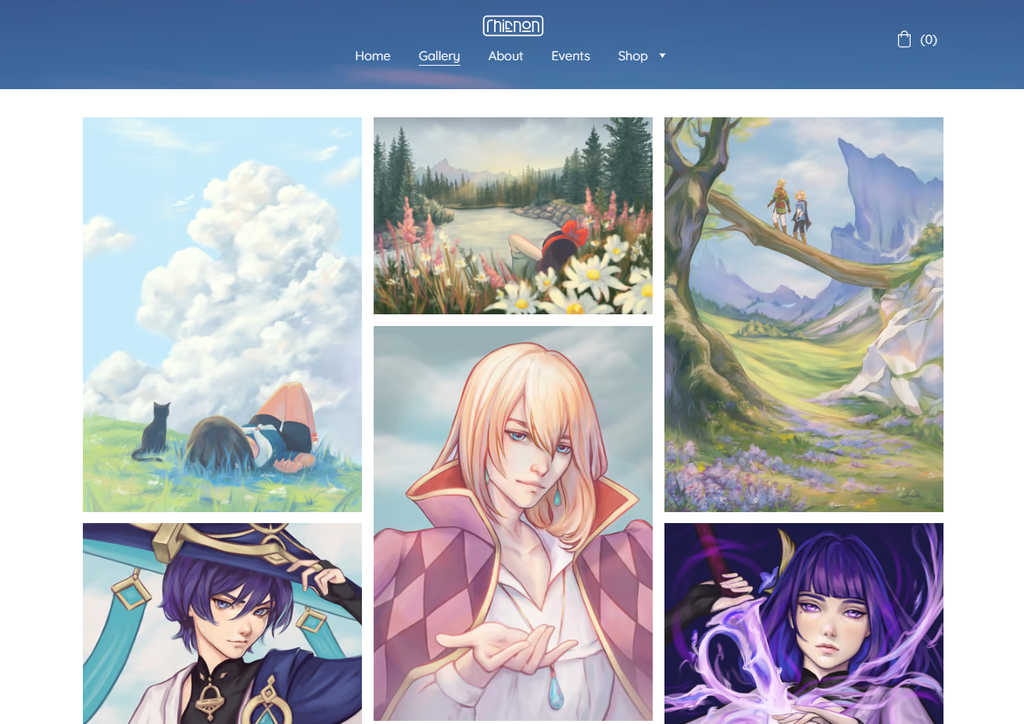
An interesting feature of Rhianna’s portfolio is the inclusion of an events page, which highlights upcoming events, exhibitions, and art fairs she’s involved in. It’s a great way to promote her participation in the art community and invite followers to see her work in person.
2. Fett Burger
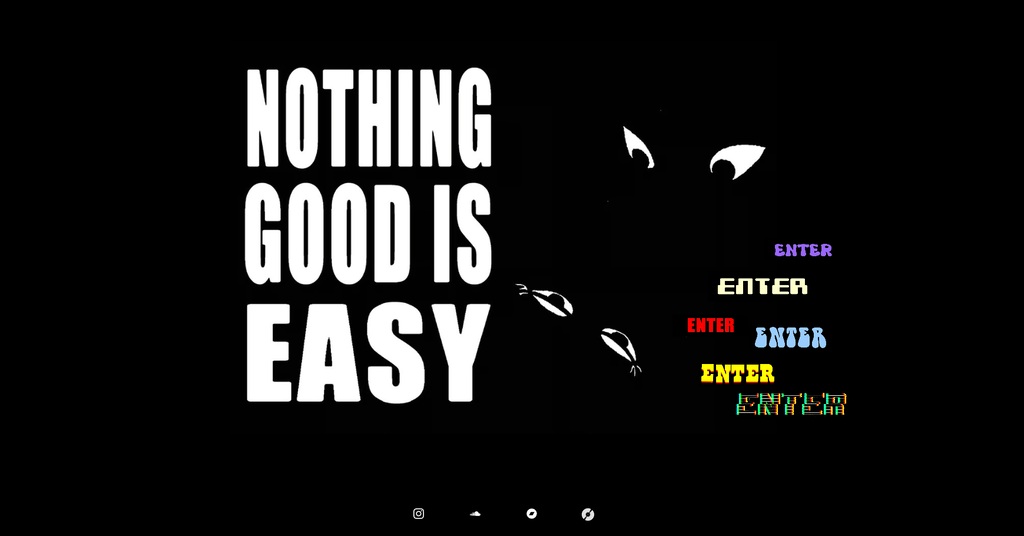
One artist whose online portfolio reflects their unique and bold artistic style is Fett Burger. The landing page has a prominent one-liner, complemented by a contrasting, playful array of “enter” buttons that entice readers to click.
A striking aspect of Fett Burger’s portfolio is the use of bold typography, colors, styles, and animation that stand out against the black background. This unique approach demonstrates how artists can creatively use web design best practices to reflect their artistic style and vision, making their portfolio a memorable visitor experience.
Fett Burger’s portfolio also includes a simple yet effective About Me page. This page offers a clear snapshot of the artist’s background and artistic journey, helping visitors connect more personally with the artist.
3. IndySign Creative
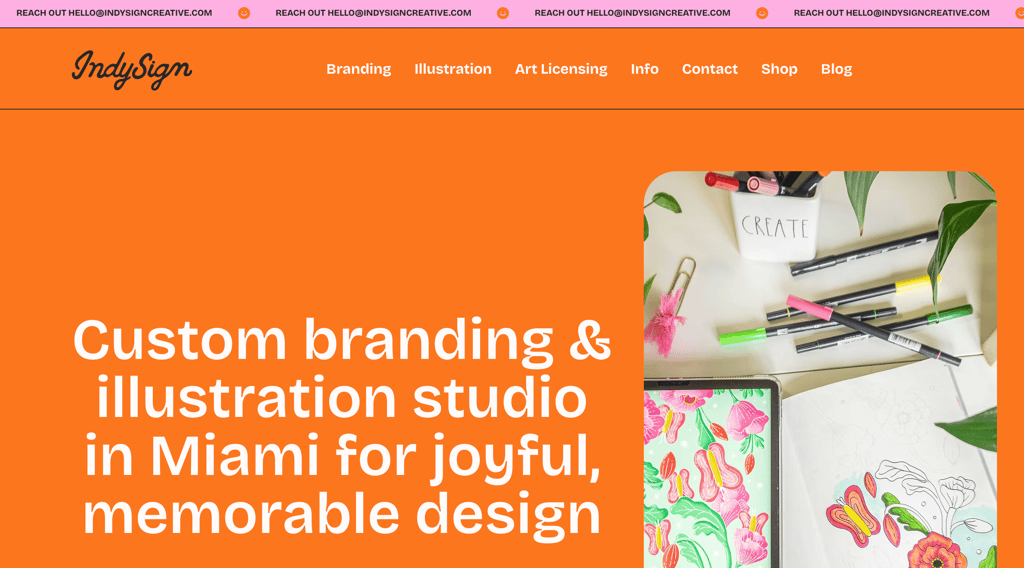
Indira Prieto, the talented digital illustrator behind IndySign Creative, stands out for her strong personal branding. Indira emphasises her creative identity by incorporating bright and cheerful elements throughout her site.
The website’s bold colors create a vibrant visual experience, enhancing the presentation of her artwork. Her portfolio page facilitates a straightforward presentation of artworks categorized by project collection.
Built with Hostinger Website Builder, Indira’s portfolio skillfully blends her professional and personal artwork, offering a comprehensive art gallery walk-through that allows visitors to explore her diverse creations in one place.
4. Pine Bones
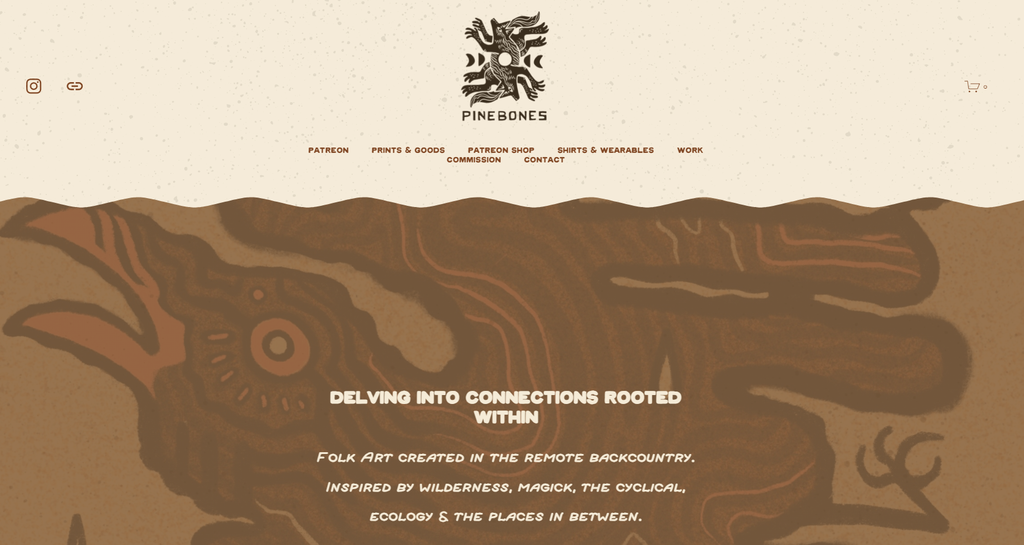
Pine Bones’s digital portfolio exemplifies a well-rounded and comprehensive showcase of their work. It’s a vivid example of effectively presenting art in an online space.
What makes Pine Bones‘ portfolio inspiring is the consistent use of colors and design elements throughout the site. This consistency makes the site visually appealing and helps create a solid and recognizable brand identity.
Additionally, the Shop and Commission pages are designed thoughtfully to appeal to potential buyers. It’s user-friendly and showcases the artworks for sale in a way that is easy to browse and understand.
5. Jason Chan Art
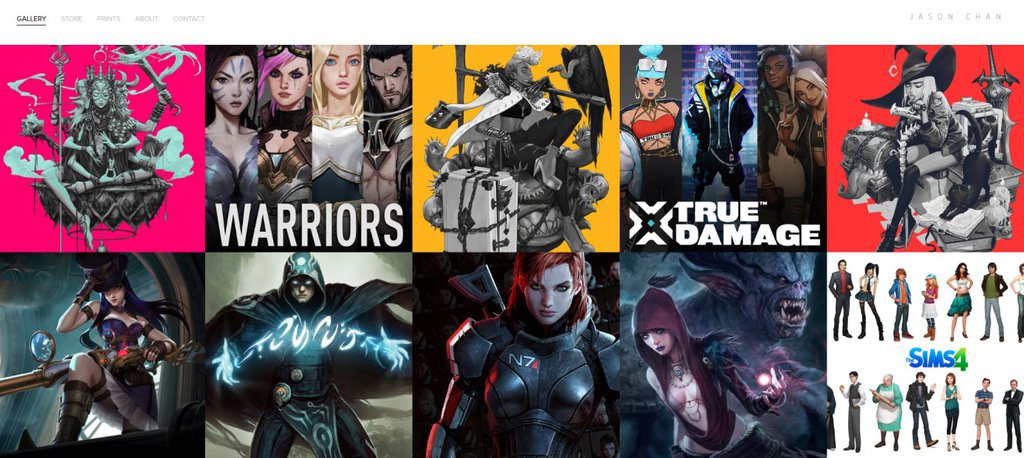
Jason Chan is a principal visual development artist at Riot Games. He works with traditional media, such as oil paints, and digital tools, including Photoshop and Illustrator.
His digital art portfolio showcases his work prominently, categorizing his extensive gallery by game title directly on the homepage. The user experience is enhanced by a clean navigation bar that directs visitors to his Store, Prints, About, and Contact sections.
This art portfolio website example is an excellent model for illustrators looking to showcase their work and provide an easy way to explore their collections.
Why create a digital art portfolio
Creating a digital art portfolio is important because it serves as your professional online resume, demonstrating your skills and personality to your target audience.
It makes it easy to share your art for career opportunities, whether you’re seeking commissions, applying for school admissions, or looking for gallery representation.
After learning how to make a digital art portfolio, here are some key reasons why you should have one:
- Showcases your work and skills. A portfolio is a professional platform where you control the narrative and context of your art. It allows you to present your finished pieces, show your creative process, and demonstrate versatility across different media and styles.
- Builds credibility and professionalism. Having a dedicated website establishes your identity as a serious, professional artist, which is vital for potential clients, employers, and art institutions. It functions like a digital business card, allowing people to verify your history and credentials.
- Increases visibility and global reach. An online portfolio enables you to reach an international audience far beyond your local area. You can attract commission work from anywhere in the world and connect with other artists and art communities. This global reach increases your chances of finding specialized opportunities that truly align with your unique talents.
- Promotes career growth and opportunities. A portfolio is an effective way to share a career in progress. You can easily update the site as you complete new projects, which is necessary for attracting potential collaborators, agencies, or industry employers. You can also create specialized, targeted portfolios, like one tailored specifically for video game character design, to secure niche roles.
- Simplifies sharing and access. A digital portfolio makes the sharing process incredibly convenient. You simply send a direct link via email or on social media, or show your portfolio on a device. This ease of access encourages more people to view your work and connect with you quickly.
Promote your digital art portfolio with a link in bio
After building your portfolio, adding the link to your social media bios is the next step to get people to view your art. Every artist uses platforms like Instagram, TikTok, and X to share snippets of their work, but these platforms aren’t enough to tell your true artistic story.
Using a single, dedicated link in bio helps you promote your work across all social platforms while directing interested visitors straight to your portfolio website.
When you put that link directly in your social profiles, you give your followers an immediate path to commission you, hire you, or browse your whole collection.
Check out our guide on how to add a link in bio for detailed instructions.
All of the tutorial content on this website is subject to Hostinger's rigorous editorial standards and values.

Simon is a dynamic Content Writer who loves helping people transform their creative ideas into thriving businesses. With extensive marketing experience, he constantly strives to connect the right message with the right audience. In his spare time, Simon enjoys long runs, nurturing his chilli plants, and hiking through forests. Follow him on LinkedIn.

Auksė Žirgulė is Vice President of Product at Hostinger, where she focuses on innovating products that help people build and grow their online presence. She currently leads Hostinger AI Builder and Hostinger Ecommerce. Passionate about solving real customer problems, Auksė enjoys turning customer insights into products that drive both user value and business growth. Follow her on LinkedIn.