Hostinger provides several ways to share access to websites with colleagues, friends, or customers. The right method depends on whether you want to share access to all websites, a single website, or only specific technical areas such as files or databases.
You can share access in one of the following ways:
- Account sharing (recommended) – securely share access to manage all websites under a hosting plan
- Website collaborators – share access to a single website (Agency hosting only)
- FTP and MySQL accounts – suitable to grant limited access to files or databases only (not supported on websites created with Hostinger Horizons or Hostinger Website Builder)
Method 1 – Share account access (recommended)
Account Sharing allows you to grant access to another person to manage your services. This method is suitable to share access to all websites under a hosting plan.
How to share access
- Open hPanel and click Account sharing on the Home page lower-left menu
- On the Account Sharing page, select Grant Access
- Choose the services you want to share
- Select the permission level, for example, manage services only, or include purchase permissions
- Select Grant access
For step-by-step instructions, refer to: How to share access to your account at Hostinger
Account sharing applies to all websites on a web or cloud hosting plan.
Method 2 – Add a collaborator to a website (Agency hosting only)
This option is available only on Agency hosting plans and allows you to grant access to a single website without sharing the entire hosting plan.
How to add a website collaborator
- Open hPanel → Websites
- Locate the website you want to share
- Select the sharing icon next to the website
- Enter the collaborator’s email address and click on Send invite
Method 3 – Create FTP and MySQL accounts
If you do not have an Agency hosting plan and do not want to share access to all websites, you can provide limited access to specific technical areas.
FTP file access and MySQL database access are not available for websites created using Hostinger Website Builder or Hostinger Horizons.
FTP Accounts
When a hosting plan is set up, a default FTP account is created. This account provides access to all domains and files on the hosting plan.
To limit access to a specific website, you can create an additional FTP account and assign it to a specific directory:
- Go to hPanel Websites → Dashboard→ Files → FTP accounts
- Specify the directory. For example, to grant access only to
domain.tld, set the directory to:/home/u123456789/domains/domain.tld/public_html Enter a new username and password and click Create
This allows the collaborator to manage the files directly through an FTP client, such as FileZilla.
MySQL Accounts
On web, cloud and Agency hosting, each database has a single database user. Instead of creating separate users, you can share database access by providing the existing credentials.
To share MySQL access:
- Open hPanel Websites → Dashboard → Databases → Management
- Note the database name, username, and password.
- Find the phpMyAdmin browser link under Databases → phpMyAdmin
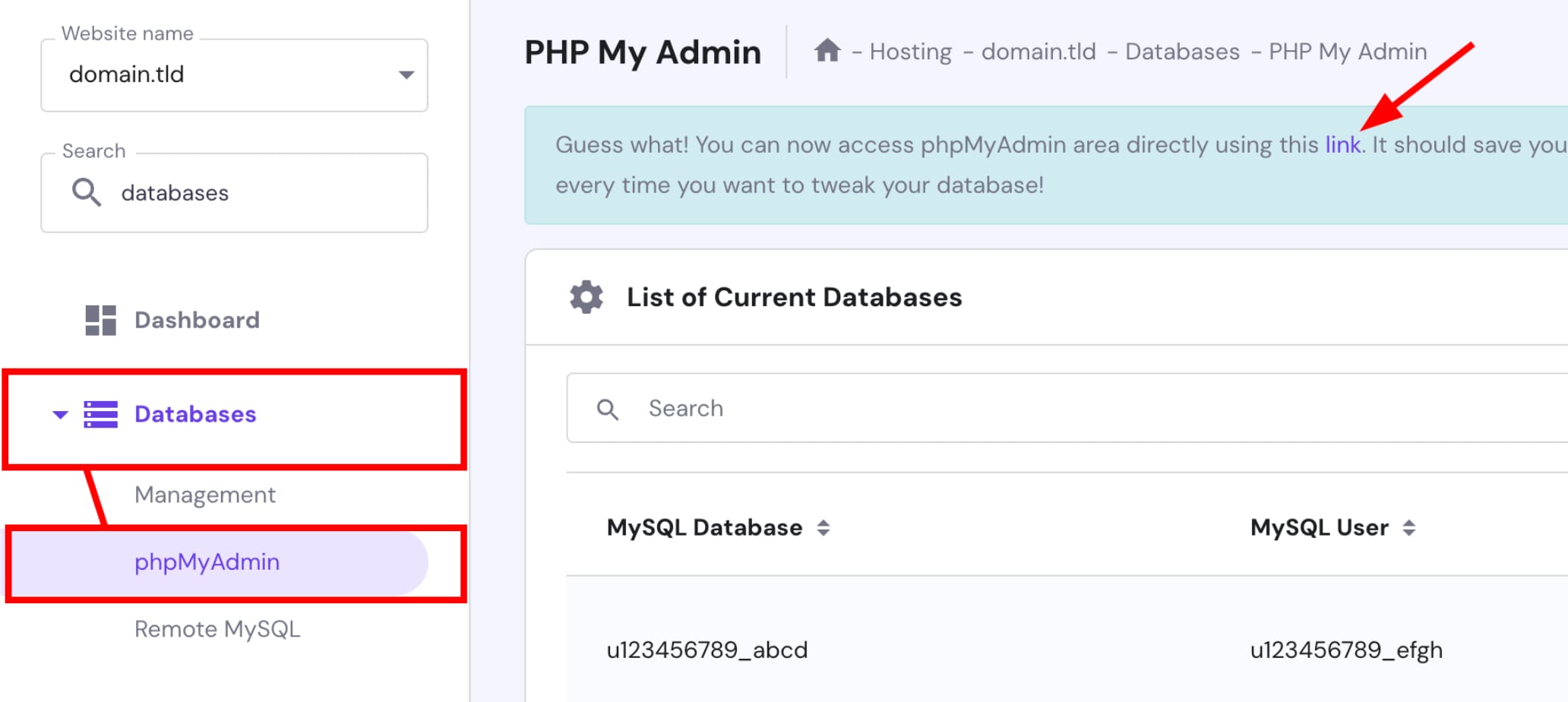
- Share the phpMyAdmin link and the database login details with your collaborator.
This allows the collaborator to manage the database directly through phpMyAdmin.