Here at Hostinger, we offer a variety of VPS plans. As your project grows, you might want to increase the resources your server has ‒ and it can be easily done with an upgrade.
To change the plan, open the VPS section and on the ellipsis button (⋯) next to the server in question, and click on Upgrade.
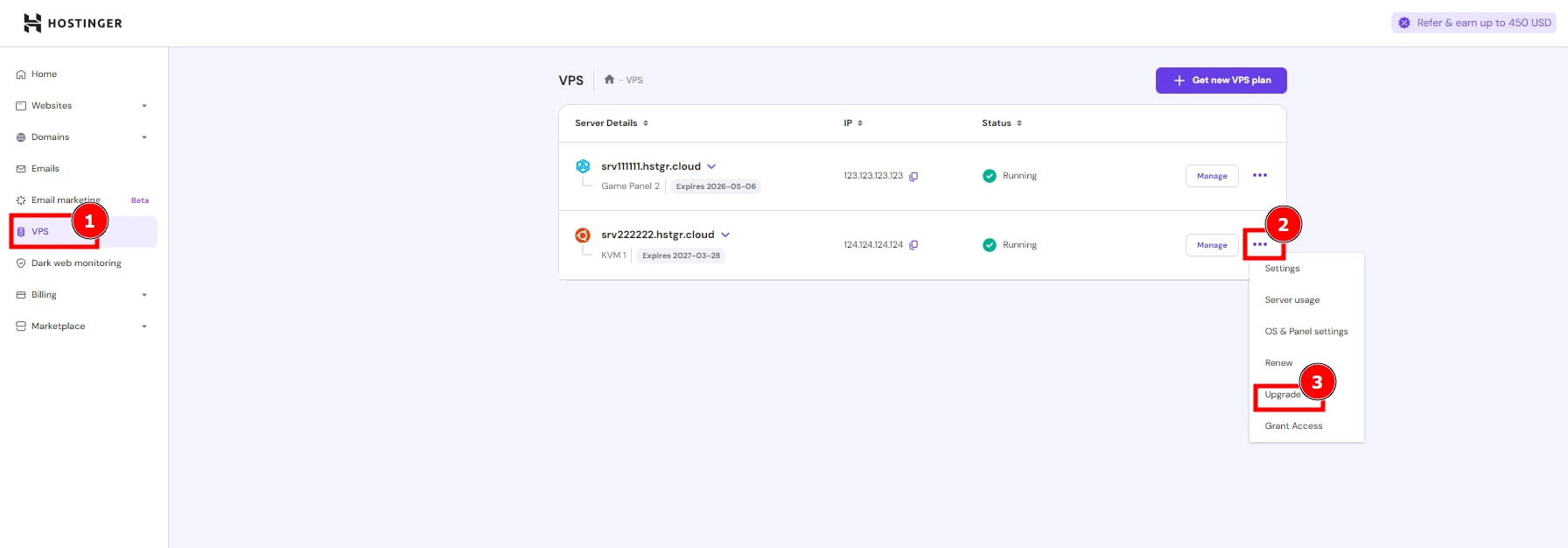
Select your new plan and duration, and proceed with the payment. That’s it! Enjoy increased resources and productivity 😊
NOTES
-
The upgrade can take up to 10 minutes to complete.
-
All your files and configurations will remain unchanged during the upgrade
-
KVM 8 plans can’t be upgraded, as they are the highest tier available. If you need more resources, you can purchase additional VPS plans and set them up to share the load manually.
-
Upgrades are not available for OpenVZ VPS plans. To upgrade, a migration from OpenVZ to KVM is required.