What is an email API and how it works
Sep 11, 2026
/
By Ksenija
/
10 min Read

An email API is a software interface that integrates email functionality into applications. The API exchanges requests and responses with an email service, allowing the application to send, receive, and manage emails through code.
Businesses use email APIs to automate email communication and integrate email into websites, mobile apps, and business systems.
Common use cases include sending transactional emails such as password resets and order confirmations, delivering notifications, and running automated email marketing campaigns.
If you’ve filled out a contact form, received a shipping update, or reset an account password, you’ve likely interacted with an application that used an email API behind the scenes.
How does an email API work?
An email API works by exchanging requests and responses between an application and an email service.
Although each provider implements its own API, the workflow follows the same core sequence: the application sends a request with the email details, the email service validates and processes the request, and then prepares the message for delivery.
After processing the request, the API returns a response. The response indicates whether the request was accepted or whether the application needs to handle an error.
1. Authenticating the request
Before an email service accepts a request, it checks whether the application is allowed to use the sender’s email account.
Authentication works like showing an ID before entering a secure building. The email service verifies the application’s identity before allowing it to send emails.
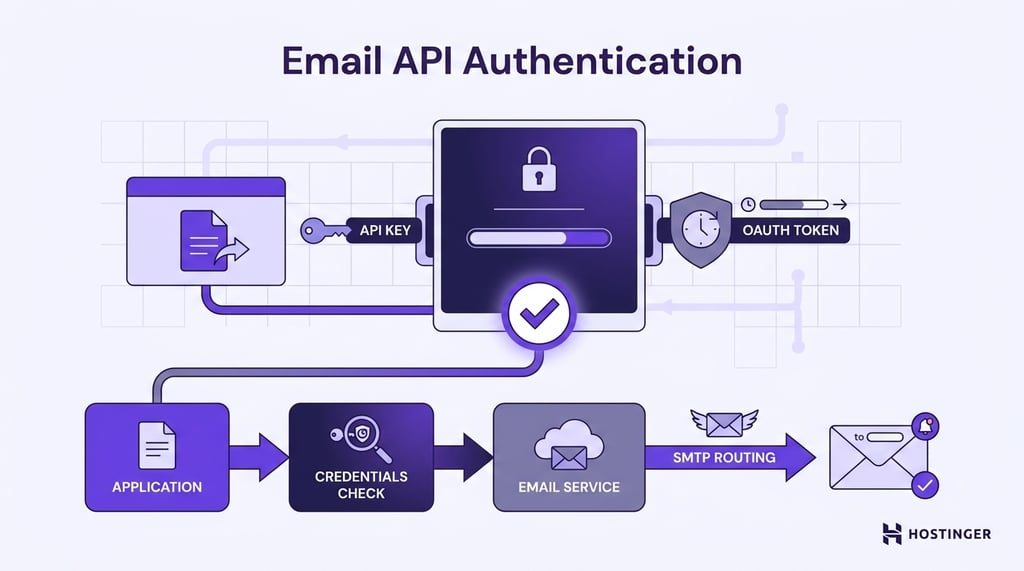
Most email APIs use an API key or an OAuth access token for authentication. An API key is a unique string generated by the email provider and linked to an account or application.
The application includes the key in every API request, so the email service can identify which account is making the request.
OAuth follows the same goal but uses temporary access tokens. Before an application can send requests, the account owner grants permission.
The application then receives an access token and includes it in each API request. Because tokens expire and can be limited to specific permissions, OAuth gives account owners more control over what an application can do.
After verifying the credentials, the email service identifies the sending account and confirms that the application is authorized to send emails on its behalf.
Once the request passes these checks, the provider prepares the email and passes it to its delivery infrastructure, which commonly includes SMTP servers responsible for routing the message to the recipient’s mail server.
If the credentials are missing, invalid, expired, or don’t have permission to perform the requested action, the email service rejects the request immediately.
2. Building the email request
After the application is authenticated, it prepares the email request, a structured set of information that tells the email service what message to send and how to send it.
Every request includes the basic parts of an email:
- sender’s email address
- recipient’s email address
- subject line
- message body
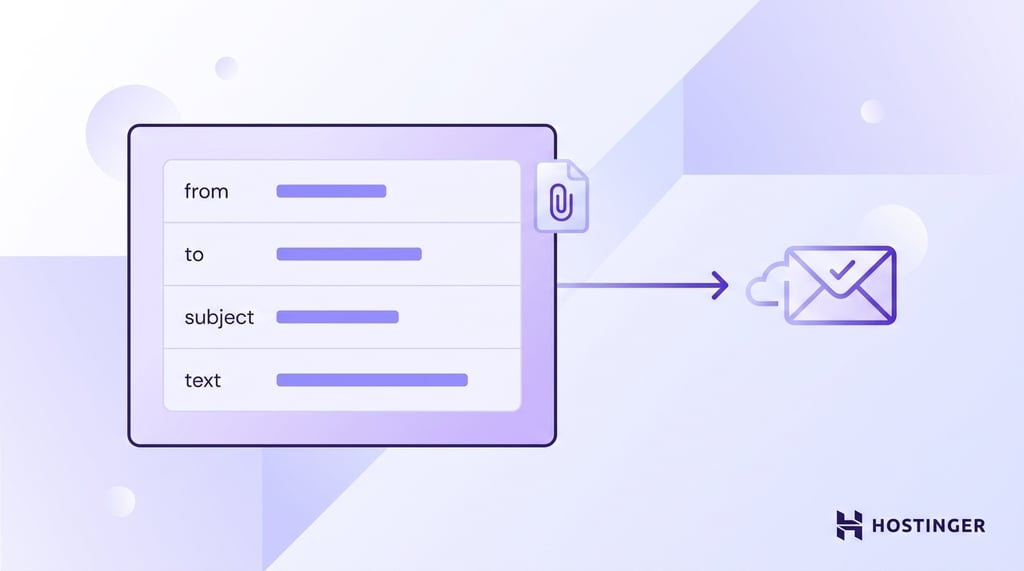
The application can also include CC and BCC recipients, attachments, reply-to addresses, custom headers, or other settings supported by the email provider.
Most email APIs expect this information in a JSON payload. JSON (JavaScript Object Notation) is a simple text format for organizing information into labeled fields and values.
Applications can process JSON efficiently, and developers can read and debug it easily, which is why it’s one of the most common formats for exchanging data between software systems.
For example, a request might include fields named from, to, subject, and text, with each field containing the corresponding email information.
If the email includes a PDF, image, or other file, the application also adds the attachment to the request using the format required by the email provider.
Once the request is complete, the application sends the JSON payload to the email API. The email service reads each field, validates the data, and prepares the message for the next stage of processing.
3. Sending the request
Once the email request is ready, the application sends it to the email service.
Think of the request as a digital package that contains everything the email service needs to send the message, including the sender, recipient, subject, message body, and any attachments.
The application sends this package to a specific web address called an API endpoint. Most email APIs receive requests through an HTTP POST request, a standard way for applications to send new data to a server.
In this case, the new data is the email the application wants to send.
After the request reaches the email service, the API checks that all required information is present and correctly formatted.
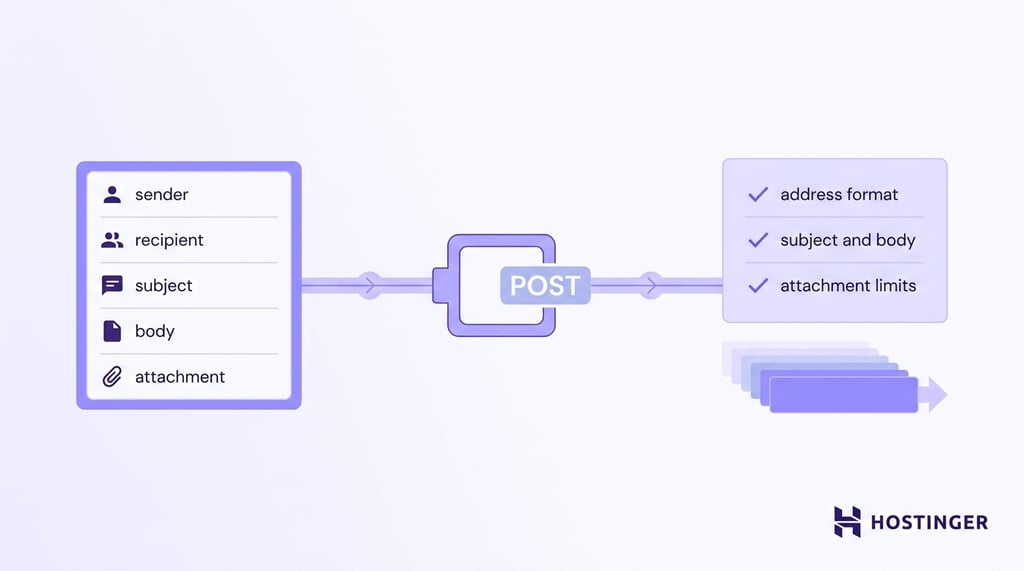
It can verify that the sender and recipient email addresses are valid, confirm that the subject and message body meet the provider’s requirements, and check whether any attachments comply with the provider’s size and file type limits.
If the request passes validation, the email service prepares the email for delivery. The provider applies any configured settings, such as templates or tracking, places the email in a delivery queue, and passes it to its delivery infrastructure.
4. Processing the response
After receiving the email request, the email API sends a response back to the application. The response tells the application whether the request was accepted or whether something needs to be fixed before the email can be sent.
A successful response confirms that the email service received and validated the request. An error response explains why the request failed.
The request might be missing a required field, contain an invalid email address, or include an attachment that exceeds the provider’s size limit.
Because the API identifies the problem, the application knows exactly what needs to be corrected.
Technically, the API returns an HTTP status code along with a response body containing additional details.
A status code in the 200 range confirms that the email service accepted the request. Codes in the 400 range point to problems the application must fix before trying again, while codes in the 500 range usually indicate temporary server issues that the application can retry later.
The response body can include additional details, such as an error message or a request ID, helping the application or developer identify the cause of the problem.
Applications use these responses to automate error handling. A temporary problem, such as a network interruption or a service timeout, can trigger an automatic retry after a short delay.
On the other hand, a permanent problem, such as an invalid recipient address or missing authentication, requires the application to correct the request before sending it again.
Accepting a request does not guarantee that the email has reached the recipient. After the email enters the provider’s delivery system, the email service continues tracking its progress and records events such as queued, sent, delivered, bounced, or opened.
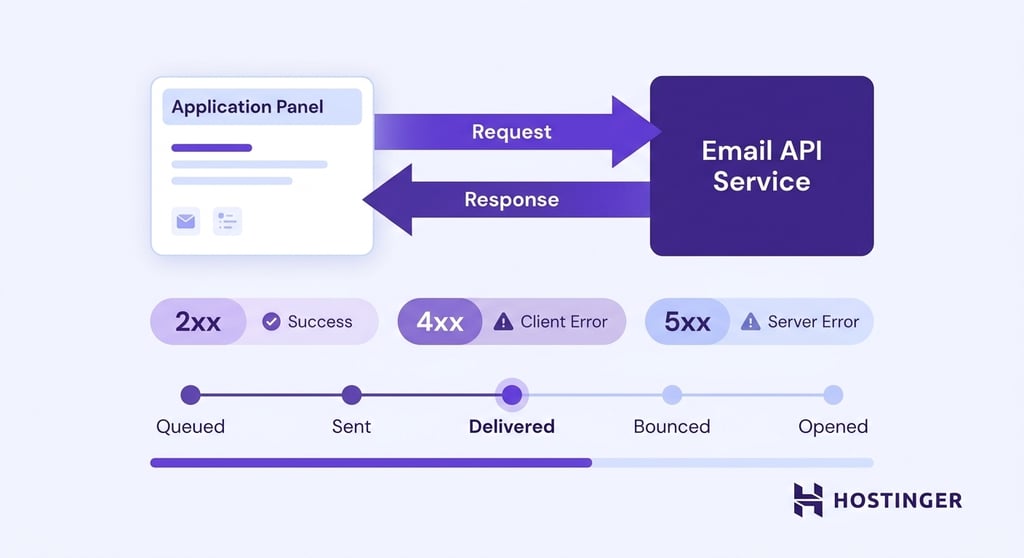
Applications can retrieve these updates through the email API or receive them automatically through webhooks. The information helps keep users informed, update business systems, and trigger follow-up actions without manual work.
Email API vs. SMTP
Email APIs and SMTP both enable email delivery, but they solve different problems.
SMTP is the standard protocol for transferring email between mail servers, while an email API allows applications to integrate email features through code.
Developers can use either approach to send emails, but the integration process, available features, and development experience differ significantly.
The PHP mail() function and libraries such as PHPMailer have traditionally been used to send emails from PHP applications, often using SMTP for delivery.
Email APIs take a different approach, adding capabilities such as delivery tracking, webhooks, structured error handling, and easier integration with automated workflows, such as with ChatGPT.
Here’s a quick comparison of email API vs. SMTP:
| Feature | Email API | SMTP |
| Primary purpose | Integrates email functionality into applications | Transfers emails between mail servers |
| Communication method | HTTP requests that exchange JSON data | SMTP commands exchanged over a TCP connection |
| Integration with applications | Designed for websites, mobile apps, and business systems | Requires an SMTP client and protocol-specific configuration |
| Authentication | API keys or OAuth tokens | Username and password or SMTP authentication mechanisms |
| Automation capabilities | Built-in support for templates, webhooks, scheduling, and event-driven workflows | Automation requires additional application logic |
| Email tracking | Delivery, opens, clicks, and other events are commonly available through the API | Limited built-in tracking capabilities |
| Error handling | Structured responses with detailed error messages | SMTP response codes that require additional parsing |
| Typical use cases | Transactional emails, notifications, password resets, AI agents, and business workflows | Mail server communication, email clients, and legacy applications |
SMTP has been the foundation of email delivery for decades. Every time an email travels from one mail server to another, SMTP provides the rules that both servers follow to transfer the message reliably across the Internet.
Email APIs operate at a higher level. An application sends an API request containing the email details, and the email provider handles the underlying delivery process.
The API also exposes capabilities that are difficult or impossible to achieve with SMTP alone, such as template management, delivery tracking, webhooks, analytics, and integration with modern applications.
The two technologies are not competing standards. Many email providers accept API requests from applications, then use SMTP within their own infrastructure to transfer the email to the recipient’s mail server.
In other words, the application communicates with an API, while the email provider still relies on SMTP as part of the delivery process.
Common email API use cases
Most email API use cases fall into a few common categories, including user account management, transactional emails, notifications, customer support, inbound email processing, and delivery tracking.
Each workflow is triggered by an action in the application, allowing emails to be sent automatically when specific events occur.
User account management
Creating an account and signing in are two of the most common email API workflows. After a user registers, the application sends a verification email to confirm the email address.
If the user requests a password reset, the application sends a secure reset link. Both emails are generated automatically as soon as the user completes the action.
Transactional emails
Buying a product or booking a service usually triggers a confirmation email. After a customer completes a purchase, the application uses the email API to generate and send an order confirmation containing details such as the items purchased, payment information, and estimated delivery date.
Booking platforms use the same workflow to send reservation confirmations as soon as a booking is confirmed.
Notifications and status updates
Applications use email APIs to notify users when something changes. When an online store updates an order from Processing to Shipped, the application sends the new order status to the email API, which generates and delivers a shipping notification.
The same workflow can notify customers when a package is delivered or a subscription is about to renew.
Any event inside the application can trigger this process. Project management software can notify team members about newly assigned tasks, while banking applications can alert customers to completed transactions or suspicious account activity.
Customer support communication
When a customer fills out a contact form or opens a support ticket, the application uses the email API to send a confirmation email with details such as the ticket number and expected response time.
As the support request moves through the workflow, the application uses the email API to send status updates, notify customers when an agent replies, or confirm that the issue has been resolved.
The email API helps keep customers informed without requiring support agents to send each message manually.
Inbound email processing
Email APIs can do more than send emails. They can also pass incoming emails to an application so the application can react automatically.
For example, a company might ask customers to send support requests to support@example.com.
Instead of waiting for someone to read every email manually, the email API forwards each message to the support application.
The application reads the sender, subject, message, and any attachments, then decides what to do next.
Depending on the workflow, the application can create a new support ticket, add a reply to an existing conversation, send the email to the right department, or extract information from an attachment for further processing.
Delivery tracking and email events
Email APIs provide real-time updates throughout a message’s lifecycle, allowing applications to react automatically when delivery status changes or recipients interact with an email. Those events can trigger workflows without requiring manual intervention.
An online store, for example, can update an order page after a shipping notification is delivered, resend an email after a temporary delivery failure, or trigger a follow-up campaign when a customer opens a message but doesn’t complete a purchase.
What are the benefits of using an email API?
Email APIs reduce manual work by allowing applications to generate, send, track, and manage emails automatically.
Key benefits of using an email AP include:
- Automating email workflows. Applications can send emails automatically in response to events such as user registrations, purchases, password reset requests, or support tickets, eliminating repetitive manual tasks.
- Scaling with application growth. The same API can support a small application sending dozens of emails each day or a large platform sending millions, without changing how the application interacts with the email service.
- Integrating easily with applications. Email APIs use standard web technologies, making it straightforward to add email functionality to websites, mobile apps, SaaS platforms, CRMs, ecommerce stores, and other business systems.
- Improving email deliverability. A good provider makes DNS for email easy to configure by guiding you through authentication records such as SPF, DKIM, and DMARC, while also monitoring sender reputation, handling bounces, and providing tools to diagnose delivery problems.
- Tracking email performance. Applications can monitor events such as sent, delivered, opened, clicked, and bounced to measure engagement, troubleshoot delivery issues, or trigger follow-up actions automatically.
- Reusing email templates. Templates separate email content and design from application code, making it easier to maintain consistent branding while inserting dynamic information such as customer names, order numbers, or appointment details.
- Customizing every message. Applications can personalize emails using customer data, allowing each recipient to receive relevant content without creating separate emails manually.
- Reducing infrastructure management. Email API providers maintain the mail servers, delivery infrastructure, monitoring, and other operational components, allowing development teams to focus on building application features instead of managing email systems.
Email APIs for automation and AI workflows
Email APIs have evolved beyond sending transactional emails. Modern applications use them to exchange information between systems, trigger automated workflows, and enable software to react to events without human intervention.
Automation platforms make it easier to build these workflows by connecting email APIs with other applications.
Platforms such as n8n, Make, Zapier, LangChain, and OpenClaw can listen for email events, exchange data between systems, create support tickets, update databases, or coordinate actions across multiple services without requiring custom integrations for every connection.
AI agents extend these workflows by interpreting email content and deciding how to respond.
Instead of following a fixed sequence of steps, an agentic email system can read an email, understand the request, retrieve relevant information, generate a response, and send the reply through the email API.
Hostinger Agentic Mail is built for automated email workflows. It gives applications and AI agents the tools to send emails, receive replies, react to email events, and manage conversations without human intervention.
Alongside an email API and webhooks, Agentic Mail includes an MCP (Model Context Protocol) server that allows compatible AI agents to access mailboxes through a standardized interface.
Mailbox allow and block lists control which email addresses or domains an application or AI agent can send messages to. This helps prevent emails from being sent to unauthorized recipients, supports testing in controlled environments, and enforces communication policies.
How do you choose an email API provider?
Before making a decision, consider how the API fits your development workflow, supports reliable email delivery, and scales as your application grows.
Evaluate each provider based on the following criteria:
- Sufficient API documentation. Read the documentation before signing up. Look for clear getting-started guides, complete endpoint references, practical code examples, and explanations for common errors.
- Ease of implementation. Estimate how much work it takes to send your first email. A well-designed API should have a straightforward authentication process, consistent endpoints, and a quick onboarding experience without requiring extensive configuration.
- Right authentication options. Choose a provider that supports the authentication method your application requires. API keys are often sufficient for server-to-server communication, while OAuth is a better fit when users need to grant applications access to their email accounts.
- Webhook support. Check which events the provider can send to your application. Support for events such as delivered, bounced, opened, and clicked makes it easier to build automated workflows and keep other systems up to date.
- SDKs and programming language support. Verify that the provider offers official SDKs for your programming language. If your application already uses a library such as PHPMailer to send emails over SMTP, check whether the provider also provides SDKs that simplify migration to an email API.
- Integration options. Consider how well the provider fits into your existing technology stack. Native integrations with CRMs, ecommerce platforms, customer support software, or automation tools can eliminate custom development and simplify workflow automation.
- Strong deliverability features. Look beyond sending emails successfully. A good provider should support SPF, DKIM, and DMARC, monitor sender reputation, handle bounces, and provide tools for diagnosing delivery problems.
- Analytics and reporting features. Decide which metrics your application needs before choosing a provider. Delivery reports, open rates, click tracking, bounce reports, and engagement metrics help measure email performance and identify issues early.
- Strong security controls. Review how the provider protects your data and API access. Features such as encrypted connections, role-based access controls, audit logs, and compliance with standards relevant to your industry become increasingly important as applications grow.
- Scalability support. Consider both your current email volume and future growth. Choose a provider that can handle increasing traffic without requiring major architectural changes or disrupting existing workflows.
- Sustainable pricing. Compare more than the monthly subscription. Review free usage limits, email quotas, overage charges, and the cost of features such as dedicated IPs, analytics, or premium support to understand the long-term cost of the service.
For AI-agent workflows, provider differences extend beyond the API itself. For example, Hostinger Agentic Mail vs AgentMail shows how two agent-focused email services differ in pricing, SDK support, integrations, webmail access, and how the email infrastructure is packaged.
Artikel ini merupakan versi setempat bagi What is an email API and how it works, asalnya diterbitkan dalam bahasa Inggeris.
All of the tutorial content on this website is subject to Hostinger's rigorous editorial standards and values.

Ksenija is a digital marketing enthusiast with extensive expertise in content creation and website optimization. Specializing in WordPress, she enjoys writing about the platform’s nuances, from design to functionality, and sharing her insights with others. When she’s not perfecting her trade, you’ll find her on the local basketball court or at home enjoying a crime story. Follow her on LinkedIn.