AI content optimization: What it is and how to use it
Sep 03, 2026
/
By Alma
/
9 min Read

AI content optimization means using AI to improve your existing content’s ranking on Google and to be picked up by answer engines like ChatGPT, Perplexity, and Google AI Overviews.
It’s not the same as writing with AI or running a standard SEO audit. Instead of producing new drafts, you’re analyzing what’s already on the page and fixing what’s holding it back: poor structure, thin coverage, stale information, or formatting that AI models can’t read.
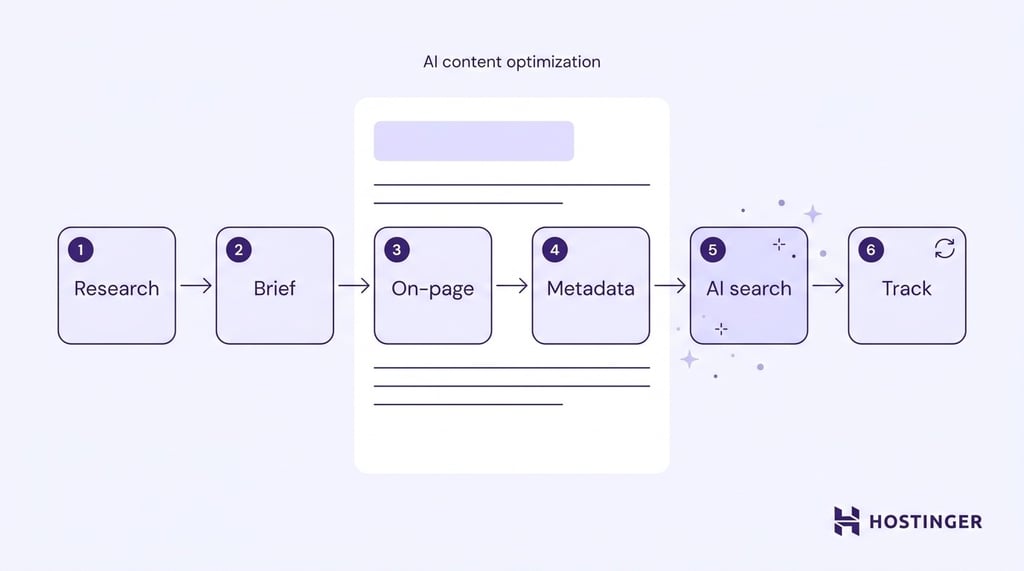
There are six steps to optimizing content with AI, and you don’t need a big team or paid tools to get started – a free ChatGPT account and Google Search Console can cover the basics:
- Research keywords and group them by topic.
- Build a content brief from that research.
- Improve the on-page content.
- Write your titles, descriptions, and technical tags.
- Format your pages so AI answer engines can cite them.
- Track results and refresh what’s falling behind.
What is AI content optimization?
AI content optimization, sometimes called AI Optimization (AIO), uses AI tools to analyze your content and improve it so it performs better in both traditional search and AI answer engines like ChatGPT, Perplexity, and Google AI Overviews.
It’s different from using AI content generators to write new pages. Generators produce drafts from a prompt. AI content optimization starts with the content you already have and compares it to pages that already rank, identifying gaps in topics, structure, and depth.
The audience for your content has changed, too. It’s no longer just human readers and Google’s crawler. ChatGPT, Perplexity, Gemini, Claude, and Google AI Overviews all read your page and decide whether to cite it. That means how your page is formatted now matters as much as what it says.
What is the difference between AI content optimization and traditional SEO?
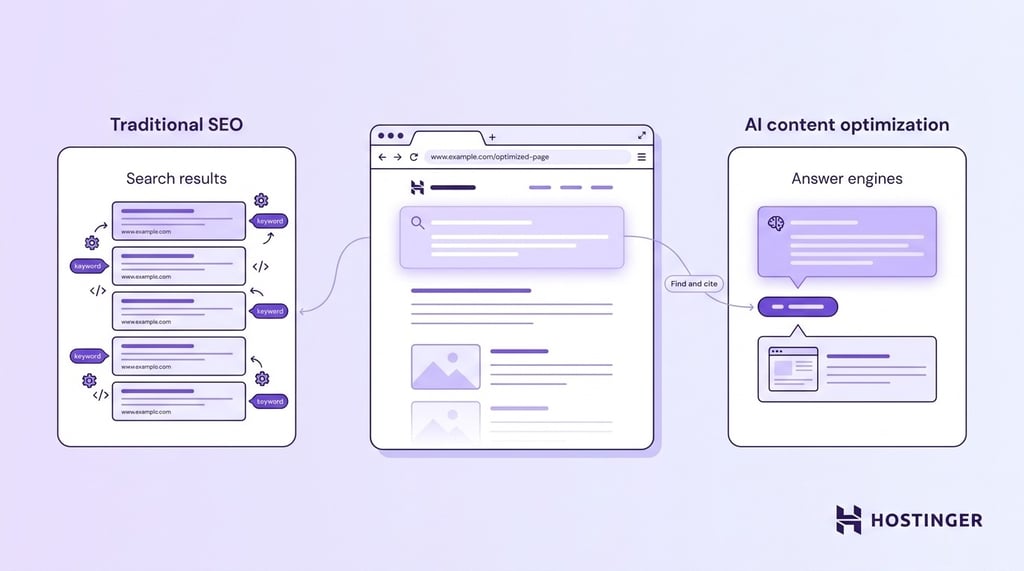
Traditional SEO gets your page onto a Google results list through backlinks, keywords, and technical setup. AI content optimization adds another layer – formatting and structuring your content so that AI answer engines can find and cite it.
You still need traditional SEO to rank in the first place. AI content optimization builds on this when your readers also search on AI platforms.
What is the difference between AI content optimization and AI writing?
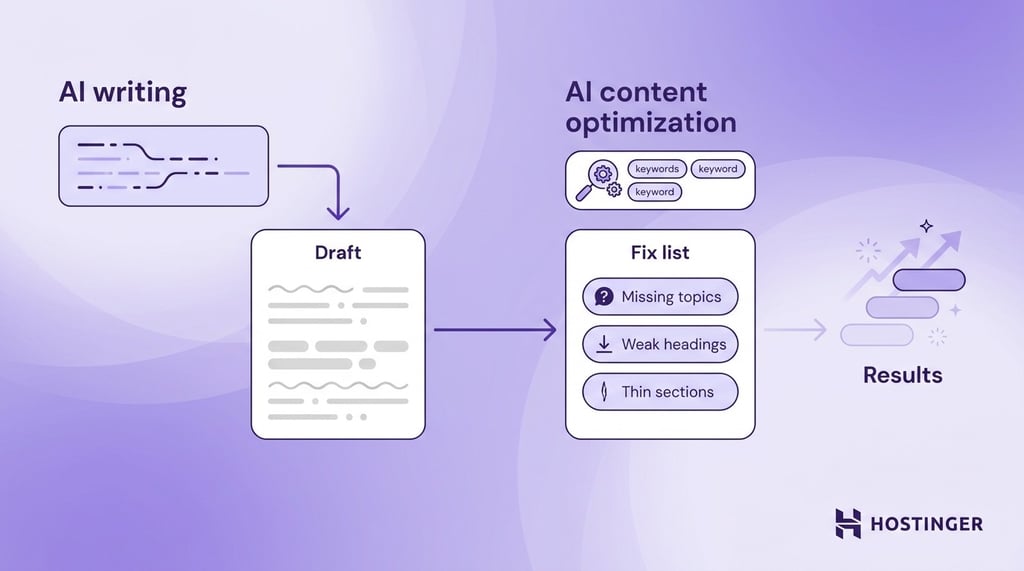
AI writing tools like ChatGPT and Jasper take a prompt and give you a finished draft. That’s useful for getting words on the page fast, but the draft still needs to be built around what search engines and AI answer engines actually look for.
This is where AI content optimization comes in. Instead of starting from a blank page, you take an existing piece of content, or a fresh draft, and compare it against a target keyword. The output isn’t another draft. It’s a list of what to fix: missing topics, weak headings, thin sections, or missing schema (the code that helps search engines understand your page).
AI-generated writing focuses on how well it reads. AI content optimization focuses on results: do rankings go up, do AI platforms cite the page, and does traffic from those platforms grow? You can publish a new AI-written article every day and still see little movement if none of them are optimized for the signals that actually matter.
They work best together. Use AI writing to draft it, then optimize it to earn its spot.
Can AI-generated content rank in Google?
Yes. Google evaluates content on quality, not authorship. Its guidelines target unhelpful, spammy, or unoriginal content, regardless of whether it was produced by a human or an AI.
Publish AI-assisted drafts after human review. Add your own examples and name your sources. Google applies the same quality standards to AI-assisted content as it does to anything written entirely by a person.
How to use AI for content optimization
1. Run keyword and topic research with AI
Use AI tools to find the queries people search for, the questions that appear in Google’s “People Also Ask” boxes (PAA), and related terms.
Then group them by search intent, meaning what the person is actually trying to do: learn something, compare options, buy, or locate a specific brand or page. Grouping by intent lets a single page target a full topic rather than a single keyword. This is where most manual research burns time, and where AI saves the most.
AI can help with several parts of keyword and topic research, including:
- Generating starting keywords from a topic prompt.
- Grouping related queries by search intent (informational, commercial, transactional, navigational).
- Extracting PAA questions tied to the primary keyword.
- Finding keyword variations and related phrases that competitors already cover.
A single well-grouped topic can replace several thin blog posts. Aim for one page per intent group, not one page per keyword.
One thing to watch out for: chasing high-volume keywords without checking whether the search intent matches your content. A page targeting a buying query with informational content ranks for neither.
2. Generate a content brief and outline
Take your keyword and topic research and turn it into a brief. A good brief includes your H2s, the subtopics you need to cover, the key entities (specific people, products, and concepts your page should mention), and PAA questions worth answering.
An AI-generated brief takes about 10 to 15 minutes and saves the writer roughly two hours of guesswork.
Start by pulling the outlines of top-ranking pages and spotting where your content falls short compared to theirs. List the entities you need to mention and draft an H2/H3 structure. Leave room for what AI can’t fill in: real experience, quotes from named experts, and data you collected yourself.
Be specific in the brief. Instead of writing “add more detail,” write exactly what’s missing, like a section on a particular feature, a comparison table, or an answer to a specific PAA question.
3. Optimize the on-page content
Now you’re working on the draft itself. Adjust the structure, wording, and depth so it matches what ranks and what AI models quote.
Most importantly, put the answer first. Growth Memo found in its February 2026 analysis that 44.2% of AI citations come from the first 30% of a text. So keep paragraphs short, use easy-to-scan lists, and put direct answers in the first two sentences.
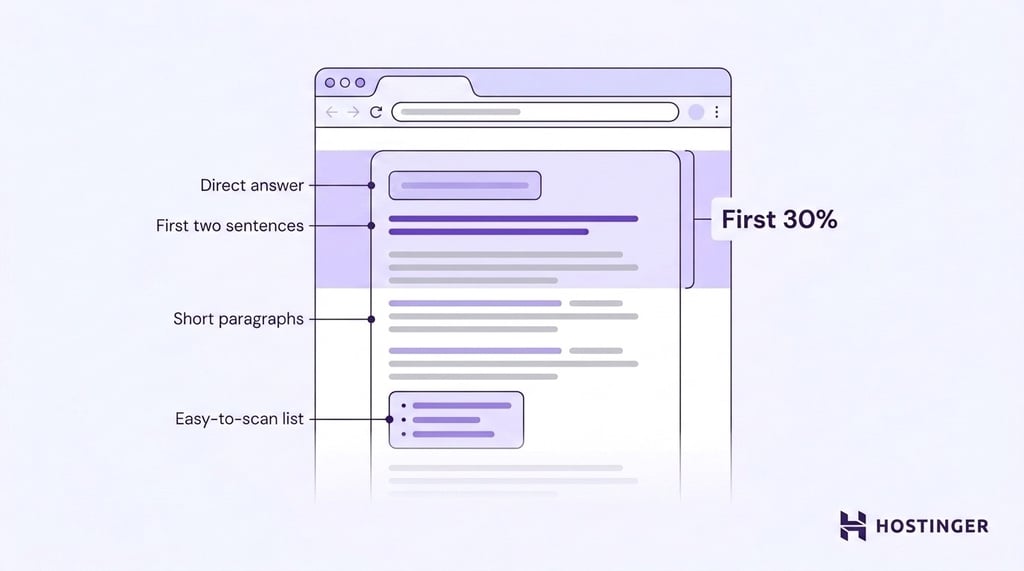
But structure alone won’t get you cited if the content itself is generic. AI answer engines pick pages that bring something the others don’t. To achieve this, you need to:
- Mention specific people, products, and companies by name instead of writing in general terms.
- Include original insights, expert quotes, and worked examples.
- Add internal links to supporting and related pages.
Be careful not to over-optimize for a content score or let AI flatten your brand voice. The things you add yourself, like test results, real examples, and data you gathered, are what separate your page from everyone else’s.
4. Draft metadata and technical elements
Use AI to draft your title tags, meta descriptions, image alt text, and structured data.
Five title-tag options and matched descriptions for a batch of pages take about ten minutes of prompting. If you’re doing this across dozens of pages on a regular schedule, you can build an AI agent to handle the repetitive parts.
Make sure you’re covering:
- Title tags under 60 characters so nothing gets cut off in search results.
- Meta descriptions around 120–155 characters, or closer to 105 characters when writing stricter mobile-first copy.
- Schema markup matched to visible content, like FAQ schema on an actual FAQ section or HowTo schema on a real how-to guide.
- Descriptive alt text for every meaningful image.
Don’t apply schema where it doesn’t belong. Adding FAQ markup to a page with no FAQ section, or writing generic descriptions that could apply to any article, does more harm than good.
5. Optimize for AI search and answer engines (GEO)
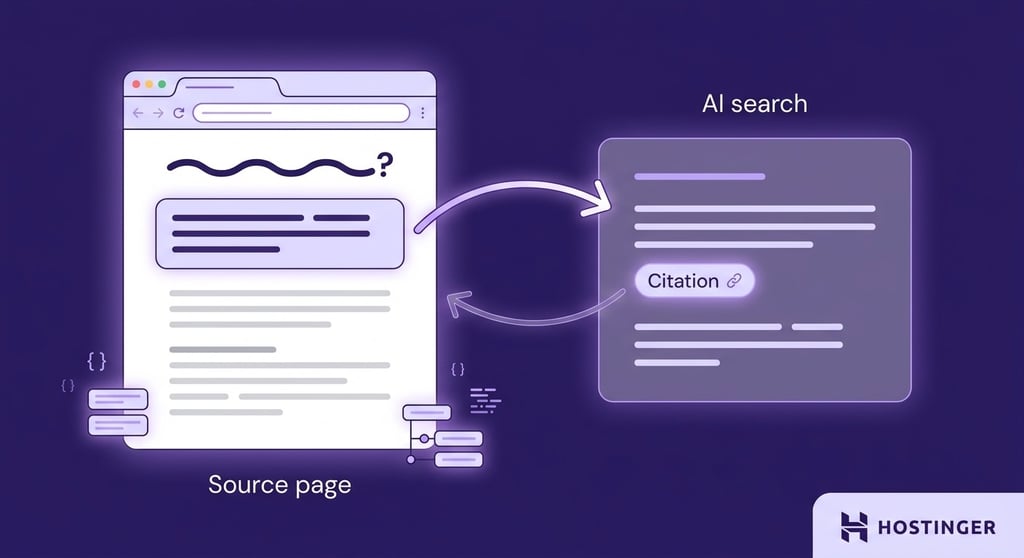
This step, often called Generative Engine Optimization (GEO), is about formatting your pages so large language models like ChatGPT, Perplexity, Gemini, Claude, and Google AI Overviews can quote your content and link back to you.
Semrush’s 2025 AI Overviews study found that the vast majority of queries triggering AI Overviews are informational. In blog posts or guides, an AI answer box is increasingly likely to appear above the standard results.
Make your pages easier for AI to cite:
- Write your H2s as questions that match how people naturally ask things. AI models pull from headings that mirror real queries.
- Add a 40–60-word answer block right after each H2. This is the chunk AI answer engines are most likely to quote.
- Cite trustworthy sources and make it clear where the information comes from. AI models favor pages that show their work.
- Keep important content in the page’s HTML, not loaded through JavaScript. If turning off JavaScript blanks the page, AI crawlers see a blank page too.
6. Track performance and refresh content
Set up a monthly review that covers rankings, AI citations, and content decay together. Content decay occurs when a page’s rankings or traffic slowly decline because its information becomes outdated. A page can lose ranking while gaining citations, or the other way around, so you need both signals in the same check.
Here’s where to look:
- Google Search Console for tracking how your pages perform in search, including any data Google provides on AI Overviews and AI Mode.
- Google Analytics 4 (GA4) for AI referral tracking to separate traffic coming from ChatGPT, Perplexity, Claude, Gemini, and Copilot from other sources.
- Semrush AI Visibility Toolkit or Nightwatch to see how often AI answer engines cite your pages compared to competitors.
- Page sorting to group pages into quick wins, major rewrites, and pages you should merge together.
Don’t just measure clicks. AI Overview citations and referral traffic from ChatGPT and Perplexity matter too, even when they don’t come with a click.
Benefits of AI content optimization
AI content optimization helps teams move faster without lowering content quality. Instead of treating every update as a manual task, you can use AI to speed up research, improve structure, and decide which pages need attention first.
- Briefs, outlines, and description drafts that took hours now take minutes, so you can update more pages each month.
- Semrush’s 2025 research found that AI search traffic leads to 4.4x more purchases than standard organic visits. You’re not just chasing views; you’re chasing traffic that buys.
- Better topic coverage and stronger structure help your standard Google rankings, not just AI citations.
- AI tools catch content decay early, so you can refresh pages before rankings drop.
- You stop guessing which pages need work. The process gives you a clear way to decide what to update first based on actual performance data, not gut feeling.
- A workflow that covers 10 pages a month can cover 100 without hiring more people, especially once you use different types of AI agents to handle research, auditing, and metadata separately.
Is AI content optimization only for large companies?
No. AI content optimization works at any scale. Free tools like ChatGPT, Google Search Console, and GA4 cover the basics.
Start with headline drafting and PAA extraction, two tasks a free ChatGPT account handles well, before evaluating paid platforms.
Popular AI content optimization tools
The best AI SEO tools each solve one part of the job, and no single tool covers everything from research to tracking. Pick by what you need done, not by the feature list.
| Task | Tools | What they do |
| Research and clustering | Semrush, Ahrefs, ChatGPT | Find keywords, group them by intent, and pull People Also Ask questions |
| On-page scoring and briefs | Surfer SEO, Clearscope, Frase, MarketMuse, NeuronWriter | Grade your drafts against pages that already rank and build structured briefs |
| AI writing | ChatGPT, Claude, Jasper | Produce drafts that scoring tools then evaluate |
| Monitoring and citation tracking | Google Search Console, GA4, Nightwatch, Semrush AI Visibility Toolkit | Show your rankings, referral traffic, and how often AI answer engines cite your pages |
Creators and small teams get most of the value from ChatGPT, a scoring tool (like Surfer or Clearscope), and Google Search Console. Larger teams add a monitoring platform like Nightwatch or Semrush’s AI Visibility Toolkit to track AI citations.
If you want to connect several of them into an automated workflow, AI agent builders let you do that without coding the connections yourself.
Using AI agents for content optimization
An AI agent is a system that performs a series of tasks autonomously toward a specific goal. Unlike a chatbot that answers one question at a time, an agent can guide you through multiple steps without you having to manage each one. You might also hear this called agentic AI.
Agents save the most time when you’re running the same optimization tasks on a schedule or across many pages. For example:
- Auditing your full content library to find pages that have lost traffic or rankings and need a refresh.
- Grouping thousands of keywords by intent.
- Creating briefs for a whole content calendar.
- Drafting titles and descriptions in bulk.
- Surfacing internal linking opportunities.
- Checking published pages for answer blocks, entity coverage, and schema markup.
Where agents don’t help is on one-off, high-stakes work – optimizing a single important page, writing something that needs a personal voice, or setting up optimization for the first time with no checklist to follow. For those, you’re better off doing it yourself.
If you’re new to agents, start with an existing product before building a custom one. Hostinger’s content marketing AI agent can plan your content, draft blog posts in your brand voice, and refresh existing pieces — with SEO tips built in. It works alongside specialist platforms like Surfer or Clearscope.
AI content optimization best practices
- Have a human review every page for E-E-A-T. AI can’t fake firsthand experience or real expertise. A human editor adds the expert quotes, credentials, and original examples that Google’s quality framework rewards.
- Refresh existing content before creating new. A page ranking on page two typically improves faster with optimization than a new page starting from zero.
- Check AI outputs against primary sources. This prevents made-up statistics from reaching your readers.
- Don’t chase a perfect tool score. Content graders reward keyword and topic coverage, but stuffing a draft to hit 90+ produces stiff, unnatural writing that neither humans nor AI models prefer.
- Write down your AI vs. human split. Spell out what AI handles and what humans handle, then stick to it.
<strong>Pro Tip</strong>
Before you add new topics to your calendar each month, run a quick audit of pages ranking on page two. They already have some authority, so small improvements (adding answer blocks, updating stats, filling entity gaps) move them faster than a brand-new article would.
How AI search is changing content strategy
AI Overviews appear in a growing share of search results, especially for informational queries, and more people now use ChatGPT, Perplexity, and Gemini as part of their search. As more traffic starts with an AI-generated answer, what counts as “good content” is changing too.
AI answer engines are getting pickier about what they cite. Early AI Overviews pulled from almost any ranking page. Newer versions favor pages with clear answer blocks, named sources, and structured data. That bar will keep rising, which means the formatting and structure work in steps 3 and 5 will only become more important.
New AI search platforms also keep launching, and each one reads and cites pages slightly differently. Tracking tools are slowly adapting, but you still need to review referral traffic and search performance manually to catch new sources as they appear.
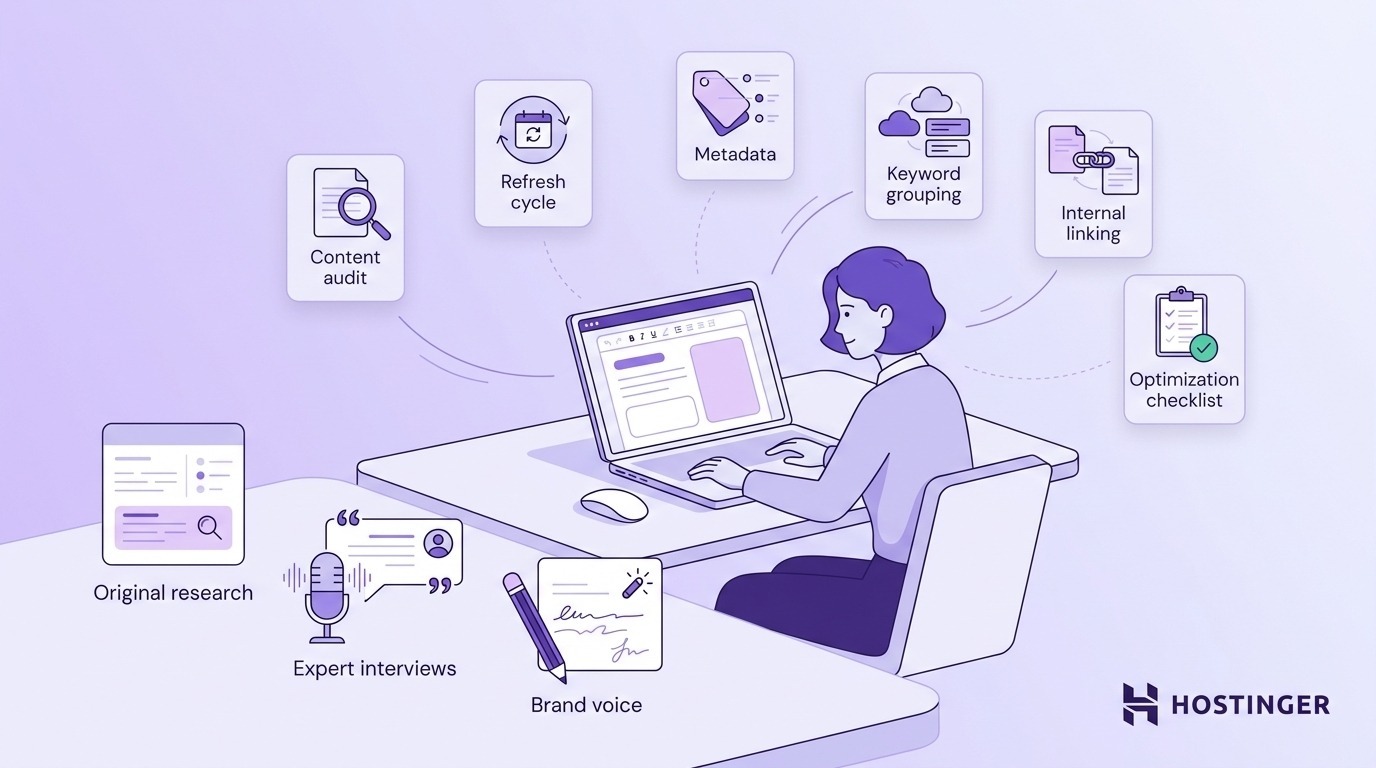
Agents will handle more of this work, too. Teams already use AI agents for marketing to automate repetitive optimization tasks, and as AI tools improve, that list will grow. That frees you to focus on the parts AI still can’t do well: original research, expert interviews, and the voice that makes readers recognize your brand.
AI answer engines keep changing what they cite, so content optimization can’t just be a one-time edit. Start with one existing page with search potential, use AI to improve its structure, answer blocks, and internal links, then track whether rankings, citations, and referral traffic improve over 30 days.
Once that works on one page, repeat the same process across the rest of your content.
Artikel ini merupakan versi setempat bagi AI content optimization: What it is and how to use it, asalnya diterbitkan dalam bahasa Inggeris.
All of the tutorial content on this website is subject to Hostinger's rigorous editorial standards and values.

Alma is an AI Content Editor with 9+ years of experience helping ideas take shape across SEO, marketing, and content. She loves working with words, structure, and strategy to make content both useful and enjoyable to read. Off the clock, she can be found gaming, drawing, or diving into her latest D&D adventure.