How to make an online store with a website builder in 8 simple steps
Apr 03, 2025
/
Matleena S.
/
11 min Read
Nowadays, you can create an online store without having coding skills and spending hours on website setup. In fact, you can make it in one afternoon with the best online store builders.
In this guide, we will show you how to build an online shop using Hostinger Website Builder. We will also share some top tips on website setup, design, and post-launch activities to help you create a profitable online store.
Download 74 ways to make money online
How to create an online shop using a website builder
Without further ado, follow these steps to launch your ecommerce shop with Hostinger Website Builder:
1. Choose an online store website builder and a domain name
If you have been thinking about how to start an online business, you have probably already mapped out your niche and the products you want to sell online. Now, it’s time to make your vision a reality.
Using website builders for online retail is an ideal choice for small online stores because they make the website development process:
- User-friendly. Website builders are designed with simplicity in mind, enabling you to create and manage a profitable online store without any technical expertise. Setting up your store, adding products, and customizing designs becomes an intuitive process, thanks to intuitive drag-and-drop interfaces.
- Cost-effective. Small businesses and startups often operate on tight budgets. Website builders are a cost-effective solution, providing a range of affordable plans that include web hosting, security measures, and essential ecommerce features without the need for significant upfront investment in web development.
- Customizable. Flexibility in web design is crucial for building a brand. Website builders offer a variety of customizable templates and design tools to tailor your online store to match your brand’s aesthetics, ensuring your store stands out and resonates with your target audience.
Hostinger’s AI store builder Business plan has easy-to-use ecommerce tools and an intuitive interface, making it suitable for beginners.
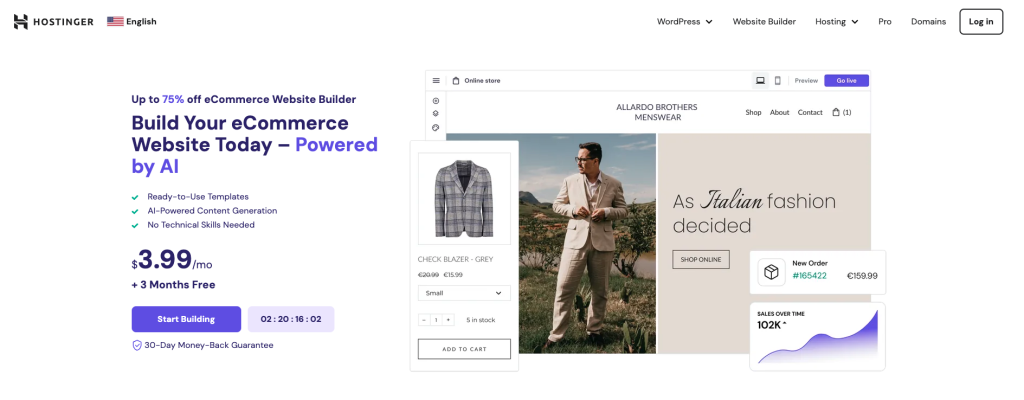
The builder doesn’t require technical or design skills, empowering anyone to create a professional-looking website quickly. The tool comes with a flexible drag-and-drop editor, designer-made templates, and free AI tools to streamline tasks like generating a unique logo and generating custom content for your site.
For ecommerce specifically, Hostinger Website Builder supports up to 500 products or services. You can choose from over 20 payment options supported worldwide and keep the profit to yourself – we don’t charge any transaction feeds. Built-in search engine optimization (SEO) tools help enhance your store’s visibility in search results.

You also get a free domain name with all Hostinger Website Builder plans. Choosing the right domain name is a vital step in establishing your online store.
The best domain names are memorable, relevant to your brand, and available across both domain registrars and social media platforms to maintain consistency in your branding.
Hostinger offers a domain name checker to help you find the perfect domain for your store, with various top-level domains (TLDs) available to make your site address stand out.
Domain Name Checker
Instantly check domain name availability.
2. Pick a template for your online store
Selecting the right template for your online store lays the foundation for your site’s aesthetic appeal and functionality.
It’s important to choose a template that not only looks good but also aligns with the type of products or services you offer. The right template can enhance the user experience, making your site easy to navigate and enticing customers to explore and purchase.
For example, stores selling luxury products may want to opt for a more minimalist design, whereas a children’s clothing store may look for a template with bright colors and fun fonts.
Hostinger Website Builder offers a wide range of designer-made templates tailored for various business niches. When choosing a template, consider the following:
- Relevance to your niche. Select a template designed for your specific industry or one that can be easily adapted to fit. For instance, if you’re selling handmade crafts, a template with large image galleries might help showcase your products more effectively.
- User experience (UX). A good template should offer a seamless browsing experience with intuitive navigation and built-in mobile responsiveness. All of our online store templates are optimized for a smooth user experience across different devices.
- Ecommerce features. Ensure the template supports ecommerce functionality, including product pages, shopping carts, and payment gateways. Hostinger’s ecommerce templates are equipped with built-in features to help manage your products, bookings, and discounts efficiently.
After you have purchased a website builder plan, access all of the online store templates:
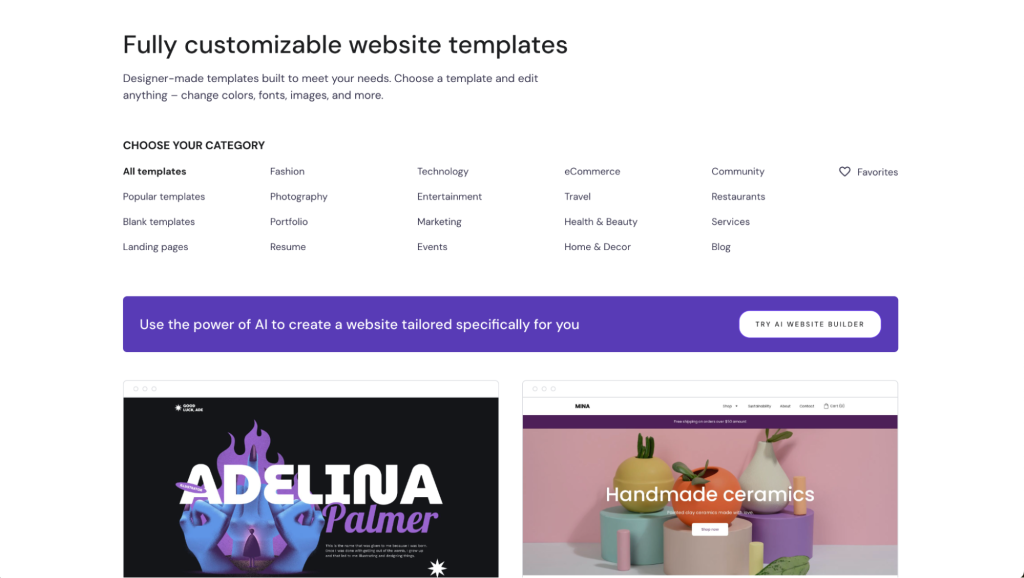
Choose the ecommerce category if you want to browse ready-made templates for online stores. Hover over a template to preview it, or select it to start building your own website using it.
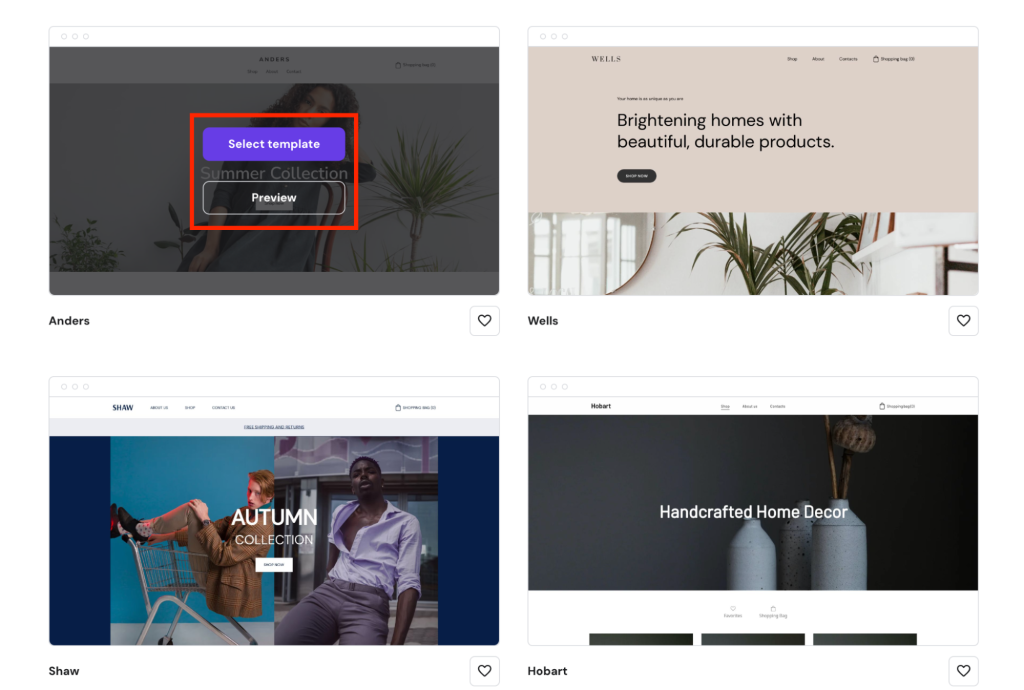
You can preview each template in both desktop and mobile views, making it easy to see how the design looks on smaller screens. The toggle is located in the top right corner. When you find a template you like, click on Start building – this redirects you to the website editor.
You can also use a blank template to create a unique design. For inspiration, read our guide on how to make a website from scratch.
3. Customize your store’s design
Customizing an online store with a website builder is intuitive and fast, as you simply need to drag and drop page elements into their desired positions on the page.
A cohesive design that reflects your brand can significantly enhance the customer experience. To customize your store’s design with Hostinger Website Builder, follow these steps:
Layout
- In the website editor, open the Add elements menu.
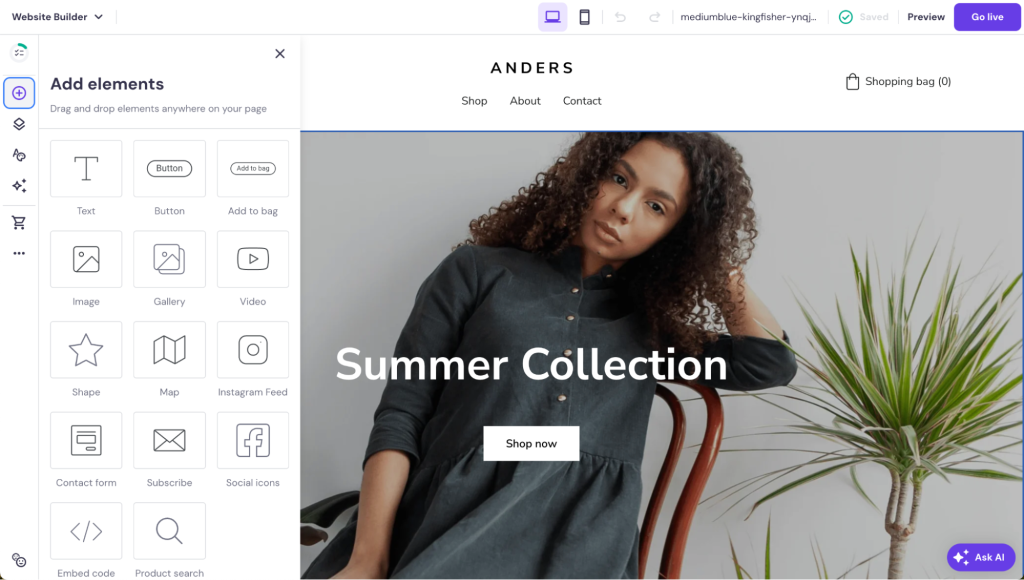
- Select an element you want to add and simply drag it to the desired spot on the page.
- Click on any element on the page to open the element settings.
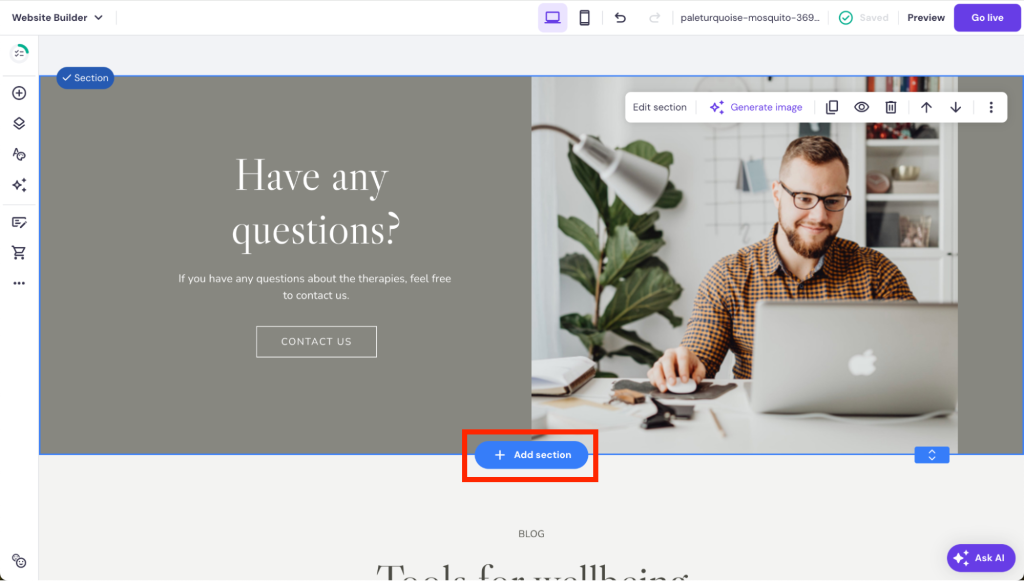
- Add or remove sections according to your needs by hovering between two existing sections and clicking on the Add section button.
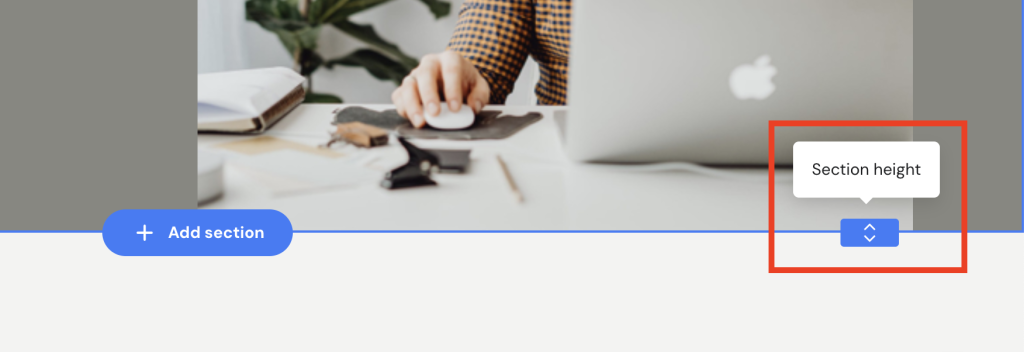
- Use the slider to adjust the section height as you prefer.
Colors
- Open the Website styles settings in the builder.

- Hover over different colors to open the individual color settings.
Fonts
- Open the Website styles settings in the builder and select the Fonts tab.
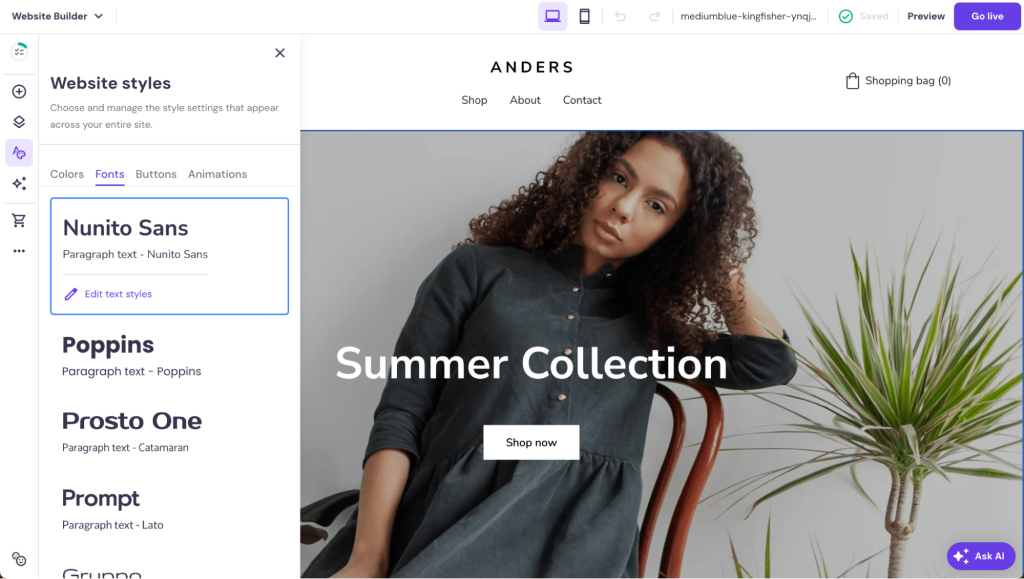
- Select a predefined text style, or edit an existing one to suit your needs by clicking on Edit text styles.
- Choose the fonts you want to use for headings, paragraphs, and navigation.
Pages and navigation
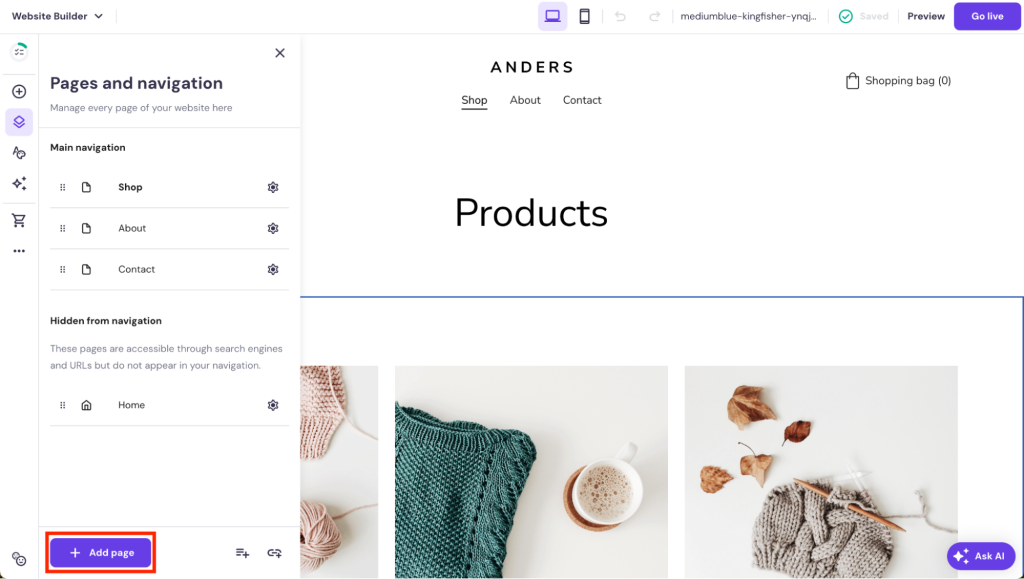
- Open the Pages and navigation menu in the editor.
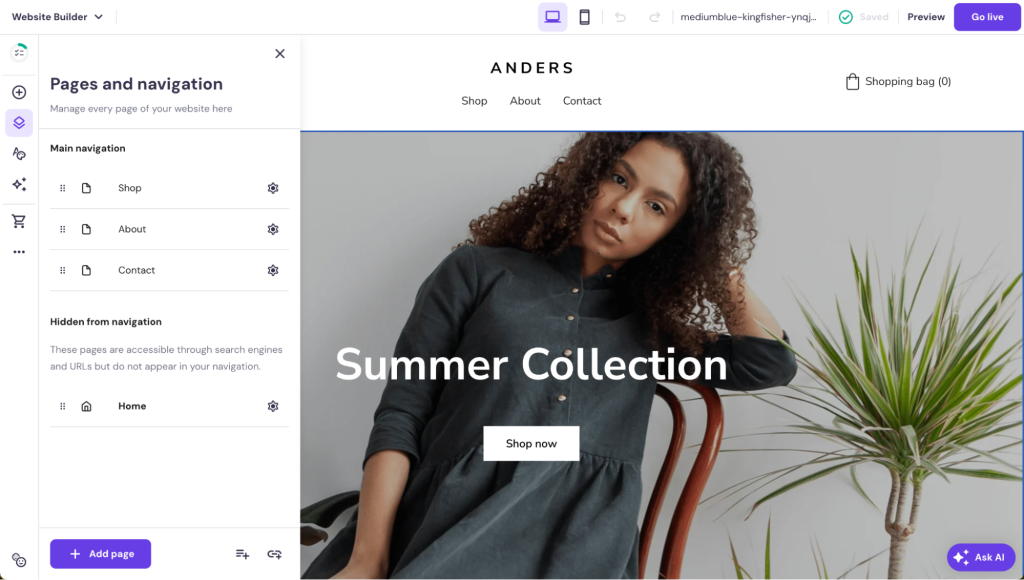
- Use the drag-and-drop functionality to organize how different pages appear in your menu. You can create dropdown menus by nesting pages under a main page.
- Open individual page settings by clicking on the settings wheel.

- Add more pages by clicking on the + Add page button.
Learn More About Web Design
How to Design a Website
Web Design Best Practices
Top Web Design Trends
4. Add your products
Adding products to your store is a simple process:
- Access the Store manager by opening the Online store settings from the side menu. Then, click on Manage products.
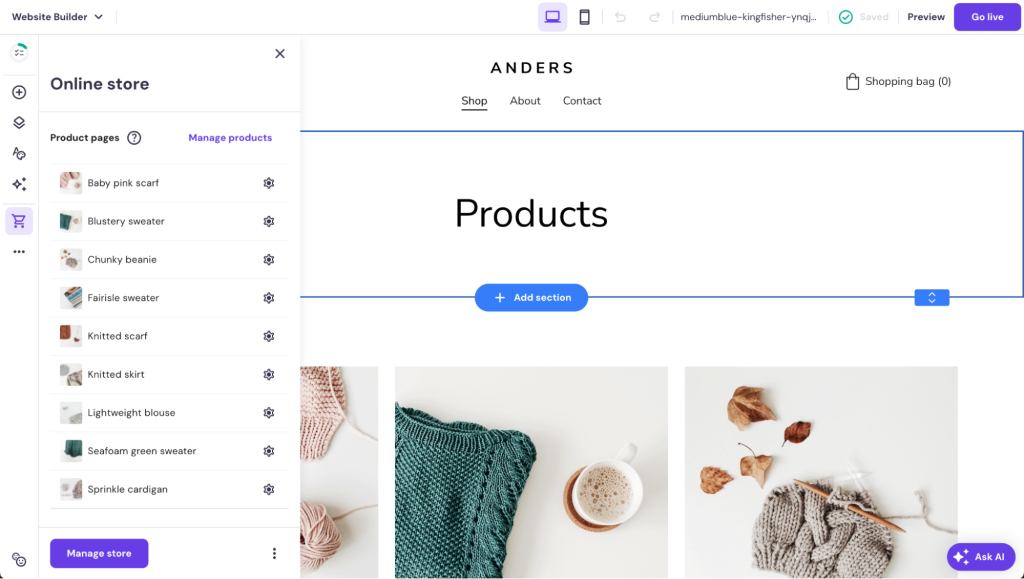
- In the Products menu, click on + Add products.

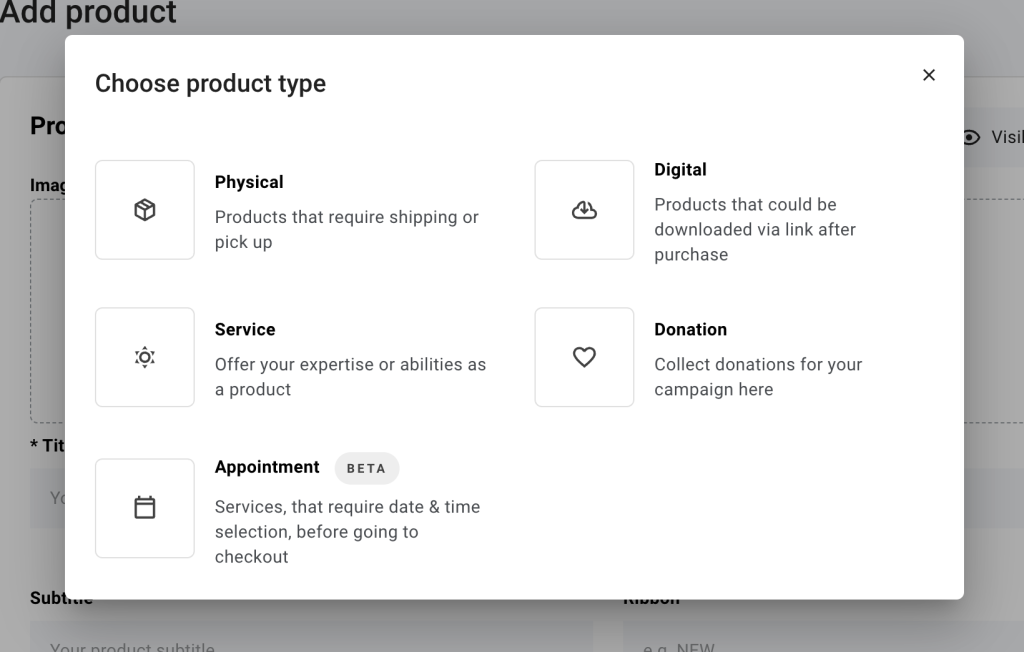
- Choose the product type. You can sell services or digital products like online courses, accept donations, or schedule appointments.
- Fill in the details for each product. For physical products, include a name, price, description, and product photos.
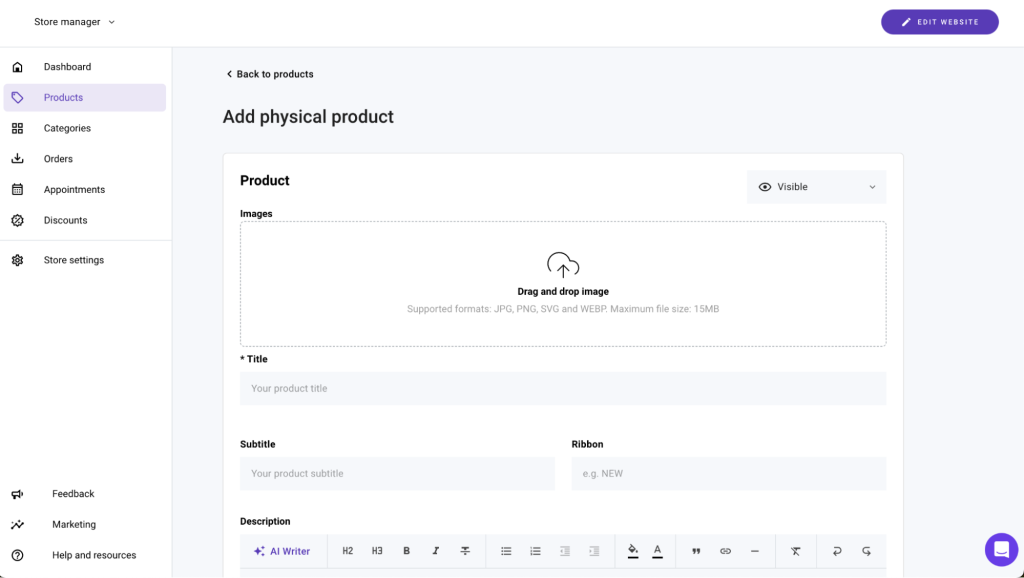
- If your products have variations – like different sizes or colors – add these as product options. To organize your products, create categories that make sense for your store and assign products to them. For a clothing store, these could be dresses, jeans, tops, and shoes.
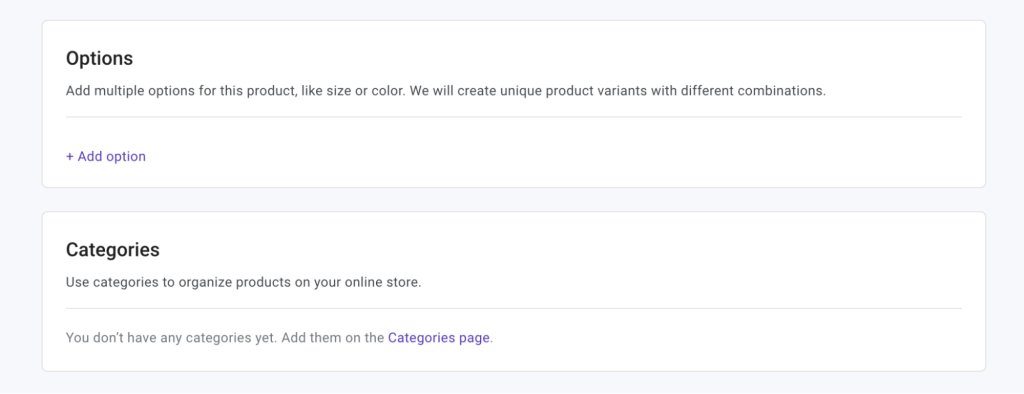
To make your products stand out, consider these top tips for product presentation:
- High-quality images. Take clear, high-resolution images that showcase your products from multiple angles. Good visuals are crucial for convincing customers to make a purchase.
- Detailed descriptions. Provide comprehensive product descriptions that highlight key features and benefits. Use bullet points for easy readability and include details like dimensions, materials, or care instructions.
- SEO. Use relevant keywords in your product titles and descriptions to improve your store’s visibility on search engines. Hostinger’s built-in SEO tools can assist in optimizing your content.
- Customer reviews. Encourage customers to leave reviews for your products. Positive reviews can significantly influence purchasing decisions and add credibility to your store.
- Pricing and promotions. Clearly display pricing information and consider adding sections for promotions or discounts to incentivize purchases.
5. Implement key online store features
Implementing essential features like a shopping bag and intuitive store pages is crucial for a successful online store. These elements not only contribute to a seamless shopping experience but also significantly impact overall customer satisfaction, helping you make more sales.
Shopping bag
The shopping bag is a fundamental feature of any ecommerce website, acting as a temporary hold for items that customers intend to purchase. It allows shoppers to add multiple items, review their selections, make adjustments, and proceed to checkout when ready. A well-designed shopping cart should be:
- Easily accessible. The cart should be visible and accessible from all pages of the website, often represented by an icon in the header.
- Informative. It should display key information such as product names, prices, quantities, and total cost, giving customers a clear overview of their potential purchases.
- Simple to edit. Customers should be able to easily add or remove items, change quantities, and see the updated costs immediately.
- Secure. Assure customers of their privacy and security, especially in the transaction stages.
Hostinger Website Builder has a built-in shopping cart feature that makes it easy for online businesses to manage orders. Add a shopping bag to your store like this:
- Select the header by double-clicking on it.
- Click on the Edit shopping bag icon.
- Enable the shopping bag option and adjust the shopping bag icon name and size.
- The shopping bag should now be visible in your main menu.
- Next, go to the Store manager by opening the Online store settings from the side menu and clicking on the Manage store button.
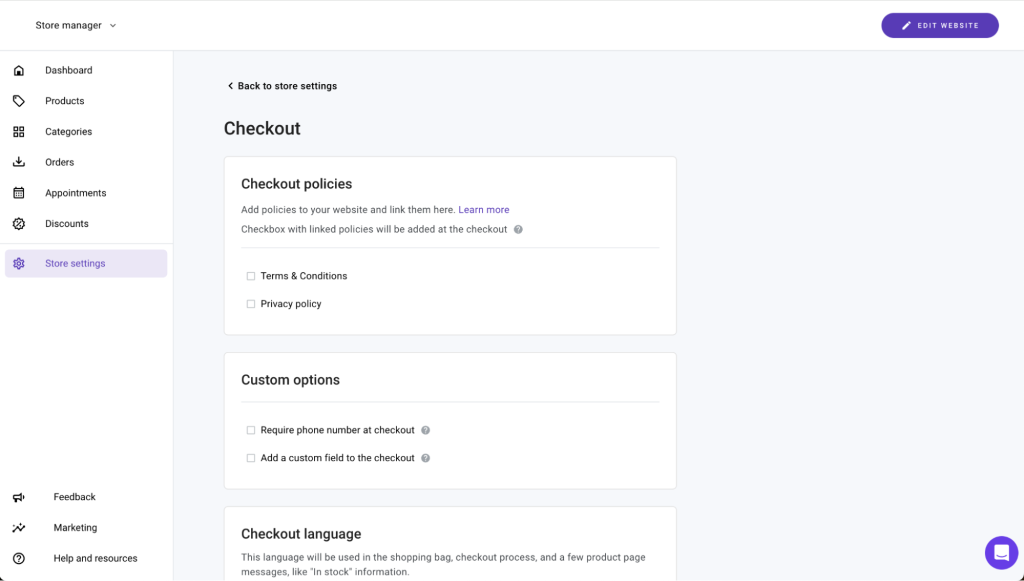
- Navigate to the Store settings and select Checkout.
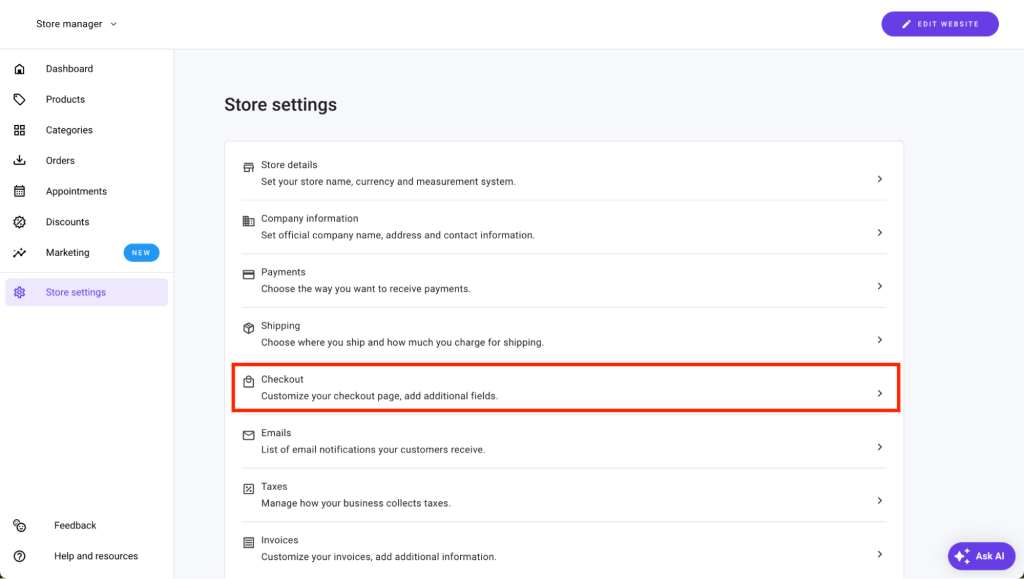
- Edit the on-page checkout experience here.
Product pages
Product pages are the backbone of your online store, showcasing your products and services. They need to be well-organized, informative, and easy to navigate. Essential aspects include:
- Clear layout and design. The design should be clean and clutter-free, with a focus on the products. High-quality images and detailed descriptions help customers make informed decisions.
- Product details. Each product page should provide comprehensive information, including features, specifications, pricing, and availability. Including customer reviews and ratings can also add credibility and influence purchasing decisions.
- Mobile-responsive. Ensuring your store pages are mobile-friendly is crucial for reaching a wider audience.
Edit product pages with Hostinger Website Builder like this:
- Open the Online store side menu and select the product page you want to edit.
- On the product page, select the section and click Edit section to access the section settings.
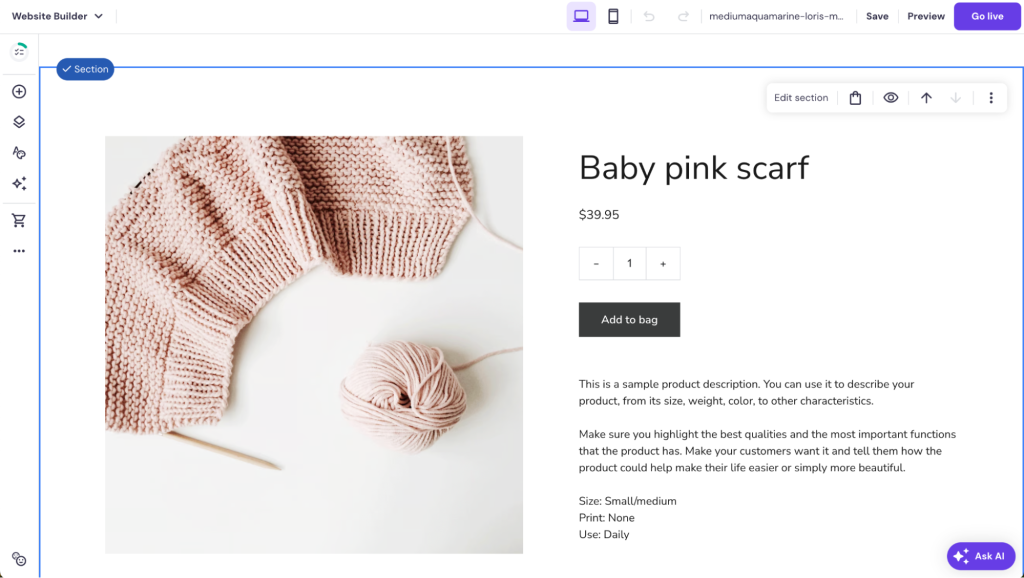
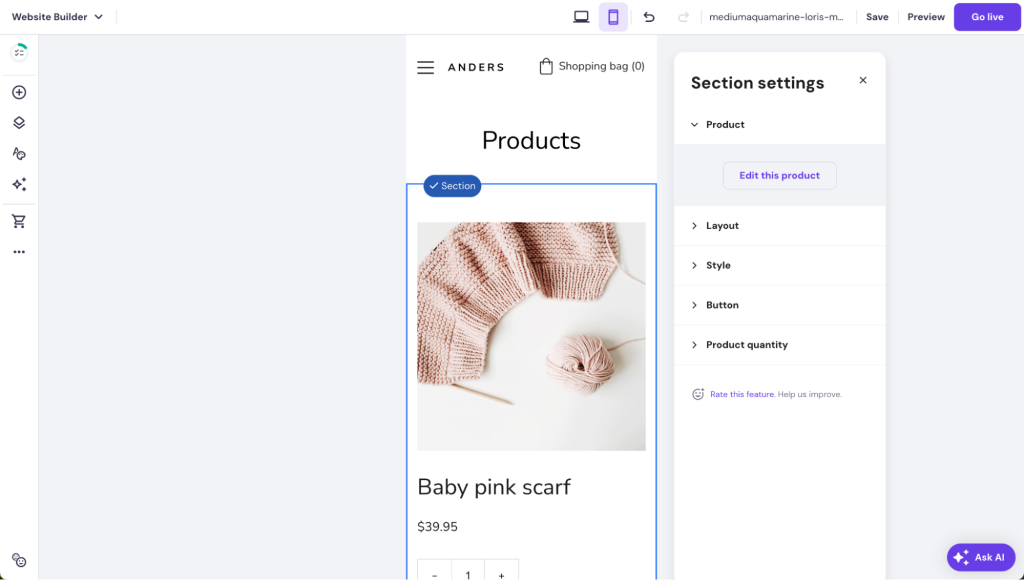
- Edit different aspects of the page here, including the product, the page layout, style, and more.
- Switch to the mobile view to double-check whether the page looks good on mobile devices.
6. Set up payment processing and shipping
Having a reliable payment gateway ensures secure, efficient transactions and builds customer trust.
Processors like Stripe and PayPal also support various payment methods, from Apple Pay to major credit cards, making it easy to accommodate different customer preferences. These platforms also simplify financial management and comply with security standards to protect sensitive data.
Set up a payment processor
Set up payment gateways like this:
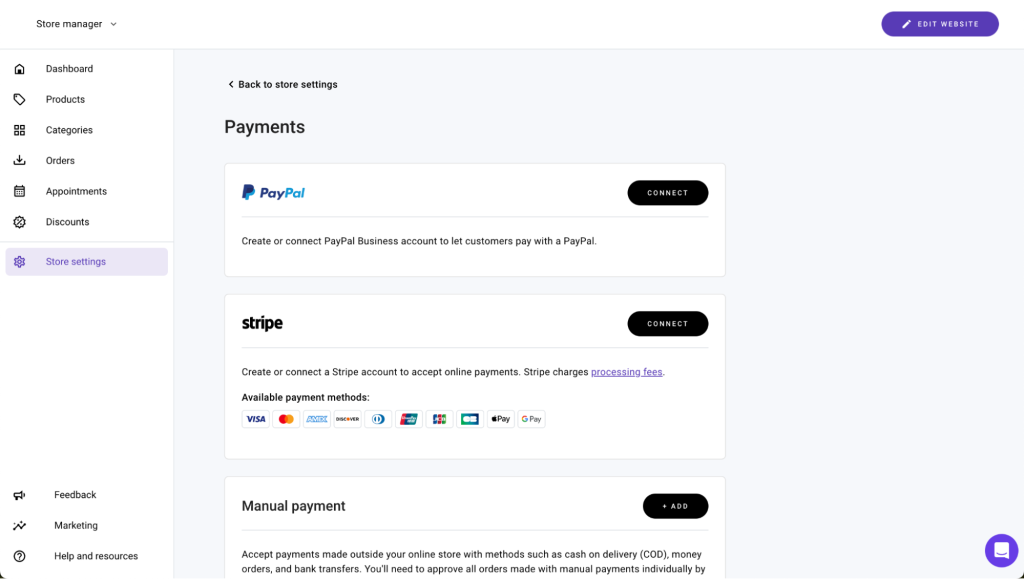
- Access the Store manager by opening the Online store settings from the side menu and clicking on the Manage store button.
- Navigate to the Store settings and select Payments.

- Connect your store with an integrated payment gateway – PayPal or Stripe – or set up manual payment options. Follow the on-screen instructions.
Set up shipping
Set up shipping for your store like this:
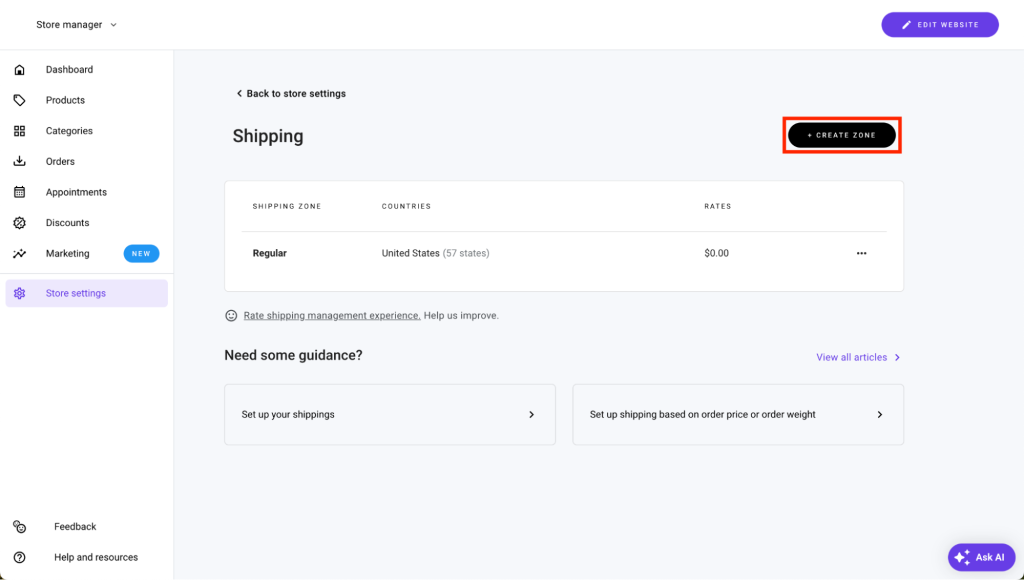
- Access the Store manager by opening the Online store settings from the side menu and clicking on the Manage store button.
- Navigate to the Store settings and select Shipping.

- Click on the Create zone button.
- Specify the shipping zone by giving it a name and selecting the countries you want the zone to cover.
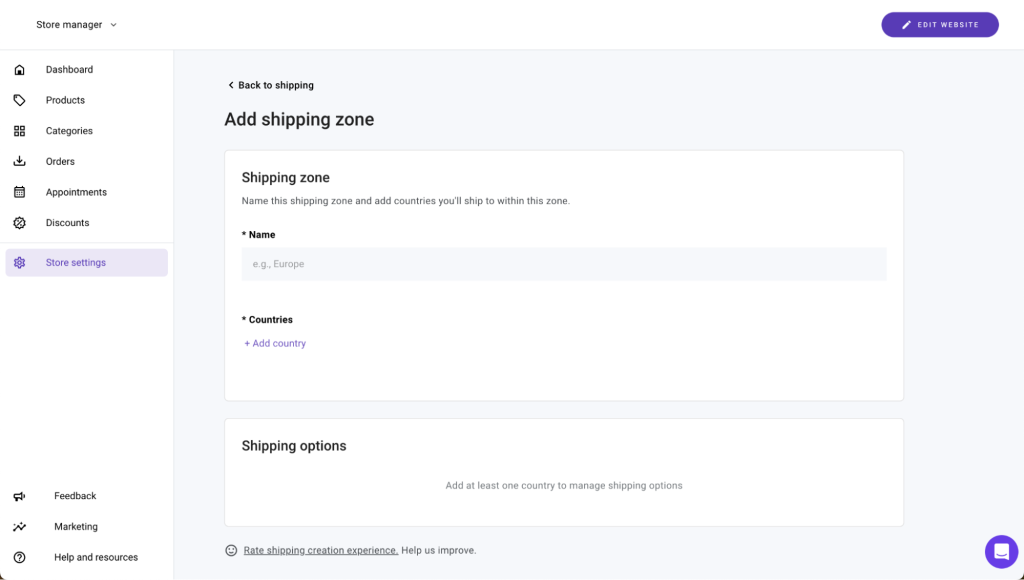
- Click on the Add option button to add a new shipping option.

- Specify the shipping method, its preferred name, and rate in the pop-up. To add more shipping conditions, click on + Add conditions.

- In the shipping condition settings, you can set up price and weight-based shipping. Click on the Add button when you’re ready.
7. Preview and test your store
Thoroughly previewing and testing your store is crucial to identify and resolve any issues before going live.
Make sure your store is easy to navigate, the transaction process is efficient, all links work properly, and the design adjusts smoothly on different devices.
Ensuring these elements work flawlessly improves your store’s user experience and builds trust with your customers.
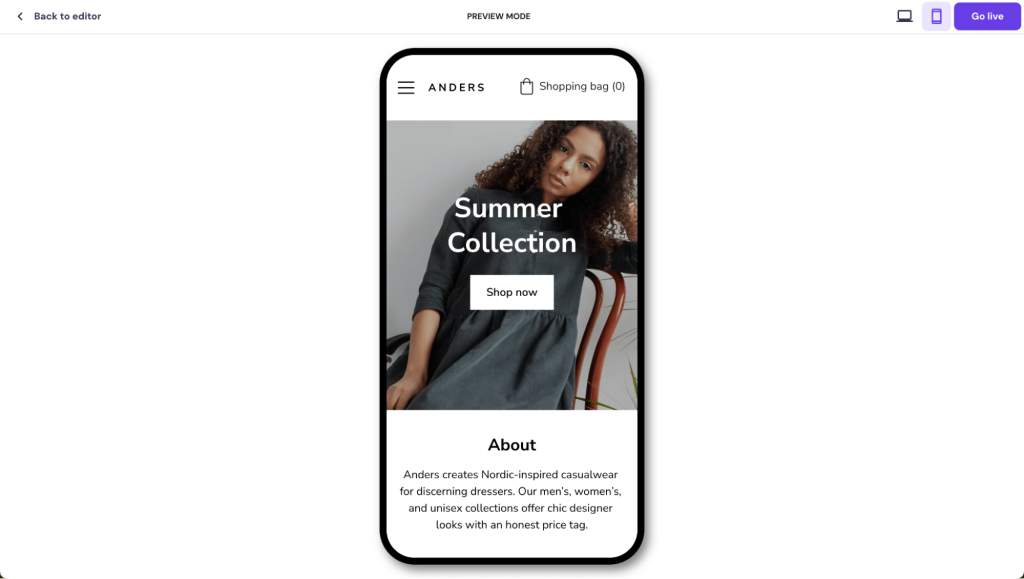
- In the website editor, click on the Preview button in the top right corner.

- In preview mode, you will see how your online store design will look once it is published. Pay attention to any elements or page sections that don’t match your vision or look wrong.
- Toggle between the desktop and mobile view to ensure everything looks good on smaller screens as well.
8. Launch your online store
To launch your online store with Hostinger, simply press the Go live button:

Your store will be published with a temporary domain name if you haven’t connected it to a custom domain:
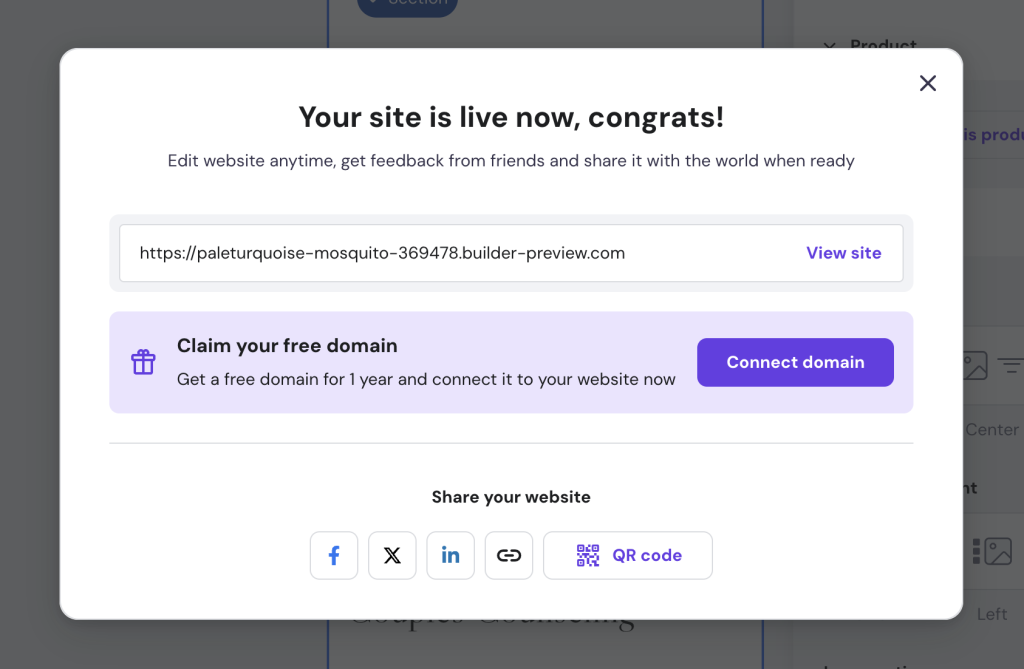
To connect your store to a domain, click on the Connect domain button. You will get redirected to hPanel:

Follow the on-page instructions to finish the domain setup.
Set up marketing integrations
Hostinger Website Builder has built-in marketing tools and integrations to help you boost sales and attract new customers.
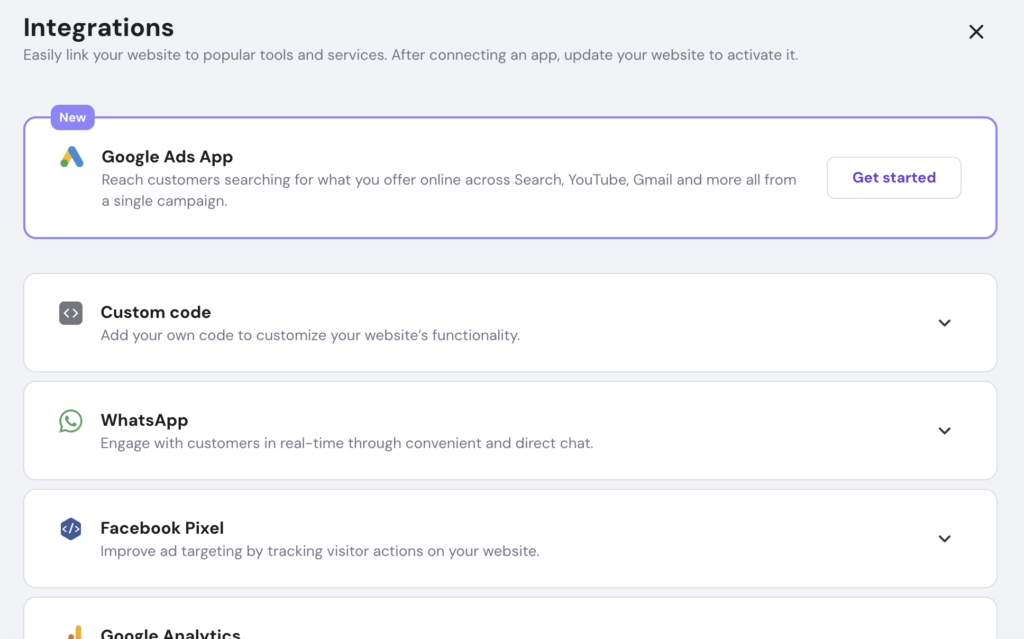
Access the Integrations settings through the Website settings side menu in the editor:
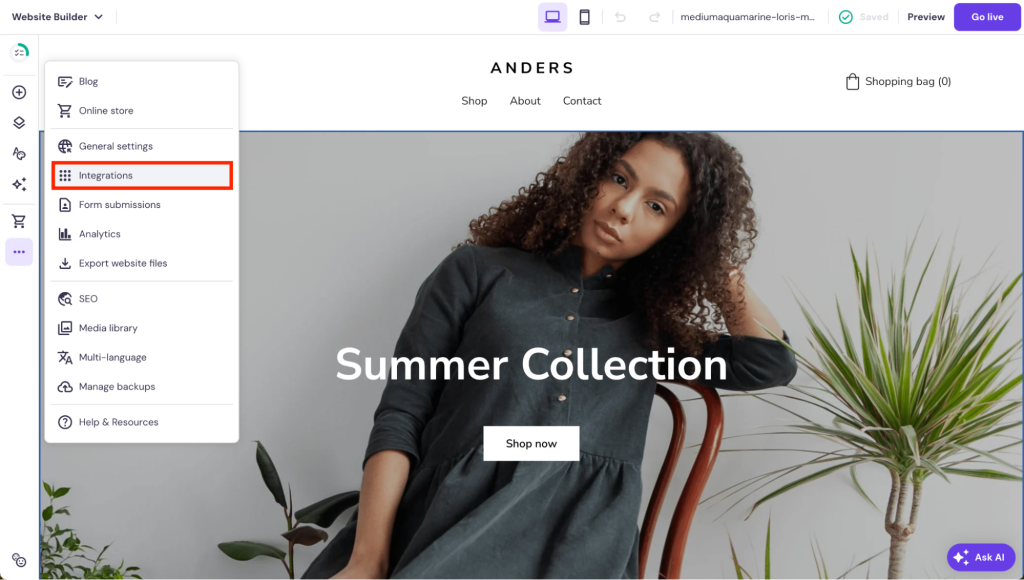
Connect your site to Google Ads, social media platforms like WhatsApp and Facebook, and website optimization tools like Google Analytics and Hotjar:
For post-launch ecommerce marketing activities, consider these strategies:
Social media
Social media is an ideal place to market a new online store due to the wide reach of most platforms, overall cost-effectiveness, and the ability to engage with potential customers directly.
If you don’t have a social media marketing strategy quite mapped out yet, here are some ideas to get you started:
- Themed content series. Build a narrative around your brand and products with a series of themed posts.
- User-generated content. Encourage early users or testers to share their experiences with your products.
- Interactive elements. Use polls, quizzes, and stories to engage with your followers.
- Countdown posts. Create excitement with daily countdown posts leading up to the launch.
- Live sessions. Host live sessions to talk about your products, answer questions, and connect with your audience.
- Giveaways and contests. Run a contest or giveaway to increase engagement and reward your community.
Email marketing
Set up a newsletter sign-up form on your website and start collecting email addresses from visitors interested in your store.
In Hostinger Website Builder, simply add a contact form element to the page and adjust the fields to only collect the name and email address of the visitors.
Consider placing the sign-up form prominently on your homepage, within blog posts, and at the footer of every page for constant visibility. To encourage sign-ups, offer incentives like discounts or free guides for subscribers.
Craft engaging newsletters and personalized emails to update your audience about new arrivals, exclusive deals, or insightful content. This helps to enhance customer loyalty and drive repeat sales.
Content marketing
Focus on creating informative and engaging content like blog posts, videos, and how-to guides that relate to your products or industry.
This approach not only helps drive organic traffic to your website through improved search engine rankings but also establishes your brand as an authority in your niche. Engaging content encourages shares and interaction, further expanding your reach.
With Hostinger Website Builder, use the built-in AI Writer to create unique content for your site. Describe the type of content you need in a few words, and the AI will produce the text for you. This way, you save time and can focus on more strategic tasks, like planning your next seasonal sale.
Regularly updating your blog or video channel with fresh content keeps your audience engaged and coming back for more.
Paid advertising
Leverage platforms like Google Ads and social media to target specific demographics with tailored advertisements.
As Hostinger Website Builder integrates easily with Google Ads App, it’s easy to set up campaigns across Search, Gmail, and YouTube, and to track which of your campaigns bring in the most traffic. This helps you focus your efforts on ads that best resonate with your target audience, and save money in the long run.
This strategy allows for precise audience targeting based on interests, behaviors, and search patterns, maximizing the chances of reaching potential customers who are most likely to be interested in your products.
Pro Tip
After launching your store, remember to monitor the channels that bring in the most traffic. Understanding the basics of conversion rate optimization (CRO) helps you optimize your store and improve sales in the long run.
Conclusion
Launching an ecommerce store no longer requires coding skills – online store builders have made it accessible to anyone.
In this tutorial, we have explained how to start selling online with Hostinger Website Builder. Begin by selecting and customizing a store template. Next, add products and key features like a shopping cart to your store and set up payment processing and shipping options.
Remember to preview and test the store before launching it. After publishing your shop, start driving traffic to it through social media marketing.
How to make your own online store with a website builder FAQ
Find answers to the most common questions about setting up an online store with a website builder.
How much does it cost to build an online store?
The cost to build an online store can range from around $10/month to hundreds and more, depending on the platform and features you choose. An online store builder like Hostinger Website Builder comes with reliable hosting and comprehensive website-building features, helping you save money.
Can I customize my online store to match my brand?
Absolutely. Customizing your online store to align with your brand is essential. Platforms like Hostinger Website Builder provide versatile design tools and templates that enable you to personalize your store’s appearance to reflect your brand identity.
What types of payment methods can I integrate into my online store?
That depends a bit on your platform, but with Hostinger Website Builder, for example, you can integrate a variety of payment methods into your online store, such as PayPal and Stripe. This ensures a convenient shopping experience for your customers, catering to their preferred payment options.
Can I optimize my online store for search engines?
Absolutely. In fact, optimizing your online store for search engines is vital for increasing visibility. With Hostinger Website Builder, you can access built-in SEO tools that help improve your store’s search engine ranking directly from the store editor.
All of the tutorial content on this website is subject to Hostinger's rigorous editorial standards and values.

Matleena is a seasoned Content Writer with 5 years of content marketing experience. She has a particular interest in emerging digital marketing trends, website building, and AI. In her free time, Matleena enjoys cups of good coffee, tends to her balcony garden, and studies Japanese. Follow her on LinkedIn


