FQDN (Fully Qualified Domain Name): What It Is, Examples, and More
May 16, 2024
/
Jordana A.
/
4 min Read
A fully qualified domain name (FQDN) is a complete address that specifies its exact location in the internet’s domain name system. It includes the hostname and the domain name, which uniquely identify a specific computer or server on the internet.
This article will define the fully qualified domain name in more detail and explore its examples and functions. We’ll also explain how you can find your own FQDN on the top three operating systems ‒ Windows, macOS, and Linux.

What is FQDN?
A fully qualified domain name (FQDN) is a complete domain name that specifies the exact location of a computer or a host on the internet. It consists of a hostname and a domain name. You can view a system’s FQDN using the Terminal in macOS and Linux or through the advanced system settings in Windows.
Examples of an FQDN
A fully qualified domain name, also known as an absolute domain name, specifies all domain levels, including the top-level domain (TLD), in hostname.domain.tld format.
For example, the FQDN for a mail server at Yahoo might be mail.yahoo.com. Other examples include www.wordpress.org and news.bbc.co.uk.
Check out our article explaining what a domain name is to understand the differences between a simple domain name and an FQDN in more detail.

Let’s explore each element on an FQDN hierarchy:
- Hostname ‒ a label assigned to a device or service on a network. It’s part of the domain name that makes an IP address easy to remember. For example, “www” is the hostname in www.hostinger.com, and “en” is the hostname in en.wikipedia.org.
- Subdomain ‒ located to the left of the main domain, it can show a specific subdivision or a service associated with a larger domain. For example, support.hostinger.com features “support” as the subdomain of hostinger.com. Note that not all domains have this element.
- Domain name ‒ consists of a second-level and a top-level domain (TLD). With hostinger.com, “hostinger” represents the second-level domain, while “.com” is the TLD.
Fully qualified domain names need a final dot or a trailing period at the end, completing the domain’s absolute path. For example, the absolute form of an FQDN would be written as “www.hostinger.com.”.
However, web browsers today usually assume the final dot, so users don’t have to include it when entering a web address.
Keep in mind that the maximum length for any single label ‒ hostname or segment of an FQDN ‒ is 63 bytes. The total length of an FQDN cannot exceed 255 bytes.
What Is a Partially Qualified Domain Name?
A Partially Qualified Domain Name (PQDN) is a web address that doesn’t include the full path specified by an FQDN. It might consist of only the hostname or a part of the domain structure, excluding the top-level domain (TLD).
Website developers often configure their sites’ Domain Name System (DNS) to redirect visitors to the same page whether they type in a PQDN or an FQDN.
For example, typing hostinger.com or www.hostinger.com in a web browser will redirect you to https://hostinger.com ‒ the URL for our homepage. As PQDNs are shorter, they are easier for users to type and remember.
When to Use an FQDN
FQDNs are used in various internet interactions since they are easier to remember than IP addresses. Here are several scenarios where using an FQDN is beneficial:
- Getting an SSL certificate ‒ a Secure Sockets Layer (SSL) certificate, which secures the connection between a web server and a browser, uses an FQDN to verify the server’s identity. Without an FQDN, the SSL protocol cannot operate properly.
- Connecting to a remote host ‒ when connecting to a remote host or virtual machine, using an FQDN helps DNS locate the server accurately. Relying solely on a hostname could lead to resolution failures if the local DNS can’t expand it to a complete domain name.
- Accessing specific domain services ‒ FQDNs are crucial for network communications, such as File Transfer Protocol (FTP) or email services. They ensure DNS directs traffic to the correct server.
- Migrating to a new server ‒ when migrating your services to another server, an FQDN lets you update only the DNS records for the new IP address. This way, you can minimize downtime due to IP address changes.
How to Find an FQDN
Here’s how you can find your own FQDN, depending on the operating system that you use.
Windows
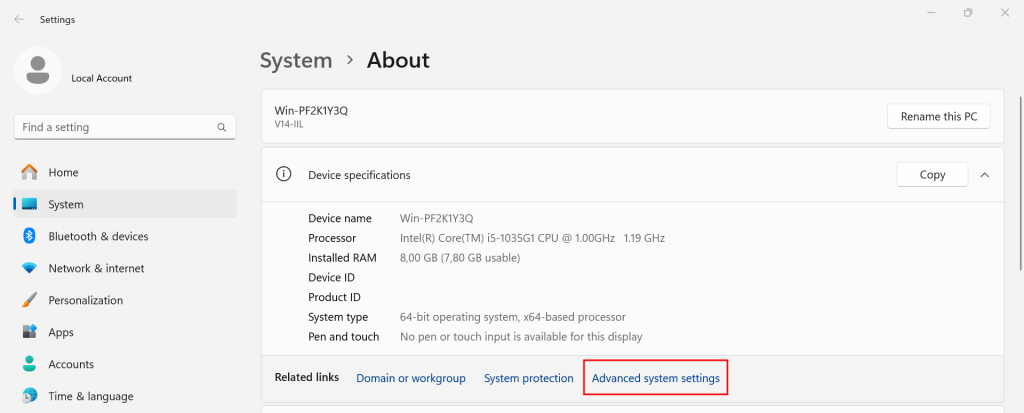
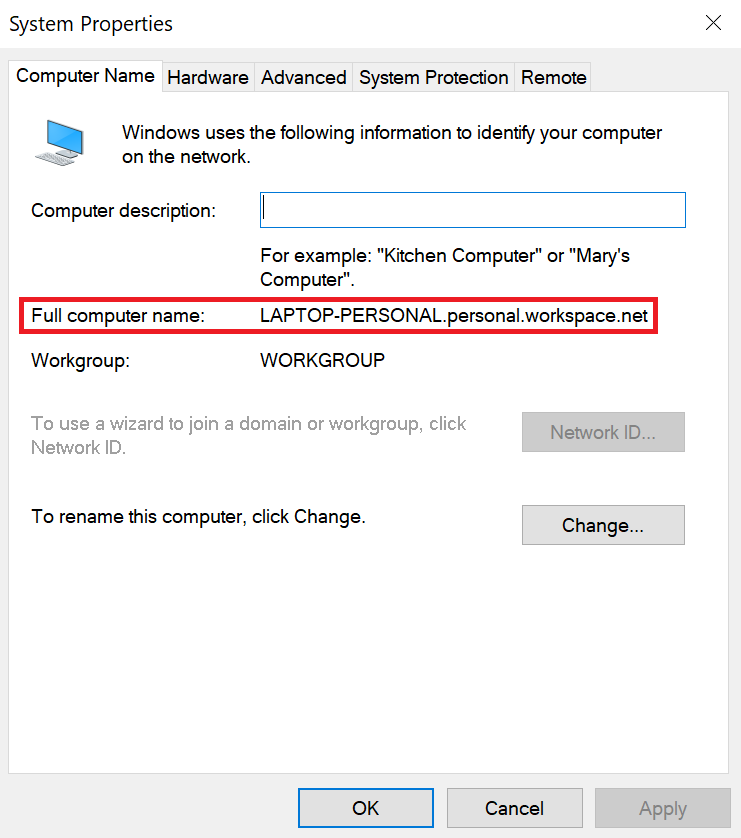
For users on the Windows operating system, follow the steps below to locate the FQDN in advanced system settings:
- Open the Start menu and open View your PC name.
- In the System tab, select Advanced system settings.
- Locate your FQDN in the Full computer name field.
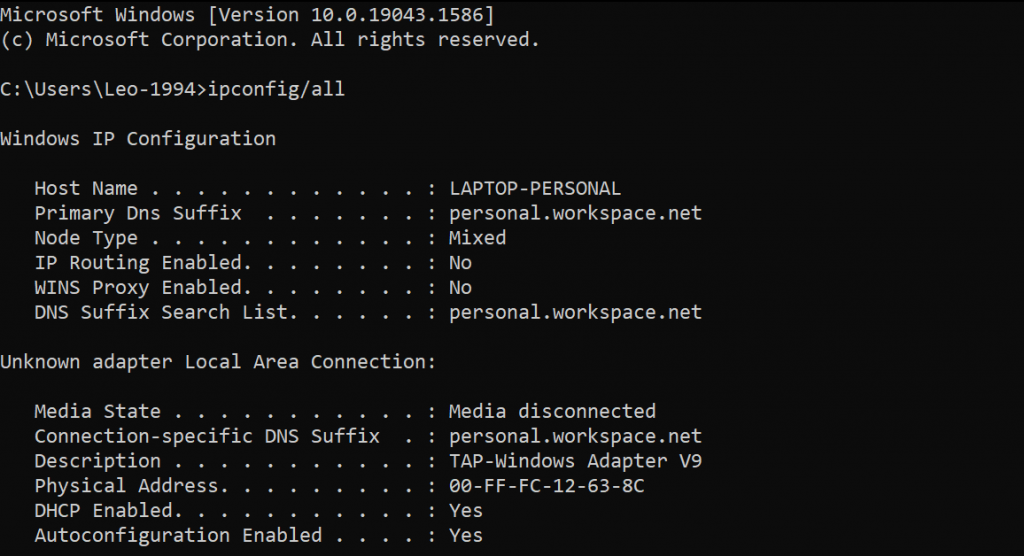
Another way to locate an FQDN on Windows is by using the command prompt. Here’s how:
- Open Terminal in the Start menu.
- Enter the ipconfig /all command to reveal the Windows IP configuration, including the hostname, primary DNS suffix, and connection-specific DNS Suffix.
macOS
For macOS users, follow these steps to locate the FQDN:
- Click the System Settings icon in the Dock. Alternatively, navigate to the Apple menu at the top left and select System Settings → Sharing.
- Scroll down to the Local hostname section. That would be your FQDN and connection-specific DNS suffix.
Linux
Meanwhile, Linux users can find FQDN through the Terminal. Press CTRL + ALT + T to open the Terminal application and enter the hostname –fqdn command line. You can also use this command in PuTTY, a popular terminal emulator. See our guide on using PuTTY to access your server.;

Conclusion
Fully qualified domain names are required for many online activities, such as securing websites with SSL certificates, connecting to remote servers, and routing email and other services. Knowing how it works makes troubleshooting easier and helps to easier manage domain and server setups.
We hope this article improved your understanding of FQDN and how to find it on different operating systems. If you have any questions, check out the FAQ section or leave a comment below.
FQDN FAQ
This section covers some of the most common questions about FQDN.
What Is FQDN vs DNS?
An FQDN uniquely identifies and locates computers within the Internet’s domain hierarchy. DNS translates domain names into IP addresses, making it easier to access network resources.
How Do I Find My FQDN Name?
On Windows, open System → Advanced system settings or enter ipconfig /all in Terminal. For macOS users, access System Settings → Sharing. With Linux, input the hostname –fqdn command in Terminal.
Can FQDN Be an IP Address?
No, an FQDN is not an IP address, but it’s associated with one. It includes a hostname and domain name, which DNS resolves to an IP address for network communication.
All of the tutorial content on this website is subject to Hostinger's rigorous editorial standards and values.

Jordana is a Senior Content Writer with a background in Information Systems. She has over five years of experience in WordPress and is casually dabbling with PHP and MySQL. Her passion for writing and technology drives her to create tutorials for anyone wanting to build their online presence. Follow her on LinkedIn.


Comments
July 21 2022
Hi Maulidina, First of all, thank you - this article was helpful to me. I could use clarification on a couple points though. 1. Under Examples of an FQDN, the article breaks down the following url: https://www.exampledomain.com https:// == protocol www. == subdomain exampledomain. == domain name exampledomain.com == root domain com == top-level domain however, just below that image, "www" is given as an example of a hostname rather than a subdomain. So I'm wondering: - is "www." a subdomain but NOT a hostname? - is "www." a hostname but NOT a subdomain? - is "www." a hostname but ALSO a subdomain? 2. how is the "co." in news.bbc.co.uk parsed? news. == subdomain bbc. == domain co. == ?? uk == top-level domain Thanks in advance for any assistance you may offer!
July 22 2022
Hey there! You can learn all the fundamentals about the domain structure by checking out this great article that we have. But to answer your questions, "www" is a subdomain that serves as a hostname, its purpose is to identify the web address. The ccTLD (country code Top-Level Domain) ".co.uk" is a country specific TLD, while "co" is the country's second-level domain. ccTLDs are two-letter TLDs that are assigned to countries primarily based on their country codes ?