What is business email compromise (BEC), and how to prevent it
Apr 30, 2026
/
Ksenija
/
12 min Read
Business email compromise (BEC) is a targeted cyberattack where criminals use email impersonation and social engineering to trick businesses into sending money or sharing sensitive data.
BEC ranks among the most damaging cyber threats because it targets real transactions and trusted communication, leading to direct financial loss and exposure of confidential information.
Knowing how these attacks start, what they look like, and how to respond puts you in a stronger position to protect your business.
What is business email compromise (BEC)?
Business email compromise is a type of cyberattack where attackers impersonate trusted contacts and use social engineering to convince employees to transfer funds or share sensitive company data.
BEC differs from broad phishing campaigns by focusing on specific individuals and real business activity. Phishing uses generic messages sent at scale. BEC targets named employees, references actual transactions, and fits into ongoing email threads.
This attack works because of preparation and timing. Attackers research employee roles, typical communication styles, and payment schedules, then send messages during routine tasks such as invoice approvals or wire transfers.
Impersonation is central to BEC attacks. Messages appear to come from trusted contacts such as executives, suppliers, or partners.
A finance employee may receive a message that looks like it came from the CEO requesting an urgent transfer, or a supplier may send updated bank details shortly before a scheduled payment.
Execution uses several techniques together. Email spoofing creates addresses that closely resemble legitimate ones.
Account compromise gives attackers access to real inboxes and existing conversations. Social engineering shapes the message tone to match normal communication while adding urgency and credibility.
The goal is financial theft or access to sensitive data. Attackers redirect payments, collect payroll or tax records, or use trusted email addresses to gain access to internal systems.
BEC creates high financial and operational risk because a single convincing email can bypass weak email security controls and trigger large transfers or expose confidential information.
The damage also includes lost trust with customers, vendors, and partners, which can take months or years to rebuild.
How business email compromise works
Business email compromise follows a step-by-step attack process where attackers move from research to execution while blending into everyday email communication.
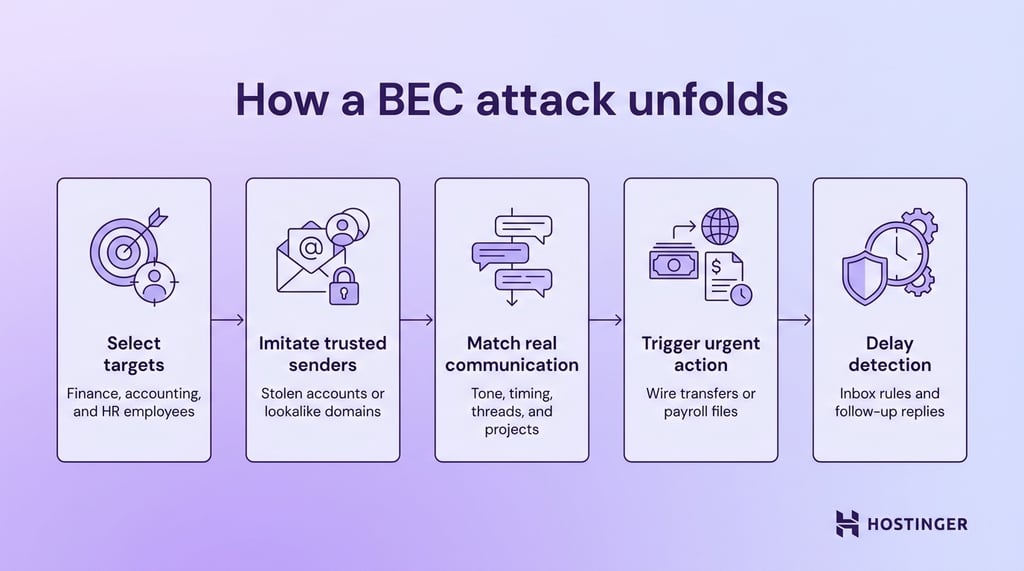
This is how it plays out in a real-world scenario:
- Attackers select employees with access to money or sensitive data. They target finance staff, accountants, and HR managers who approve payments or handle payroll records. Public sources such as company websites, LinkedIn profiles, and press releases reveal job roles, reporting lines, and current projects.
- They gain access to email accounts or imitate trusted senders. Stolen login credentials allow attackers to read real emails and join active conversations. They also use lookalike domains, such as replacing one letter in a company name, to send messages that appear authentic at a glance.
- After they gain access, they write emails that match real business communication.
Messages copy the tone, formatting, and timing of normal emails. Many attacks continue existing threads and mention specific invoices, approvals, or projects, so the request feels routine. - In their emails, they trigger a payment or request sensitive data. The message asks for urgent action, such as approving a wire transfer or sending payroll files. In a common invoice fraud scenario, an attacker can impersonate a supplier and send new bank details shortly before a scheduled payment, redirecting the funds.
- Lastly, they maintain control to delay detection. Attackers reply to follow-up emails to keep the story consistent and avoid raising suspicion. They may also set inbox rules, delete warning messages, or monitor conversations silently to extend the attack window.
How to prevent business email compromise
Preventing BEC requires specific controls tied directly to how payments, email, and approvals work inside your company. Each control should map to a common attack step, leaving no gaps between detection and action.
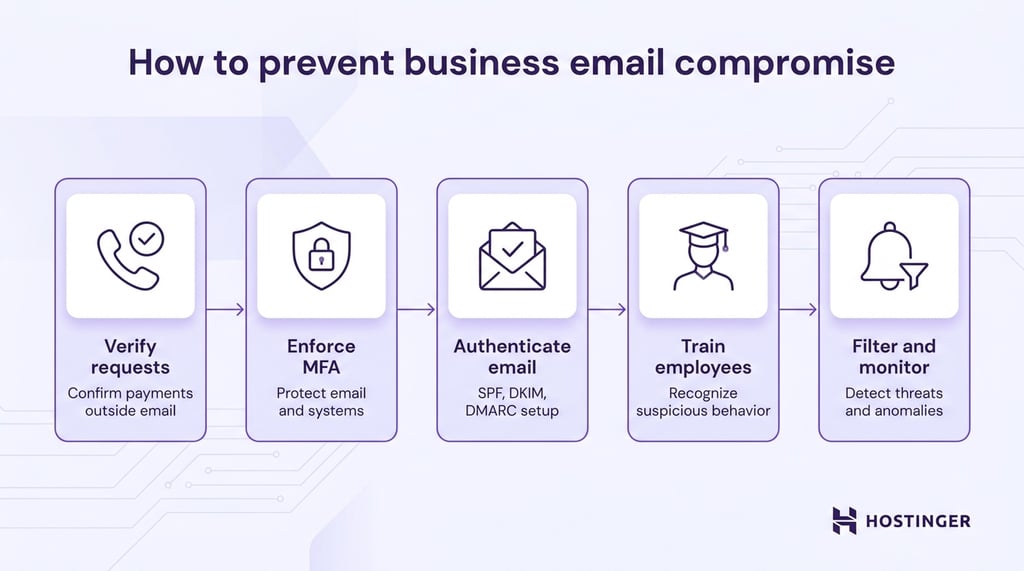
1. Verify sensitive requests
Treat every payment request or bank detail change as untrusted until you confirm it through a separate channel.
Call the requester using a phone number stored in your internal system, vendor records, or signed contracts. Do not use contact details from the email itself. Attackers control those.
Ask specific questions that only the real sender can answer. Confirm details like invoice numbers, agreed payment terms, recent transaction history, or contract references.
Reject requests that create pressure or try to bypass the process. Messages that demand immediate action, stress confidentiality, or discourage verification should be escalated and reviewed before any action is taken.
2. Use multi-factor authentication (MFA)
Here’s what you can do to enforce strong MFA rules:
- Require MFA for email, VPN, accounting systems, and admin accounts.
- Use authenticator apps or hardware keys instead of SMS, which can be intercepted.
- Disable older email login methods like IMAP and POP3, which allow access with only a password and can bypass MFA protections.
- Set conditional access rules, for example: Require extra verification for new locations or devices, or block logins from countries where your company does not operate.
3. Implement email authentication protocols
Configure SPF, DKIM, and DMARC at the domain level to control who can send emails on your behalf and how receiving servers handle suspicious messages.
Start with SPF (Sender Policy Framework). Add a DNS record that lists all approved mail servers for your domain.
Keep this list tight. Include only the services you actually use, such as your email provider or marketing platform. Remove unused entries to reduce the chance of abuse.
Set up DKIM (DomainKeys Identified Mail) to sign every outgoing message. Your email system adds a cryptographic signature that receiving servers can verify.
This ensures the message content has not been altered in transit and confirms it came from an authorized source.
Deploy DMARC (Domain-based Message Authentication, Reporting, and Conformance) to enforce these checks.
Begin with a monitoring policy (p=none) to collect data without blocking messages. Review the reports to see which sources send email on your behalf.
Once you confirm legitimate senders, move to p=quarantine to send suspicious messages to spam, then to p=reject to block them entirely.
Review DMARC reports regularly. Focus on unknown sending sources and failed authentication attempts. Investigate anything that does not match your approved systems and remove or block it quickly.
Protect your domain beyond basic setup. Register common lookalike domains, such as replacing “m” with “rn” or using different top-level domains, and keep them inactive or redirect them safely.
A complete setup ensures that only authorized systems send emails from your domain and that unauthenticated messages are flagged or blocked before reaching users.
4. Train employees to recognize BEC
Focus your training on specific behaviors.
Teach employees to check:
- Sender domain carefully, including small misspellings.
- Reply-to address, which attackers often change.
- Timing, such as requests sent outside normal hours.
- Tone changes, like unusual urgency from a normally calm executive.
Run simulated attacks as short, repeatable exercises that train employees to act correctly under pressure.
Set a clear goal for each scenario, send the test email, and review the response within the same day.
Start with a fake CEO request for an urgent transfer. Send it to employees who handle payments and approvals. Measure whether they follow the approval process or act immediately.
The correct action is to pause, check the request against internal policy, and confirm through a known phone number.
During the review, show the exact moment where verification should have happened and reinforce the approval steps.
Next, run a vendor bank detail change scenario close to a real payment cycle. Send a message that appears to come from a regular supplier and includes updated payment details.
Track whether the employee updates the records or verifies the change. The expected response is to contact the vendor using stored contact details, not the email. Afterward, walk through the verification process step by step and demonstrate how attackers exploit timing.
Then test an HR-focused scenario with a request for employee tax or payroll data. Send it to HR or admin staff with a message that appears to come from a manager.
Check whether the employee shares the data or follows data handling rules. The correct action is to verify the request and limit data sharing in accordance with policy.
Use the review to highlight how sensitive data requests should always follow strict approval paths.
Keep each simulation simple and realistic. Use real names, familiar formats, and normal business language. Track who reported the email, who verified it, and who acted on it.
Close each exercise with clear feedback so employees know exactly what to do next time.
5. Use email filtering and monitoring tools
Email security tools must detect both external threats and compromised internal accounts, and they need to be configured with clear, practical rules.
Start by flagging emails that appear to be internal but are actually from outside the organization.
Configure your system to highlight messages whose display name matches an employee or executive but whose actual email address is external. This simple visual warning helps employees catch impersonation at a glance.
Set up detection for lookalike and newly registered domains. Attackers often register domains that differ by one letter or use subtle variations of your company name.
Your filtering tool should quarantine or flag these messages before they reach the inbox, especially if they target finance or leadership roles.
Add keyword-based alerts tied to financial actions. Terms like “urgent transfer,” “bank update,” “payment change,” or “confidential request” should trigger warnings or route the email for additional review.
Combine keyword detection with context, such as sender reputation or unusual timing, to reduce false positives.
Monitor internal account behavior to catch compromise early. Track events like inbox rule creation, automatic forwarding to external addresses, and mass deletion of emails. These actions often signal that someone has gained access and is trying to hide activity or redirect communication.
For everyday communication and campaigns, use tools that simplify email setup while maintaining strong controls.
Platforms like Hostinger Reach combine automation, segmentation, and built‑in compliance features (including automatic SPF, DKIM, and DMARC setup and GDPR/CAN‑SPAM‑ready templates), so you can manage email marketing campaigns without undermining basic security and deliverability standards.
6. Establish financial and approval workflows
Define clear, enforceable workflows for every payment and data request so employees follow a fixed path every time.
Start by mapping how money moves through your organization. Document who can request a payment, who approves it, and who executes it.
Assign each step to a different person. A finance employee can prepare a transfer, but approval must come from a separate manager, and release should require a second check. This separation of duties removes single points of failure.
Set strict approval thresholds and make them visible. For example, any transfer above $5,800 requires two approvals, and anything above $23,200 requires executive sign-off.
Build these rules into your payment system so they cannot be bypassed through email requests.
Create a fixed process for bank detail changes. Store verified vendor details in a central system and restrict who can edit them.
When a change request comes in, require a callback using an existing phone number from your records. Log the verification step, including the name, date, and outcome, to ensure a clear audit trail and support email compliance requirements.
Standardize how employees handle incoming requests. Every payment-related email should trigger the same checklist: confirm sender identity, check against known vendors or internal contacts, verify through a second channel, and match the request to an approved invoice or contract.
Turn this into a short internal playbook that employees can follow without hesitation.
Use system controls to enforce the workflow. Limit who can create or modify payees. Enable alerts for new bank accounts, changes to payment details, or unusually large transfers.
Require dual authorization within banking platforms so approvals occur within the system, not via email.
Run periodic checks to ensure the process works. Review recent payments, look for skipped steps, and test whether employees follow verification rules. When you find gaps, update the workflow and communicate the change clearly.
Types of business email compromise attacks
Business email compromise attacks include executive impersonation, invoice fraud, payroll diversion, and account takeover.
Each of these attacks are designed to target a specific role, workflow, or type of data within an organization.
CEO fraud (executive impersonation)
CEO fraud uses authority and urgency to push employees into sending money quickly. An attacker impersonates a senior executive and contacts someone in finance with a direct request that looks routine at first glance but quickly escalates in urgency.
A message can read like this:
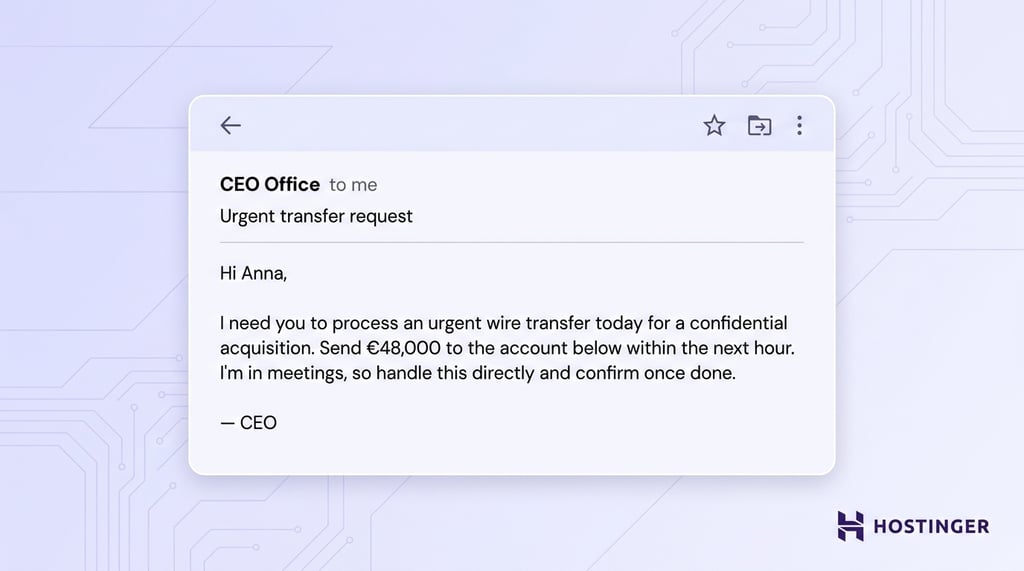
The tone feels familiar, and the request sounds like a typical executive task, increasing the likelihood of quick action without verification.
Vendor or invoice fraud
Vendor email compromise focuses on redirecting payments by posing as a trusted supplier. The attacker inserts the request into an existing payment cycle to align with expected activity.
The email looks like a regular communication:
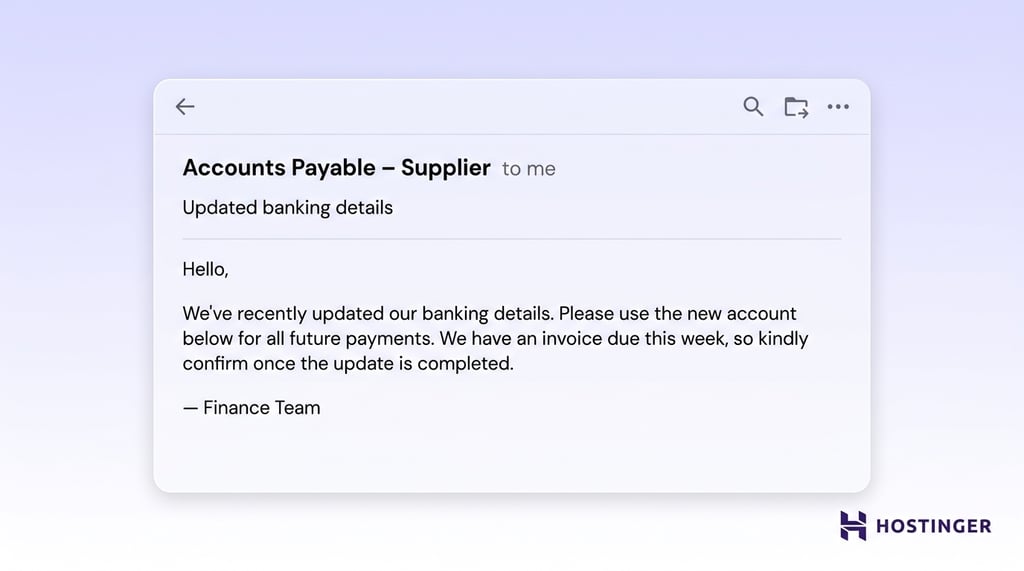
Because the request arrives at the right time and references a real payment, it feels like part of standard vendor communication.
Payroll diversion scams
Payroll diversion targets HR or payroll teams to reroute employee salaries. The attacker poses as an employee and submits what appears to be a normal update request.
The message often follows a simple, routine format:
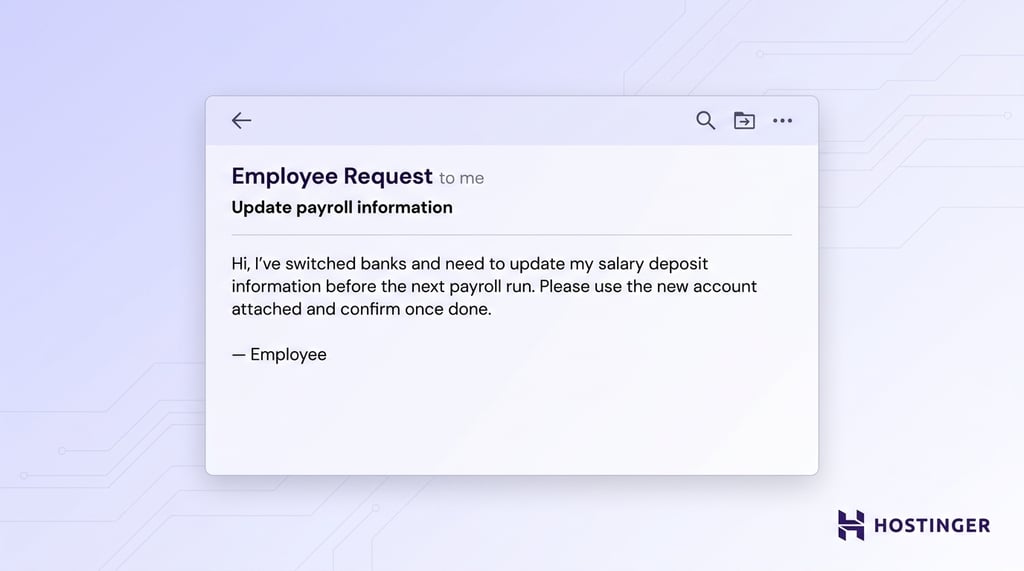
The request fits into everyday HR tasks, which lowers suspicion and speeds up processing.
Data theft BEC attacks
Some BEC attacks focus on collecting sensitive business or personal data rather than on immediate payments. The attacker frames the request as part of internal reporting or administrative work.
The email usually sounds like a standard internal request:
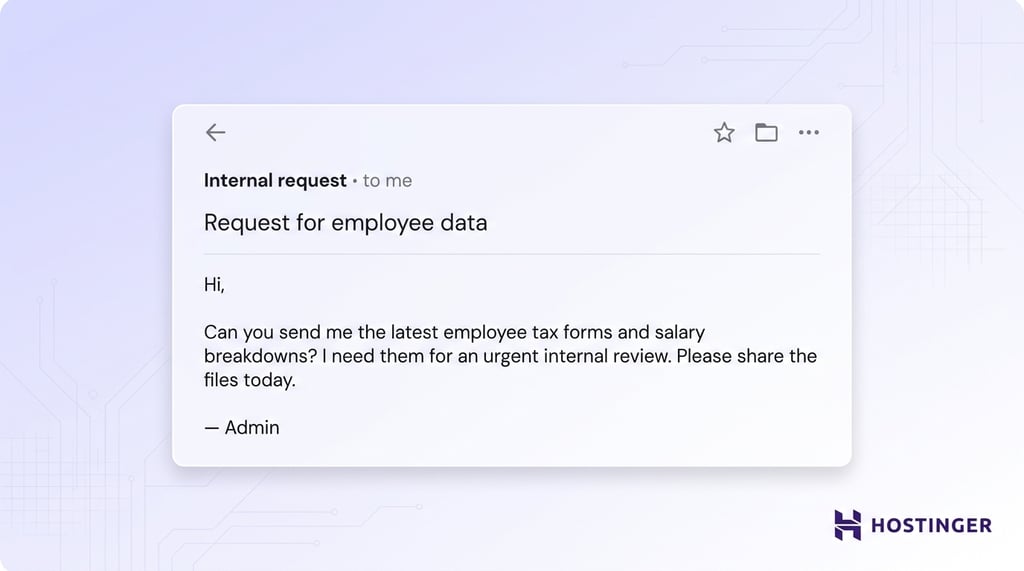
The familiarity of the request increases the likelihood that sensitive data will be shared without proper checks.
Attorney or legal impersonation scams
Legal impersonation uses pressure tied to legal matters or compliance deadlines. The attacker presents the request as formal and confidential to limit internal discussion.
The message often carries a serious tone:
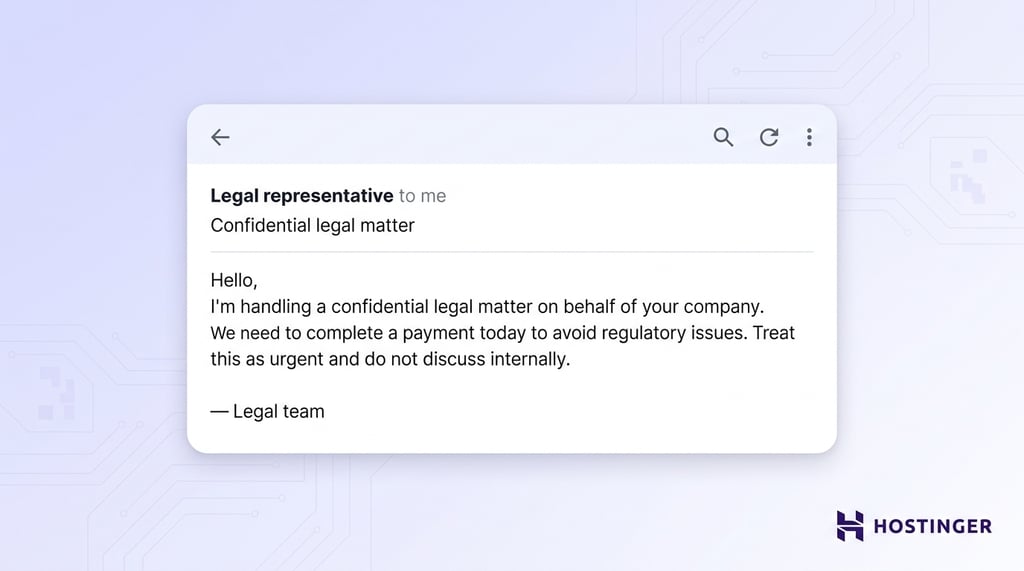
The combination of authority, urgency, and confidentiality pushes the recipient to act quickly and skip standard verification steps.
How to detect business email compromise
To detect business email compromise, review email requests for unusual urgency, check sender details for inconsistencies, watch for changes in communication behavior, and verify any financial changes.
Signs of suspicious email requests
Focus on how the request is framed and whether it fits your usual process. Messages that create urgency or push confidentiality deserve immediate verification. A request that asks you to skip approval steps or act quickly should raise attention.
A typical message might read:
“I need this transfer completed within the next hour. Keep this between us until the deal is finalized.”
Requests that fall outside normal procedures also signal risk. If a finance process always requires two approvals, any message asking you to bypass that step should be treated as suspicious.
Email anomalies
Check the sender details closely before acting. Lookalike domains often replace or add small characters, such as changing “company.com” to “cornpany.com.” These differences are easy to miss at a glance.
Unusual sender addresses also stand out when you compare them with known contacts. A vendor who always emails from one domain but suddenly uses another should trigger verification.
Behavioral red flags
Pay attention to how the message feels compared to normal communication. Changes in tone, wording, or level of formality can signal impersonation. A colleague who usually writes detailed messages may suddenly send short, urgent instructions.
Timing also reveals patterns. Requests sent late at night, during holidays, or outside normal business hours often aim to catch you off guard when verification is harder.
Financial inconsistencies
Look closely at any change involving money. Sudden updates to bank details, payment instructions, or invoice amounts require confirmation through a trusted channel.
A common scenario involves a message that says:
“We’ve updated our banking details. Please send all future payments to the new account starting today.”
Treat every such request as high risk until verified. Clear detection comes from combining these signals rather than relying on a single indicator.
What to do after a business email compromise attack
Following the business email compromise attack, take these steps:
- Contact your financial institution immediately. Call your bank as soon as you detect unauthorized activity. Ask them to freeze or recall the transaction and flag the destination account.
- Report the incident to the relevant authorities. Report cybercrime through your national reporting channels or law enforcement. This step supports your BEC incident response and creates an official record, which may be required for recovery or insurance claims.
- Secure compromised accounts. Reset passwords for affected email accounts and enable multi-factor authentication across all users. Review login activity and remove any unauthorized access. This step stops attackers from continuing the attack.
- Investigate the breach internally. Review email logs, message history, and account activity to understand how the attack started and what was affected. Identify which data or funds were exposed so you can contain the impact and prevent further loss.
- Strengthen security policies and controls. Update your internal processes based on what failed. Improve verification procedures, tighten access controls, and train employees to spot similar threats.
Why business email compromise is dangerous for businesses
Business email compromise is dangerous because it turns normal business communication into a direct path for financial loss, data exposure, and broken trust.
A single fake invoice, wire request, or bank detail change can move large sums before anyone notices.
BEC also disrupts daily operations. Teams have to freeze payments, review invoices, secure accounts, contact banks, notify vendors, and investigate what happened. A finance team may spend days checking every recent transfer after one fraudulent vendor email.
The reputational damage can last longer than the incident itself. Customers and suppliers expect careful handling of money and data. If an attacker tricks your company into exposing payroll records or sending payment to the wrong account, partners may question your internal controls.
Emerging trends in business email compromise
BEC is evolving as advanced technology makes attacks more convincing, and growing email usage gives attackers more opportunities to reach businesses.
AI-generated and personalized attacks
AI helps attackers write cleaner, more believable emails at scale. Poor grammar used to be an easy warning sign, but AI tools can now produce messages with natural tone, correct wording, and details tailored to the target.
An attacker can feed AI a company website, LinkedIn profile, or old email thread, then generate a message that sounds like a real executive or vendor.
That makes routine requests, such as invoice approvals or payment updates, harder to judge solely by writing style.
This shift is already reflected in real losses. The FBI’s 2025 data linked more than $30 million in BEC losses to confirmed AI components, while total BEC losses reached $3.046 billion.
Deepfake and executive impersonation
Deepfake tools add voice and video to the impersonation of executives. Attackers can clone a leader’s voice, create fake video clips, or join a call while pretending to be a senior decision-maker.
This increases credibility because the request no longer arrives as an email alone. A finance employee may receive an email about a transfer, then hear a “CFO” confirm it on a call.
Growth of email usage increases the attack surface
Higher email volume gives attackers more chances to hide inside normal communication. Businesses rely on email for internal updates, vendor messages, invoices, customer support, transactional alerts, and marketing campaigns.
This scale keeps growing. Daily email volume is expected to surpass 408 billion messages worldwide by 2027. That volume creates a constant stream of routine communication where fraudulent messages can blend in.
As inboxes fill up, employees scan messages faster and rely on quick judgment. A well-timed BEC email can sit next to real invoices or internal requests and look completely normal.
This environment gives attackers more opportunities to insert malicious messages without raising suspicion.
Increased targeting of SMBs
Small and midsize businesses face higher exposure to BEC attacks because daily operations often rely on fewer people and simpler approval processes.
In many cases, one employee handles invoices, updates vendor details, and approves payments, creating a single point of failure and reducing oversight.
Automation of BEC attacks
Automation helps attackers monitor inboxes, track payment timing, and send messages at the right moment. A compromised mailbox can reveal when invoices arrive, who approves them, and which vendors receive regular payments.
This makes BEC a faster, larger operation. Attackers can watch many accounts, wait for useful conversations, and insert fraudulent requests when employees expect payment-related emails.
Advancements in detection and prevention
Security tools are improving in response to these threats. AI-based detection can flag unusual sender behavior, suspicious wording, lookalike domains, and abnormal inbox activity.
Email authentication is also becoming more important. SPF, DKIM, and DMARC help confirm whether a message really comes from an approved sender.
These controls work best when paired with human verification, especially for payments, changes to bank details, and sensitive data requests.
All of the tutorial content on this website is subject to Hostinger's rigorous editorial standards and values.


Ksenija is a digital marketing enthusiast with extensive expertise in content creation and website optimization. Specializing in WordPress, she enjoys writing about the platform’s nuances, from design to functionality, and sharing her insights with others. When she’s not perfecting her trade, you’ll find her on the local basketball court or at home enjoying a crime story. Follow her on LinkedIn.


