What is email security? How email security works
Apr 06, 2026
/
By Ksenija
/
16 min Read
Email security is the set of technologies and practices used to protect email communication from unauthorized access, impersonation, malware, and other forms of abuse.
It helps keep messages private, verifies that senders are legitimate, and reduces the risk of phishing, spoofing, and harmful attachments reaching inboxes.
A secure email setup supports confidentiality, integrity, and availability by combining encryption, authentication, spam filtering, and malware detection into one layered defense.
To understand what email security is, it helps to look at the core concepts behind it, the most common email threats, the technologies that block them, and the best practices that make email systems safer to use.
What is email security?
Email security is the system that makes email communication safe to use in practice. It ensures messages are delivered to the right people, remain unchanged, and can be trusted by both the sender and the recipient.
At its core, email security ensures that only the right people can read your emails, that messages are not altered in transit, and that senders are who they claim to be.
To understand how it works, you need to know the four core attributes it protects:
- Confidentiality
- Integrity
- Authentication
- Non-repudation
Confidentiality means only the intended recipient can read the message. If you send login details or invoices over email, confidentiality prevents anyone else from viewing that content. This is enforced through encryption, which turns readable text into unreadable data during transmission.
Integrity ensures the message is not changed after it is sent. If someone intercepts an email and tries to modify a payment request or link, integrity checks detect that change. The receiving server can then flag or reject the message.
Authentication verifies the sender’s identity. When you receive an email from a bank or colleague, authentication checks confirm that the message actually comes from that domain. This prevents attackers from impersonating trusted senders.
Non-repudiation provides proof that a message was sent and not denied later. This matters in business communication, where email can serve as a record of agreements or approvals.
These attributes are enforced through a set of email security protocols: Transport Layer Security, Secure/Multipurpose Internet Mail Extensions, and DomainKeys Identified Mail.
Transport Layer Security (TLS) encrypts the connection between email servers.
It protects emails while they travel across the internet so attackers cannot read them in transit.
Secure/Multipurpose Internet Mail Extensions (S/MIME) encrypts the actual email content and allows digital signatures. This ensures both confidentiality and sender verification at the message level.
DomainKeys Identified Mail (DKIM) adds a cryptographic signature to each email. The receiving server checks this signature to confirm the message was not altered and that it came from the claimed domain.
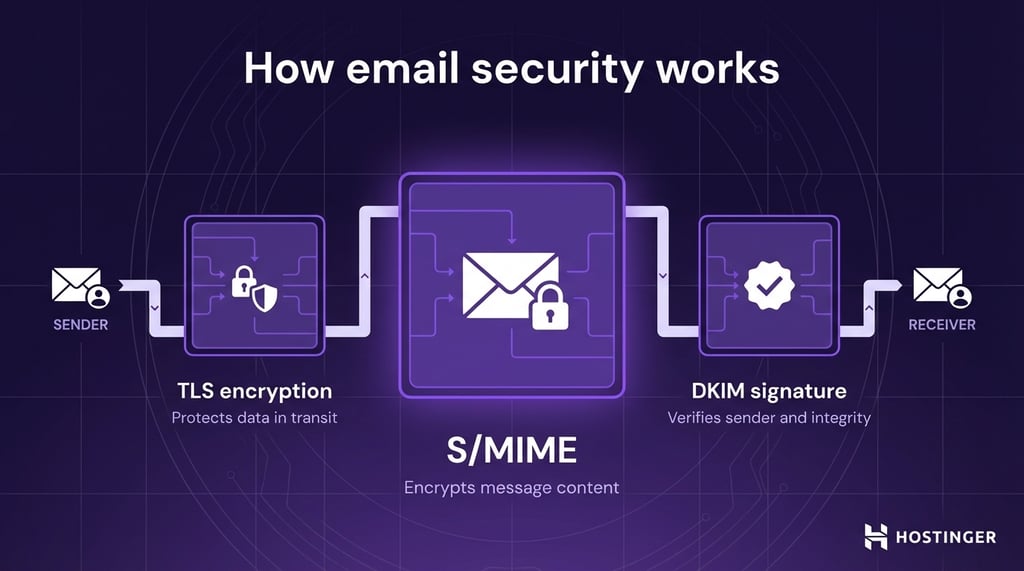
Together, these protocols form the technical backbone of email security. But protocols alone are not enough. Email security systems must prevent unauthorized access and data breaches by combining several layers of protection.
Each layer focuses on a different part of the problem:
- Encryption keeps message content private
- Authentication blocks domain spoofing
- Spam filtering removes unwanted or suspicious emails
- Malware detection scans attachments and links before delivery
For example, if an attacker sends an email pretending to be your hosting provider, authentication checks can flag it as fake, and phishing detection can block the malicious link before you click it, protecting the accounts connected to your inbox from the moment you create an email.
Why is email security important?
Email security is important because email remains the primary channel for daily work, identity verification, and account recovery.
For most people, email is not just a messaging tool. It is tied to invoices, contracts, password resets, login alerts, customer support, internal approvals, and account recovery.
If someone gains access to an email account, they gain a path to everything connected to it. That includes business tools, cloud storage, banking notifications, and personal accounts.
This is what makes email so valuable to attackers. One compromised inbox can open the door to much larger damage.
For organizations, the consequences don’t stop at one inbox. A compromised email account can disrupt operations, expose internal data, and damage trust with customers and partners.
The financial impact is often immediate. A fake payment request can lead to wire fraud. A stolen account can trigger unauthorized purchases or service abuse. Recovery also costs money through downtime, incident response, legal work, and customer support.
The operational impact is just as serious. If attackers use one employee account to send malicious emails internally, they can spread malware across the company faster than many teams can respond.
The reputational damage can last even longer. If customers receive scam emails from your domain, they stop trusting your messages. If sensitive conversations leak, your brand loses credibility. Even after the technical issue is fixed, trust is harder to restore.
Many privacy protection and email compliance laws require organizations to protect personal and confidential information. If a company fails to secure email properly and that leads to a data breach, it may face fines, mandatory reporting obligations, contractual penalties, and audits.
Even when laws differ by country or industry, the basic expectation stays the same: if you handle sensitive data, you need to protect the systems used to send and receive it.
Email security also supports the rest of your cybersecurity strategy, such as:
- Endpoint security – stopping malicious attachments and links before they reach laptops, phones, and servers.
- Identity protection – preventing account takeover, blocking phishing pages, and enforcing stronger login checks such as multi-factor authentication.
- Zero-trust security models – treating every message as untrusted until it is verified. Instead of assuming an email is safe because it came from a familiar name, zero trust requires proof.
When email is secure, you reduce the risk of fraud, data loss, downtime, and account compromise. When it is not, one message is enough to start a much bigger problem.
What are the key components of email security?
The key components of email security are:
- Email encryption
- Email authentication protocols
- Spam filtering and threat detection
- Malware protection and attachment scanning
- User authentication and access control
- Email monitoring and threat response
Email encryption
Encryption protects the content of your emails so only the intended recipient can read them. When an email is encrypted, its content is turned into unreadable data during transmission.
Even if someone intercepts the message, they cannot understand it without the correct decryption key.
Email authentication protocols
Authentication protocols verify that an email actually comes from the sender it claims to represent. Technologies like SPF, DKIM, and DMARC allow email servers to check whether a message is authorized and has not been altered.
Spam filtering and threat detection
Spam filters analyze incoming emails and decide which messages are safe, suspicious, or unwanted. They look at patterns such as sender reputation, message content, links, and behavior.
Threat detection systems go further by identifying phishing attempts, fake login pages, and social engineering tactics.
Malware protection and attachment scanning
This component focuses on files and links inside emails. Attachments are scanned for known malware, and suspicious files may be opened in a secure environment (called a sandbox) to observe their behavior.
If a file tries to install software or access sensitive data, it is blocked before it reaches you. Links are also checked to detect websites designed to steal credentials or distribute malware.
User authentication and access control
This layer protects access to your email account itself. It includes login security measures such as strong passwords, multi-factor authentication (MFA), and login restrictions based on device or location.
Email monitoring and threat response
Monitoring tools track email activity and look for unusual behavior, such as login attempts from new locations or sudden spikes in outgoing messages.
If a threat is detected, response systems can block accounts, quarantine emails, or alert administrators.
Each of these components solves a different part of the problem. Encryption protects the message, authentication verifies the sender, filtering blocks suspicious emails, scanning stops malicious content, access control secures accounts, and monitoring limits damage if something slips through.
How an email attack works
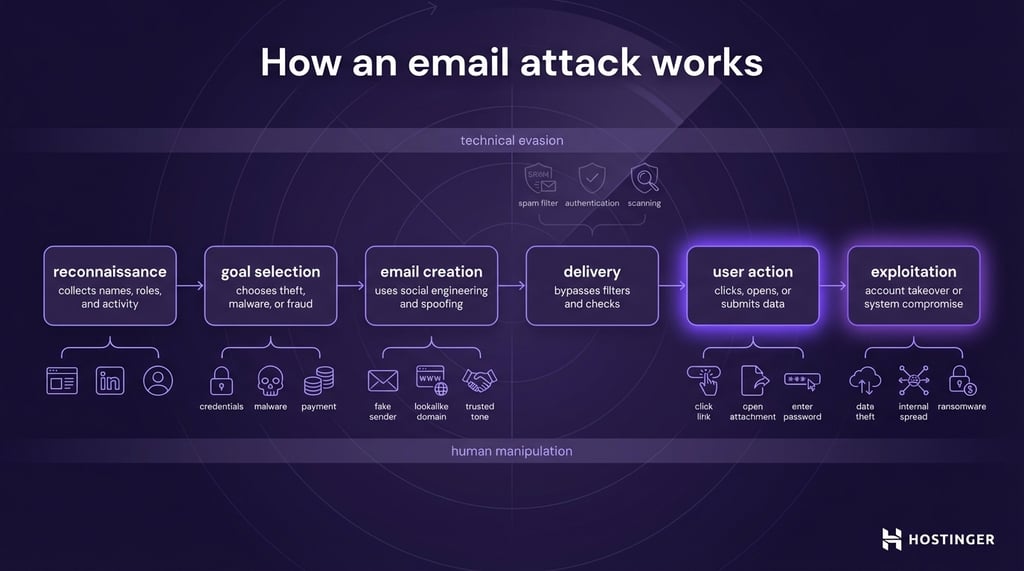
An email attack works by using a trusted-looking message to get you to click, reply, download, or share something that gives the attacker access to your accounts, data, or systems.
Most email attacks follow a similar pattern. The attacker studies the target, creates a convincing email, sends it at the right time (e.g., during busy work hours), and waits for the recipient to take the next step. That next step is what turns a simple email into a security incident.
The reason this works so well is simple: people trust email more than they should. You expect emails from coworkers, clients, banks, delivery services, and software providers. Attackers use that habit against you. Instead of breaking in through a locked door, they try to get you to open it for them.
A typical email attack moves through several stages.
First, the attacker gathers information.
This stage is called reconnaissance. The attacker looks for names, job titles, company domains, suppliers, login portals, and recent activity. A public company website, LinkedIn profile, or social media post can give them enough detail to build a believable message.
For instance, an attacker visits your company website and sees your email format (like name@company.com) and your role listed as “Customer Support.”
They send you an email like:
“A customer submitted a complaint. Please review the attached file.”
You open the attachment because handling customer requests is part of your job. That’s the attack.
Next, the attacker chooses a goal.
Not every email attack is trying to do the same thing. Some are designed to steal passwords. Others try to install malware. Some aim to trick someone into sending money or disclosing sensitive data. The goal shapes the message.
If the goal is credential theft, the email will usually push you toward a fake login page. If the goal is malware delivery, it will likely include an attachment or a link to a file. If the goal is fraud, the message will focus on urgency and authority.
Then the attacker builds the email.
This is where social engineering comes in: manipulating people rather than attacking systems directly. The attacker writes a message that feels familiar, urgent, or important enough to lower your guard.
They often imitate:
- A manager asking for a quick favor
- A bank warning about suspicious activity
- A service provider asking you to verify your account
- A courier asking you to review a delivery update
The best phishing emails do not look dramatic. They look normal. That is what makes them dangerous.
Attackers also use technical tricks to make the message harder to detect. They may spoof the sender name so the email appears to come from a real company.
They may register a domain that looks almost identical to a trusted one. For example, yourcompany-support.com looks close enough to fool a busy reader. They may also hide malicious links behind clean-looking button text such as View document or Reset password.
After that, the attacker sends the message.
This stage is simple in appearance but often carefully timed. Attackers may send emails during busy hours, before weekends, at month-end, or during holidays when people rush through their inboxes.
In business settings, they often target finance, HR, support, and executives because those roles handle payments, employee data, and account access.
Some attacks are broad and automated. A spam campaign may go to thousands of inboxes at once. Others are highly targeted.
The email then tries to get past technical defenses.
Before it reaches the inbox, an email must survive spam filters, authentication checks, and threat scanning. Attackers know this, so they design emails to avoid obvious warning signs.
They may avoid suspicious words that trigger filters. They may keep the message short and plain. They may embed harmful links in PDF files or cloud document shares instead of placing them in the body. They may use compromised accounts, so the email comes from a real mailbox with a real sending history.
People assume a delivered email is a safe email. It is not. Delivery only means the message passed enough checks to reach the inbox.
Once the email is opened, the real attack begins.
At this point, the attacker depends on human action. The recipient clicks a link, opens an attachment, enters a password, approves a sign-in request, or replies with sensitive information.
A fake login page is one of the most common examples. The email says your mailbox is full or your account needs verification. You click the link, land on a page that looks real, and enter your password. The attacker now has your credentials.
In another case, the email includes an attachment named something like invoice.pdf.zip or payment-details.docm. If you open it and enable macros or run the file, malware is installed on your device.
After the first action, the attacker moves to exploitation.
This is the stage where they use what they have gained. If they stole credentials, they log in to the real account. If they installed malware, they may steal files, monitor activity, spread to other systems, or prepare a ransomware attack.
If they compromised one mailbox, they may use it to send more convincing internal emails to coworkers.
The most effective email attacks combine two methods at once: technical evasion and human manipulation.
Technical evasion helps the message get delivered. That includes spoofed sender information, lookalike domains, compromised mailboxes, hidden links, and attachments designed to avoid detection.
Human manipulation gets the victim to act. That includes urgency, fear, authority, curiosity, and routine. A subject line like Invoice overdue, Password expires today, or CEO request is not advanced technology. It works because it pressures the reader into acting before thinking.
The main lesson is that email attacks do not succeed because email is broken. They succeed because email mixes technology with human trust. A secure email system needs to protect both.
It must block unwanted emails and suspicious messages before they arrive, verify who sent them, scan links and attachments, and help users spot requests that do not feel right.
Types of email security threats
The most common email security threats are phishing, email spoofing, spear phishing, business email compromise (BEC), and malware delivered through attachments or links.
Phishing attacks
Phishing is a fake email designed to trick you into taking an action, like clicking a link, entering your password, downloading a file, or sharing sensitive information.
These emails often pretend to come from a trusted source such as your bank, hosting provider, or delivery company.
A simple example is an email that says your account will be suspended unless you log in right away. The link leads to a fake website that steals your credentials.
Email spoofing
Email spoofing is when an attacker makes a message look like it came from a legitimate sender. The goal is to create trust before the recipient notices anything suspicious. The attacker may fake the sender’s name, the sending address, or the domain itself.
For example, an email might appear to come from billing@yourcompany.com even though it was sent from somewhere else. Spoofing is often used as part of phishing, fraud, and impersonation attacks.
Spear phishing attacks
Spear phishing is a more targeted attack. Instead of sending the same message to thousands of people, the attacker tailors the email to a specific person or role. The message may include your name, job title, company details, or references to recent activity.
This makes the email much more convincing. A fake message sent to an HR manager about payroll, or to a developer about a code review request, is more likely to succeed because it fits the recipient’s daily work.
Business email compromise (BEC)
Business email compromise is a fraud attack that uses impersonation and social engineering to manipulate payments, approvals, or sensitive data sharing.
In many cases, the attacker pretends to be a company executive, finance lead, employee, or vendor. Some BEC attacks come from spoofed addresses. Others come from real accounts that were already compromised.
A common example is an email that appears to come from the CEO asking the finance team to make an urgent bank transfer. The message may not include any links or attachments, making it harder to detect with basic filtering alone.
Malware and malicious attachments
Some email attacks aim to infect your device rather than steal information directly in the message. They do this through infected attachments or harmful links that download malware.
The file may look harmless, such as an invoice, a PDF, a spreadsheet, or a shared document. Once opened, it can install spyware, ransomware, or other malicious software.
For example, an email with a fake invoice attachment may prompt you to enable macros or open a compressed file. That single action can install malware that steals files, records keystrokes, or spreads through your network.
These threats often overlap. A phishing email may use spoofing to look more convincing. A spear phishing message may carry malware. A BEC attack may start with credential theft and end with payment fraud.
Best practices to secure your email
A secure email follows a clear workflow: the message is encrypted before sending, transmitted through secure channels, checked and verified by the receiving server, and delivered to the inbox only then.
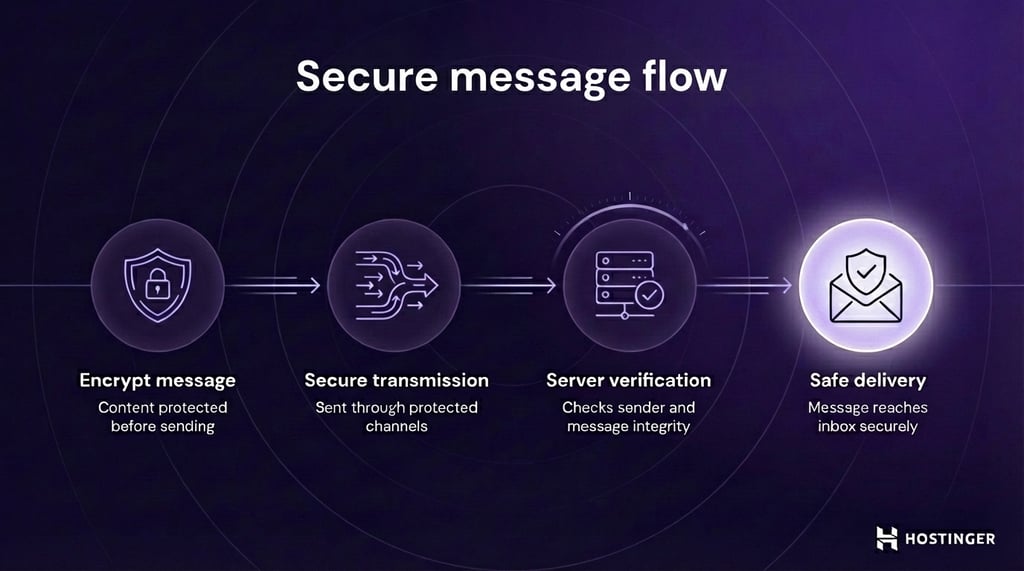
At the same time, the system confirms the sender and scans the email for threats.
1. Use email encryption
Email encryption protects the content of your messages by making them unreadable to anyone except the intended recipient.
If a message is intercepted while traveling between servers or accessed by someone who should not see it, the content may be exposed. Encryption solves that by turning readable text into unreadable data.
In simple terms, encryption takes your plain message, called plaintext, and converts it into scrambled data, called ciphertext, using cryptographic algorithms. Only someone with the correct key can turn that ciphertext back into readable text.
There are two main ways email encryption works: Transport Layer Security and end-to-end encryption.
Transport Layer Security (TLS) protects the connection between email servers while the message is being delivered. It creates an encrypted channel between mail servers so the email cannot be easily read in transit.
You can think of the TLS protocol like a secure tunnel. The message travels through that tunnel from one server to another, which helps prevent interception along the way.
TLS improves email confidentiality during transport, but it does not fully protect the message once it reaches a server or mailbox. That is where end-to-end encryption becomes important.
End-to-end encryption protects the message itself, not just the connection used to send it.
With this approach, the email is encrypted before it leaves the sender and stays encrypted until the intended recipient decrypts it.
The two most common email encryption methods here are PGP and S/MIME.
PGP (Pretty Good Privacy) uses a pair of cryptographic keys: a public key to encrypt the message and a private key to decrypt it. If someone sends you an email encrypted with your public key, only your private key can unlock it.
S/MIME (Secure/Multipurpose Internet Mail Extensions) also encrypts messages and supports digital signatures. That means it helps protect confidentiality and also helps verify that the message really came from the claimed sender.
The difference between TLS and end-to-end encryption is important. A simple way to think about it is this:
- TLS secures the road
- PGP and S/MIME lock the package
2. Implement email authentication
Email authentication verifies that a message really comes from the domain it claims to come from.
Email authentication relies on three main protocols: SPF, DKIM, and DMARC. Each one checks a different part of the message.
SPF (Sender Policy Framework) tells the Internet which mail servers are allowed to send email on behalf of your domain.
You publish an SPF record in your domain’s DNS settings. That record lists the servers that are authorized to send your emails.
When a receiving server gets a message from your domain, it checks that SPF record. If the sending server is not on the approved list, the message fails the SPF check.
SPF answers this question: Was this email sent from an approved server?
DKIM (DomainKeys Identified Mail) adds a digital signature to outgoing emails. That signature is created with a private cryptographic key, and the receiving server verifies it using a public key published in DNS.
This check confirms two important things:
- The message came from a server associated with the domain
- The message was not changed after it was sent
DKIM answers this question: Is this message authentic, and has it been tampered with?
DMARC (Domain-based Message Authentication, Reporting and Conformance) builds on SPF and DKIM. It tells receiving servers what to do when an email fails authentication checks.
A domain owner can set a DMARC policy to:
- Accept the message
- Quarantine it, usually by sending it to spam
- Reject it completely
DMARC also adds reporting. That means domain owners can see which messages are passing or failing authentication and spot abuse of their domain.
DMARC answers this question: if this email fails the checks, what should happen next?
This is why email authentication is a core part of email security. It does not replace spam filtering, phishing detection, or encryption. It supports them by making the sender identity harder to fake in the first place.
3. Use malware and phishing detection
Malware and phishing detection stop harmful emails before they reach your inbox. This is where spam filtering and a secure email gateway do most of the work.
A spam filter blocks unwanted or suspicious emails based on patterns such as sender reputation, message wording, domain history, and sending behavior.
For example, if a message comes from a domain that has already been linked to phishing, or if it uses wording commonly found in scams, the filter can send it to spam or block it entirely.
A secure email gateway inspects links and attachments before an email reaches your inbox. When an email contains a URL, the gateway checks it before delivery. It analyzes the destination to see if it leads to a known phishing site, a fake login page, or a domain created to steal credentials.
It also compares what you see with what actually happens. For example, a button may say “View invoice,” but the link may point to a completely different website. That mismatch is a strong warning sign, and the message can be flagged or blocked.
Attachments are another common risk, and the secure email gateway is responsible for checking them as well.
An email may include a file that looks harmless, such as an invoice, spreadsheet, or PDF. But once opened, that file may install malware, steal data, or give the attacker access to your device.
To prevent this, the gateway scans attachments during delivery. It first checks files against known malware signatures and flags suspicious file types.
For higher-risk cases, the gateway opens the file in a controlled environment called a sandbox. This is an isolated system where the file can run safely without affecting real devices.
If the file tries to install software, access data, or contact external servers, it is flagged as malicious and blocked before the email reaches your inbox.
Put simply, this part of email security asks three practical questions:
- Does this message look suspicious?
- Does this link lead somewhere unsafe?
- Does this attachment behave like malware?
If the answer to any of those is yes, the message can be blocked, quarantined, or sent to spam before it puts your account or device at risk.
This is how modern email services handle threat detection in practice. For example, Hostinger Business Email includes built-in spam filtering, phishing detection, and malware scanning, so harmful messages are filtered out before you ever see them.

4. Create a strong user verification and access control
Strong user verification and access control protect your email account from unauthorized access, even if someone steals your login details.
The first layer is multi-factor authentication (MFA). Instead of relying only on a password, MFA requires a second form of verification during login. Even if an attacker has your password, they still cannot access your account without this additional step.
That second factor can be:
- One-time code sent to your phone or email
- Code from an authentication app
- Hardware security key
- Biometric check, such as a fingerprint or face scan
The next layer is access control, which defines how and where your account can be accessed.
Instead of allowing unrestricted logins, access control applies rules such as:
- Limiting failed login attempts
- Blocking access from unknown or high-risk locations
- Requiring verification on new devices
- Enforcing strong password requirements
Together, these controls shift email security from simple password-based access to continuous identity verification. A correct password is no longer enough, as the system will also check context, behavior, and risk.
Differences and related concepts
Email security is one part of a broader cybersecurity system, focused specifically on protecting email communication, the systems that handle it, and the people who use it.
Cybersecurity covers everything from networks and devices to applications and data. Email security fits into that system as the layer that protects one of the most commonly used and most targeted communication channels.
Email security vs network security
Email security focuses on threats that arrive through email. It protects messages, inboxes, mail servers, and users from risks such as phishing, spoofing, malicious links, and infected attachments.
Its job is to check whether an email is safe, whether the sender is legitimate, and whether the message should reach the inbox.
Network security focuses on traffic moving across your broader infrastructure, protecting routers, firewalls, switches, servers, and connections between systems.
It controls who can access the network, monitors traffic, blocks unauthorized connections, and stops threats from spreading across systems.
So email security deals with the attack at the point of entry. Network security deals with traffic and access across the environment as a whole.
Email security vs endpoint security
Email security focuses on the communication layer. It checks incoming and outgoing emails for phishing, spoofing, malicious links, dangerous attachments, and sender impersonation.
Endpoint security focuses on the device itself. It protects laptops, desktops, phones, and servers from malware, unauthorized access, suspicious activity, and software abuse.
Imagine you receive an email with a fake invoice attachment.
- Email security scans the message, checks the sender, inspects the attachment, and tries to block the email before it reaches your inbox.
- Endpoint security steps in if the file is opened and tries to stop malicious code from running on your laptop or server.
So email security tries to stop the threat at the door. Endpoint security protects the room if the threat gets inside.
Cloud-based email security vs on-premise email security
Cloud-based email security uses a provider’s hosted platform to filter, scan, and protect email traffic before it reaches your inbox. Security tools are managed outside your internal environment, typically via a web-based dashboard.
The provider handles the infrastructure, updates, and much of the day-to-day maintenance.
On-premise email security runs on systems that your organization owns and manages itself. That means the filtering, scanning, policy enforcement, and logging happen inside your own servers or data center.
Your team is responsible for deployment, updates, maintenance, and troubleshooting.
AI in email security
AI is changing email security by helping systems detect threats faster, spot patterns humans miss, and respond to attacks that no longer look obviously malicious.
Older scams were easier to catch because they were full of spelling mistakes, suspicious links, and obvious red flags.
Many modern attacks are cleaner, more targeted, and harder to spot. A phishing email today may look like a normal message from a coworker, a vendor, or a service your team already uses. AI usage trend in business
This is where AI improves email protection. Instead of relying only on fixed rules, AI-powered systems, in line with the growing AI usage trend in business, learn from large volumes of email activity and look for signals that suggest something is wrong.
It may notice that the writing style does not match the sender, that the request is out of character, or that the message is asking for a risky action at an unusual time. That helps catch attacks that would slip past traditional filters.
AI is also pushing email security toward a stronger zero-trust model.
Zero trust means no email is trusted by default, even if it appears to come from inside the organization or from a familiar contact. Every message, sender, link, and attachment must be verified before it is treated as safe.
In practice, this means email security is becoming more context-aware. Systems do not just ask, “Did this pass SPF or DKIM?” They also ask, “Does this message make sense for this sender, this user, and this situation?”
The future of email protection is combining AI, authentication, encryption, and access controls into a system that assumes every message needs proof before it earns trust.
All of the tutorial content on this website is subject to Hostinger's rigorous editorial standards and values.

Ksenija is a digital marketing enthusiast with extensive expertise in content creation and website optimization. Specializing in WordPress, she enjoys writing about the platform’s nuances, from design to functionality, and sharing her insights with others. When she’s not perfecting her trade, you’ll find her on the local basketball court or at home enjoying a crime story. Follow her on LinkedIn.


