Link cloaking: What it is, how it works, and best plugins
Oct 15, 2026
/
By Sopha M.
/
5 min Read
Link cloaking replaces long affiliate URLs with shorter, branded links that redirect visitors to the original destination. It helps affiliate marketers organize their links, track clicks, and update destinations without changing every published URL.
In this guide, you’ll learn how link cloaking works, whether it affects SEO, and how to create cloaked links using WordPress plugins or manually. We’ll also compare three popular plugins to help you choose the right option.
What is link cloaking and how does it work?
Link cloaking is a link management technique that replaces a long destination URL with a shorter, branded URL, typically on your own domain. When someone clicks the branded link, a redirect sends them to the original destination.
For example, instead of displaying a long affiliate URL containing tracking parameters, you could use yoursite.com/go/product-name. Visitors clicking this link would be redirected to the merchant’s product page.
This makes affiliate links easier to manage while allowing you to track clicks and update their destinations.
Link cloaking vs Link shortening
Since link cloaking works similarly to link shortening, many use both terms interchangeably. However, there are some differences, such as their appearance and purpose.
A link shortening service like Bitly or TinyURL redirects your link to their domain instead of yours. They also change your permalink to numbers and letters. For instance, bit.ly/2AERJK9.
As you can see, link shortening is designed to make a link shorter but not memorable. On the other hand, link cloaking produces more professional URLs for affiliate marketing.
Does link cloaking affect SEO?
Link cloaking doesn’t automatically harm SEO, but how you use it matters. Creating branded affiliate links that redirect visitors to the intended destination is different from the cloaking prohibited by Google, which involves showing different content to users and search engines to manipulate rankings.
However, misleading redirects can violate Google’s spam policies. To avoid issues, make sure your links lead to the expected destination, disclose affiliate relationships, and use rel="sponsored" or rel="nofollow" for paid affiliate links.
Also, check your affiliate program’s terms, as some programs restrict cloaked or redirected links. Link cloaking can simplify affiliate link management, but it doesn’t directly improve search rankings.
Why you should cloak affiliate links
Using cloaked links for affiliate URLs enables you to create a personalized link for your visitors, making your destination links look trustworthy. It’s a practice that many affiliate marketing websites do.
Now, let’s find out what else cloaked links can do for your business.
Boost link trust
Due to the security threats like malware and phishing, many visitors are more cautious of long links that contain random numbers and letters. Therefore, you might lose visitors’ trust as they will avoid clicking on those links.
Through a cloaking technique, you can create a link that includes your own domain name and product at the end of your URL slug. It will make your link clean and appealing, giving users an idea of what to expect. As a result, it will make them feel more secure when clicking on your link.
To illustrate, if the cloak link is example.com/go/brandname-shopping-bag, visitors will know that the link will lead them to a shopping bag product from your store.

Enhance affiliate link management
It might be challenging to organize and track many affiliate links. Thus, you’ll need a link cloaker that provides a management tool. This tool allows you to organize all your links by separating them into categories in a single dashboard. For instance, you can categorize them based on your affiliate program or campaign.
Link cloaking allows you to access data such as click tracking and conversion tracking. This will increase your effectiveness in link management and improve your workflow.
Furthermore, you may use various URL redirect types, such as a 301 redirect for permanently moved pages. For paid affiliate links, use rel="sponsored" or rel="nofollow" to indicate the relationship to search engines. These attributes don’t prevent pages from being indexed.
Track click data
Using cloaked links enables you to track your affiliate URL performance using affiliate marketing tools. By analyzing it, you will know your earnings per click and what aspects need to be improved and which links perform the best. This way, develop an effective strategy to get the desired results.
For example, if you have two links that redirect to shopping bag web pages, using link cloaking will help you decide which one suits your target audience. By tracking these links, you will know which product generates more traffic.
Reach a larger audience
With a cloaked link, you can create a clean URL that is easier to remember and more appealing since it contains a brand name or a product.
It will help convince visitors to share it on their social media platforms, helping you reach a larger audience.
Best WordPress link cloaking plugins
WordPress provides many great plugins to extend your site’s functionality for different purposes. To help you choose the one that suits your needs best, we’ve picked the best three affiliate WordPress plugins for link cloaking.
| Plugin | Best for | Advantage |
|---|---|---|
| Pretty Links | Branded URLs and click tracking | Simple redirects and detailed click reports |
| ThirstyAffiliates | Managing many affiliate links | Link categorization and centralized management |
| Easy Affiliate Links | Simple affiliate link management | Supports both cloaked and uncloaked links, including sponsored attributes |
1. Pretty Links
Pretty Links is a powerful WordPress plugin that allows you to shorten and cloak your affiliate links. With its user-friendly interface, you can create a more attractive link and efficiently manage affiliate links.
This link cloaking tool also offers various features, such as tracking and redirecting links, as well as affiliate link management. You can also share affiliate links easily on podcasts, videos, and email. To get more advanced features, consider purchasing the premium plan that starts from $79/year.
2. ThirstyAffiliates
Thirsty Affiliates is one of the most widely used WordPress plugins for link cloaking. It helps add, manage, and track affiliate links from your admin dashboard. With its various features, you can create a branded affiliate link for your products. This will help you generate affiliate income from your visitors.
Moreover, it works seamlessly with a visual editor as it appears as a TA button in the toolbar. This way, you can insert affiliate links into your blog post more easily. Also, it enables you to create cloaked affiliate links by using the Quick Add button.
Starting at $49 for one site, their premium plans let you attach images to your affiliate URL, which may increase your visitor clicks and make your links more appealing.
3. Easy Affiliate Links
Easy Affiliate Links is a user-friendly WordPress plugin that helps you manage all your affiliate links in one central location, from cloaked to regular links. This plugin is also compatible with the Classic Editor and Gutenberg Block Editor.
Furthermore, it provides valuable insights like monthly and lifetime clicks on the link. While advanced features are available on the premium plan for $29/year, its free version offers more beneficial features than other plugins.
How to cloak links without a plugin
If you want to hide affiliate links without a WordPress plugin, you can do so by using your FTP account. However, this method is suitable for those with few affiliate links to manage.
Follow the steps below to cloak links manually:
- Connect your site via an FTP client like FileZilla and create a new folder in your website’s root directory (public_html). This folder’s name will be your URL slug which can be /go/, /recommend/, and /out/.
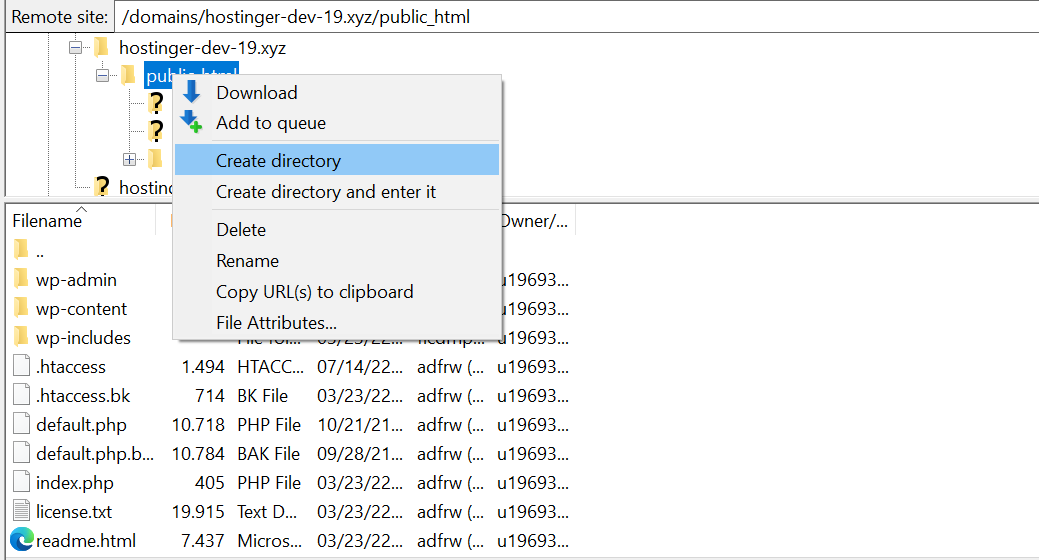
- In the same folder, create a new file named index.php and add the code from Yoast’s GitHub repository.
- After adding the code, create a redirects.txt file for your affiliate link cloaking. In this file, you can add the destination URL and its slug by using the following format:
- Website-slug, https://example.com/affiliateid=123
For a deeper understanding of how to use and optimize these rules, you can refer to our detailed guide on understanding robots.txt Disallow Rules. This will ensure you’re using the robots.txt disallow directive effectively, avoiding common mistakes.
Next steps: Set up and test your affiliate links
Start by creating a branded redirect for one of your existing affiliate links. Test that it leads to the correct destination, preserves tracking parameters, and records clicks as expected.
Before adding more links, check your affiliate program’s rules, include appropriate disclosures, and configure sponsored link attributes. Once everything works correctly, you can gradually organize your remaining affiliate links and manage them from one place.
This article is a localized version of Link cloaking: What it is, how it works, and best plugins, originally published in English.

Dinda is a WordPress and digital marketing enthusiast. She loves to share her knowledge with others so that they can be successful in their online endeavors. During her free time, she enjoys watching movies and exploring historical places.