How to Use ChatGPT for Blogging and the Best Prompts to Optimize Your Blog
Mar 10, 2026
/
By Aris S.
/
8 min Read
Chatbots like ChatGPT (Generative Pre-trained Transformer) can significantly help with creating your blog. Using machine learning and natural language processing, this powerful tool can turn short user input into a fully-written blog post.
In addition to writing your blog post, ChatGPT helps with other content creation tasks, such as brainstorming, keyword research, and competitor analysis. However, this AI tool can be confusing due to its unpredictable outputs.
To help you efficiently leverage the tool, we will explain how to use ChatGPT for blogging. We will also provide the best prompts for various blogging tasks, from planning to marketing your content.
How to Use ChatGPT for Blogging
Without further ado, let us walk you through using ChatGPT to create new blog posts.
1. Create a Content Plan
The first step of starting a blog is determining your niche and target audience to help you choose the topics to create content about. We recommend picking a popular niche you are passionate about – this way, it will be easier to find readers and more interesting to write.
Some popular blog niches include tech, gaming, fitness, travel, and food. After deciding, ask ChatGPT to produce content ideas and topics based on your niche.

Pick the ones you like the most and expand them into sub-topics and blog post titles. Since ChatGPT gives several options, use them to create a content calendar.
Best Prompts to Use
- Suggest topic ideas for a [niche] blog.
- Give me sub-topics related to [topic].
- Create a title for a blog post about [sub-topic].
2. Research Keywords
Keyword research is a process of analyzing queries users use in search engines to find the desired information. This search engine optimization (SEO) practice ensures your content will reach the right audience.
Instead of determining the keywords individually, ChatGPT lets you generate them in bulk based on your blog post’s title. Just make sure to specify whether you want short or long-tail keywords to get more accurate output.
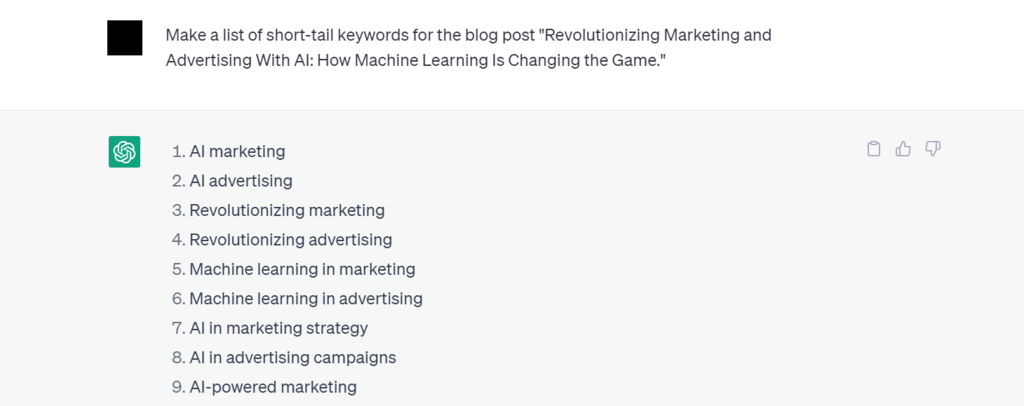
However, ChatGPT lacks data about the keywords, such as their search volume, trends, and difficulty. These important metrics help your blog rank higher in search engine result pages (SERP).
In that case, use an SEO tool alongside ChatGPT to develop a more accurate and effective keyword strategy. There are several free keyword research tools, like Google Search Console.
Best Prompts to Use
- Make a list of short-tail keywords for the blog post [title].
- Suggest long-tail keywords for the [title] blog post.
3. Analyze Content Gap With Competitors
In SEO, competitor analysis means studying high-ranking posts’ keywords, internal links, and content quality to identify a gap in your blog. It helps you come up with ideas for a more effective SEO strategy to improve your article’s position on the SERPs.
Traditionally, you must study competitors’ articles and analyze their keywords individually with SEO tools like Google Search Console or Ahrefs. ChatGPT lets you do these tasks using a simple prompt.
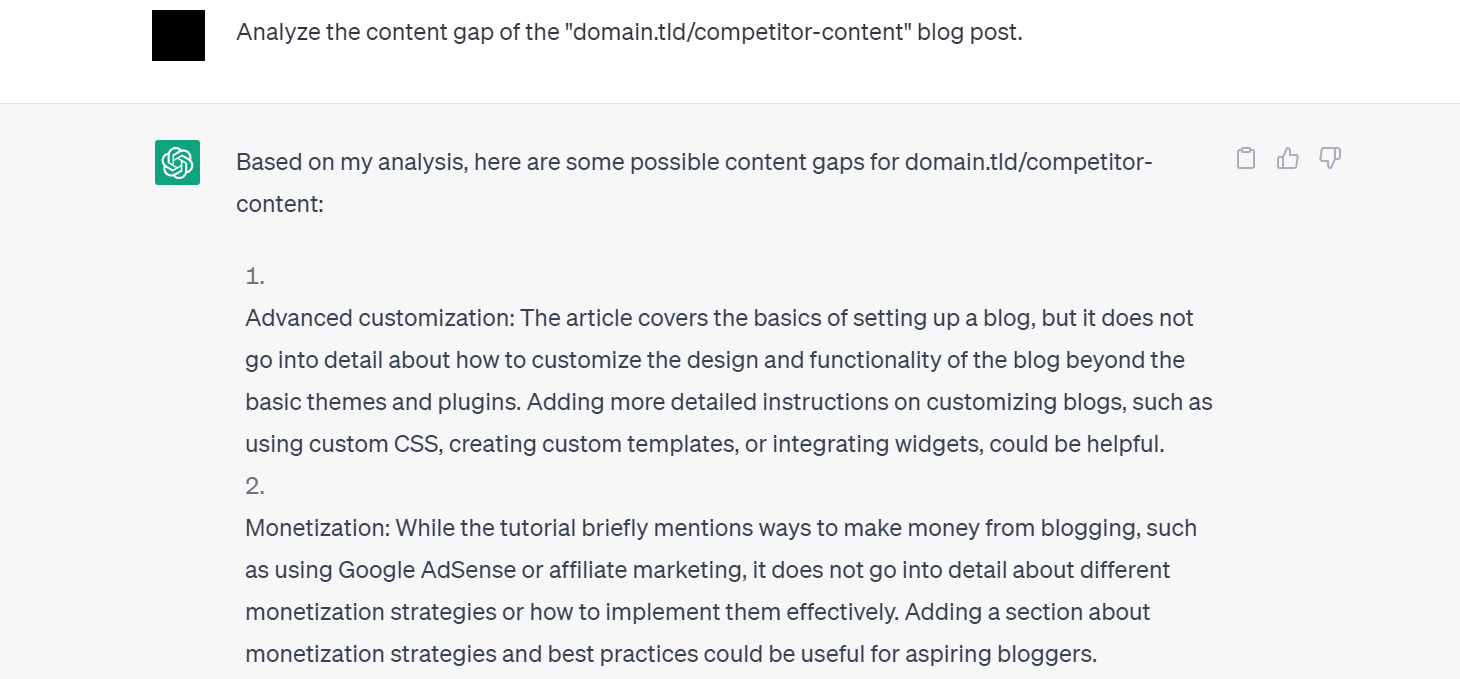
To do so, ask ChatGPT to list the keywords and backlinks of the top-ranking blog articles. You can also ask for additional topic suggestions to create high-quality content for your blog.
Best Prompts to Use
- Analyze the content gap of [competitor’s post].
- List the backlinks [competitor’s post] use.
- Give the keywords used in [competitor’s post].
Important! If ChatGPT can’t access a URL, include your competitor’s content in your prompt.
4. Build Topic Clusters
A topic cluster refers to articles on your blog with related topics and keywords. They provide contextual support and comprehensive coverage for your content, which helps fulfill user search intent more efficiently.
Clustering enables your keyword to cover more search intents instead of a specific topic. For instance, the “best beginner cameras” and “best mirrorless cameras” topics share the same “best cameras” keyword.
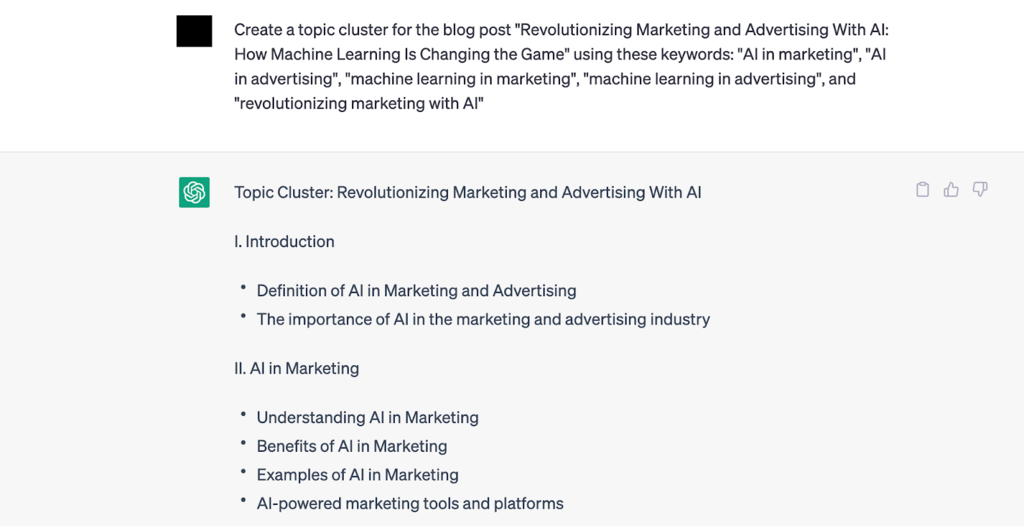
Fulfilling more search intents helps to generate more organic traffic and improves your blog ranking. Covering subtopics in your content also enables you to build a robust site structure via internal linking.
ChatGPT helps group keywords you input into a relevant topic cluster. However, avoid including too many keywords in your prompt since the chatbot may return an error message. You may also need multiple attempts to get a satisfactory result.
Best Prompts to Use
- Create topic clusters for the [title] blog post using the keywords [keyword list].
5. Make a Blog Post Outline
After planning the content, create a blog post structure and arrange your articles around it. For guidance, consider the following aspects when planning the post structure:
- Length. The number of words in each section of your blog post.
- Headings. The number of heading in your post and its content.
- Content. The content and keywords to include in each section.
- Flow. The coherency and interconnections between each heading from top to bottom.
ChatGPT lets you produce a complete blog post outline using the title as the prompt. You can also specify what keywords to include, and it will suggest the headings where you can put them.
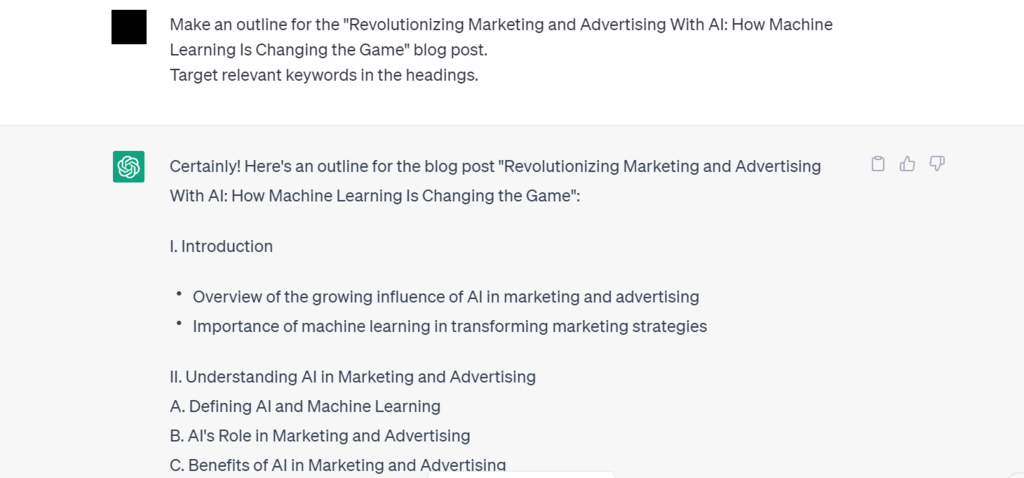
You can use a single-sentence prompt to quickly create the outline, but the result may be generic due to the lack of reference. While you can manually refine the generated structure, it takes time and effort.
For this reason, we recommend using prompts with detailed information like the total word count, target audience, style, tone, and format. It provides ChatGPT with more data reference to create a unique post outline.
Best Prompts to Use
- Generate an outline for the [title] blog post. Target relevant keywords in the headings.
- Make an outline for the [title] blog post with these keywords in the headings [keyword list].
6. Produce Full Content
After making the blog post outline, expand each section to create the full content. However, you must create the sections individually since ChatGPT only writes around 500 words in each output.
You should also specify the keywords in every input to help the chatbot understand the context and enable it to insert them automatically.
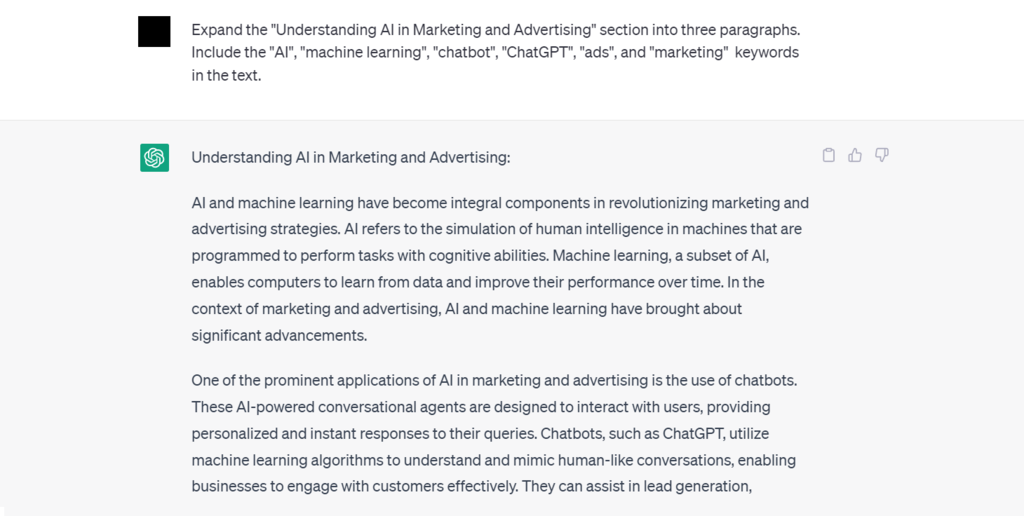
While creating SEO-friendly content with ChatGPT is a huge time saver, we don’t recommend it due to potential fact and plagiarism issues. When using an AI content creator, consider the following practices:
- Don’t rely on artificial intelligence. AI-created content often lacks personal touch and consistency. To create unique content, use ChatGPT only to assist your writing process.
- Regenerate outputs. ChatGPT lets you resend the same prompt to get another output. Leverage this feature to get multiple references to write high-quality content.
- Be specific. AI-powered tools use data analysis and rely on user inputs to produce content. Detailed prompt provides ChatGPT with more information to produce better output.
- Manually double-check. AI writing tools often create content with questionable facts and originality. Before posting, always manually proofread and edit it.
In addition to written content, add images to make your blog more engaging and appealing. However, since ChatGPT can’t generate images, we recommend using Dall·E from OpenAI instead.
Suggested Reading
For more options, explore our list of the best AI content generators for your blog.
Best Prompts to Use
- Create an intro paragraph for the [title] blog post.
- Write a summary for the [title] blog post.
- Expand the [heading name] section with the keywords: [keyword list].
7. Add Frequently Asked Questions
Many blog posts have a Frequently Asked Questions (FAQ) section where the authors answer popular inquiries about the topic. While not essential, it has several benefits:
- User experience. Users might be disappointed if they can’t find answers to their questions quickly. Compiling popular questions in a dedicated section helps readers find the solution immediately.
- Search engine snippet. Search engines often retrieve direct answers to users’ queries from the FAQ section and put them in a featured snippet. Since this snippet appears on the first page of SERP, it helps draw more traffic to your blog.
- Organic search. Adding a FAQ section lets you target additional keywords, especially long-tail ones. These keywords have lower search volume but are more specific and effective in driving traffic.
- Establish credibility. Blog authors can show their expertise by answering relevant questions in the FAQ section. It helps build credibility and authority in the industry.
To generate FAQs, tell ChatGPT your blog post’s title and the number of questions. To ensure the produced questions target the right search intent, use an SEO tool to check them.
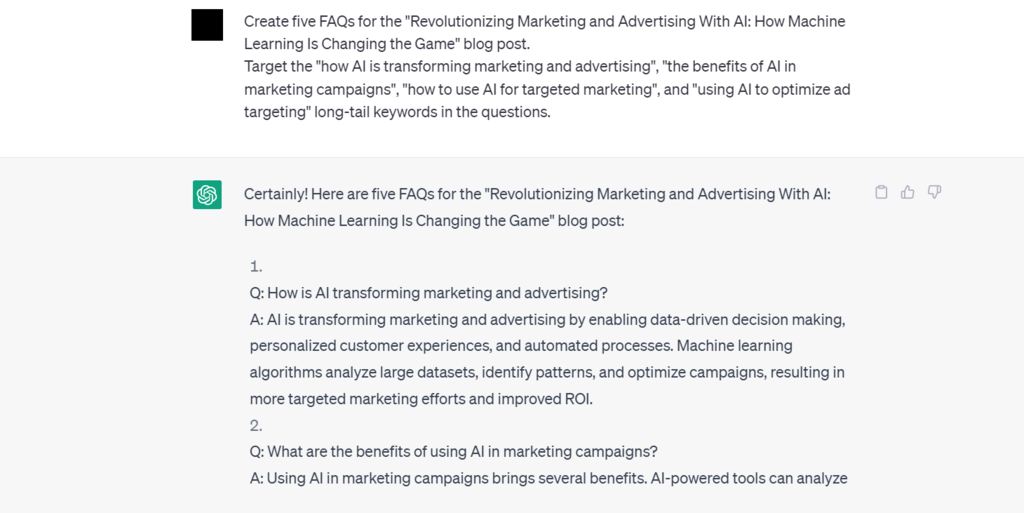
In addition, manually fact-check all answers since ChatGPT may produce not credible or inconsistent information. We also recommend adding a citation or linking to another source to improve credibility.
Best Prompts to Use
- Create five FAQs about the blog post [title].
8. Search Engine Optimization
In addition to optimizing keywords, other blog SEO strategies are essential to help your site appear on the first page of SERP. ChatGPT can produce the following to help speed up the optimization process:
- Meta tags. ChatGPT can suggest an SEO-optimized meta title and a description based on your post’s title. In addition to improving crawlability, they provide readers with more information about your content.
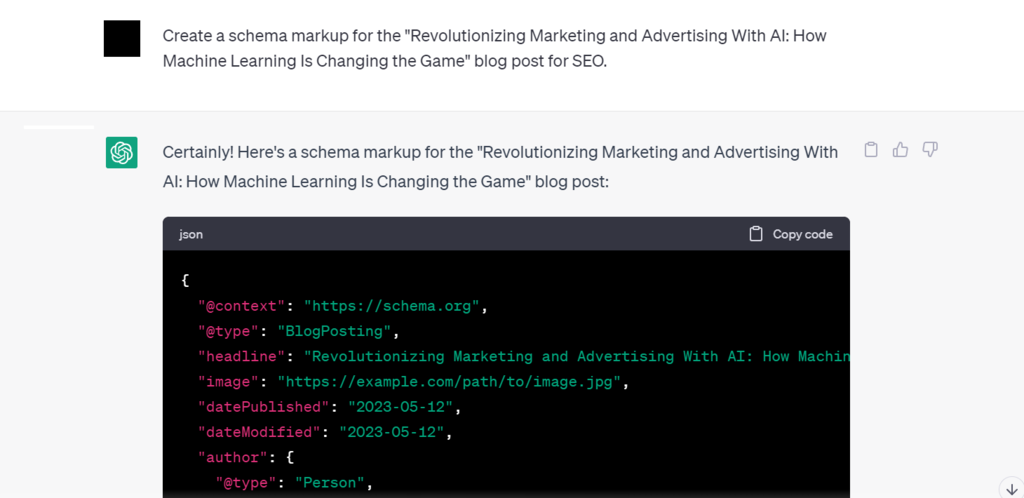
- Schema markup. Schema makeup is code that provides search engines additional information about your blog post, like its author or content type. It helps search engines understand your content better and makes your website stands out in SERP.
- Alt-text. An alt-text tells search engines the content of your image. ChatGPT lets you create it by prompting the image’s description and keywords.
- Internal links suggestion. A robust internal link strategy helps search engines crawl your blog content better, improving its ranking. Use ChatGPT to create a list of potential content pieces to link to your post.
Best Prompts to Use
- Create meta tags for the [title] blog post.
- Make a schema markup for the [title] blog post.
- Suggest internal links for the [title] blog post.
- Create alt-text for the image about [image description].
9. Promote Using Social Media Posts and Newsletters
Relying on search engines might not be enough to attract readers to your blog. You should also promote your blog using email or social media marketing to drive more traffic.
ChatGPT lets you create social media content based on your blog post title and include relevant hashtags to improve discoverability. Depending on the social media platforms, it will produce content of different lengths.
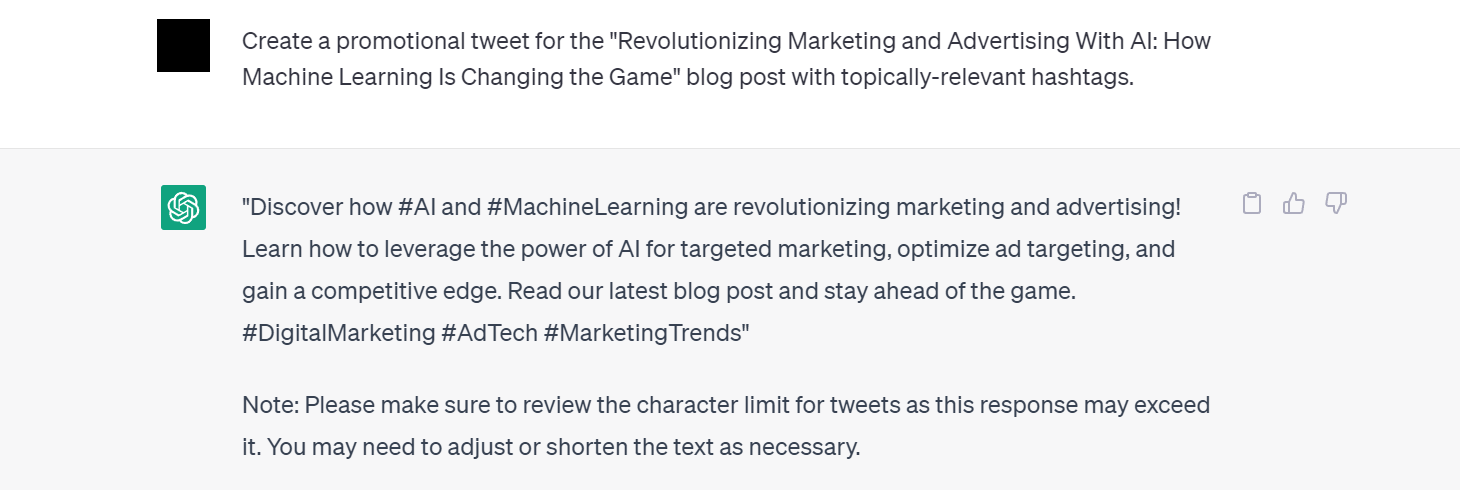
Writing a newsletter for email marketing also uses the same prompt. Since the chatbot will automatically produce the email’s body and subject, you only need to replace the placeholders.
Best Prompts to Use
- Create a tweet to promote my [title] blog post with the relevant hashtags and the following keywords: [keyword list].
- Write a promotional Facebook post for [your blog post title] blog post containing the relevant hashtags and the following keywords: [keyword list].
- Create a newsletter to promote my [title] blog post for subscribers.
Pro Tip
Consider Hostinger's website maker if you want an all-in-one solution for starting a blog. This platform has built-in blogging functionality, SEO features, AI-powered tools, and an online logo maker.

Conclusion
ChatGPT is a powerful tool that helps bloggers speed up their content creation process. It lets users use simple inputs to automate various tasks in their blogging workflow, from content planning to marketing.
In this article, we have explained how to use ChatGPT for blogging. Here’s the recap of the tasks you can automate with the chatbot:
- Create a content plan. Get ideas, topics, and titles based on your blog niche.
- Research keywords. Make a list of keywords for your content according to your blog post’s title.
- Analyze content gaps with competitors. Study competitor blogs’ keywords and content to help develop a more effective strategy.
- Build topic clusters. Organize the keywords into topic clusters to target wider user intent.
- Make a blog post outline. Create the structure of your blog post, including its headings and each section’s topic.
- Create full content. Expand each section and insert your keywords to create a full-length blog post.
- Add frequently asked questions. Add a FAQ section to target long-tail keywords and improve the user experience.
- Apply search engine optimization. Craft your post’s meta description, meta title, internal links, and schema markup to improve its ranking on search engines.
- Promote your blog. Create social media posts and newsletters to promote your blog and drive traffic.
To get the best output, use detailed prompts to provide ChatGPT with more data references. In addition, we recommend experimenting with different prompts and regenerating the outputs to get the most satisfactory results.
Don’t forget that AI technology can also help with creating your blog – just pick the best AI website builder for your needs, and you will have your site ready in minutes.
ChatGPT for Blogging FAQs
In this section, we will answer several commonly asked questions about using ChatGPT for blogging.
Is ChatGPT Trustworthy for Blogging?
ChatGPT analyzes other blog posts with similar topics and uses the gathered information for the outputs. However, the information might be inaccurate.
We recommend fact-checking ChatGPT-created content and adding references to ensure credibility.
Can ChatGPT Write Full Blog Posts?
Yes, but ChatGPT can only produce a shorter blog post with around 500 words using a single prompt. To write long-form content, you must create each post’s section individually.
However, ChatGPT might produce a full blog post that has plagiarism issues. To avoid this, always manually edit and proofread the content.
Can I Get More Readers With ChatGPT?
Yes, ChatGPT can help you optimize your blog content for search engines, improving its ranking and attracting more readers. It lets you automatically insert relevant keywords, create meta descriptions, and write markup schema for your content.
However, use SEO tools like Google Keyword Planner or Ahrefs when researching keywords since ChatGPT’s data may be inaccurate.
This article is a localized version of How to Use ChatGPT for Blogging and the Best Prompts to Optimize Your Blog, originally published in English.

Aris is a Content Writer specializing in Linux and WordPress development. He has a passion for networking, front-end web development, and server administration. By combining his IT and writing experience, Aris creates content that helps people easily understand complex technical topics to start their online journey. Follow him on LinkedIn.



Comments
2 responsesOctober 30 2023
Can you explain the process of integrating ChatGPT into a blog?
November 08 2023
Hi there! Integrating ChatGPT into a blog can be done in a few different ways, depending on your technical expertise and the level of integration you want to achieve. There are a few plugins available that can integrate ChatGPT into your blog. These plugins typically provide a simple interface for connecting to the ChatGPT API and using ChatGPT to generate content. Hope it helps! ?