10 ways to fix INET_E_RESOURCE_NOT_FOUND Error
Mar 10, 2026
/
By Aris S.
/
8 min Read
INET_E_RESOURCE_NOT_FOUND is an error code Windows users may encounter when the visited websites can’t load. While it usually occurs on Microsoft Edge and Internet Explorer, other browsers can also face the same issue.
Most commonly, the INET_E_RESOURCE_NOT_FOUND error is due to the Domain Name System (DNS) server failure. Other possible causes can include network connection and browser issues.
Getting this error can be infuriating since it prevents you from accessing a website. Thankfully, there are various possible ways to resolve it.
In this article, we will go over ten different methods to fix the INET_E_RESOURCE_NOT_FOUND error.

| Error code | Connection refused |
| Error type | Network communication protocol error |
| Error causes | Network problem Incorrect SSH installation Wrong credentials Security system configuration |
10 Methods to Fix INET_E_RESOURCE_NOT_FOUND Error
Since the causes of the INET_E_RESOURCE_NOT_FOUND error vary, determining the culprit can be difficult. It may also disappear by itself, for instance, when it is caused by a temporary DNS error.
Wait and reload the website periodically to see if the error is temporary. If the problem persists, fix it using these ten possible solutions.
1. Disable the TCP Fast Open Option in Microsoft Edge
The Microsoft Edge browser has a built-in Transfer Control Protocol (TCP) Fast Open feature. It speeds up data transmission between the web server and the browser, allowing the site to load faster.
However, enabling TCP Fast Open may prevent the browser from transmitting data properly, causing issues like the INET_E_RESOURCE_NOT_FOUND error.
Microsoft Edge has this feature enabled by default, so disable it to fix the error:
- Launch Microsoft Edge and open a new empty tab.
- Navigate to the URL address bar, type in edge://flags, and press Enter.

- On the Developer Settings screen, locate the Networking section.
- Uncheck the Enable TCP Fast Open box. If you can’t find the option, press Ctrl + Shift + D to bring up the diagnostics section.
- Restart Microsoft Edge and see if the error code still shows.
Important! The newer version of Microsoft Edge doesn’t let users disable the TCP Fast Open via the developer settings. In this case, try to fix the error with other methods.
2. Restore Corrupted Edge Files
Microsoft Edge may show the INET_E_RESOURCE_NOT_FOUND error code when the browser’s files are corrupted.
To restore corrupted files, repair or reset your Microsoft Edge browser. Start by repairing and move to the latter if the error persists.
The Microsoft Edge repair feature will scan for any issues and automatically fix them. This method preserves all of your browser data, so you don’t need to create a backup file.
Follow these steps to repair your Microsoft Edge browser:
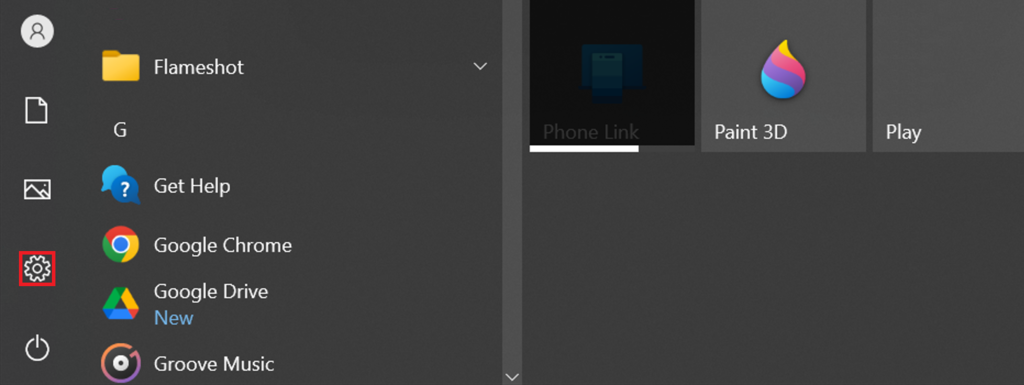
- Open Windows Settings by clicking the gear icon in the start menu. Alternatively, press Windows key + I.
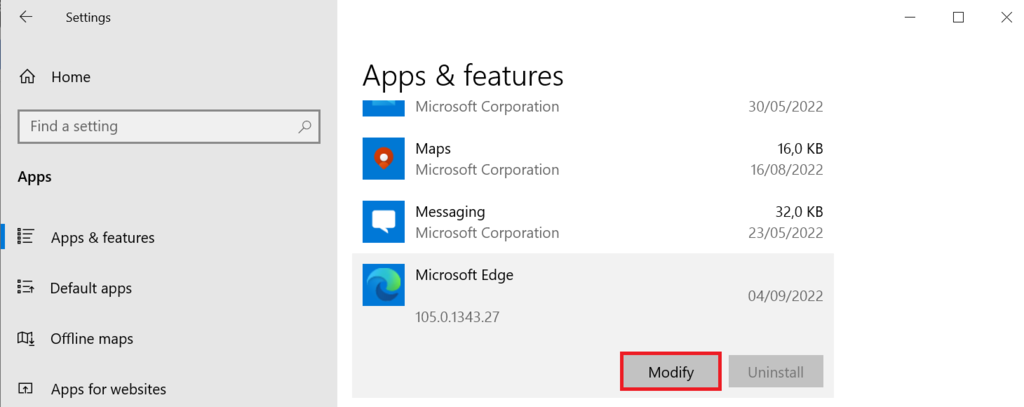
- Click Apps. Find and select Microsoft Edge -> Modify. For older versions of Windows 10, select Advanced options.
- If a pop-up window appears, select Yes.
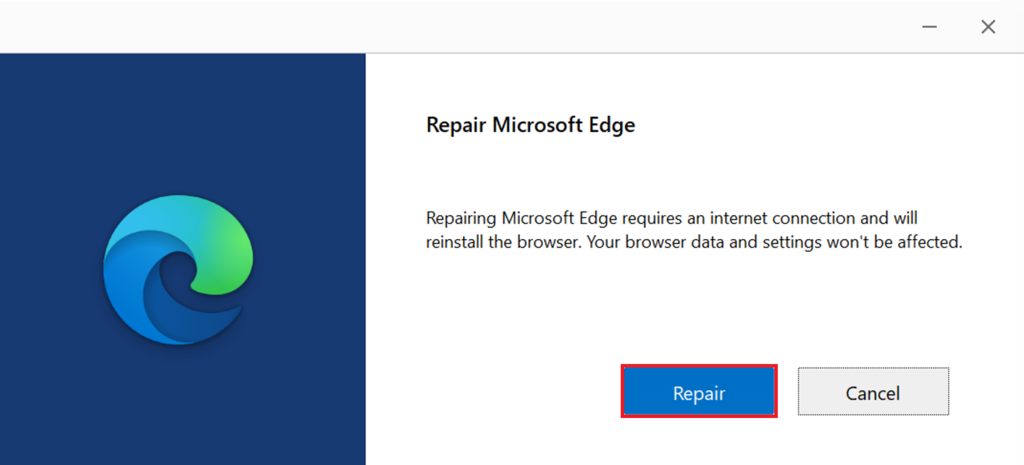
- Ensure your system has an internet connection, then click Repair and wait until it finishes.
- Open Microsoft Edge and check if the problem is resolved.
If the INET_E_RESOURCE_NOT_FOUND error code persists, try resetting Microsoft Edge. However, since this solution will erase most of your browser data, create a backup first:
- Open File Explorer. Navigate to the View tab and check the Hidden Items box.

- Go to the following directory C:UsersYourUserNameAppDataLocalMicrosoft. YourUserName refers to your computer’s username.
- Find and copy the Edge folder.
- Paste it into another directory.
Now, reset Microsoft Edge using the following steps:
- Launch Microsoft Edge.
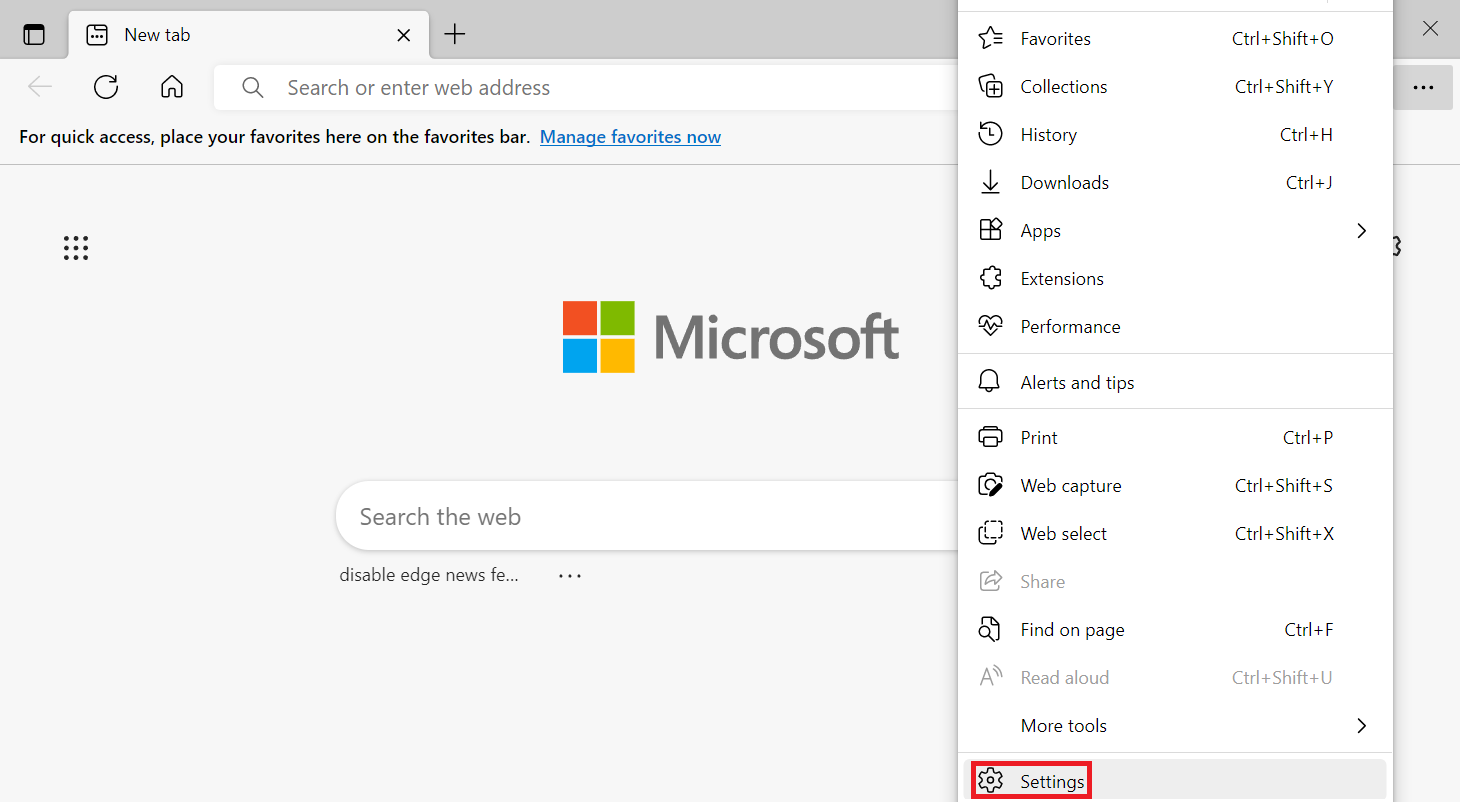
- Click the three dots icon on the top right corner -> Settings.
- From the left sidebar, find and select Reset Settings -> Reset settings to their default values.
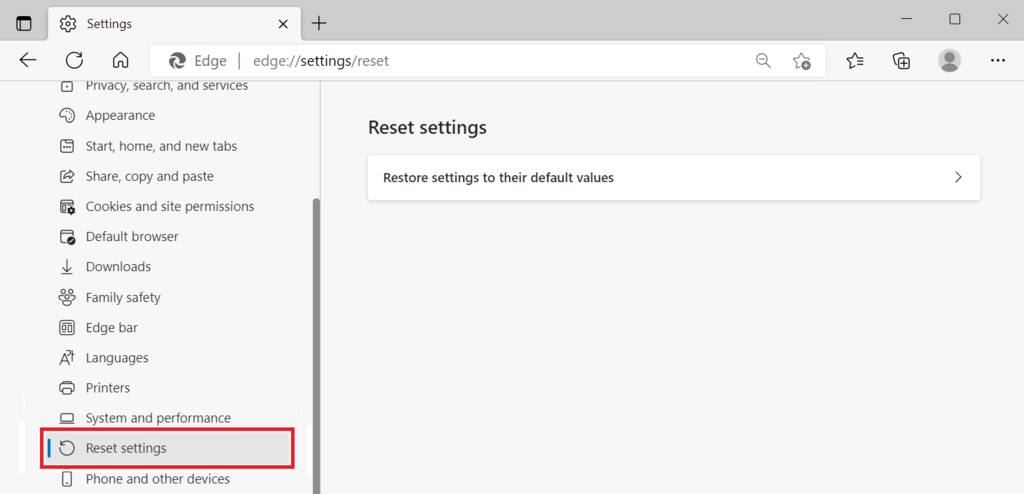
- The web browser will warn you about the data deletion. Click Reset to proceed.
- Copy the backup folder to its original directory to restore the deleted data.
- Restart the browser.
If the two previous methods don’t work, reinstall your Edge browser. It replaces all the browser files with the new ones, ensuring they are updated and correctly configured.
For older Windows versions, navigate to Control panel -> Uninstall a program to remove Microsoft Edge. However, since the operating system now doesn’t allow users to uninstall Edge, use the following method:
- Open the File Explorer. Ensure the Show Hidden Files option is enabled.
- Go to C:UsersYourUserNameAppDataLocalPackages.
- Find and delete the Microsoft.MicrosoftEdge_8wekyb3d8bbwe folder.
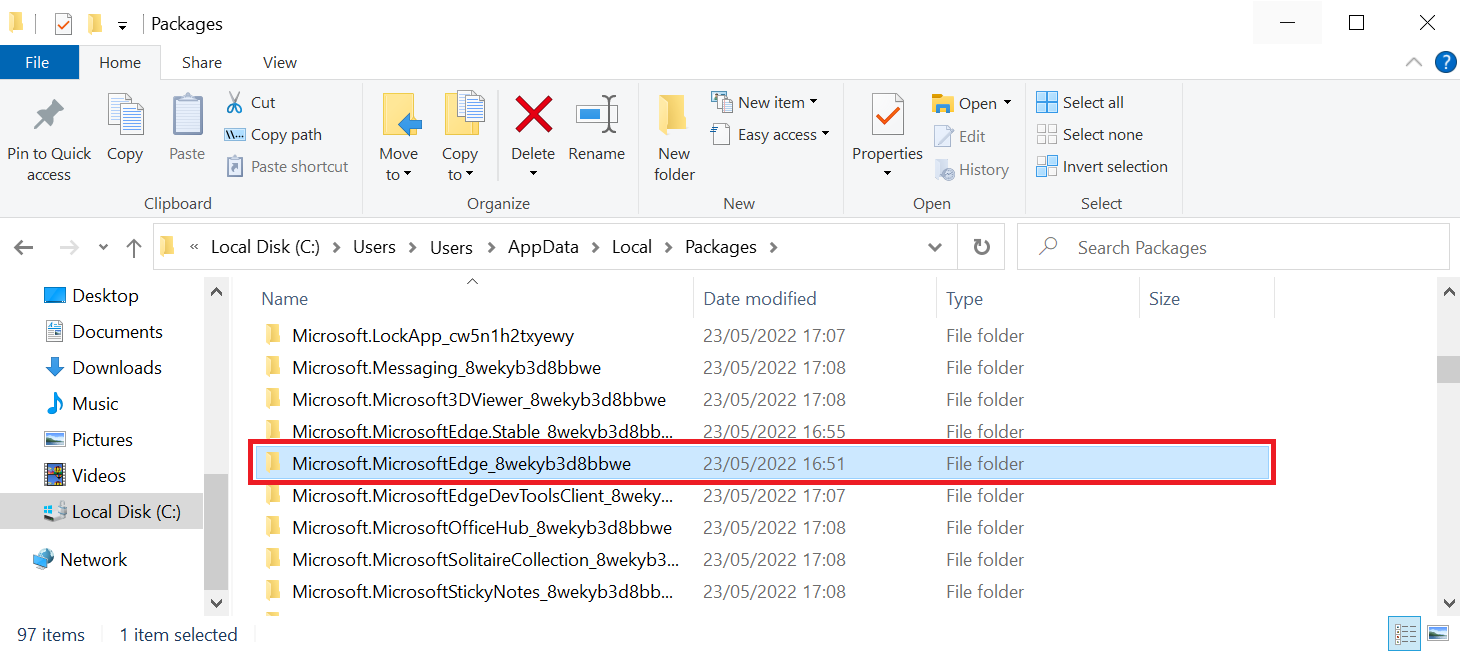
- If a confirmation window shows up, click Yes.
- Restart your computer.
Once removed from your system, you can now download and reinstall Microsoft Edge manually. Alternatively, install it via Windows PowerShell:
- Press Windows key + X and select Windows PowerShell (Admin). Click Yes on the pop-up window.
- On the PowerShell window, type cd C:usersyourusername and press Enter. Replace yourusername with the computer’s account name.
- Paste the following command and press Enter:
Get-AppXPackage -AllUsers -Name Microsoft.MicrosoftEdge | Foreach {Add-AppxPackage -DisableDevelopmentMode -Register “$($_.InstallLocation)AppXManifest.xml” -Verbose}
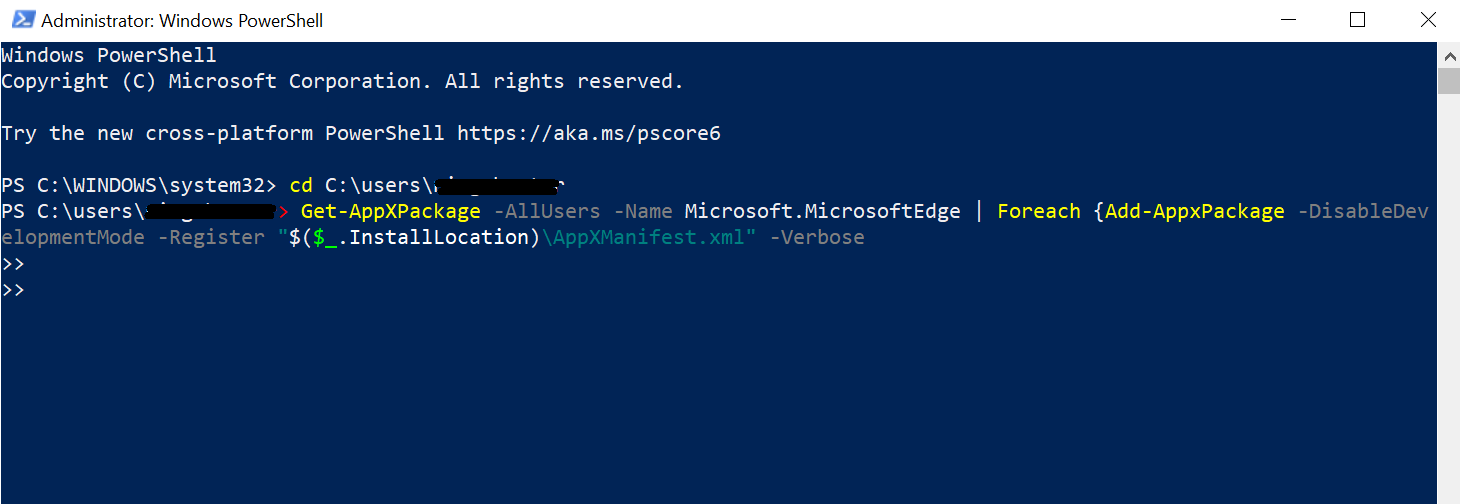
- Wait until the installation process finishes, then restart your computer.
3. Rename the Connections Folder in Windows Registry
Faulty system settings can trigger the INET_E_RESOURCE_NOT_FOUND error. Many users discover that renaming the Connections folder in Windows Registry can fix the issue.
Windows Registry is a database storing low-level settings for the operating system and installed applications. Renaming prevents the system from identifying the folder, which possibly causes the error.
Here are the steps to rename the Connections folder in the Registry Editor:
- Open Windows Registry Editor by entering regedit into the search bar.
- Right-click on the Registry Editor icon -> Run as administrator -> Yes.
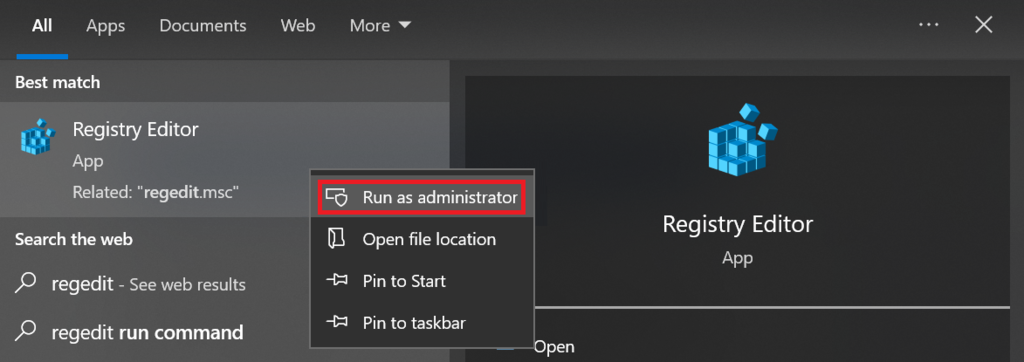
- On the left sidebar, navigate to this directory: HKEY_LOCAL_MACHINE -> SOFTWARE -> Microsoft -> Windows -> CurrentVersion -> Internet Settings.
- Find and right-click the Connection folder. Select Rename.
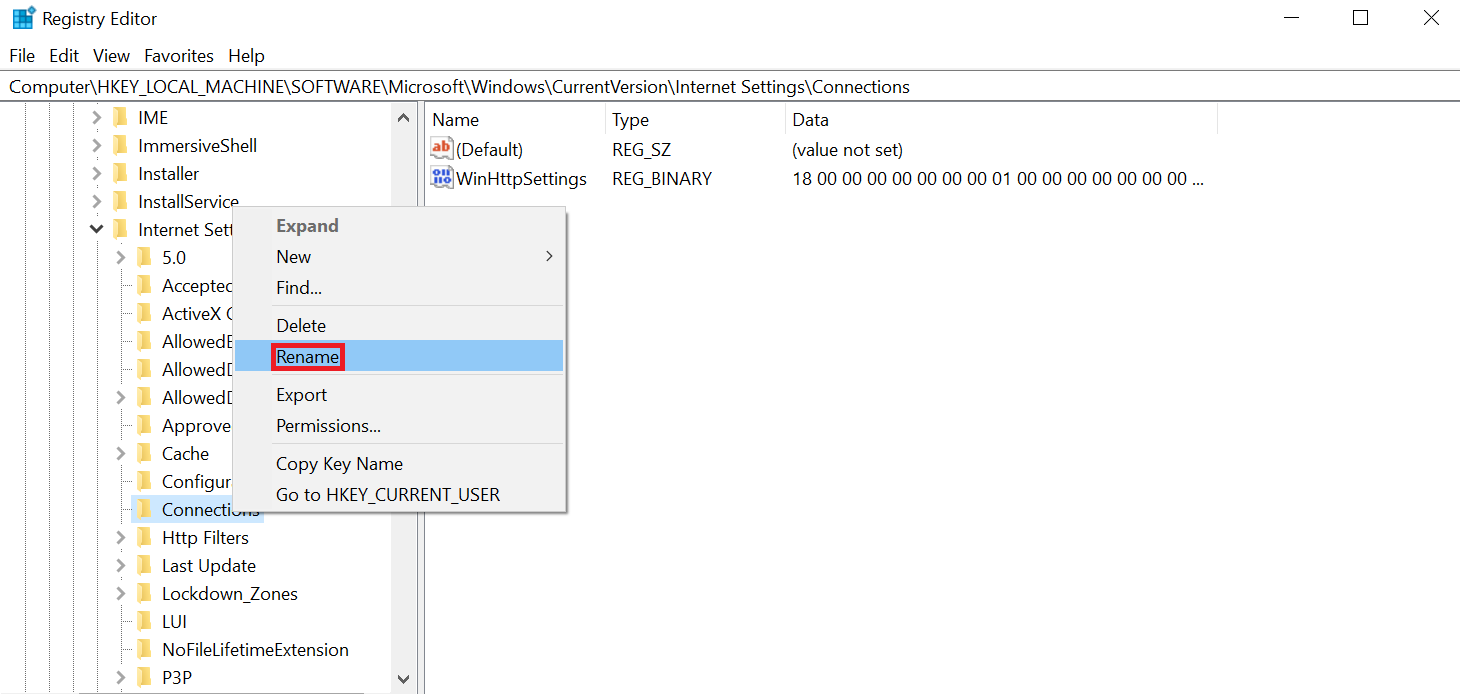
- Rename the folder to ConnectionsX and press Enter.
Pro Tip
Enter the following path into the Registry Editor’s address bar to quickly access the folder: HKEY_LOCAL_MACHINE/SOFTWARE/Microsoft/Windows
/CurrentVersion/Internet Settings
4. Flush DNS
Your web browser saves a visited website’s IP address record as a DNS resolver cache. It speeds up the DNS lookup process, allowing the web page to load faster on the next visit.
However, storing a DNS resolver cache for too long may present various issues. Web browsers will access the site using DNS caches’ outdated information, triggering the INET_E_RESOURCE_NOT_FOUND error message.
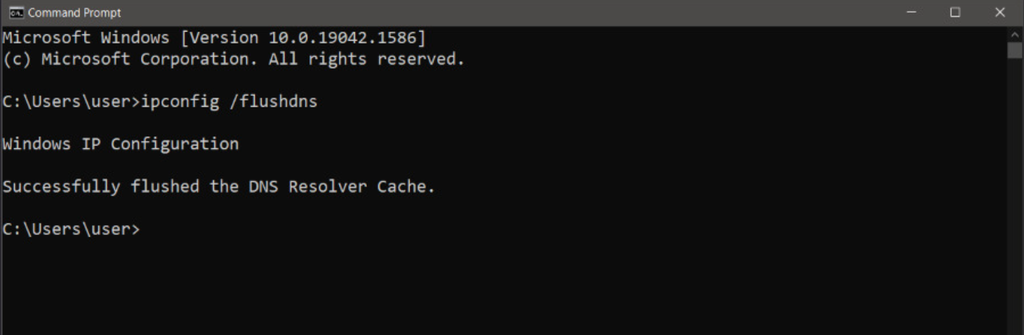
To fix it, delete the outdated information by flushing the DNS cache. Flushing DNS forces web browsers to look for updated information about the visited website.
Here are the steps to flush the DNS cache on Windows:
- Open Command Prompt by entering cmd into the search bar.
- Right-click on the Command Prompt icon -> Run as administrator.
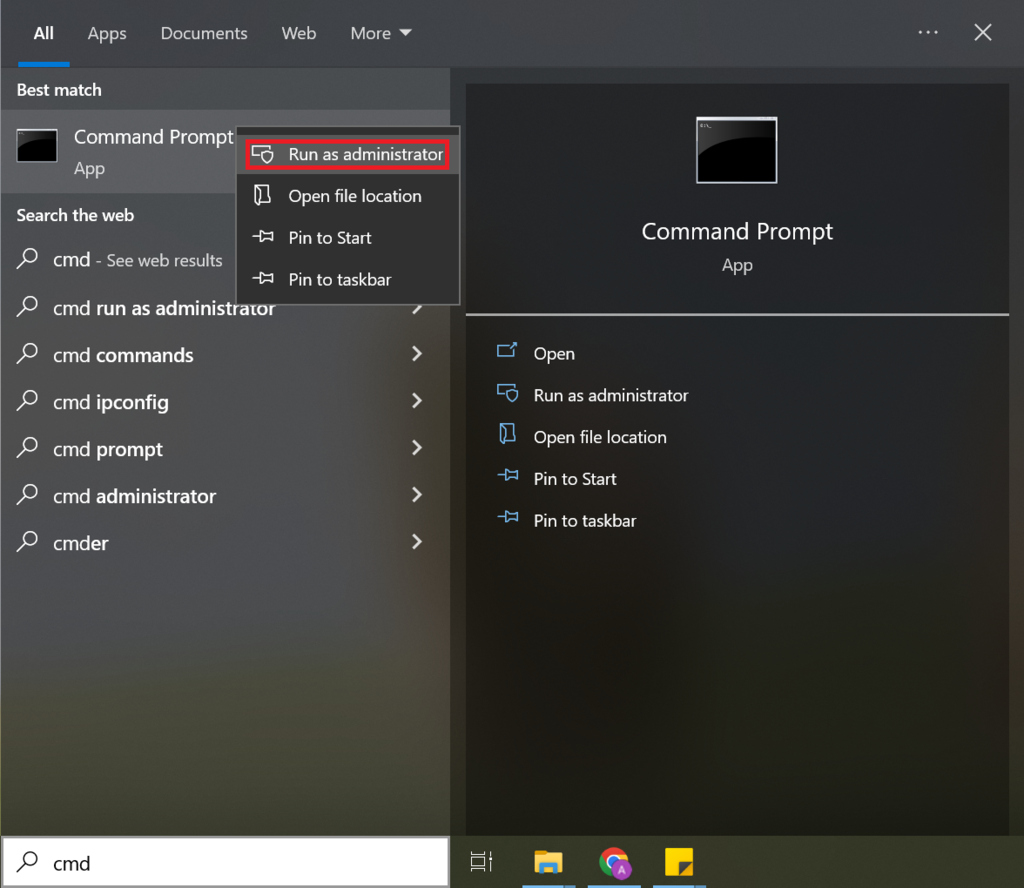
- Click Yes on the confirmation window.
- On the Command Prompt window, type ipconfig /flushdns, and press Enter.
5. Update the Wi-Fi or Network Driver in Windows 10
INET_E_RESOURCE_NOT_FOUND might occur when you use an outdated network driver. Updating your network driver helps resolve any bugs which may cause the error.
Follow these steps to update Wi-Fi or network driver in Windows 10:
- Open the Windows start menu. Type in Device Manager and press Enter.
- Locate and expand Network Adapters by clicking the little arrow icon next to it.
- Right-click your machine’s network adapter -> Update driver.
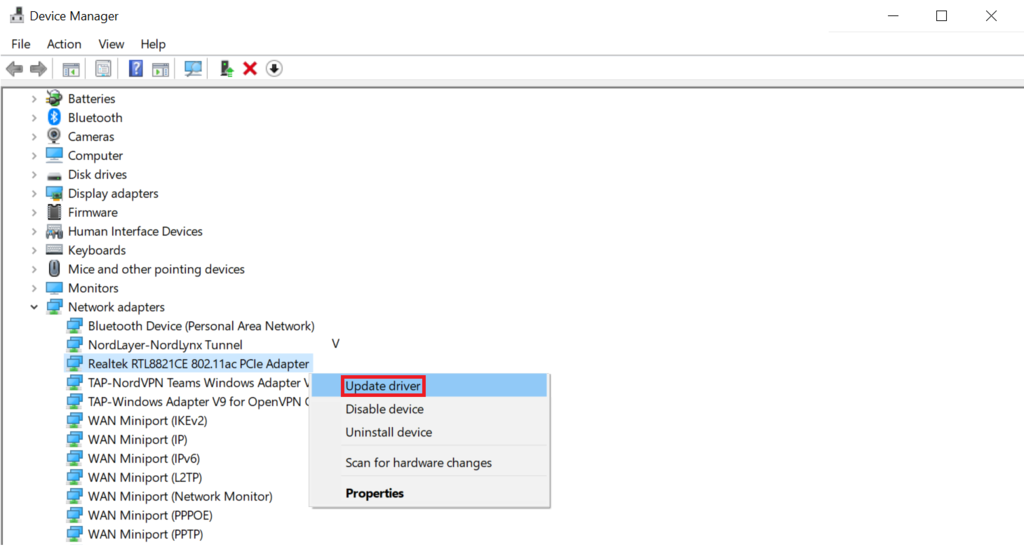
- A pop-up window will appear. Select Search Automatically for Updated Driver Software.
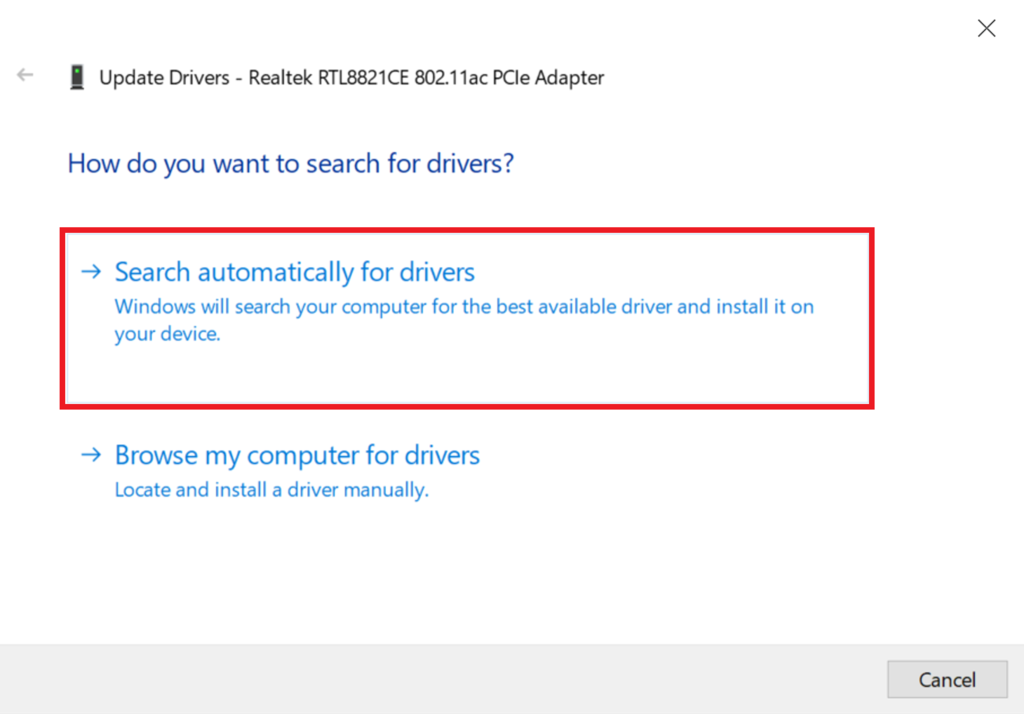
- Follow the instructions to complete the installation process.
- Restart your computer.
6. Modify the User Account Control Settings
User Account Control (UAC) is a Windows security feature that prevents unauthorized system modification. It notifies the user and asks for permission whenever an application wants to make changes.
If UAC is incorrectly configured, your system’s applications may not work properly. In this case, Edge may show errors like the INET_E_RESOURCE_NOT_FOUND or won’t run altogether.
Here are the steps to change User Account Control settings in Windows 10:
- From your desktop, press Windows key + R to bring up the Run application.
- Enter Control and click Ok.
- From the Control Panel window -> User Accounts -> User Accounts -> Change User Account Control Settings.
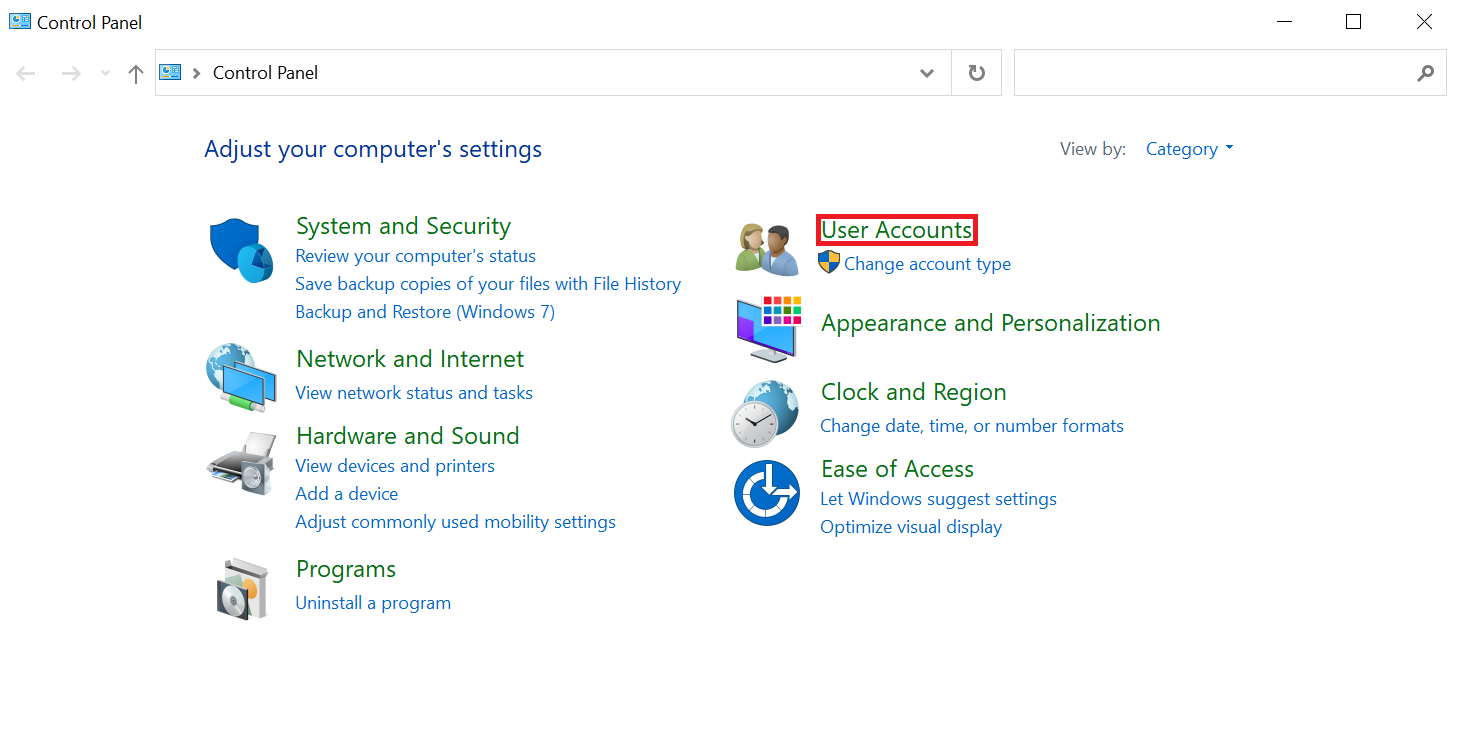
- Adjust the slider to enable Windows notifications. We recommend the second option from the top. Click Ok.
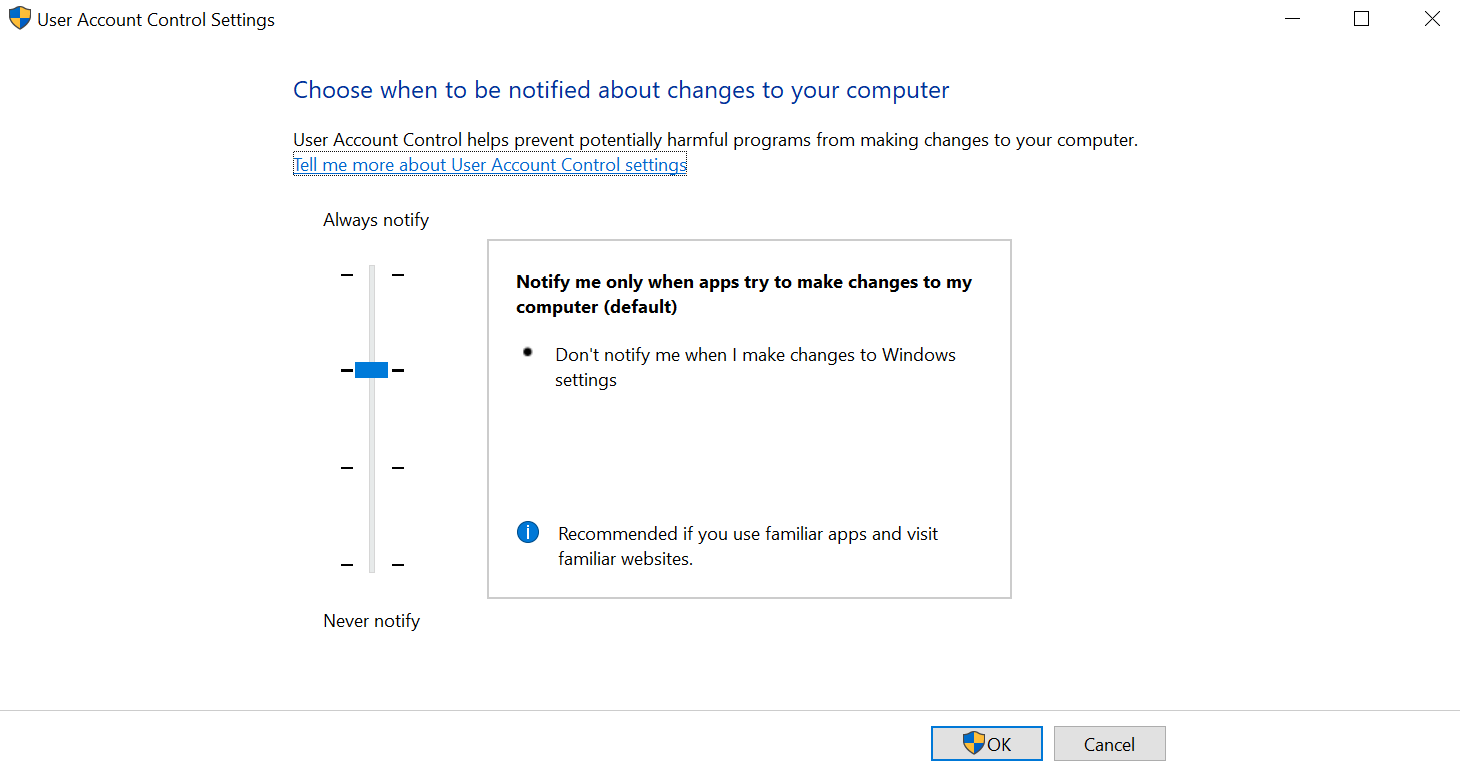
- On the confirmation window, select Yes to confirm.
7. Reset Network Settings Using Netsh
The INET_E_RESOURCE_NOT_FOUND error may occur due to misconfiguration in the network settings. Fix it by resetting the network configurations using the netsh command via Command Prompt.
Avoid this solution if your system uses a static IP address since it will reset your IP settings. Otherwise, save the IP configuration beforehand.
Also, use netsh to reset Winsock – a Windows programming interface responsible for establishing a network connection. It may become corrupted, causing connectivity errors.
Here are the steps to reset your system’s IP settings and Winsock:
- Open Command Prompt by entering cmd into the search bar.
- Right-click on the Command Prompt icon -> Run as administrator.
- Enter the netsh int ip reset command.
- On a new line, enter netsh winsock reset catalog.
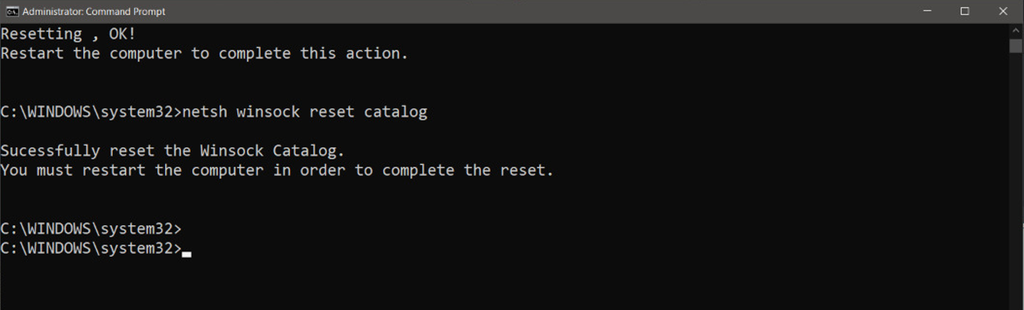
- Restart your computer to apply the changes.
8. Change DNS Server
If you encounter the INET_E_RESOURCE_NOT_FOUND error message, the DNS server might be facing an issue. The error may also occur when your system uses an incorrect or invalid DNS address.
A faulty DNS server can’t match a domain to its corresponding IP address. Without the IP address, your web browser can’t connect to the website’s server, unable to display it.
To resolve this issue, switch to other DNS servers using the following steps:
- Open Run by pressing Windows key + R. Type in Control Panel and press Enter.
- Under the Network and Internet section, select View network status and tasks.
- Click your ethernet or Wi-Fi connection and select Properties.
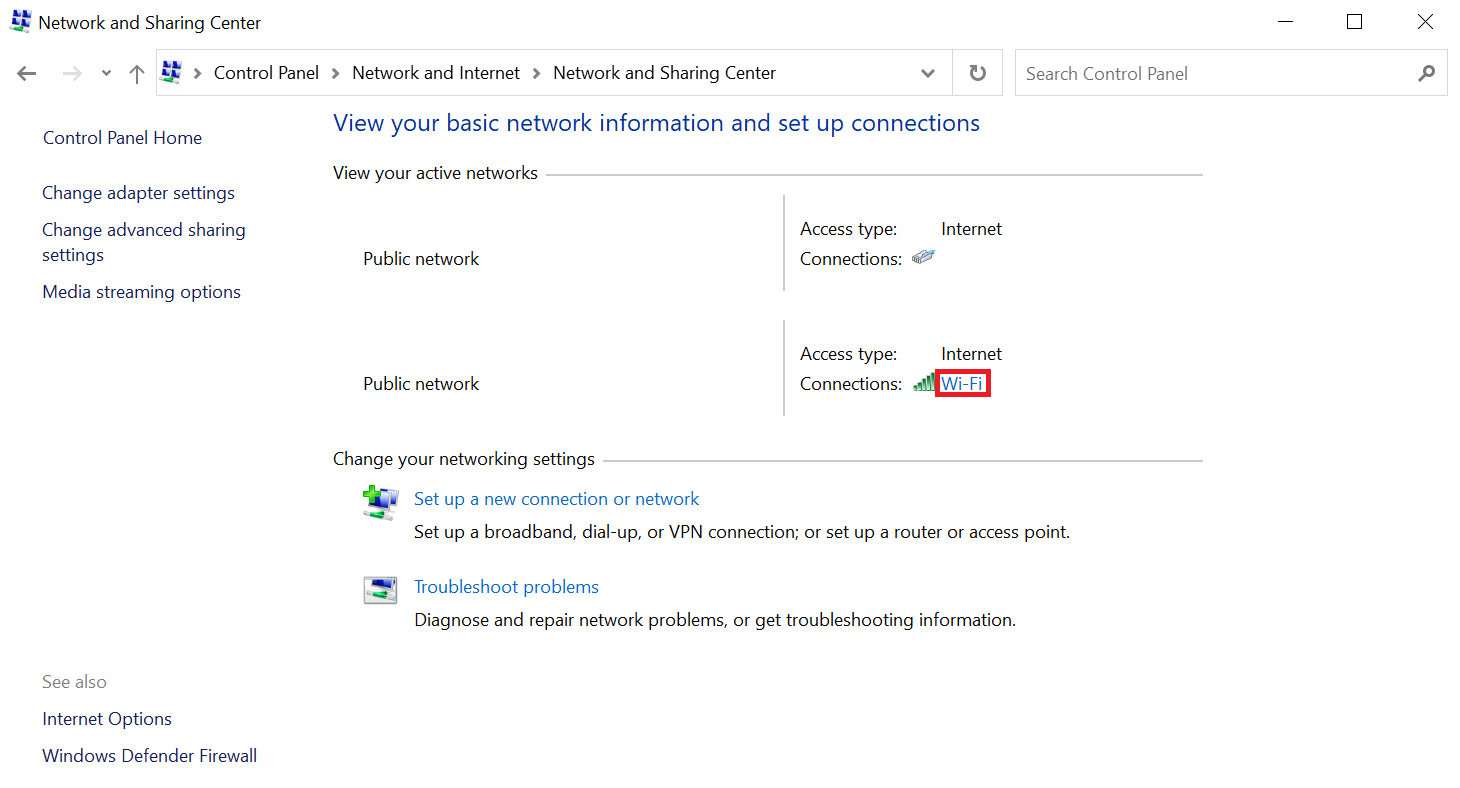
- From the pop-up window, double-click Internet Protocol Version 4 (TCP/IPv4).
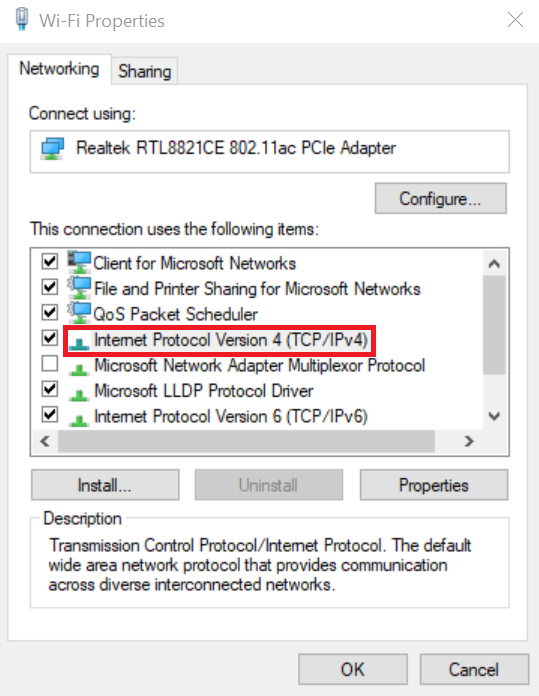
- On the properties window, select Use the following DNS server addresses.
- Enter your desired DNS server addresses. For example, to use the Google DNS server, enter 8.8.8.8 as the preferred and 8.8.4.4 as the alternate.
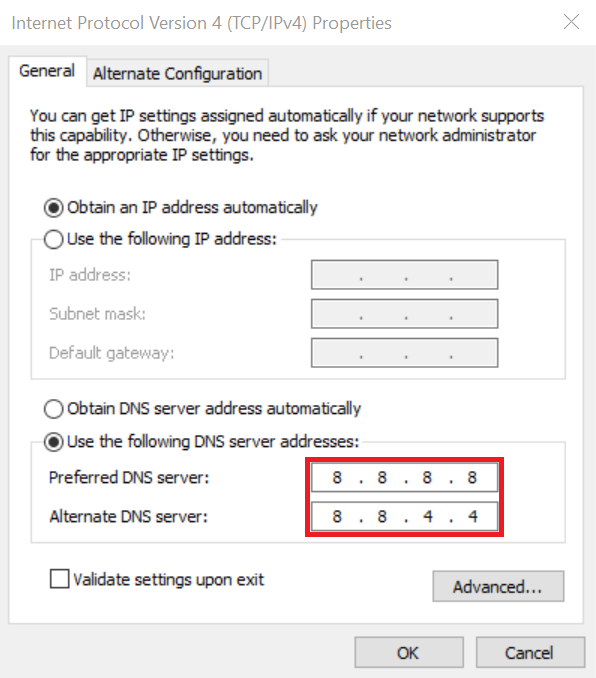
- Click Ok to confirm.
If the problem persists, use other free public DNS services. Here are some of the most popular options with their preferred and alternate addresses:
- Cloudflare DNS – 1.1.1.1 and 1.0.0.1.
- Cisco OpenDNS – 208.67.222.222 and 208.67.220.220.
- Quad9 – 9.9.9.9 and 149.112.112.112.
- Comodo Secure DNS – 8.26.56.26 and 8.20.247.20.
9. Open Private Browsing Session
If a website shows the INET_E_RESOURCE_NOT_FOUND error code, access it in a private browsing session.
Most information and data you enter in a private browsing session will be removed upon exiting. So, use it as a temporary method in case you need to visit the website immediately.
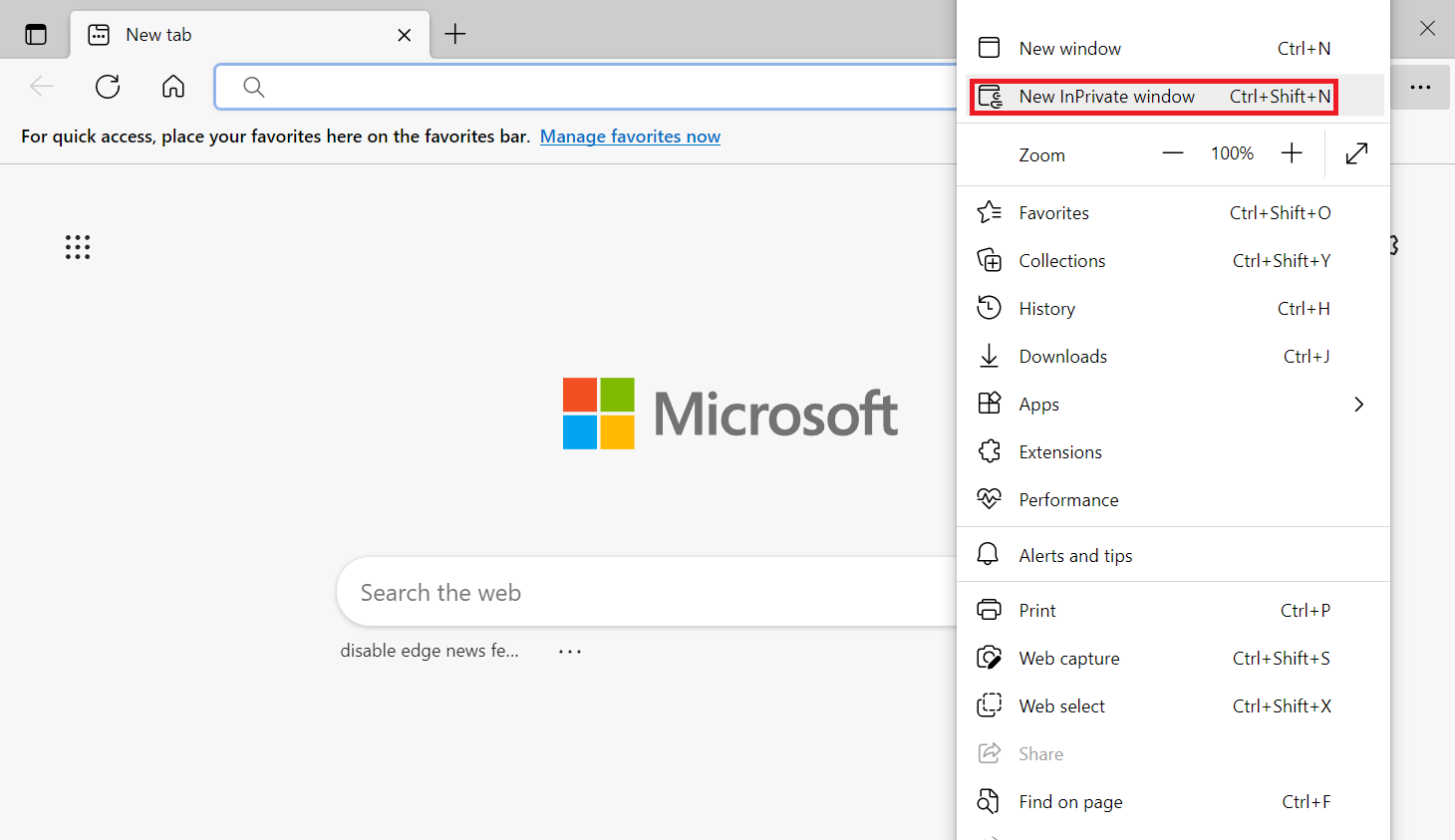
To open a private browsing session In Microsoft Edge, click the three dots icon on the top right -> New InPrivate window. Alternatively, use the Ctrl + Shift + N shortcut keys.
10. Use a VPN
A virtual Private Network (VPN) not only provides a secure internet connection but also helps fix the INET_E_RESOURCE_NOT_FOUND error. VPN ensures the domain is resolved to the corresponding IP address by temporarily using a new DNS server.
There are many VPN services available at different prices. While free VPNs are enough to fix the error, we recommend the likes of ExpressVPN or NordVPN for reliability and data security.
Before using a VPN service, you must create an account and register for a subscription plan:
- Choose a VPN provider. For this tutorial, we will use NordVPN.
- Open NordVPN’s website and select Get NordVPN on the top right of your screen.
- Select a plan that suits your needs. Click the Get Plan button.
- Create an account and complete the payment process.
Once your account is ready, install and use NordVPN:
- Visit the NordVPN download page and select Download App.
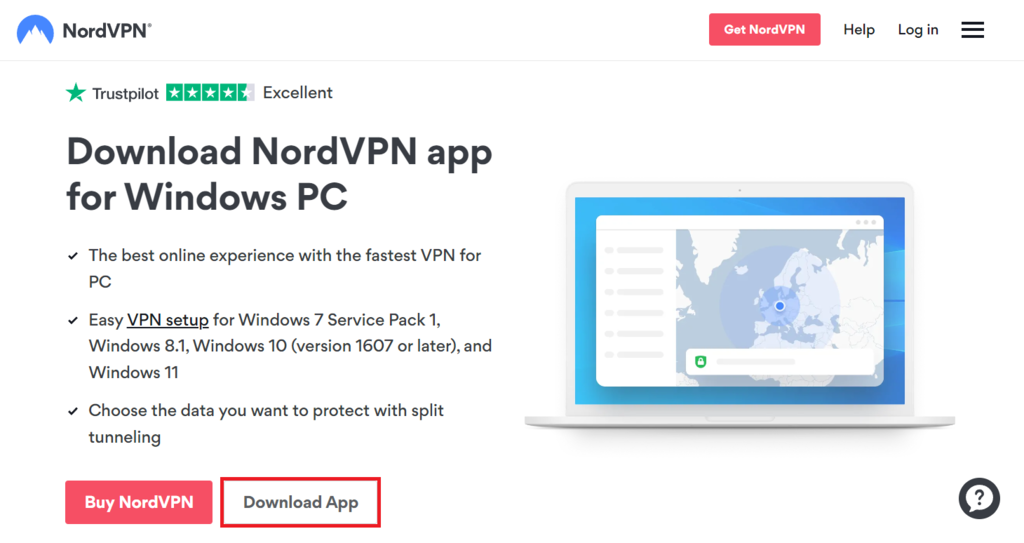
- Once downloaded, double-click the .exe file and complete the installation process.
- Open the NordVPN Desktop App and enter your login credentials.
- Optionally, click the gear icon on the top right to bring up the settings menu. Configure NordVPN based on your preferences.
- Select the arrow icon on the top left to save the settings.
- Connect to the fastest VPN server by clicking the Quick Connect button. Alternatively, pick one from the server list.

Conclusion
When Internet Explorer and Microsoft Edge users fail to visit a website, they may see the NET_E_RESOURCE_NOT_FOUND error code. While various things can trigger the error, it is usually due to DNS-related issues.
Since it is difficult to pinpoint the exact cause, we have listed ten solutions to fix the INET_E_RESOURCE_NOT_FOUND error:
- Disable the TCP Fast Open feature in Edge’s settings.
- Repair, reset, or reinstall Edge to restore corrupted files.
- Rename the Connections folder in Windows Registry Editor.
- Flush the DNS cache via Command Prompt.
- Update your device’s Wi-Fi or network adapter driver.
- Adjust the User Account Control Settings.
- Reset network settings using the netsh command.
- Change the DNS server.
- Open the website in a private browsing session.
- Access the website using a VPN.
If the first solution doesn’t work, move on to the next one. Hopefully, these methods can help you resolve the INET_E_RESOURCE_NOT_FOUND error. Good luck!
INET_E_RESOURCE_NOT_FOUND FAQs
Here are some frequently asked questions about the error.
What Causes INET_E_RESOURCE_NOT_FOUND?
INET_E_RESOURCE_NOT_FOUND is an error that occurs in the Microsoft Edge browser when it is unable to locate the requested resource on the web server. The cause of this error varies, from mistyped URLs, server connectivity issues, and DNS resolution problems to missing or deleted files on the server.
How Do I Prevent INET_E_RESOURCE_NOT_FOUND?
To prevent INET_E_RESOURCE_NOT_FOUND errors, ensure that URLs are typed correctly and that the website or resource being accessed is available and reachable. Clearing the browser cache and cookies, disabling browser extensions, and resetting the browser settings can also help resolve the error.
This article is a localized version of 10 ways to fix INET_E_RESOURCE_NOT_FOUND Error, originally published in English.

Aris is a Content Writer specializing in Linux and WordPress development. He has a passion for networking, front-end web development, and server administration. By combining his IT and writing experience, Aris creates content that helps people easily understand complex technical topics to start their online journey. Follow him on LinkedIn.

Comments
0 responses