5 best WordPress cache plugins to boost site speed
Mar 10, 2026
/
By Nadya A.
/
12 min Read
Maintaining a fast-loading site is the key to a successful online presence, as 40% of web visitors will leave a site if it takes longer than three seconds to load. Not only does a slow site increase bounce rates, but it also impacts the site’s SEO.
Installing a WordPress cache plugin is a convenient way to solve this issue. However, with various caching plugins available, how do you choose the most suitable one for your website?
In this article, we have compiled the five best WordPress cache plugins that will take your site to the next level. We’ll discuss important factors to consider when choosing a suitable plugin to install. Then, we’ll list each plugin’s statistics and features to help you make an informed decision.
Download WordPress security checklist
What Is Cache and Why Is It Important?
When users visit a website, the browser requests the site’s content to the server. Then, the server returns the website files in small chunks called data packets. Then, the browser assembles the data chunks and serves them as a complete web page to visitors.
Repeating this process each time someone visits your website is time-consuming and could wear down server resources.
Website cache accelerates the process by serving users downloaded static content, reducing the need to load pages from scratch for every visitor.
Leveraging site’s cache with WordPress caching plugins helps optimize your website by:
- Conserving bandwidth. Most cache plugins offer file minification and image optimization features, ensuring more efficient bandwidth usage.
- Speeding up your WordPress site. Page speed will increase significantly, as there’s no need to fetch the website files from the server.
- Improving user experience. Fast loading sites provide a better user experience as content is more quickly available.
- Boosting SEO. Improving site speed will help the site rank better since search engines like Google consider speed a ranking factor.

5 Best WordPress Cache Plugins
To ensure we only selected the best WordPress caching plugins, we have conducted thorough research and tested site speed with tools like Google PageSpeed Insights. In addition, we took into account the following factors:
- Features. Besides evaluating its caching functionality, we looked for other website optimization features, such as CDN support and compatibility with other plugins.
- Ease of use. We evaluated each WordPress cache plugin’s configuration difficulty to help decide whether it’s more suitable for beginners or advanced users.
- Reliability. To ensure the WordPress caching plugins are safe to use, the plugins should be credible and compatible with WordPress’s latest updates. In addition, we evaluated users’ ratings and the plugin’s developers.
- Support. Having resources to help you solve any issue that might arise while using the plugin is essential – whether it’s via a support team, online forum or community, documentation, or blogs.
We’ve narrowed down the options to the five best WordPress caching plugins. Let’s take a deeper look at each of them in the following sections.
1. LiteSpeed Cache

LiteSpeed Cache stats:
- Downloads: 3+ million
- Rating: 4.8/5
- Best for: all caching purposes
- Price: free
LiteSpeed Cache is a highly rated, open-source WordPress caching plugin developed by LiteSpeed Technologies. In addition to its caching functionalities, this cache plugin is equipped with a complete set of website optimization features to level up the site’s performance.
As a server-side caching plugin, it processes requests faster than browser caching, significantly improving page speed.
Moreover, this caching plugin is compatible with most WordPress themes and plugins, such as bbPress, YoastSEO, and WooCommerce. It also supports the WordPress multisite network feature and provides a WordPress API to tweak incompatible themes and customize cache rules.
Apart from that, it comes with detailed documentation, support forums, and a Slack community that allows users to connect.
From improving SEO for a personal WordPress blog to speeding up a high-traffic eCommerce site, this WordPress plugin has all features you’ll need.
The features of the LiteSpeed caching plugin come in two sets. While the general features are compatible with any web server, unlocking the exclusive features requires LiteSpeed-powered web hosting.
Let’s look into both sets of features in more detail.
LiteSpeed Cache General Features
- Free QUIC.cloud CDN. QUIC.cloud CDN caches both static and dynamic web content, and also helps secure your WordPress site.
- Object cache support. Although not directly provided by LiteSpeed, object caching is available by installing external object caches such as Redis and MemCache. This integration speeds up database query delivery.
- One-click database optimization. Allows users to manage their WordPress database conveniently with a single click. This includes removing old post revisions, auto drafts, spam comments, and clearing pingbacks.
- CSS, HTML, and JavaScript optimization. Conserves bandwidth resources by combining and minifying CSS, HTML, and JS files.
- Image placeholders. Replaces full-sized images with placeholders upon the page’s initial load. This boosts loading speed as the full images are only generated as requested – once users scroll down the page.
- WebP image format support. Optimizes images by generating smaller-sized WebP versions.
- Optimize Losslessly. Enables lossy and lossless image compression to reduce image size and speed up the website. By default, the configuration is set to lossy compression, but you can simply switch to lossless by clicking the toggle button.
Litespeed Cache Exclusive Features
- Private cache. A private cache displays different content for different users. This is especially useful for eCommerce sites, where users have personalized accounts with specific preferences and order history.
- ESI (Edge Side Includes) integration. ESI works by breaking up specific web content into public and private pieces and caching them separately. Then, the content is re-assembled and served to users as a complete web page. This integration boosts loading time since it doesn’t involve complicated PHP back-end processing.
- Crawler. Looks for expired pages and refreshes them to prevent the site from displaying uncached pages. Note that enabling this function requires configuration at the server level.
- Smart purge. Offers options from selective cache purging based on tags and scheduled URL purge to clearing all WordPress cache.
- WP CLI support. This command-line interface allows users to manage and configure their WordPress sites without using a browser.
When it comes to manual configuration, the Toolbox section allows you to tweak specific caching setups, such as editing the .htaccess file, purging error pages, and reporting bugs.
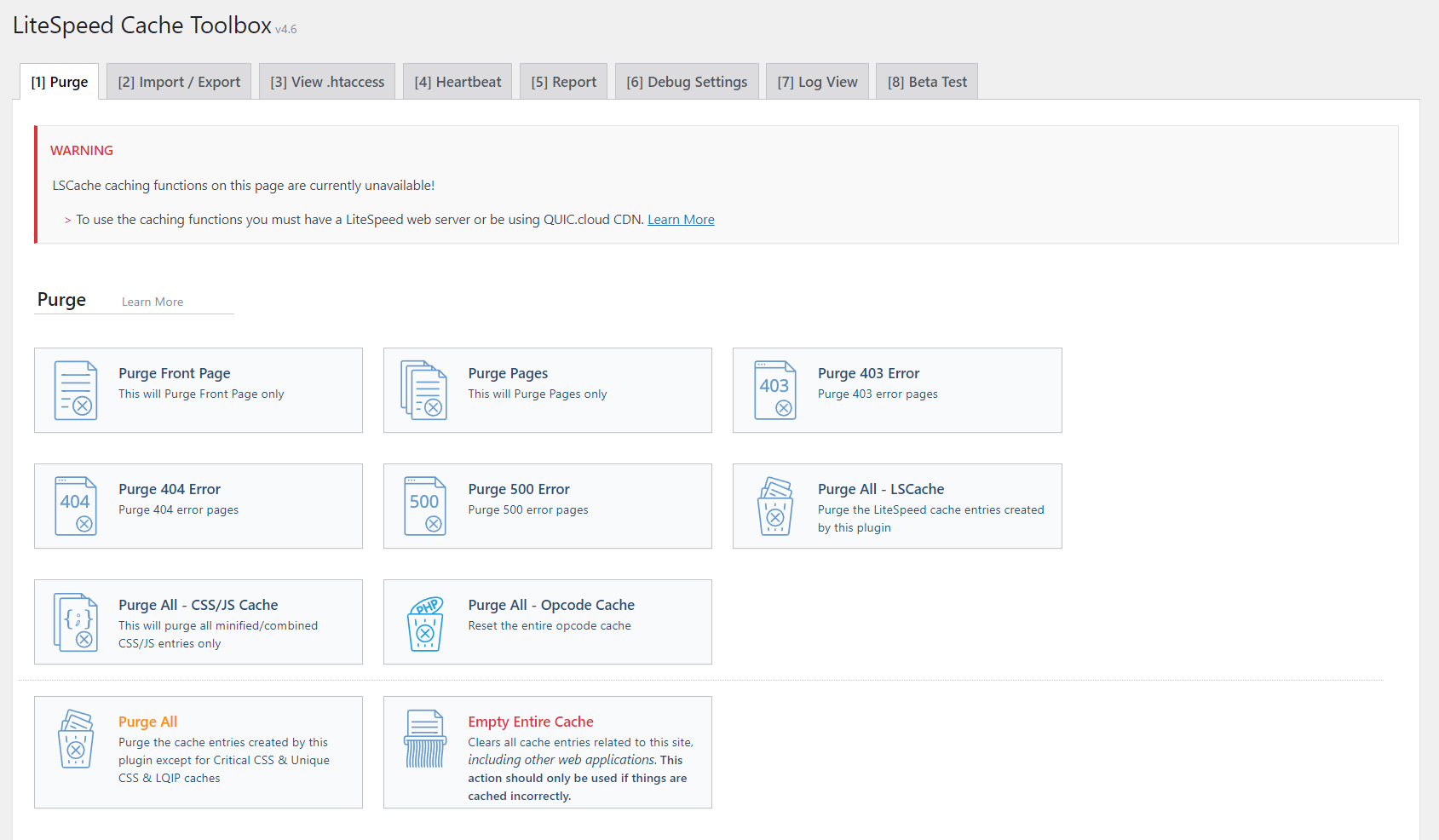
Although Litespeed is a free plugin, unlocking the full features is only possible for users hosting their sites on a LiteSpeed web server. Alternatively, purchase a commercial LiteSpeed product or a separate QUIC.cloud CDN service – which can be quite costly.
For convenience, we suggest finding a web hosting provider that’s already using a LiteSpeed server, such as Hostinger.
This WordPress cache plugin comes pre-installed with all our web hosting plans, granting users access to its exclusive features without additional cost.
2. WP Rocket
WP Rocket Stats:
- Downloads: 2+ million
- Rating: 4.9/5
- Best for: beginners
- Price: premium (starts at $49/year)
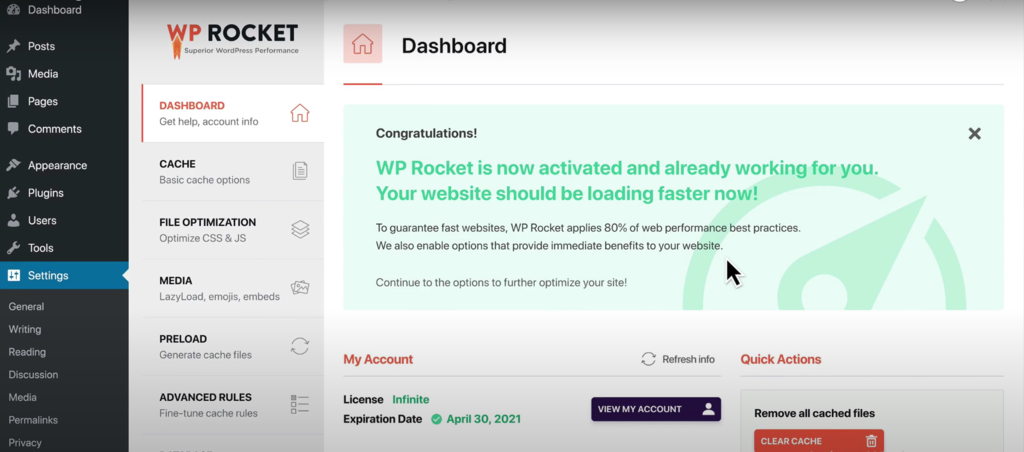
WP Rocket is the most popular premium WordPress caching plugin. It comes with a user-friendly dashboard and default configuration that automatically turns on the recommended WordPress caching settings.
Thus, it is an ideal option for beginners with minimum knowledge about caching.
WP Rocket page feature caches a fully rendered web page, stores it on the browser, and serves it as a static HTML file to the users. This prevents sending a PHP request to the server and reduces page load time.
In addition, this WordPress cache plugin offers a cache preloading feature, activated by default. For instance, when you make changes to the WordPress site, the cached pages served to visitors are not updated automatically.
Cache preloading eliminates this issue by clearing old cache and taking a snapshot of the new content – preventing visitors from seeing outdated content. Moreover, it works for mobile and sitemap cache.
Apart from caching, WP Rocket offers a wide array of website optimization features, such as files, images, code, and database optimization.
Other key features available in WP Rocket include:
- Optimize CSS delivery. Identifies and generates critical CSS. This ensures prioritized content loads first, and the page is displayed as quickly as possible.
- Remove unused CSS. Unused CSS files can affect the site’s performance metrics, such as the largest contentful paint.
- Defer JavaScript loading. Execute JS files upon visitors’ interaction. For example, an exit-intent pop-up will only load when visitors are about to leave the site, speeding up initial page load time.
- Purge individual URLs. Since clearing the whole site’s cache requires a time-consuming cache rebuilding, it gives you the option to clear cache only from specific URLs.
- Automatic database cleanup. Enables users to schedule database optimization tasks, including cleaning up tracked changes and removing spam comments with a single click.
- Optimize Google Fonts. Combines multiple Google Fonts requests into one so they are processed quicker. Moreover, this feature also preloads Google Fonts asynchronously.
- Prefetch DNS requests. Enables browsers to perform DNS lookups for external links in the background as users browse the site, minimizing latency.
- Lazy load images. Load images only when requested. If visitors need to scroll down until they find the image, the full size is not generated upon initial load. Instead, the website will only load a placeholder image to conserve bandwidth.
- Control the Heartbeat API. Enables disabling and reducing the Heartbeat API’s activity.
In terms of compatibility, this WordPress cache plugin requires PHP 7 or higher and performs very well on most servers, including Apache, NGINX, and Litespeed.
It is also compatible with other extensions that improve security and search engine optimization, like Wordfence, SEOPress, and YoastSEO.
On top of that, WP Rocket supports the multisite network feature and performs well with eCommerce plugins such as WooCommerce and BigCommerce, making it an excellent choice for online businesses.
Another advantage of this WordPress cache plugin is that it provides detailed, easy-to-digest information on its blog about caching-related topics such as caching features, compatibility with other plugins, troubleshooting, tips, and tutorials.
If you’re just starting out, we recommend taking a look at the documentation before installing the cache plugin.
Finally, if you run into a problem while using the plugin, simply submit a support ticket from the Support section on the plugin’s dashboard.
Although it seems like a complete package, the drawback of this WordPress cache plugin is that it doesn’t offer a demo or trial version. To try WP Rocket, you will need to purchase one of its plans:
- Single – $49/year for one website.
- Plus – $99/year for three websites.
- Infinite – $249/year for unlimited websites.
That said, if the premium caching plugin doesn’t meet your expectations, WP Rocket offers a 14-day money-back guarantee.
[DOWNLOAD]
3. W3 Total Cache
W3 Total Cache Stats:
- Downloads: 1+ million
- Rating: 4.4/5
- Best for: advanced users with technical knowledge
- Price: freemium (starts at $99/year)
Recently acquired by Boldgrid, W3 Total Cache is an open-source, multi-purpose WordPress caching plugin with robust features that will take your site speed to the next level.
This WordPress caching plugin comes with extensive settings, making it a good option for users looking to have more control over their site’s cache. For starters, it comes with various caching methods, such as using local disk, Redis, Memcache, eAccelerator, XCache, and WinCache.
It ensures proper caching by providing support for page cache, browser cache, and fragment cache. The latter comes with a cache-control header that instructs the user’s browser on how to cache files. You can also prevent dynamic page caching with the no-cache directive.
What’s more, caching is optimized for databases, search results pages, and feeds.
W3 Total Cache integrates with several content delivery networks (CDNs), such as Cloudflare, StackPath, and KeyCDN, to ensure your site’s content is delivered to visitors as quickly as possible.
With its cache group feature, this WordPress caching plugin offers extra flexibility by letting you customize cache for different groups. For example, configure specific redirection for visitors coming from certain links, set up different renderings for mobile visitors, and assign unique cookie groups.
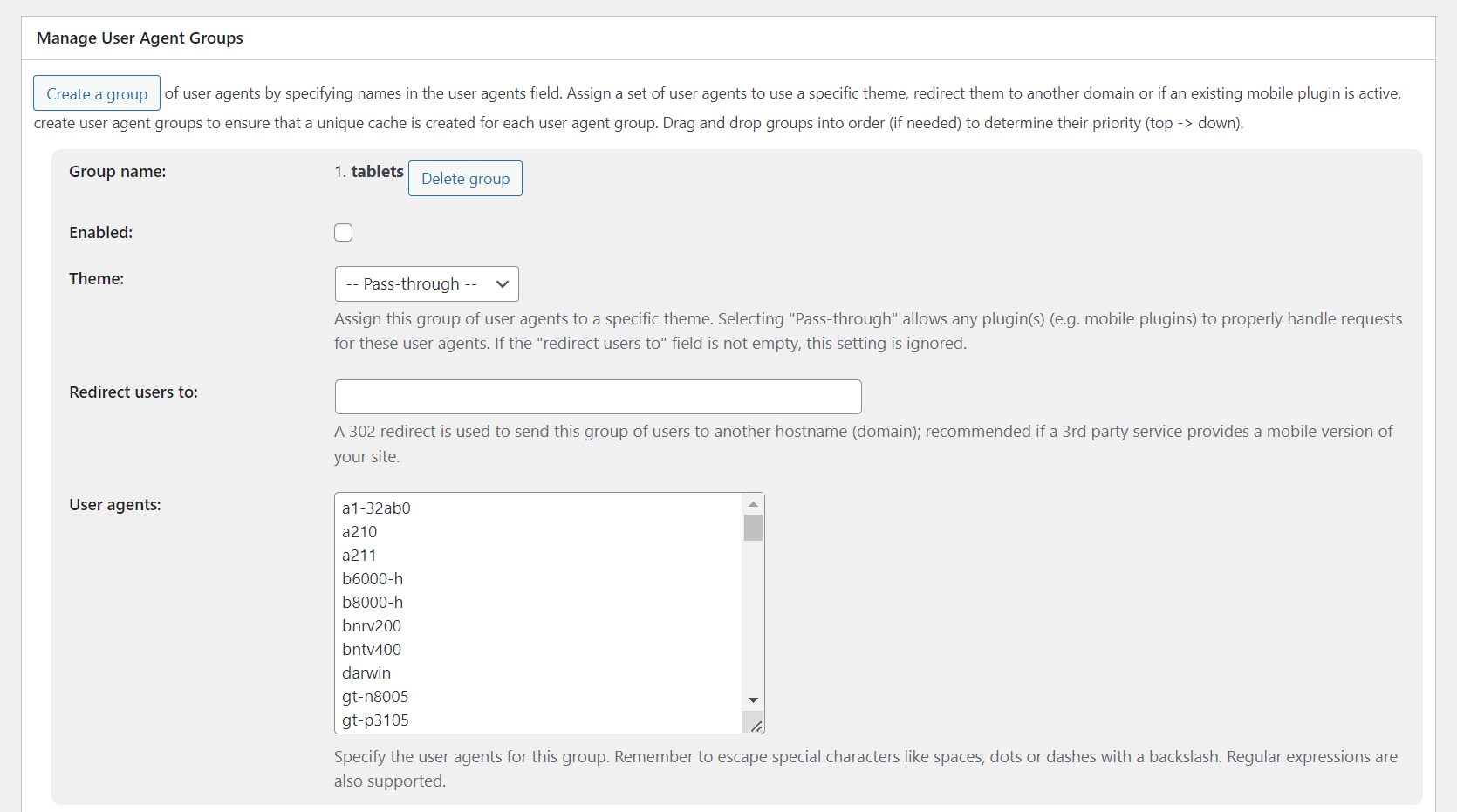
Let’s take a look at other key features from the W3 Total Cache plugin:
- Reverse proxy integration. Helps to speed up performance since data can be fetched from a reverse proxy server instead of a remote server.
- SSL support. The plugin’s functionality is compatible with WordPress sites that use SSL.
- Google AMP support. Ensures optimal caching for mobile devices.
- Caching statistics. Provides metrics to analyze site performance and fix related issues.
- Eliminate render-blocking resources. Eliminates JavaScript, CSS, and HTML elements that delay page rendering, speeding up its initial load time.
- Lazy load for Google Maps. Integrates Google Maps without dragging down the site loading speed. This feature is handy for businesses looking to attract local audiences.
- WPML support. Optimizes caching for sites localized using the WPML plugin, improving their scalability.
- Genesis framework support. Enables seamless integration with the Genesis theme framework. The framework offers a set of features to help develop your WordPress site.
Keep in mind that some features are only available on the Pro version, starting at $99/year for one site. So, it can be quite costly for WordPress users with multiple websites.
If you’re on a budget, the free version still offers a wide range of caching options.
Due to its extensive features and complicated dashboard, W3 Total Cache is better suited for advanced users who are experienced with caching.
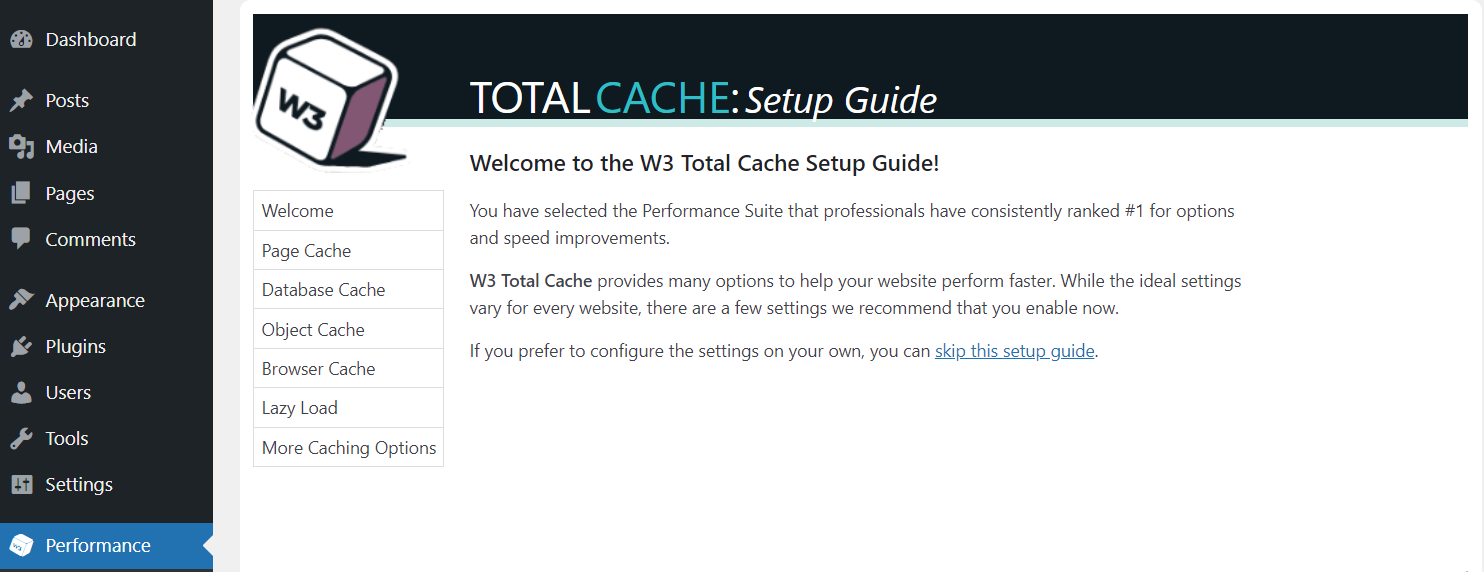
Nevertheless, W3 Total Cache provides a quick setup guide for beginners who want to try out this caching plugin. You can test the site’s initial caching performance and learn how to improve it by enabling page caching and image optimization settings.
In addition, W3 Total Cache’s Github repository features an FAQ section with information about updates, integrations, and other topics.
4. WP Super Cache

WP Super Cache Stats:
- Downloads: 2+ million
- Rating: 4.3/5
- Best for: users looking for a cost-effective caching plugin
- Price: free
If you’re looking for a simpler version of W3 Total Cache, WP Super Cache is for you. This beginner-friendly and free caching plugin was created by Automattic.
It works by saving static HTML files from your dynamic WordPress site and serving them to visitors. This reduces latency as the process doesn’t involve heavy WordPress PHP scripts.
WP Super Cache delivers a cached version of the WordPress site in three caching modes: simple, expert, and WP-Cache.
The expert mode serves static HTML files at a much faster speed using the mod_rewrite module. Since employing this mode requires .htaccess file modification, it is only recommended for users with the appropriate technical knowledge.
On the other hand, the simple mode uses PHP to serve cached files and is more suitable for beginners due to its easy setup.
Lastly, the WP-Cache mode caches web pages for known users. Since the pages are customized according to users’ data, it is the most flexible yet slowest caching mode.
Here are WP Super Cache’s key features to improve site performance:
- Cache rebuilding. Prevents immediate removal of cached files after every update. Instead, the plugin serves the old cache to visitors until a new file is generated.
- Disable cache for known users. Identifies known users and prevents them from seeing cached pages.
- 304 browser caching. Triggers browser to check for updates since the last page request to prevent serving outdated content.
- Garbage collection. Schedules automatic purging for outdated cache to ensure visitors always see updated web pages.
- Enable Gzip compression. Automatically shrinks the page size by up to 70%, speeding up content delivery.
- Extra homepage checks. Ensures the WordPress site’s homepage shows the newest content.
- User-friendly import and export settings. Enables users to easily transfer existing caching settings to additional sites.
Moreover, this caching plugin is compatible with mobile support plugins and CDNs. This ensures fast loading time and reduces the possibility of bounce rates on the site’s mobile version.
Equipped with a straightforward interface and simple dashboard, this plugin enables users to set up their caching preferences with a single click.
When first installed, you will see seven tabs in total. The tab titled Easy is displayed first.
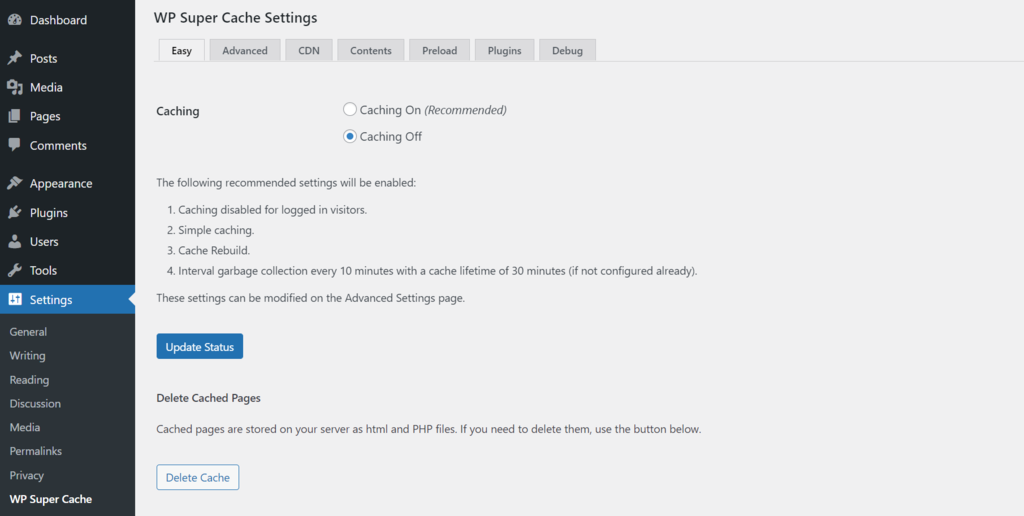
Opting for Caching On will turn on the simple caching mode by default. Meanwhile, the Advanced tab provides access to more elaborate configurations, such as scheduling cache timeout, customizing cookies, URL, and cache locations.
Although there’s no official documentation, the WP Super cache plugin comes with a support forum and an informative directory page. There’s also a Debug section to report problems while using the plugin.
If you run into an issue while setting up the caching features, there’s an option to restore it to the default configuration with a single click.
Compared to other caching plugins, the downside of WP Super Cache is that it doesn’t offer code minification features or browser caching.
Despite so, this is still one of the best WordPress caching plugins for boosting site loading speed.
[PREVIEW]
5. WP Fastest Cache

WP Fastest Cache Stats
- Downloads: 1+ million
- Rating: 4.4/5
- Best for: beginners who own small WordPress websites
- Price: freemium (starts at $49.99/license)
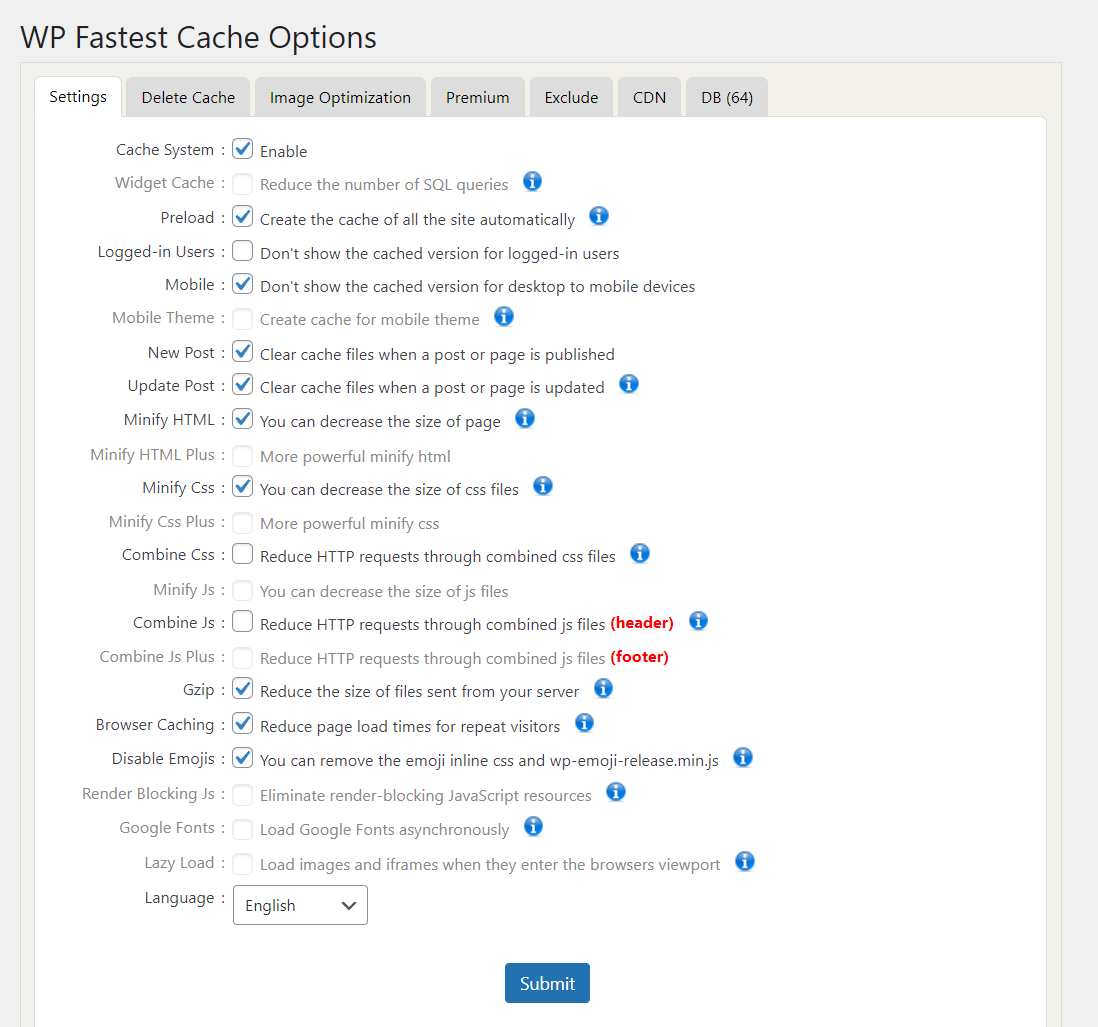
WP Fastest Cache is one of the most popular caching plugins for beginners who want a well-performing, cost-effective plugin with all the necessary caching features and without complicated settings.
It has a user-friendly dashboard displaying a list of checkboxes for enabling and disabling features. Each checkbox comes with explanations about the features, as seen in the picture below.
This cache plugin integrates well with several popular CDN such as Cloudflare and StackPath, enabling further site acceleration.
Moreover, it’s equipped with several web optimization features like database cleanup and image optimization – which are accessible on the premium plugin.
Unlocking WP Fastest Cache’s premium features only requires a one-time advance payment starting at $49.99/site, so there’s no need to renew the premium plan annually. It’s a considerably lower deal compared to WP Rocket’s and W3 Total Cache’s pricing.
Moreover, a 30-day money-back guarantee is available if you change your mind after purchasing the license.
On top of that, WP Fastest Cache offers multisite discounts and options for transferring settings, which is a good option if you’re running more than one WordPress website.
Note that the premium version is available in-app, so you don’t need to look for it on other platforms.
What sets the free version of this WordPress plugin apart from WP Super Cache is its ability to minify CSS, HTML, and JS files. Combined with the Gzip compression feature, this cache plugin is able to reduce the size of website files significantly.
Let’s take a closer look at other key features of the WP Fastest Cache plugin. Keep in mind that some features listed aren’t available on the free version.
- Combine JS and CSS files. Reduces the number of HTTP requests, speeding up page loading time.
- Browser caching. Stores a static copy of the web page in the browser for quicker access.
- Mobile theme and widget caching. Generates separate cache for widgets and mobile themes. The latter is helpful if you have a different WordPress theme for the site’s mobile version.
- Cache timeout. It allows users to schedule cache clearing.
- Cache statistics. Enables cache monitoring from the WordPress dashboard.
- Database cleanup. Clear unnecessary data with a single click, including trashed content, comments, transients options, post revisions, and pingbacks.
- Image optimization. Includes image size reduction, lazy loading, and WebP support. This feature uses a credit system, requiring one credit for each optimization process. Once you use up one thousand credits from the first premium upgrade, you can buy more starting at $0.01/credit.
- Optimize Google Fonts. Loads Google Fonts asynchronously.
Although it doesn’t have official documentation, the plugin is regularly updated, and its blog provides WP Fastest Cache’s tutorials and feature details.
However, most website optimization features are only available on the premium version. With other WordPress caching plugins like W3 Total Cache, the features are accessible for free.
Still, the free version is still one of the best WordPress caching plugins for accelerating your WordPress website to the next level.
Conclusion
WordPress caching plugins play an important role in your site’s optimization. Aside from boosting site speed, installing a WordPress caching plugin helps improve user experience and SEO.
In this article, we covered the five best WordPress caching plugins to level up site speed and overall performance. Let’s recap the list:
- LiteSpeed Cache – best for all caching purposes as it offers complete website optimization features for free.
- WP Rocket – best for users who don’t mind spending extra for a user-friendly dashboard and premium caching features.
- W3 Total Cache – best for advanced users as its extensive caching options involve complicated configuration.
- WP Super Cache – best for users who want a completely free but reliable caching solution.
- WP Fastest Cache – best for beginners who own small WordPress websites as it offers simple caching configurations at an affordable price.
When navigating between the vast option of caching plugins available, consider your goals, needs, budget, and technical knowledge. Doing so will help you select the best WordPress caching plugin for the site.
If you have any questions, feel free to leave a comment below.
Discover Other WordPress Plugins to Help Build Your Website
Best WordPress Forum Plugins
Best WordPress Live Chat Plugins
Best WordPress Comment Plugins
Best WordPress Contact Form Plugins
Best WordPress Search Plugins
This article is a localized version of 5 best WordPress cache plugins to boost site speed, originally published in English.

Nadya has a passion for WordPress and web hosting. She wants to help people build a successful online presence, so they can make an impact in the world. When not writing, she can be found learning new languages or orchestrating a photoshoot for her cat. Nadya is always looking to learn and grow, and she hopes to help others do the same.

Comments
0 responses