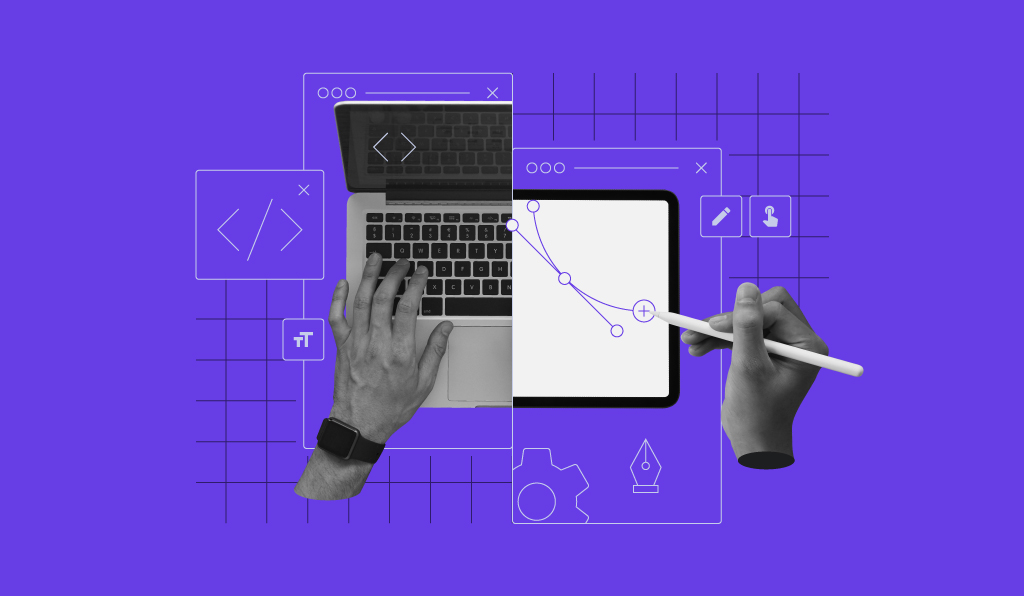
The main difference between a headless CMS and a traditional CMS is how they manage and display content. A traditional CMS combines content management and website presentation in a single system, while a headless CMS separates them and delivers content to independently built frontends via APIs.
Traditional CMS platforms like WordPress are generally easier to set up and manage, making them suitable for blogs, business websites, and online stores. Headless CMS platforms offer greater control over frontend development and content delivery across websites, mobile apps, and other channels, but usually require more technical expertise.
The right choice depends on your budget, development resources, content delivery needs, and long-term plans. We’ll compare both approaches in terms of usability, flexibility, performance, SEO, security, scalability, and cost to help you decide.
What is a CMS?
A Content Management System (CMS) is software that lets you build and update a website without having to write code every time you want to make a change. You type your text into an editor, upload your images, and the CMS turns it all into web pages that visitors can see.
Every CMS has three basic parts:
- The editor is where you write and organize your content.
- The database is where all that content gets stored behind the scenes.
- The frontend is the part of the website that visitors actually see and interact with.
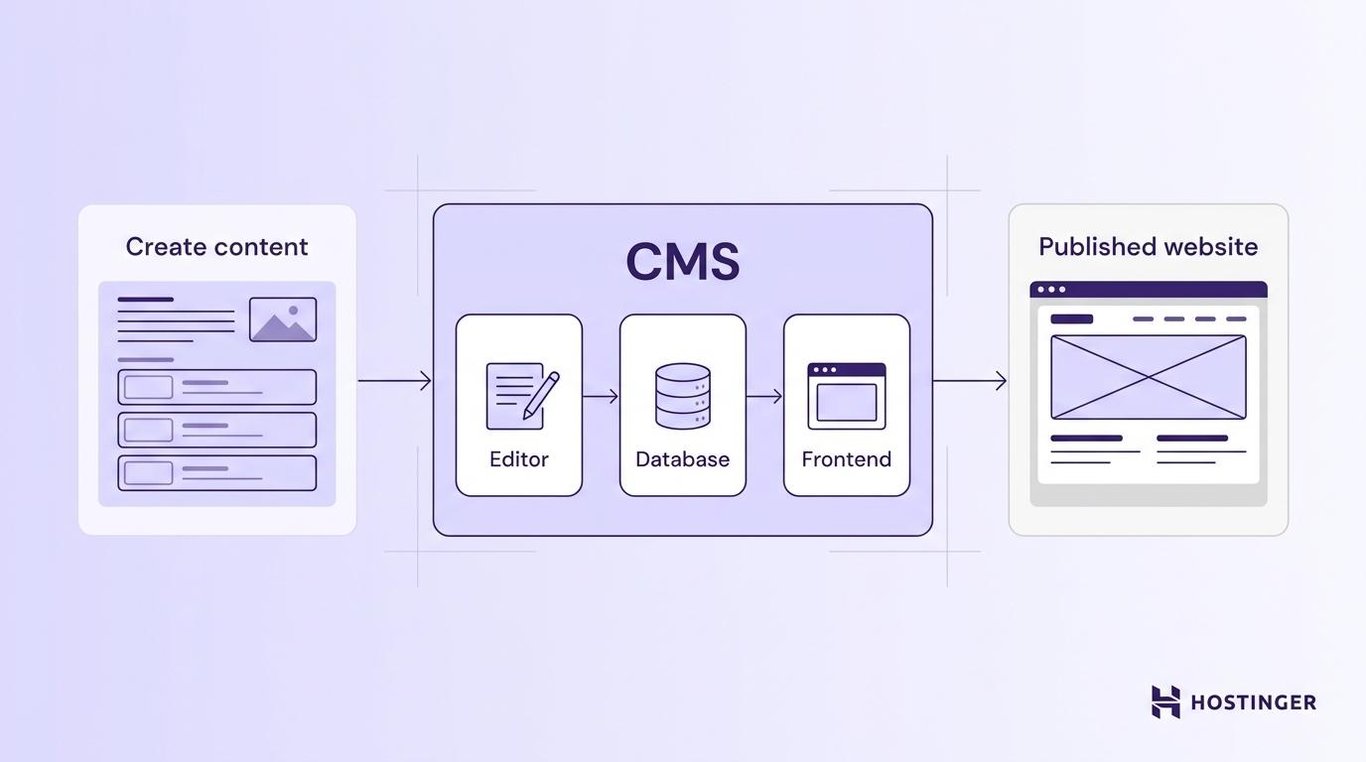
What makes headless and traditional CMS different is how these three parts are connected. In a traditional CMS, they’re all bundled together in one app. In a headless CMS, the editor and database are separated from the frontend, and the two sides communicate through an API (application programming interface).
Whether you want to build an ecommerce website, start a blog, or put up a company site, a CMS makes it manageable. The type you pick decides how much technical help you’ll need and how flexible the site can be down the road.
Why does CMS architecture matter?
CMS architecture refers to whether the editor, database, and frontend are bundled together or kept separate. That one detail affects a lot:
- Whether you can update the site yourself or need a developer for every change
- Whether your content can reach other places later, like a mobile app or a smart display
- How much maintenance the site needs as it gets more visitors
Changing your CMS type after your site is already up and running means rebuilding pages, moving content, and often retraining your team.
For large businesses, it can cost more than $420,000 and take up to 18 months to run both old and new systems simultaneously, according to Mordor Intelligence.
Even for a smaller site, you’re looking at weeks of work and a learning curve on the new system. That’s why it helps to understand the difference before you pick one.
What is the main difference between a headless CMS and a traditional CMS?
A traditional CMS keeps content and design in one system. A headless CMS separates them and uses an API to send content to a separate frontend.
Think of a traditional CMS like WordPress or Drupal as one box that does everything. You write your content, choose a theme, install plugins, and the same software puts it all together into a website. This is sometimes called a “coupled” setup, because everything is connected and runs together. This integrated approach makes it easier to launch and manage a website, although platforms like WordPress can also distribute content through APIs when additional channels are needed.
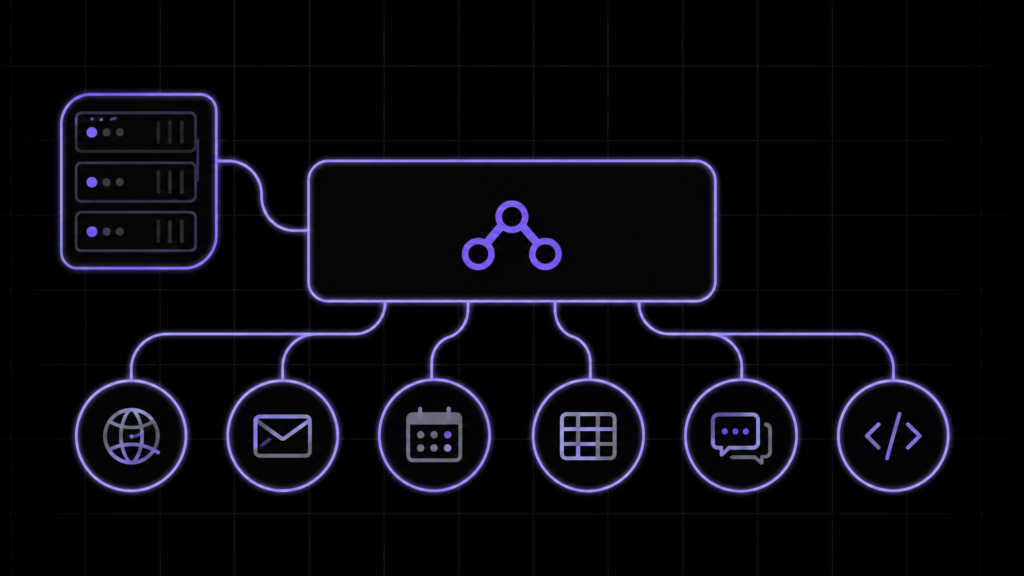
A headless CMS splits that box in two. You still write and manage content in the backend, but there’s no theme or design system attached to it. Instead, the content is delivered through an API, and a separate frontend picks it up and decides how to display it. A developer builds that frontend in whatever tool they prefer.
The benefit is flexibility. Because the content isn’t tied to one design, it can go anywhere: a website, a mobile app, a kiosk, or all three at once. The downside is that you need a developer to build and maintain that frontend.
Here’s how the two compare:
| Feature | Headless CMS | Traditional CMS |
|---|---|---|
| Architecture | Backend and frontend are separate and connected through APIs | Content management and website presentation are integrated |
| Frontend development | Developers can choose their frontend framework | Uses built-in themes, templates, or custom frontend development |
| Content delivery | Designed to deliver content to multiple channels through APIs | Primarily serves websites but can support other channels through APIs and integrations |
| Setup complexity | Usually requires frontend development and API integration | Typically faster to configure using existing tools and templates |
| Developer requirements | Higher for initial setup and customization | Lower for standard websites, higher for custom functionality |
| Scalability | Frontend and backend can scale independently | Can scale with optimized infrastructure, caching, and hosting |
| Best for | Custom digital experiences and multichannel content delivery | Blogs, business websites, and stores prioritize ease of management |
At its core, headless CMS vs. traditional CMS is a choice between simplicity and flexibility.
Is WordPress a headless CMS?
Not out of the box. WordPress ships as a traditional CMS. Its themes, editor, and plugins all assume the frontend is part of the same system.
But WordPress does come with a built-in REST API, which lets other software request content from it over the web. A plugin called WPGraphQL adds another option, GraphQL, that does the same thing in a different way.
With either one, developers can use WordPress just for writing and managing content, then build a completely separate frontend in React, Next.js, or another tool.
The catch? You give up the theme system, most plugins that change how the site looks, and the live preview editor. Teams that do this usually love how WordPress feels for writing, but need a custom frontend for speed or to reach more channels.
What are the pros and cons of a headless CMS?
A headless CMS gives you more control over how and where your content appears. However, you pay for that with higher startup costs and more reliance on developers.
Headless CMS pros:
- Works across channels. APIs send the same content to websites, mobile apps, kiosks, smart displays, and voice assistants. You write once, and every channel pulls what it needs. No copying, no running separate systems for each one.
- Any frontend tool. Developers can use React, Next.js, Vue, Astro, or native mobile tools instead of being stuck with the CMS’s own templates. That means faster pages, more design freedom, and an easier time hiring, since React and Next.js developers are much easier to find than CMS-specific ones.
- Scales on each side. A traffic spike on the website doesn’t slow down the editing backend. You add server power only where you need it.
- Faster to wire up new tools. Connecting to a payment service, analytics, or any third-party tool is done through a standard API. No waiting for someone to build or update a plugin.
- Separate security controls. A headless architecture allows developers to isolate the content management backend from the public-facing frontend. This can reduce exposure when configured correctly, but APIs, authentication, hosting, and both application layers still require security measures.
Headless CMS cons:
- More expensive and slower to launch. Most headless projects need more custom frontend work, since there are fewer ready-made templates to start from.
- Design changes need a developer. Editors can update content, but changing a page layout or adjusting SEO tags means writing code.
- SEO takes more effort. Meta tags, sitemaps, schema markup (code that helps search engines read your pages), and canonical URLs (the preferred web address for a page) usually need to be coded into the frontend by hand. Some headless platforms offer basic SEO fields, but the process is less automatic than with a traditional CMS.
- Harder to preview pages. Editors type into fields (title, body, image) instead of seeing the page as it will look. Getting a proper preview before publishing means building a custom preview tool, which is more dev work.
- Running costs add up for small sites. Self-hosted platforms like Strapi still need server hosting, updates, and security management. Software-as-a-service (SaaS) options start at $15–$300/month.
Headless CMS pays off when you’re publishing to many channels, want full design control, or expect heavy traffic.
What are the pros and cons of a traditional CMS?
Traditional CMS trades the flexibility of headless for speed and ease. It’s built to get one website up fast, and it lets non-tech editors run the whole thing.
Traditional CMS pros:
- Live in a day. A WordPress site can go from zero to published in hours. 1-click installers do the setup, and thousands of free themes give you a working design right away.
- Editors run it all. Drag-and-drop builders, live preview, and visual editors let non-tech people write, design, and publish on their own.
- Huge plugin library. Need SEO, forms, or analytics? WordPress has over 59,000 plugins for that. Yoast and Rank Math take care of meta tags, sitemaps, and schema. Store plugins add checkout and payments.
- See the page before you publish. You see exactly how the page will look, right in the editor.
- Cheap for simple sites. WordPress is free. Hosting starts at a few dollars a month. A basic site can stay under $10/month.
- Easy to get help. WordPress powers about 43% of all websites and roughly 62% of sites using a known CMS, according to W3Techs. That kind of market share means tutorials, agencies, and freelancers are never hard to find.
Traditional CMS cons:
- Multichannel delivery requires extra configuration. Traditional CMSs are primarily designed to publish websites. Sharing content with mobile apps or other channels is possible through APIs and integrations, but these connections usually need additional development.
- Frontend technology depends on the CMS architecture. Traditional WordPress themes use PHP, HTML, CSS, and JavaScript. Developers can customize these themes or use WordPress APIs to build a separate frontend, although the latter requires additional development.
- Slows down as plugins pile up. Each plugin adds load time through extra server calls and database queries. Sites with many plugins can get sluggish.
- Plugin security risks. A bug in a single plugin can expose the entire site. That’s a bigger worry for stores or sites that collect personal data.
- Redesigns are messy. Content and design are tied together, so changing the look of the site usually means reworking how the content is structured, too.
How does content delivery differ between headless CMS vs. traditional CMS?
A traditional CMS primarily delivers content through its built-in website frontend, while a headless CMS delivers structured content through APIs to separately developed frontends. Both approaches can support multiple channels, but headless architecture is designed around this flexibility.
In a traditional CMS like WordPress, you create a blog post, select a layout, and publish it directly to your website. The same content can also be retrieved through the WordPress REST API for use in a mobile app or another interface, although this requires additional development.
A headless CMS separates content management from presentation from the start, allowing developers to connect different websites, apps, and other interfaces to a shared content source.
A headless CMS works differently. When you publish something, the content doesn’t go straight to a web page. Instead, it sits in the backend and waits for something to ask for it through the API. That “something” can be anything: your website, a mobile app, a voice assistant, a screen in a retail store, or all of them at once.
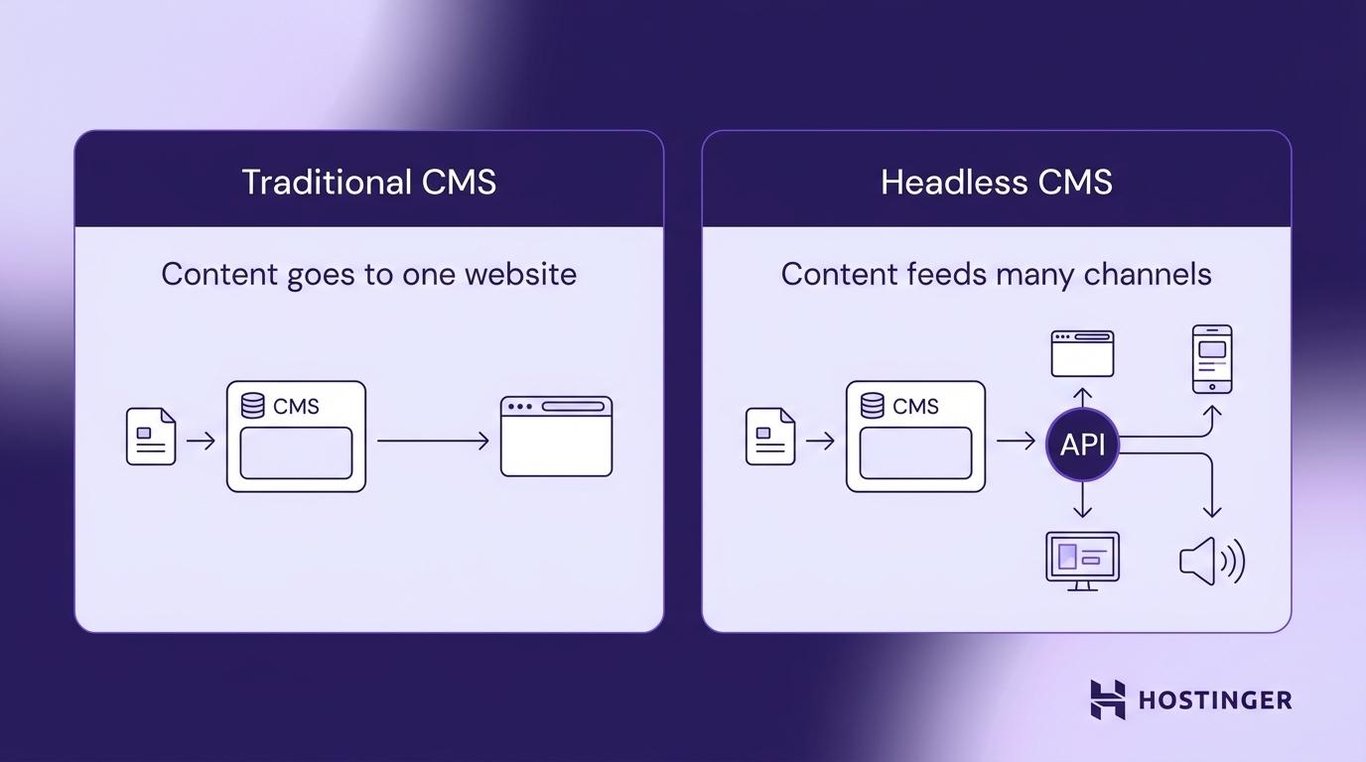
Here’s a simple example. Say you write a product description. With a headless CMS:
- Your website pulls it in and shows it on the product page
- Your mobile app grabs the same text and shows it in the app
- A screen at your physical store displays the same description
- A voice assistant reads it out loud when a customer asks
Each connected channel retrieves the product description from the same content source through an API. Updates made in the CMS can then appear across those channels according to their integration and caching settings.
A traditional CMS is usually sufficient when your content primarily serves one website. Choose a headless CMS when you need independent control over multiple frontends or plan to reuse structured content across several digital experiences. If you’re considering additional channels later, compare the development and migration costs before choosing an architecture.
Which CMS is easier to set up and use?
Traditional CMS is the easier path for non-tech teams. Headless gives you more flexibility, but only after a developer does the groundwork.
WordPress can be installed in minutes with 1-click tools on hosts like Hostinger. You walk away with a working site, a theme, an editor, and plugins. A headless setup is a different story: you pick a frontend tool, build the pages, wire it to the CMS, and deploy both halves before anyone sees anything. That takes days to weeks, depending on complexity.
Once everything is running, editors in both systems write and publish without touching code. The experience just feels different. Traditional CMS editors see the page as it will look, drag things around, and hit publish. Headless CMS editors type into structured fields: title, body, image. The content stays clean and works across channels, but you don’t see the finished page while writing.
The biggest gap shows when something visual needs to change:
- Traditional CMS – An editor swaps a banner, rearranges a section, or adds a widget. No help needed.
- Headless CMS – Those same changes go through a developer, because the frontend is its own separate project.
Go with traditional if editors need to control both content and design. Go with headless if you have frontend developers and want content that works across channels.

Which CMS delivers better performance?
A headless CMS can enable faster website development by allowing developers to optimize the frontend independently of the content management system. However, headless architecture doesn’t automatically improve performance.
Traditional CMS platforms like WordPress can also deliver fast-loading pages when configured correctly. Performance depends on hosting resources, caching, theme efficiency, image optimization, and plugin quality.
Headless CMS setups give developers more control over frontend technologies. Frameworks like Next.js, Nuxt, and Astro support techniques such as static site generation and server-side rendering, which can improve loading performance when implemented effectively.
Separating the frontend and backend can also help manage traffic. Developers can allocate resources and scale each component independently. Traditional CMS platforms can handle high traffic too, using caching, content delivery networks (CDNs), load balancing, and scalable hosting infrastructure.
Both approaches can achieve good Core Web Vitals scores, including Largest Contentful Paint (LCP), Interaction to Next Paint (INP), and Cumulative Layout Shift (CLS).
For a blog, business website, or small online store, an optimized traditional CMS is often sufficient. A headless CMS becomes more attractive when a project needs custom frontend performance optimization, independent scaling, or multiple frontend applications that share the same content backend.
How does SEO compare between headless and traditional CMS?
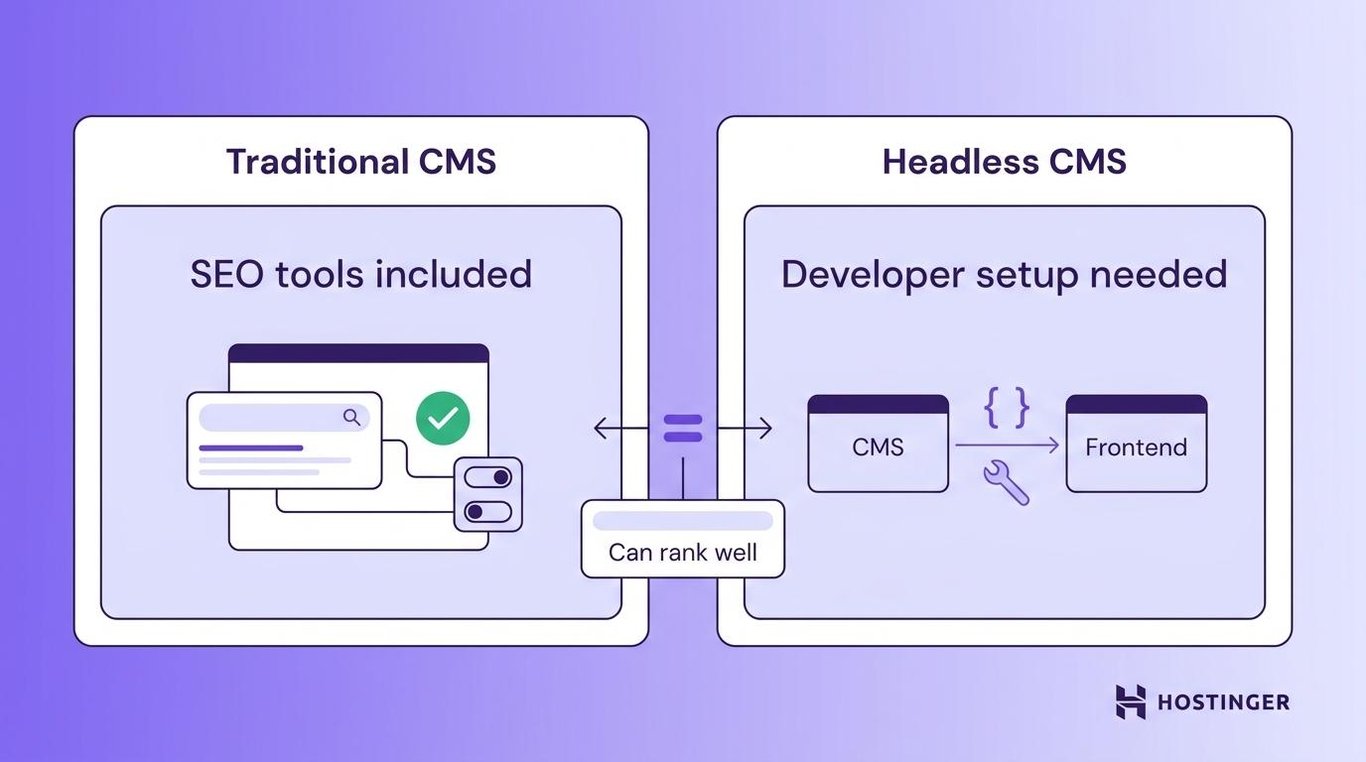
Traditional CMS makes it easier to set up SEO. A headless CMS can do the same things, but a developer has to build them in.
For a page to rank well on Google, it needs certain things in place: a title tag that tells Google what the page is about, a description that shows up in search results, a sitemap that helps Google find all your pages, and schema markup.
With a traditional CMS like WordPress, plugins like Yoast and Rank Math set all of this up for you. Editors fill in a few fields, and the plugin takes care of the technical side. No coding needed.
With a headless CMS, those same SEO features are possible, but they don’t come ready to use. A developer has to create the fields where editors enter titles and descriptions, then write the code that makes sure Google can actually see them on the finished page. It takes more planning from the start.
Some headless websites use JavaScript to load content after the initial HTML response. Google can render JavaScript, but this process introduces additional considerations for crawling and indexing. Developers should ensure important content and links are accessible in rendered HTML. Server-side rendering or static generation can help make content available to search engines more reliably.
Both traditional and headless CMS setups can achieve strong SEO results. Traditional CMS platforms usually simplify optimization through built-in features and plugins, while headless projects require developers to configure frontend rendering, metadata, canonical URLs, structured data, and XML sitemaps. The quality of the implementation matters more than the CMS architecture itself.
Which CMS is more cost-effective?
A traditional CMS is usually more cost-effective for straightforward websites because it offers ready-made themes, publishing tools, and simpler hosting requirements. A headless CMS typically costs more to develop and maintain, but its reusable content and independent frontends may justify the investment for projects that publish across several channels.
With a traditional CMS, the software itself is usually free. WordPress and Drupal cost nothing to download. You just need hosting, which starts at a few dollars a month on providers like Hostinger, so you can have a live site for under $5/month.
Online stores may also require payment processing, premium plugins, security features, and ongoing maintenance. The cost of building an ecommerce website depends on the platform, design requirements, integrations, and development work involved. A traditional setup is often less expensive initially, but heavily customized stores can still require a substantial investment.
Headless CMS pricing works differently because you’re paying for more pieces. Some headless platforms are free to install on your own server, like Strapi and Directus, but you’re responsible for the server, updates, backups, and security. Others charge a monthly fee and take care of that for you:
- Directus: The Core plan is free within its usage limits. The Team plan costs $599/month with monthly billing or $499/month when billed annually, with cloud hosting available separately.
- Strapi Cloud: The Starter plan costs $35 per project per month with monthly billing. Certain advanced CMS features require a separate license.
- Contentful: Offers a free plan, while the Lite plan costs $300/month.
- Sanity: Offers a free plan, while the Growth plan costs $15 per user per month.
A headless CMS may involve several separate expenses, including CMS licensing, frontend hosting, API integrations, and developer time. Some providers bundle content hosting into their subscriptions, while self-hosted platforms require you to manage the infrastructure. Traditional CMS costs also vary depending on hosting, premium plugins, custom development, and maintenance requirements.
| Cost factor | Traditional CMS | Headless CMS |
|---|---|---|
| CMS software | Free open-source options or paid subscriptions | Free self-hosted options or paid subscriptions |
| Hosting | CMS and website often share hosting infrastructure | CMS and frontend hosting may be billed separately |
| Initial development | Lower for standard themes and templates | Usually higher due to frontend development and integration |
| Ongoing maintenance | CMS updates, plugins, themes, and hosting | CMS, frontend, APIs, integrations, and hosting |
| Total cost | Usually lower for straightforward websites | Depends on development complexity and multichannel requirements |
A traditional CMS is generally the more economical option for a single website with standard publishing needs. A headless CMS may justify its higher development and maintenance costs when several digital channels use the same content, especially if maintaining separate content systems would otherwise require significant work. Compare the full cost of ownership rather than relying on CMS subscription prices alone.
What are the alternatives to headless and traditional CMS?
Headless and traditional aren’t the only options. Depending on your project, one of these might be a better fit.
Hybrid CMS platforms like Contensis, Brightspot, and Liferay DXP sit between traditional and headless. They give editors a visual page builder and live preview (like a traditional CMS), but also let developers pull content through APIs for other channels (like a headless CMS). A good pick if your team wants easy editing and multi-channel delivery without choosing one over the other.
Website builders like Hostinger AI Builder, Wix, and Squarespace, and are all-in-one, no-code platforms. They bundle hosting, design, and editing into one tool. If you’re not technical and you need a marketing site, portfolio, or small store up as fast as possible, this is the simplest route.
Static site generators like Hugo, Astro, Gatsby, and Eleventy are developer tools that create websites as simple, pre-built pages. Because the pages are already finished before a visitor arrives, they load extremely fast. They work well for blogs, documentation, or marketing pages that don’t change often, but they’re not beginner-friendly – you need a developer to set them up and update them.
Ecommerce platforms like Shopify and WooCommerce are built specifically for online stores. They focus on product listings, checkout, and payments rather than general content. Choosing between the best ecommerce platforms comes down to catalog size, payment needs, and how much design control you want.
Digital Experience Platforms (DXPs) like Adobe Experience Manager, Sitecore, and Contentful DXP combine a CMS with tools for personalizing content, tracking visitor behavior, and running marketing campaigns. They’re built for large companies that operate across many countries, have complex approval workflows, and have the budget to support that kind of setup.
Which CMS approach works best for ecommerce?
For businesses starting with online selling, a traditional CMS or website builder is usually the faster and more affordable way to launch a single store. A headless approach becomes more attractive when you need independently developed storefronts, mobile apps, or other connected sales channels.
Builder / traditional CMS | Headless + commerce API | |
Setup time | Days | Weeks to months |
Developer need | None to low | High |
Multi-channel selling | Available through platform integrations and supported APIs | supported APIs |
Cost to launch | Usually lower for standard stores | Usually higher due to custom frontend development and integration |
Best for | Single store, small-to-mid catalog | Multi-channel, custom experiences |
Popular platforms | Hostinger Ecommerce Builder, WooCommerce, Shopify | Contentful + Storefront API, Sanity + commercetools, Storyblok |
Most online stores don’t need a headless setup. The ecommerce website features they need, like product pages, a cart, and payment handling, already come built into simpler platforms.
For businesses that want to launch without custom frontend development, Hostinger AI Builder provides a straightforward way to create a website. With Hostinger Ecommerce, you can manage products, orders, and payments from one dashboard. This approach is particularly useful for small businesses that want to start selling without maintaining a separate storefront application.
WooCommerce offers more customization through WordPress plugins and themes, while Shopify combines storefront creation, hosting, and commerce management on a single platform.
Headless commerce makes more sense when your products need to appear on a website, a mobile app, in-store screens, and marketplaces at the same time. For that kind of ecommerce website development, you keep products in one backend and push them to every channel through APIs. Platforms like Contentful, Sanity, and Storyblok pair with commerce tools like Shopify’s Storefront API or commercetools.
Some ecommerce platforms support both approaches. For example, Hostinger Ecommerce provides a ready-made storefront experience and supports custom sales channels through its API. The standard website builder setup is the simpler choice for launching a store, while API-based development is more appropriate when a business needs a custom customer-facing experience.
You don’t have to commit to one path forever, either. Shopify’s Hydrogen framework and WooCommerce’s REST API let stores start simple and add custom frontends later as they grow.
When should you use a headless CMS vs. a traditional CMS?
Choose a traditional CMS if you need an easy-to-manage website with built-in design and publishing tools. Choose a headless CMS if your project requires custom frontend development, structured content delivered to several channels, or independently managed frontend applications.
Here’s which approach makes sense for different projects:
- Small business website or blog: Traditional CMS. Platforms like WordPress let nontechnical teams create, update, and publish content without ongoing developer support.
- Website and mobile app sharing content: Headless CMS. An API-based architecture makes it easier to deliver the same structured content to multiple independently developed frontends.
- Limited budget and no developers: Traditional CMS or website builder. Both reduce setup complexity and the need for custom development.
- High-traffic website: Either approach. Traditional CMS platforms can scale with optimized hosting and caching, while headless setups allow independent frontend and backend scaling.
- Custom multichannel ecommerce experience: Headless CMS combined with a compatible commerce backend. This provides greater control over custom storefronts, mobile apps, and other shopping interfaces.
- Online store that needs to launch quickly: An ecommerce website builder. Hostinger AI Builder with Hostinger Ecommerce provides store management tools without requiring a custom frontend.
Before deciding, identify where your content needs to appear, which frontend features require customization, and how much development and maintenance your team can support.
If you’re planning a store with custom frontend requirements, understanding how headless commerce works can help you evaluate the technical setup and decide whether the additional complexity is justified.
This article is a localized version of Headless CMS vs. traditional CMS: How to pick the right one, originally published in English.

Alma is a Content Writer at Hostinger with a background in communications and 9+ years of experience in SEO, content, and marketing. She writes about email marketing, ecommerce, AI tools, domains, and web hosting. Off the clock, she's either farming virtual crops, losing track of time in RPGs and her sanity in MOBAs, or rolling horribly in D&D. Follow her on LinkedIn.