If you want to cut your website’s loading time, you can try to defer parsing of JavaScript. It allows the browser to render JavaScript only after it finishes loading the main content of a site. In this tutorial, we will cover several ways on how to defer parsing of JavaScript in WordPress CMS.
Download all in one WordPress cheat sheet
Why Should You Defer Parsing of JavaScript?
When you open a website, your browser will receive the site’s content from the server and loads the code from top to bottom. However, if it finds JavaScript, the loading process will be interrupted until it finishes downloading all the JavaScript.
To solve this issue, you can defer parsing of JavaScript, which allows the browser to load the full content without waiting for the scripts to load. By implementing this task, JavaScript parsing won’t negatively affect your website’s loading time.
Keep in mind that having lots of JavaScript isn’t bad. After all, It’s one of the essential web components, which allows you to extend the functionality of your site.
The point is, there are two main benefits you can get:
- Better user experience – visitors won’t have to wait long to view your website content.
- Improved SEO ranking – Google bots can crawl your site faster.
How to Defer Parsing of JavaScript in WordPress?
This section will show you a step-by-step guide to defer parsing of JavaScript. To top it off, we’ll also show you how to analyze the problem and test the changes after applying the task.
1. Analyze the site
To find out whether you should defer parsing of JavaScript in your WordPress website, analyze it using site speed testing tools like GTMetrix. As an example, here is the performance result of a website before implementing the method:
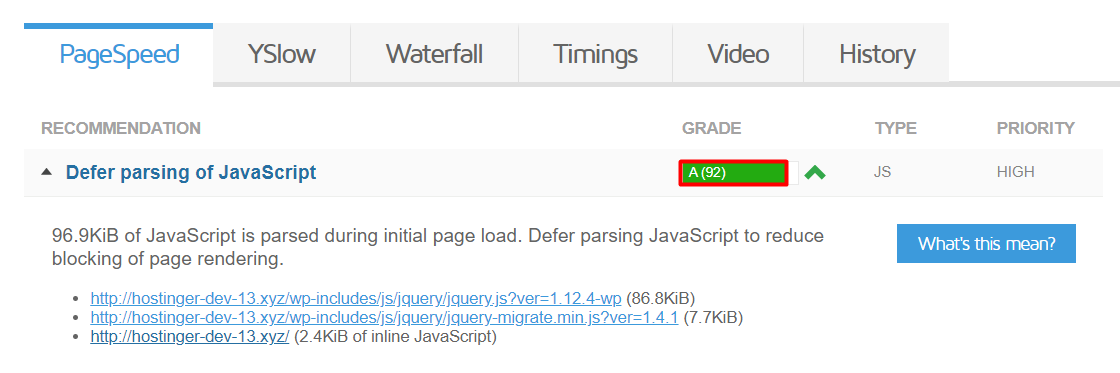
It shows that there’s an issue regarding JavaScript parsing, which means the website site needs to defer it.

2. Defer Parsing of JavaScript in WordPress
Now, let’s get into the steps of deferring parsing of JavaScript! There are two ways to do it – installing a plugin or adding a code snippet manually.
Using WordPress plugins

One of the easiest ways to defer JavaScript parsing is by using a plugin. Speed Booster Pack is one of the most popular plugins for this task. To begin, install the plugin and activate it, then follow these steps:
- Go to your WordPress Dashboard.
- On the left sidebar, navigate to Speed Booster.
- Click the Advanced tab, and activate Defer parsing of JS files.
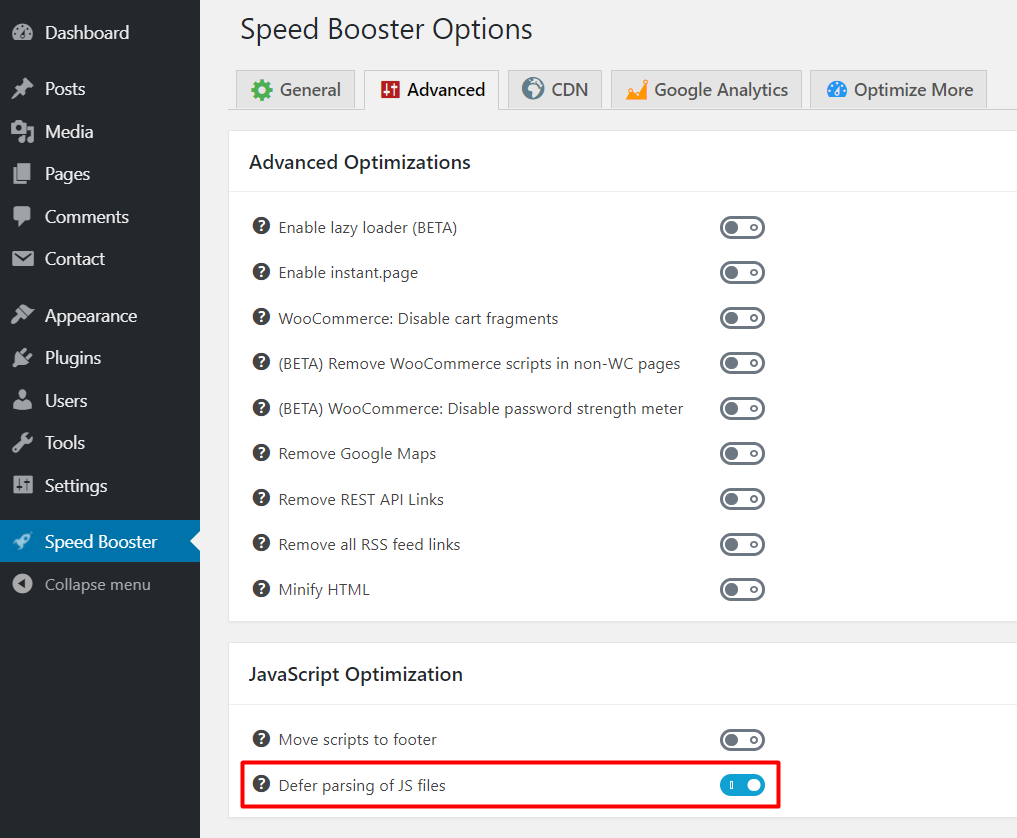
- Once done, tap Save Changes.
Defer Parsing of JavaScript via functions.php
Alternatively, you can carry out the task manually by editing one of the WordPress core files. Make sure to backup your website before proceeding. Here are the steps:
- From your WordPress admin area, go to Appearance -> Theme Editor
- Select functions.php in the Theme Files
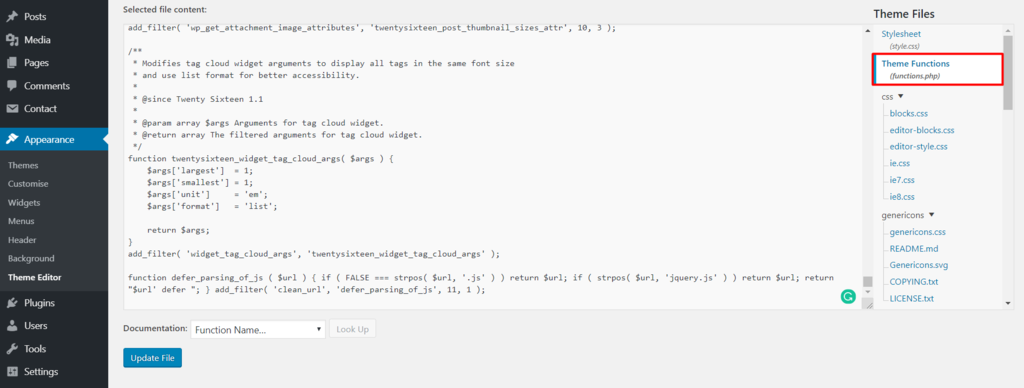
- Enter this code at the bottom of the file:
function defer_parsing_of_js ( $url ) { if ( FALSE === strpos( $url, '.js' ) ) return $url; if ( strpos( $url, 'jquery.js' ) ) return $url; return "$url' defer "; } add_filter( 'clean_url', 'defer_parsing_of_js', 11, 1 ); - Click Update File.
3. Test the Changes
After using one of the above options, re-analyze your site with GTMetrix:

Conclusion
In this tutorial, you’ve learned how to improve your WordPress site speed by deferring parsing of JavaScript. You can do so by using a plugin or adding a code snippet to the theme’s functions.php file.
Keep in mind that improving your website’s loading time will lead to better user experience and improved SEO ranking.
Do you have any questions regarding this topic? Share your thoughts in the comment section below!
Discover More Expert WordPress Techniques
How to Add JavaScript to WordPress
Combine External JavaScript in WordPress
Remove Query Strings From Static Resources
How to Fix Admin Ajax File in WordPress
How to Eliminate Render Blocking JavaScript and CSS
All of the tutorial content on this website is subject to Hostinger's rigorous editorial standards and values.

Domantas leads the content and SEO teams forward with fresh ideas and out of the box approaches. Armed with extensive SEO and marketing knowledge, he aims to spread the word of Hostinger to every corner of the world. During his free time, Domantas likes to hone his web development skills and travel to exotic places.