What is continuous deployment?
Oct 20, 2026
/
By Ksenija
/
10 min Read
Continuous deployment is the practice of automatically deploying every validated code change to production.
If the code passes every required validation step, such as builds, automated tests, security checks, and deployment safeguards, it is deployed to production automatically without waiting for human approval.
Continuous deployment builds on continuous integration and continuous delivery by automating only one step: the final manual approval before production.
Everything else that makes a release safe – code reviews, automated testing, deployment strategies, monitoring, and recovery procedures – remains part of the process.
Before a change reaches the deployment pipeline, it is still reviewed through a pull request and merged into the main branch only after meeting the team’s quality requirements.
Automation begins after that merge, when the system takes over the remaining release process.
From that point, every deployment follows the same sequence:
- An approved code change is merged into the main branch, starting the deployment process.
- The application is prepared for deployment by building the source code, packaging its supporting files, and creating a deployable build package.
- Automated checks verify the release through testing, security scans, and code quality validation.
- The new version is published to production automatically if every required check succeeds.
- The running application is observed to confirm it behaves correctly under real user traffic.
- Any production issues are handled quickly by restoring the previous version or deploying a fix.
Continuous deployment vs. continuous delivery vs. continuous integration
The three practices are often grouped together, but each automates a different part of the release process.
Continuous integration handles code validation, continuous delivery prepares validated code for release, and continuous deployment carries validated code all the way to users. Our guide to continuous integration vs. continuous deployment compares the first and last stages in more detail.
Here is a continuous deployment vs. continuous delivery vs. continuous integration quick comparison:
Feature | Continuous integration | Continuous delivery | Continuous deployment |
What it automates | Builds and tests every code change | Everything up to the production release | The entire release process, including production deployment |
Production deployment | Does not deploy | Manual approval required | Automatic after successful validation |
Primary goal | Keep new code integrated safely | Keep every change ready for release | Deliver validated changes immediately |
Best suited for | Any collaborative software project | Teams requiring control over release timing | Teams with mature automated testing and monitoring |
The choice between continuous delivery and continuous deployment comes down to who approves the production release.
In a continuous delivery workflow, a person decides when to deploy. In a continuous deployment workflow, the pipeline makes that decision once every automated check succeeds.
Many organizations intentionally stop at continuous delivery because their release process includes requirements that can’t be automated.
Common examples include:
- Regulatory requirements that require documented human approval before production changes.
- Business approvals tied to marketing campaigns, contract milestones, or customer commitments.
- Coordinated releases where mobile apps, backend services, and web applications must launch together.
- Internal policies that separate development from production release responsibilities.
How does continuous deployment work?
Continuous deployment works as an ordered sequence of automated stages. Each stage produces an output that the next stage consumes, and each stage can stop the pipeline if something fails.
Step 1: Merging approved code
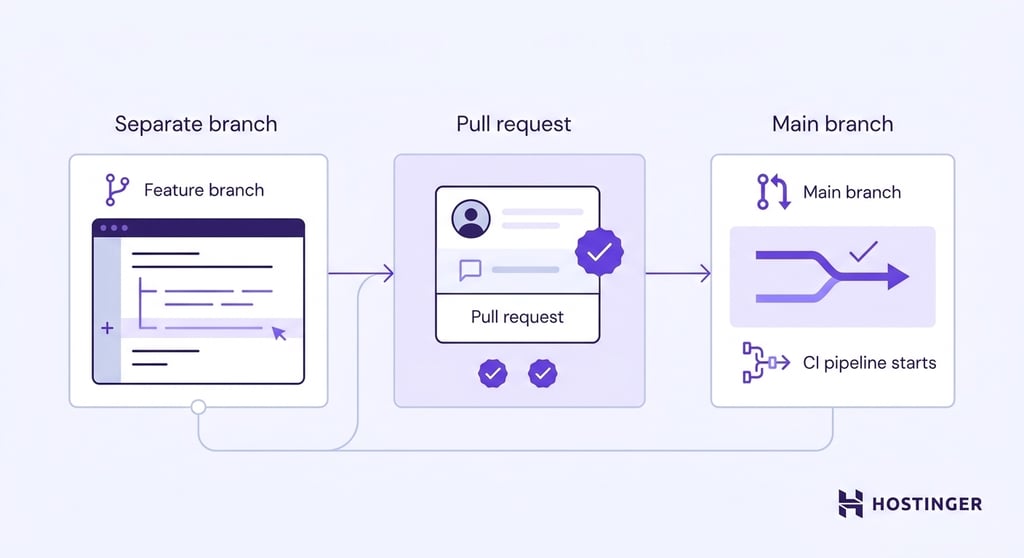
A continuous deployment pipeline begins when new code is merged into the main branch, the primary version of an application’s source code.
Before that happens, developers make their changes in a separate branch, an isolated copy of the project where they can work on new features or bug fixes without changing the main application.
When the changes are ready, the developer opens a pull request. This asks teammates to review the proposed changes before they’re merged into the main branch.
During the review, teammates check the code, suggest improvements, and confirm that it meets the team’s quality standards.
From this point on, automated checks decide whether the change can continue. If any of them fail, deployment stops until the problem is fixed.
Once the merge is complete, the version control system automatically starts the CI pipeline, which builds and tests the new version of the application.
Step 2: Building the application
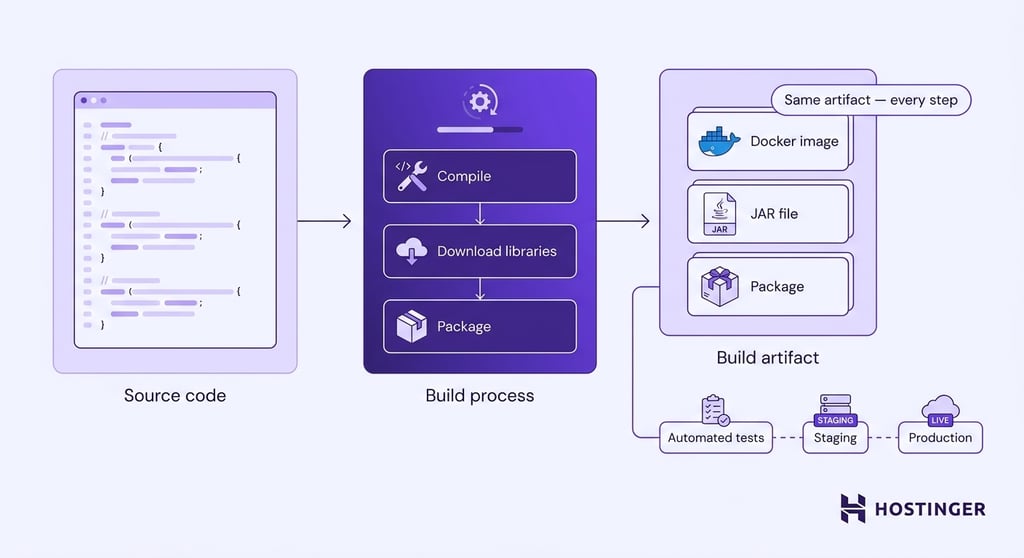
Once the approved code is merged, an automated deployment process takes over. The first job is to build the application, which means preparing the source code so it can actually run on a server.
The source code is prepared by compiling it when necessary, downloading any required libraries, and packaging everything the application needs to run into a single deployable package.
That package is called a build artifact. It is the exact version that moves through the rest of the deployment pipeline. Depending on the application, the build artifact might be a Docker image, a Java JAR file, or a Vite production build containing the optimized files needed to run a frontend application in production.
From this point on, the automated deployment process no longer works with the original source code.
It uses the same build artifact for every remaining step, including testing and deployment. Because the artifact never changes, the version that passes automated tests is the exact same version that eventually reaches production.
Step 3: Running automated quality checks
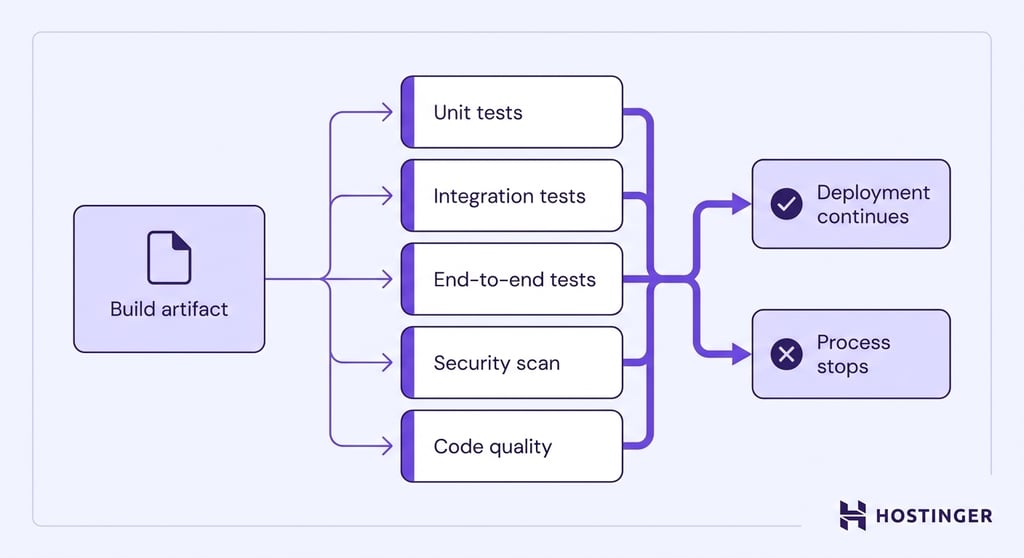
After the build is complete, the automated deployment process runs a series of quality checks on the build artifact to catch problems before they reach users.
Those checks include:
- Unit tests – verify that individual pieces of code work correctly on their own.
- Integration tests – ensure that databases, APIs, and other components interact correctly.
- End-to-end tests – recreate real user actions to confirm the application behaves as expected from start to finish.
- Security and dependency scans – identify known security vulnerabilities in your code and the third-party libraries your application uses.
- Code quality checks – flag issues such as inconsistent formatting, unused code, and other common programming mistakes.
Every required check must pass before the deployment continues. If a single critical check fails, the automated process stops and reports the problem so developers can fix it before trying again.
Some teams perform part of these quality checks in a staging environment. Because staging closely matches the production environment, it provides a final opportunity to validate the build artifact under realistic conditions before automated deployment continues.
Step 4: Deploying the validated application
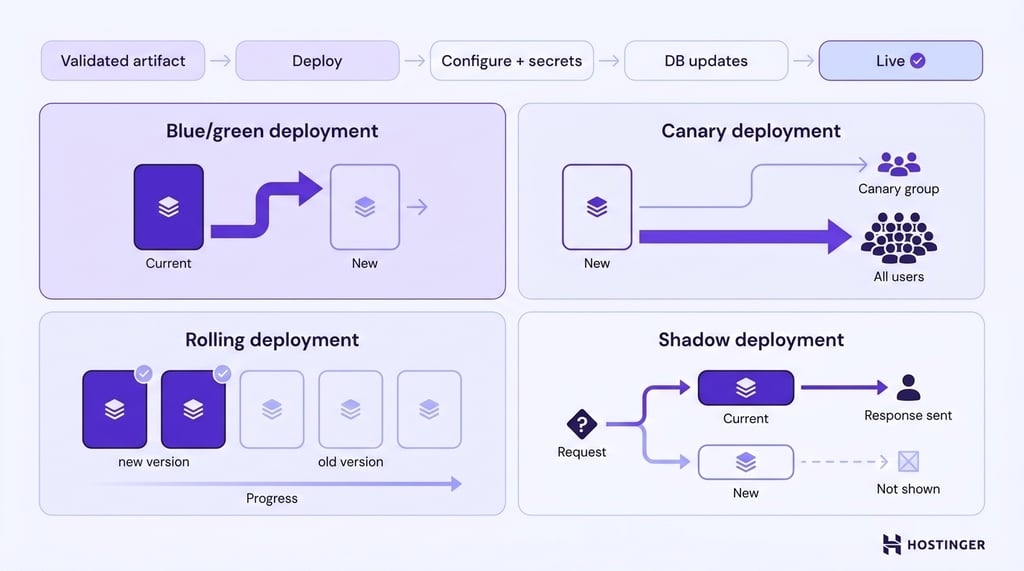
The deployment system takes the validated build artifact and makes it available to users by updating the servers that run the application.
During this process, it also applies configuration settings, securely loads passwords and API keys (known as secrets), and performs any database updates the new version requires.
Deploying a new version doesn’t always mean replacing the old one instantly. Modern deployment strategies gradually introduce the new version so problems can be detected before every user is affected.
The most common deployment strategies include:
- Blue/green deployment – keeps the old and new versions running at the same time. Once the new version has been verified, all user traffic is switched to it in a single step. If something goes wrong, traffic can be switched back just as quickly.
- Canary deployment – sends the new version to a small group of users first. If everything works as expected, more users will be gradually moved to the new version until it serves everyone.
- Rolling deployment – gradually replaces the servers running the old version with ones running the new version. As each server is updated, it starts handling user requests with the new version while the remaining servers continue running the previous version until the rollout is complete.
- Shadow deployment – runs the new version alongside the current one without exposing it to users. Every user request is processed by both versions, but only the current version’s response is sent back. The new version runs in the background, allowing teams to see how it performs with real traffic before anyone starts using it.
The goal of every deployment strategy is to reduce the impact of a bad release.
Step 5: Monitoring the deployment
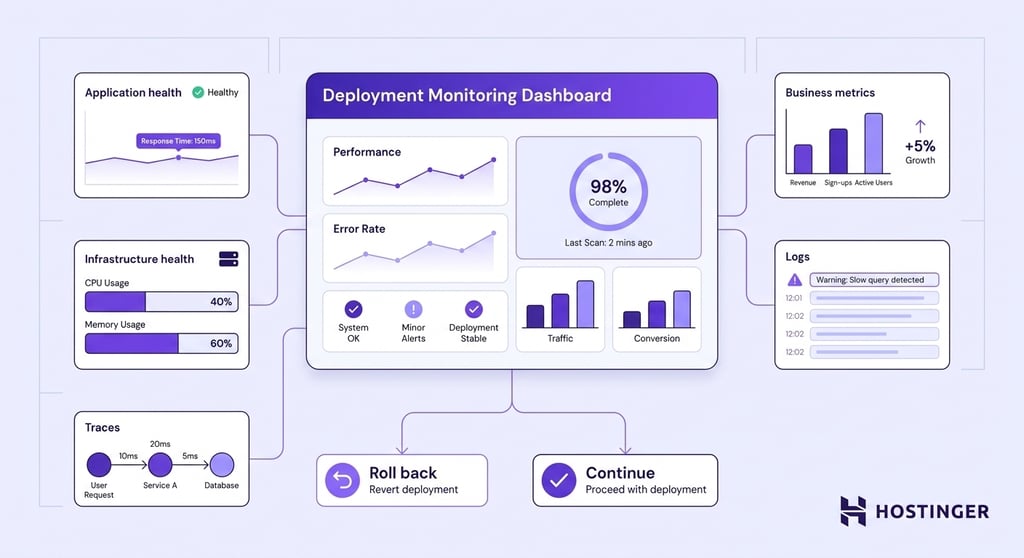
Once the application is live, the team continues watching it to confirm everything works as expected under real user traffic.
Automated tests reduce the risk of problems, but they can’t predict every situation the application will encounter in production.
Teams monitor several kinds of information:
- Application health – error rates, response times, and the number of requests the application is handling.
- Business metrics – completed purchases, successful sign-ups, or other actions that show whether users can achieve their goals.
- Infrastructure health – CPU, memory, disk, and network usage, to make sure the servers have enough resources to run the application reliably.
- Logs – a record of events that helps engineers understand what happened before an error occurred.
- Traces – a map of a single request’s journey through the application, helping engineers find exactly where delays or failures occur.
If monitoring detects a serious problem, the deployment can be paused or rolled back before the issue affects more users.
Step 6: Recovering if something goes wrong
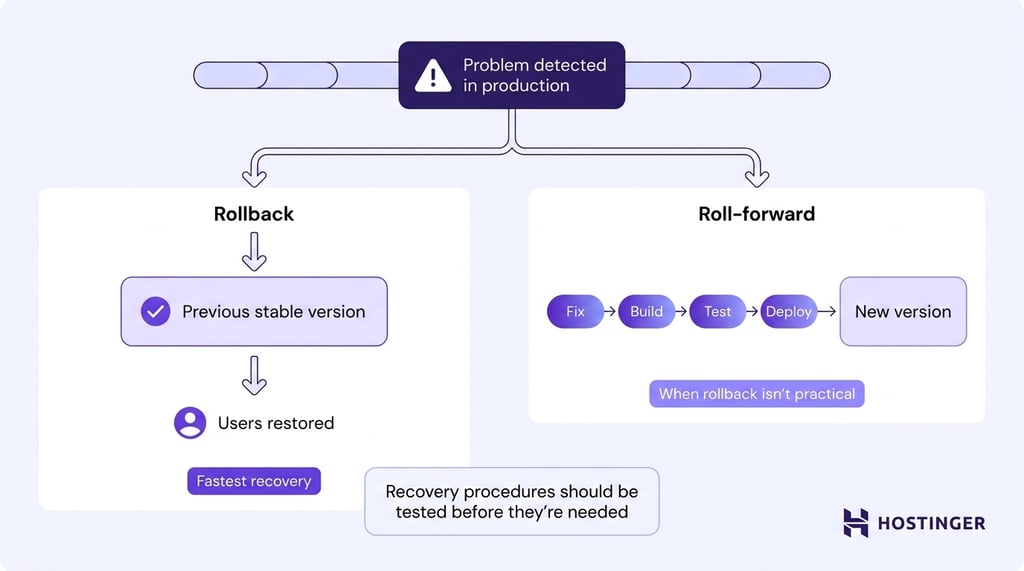
If a deployment causes problems in production, the goal is to restore a working version of the application as quickly as possible.
Continuous deployment supports fast recovery by making every release small, automated, and repeatable.
Teams can recover in one of two ways:
- Rollback – switches users back to the previous working version of the application. This is usually the fastest option because the last stable version has already been tested and is ready to use.
- Roll-forward – fixes the problem by creating a new version of the application and sending it through the same deployment process. Teams often choose this approach when the previous version can no longer be restored safely, such as after certain database changes.
Recovery procedures should be tested before they’re needed. A rollback that has never been practiced may fail during a real incident, delaying recovery when every minute counts.
Most deployments move smoothly from code review to production. Recovery only becomes necessary if monitoring detects a problem after the release.
The example below shows a typical successful deployment of a small code change.
Developer commits the fix
        ↓
Pull request reviewed and approved
        ↓
Merge into the main branch
        ↓
Application is built
        ↓
Automated tests run
        ↓
Deployment begins (5% of users receive the update)
        ↓
Monitoring confirms everything is working correctly
        ↓
Deployment expands to all users
Is continuous deployment safe?
Yes, continuous deployment is safe because every release must pass the same predefined quality checks before reaching production.
The deployment proceeds only if every required build, test, security scan, and validation step succeeds. If any required checks fail, the release stops automatically.
This approach also makes the release process more consistent. A human reviewer may overlook a failed check or approve a deployment under time pressure.
An automated pipeline applies the same rules to every deployment, regardless of who wrote the code or when it’s released.
Still, continuous deployment is only as reliable as the automated checks that support it. If they are incomplete or monitoring fails to detect problems, the system can still release faulty code.
For that reason, successful continuous deployment depends on a pipeline with reliable automated validation, effective monitoring, and fast recovery mechanisms.
What are the benefits of continuous deployment?
By automating the release process and releasing small changes continuously, teams can deliver new features faster, respond to problems sooner, and spend less time managing deployments.
The main benefits include:
- Faster releases. New code reaches users as soon as it passes the deployment pipeline, eliminating the delays caused by manual approvals and scheduled release windows.
- Shorter feedback loops. Developers see how changes perform in production within hours or even minutes, making it easier to validate ideas, identify problems early, and improve the application based on real user behavior.
- Faster bug fixes. Critical fixes follow the same automated deployment process as every other change, allowing issues to be resolved quickly without waiting for the next planned release.
- Continuous improvements for users. New features, performance improvements, and bug fixes are delivered throughout the development cycle instead of being bundled into large, infrequent releases.
What are the challenges of continuous deployment?
Every part of the delivery process must be reliable enough to operate without a person reviewing each production deployment.
When testing or monitoring is weak, infrastructure is unreliable, or team responsibilities are unclear, automation simply allows those weaknesses to reach production faster.
The most common challenges include:
- Building enough confidence to remove the final manual approval. Teams need to trust that code reviews, automated tests, and deployment checks will catch problems before software reaches production. That level of confidence takes time to build.
- Keeping the main branch deployable. Once an approved change is merged, the deployment starts automatically. Developers, therefore, need a safe way to merge code for features that are incomplete, being tested, or scheduled for a later launch.
- Handling complex application changes. Some updates, particularly those involving databases or multiple interconnected services, can’t always be deployed or rolled back as easily as a simple code change. Those releases often require additional planning to keep the old and new versions working together during the transition.
- Changing the way teams work. Continuous deployment changes more than the deployment pipeline. Teams responsible for product launches, customer support, compliance, or marketing may need to adjust workflows that were built around scheduled releases and manual approvals.
Pro tip
Feature flags are a common solution for keeping the main branch deployable. By using feature flags to hide incomplete or unreleased features, developers can merge code safely without showing those changes to users. Teams can then turn the feature on later without needing to deploy new code, giving them more control over when it becomes available.
Continuous deployment is not a switch that organizations simply turn on. It is the result of strong engineering practices, reliable automation, and a delivery process that teams trust enough to let software reach production without waiting for one final approval.
When is continuous deployment not the right choice?
Continuous deployment isn’t suitable for every application. Some organizations must review, coordinate, or approve production releases before they go live, making continuous delivery a better fit.
Continuous deployment may not be the right fit in the following situations:
- Regulatory approval is required. Industries such as healthcare, finance, and aviation often require documented reviews, security and regulatory checks, or formal approval before software can be released. In these environments, a mandatory approval step is part of the release process rather than a sign of inefficient delivery.
- Releases must happen on a fixed schedule. Mobile applications must pass app store review before users receive updates, and some organizations coordinate releases with marketing campaigns, product announcements, customer communications, or partner launches. Even if the software is technically ready, the business may choose to release it later.
- Changes cannot be easily reversed. Firmware, embedded systems, and certain industrial or safety-critical applications may be difficult – or impossible – to update or roll back once deployed. Those environments often require additional validation before a release is approved.
- The delivery process is still maturing. Continuous deployment relies on reliable automated testing, monitoring, and recovery procedures. Teams that are still building those capabilities often adopt continuous delivery first, automating everything up to production while keeping a final manual approval until they have confidence in the pipeline.
Where can you deploy an application continuously?
Continuous deployment can work with any hosting environment that supports automated application updates.
Common options include managed hosting platforms, cloud services, Kubernetes clusters, serverless platforms, and virtual private servers.
Support varies between providers: some include direct Git integrations and automatic builds, while others require a separate CI/CD service or deployment configuration.
Continuous deployment with Hostinger Web Hosting
Hostinger’s web hosting provides a managed environment that automatically builds and deploys web applications when code changes are pushed to a connected GitHub repository.
Developers don’t need to manage the underlying server infrastructure.
Eligible Unlimited Web Hosting and Cloud plans support automatic deployments for Node.js web applications.
After you connect a GitHub repository, every push to the selected branch automatically triggers a new build and deployment.
A simplified workflow looks like this:
Write and review the code
        ↓
Merge the approved change
        ↓
Push the updated branch to GitHub
        ↓
Run automated tests in the CI system
        ↓
Hostinger builds the application
        ↓
Deploy the new version
The GitHub integration automates the build and deployment stages. Code review, automated testing, production monitoring, and recovery still need to be configured as part of the wider continuous deployment process.

Using Hostinger Connector during development
Hostinger Connector provides another way to work with Hostinger infrastructure. The extension connects supported development tools, including VS Code, Cursor, Devin, Antigravity, Claude, and Codex, to a Hostinger account through OAuth authentication.
Developers and AI coding agents can publish sites, deploy applications, manage domains and DNS, and perform VPS tasks without leaving the editor.
GitHub integration and Hostinger Connector can support the same development workflow, but they serve different purposes.
GitHub integration reacts automatically to changes in your codebase, making it suitable for repeatable deployments from a configured branch.
Hostinger Connector gives developers or coding agents direct control over deployment and hosting tasks from their development environment.
Is your team ready for continuous deployment?
Continuous deployment is only practical when your team no longer depends on a final manual review to decide whether software is ready for production.
Before removing that approval step, make sure the development and deployment process can reliably detect problems, recover from failures, and keep releases safe.
Use this checklist to assess your readiness:
- Automated tests consistently catch important bugs before code reaches production.
- Code reviews and merge rules are enforced so only approved changes can be merged.
- Monitoring and alerts quickly detect problems after a deployment.
- The team can restore a working version quickly if a release causes unexpected issues.
- Builds and deployments produce consistent results every time, without manual configuration.
- Developers regularly merge small, reviewed changes instead of large batches of code.
- Unfinished features can remain hidden until they’re ready to be released, for example, by using feature flags.
- Database changes are designed to work safely during deployments so the application can continue running while updates are rolled out.
- Clear ownership exists for production incidents, and every incident leads to improvements in the deployment process.
If several items on this list are still works in progress, continuous delivery is often the better next step.
Once the pipeline consistently produces reliable releases without depending on manual intervention, removing the final approval becomes a much smaller change than most teams expect.
This article is a localized version of What is continuous deployment?, originally published in English.
All of the tutorial content on this website is subject to Hostinger's rigorous editorial standards and values.

Ksenija is a digital marketing enthusiast with extensive expertise in content creation and website optimization. Specializing in WordPress, she enjoys writing about the platform’s nuances, from design to functionality, and sharing her insights with others. When she’s not perfecting her trade, you’ll find her on the local basketball court or at home enjoying a crime story. Follow her on LinkedIn.