Faraday is a collaborative vulnerability management and penetration testing platform that can be deployed quickly using the Hostinger Docker Catalog. Once deployed, Faraday automatically initializes its database and creates an administrator account during the first startup.
Because of this automated setup, login credentials are not shown in the UI and must be retrieved from the container logs.
This article explains where and how to find them.
Deploying Faraday via Hostinger Docker Catalog
When you deploy Faraday from the Hostinger Docker Catalog, all required services are automatically started, including the database and the Faraday backend. During the first launch, Faraday creates an admin user and prints the credentials directly to the container logs.
This is expected behavior and occurs only during initial startup.
Where to find Faraday login details
After deployment, Faraday login credentials can be found in the Docker Manager logs.
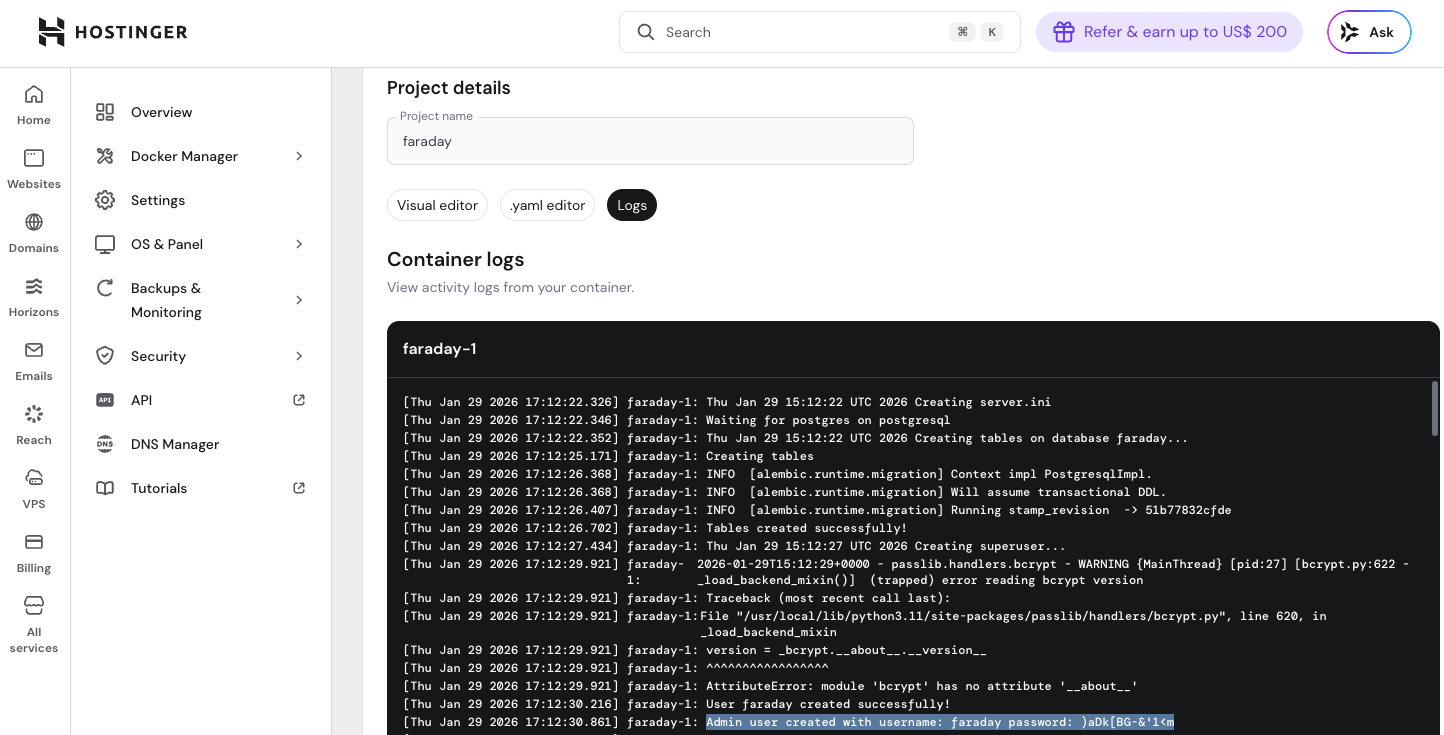
Log in to your VPS control panel and open Docker Manager. Locate your Faraday project and open it. Switch to the Logs tab and select the container named faraday-1.
During the first startup sequence, Faraday outputs a line similar to:
Admin user created successfully!
Admin user created with username: faraday password:
These credentials are generated automatically and are unique to your deployment.
Logging In to Faraday
Once you have the credentials:
Open Faraday in your browser using the project access URL shown in Docker Manager.
Log in using the username and password found in the faraday-1 container logs.
For security reasons, it’s strongly recommended that you change your password immediately after your first login.