Email editor flexibility is key when creating campaigns that look exactly the way you want. With Hostinger Reach, you can now drag and drop elements inside your email templates, making it easier to reorder content and fine-tune your layout without rebuilding sections from scratch.
This gives you more creative freedom and faster editing, especially when adjusting emails based on feedback or performance.
Reordering content in email templates
The drag-and-drop reordering feature allows you to change the position of elements directly inside the email editor.
You can move:
-
Text sections
-
Images
- Other content blocks
This works within a single email template and does not affect your automation logic or sending rules.
How the drag-and-drop editor works
Reordering content is simple and intuitive:
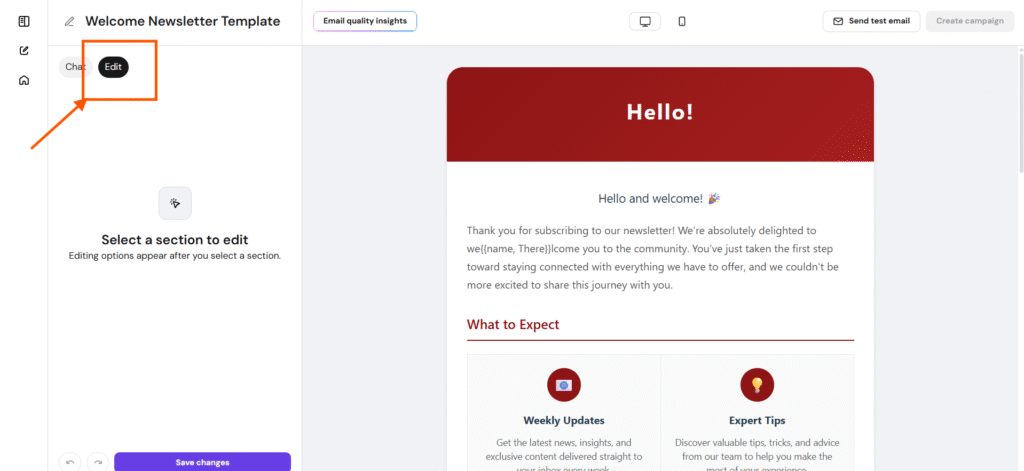
- Open an email template in the Reach email editor. Click Edit to be able to move elements.
- Click on any section, image, or button
- A drag handle will appear on the selected element
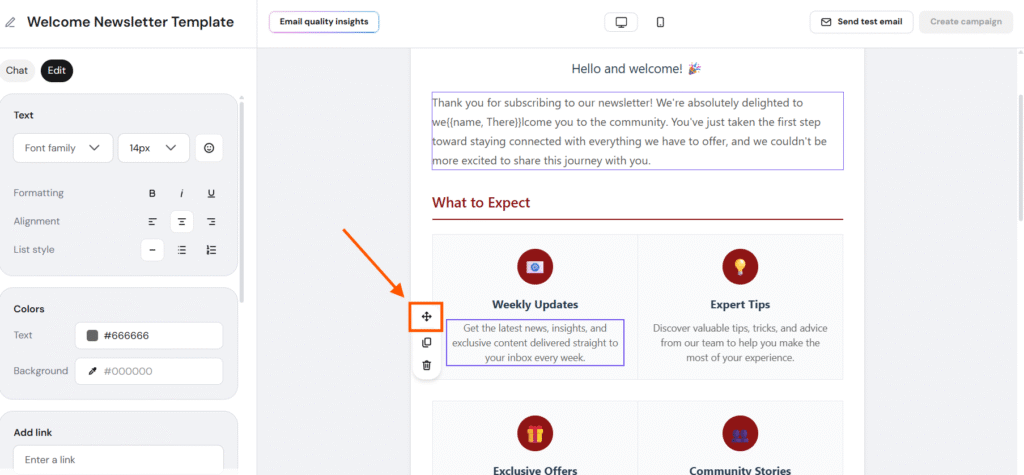
- Grab the handle and drag the element to a new position
- Drop it above or below other content to rearrange your email
Changes are applied instantly, allowing you to preview the updated structure as you work.