Hostinger AI Router credits allow you to use large language models directly inside OpenClaw without managing individual API keys or external integrations. When OpenClaw is connected to Hostinger AI Router, all model usage is billed through your AI credits instead of separate provider accounts.
This makes it much easier to get started, especially if you want to experiment with different AI models or avoid setting up multiple API keys.
Purchasing AI credits with OpenClaw
When deploying OpenClaw through the Hostinger Docker Catalog, you can add AI credits directly in the cart.
If you select AI credits during checkout, the integration is handled automatically. OpenClaw will be connected to Hostinger AI Router as soon as the container is deployed. There is no need to copy, paste, or manage API keys manually.
If AI credits are not added during purchase, OpenClaw will still work, but you will need to configure your own AI provider credentials manually.
Automatic AI Router integration
When AI credits are included with your OpenClaw order:
- OpenClaw is automatically authenticated with Hostinger AI Router
- No API keys or environment variables are required
- Usage is billed against your AI credits balance
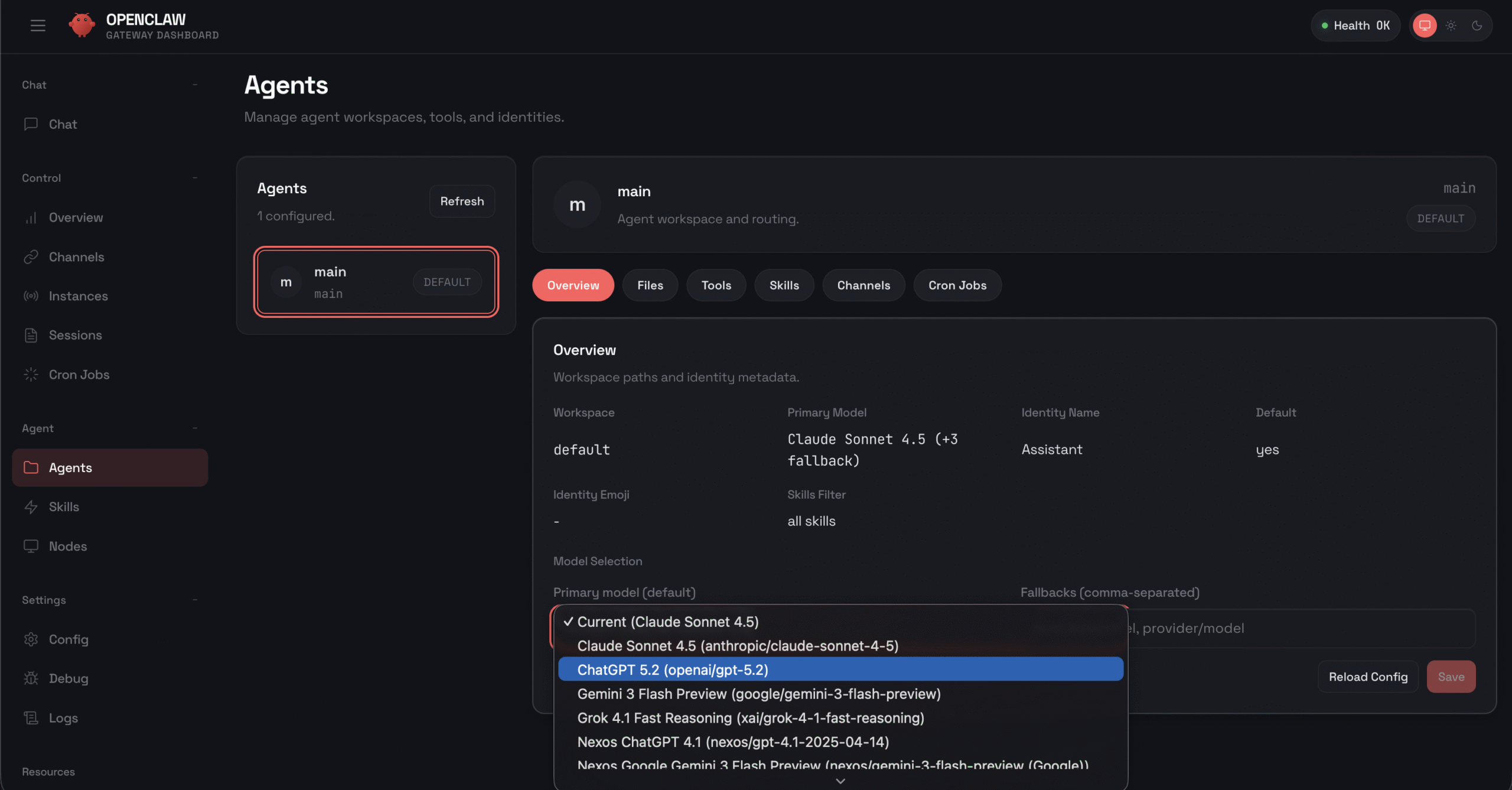
- You can switch between supported AI models directly in the OpenClaw interface
This setup is especially useful for production environments where security and simplicity matter.
How to connect AI Router credits to an existing OpenClaw instance
If you have purchased AI credits and want to use them with another OpenClaw instance that was deployed previously, you can connect them manually by adding your API key.
- Copy your AI Router API key by pressing Copy key inside your Docker Manager, or from Hostinger dashboard → AI Router → API key
- Click Manage to open the OpenClaw Docker configuration
- Open the Environment tab
- Add a new environment variable with the following details: NEXOS_API_KEY
:[PASTE_YOUR_AI_ROUTER_API_KEY_HERE] - Click Deploy to re-deploy your OpenClaw container
- Once the container restarts, open your OpenClaw dashboard
- Navigate to the Agents page
- In the model selection dropdown, choose your preferred AI model
After completing these steps, your OpenClaw instance will be connected to Hostinger AI Router, and all AI model usage will be billed against your AI credits balance.
Selecting an AI model in OpenClaw
Once OpenClaw is deployed and connected to Hostinger AI Router, you can choose which AI model your agent should use.
In the OpenClaw dashboard, open your agent configuration and locate the model selection dropdown. From there, you can select any supported model, such as Claude, ChatGPT, Gemini, or other available providers.
The model selection interface allows you to switch models at any time without redeploying OpenClaw. This makes it easy to balance cost, performance, and response quality depending on your use case.
Different models consume AI credits at different rates.
You can find the full, up-to-date pricing for each model in Hostinger dashboard → AI Router → Models.
How credit usage is calculated
Each AI model available through Hostinger AI Router has its own credit cost based on factors such as model size, reasoning capabilities, and response quality. More advanced models consume credits faster, while lighter models are more cost-efficient for simple tasks.
Your credit balance is shared across all OpenClaw agents connected to Hostinger AI Router, and across other Hostinger AI products that use AI credits.
Supported models and pricing
The following table lists example AI models available when using AI credits with OpenClaw, along with their credit costs.
| Model | Input cost (per 1M tokens) | Output cost (per 1M tokens) | Cache creation (per 1M tokens) | Cached input (per 1M tokens) |
|---|---|---|---|---|
| Claude Sonnet 4.5 | 3.3 credits | 16.5 credits | 4.125 credits | 0.33 credits |
| Claude Opus 4.6 | 5.5 credits | 27.5 credits | 6.75 credits | 0.55 credits |
| Claude Opus 4 | 15 credits | 75 credits | 18.75 credits | 1.5 credits |
| Gemini 3 Flash | 0.5 credits | 3 credits | Not applicable | 0.05 credits |
| GPT-4.1 | 2.2 credits | 8.8 credits | Not applicable | 0.55 credits |
| Grok 4 | 3 credits | 15 credits | Not applicable | 0.75 credits |
Choosing the right model
Each model available through Hostinger AI Router is suited for different tasks. Here is a summary to help you choose:
Claude Sonnet 4.5 is a balanced model suited for strong reasoning, clear writing, and coding support. It works well for business tasks, structured outputs such as JSON or reports, detailed explanations, and everyday AI assistants. This is a reliable default choice for most applications that need both quality and efficiency.
Claude Opus 4.6 is a premium model built for complex analysis and advanced problem-solving. It performs well on deep research tasks, multi-step logic, long-context understanding, and high-precision outputs. Choose this model when accuracy and advanced reasoning are critical.
Claude Opus 4 is optimized for intensive reasoning and complex AI workflows. It is well-suited for enterprise-grade tasks, advanced AI agents, deep analytical work, and multi-layered problem solving. This model is ideal for demanding use cases that require maximum capability.
Gemini 3 Flash is a fast and lightweight model optimized for high-volume and quick-response tasks. It performs well for summaries, simple Q&A, content generation, and scalable chatbot applications. Choose this model when speed and responsiveness are the priority.
GPT-4.1 is a versatile model suited for structured workflows, coding, automation, and tool integration. It delivers consistent results in business environments and performs well in systems that require stable and predictable outputs. This model is a strong choice for production-ready applications.
Grok 4 is a conversational model designed for engaging interactions and idea generation. It performs well in brainstorming, social content creation, casual chat experiences, and personality-driven assistants. Choose this model for applications focused on creativity and user engagement.
What these costs mean
Input tokens are the text you send to the model, such as prompts, instructions, or conversation history.
Output tokens are the text generated by the model in response.
Cache creation applies when reusable context is stored to reduce future costs.
Cached input pricing is used when previously cached context is reused instead of being processed again.
More advanced models generally consume more credits, especially for output tokens, while lighter models like Gemini 3 Flash are more cost-efficient for simple or high-volume tasks.
Hostinger AI Router simplifies the OpenClaw experience by removing manual API configuration and giving you access to multiple AI models out of the box. By adding AI credits during OpenClaw deployment, you can start using AI immediately and manage everything directly from the OpenClaw dashboard.