Post-purchase email automation helps you stay connected with customers after they complete an order. With Hostinger Reach, you can automatically send thank-you messages, request reviews, share support information, or encourage repeat purchases.
This guide explains how to enable post-purchase automations, how purchase tracking works, and how to troubleshoot common setup issues.
Requirements for post-purchase automation
Post-purchase automation works with two types of eCommerce sites:
- WooCommerce sites connected through the WordPress integration
- Hostinger AI Builder eCommerce sites
- Hostinger eCommerce stores (standalone, connected via Integrations)
You can connect either type to Hostinger Reach.
Once your site is connected, Reach automatically tracks customer purchase events — no extra configuration is required.
How purchase detection works
Post-purchase email flows use the trigger of when contact completed a purchase.
This trigger activates when:
- A customer goes through the checkout process
- They successfully complete the payment
- The order is confirmed in your WooCommerce, Hostinger AI Builder, or Hostinger eCommerce store
As soon as the purchase event is received, the automation flow begins, based on your automation.
Enabling a post-purchase automation flow
To set up your automation:
- Open your Hostinger Reach dashboard
- Go to the Automations page
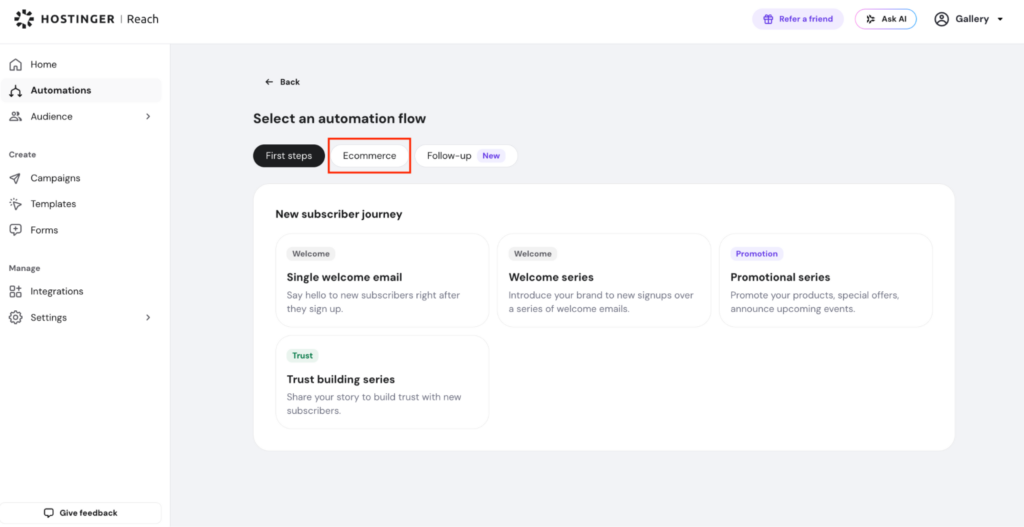
- Select the Ecommerce section

- Select one of the predefined Post-purchase automation flows
- Review the preconfigured purchase trigger

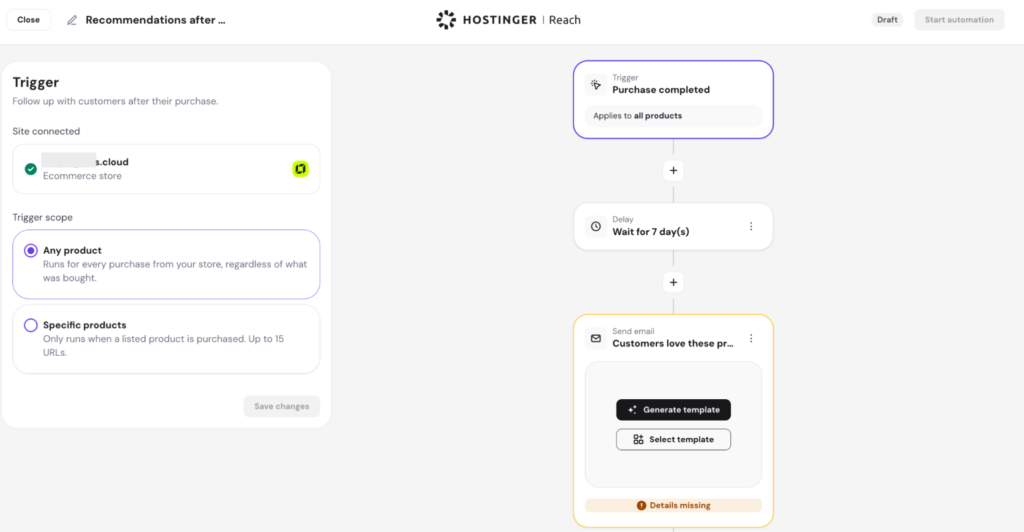
You can choose to trigger the purchase automation for all products, which means every purchase will trigger an email, or configure the automation to trigger only for specific products.
To set up the trigger for specific products, enter the URL of the product page. You can add up to 15 products that, after they would be purchased, this automation flow would be activated.
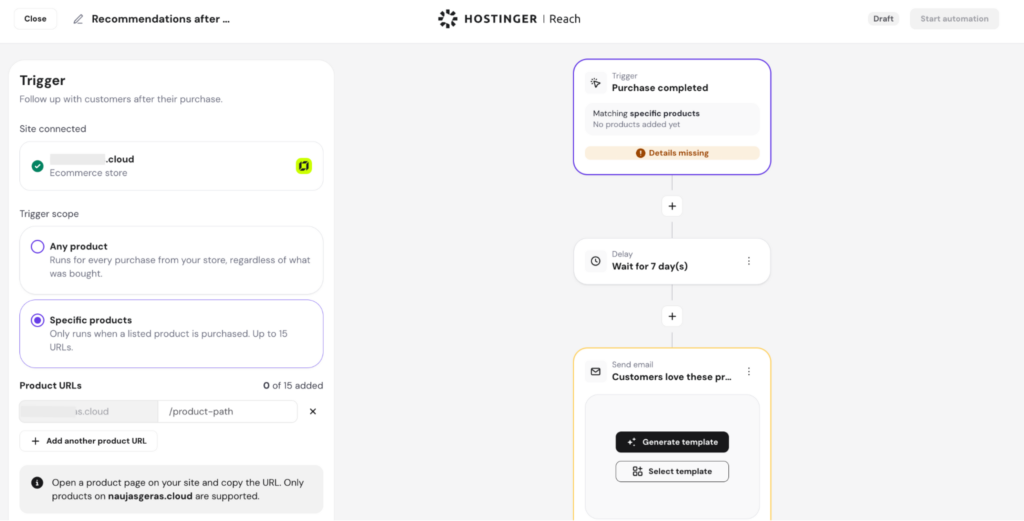
To get the correct UR for your product:
- Open the product page on your live store. This should be the public page on your store where customers can view the product and add it to their cart.
- Copy the full URL from your browser address bar.
- Paste the URL into the automation trigger field.
Creating or choosing your post-purchase email
Inside the automation builder, you can:
- Choose an existing email template, or
- Generate a new template within REACH
When using product-specific trigger, you can create more personalized post-purchase emails based on the exact product the customer purchased. This gives you greater flexibility compared to generic post-purchase campaigns.
For example, you can:
- Send product care or usage tips related to the purchased item
- Recommend complementary or related products
- Include product-specific images or content
- Tailor follow-up messaging for different product categories
This allows you to create more relevant customer experiences and increase engagement after purchase.
Recommended approach
Create post-purchase emails tailored to the selected product or product category, using general messaging such as:
- “Thank you for your order”
- “Your purchase is confirmed”
- “Welcome to the family — here’s what to expect next”
- “How was your experience? Please leave a review”
You can also include:
- Product care instructions
- Helpful tips and resources
- Links to support pages
- Recommendations for related products
- Invitations to continue browsing your store catalog
Troubleshooting site connection issues
Depending on your setup, REACH may display different prompts inside the automation builder.
A. No website is connected
If no site is connected, REACH will show an action prompting you to connect one.
You can:
For WooCommerce / WordPress
- Click Connect to link your WordPress site hosted at Hostinger
- If hosted elsewhere, install the Hostinger Reach WordPress plugin and connect via one click
For Hostinger AI Builder
- Click Connect and select your Hostinger AI Builder website which has eCommerce store from the list
For Hostinger eCommerce
- Find the Hostinger eCommerce card on the Integrations page, click Connect, then select the store you want to connect from the dropdown
B. eCommerce for connected site is not setup
WooCommerce not installed
If you connected a WordPress site but WooCommerce is missing:
- If the site is hosted at Hostinger, you’ll see a WordPress Admin button that takes you directly to your admin panel, where you can install WooCommerce in one click.
- If the site is hosted externally, Reach will guide you to open your WordPress Admin dashboard and confirm that WooCommerce plugin exists.
For Hostinger AI Builder sites
If your site is built with Hostinger AI Builder and eCommerce is not yet active, you can enable it directly from the editor:
- Enter the Hostinger AI Builder Editor
- Open the left-side menu and click Store
- Select Add store to set up your eCommerce functionality
Once the store is added, your HWB site will automatically support purchase events in Reach.
What happens after integration is active
Once your WooCommerce, Hostinger AI Builder, or Hostinger eCommerce store is connected:
- Reach automatically detects completed purchases
- Purchase triggers become available in automation flows
- You can build post-purchase email sequences as needed
- No manual configuration is required for purchase tracking
This ensures consistent communication with your subscribers after every order.
Summary
Post-purchase automation in Hostinger Reach helps you deliver timely, helpful follow-up emails after customers complete a purchase. Whether you’re using WooCommerce or Hostinger AI Builder, Hostinger eCommerce, you can easily activate predefined post-purchase flows and customize the messages you send.