When you create a Hostinger Website Builder website, it is initially hosted on a temporary domain. You can later replace the temporary domain with a custom domain (for example, domain.tld) or a subdomain (for example, store.domain.tld).
This article explains how to create a Website Builder site on a subdomain and make it accessible online.
Before you start
- The subdomain must belong to a domain you own.
- Only first-level subdomains are supported (for example,
store.domain.tld)
shop.store.domain.tld) are not supportedStep 1 – Create a Website Builder site on a subdomain
If you have not yet created the website, start from adding it to your hosting plan:
-
Open hPanel and go to Websites.
-
Select Add website on the desired hosting plan.
-
Choose Hostinger Website Builder.
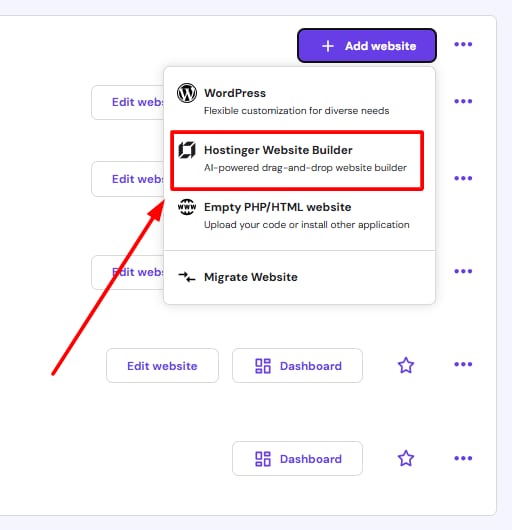
- Complete the onboarding process.
- In the Website Builder platform, open Connect domain → Change domain.
- Enter the subdomain name and continue.
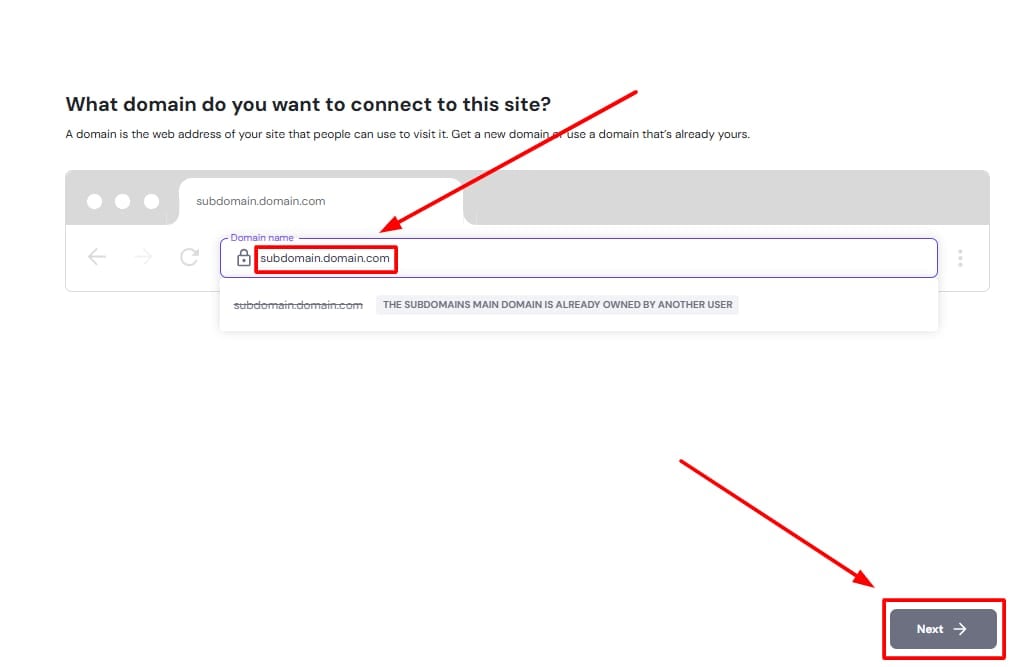
This assigns the subdomain to the website. If you choose not to connect the subdomain during setup or if you have already created the website, you can connect it at any time from hPanel:
- Go to hPanel → Websites
- Locate the website using a temporary domain, and click on Connect domain below the temporary domain name to continue with domain connection.
Step 2 – Point the subdomain
For the website to be accessible using the subdomain, the subdomain’s DNS must point to Hostinger.
If the domain uses Hostinger nameservers
If the main domain is pointing to Hostinger nameservers, no additional action is required.
The subdomain connects automatically and becomes available shortly.
If the domain uses external nameservers
If the domain’s DNS is managed outside Hostinger (for example, at Cloudflare or another provider), you need to add a CNAME record for the subdomain.
Create the following DNS record at your DNS provider:
-
Type: CNAME
-
Name: subdomain name (for example,
shop) - Points to:
connect.hostinger.com -
TTL: default or 300
Do not add a www record when connecting a subdomain.
After saving the changes, allow up to 24 hours for DNS propagation.
NOTE
- A Website Builder site can be connected to one address at a time. It is not possible to use both a domain and a subdomain for the same website.