How to make a WordPress website for clients and tips for freelancers to create stellar sites
Mar 10, 2026
/
Mulan G.
/
8 min Read
If you’re a freelancer looking to start your website development service, you’ve come to the right place. Since WordPress is one of the most popular content management systems (CMS), knowing how to build a WordPress website will be useful to any developer.
This article will go through eight simple steps to make a WordPress website for clients. We’ll also explore some valuable tips to ensure your website looks as professional as it can be.
Download all-in-one WordPress cheat sheet
How to Make a WordPress Website for Clients in 8 Steps
First and foremost, you must be thorough with your approach when making a WordPress website, especially for a client. However, that doesn’t mean that the process has to be complicated.
If you follow the steps below, you’ll make stellar WordPress websites for your clients in no time.
1. Understand Your Client’s Goals
The first step in making a client’s site is to understand the fundamental purpose of said website.
Gather as much information as possible about your client’s industry, business, and target audience, noting your client’s website goals. These goals can be as simple as informing visitors about their business, encouraging visitors to purchase their product, or enhancing customer interaction.
There are many different types of websites, such as eCommerce sites, portfolios, blogs, online forums, corporate landing pages, directories, and media sites. Ask your client to decide what website they want to build.
This will be the basis for web design since different websites require different initial building blocks.
2. Choose a Hosting Provider
After establishing the website type you wish to build, the next step is choosing your hosting provider. Besides storing website files in the server, your web host also impacts the site’s security and performance. Therefore, it’s essential to choose correctly.
There are several factors to consider when choosing a WordPress hosting provider, namely:
- Website type. Determine the website’s objective, also approximate traffic and storage capacity it may need.
- Budget. Agree on the overall budget with your clients, including buying a domain name, premium theme, and hosting services.
- WordPress oriented. Make sure the hosting provider can work well with WordPress.
- Security. Check if the hosting provider offers security measures like SSL certificates, automated backups, software updates, and access management.
3. Define the Scope of the Project
Once you understand your client’s goals and the type of website they want, you should extend your research to fully define the project’s scope.
Use the questions below to narrow down your plan of action:
- What are your client’s values?
- Do they have any brand guidelines or assets?
- Do they have any websites you can use as a reference?
- Do they want to integrate email or social media platforms?
- What is the website scale? Will it be a simple five-page site or an eCommerce project with 20+ product categories?
- What functionalities will be built into the website?
- What is the deadline for completing the project?
After you list down all the necessary information, you can estimate the project’s time frame and direction.
4. Create a WordPress Admin User for the Client
WordPress allows you to easily manage user roles. You can assign one of six different roles in WordPress – administrator, editor, author, contributor, subscriber, and super admin. The webmaster organizes these role management rules.
Giving your clients the Admin role means they have full control over the website, including its settings and content management.
Have your clients install WordPress. Then, to create and assign a new WordPress user role, follow the steps below:
- Log in to your WordPress Dashboard, then click Users → Add New.
- Insert the user’s personal information.
- Create a new password. Users can change the password after logging in.
- Pick the Admin role from the drop-down menu.
- Finally, click Add New User.

5. Develop a Sitemap and Visual Design
Website design can have a major impact on its performance and popularity. 50% of consumers believe that website design is essential for a business. In just 0.05 seconds, visitors can determine whether they’ll browse your site or leave it instead.
Website design also significantly affects search engine optimization (SEO). If the website is easy to navigate, search engine bots can easily crawl to index and rank it.
Hence, ensuring that your client’s website looks perfect is crucial.
Before moving to visual design, you must develop a sitemap – a separate page containing the website’s structure. This helps search engines connect each page and speed up the indexing process.
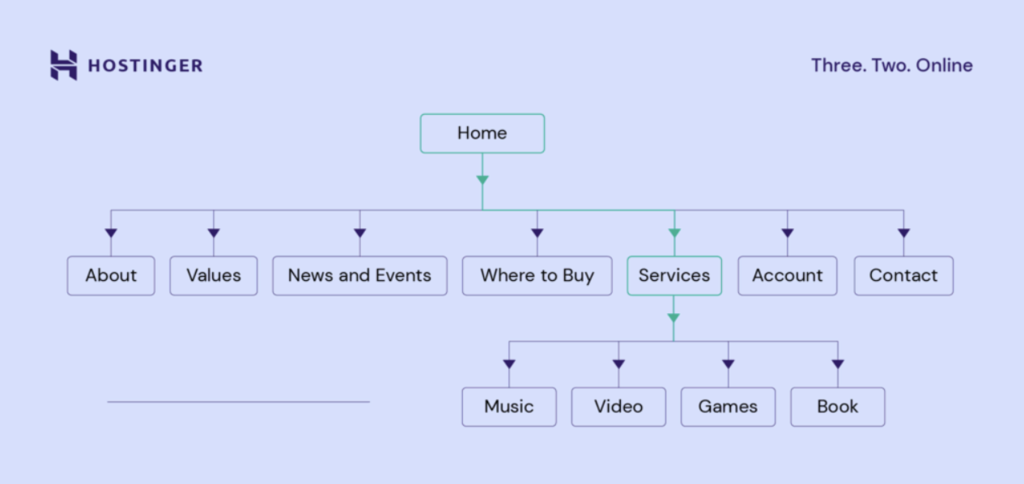
Start by listing all the website’s main pages, followed by subcategories. Finally, map out how many clicks are required to reach each subcategory from the homepage.
You can use an online generator like Dupli Checker to automatically create an XML sitemap.
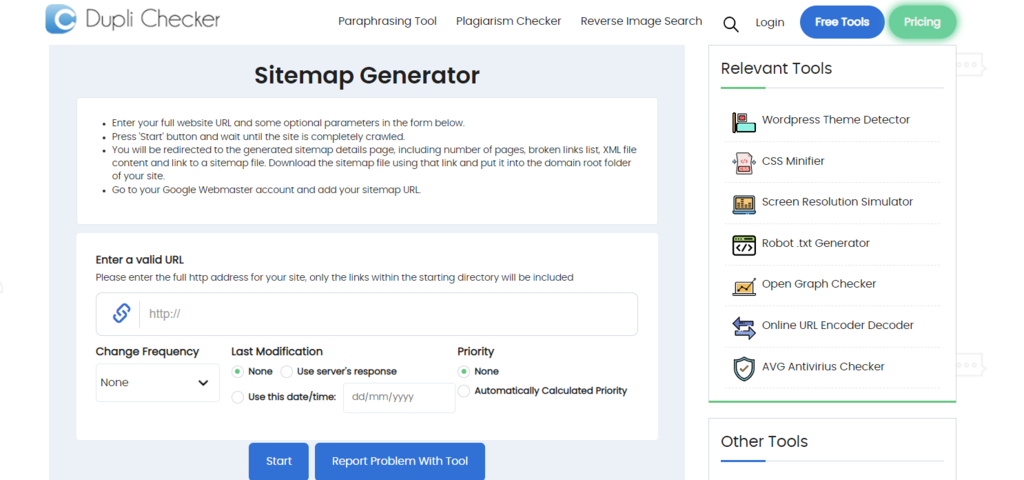
After the website’s framework is clear, you can work on its visual design. Based on Step 3 findings, brainstorm ideas and create a mood board to help you decide on a style.
Make sure that you have the essential elements for website design:
- Buttons and icons.
- Color schemes.
- Fonts.
- Headers.
- Logos.
- Patterns.
- Photos and/or videos.
Compile all these in one folder and run through them with the client. After you have all the assets, you can start developing the WordPress website design.
6. Choose the Right Plugins and Themes
One of the main features of WordPress is the vast number of plugins available. You can install WordPress plugins to simplify the process of adding functionality to your website.
Essential WordPress plugins may vary depending on the website type, but here are some of the must-haves:
- SeedProd – drag-and-drop theme builder to customize your WordPress website design easily.
- AIOSEO – an automatic tool that helps manage your website’s SEO.
- MonsterInsights – connects your site to Google Analytics.
- WPForms – creates any type of form or survey for your site.
- WooCommerce – a popular eCommerce plugin for online stores.
- WordFence – handles fundamental website security elements.
While WordPress plugins help to add new features to your site, themes are responsible for its appearance. A suitable theme leads to a visually appealing WordPress website design with a few clicks.
Here are some things to consider when choosing a WordPress theme:
- Budget. Free options are available, but premium themes with the most features tend to cost money. There are themes for every budget, so choose the theme that suits your client’s budget the most.
- Type of website. If you’re building an online store, it’s best to find a theme specifically made for eCommerce. A specific theme has pre-built templates or functionalities that best suit your site’s purpose, thus saving time.
- Brand aesthetic. Once you figure out the website’s brand identity, find a theme that would suit the visual look. It can be bold, bright, minimalistic, modern, or classic – you simply need to pick a theme that utilizes one or two of these elements.
- Performance. After picking out a theme, ensure it’s responsive, customizable, accessible, well-reviewed, and has customer support on standby. WordPress websites without these features perform worse.
7. Prepare Necessary Documentation to Help Your Client With Site Management
Website building documentation is a set of guidelines that will help your clients to understand the site’s development process and maintenance.
While documentation styles may vary, these are the fundamentals of website documentation:
- Project description. Describe the website’s purpose and what goals it will be trying to accomplish.
- Front-end functionality. List important features and establish basic wireframe templates.
- Back-end functionality. Describe the steps on how to log in and edit the website.
- Design fundamentals. Put together a list of the brand identity, fonts, color palettes, photos, or videos that will be used, and describe the website’s general style.
- Contact information. Remember to leave your contact details in case the client has further questions.
Remember that this document aims to inform your clients about the project. Therefore, create something simple, easy to understand, and detailed. Ensure that the documentation shares the website’s actual design as well.
8. Hand Over the Site to the Client
The final step is handing the WordPress website over to your client. However, before you hand it over, ensure you’ve completed the following checklist with the development site:
- Grammar and typos – run through all the text and check for misspelled words and grammatical errors.
- Overall functionality – test all the buttons and forms one more time to ensure everything’s working properly.
- Backup policy – ensure that a strong backup policy is set in place.
- Payment and billing – guarantee that any invoice issues are already taken care of.
Next, share all login credentials with your client. These may include WordPress admin, hosting login, and domain registrar accounts. Make sure they have tested each one and confirm they’re working properly.
As explained in the previous step, you only need to remove yourself from the Admin role if you’ve added your client as one as well.
You can ask your clients to do this or use their credentials to remove yourself as a user:
- Go to the WordPress Dashboard → Users → All Users.
- Pick your username and click the Delete button.
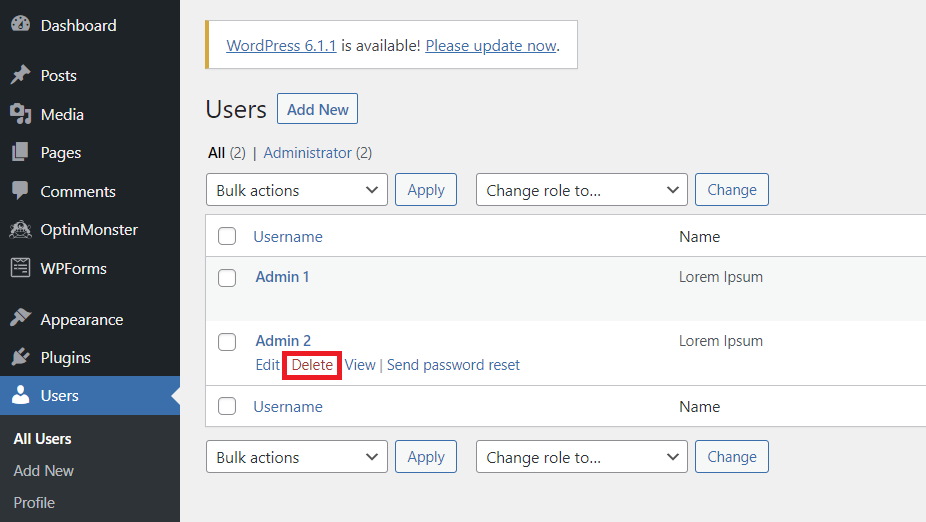
- Note that all the content you’ve created will be removed unless you assign it to another user. To do so, after you click the Delete button, choose your client account from the Attribute all content to drop-down menu.
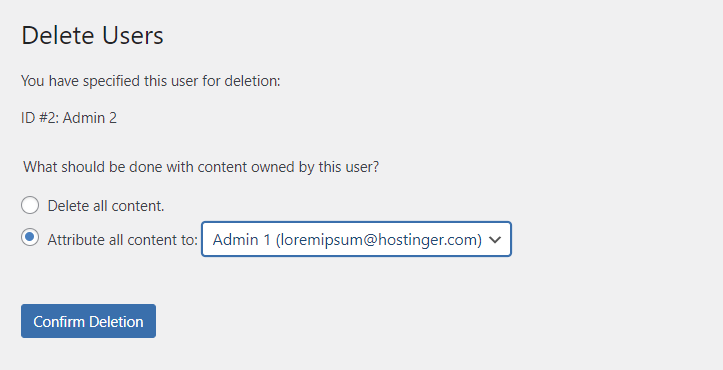
- Finally, click Confirm Deletion.
Tips for Making a WordPress Website for a Client
Once you have explored the steps of creating a WordPress website for your client, we will also go over the tips you can use to ease up the process.
Decide With the Client on the Service First
Before working on your client’s site, you should determine what type of services you will provide.
There are mainly three types of service you can offer, such as:
- Building the website only. Your services are limited to developing their website locally. Afterwards, your client will take over the hosting and publication of the website.
- Creating and publishing the website. After completing the website, you will help the client make the site go live. Later, you will hand the site’s ownership to the client, and they will take it from there.
- Making and hosting the website. You will not only create and publish the website but also set up the hosting process and maintain it. Since you own the hosting account, the client will pay you for the development and hosting service.
Build on a Staging Site First
A WordPress staging environment is a duplicate version of the live website. Staging helps test changes before applying them to the actual website. These changes may include updating themes, editing content, or reconstructing the website completely.
Any changes to a website can affect its functionality. Using a staging site allows you to revise it freely without the risk of crashing the live version.
Staging sites are also not accessible by the public and search engines. Therefore, checking whether each element works correctly after the edits is useful. It will help you find system errors before the site goes live.
However, this may add extra costs for your client for an additional plugin or hosting fee. Plus, you need to spend additional time testing the changes on the staging site and applying them on the live site.
Despite that, utilizing a staging site is recommended to ensure a good user experience.
Ask the Clients to Choose Their Own Domain
Choosing the right domain name for your business is crucial. Domain names can affect traffic, conversion rates, and the website’s credibility.
Some clients may already have a domain name in mind before they come to you. However, you should ask them to choose a domain name if they haven’t because that will be a big part of their brand identity.
Nevertheless, you can still help them in choosing a domain name.
Domain Name Checker
Instantly check domain name availability.
A domain name should reflect the website’s purpose. Besides that, it should also be short, catchy, and easy to remember.
Here are some tips for picking a perfect domain name:
- Make a list of words that suit the business.
- Use a domain name generator to help you choose the perfect domain name.
- Check the domain name availability to shortlist your options.
Use a Migration Plugin to Transfer the Site to the Client
The final step of creating a WordPress website for a client is handing it over. Migrating a website can be a complicated process. If done incorrectly, you can experience downtime or data loss.
Fortunately, you can use a migration plugin to ensure the transfer process runs smoothly. Migration plugins will automatically work for you, saving you some precious time.
Some of the WordPress migration plugins we recommend are:
- All-In-One WP Migration – you don’t need any technical expertise since the drag-and-drop tool makes the process effortless and straightforward. Plus, it works with several popular hosting providers.
- UpdraftPlus – this backup and restore WordPress plugin can also help with website migration. It’s compatible with cloud storage services such as Dropbox or Google Drive.
- Duplicator – this plugin enables you to move, migrate, or clone a website without downtime. It helps duplicate a live site to a staging environment as well.

Conclusion
In this article, we’ve explored step-by-step how to make a WordPress website for a client, alongside valuable tips on how to keep the whole process running smoothly.
To recap, here are the eight steps we discussed:
- Understand your client’s goals.
- Choose a hosting provider.
- Define the scope of the project.
- Create a WordPress Admin user for the client.
- Develop a sitemap and overall visual design for the website.
- Install plugins and choose a theme.
- Create a documentation file to help clients with site management.
- Hand over the website’s ownership to the client.
If you have any questions, drop them in the comments section below. Remember to check out our other excellent WordPress tutorials to improve your website-building skills further. Good luck!
Suggested Reading
How to Become a Web Developer from Scratch
How to Create an Eye-Catching Web Developer Portfolio
Top Web Developer Certifications to Improve Your Skills and Career
Web Developer Portfolio Examples to Take Inspiration From
How to Write a Compelling Web Developer Resume
Web Development Proposal: Best Practices and Examples

Mulan is a Digital Marketing enthusiast experienced in creating social media content. She is eager to help people learn in the simplest way possible. During her free time, Mulan likes to cook and watch sci-fi or documentaries.