Is your finance app just a scorecard? How to build one that actually coaches you
Mar 10, 2026
/
Ariffud M. & Marina M.
/
7 min Read

Many of us have a graveyard of finance apps on our phones. Somewhere between the third page and the Utilities folder sits Mint, YNAB, or that one with the cartoon pig.
We downloaded it in January with real conviction. We logged every coffee for two weeks. Then we stopped.
Quitting wasn’t a failure of willpower. And the app worked exactly as designed – but that design was the problem.
Most commercial finance apps act as reactive scorecards. They track the “what,” such as the fact you spent $847 on dining, but they’re structurally incapable of capturing the context.
Was that a month of planned dinners with friends, or a series of lonely Uber Eats orders at 11 pm? The pie chart doesn’t know. The pie chart doesn’t care.
And while these tools are “free,” you’re the product, not the customer. Your transaction history reveals your triggers, coping mechanisms, and weak moments.
Some companies package that psychological profile and sell it to advertisers who understand your behavior better than you do.
What if you built something different?
A coach that interrupts you in the moment, instead of an accountant that audits you after the fact. One that runs on infrastructure you control, not on servers mining your spending patterns for profit.
We’ll show you how to build exactly that: a privacy-first finance assistant using n8n, OpenAI, and a VPS.
Why do standard finance apps eventually fail us?
Standard finance apps fail because they’re fundamentally misaligned with how humans actually behave. They aren’t just poorly designed. They’re built on assumptions that contradict basic psychology.
The lag-time problem
Traditional finance apps force you to log purchases manually after the fact. That delay between spending and recording – the lag time – kills both the habit and the insight.
Think about your last impulse purchase. There was a moment, maybe three seconds, when you felt the pull. Something emotional happened. Then you bought it.
Now imagine the app’s workflow. You pull out your phone, unlock it, find the app, wait for it to load, tap Add transaction, select a category, and type the amount.
By the time you’re done, you’re in a completely different headspace. The emotional truth of that purchase has evaporated. Logging expenses becomes a chore, and chores get abandoned.
The context gap
The context gap is the inability of transaction data to capture intent.
Your bank sees “$127.43 at Target.” It doesn’t see that you went in for toothpaste and walked out with a weighted blanket because you’ve been sleeping terribly since the breakup.
It can’t distinguish between a planned birthday gift and a stress purchase triggered by a passive-aggressive message from your boyfriend.
Transaction data captures the output of a decision, not the input. Without the input, the emotional state, and the intent, you’re just looking at numbers. Numbers don’t change behavior. Understanding does.
The shame loop
The shame loop happens when punitive metrics cause users to abandon the app entirely.
When you open your budgeting app and see red bars, broken streaks, and “You exceeded your limit by 340%,” you don’t think, “I should try harder.”
You think, “I don’t want to feel this way again.” And the easiest way to avoid that feeling is to stop opening the app.
A system that actually works needs to adapt to imperfection instead of punishing it.
The data trap
The data trap is the privacy cost of using “free” financial tools. Your impulse purchase history is one of the most intimate datasets about you. It reveals your triggers, your coping mechanisms, and your secrets.
When you use a free app, you’re handing that psychological profile to a company whose business model depends on monetizing your attention.
The only way to protect your financial data privacy is to own the infrastructure it lives on. Not to trust the company’s privacy policy.
Can a workflow actually change how we spend money?
A workflow can change spending behavior by interrupting psychological patterns at the exact moment they happen.
You don’t need a better spreadsheet. You want a behavioral finance budgeting system that tracks impulse spending in real time.
Here’s the problem: if an app asked you to rate your purchase on a 1–10 scale for impulsivity while factoring in your emotional state, you’d probably ignore it. Too much thinking. Too much effort.
But “Was this an impulse buy? Yes or no?” That’s something you can answer in one second at the register.
This simplification is the innovation. In programming, it’s called a Boolean – a variable that can only be true or false.
By compressing complex self-assessment into a single binary question, you make reflection possible in the moment when it actually matters.
What counts as impulse? Here’s the working definition: a purchase driven by emotion rather than necessity or routine.
That “sale” you stumbled across? Impulse. The shoes you saw on Instagram and bought six hours later? Impulse.
The coffee you buy every morning without thinking? Planned. It’s habitual, which is different. A new smartphone because your old one suddenly died at the airport? Unplanned, but not impulsive either.
You might want to tweak this rule, and that’s fine. The point is to force a moment of honest self-classification while you’re still at the register.
How can you capture the context of a purchase?
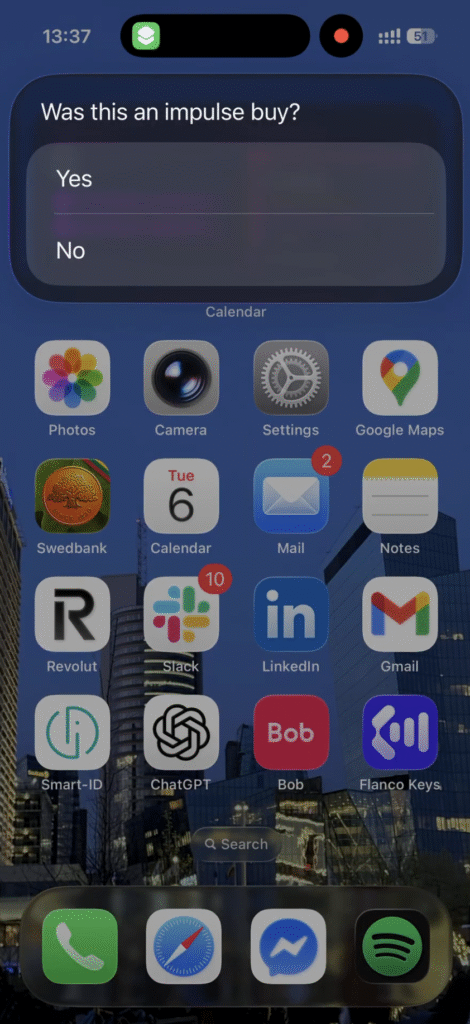
You can actually capture context quite easily through an iOS Shortcut (or an Android equivalent) mapped to your Action button or home screen. This expense tracking automation needs to be faster than your banking app.
No searching your phone for an app. No login. Just hold the button and answer three questions in under ten seconds:
- How much?
- What category?
- Was this an impulse buy? (Yes or No)
Your bank records: Amount: $47, Merchant: Target, Category: Shopping.
Your shortcut records: Amount: $47, Category: Household, Impulse: true.
The Impulse field doesn’t explain why you bought it. Not yet. Was it stress? Boredom? A genuine need you just hadn’t planned for? The system doesn’t know at this stage.
But it captures something your bank statement never could: your own assessment of intent. This is the signal the AI will analyze later.
How does your data get processed?
After you answer the last question, the shortcut sends your input to a webhook – a URL on your VPS that’s always listening.
The workflow behind that webhook receives the data, checks it against your budget, and decides what to do next.
That workflow runs on n8n, an open-source automation platform. n8n is perfect for this project because:
- It’s self-hosted. Your financial data stays on infrastructure you control, not on someone else’s cloud.
- It triggers instantly. The moment your shortcut sends data, the workflow responds.
- It connects to AI. You can plug in OpenAI to analyze your spending patterns.
- No coding required. You build workflows visually by connecting nodes.
How can you build an n8n workflow for impulse spending tracking?
The workflow does two things: alert you in real time when you’re over budget, and send you a monthly AI analysis of your spending patterns.
This Hostinger Academy video walks through how to build the n8n workflow step by step.


For instant alerts, when your data arrives from the shortcut, n8n queries your running totals (stored in a simple database or Google Sheet) and compares them against thresholds you’ve set.
The logic is simple: if current spending in [Category] is greater than [Limit], trigger an alert.
In practice, it works like this:
You spend $85 at a restaurant. You log it through the shortcut, and the alert comes back immediately: “Heads up: you’ve spent $340 of your $300 dining budget.”
You get that feedback while you’re still at the table, so you can decide whether to close the bill or order dessert. Not three days later when your bank syncs. This is the difference between a rearview mirror and a dashboard.
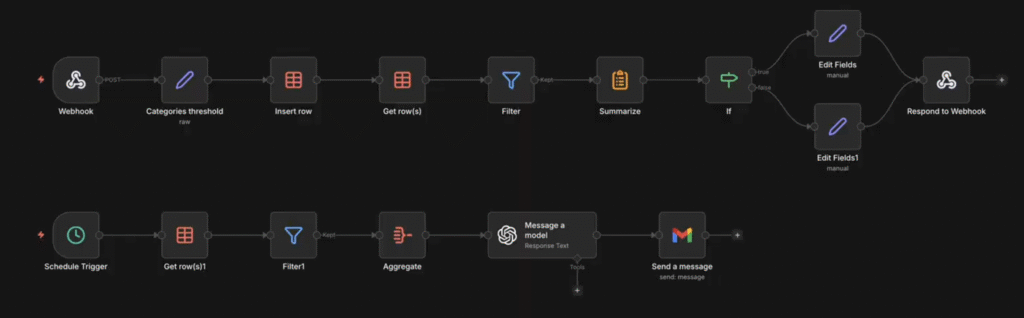
Because you built this system, you control the rules. Want gentle nudges like “Hey, just a heads up that you’re getting close to your limit,” or aggressive interventions such as “STOP. You’ve exceeded your budget”? Your call.
And since this runs on your server, your psychological data never touches a company’s cloud. No third-party analytics. No data brokers. No algorithms learning your weaknesses to sell you things.
You get the convenience of a connected system with the security of a private vault. This n8n personal finance app keeps data only on the infrastructure you manage, accessible only to the workflow you’ve configured.
How does the monthly AI analysis work?
Now, let’s go through the second part of the workflow: monthly AI analysis.
A scheduled trigger (say, on the first of each month) aggregates your spending data, sends it to OpenAI for AI spending analysis, and emails you the results. Think of it as a monthly check-in that arrives in your inbox automatically.
But the value isn’t in the automation. It’s in the prompt.
The therapist prompt
If you ask the AI to “summarize expenses,” you’ll get a useless summary. What you want is interpretation.
The prompt is engineered around three principles:
- Look for correlations, not totals. You don’t need the AI to say you spent $400 on dining. You need it to notice that 70% of impulse purchases happen between 9 pm and midnight, or that you never impulse-buy on days you exercise.
- No guilt or shame. The prompt explicitly forbids scolding. No “You really need to cut back on coffee.” Shame triggers defensiveness, and defensiveness kills self-awareness.
- Forward-looking suggestions. Instead of “You overspent on entertainment,” you want “Your impulse spending dropped when you had weekend plans scheduled. Consider planning one activity each Saturday.”
Here’s an example system prompt you can use:
You are a behavioral finance coach. Analyze the spending data below and provide insights.
Rules:
- Focus on patterns and correlations, not totals. Look at timing, frequency, and the “impulse” flag.
- Never scold or shame. Avoid phrases like “you need to stop” or “you spent too much.”
- Offer one or two forward-looking suggestions based on the patterns you find.
- Keep your response under 1000 words.
Spending data:
{{monthly_spending_json}}
The {{monthly_spending_json}} placeholder is where n8n inserts your aggregated data before sending the request to OpenAI.
The output difference
The output difference between standard apps and AI coaching is significant.
- Standard app. “You spent $200 on dining this month.”
- AI therapist. “You hit your dining budget, and 40% was marked as impulse, mostly on weekday evenings after 8 pm. It looks like you default to delivery when you haven’t prepped dinner. Try batch-cooking on Sundays or keeping frozen backups. The goal isn’t to never order food. It’s to make it a choice instead of a default.”
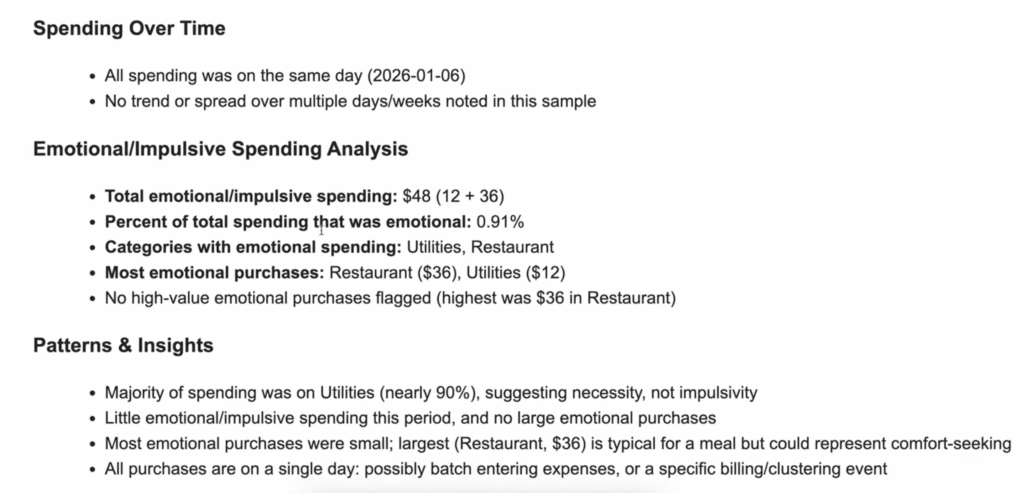
One is a report. The other is coaching. The difference is that coaching actually changes behavior.
What happens when you finally own your data?
There’s a quiet power in building your own tools.
When you use commercial software, you’re a tenant. You live within their constraints, their defaults, and their update schedules.
When you build your own finance app, you’re the owner. Want to add a new category? Done. Want to change the AI’s tone from “supportive friend” to “drill sergeant”? Your call.
Want to add a fourth question to your shortcut, such as “Were you hungry when you bought this?” because you suspect there’s a pattern? Nobody’s stopping you.
This is the real benefit beyond privacy: sovereignty. You stop renting clarity from companies with misaligned incentives and start building it on infrastructure you control.
And unlike the apps collecting dust in your phone’s graveyard, it alerts you in real time when you’re off track, and coaches you at the beginning of the month with patterns you’d never see yourself.
If you want to build a similar workflow, you’ll need a server running 24/7 to catch your data. n8n VPS plans from Hostinger are built for this kind of always-on automation.
It gives you everything you need to build a privacy-first personal finance app that’s reliable and entirely under your control.


Ariffud is a Technical Content Writer with an educational background in Informatics. He has extensive expertise in Linux and VPS, authoring over 200 articles on server management and web development. Follow him on LinkedIn.

Marina is a scriptwriter for Hostinger Academy, where she writes about web hosting, AI tools, and digital marketing. Her background in theatre and storytelling helps her turn technical topics into accessible, engaging videos. When she's not writing, Marina enjoys knitting, hiking, and watching movies (not at the same time). Follow her on Linkedin.