How to choose a web host and find the best hosting provider
Mar 10, 2026
/
Domantas G. & Saulius L.
/
12 min Read

Every website needs web hosting to go online, so finding the most suitable one is crucial to optimize performance.
With over 260 web hosting providers worldwide, it can be challenging to choose as each web host offers varying products, pricing options, support, and features.
To help narrow down your choices, we will explain five simple steps for finding the right hosting provider for your site. This tutorial will also share some best practices and elements to consider when looking for a suitable web host.
By the end of this article, you will be able to choose the right web host that can help your site succeed.

How to choose a web host provider for your website
To start, here is an overview of the five steps to help choose the best web hosting provider for your site:
- Understand your website needs. Determine the website type and purpose. For example, a blog needs different features than an online store.
- Research and compare hosting providers. Look at the different hosting providers available, and compare their core services to find the most suitable one.
- Check the key features. Research the features that the web hosting company offers, especially for security and performance.
- Look for dedicated support. Choose a web host that offers support 24/7 to ensure that you can get help right away in case of any issues.
- Find the right plan. Get a suitable plan to host your website. Consider the resources and note the web hosting type.
Now, let’s look at each of these steps in more detail.
1. Understand your website needs
Before looking for the right web host, understanding your website needs is essential to guide your search.
Some key factors to consider are:
- Project scope. Decide on the purpose of your site, whether that’s a personal portfolio or a business landing page. For example, a freelance web developer handling small businesses will need more hosting resources to create multiple sites.
- Traffic. Estimate the potential website traffic to find a web host that can provide sufficient resources.
- Platform. Consider how you want to build the website by choosing between a self-hosted or a hosted service. Find a web host that supports the web-creation tool you prefer.
- Features. Check the overall bandwidth and storage necessary to run your website. Note the scalability of the web hosting solution, so your website has plenty of room to grow.
- Security. Consider the level of security you will need for your website. For example, online stores need secure servers to protect customers’ credit card information.
- Budget. Set a budget for hosting services. Some web hosting costs more than others, so creating a budget can help organize your long-term spending.
Understanding these factors will help you make better decisions in the next steps. We recommend writing down your website needs before moving forward.
2. Research and compare different hosting providers
Pro Tip
The following steps are also applicable for those who already have a website but want to transfer web hosting to a different company.
When comparing different hosting providers, make sure to check their legitimacy. In-depth research is essential to avoid getting scammed, as not all hosting providers offer reliable service.
Some ways to determine if a hosting provider is legitimate are:
- Checking reviews. Look for testimonials on trustworthy platforms, such as HostAdvice and Trustpilot.
- Looking for a money-back guarantee or free trial options. This lets you try the web host’s services risk-free.
- Contacting customer support. Check if they have responsive customer support that can address users’ issues quickly.
One way to find a reliable web hosting provider is to use an online tool like Amazing Algorithms. Simply copy and paste the domain of a website you like, and the tool will reveal its hosting provider.

We recommend listing three main web hosts to compare. This will make it easier to narrow down your choices and analyze each solution’s pros and cons.
Web Hosting Providers Comparison
Hostinger vs Bluehost
Hostinger vs Siteground
Hostinger vs GoDaddy
3. Check the web host’s technology and features
Once you have shortlisted a list of web hosts, compare their technology and features. Each hosting provider has its own approach to boosting your website performance.
For example, Hostinger’s technology is enhanced with LiteSpeed Web Servers (LSWS) and an in-house web application firewall to strengthen security.
Before deciding on a web host, consider researching the following factors:
- Data centers. Choose a web host with multiple server locations worldwide and check whether it has a data center near you to ensure low latency.
- Migration option. This is a great feature to have if you are looking to transfer web hosts. For instance, Hostinger offers a free and seamless website migration service.
- Domain name. An essential element of a website is its domain name. Check if your web host offers domain name registration with their hosting to simplify the website-building process and choose the right domain for your website.
- Email. Having a custom email is a great additional feature for business websites and online stores as it helps to boost credibility.
Pro Tip
Unsatisfied with the technology and features of your current web host? Time for a hosting makeover, check out our articles on:
4. Look for dedicated support
Having a reliable support team that’s ready to help 24/7 is vital to fix any website-related issues immediately. Before selecting a web host, ensure the company offers multiple support options.
Even though there are various types of support services, here are the main ones to look for in a web host:
- Live chat. This popular customer service approach is great for getting quick responses. Most web hosts also provide transcripts of the conversation to keep track of the issue and progress.
- Email. This method is great for non-urgent issues or inquiries. Customer service can fix the problem without responding right away.
- Phone call. If you prefer explaining issues verbally, look for a web hosting service that offers phone support. Note that most providers only offer this as a premium service.
- Knowledge base. Other than talking directly to a customer service agent, check if the web host has a knowledge base that answers frequently asked questions. This resource can be particularly helpful for beginners in website development.
- Tutorials or blogs. Another characteristic of a reliable web host is providing industry-related tutorials and blog posts. This is great for people who like to learn and solve issues independently.
If you are uncertain about a provider’s quality of customer support, look for reviews about their service.
5. Find the right web hosting type
Most web hosts offer various hosting services, so make sure to do your research before choosing the right hosting plan for your website.
Consider the price, storage, bandwidth, and features. Additionally, check whether they offer self-managed or managed hosting.
There are also different types of hosting services available, and each one has its own benefits and downsides. To help identify which option will suit your website best, let’s take a closer look at each web hosting type below.
Web hosting
With basic web hosting, multiple websites run and use resources on the same physical server. Therefore, any issues other websites may face under the same server can impact your own site performance.
The basic web hosting service is the most affordable option in general and requires the least technical knowledge.
The best hosting providers offer a beginner-friendly control panel to help users manage their websites easily, even on the most basic plans. For example, Hostinger has an intuitive custom hPanel, helping to make the website management process seamless.
This type of hosting is the best web hosting service for low to medium-traffic sites, such as personal portfolios, blogs, and small business websites.
Virtual Private Server (VPS) hosting
On VPS hosting, users use the same server but with dedicated partitions. Therefore, your website can have a more stable and secure performance due to allocated resources.
Hostinger provides VPS hosting that utilizes Kernel-based virtualization (KVM), ensuring even better performance and stability. With the KVM hypervisor technology, your website gets fully separate resources.
One of the essential factors to look into with VPS hosting is its compatibility with your preferred operating system. For example, Hostinger offers instant Linux deployment for its VPS web hosting.
VPS is an excellent option for medium-sized websites. However, compared to regular web hosting VPS has a steep learning curve and requires more technical knowledge to fully configure and maintain, as site owners will get full root access.
Hostinger has four KVM VPS options that vary mainly depending on the memory, storage space, and bandwidth. We recommend buying a VPS that is most suitable for your project.
WordPress on VPS
Learn how to optimize your WordPress website with KVM VPS at Hostinger.
Cloud hosting
Cloud hosting is the best web hosting service for consistent uptime. With cloud hosting, you get more resources – combining the user-friendliness of basic web hosting with the capacity and reliability of VPS hosting.
This web hosting service uses cloud technology to delegate the load of running a website to a virtual network of cloud servers. If one server is down, another can take its place to keep the website running.
If you’re expecting high website traffic, cloud hosting is a great choice. This option also works well for medium to large businesses looking to improve their websites’ speed and user experience.
Hostinger offers fully managed cloud hosting with free domain name registration and SSL certificates. The options vary depending on the disk space, RAM, and CPU cores:
- Startup. Available from CA$ 11.19/month, it comes with 100 GB of disk space, 3 GB of RAM, and 2 CPU cores.
- Professional. Get 200 GB of disk space, 6 GB of RAM, and 4 CPU cores. Prices start at CA$ 22.39/month.
- Enterprise. This plan starts at CA$ 41.89/month and offers 300 GB of disk space, 12 GB of RAM, and 6 CPU cores.
Dedicated hosting
With dedicated hosting, users can control the entire server and decide how many resources to allocate and what software to install.
Advanced technical knowledge is essential to run websites and online projects using dedicated hosting. It is also more expensive than other web hosting types.
Therefore, dedicated hosting services are mainly suitable for large-scale projects and enterprise-level companies, such as an online streaming service or an ecommerce store.
Managing dedicated hosting also requires more work, so consider allocating a budget to hire a professional team if you choose this option.
WordPress hosting
The WordPress content management system (CMS) can run on any web hosting service. However, WordPress hosting services are specifically designed to boost your website’s performance and security.
Managed WordPress hosting is the best option if you are certain about using this CMS. Most providers will take care of any WordPress-related updates and technical adjustments. We also recommend looking for a WordPress host that provides expert customer support.
In addition, this web hosting service often comes with pre-installed plugins and themes to speed up your website-building process.
For example, all of Hostinger’s WordPress packages come with a free SSL certificate and include the LiteSpeed Cache plugin to improve website performance.
What to consider when choosing a web hosting provider
This section will explain the key elements in choosing a web host and why they are important.
CMS vs website builder
The best web hosts offer web hosting services that integrate well with various platforms, such as different content management systems (CMSs) and website builders. Choosing the right platform is crucial in creating a successful website.
A CMS can help you build websites from the ground up but with a relatively steep learning curve. With this option, you will need some technical knowledge to handle technical tasks like optimizing speed and security.
The most popular CMS platforms are WordPress, Joomla, and Drupal. If you are certain about using a specific CMS, find a web hosting service catered to the platform, such as managed WordPress hosting or Joomla web host. Some web hosts also offer an auto-installer to quickly activate your chosen CMS.
Another option is to use a website builder, where users do not need to worry about managing the technical aspects of hosting. Some providers offer a built-in site builder for a more user-friendly way to create a website.
Many website-building tools include designer-made templates that can help create a professional-looking website within minutes. This option is more user-friendly and often comes with a drag-and-drop interface.
Consider the following elements before choosing a suitable platform for your site:
- Technical skills. Using a CMS requires more knowledge of maintaining web hosting than a website builder.
- Budget. Self-hosted platforms are often more affordable than website builders.
- Design. Most website builders offer pre-made templates and user-friendly tools. On the other hand, a CMS provides the freedom to customize a website from scratch.
- Flexibility. A website builder can have more limitations than a CMS since aspects like hosting and security are out of your control.
Once you determine the platform suitable for your needs, choose a hosting service that supports it.
Suggested reading
Check out these guides to learn how a website builder differens from these other web-building methods:
Hostinger Website Builder vs WordPress
Website Builder vs CMS
Website Builder vs Coding
Storage and bandwidth
When looking for a web host, consider the storage and bandwidth it offers.
Storage refers to space in the server where the site’s files and data are stored, such as images and videos. The amount of storage you will need depends on the type of website and content you have.
For reference, Hostinger’s Premium hosting plan provides 25 GB of SSD storage space, which is suitable for small-to-medium businesses, blogs, and personal websites.
On the other hand, bandwidth is the website’s data transfer limit within a given period, typically every month. The two categories of bandwidth are:
- Metered. Sets a monthly limit on how much traffic the website can handle. Visitors might be unable to access your website if the traffic exceeds that threshold.
- Unmetered. The hosting service will not limit the amount of data transferred monthly and will only set the server’s capacity.
We recommend picking a hosting option that offers 50% more resources than the amount your website currently needs to ensure optimal performance. Check the average of the following website factors to estimate the necessary amount of resources:
- Monthly visitors. This number shows how much traffic your site gets each month.
- Page views. This metric displays the average amount of views a page receives per month.
- Size of web pages. Although the size of your web pages will vary depending on the content, find the average to approximate the necessary resources.
There are various tools that can help you gather this data, such as Google Analytics, Rankwatch, and Pingdom.
Next, multiply the average number of monthly visitors, page views, and web page sizes.
To demonstrate, let’s say the average size of your web page is 2MB, with an average monthly traffic of 3,000 visitors who open around two pages. The result will be 3,000 x 2 x 2 = 12,000 MB or 12 GB/month.
To give your website room to scale, multiply the amount by 150%, making it 18 GB/month. Hostinger’s Web Hosting offers unlimited bandwidth and storage starting at 25 GB, making it more than sufficient to power this example site.
Important! Note that the unlimited bandwidth given by any hosting provider still has a limit. However, it is generally higher than any regular website will need, making it appear limitless for most users. If you are worried that this is insufficient, contact your web host.
Websites with specific purposes should consider their storage and bandwidth needs separately from an average site. For example, a content-heavy photography or streaming website must prioritize speed and storage before selecting a web host.
Speed and optimization
Choosing a web host that offers excellent speed and optimization features will help improve your site performance.
First, get a hosting service with a fast web server. For example, Hostinger uses the LiteSpeed Web Server with an advanced cache engine. It speeds up websites by compressing cache files instead of creating a new request every time.
Server locations also influence your site’s speed. Being close to your host’s server can decrease loading time, but it’s best to find a web host that offers multiple server locations.
Another option is to look for a hosting service that integrates well with a content delivery network (CDN). A CDN is a network of data centers distributed worldwide that speeds up content delivery for users regardless of their location.
Some web hosts also offer additional features to improve site speed. For example, Hostinger includes a LiteSpeed Cache plugin for all WordPress Hosting users. In addition, you can run page speed tests directly from hPanel to track the site’s performance.
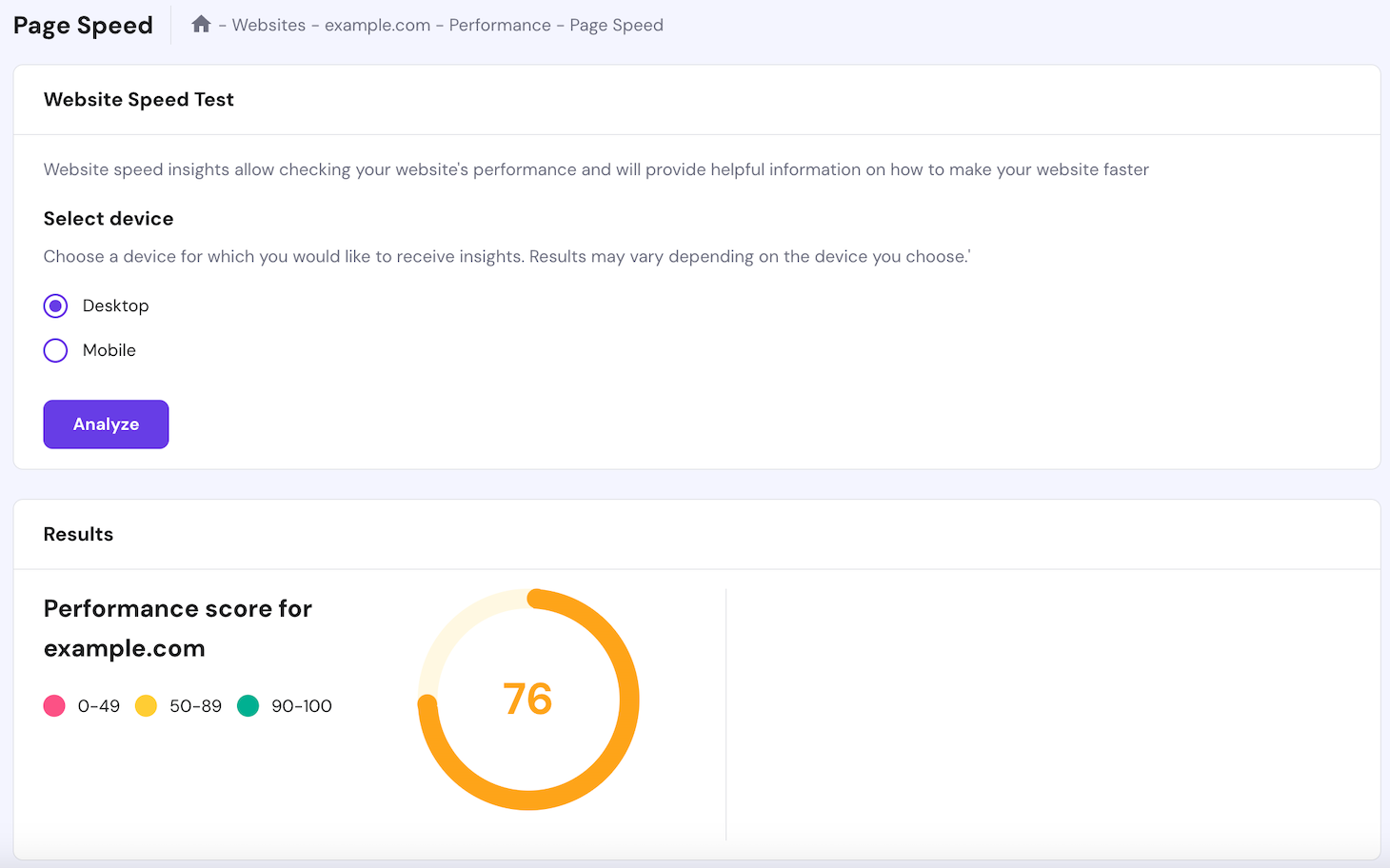
When running a speed test, take these two factors into account:
- Time to first byte (TTFB). The time it takes a browser to send a request and receive the first byte of the page. Google states that the ideal estimate is 200 milliseconds or less.
- Component loading time. This measures how long a server loads cached content, which shouldn’t take longer than a few milliseconds to render.
Security
Securing your website is essential to protect sensitive information from malicious attacks. Here are some factors to consider when it comes to security:
- Access management. A good provider should offer a robust and secure system to limit admin and user privileges. In addition, back-end operations should be restricted to authorized IP addresses.
- SSL certificates. Secure Sockets Layer (SSL) is a security protocol that encrypts the connection between a web server and a browser. It prevents third parties from accessing or modifying the information transferred. Look for a web host that offers a free SSL certificate to protect your site.
- Firewalls. A web host should offer multiple layers of firewalls to monitor traffic, detect malware, and protect sensitive data against DDoS attacks.
- Network monitoring. A good hosting provider monitors its network for suspicious activities and periodically updates its server software and hardware for optimal server security.
- Automated backups and updates. The hosting company should perform regular site-level backups and automatically update the software to the latest version. This is to prevent data loss and other vulnerabilities from outdated software.
For example, Hostinger’s WordPress Hosting offers the essential resources and features needed to protect your WordPress websites, such as a web application firewall and a malware scanner.
For site owners who prefer more resources, Hostinger provides secure virtual private servers and cloud web hosting services.
Ease of setup and use
When researching web hosting services, another essential factor to consider is their ease of use. This is important, as some hosting control panels offer a more user-friendly interface than others.
For instance, Hostinger’s hPanel is intuitive and beginner-friendly. With it, you can easily configure domain names and hosting, install software, and manage files.
Aside from an intuitive user interface, a reliable provider should offer a library of information or a knowledge base to help you get started on building your own website.
Check whether the web host provides tutorials or glossary entries for users. See whether they can explain complicated terminologies in simple terms and offer straightforward methods to solve problems.
For example, if Hostinger users encounter a technical issue and want to solve it independently, our Hostinger Tutorials and Help Center pages provide an extensive repository of learning materials.

Conclusion
Finding the best web host for your website can be challenging as there are many options available.
In this article, we explained the steps on how to choose a web host. From understanding your website needs to finding the right web hosting type, all the steps require in-depth research.
To help narrow down your selection process, we have shared some crucial elements to consider when choosing a web host:
- Platform. Make sure that the hosting provider supports the platform you want to build your website with. Keep in mind that if using a website builder, there’s no need to find a separate hosting provider.
- Storage and bandwidth. It’s essential that the provider gives you enough server resources to store all your website files. Also, an unmetered bandwidth helps guarantee that your website can handle high traffic.
- Speed and optimization. Underperforming servers impact your site’s loading time, negatively affecting its SEO and user experience. So, find hosting services with optimized resources.
- Security. Check that the provider offers DDoS protection, encryption methods, and malware detection. Automatic backup services and updates are also essential.
- Ease of setup and use. A user-friendly and easy-to-navigate interface will make managing your files, domains, and software much easier.
We hope that you are now more familiar with the process of choosing a web hosting service and can make an informed decision to grow your business online.
How to choose a web host FAQs
What is most important when selecting a website host?
The most important factors to consider when selecting a website host include reliability, performance, security, customer support, scalability, and pricing. Look for a provider with a solid reputation, proven uptime, fast loading times, robust security features, responsive support, and plans that can grow with your website.
Do I really need a host for my website?
Yes, you need a host for your website as it provides the infrastructure and resources necessary to make your website accessible on the internet. A host stores your website files, manages your domain, and ensures that your website is secure and performs well for visitors.
Can I migrate my current web host to a new one?
Yes, you can migrate your current web host to a new one. The process involves selecting a new host, setting up your account, copying your website files and database, and updating your domain’s DNS settings. Hostinger offers an easy way to migrate your web host.

Domantas leads the content and SEO teams forward with fresh ideas and out of the box approaches. Armed with extensive SEO and marketing knowledge, he aims to spread the word of Hostinger to every corner of the world. During his free time, Domantas likes to hone his web development skills and travel to exotic places.

As VP of Product at Hostinger, Saulius oversees Web Hosting Platform & Tools, Managed WordPress, and WebPro Experience. Saulius enjoys observing users through their daily life activities, looking for problems to solve, and building products that make users more efficient online, help them spend more time on the things they love, and leave all the rest for technology to solve. Follow him on LinkedIn.


Comments
December 05 2024
Hi. I need a domain with .om Because I live in Oman and some of my customers need it. I didn't see any domains with .om here. Does it exist? And if it exists, how much is it?
December 11 2024
Hi! Unfortunately, .OM domains aren’t available, but you can easily buy domain alternatives that work great for your business ;)