How to transfer a domain name from IONOS to Hostinger
Sep 15, 2026
/
By Akshay K. & Klaudijus J.
/
5 min Read
If you’re searching for better privacy features, customer support, user interface, or value for money for your domain name, Hostinger can be a good IONOS alternative.
Meanwhile, for users who already use our web hosting, transferring your domain to Hostinger can streamline all your services under one roof.
Fortunately, transferring a domain name from IONOS to Hostinger is easy. This guide will walk you through each step to transfer a domain from IONOS to Hostinger.
Download guide to using Hostinger
Suggested Reading
If you need help moving your website from IONOS to Hostinger, check out our articles on how to delete your IONOS account and migrate to Hostinger
Steps to transfer a domain from IONOS to Hostinger
Here are the steps to move your domain name to the new registration authority, Hostinger:
1. Purchase a domain transfer from Hostinger
To transfer the domain to Hostinger, first, purchase our domain transfer package.
Head to Hostinger’s official website and locate the Domains section. You’ll find the Hostinger domain transfer service, which can move your domain to our servers in four easy steps.
First, enter your domain name into the field, then click Transfer.
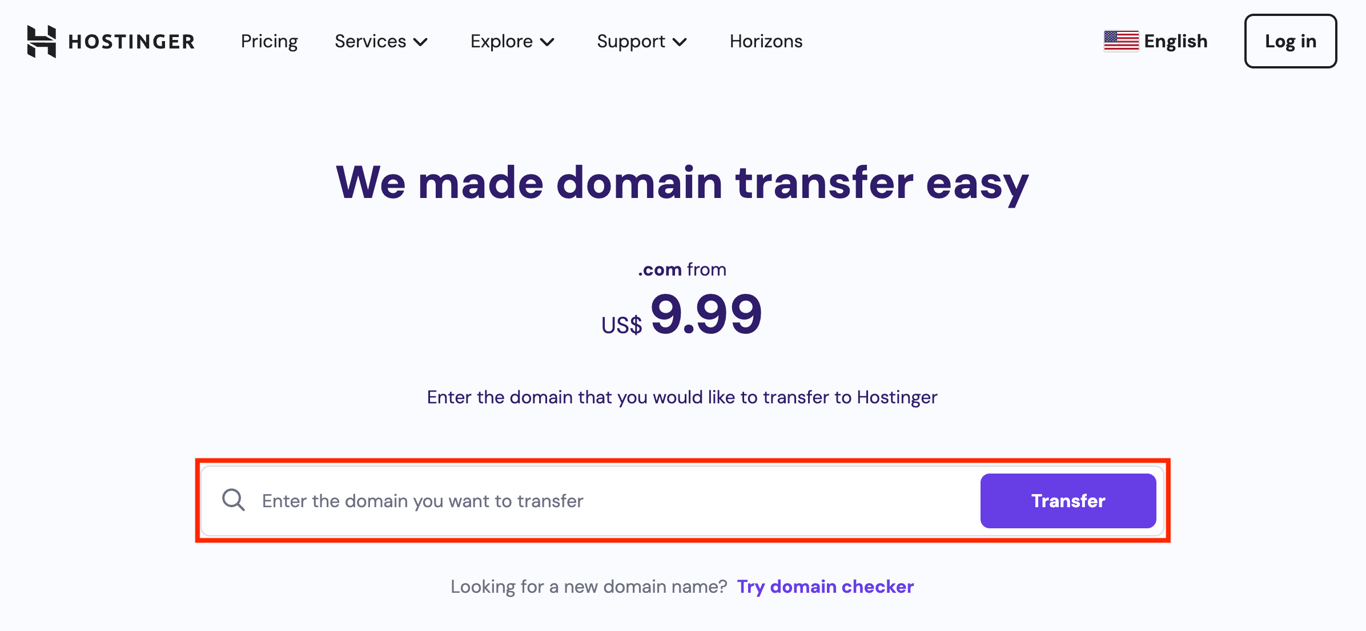
Proceed to the payment screen. If you’re new to Hostinger, you’ll be guided through the account creation process before making the purchase.
2. Unlock your domain at IONOS
Before initiating the domain transfer, verify its eligibility under ICANN rules and domain registration policies.
Important! Generic domain extensions such as .com, .net, .org, .info, .biz, .mobi, .cc, and .tv must be registered under your name for a minimum of 60 days before you can make a transfer request.
After you’ve verified your domain’s eligibility, the next step is to unlock it at your current registrar to initiate the migration request.
Warning! We highly recommend backing up your website before transferring your domain.
Here are the steps to unlock your domain:
- Log in to your IONOS account.
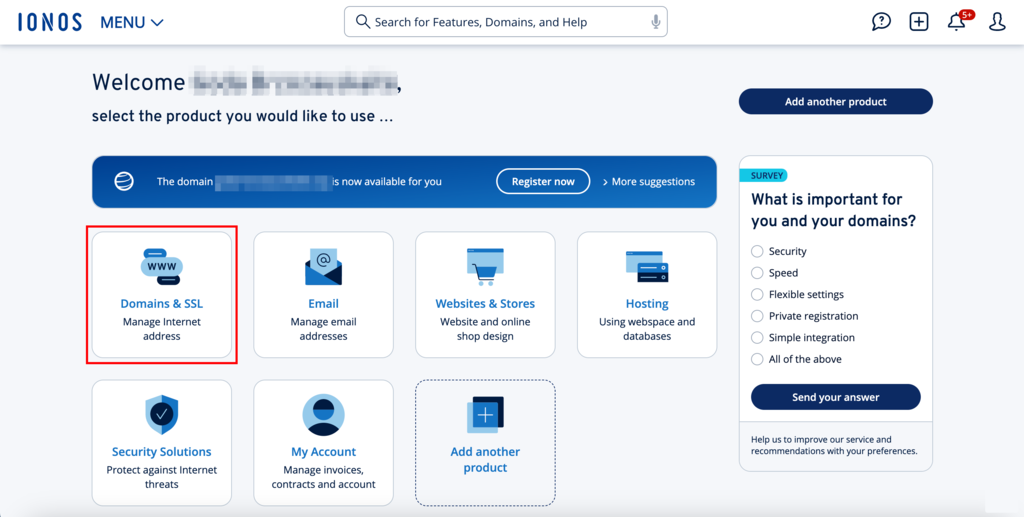
- In the dashboard, select Domains & SSL.
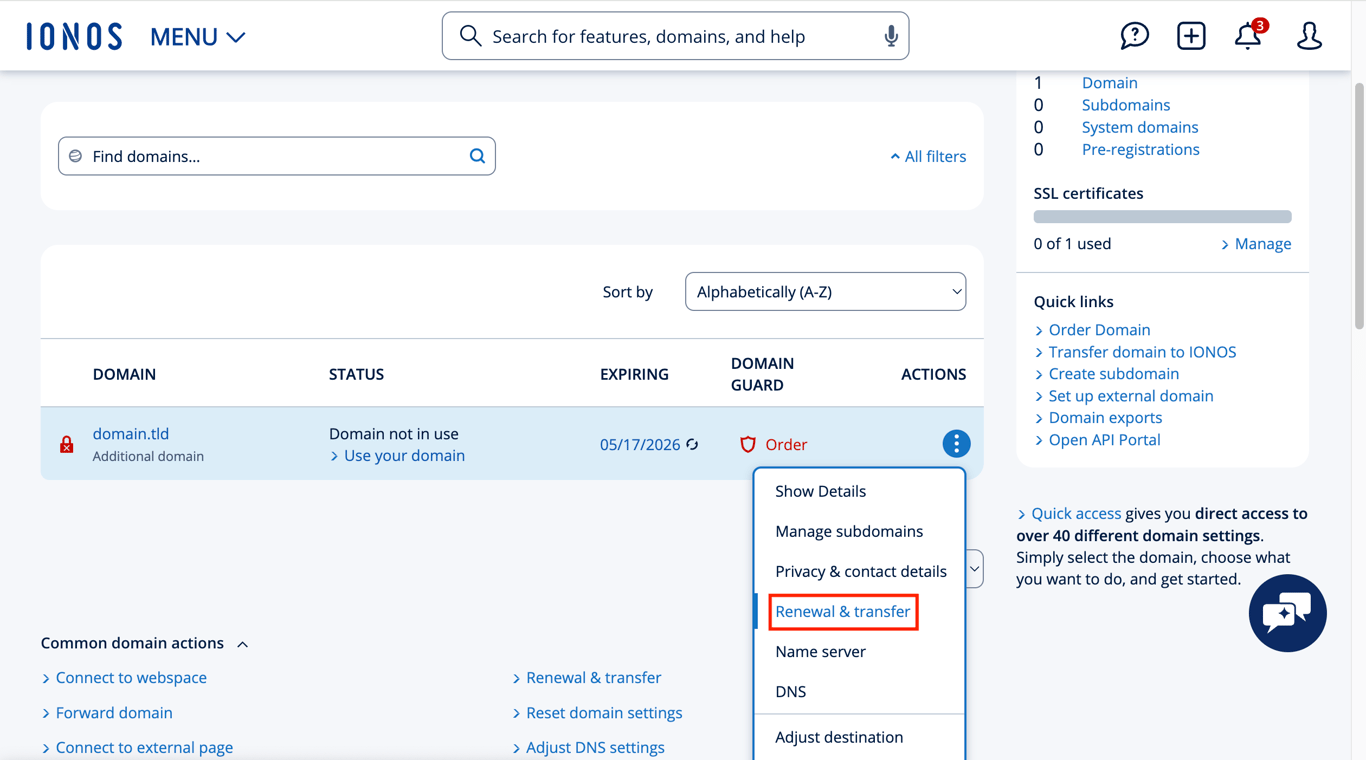
- Locate the domain you intend to transfer to Hostinger and click on the gear icon.
- Select Renewal & Transfer.
- Ensure the Domain transfer lock option is disabled by clicking the toggle button.
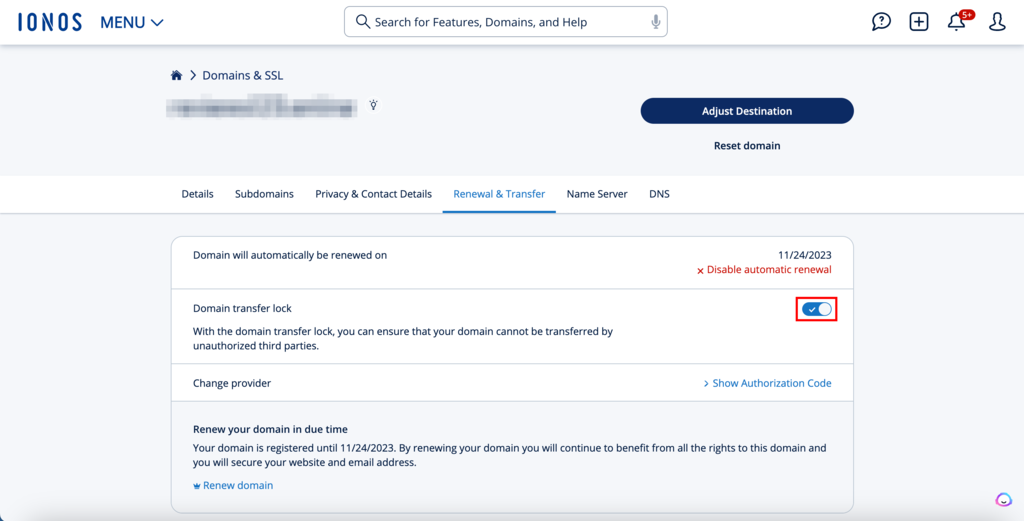
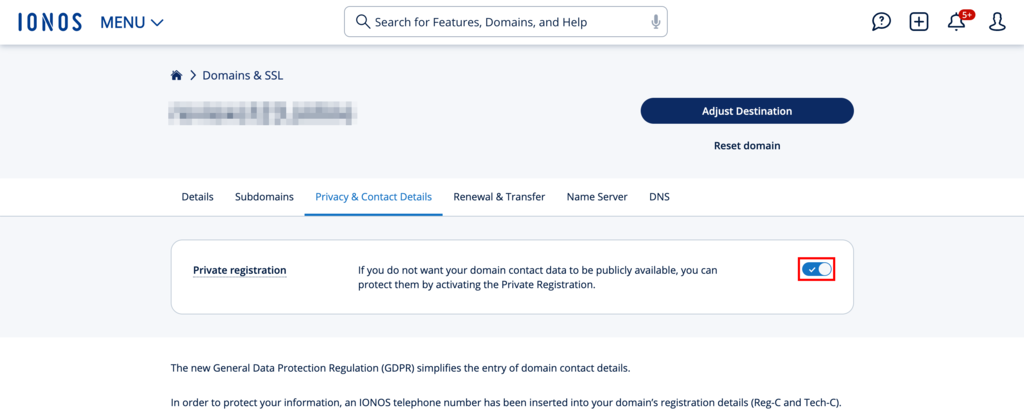
If you do not see the toggle button, that means your WHOIS privacy is turned on. To turn it off, head to the Privacy & Contact Details tab and toggle the Private registration option off.
Pro Tip
If you’ve changed your domain contact email address, you must verify the new contact information before disabling the Private registration and Domain transfer lock options.
3. Obtain the transfer authorization code
The next step is to get the authorization code from the registrar responsible for the domain. This alphanumeric code is needed to initiate a successful domain transfer to Hostinger from IONOS.
Also known as the transfer code or EPP key, retrieving it is a critical step in the domain name transfer process. It helps the domain registration authority confirm that you are the legitimate owner, preventing unauthorized transfers.
Here’s how to locate your EPP key:
- In the domain name’s management tools, switch to the Renewal & Transfer tab.
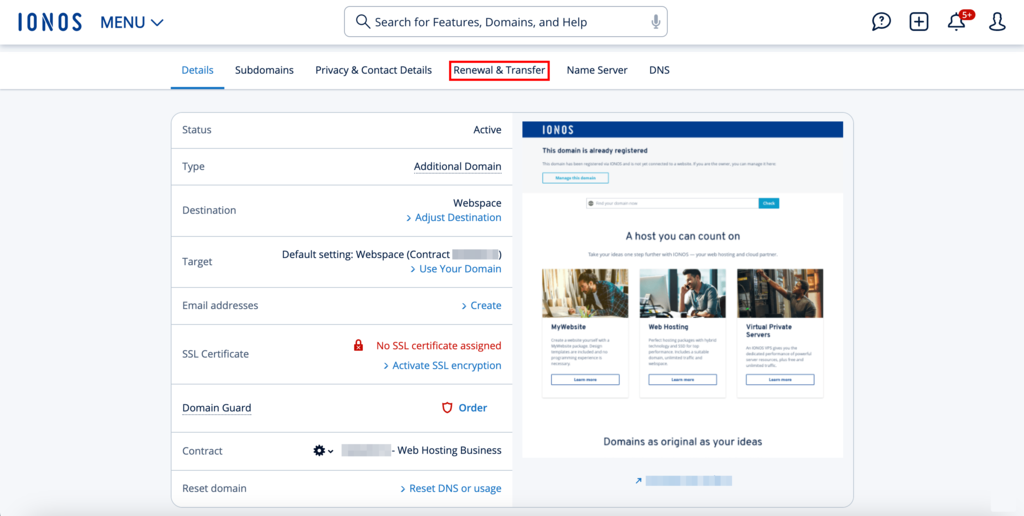
- Click the Show Authorization Code option to view your EPP key.
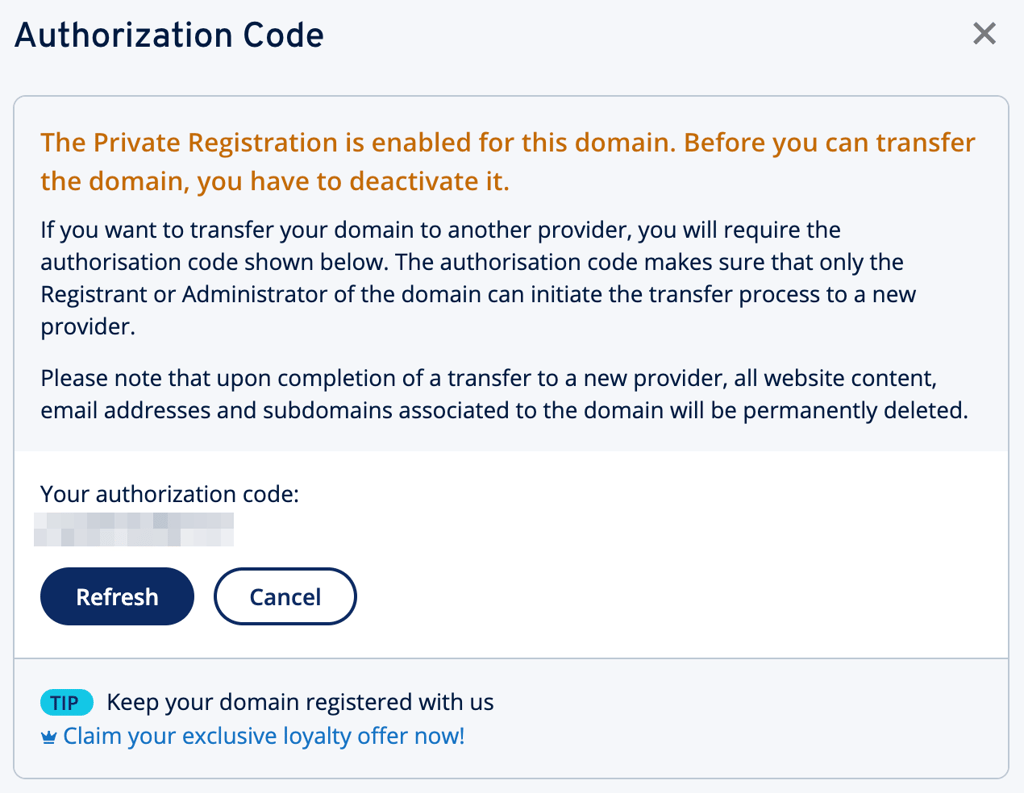
- Copy the auth code to a safe place.
4. Point your domain nameservers to Hostinger
The next step is directing your domain nameservers to Hostinger. Updating DNS settings ensures a seamless transition and a functional website after moving the domain to a new registration authority. Follow these steps to point your domain to Hostinger.
Important! DNS changes may take up to 24 hours to fully propagate worldwide.
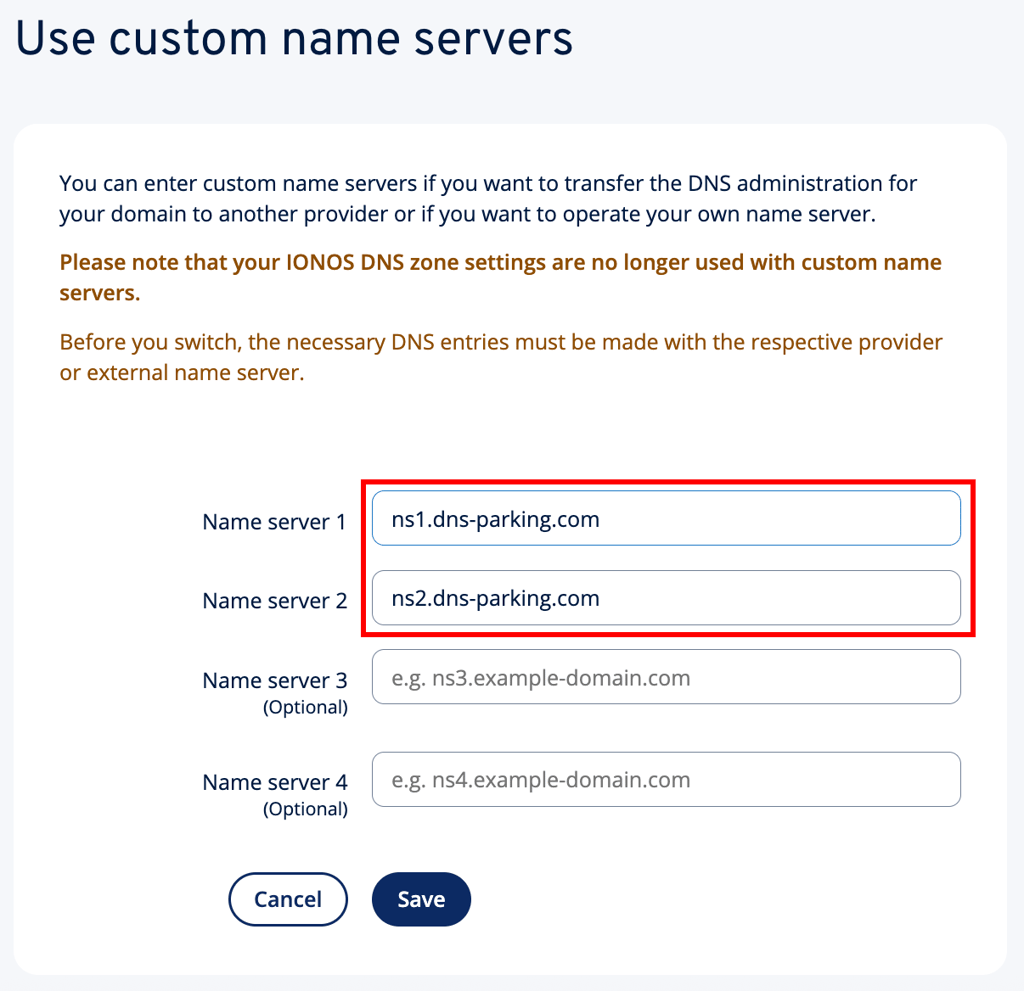
First, copy Hostinger’s nameservers:
ns1.dns-parking.com (162.159.24.201)
ns2.dns-parking.com (162.159.25.42)
Hostinger uses two nameservers for improved stability and connectivity. In most cases, you only need the names, but certain registrars may also require the IP address.
Next, replace IONOS’ nameservers with Hostinger’s with these steps:
- Go to your IONOS account and access the Name Server tab.
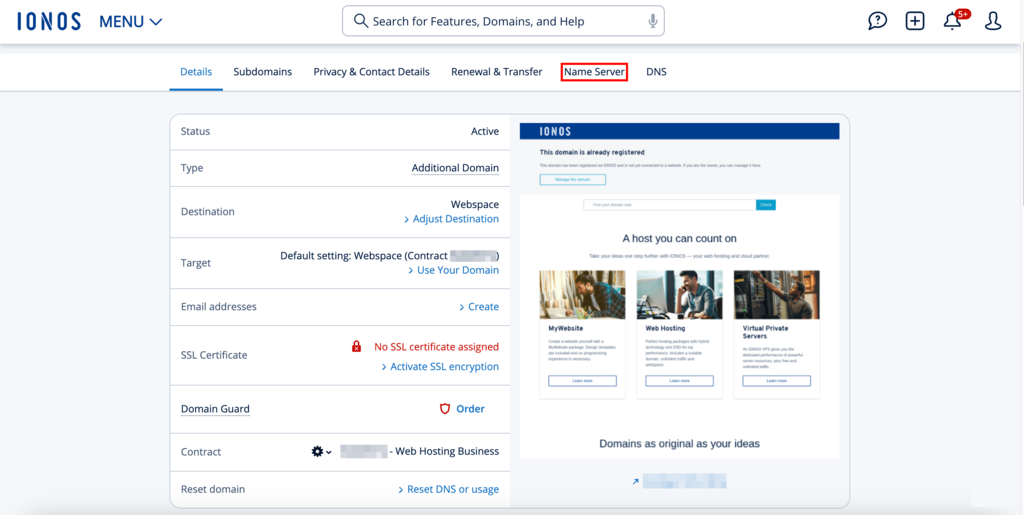
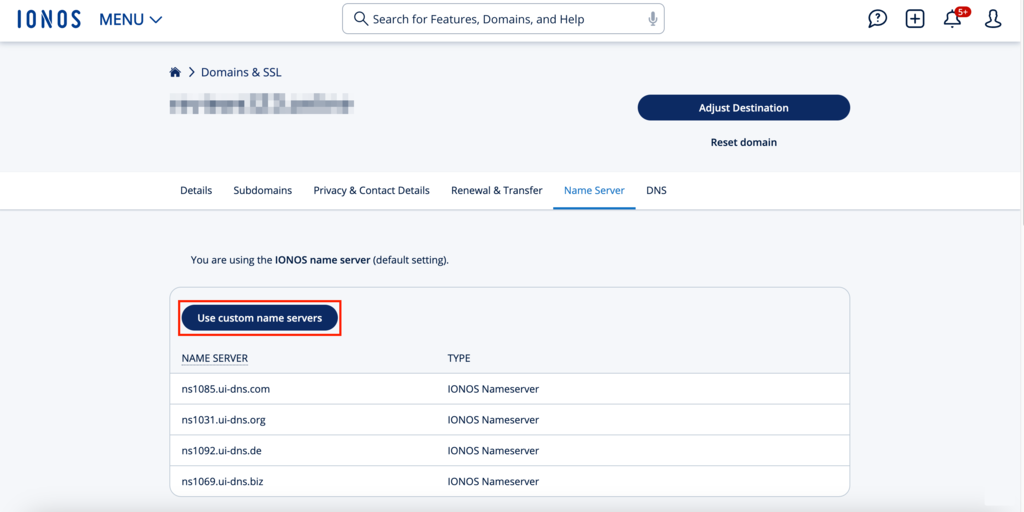
- Here, you must replace the IONOS nameservers with Hostinger’s. Click the Use custom name servers button.
- Enter the two Hostinger nameservers in the text boxes and click Save.
Warning! If you don't update the nameservers first, you can only modify your DNS settings after the domain transfer is complete. This could lead to downtime or limited functionality on your website.
5. Initiate the domain transfer to Hostinger
After your domain is unlocked and pointed to Hostinger, it’s time to initiate the transfer.
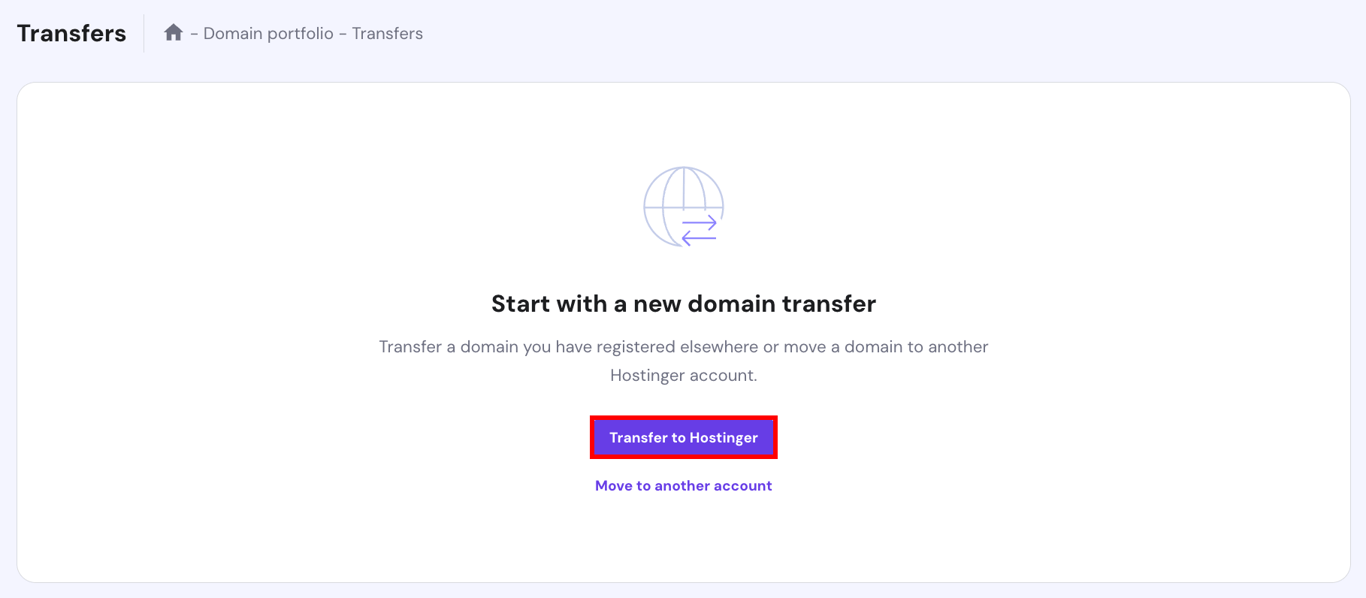
- Log in to your Hostinger account and navigate to Domains → Transfers, then click the Transfer to Hostinger button.
- Enter the domain name you wish to transfer, then click the Transfer button.

- Enter the authorization code from IONOS.
6. Verify contact information
Hostinger will email the administrative contact associated with the domain for verification purposes. Failure to verify may cause delays or even cancellation of the transfer.
The email will contain instructions to confirm your domain transfer. To proceed with the transfer, follow the steps in the email. This allows Hostinger to assume responsibility and complete the domain transfer process.
7. Complete the transfer
After completing the steps, Hostinger will coordinate with IONOS to ensure a seamless domain transfer.
Once the domain transfer is approved, it will be moved to Hostinger. Remember, domain transfers can take several days to complete, depending on the extension and the current registrar’s responsiveness. You’ll receive a confirmation email once the domain transfer is complete.
Once your domain is moved to Hostinger, you’ll have full control over its settings via Hostinger dashboard. This includes DNS adjustments, custom email setup, and subdomain creation.

Conclusion
A domain name is an essential element of building an online presence. However, you may want to consider migrating your domain to another registrar for pricing, privacy, or security reasons.
Transferring domains between hosting companies or domain registrars is not as difficult as it may seem. This detailed guide outlines the steps to transfer a domain from IONOS to Hostinger. Here’s a quick recap:
- Check your domain transfer eligibility to make sure your domain adheres to the requirements.
- Unlock your domain at IONOS by disabling the WHOIS privacy protection and domain transfer lock option.
- Obtain the authorization code or EPP key from IONOS.
- Update the domain nameservers at IONOS and point them to Hostinger.
- Initiate the domain transfer to Hostinger from Hostinger dashboard.
- Verify your contact information using the steps provided by Hostinger via email.
By following these steps, you can transfer your domain seamlessly to your Hostinger account. Leave a comment below if you have questions about switching from IONOS to Hostinger or the domain transfer process.
Transferring a domain name from IONOS to Hostinger FAQ
Let’s address some commonly asked questions about transferring a domain from IONOS to Hostinger.
Why should I transfer my domain from IONOS to Hostinger?
Switching to Hostinger, which is known for being one of the best website hosting providers, has numerous advantages, such as competitive pricing, robust customer support, and an easy-to-use dashboard for managing your domain and hosting services. Moreover, if you already host your website at Hostinger, having all your services under one provider simplifies management and boosts productivity.
How much does it cost to transfer a domain from IONOS to Hostinger?
The cost of transferring a domain from IONOS to Hostinger depends on the domain extension and additional services you choose. Typically, a fee for a one-year domain renewal applies. Check Hostinger’s domain transfer page for current domain transfer fees.
How do I know if my domain is eligible for transfer?
Ensure your domain is unlocked and not registered or transferred in the past 60 days. You can check these conditions using your IONOS account’s domain management tools. Hostinger’s domain transfer service will also verify whether your domain can be transferred.
This article is a localized version of How to transfer a domain name from IONOS to Hostinger, originally published in English.

Akshay is a Senior Content Writer who loves writing about technology. As a Computer Engineering graduate and a certified digital marketer, he aims to make tech easier for everyone. He also enjoys cooking, traveling, and learning new languages. Follow him on LinkedIn.

As Hostinger's Head of Domains, Klaudijus Januitis is a product leader but also a customer advocate ensuring the product meets user needs. He works closely with engineering, design, and marketing teams to develop and adapt the product and ensure alignment between product strategy and company goals. Klaudijus is also skilled in building relationships with registries and resellers to support joint marketing efforts and ensure successful partnerships. Follow him on LinkedIn.