What is a website? How a website works
Jun 11, 2026
/
By Simon L.
/
7 min Read

A website is a collection of interlinked web pages, published under a single domain name, and accessible to anyone with an internet connection and a web browser.
At its core, a website exists to do one (or more) of three things: share information, enable interaction, or deliver digital services.
A local bakery’s site shares its menu and hours. A social platform lets millions of people interact in real time. A banking portal delivers financial services through your browser. Same underlying technology, wildly different outcomes.
For individuals, businesses, and organizations alike, a website is the one piece of digital real estate you fully control.
Unlike social media profiles that depend on algorithms and platform rules, your website lets you shape exactly how people find you, what they see first, and how they engage with what you offer.
Every website relies on a handful of key website components working together: a domain name, web hosting, website files (HTML, CSS, JavaScript), and a web browser to pull it all together.
Websites come in many forms: informational sites, online stores, social platforms, streaming services. And behind the scenes, they all run on the same basic process – your browser requests data from a server, and that server sends it back in milliseconds.
Website meaning and key characteristics
You access a website by typing its URL into a web browser, something like https://example.com. That URL points the browser to the right server, which sends back the web pages your browser then renders on screen.
Every URL follows a consistent structure: protocol (https://), domain name (example.com), and optionally a path to a specific page (/about).
A few key characteristics define how websites work in practice.
They’re structured: a homepage connects to subpages, subpages link to each other, and a navigation system ties it all together. This website structure is what lets visitors move through a site and find what they need without getting lost.
They’re accessible: available to anyone with an internet connection.
And they’re persistent: they stay available around the clock (as long as the hosting is paid for, anyway).
These traits are what separate a proper website from, say, a shared Google Doc or a file sitting on someone’s desktop.
Website vs. web application
A standard website is mostly about presenting information. You read it, browse it, and move on.
A web application (or web app) goes further; it’s built for interaction and functionality. For example, reading a news article is a website experience, while editing a spreadsheet in Google Sheets is a web app experience.
Web apps typically require user input, process data, and respond dynamically. They often require you to log in and keep a session open.
For example, a restaurant website shows you the menu, whereas a restaurant web app lets you customize your order, pay, and track delivery in real time.
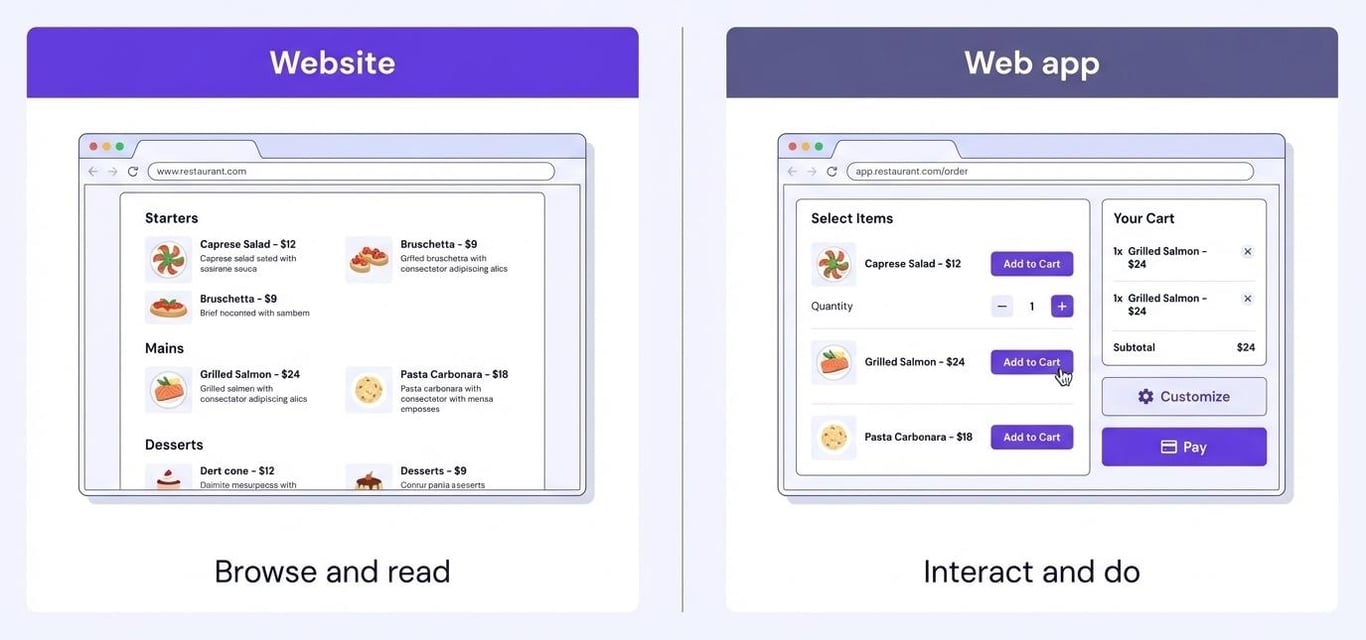
That said, the line is getting blurrier. Many modern websites have web-app-like features baked in, which is why understanding what a web application is helps you make better decisions when planning your own project.
Static vs. dynamic websites
Another important distinction is between static and dynamic websites.
A static website delivers the same pre-built HTML files to every visitor. The content doesn’t change unless a developer manually updates the code.
These are fast, simple, and cheap to host – great for portfolio sites, landing pages, or small business sites that don’t need frequent updates.

A dynamic website generates pages on the fly, often pulling content from a database depending on who’s visiting or what they’re doing.
Think of your social media feed or an ecommerce site showing personalized product recommendations. That’s dynamic content in action.

The choice between static and dynamic websites usually comes down to how often your content changes and how personalized the experience needs to be.
Feature | Static website | Dynamic website |
Content | Same for every visitor | Changes based on user/context |
Speed | Very fast (pre-built files) | Slightly slower (server processes each request) |
Complexity | Simple to build and host | Requires backend logic and often a database |
Best for | Portfolios, landing pages, docs | Ecommerce, social platforms, dashboards |
Cost | Lower | Higher (more infrastructure needed) |
How a website works
Every time you visit a website, there’s a whole chain of events happening behind the scenes, and it all takes place in milliseconds.
Websites operate on a client–server model: your browser (the client) sends a request, and a remote server sends back the data your browser needs to display the page.
Let’s meet the main players:
- Your web browser. Chrome, Firefox, Safari. This is what sends the request and renders the page you see.
- DNS (Domain Name System). Think of it as the internet’s phonebook. It translates the domain name you type (like example.com) into an IP address that the computer can use.
- The web server. The computer that stores the website’s files and sends them to your browser when asked.
- Your internet connection. The highway that carries data between your browser and the server.
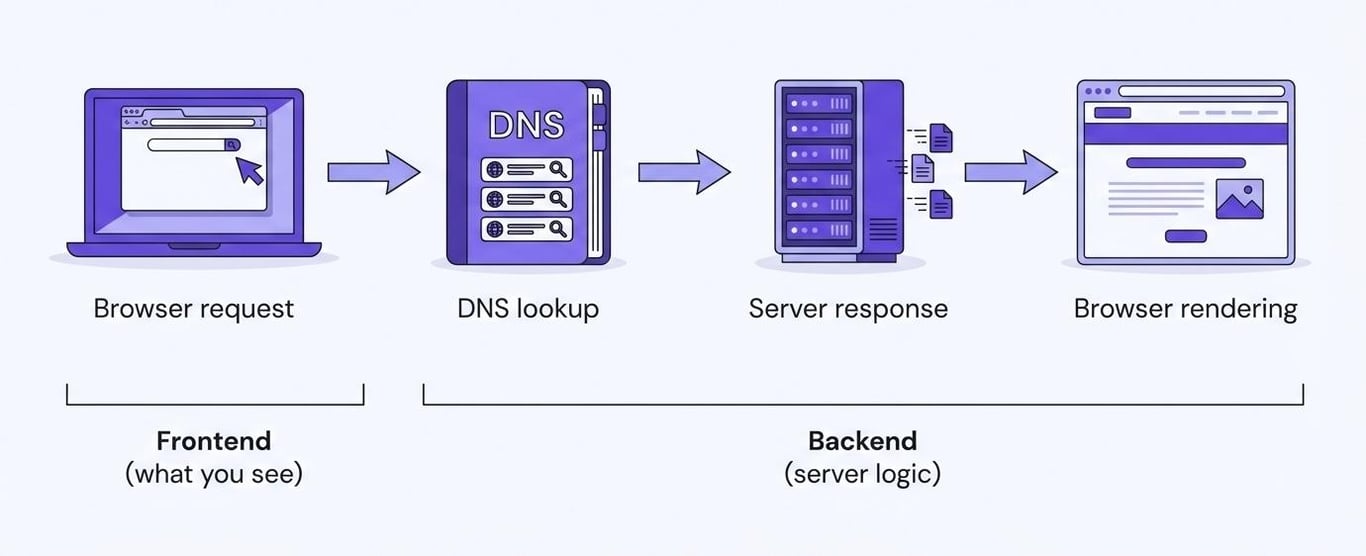
Now, here’s a step-by-step of what happens when you type a URL and hit Enter:
- Browser request. Your browser takes the URL and sends a request out over the internet.
- DNS lookup. The DNS translates the domain name into the server’s IP address so the request knows where to go.
- Server response. The web server receives the request, finds the right files, and sends them back to your browser.
- Browser rendering. Your browser takes the HTML, CSS, and JavaScript files it received and assembles them into the visual page you see.
- Frontend and backend. Everything you see and interact with is the frontend. The server-side logic, databases, and processing that power it? That’s the backend.
The whole process is invisible to you as a user. You just see the page pop up. But under the hood, your browser, DNS servers, and the web server all coordinated in a split second to make it happen.
Types of websites
Not all websites are built for the same reason. The most useful way to think about different types of websites is by their purpose: what they’re actually trying to do for the people who visit them.
Here are the most common websites you’ll encounter, with website examples for each.
Informational websites
An informational website exists to share knowledge, educate, or provide details about a topic, organization, or service.
This is the broadest category and includes everything from a blog website sharing cooking recipes to a company website outlining what a business does, to educational resources like Wikipedia or online course platforms.
Blogs alone cover a huge range, and seeing what works in different niches can spark ideas for your own. Some popular blog examples include TechCrunch (tech), HowStuffWorks (education), and Pinch of Yum (food).

The common thread is that visitors come primarily to consume content, even if the site also promotes products or services down the line.
Ecommerce websites
An ecommerce website is built for selling online. These sites feature product pages with descriptions and images, shopping carts, and checkout flows that handle payment and shipping.
Think Amazon, Etsy, or the online store of your favorite clothing brand.

Ecommerce sites are a step up in complexity from informational websites because they need secure payment processing, inventory management, and often user accounts.
They’re dynamic by nature, since product availability, prices, and recommendations change constantly. If you’re curious what good ones look like, these ecommerce website examples are worth browsing.
Social and community websites
A social website or community website is built around interaction and user-generated content. Instead of one organization publishing content for visitors to read, the users themselves create the content: posts, comments, reviews, discussions, and more.
Platforms like Reddit, Facebook, and Discord are obvious examples, but online forums, Q&A sites, and even review platforms like Yelp also fit this category.
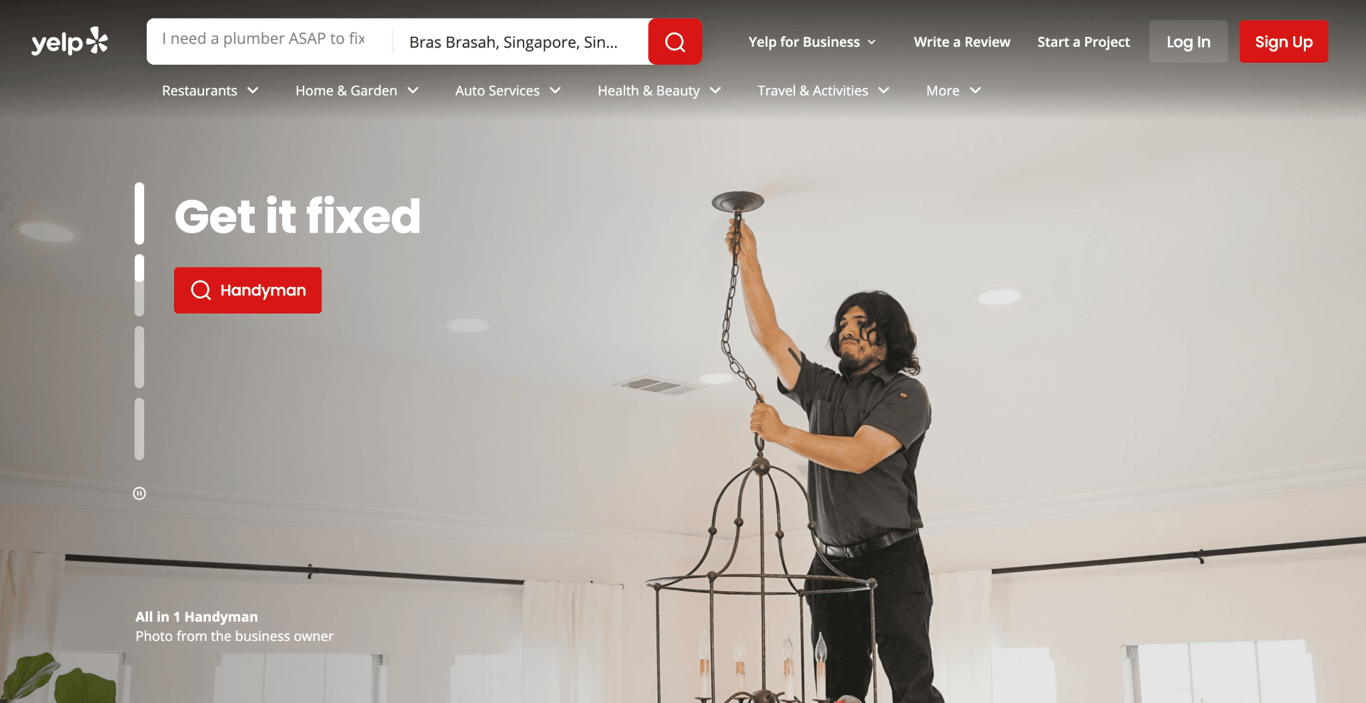
The key difference from a company website is that the value comes from the community, not the site owner. That also means these sites thrive on engagement.
If people stop posting, the site loses its purpose. Building one requires thinking carefully about moderation, onboarding, and giving people a genuine reason to contribute.
Media and entertainment websites
A media website or entertainment website focuses on delivering video, audio, or other rich media content. These are your streaming websites like YouTube and Netflix, as well as news outlets, podcast platforms, and digital magazines.
These sites are often the most technically demanding because they need to serve large media files quickly and reliably to potentially millions of simultaneous users.
They’re almost always dynamic, often personalized, and increasingly powered by recommendation algorithms.
If you’ve ever noticed that YouTube seems to know exactly what you want to watch next, that’s the dynamic backend doing its job – tailoring the experience to each individual visitor in real time.
Core components of a website
Now that you know the different types, let’s look at the essential website components that make up every site. These are the core parts of a website that need to be in place for it to exist and function.
Domain name
Your domain name is your website address, the human-readable name people type into their browser to find you (like hostinger.com or yourdomain.com).
Every domain name is unique, which means once you register one, nobody else can use it as long as you keep renewing it.
Choosing a good domain name matters more than most people think. It affects how easily people find you, remember you, and trust you.
Short, memorable, and relevant to your brand or purpose. That’s the sweet spot.
Domain Name Checker
Instantly check domain name availability.
Web hosting and servers
If the domain name is your address, web hosting is the house itself. A hosting server is a computer (usually in a data center) that stores all your website’s files and makes them available to anyone who requests them.
When someone visits your site, their browser sends a request to your hosting server, which responds by sending back the necessary files.
The quality of your web hosting affects how fast your site loads, how much traffic it can handle, and how reliably it stays online.

Website files and content
Every website is ultimately made up of website files that your browser downloads and interprets. The three foundational languages are HTML (the structure and content), CSS (the styling and layout), and JavaScript (the interactivity and behavior).
Beyond code, website content includes text, images, videos, and data pulled from databases. A simple personal blog might just be HTML files with some images.
A large ecommerce platform has millions of product entries stored in databases, dynamically assembled into pages when you request them.
Web browser
A web browser is the software that provides website access. It’s the tool you use to actually see and interact with websites.
Browsers like Chrome, Firefox, Safari, and Edge take the raw HTML, CSS, and JavaScript files from a server and render them into the visual, interactive pages you’re used to.
Without a browser, all those website files would just be lines of code. The browser is the translator that turns code into the experience you see on screen.
Every browser does this slightly differently, which is why web developers test their sites across multiple browsers to make sure everything looks and works right.
How to create your own website
If all of this has you thinking “I want to build one,” good news: you don’t need to be a developer to get started.
Website creation tools have come a long way, and the barrier to entry is lower than ever. The harder part is often figuring out what to build. If you’re stuck, these website ideas are a solid starting point.
A website builder is the fastest route for most people. These are drag-and-drop tools that handle the technical stuff behind the scenes so you can focus on your content and design.
Some builders now use AI to generate a starting layout based on a description of your site, which you can then customize and publish, often in a single afternoon.

If you’re building something for yourself, like a portfolio, a resume site, or a creative outlet, browsing personal website examples can help you figure out what direction to take.
If you want more control, content management systems like WordPress give you more flexibility while still being approachable for non-developers.
And if you’re comfortable with code (or want to learn), building from scratch with HTML, CSS, and JavaScript gives you complete freedom over every detail.
Regardless of which path you choose, you’ll need the components we covered: a domain name, web hosting, and your website files. That’s the foundation everything else builds on.
For a hands-on walkthrough, this guide on how to create a website takes you through the whole process step by step.
The fundamentals are the same whether you’re launching a blog, an online store, or something nobody’s thought of yet. Pick your tools and start building.
This article is a localized version of What is a website? How a website works, originally published in English.

Simon is a dynamic Content Writer who loves helping people transform their creative ideas into thriving businesses. With extensive marketing experience, he constantly strives to connect the right message with the right audience. In his spare time, Simon enjoys long runs, nurturing his chilli plants, and hiking through forests. Follow him on LinkedIn.