WordPress CDNs: 6 best choices to speed up your website
Sep 15, 2026
/
By Ariffud M.
/
10 min Read
Using a content delivery network (CDN) can enhance your WordPress site’s performance. A CDN service distributes the site’s static content from the visitor’s closest server, ensuring quicker load times and a better user experience.
In this article, we’ll explore the benefits of using a CDN, provide insights on how to choose the right one, and recommend the best CDNs for your WordPress website. By the end, you can make an informed decision about which provider to use to speed up your site.

Benefits of Using a CDN
Integrating a content delivery network into your WordPress site offers numerous advantages, such as:
- Faster load times. CDN services distribute your content across multiple edge servers, ensuring that users receive data from the nearest one, which reduces latency and speeds up your website.
- Improved user experience. Faster load times lead to a better overall user experience, keeping visitors engaged and reducing bounce rate.
- Reduced server load. By offloading the delivery of static content to the CDN, your origin server experiences less strain, leading to more efficient resource management.
- Enhanced security. CDNs often come with built-in security features like DDoS protection, which helps safeguard your site from malicious attacks.
- Better scalability. Content delivery networks can handle high traffic volumes, making it easier to scale your WordPress sites during peak times without compromising performance.
CDN Speed Test: With vs. Without CDN
Now, take a look at the Hostinger CDN speed test results. Our team performed over 42,000 tests on more than 10,500 client websites using Lighthouse to see the CDN’s impact.
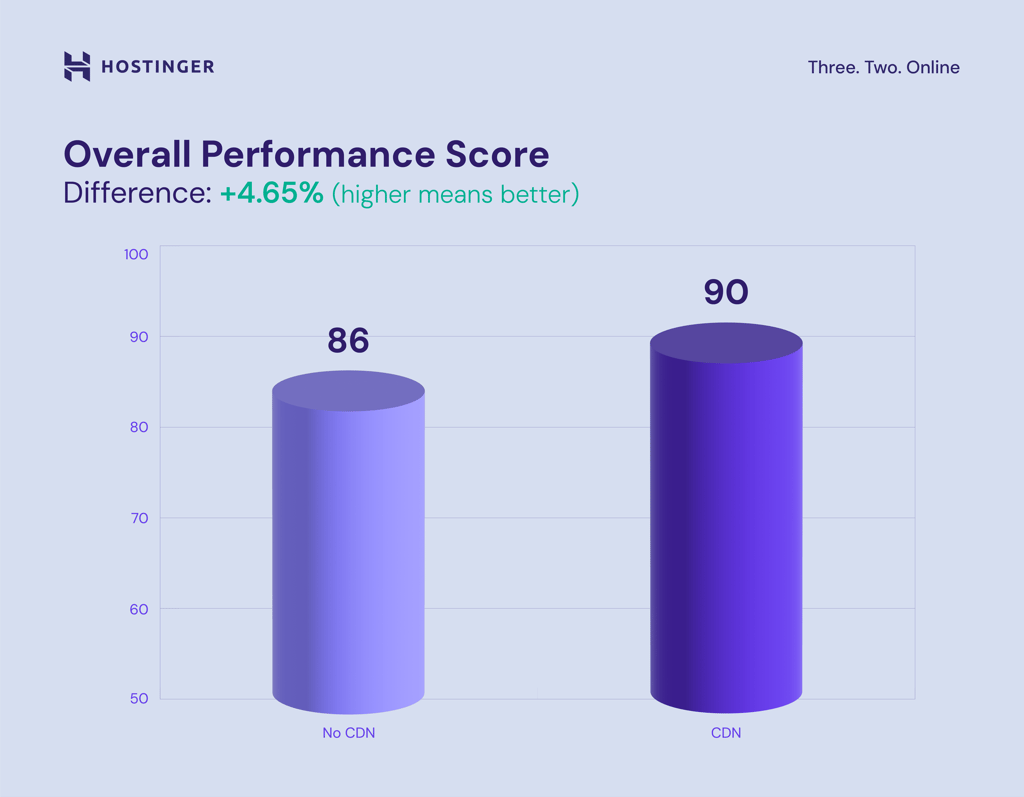
The overall performance score is derived from several metrics, such as First Contentful Paint (FCP), Speed Index (SI), Largest Contentful Paint (LCP), Cumulative Layout Shift (CLS), and Total Blocking Time (TBT). Enabling the CDN immediately pushes the average score from 86 to 90.
We’ll also break down the results focusing on core web vital metrics, such as LCP, CLS, and FCP. Core web vitals are specific metrics that contribute to the overall user experience and influence SEO.
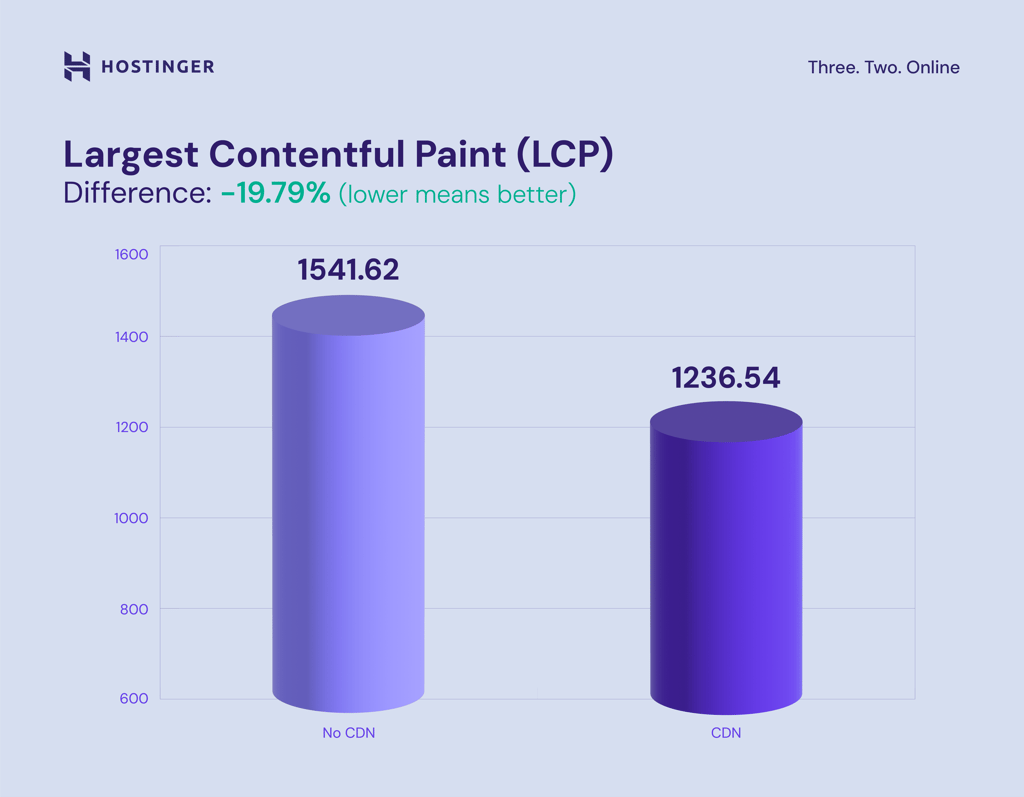
There is a significant improvement in Largest Contentful Paint. The average result dropped from 1541.62 to 1236.54 (down 19.79%), indicating most websites perform better after activating the CDN.
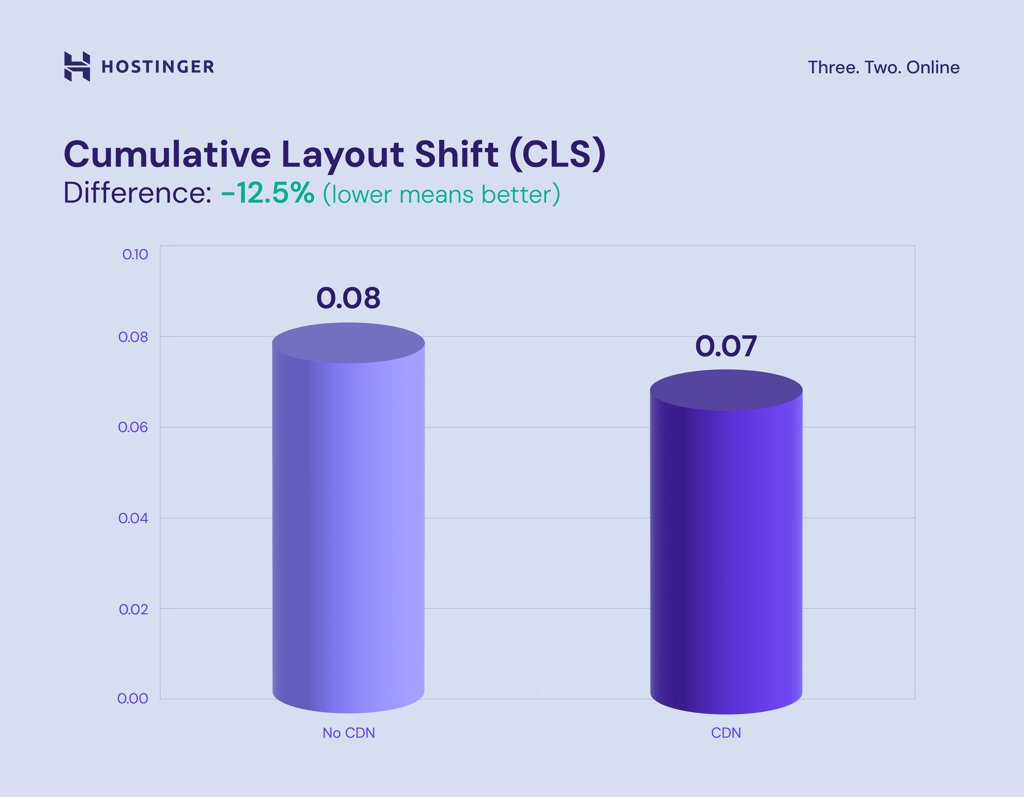
Cumulative Layout Shift showcases a modest performance improvement, with a decrease from 0.08 to 0.07, or 12.5%. This demonstrates how a CDN can help improve site stability.
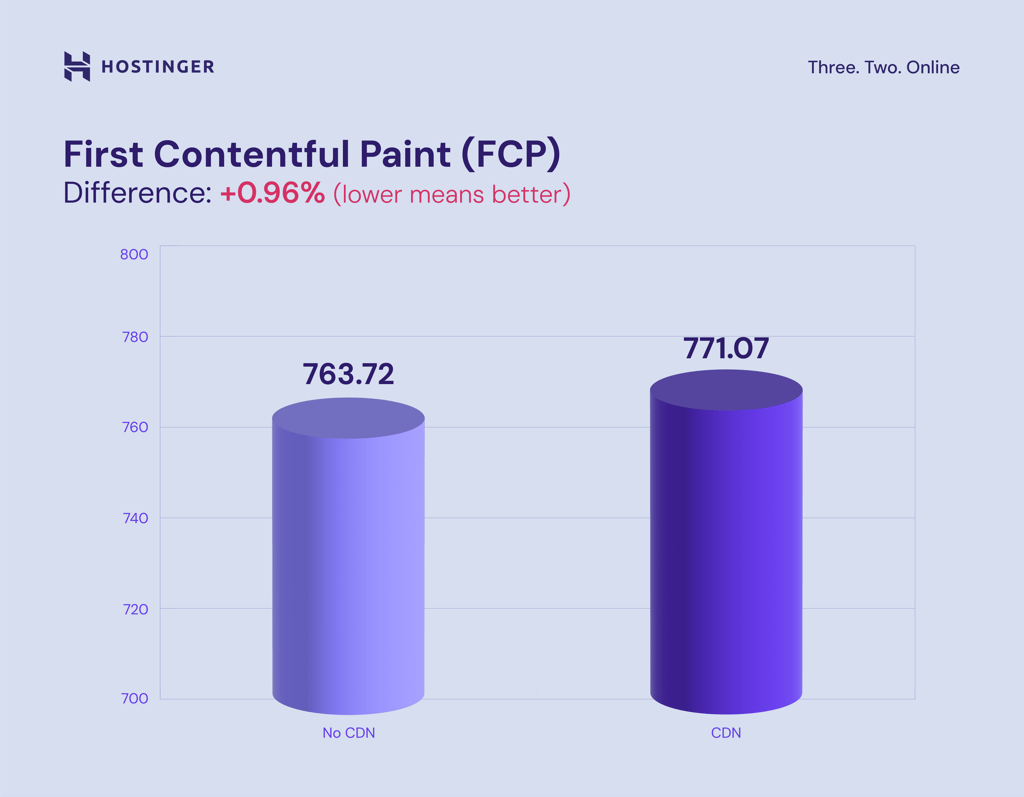
Meanwhile, FCP shows slightly worse results after initiating the CDN, rising from 763.72 to 771.07 (up 0.96%). However, the improvements in other areas compensate for this minor increase.
How to Choose a WordPress CDN Provider
Selecting the right CDN provider is crucial for maximizing your WordPress site’s performance and reliability. Here’s what to look for when choosing an ideal one:
Assess Your Needs
Start by evaluating your website’s traffic level, budget, and specific features required. High-traffic websites require CDN providers with extensive server networks and robust performance capabilities, while smaller sites prioritize cost-effectiveness.
Additionally, consider any specific features that might be important for your site. For example, eCommerce sites may benefit from advanced security features, while content-heavy ones might need efficient server caching.
Features to Look For
A good CDN provider should offer basic features such as global reach, robust security measures, and real-time analytics. Global reach is crucial for sites with an international audience, as it minimizes latency and improves load times regardless of users’ locations.
Security features like DDoS protection and SSL support safeguard your site against cyber attacks. Real-time analytics provide actionable data to monitor performance, identify issues, and optimize content delivery.
Ease of Integration
The CDN should be easy to set up and compatible with WordPress plugins. Look for providers that offer detailed setup guides so you can quickly speed up your website without requiring extensive technical knowledge.
Compatibility with popular WordPress plugins, such as caching and security plugins, is also essential. An easy integration process with your existing setup saves time and reduces the risk of configuration errors, letting you focus more on delivering great content.
Customer Support and Reliability
Reliable customer support and a strong reputation are essential when choosing a CDN provider. Look for providers with a track record of excellent service and support, as this will help resolve problems quickly and minimize downtime.
Consider the provider’s overall reliability and reputation. Check reviews and case studies to see how other WordPress websites have benefited from the CDN. Choose a provider with a proven track record of reliability and satisfied customers for your site’s long-term success.
6 Best CDNs for Your WordPress Website
With numerous options available, here are the best WordPress CDN providers to enhance your site’s speed.
1. Hostinger CDN

Hostinger CDN stands out from competitors by being the easiest CDN to implement for our customers. This CDN feature is directly integrated into Hostinger’s managed WordPress plans, providing an all-in-one solution for website speed enhancement.
Unlike other WordPress CDN services, which may require complex setups or additional plugins, Hostinger CDN can be activated with just a few clicks on Hostinger dashboard, saving time and reducing the risk of configuration errors.
Hostinger CDN is ideal for users who are already using WordPress hosting services or are considering switching to Hostinger for their hosting needs. If you have already purchased one, here’s how to activate our built-in CDN:
- Log in to Hostinger dashboard and navigate to Websites → Dashboard.
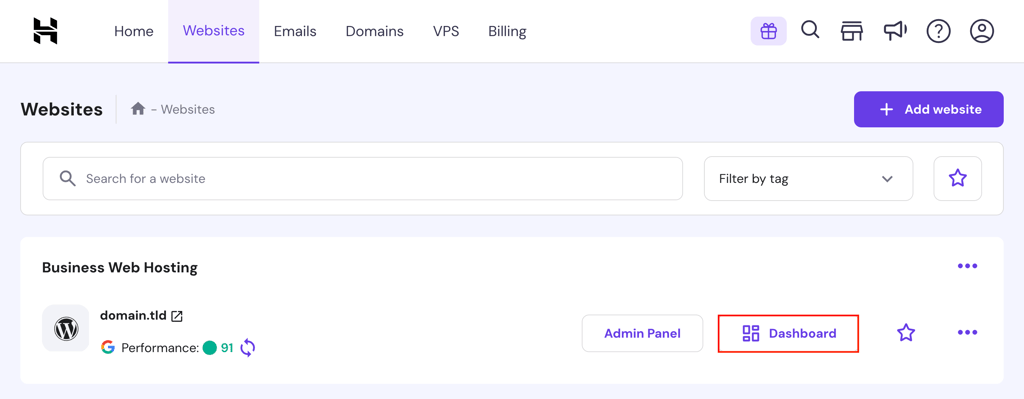
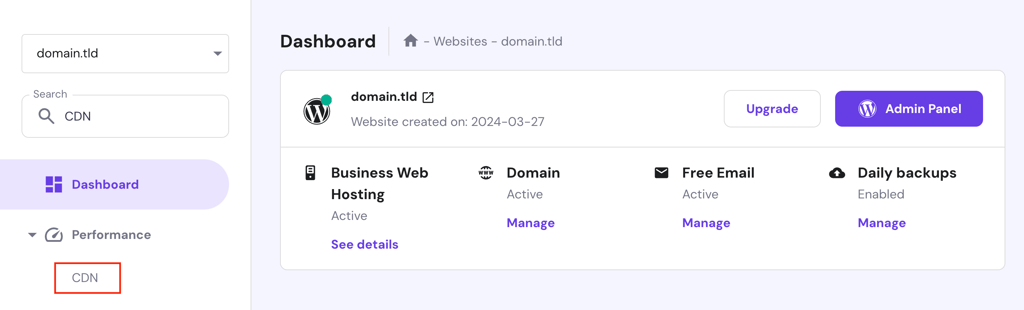
- Go to Performance → CDN via the dashboard’s left sidebar, or simply type CDN in the search field.
- Click Enable. Now, you will have to wait for the CDN to propagate fully, which can take roughly 24-48 hours.
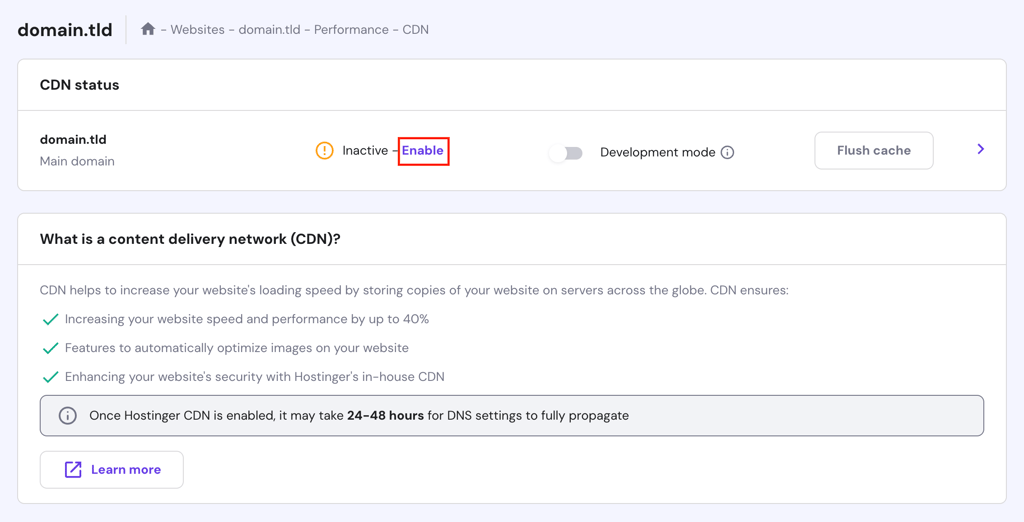
- To speed up the process, you can periodically click Flush cache.
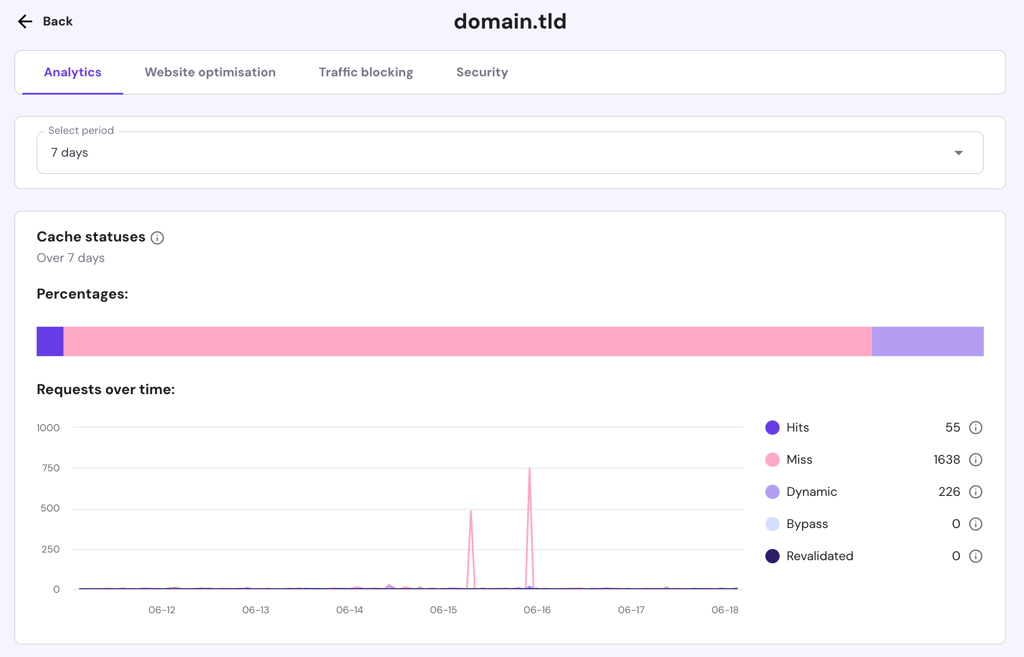
- Once activated, click the > button to explore our CDN’s additional features, including cache and HTTP request analytics, website file minification, image optimization, traffic filtering, and DDoS protection.
Key Features
- Ease of use. Customers can activate or deactivate Hostinger’s CDN service with just a few clicks.
- Real-time analytics. Provides insights into cache status and HTTP requests, helping you monitor content delivery and server load.
- Smart image optimization. Automatically resizes and compresses image files, including WebP format, for both desktop and mobile visitors.
- Traffic blocking. Filters traffic from certain IP addresses or specific countries.
- I’m under attack mode. Enables a browser validation page for visitors, which is helpful in fighting rapid DDoS attacks.
Drawbacks
- Limited to Hostinger. This CDN is only available for websites hosted on Hostinger and is, therefore, not suitable for users who prefer other hosting providers.
- No standalone option. Hostinger CDN comes as part of the WordPress hosting plans and is not available as a standalone service.
Pricing
Hostinger CDN is available on our managed WordPress Business ($3.99/month) and Cloud Startup ($9.99/month) plans. If you’re already subscribed to one of them, there’s no additional cost for the CDN.

2. Cloudflare
Cloudflare is one of the most popular CDN providers out there. It caches content across numerous data centers worldwide while protecting websites from malicious traffic, making it a top choice for many WordPress users.
Operating as a reverse caching proxy, Cloudflare CDN handles all requests for a website without requiring specific content caching or site code modifications. This technology means you can easily integrate Cloudflare on their WordPress sites.
A unique feature is Cloudflare Workers, which allows developers to run JavaScript code at the network edge, closer to the user. This serverless computing platform can handle tasks such as A/B testing, bot mitigation, and API responses, reducing latency and improving performance.
Key Features
- Global CDN network. Accelerates content delivery by caching content over 200 data centers worldwide.
- Web application firewall (WAF). Protects against common web vulnerabilities like SQL injection and cross-site scripting.
- SSL/TLS encryption. Provides free SSL certificates to secure data in transit and boost SEO.
- Cloudflare Workers. Enables running custom JavaScript at the edge for low-latency execution.
Drawbacks
- Limited free plan. The free tier offers basic features, but advanced functionalities are locked behind paid plans.
- Customer support. Some users have reported slow support responses and occasional difficulties with troubleshooting.
Pricing
Cloudflare offers both free and paid plans. The paid options consist of Pro ($20/month), Business ($200/month), and Enterprise, which has custom pricing by contacting its team.
3. Amazon CloudFront
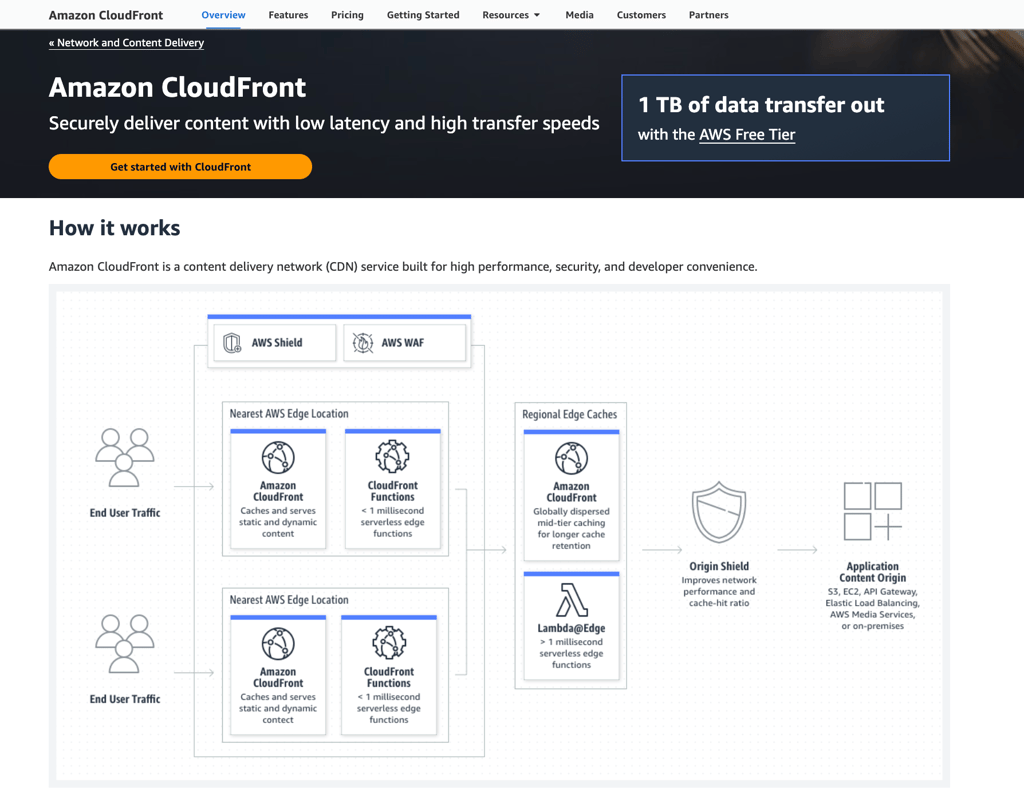
Amazon CloudFront is a powerful CDN service integrated into the Amazon Web Services (AWS) ecosystem. It caches content across a global network of over 310 Points of Presence (PoPs) in more than 100 cities.
CloudFront differentiates itself by offering deep integration with other AWS services, such as S3, EC2, and Lambda. This makes it ideal for users already invested in the AWS ecosystem, providing a unified platform for managing and delivering web content.
One standout feature is AWS Shield, which provides advanced DDoS protection without additional cost. Additionally, CloudFront’s serverless compute capabilities powered by AWS Lambda@Edge allow developers to run custom code based on the visitor’s location.
Key Features
- Global network of edge locations. Enhances content delivery speed by serving content from nearby CDN servers.
- Lambda@Edge. Allows running custom code closer to the user to personalize content and reduce latency.
- Integration with AWS services. Seamlessly works with AWS services like S3, EC2, and Lightsail for a comprehensive solution.
- Advanced security. Includes AWS Shield for DDoS protection and AWS WAF for additional security layers.
Drawbacks
- Learning curve. Requires an understanding of AWS services and infrastructure, which can be steep for beginners.
- Pricing complexity. The pricing model can be difficult to understand, with variable rates based on data transfer and requests.
Pricing
CloudFront offers a free tier as part of the AWS free usage policy. It also has regional-based pricing based on data transfer and HTTP requests, as well as custom pricing for large-scale companies.
4. Bunny CDN

Bunny CDN is a high-performance, cost-effective CDN service based in Slovenia. It employs a global network of over 120 edge locations across six continents to deliver content quickly and reliably.
Unlike some CDN services for WordPress that require a higher budget, BunnyCDN offers an affordable pricing model starting as low as $0.01/GB, making it accessible for small to medium-sized websites.
Additionally, its Bunny Optimizer addon provides on-the-fly image optimization, resizing, and conversion to WebP format. This tool significantly reduces image load times, enhancing the overall user experience.
Key Features
- Bunny Optimizer. On-the-fly image optimization and conversion to WebP format.
- Perma-Cache. Stores cache files permanently on edge locations instead of the origin server, delivering a faster content load.
- Edge rules. Allows custom configurations for caching, security, and routing.
- Integration with WordPress. Simple setup with the bunny.net WordPress plugin, allowing quick activation and configuration.
Drawbacks
- Limited free plan. Only offers a free CDN up to a 14-day trial, which might not be enough for extensive testing.
- Clash with other plugins. Some users note incompatibility issues, especially when installing other plugins with similar functionality, like caching.
Pricing
BunnyCDN follows a pay-as-you-go pricing model, with a minimum monthly spend of $1. Storage costs vary by region, ranging from $0.01 to $0.06/GB.
5. StackPath
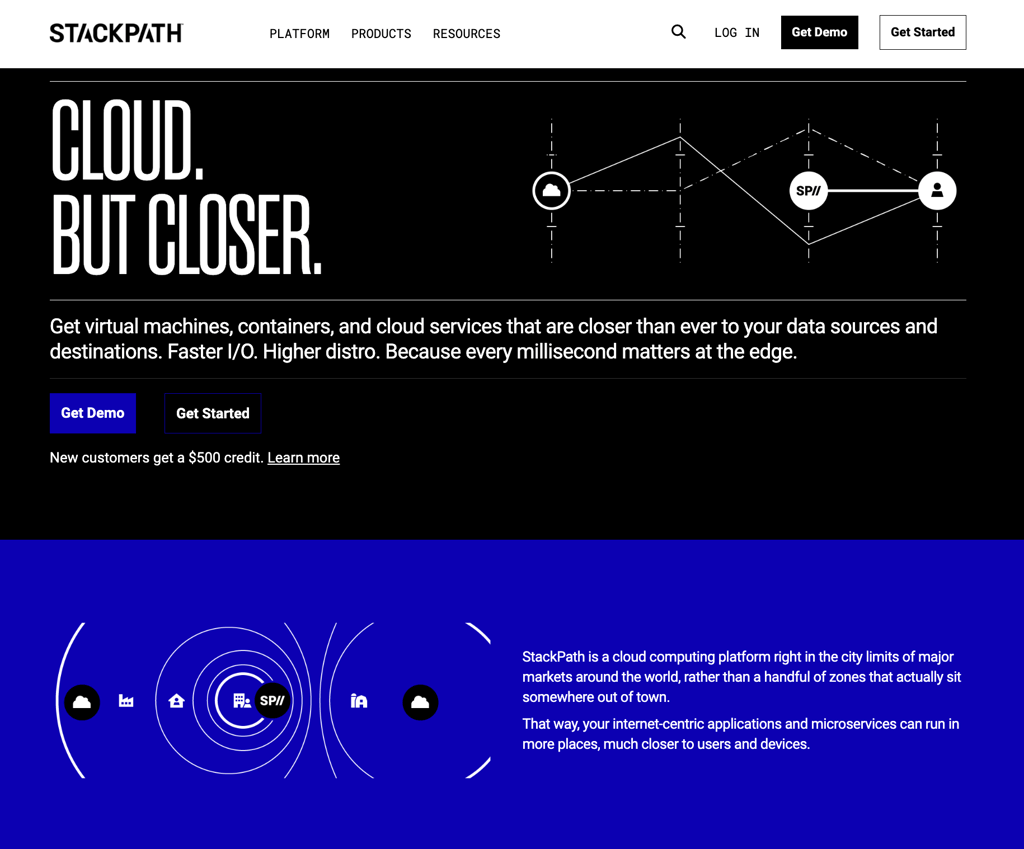
Formerly known as MaxCDN, StackPath is designed to enhance the speed, security, and performance of websites, including those built with WordPress. StackPath’s robust capabilities make it a versatile choice for various use cases.
It has an EdgeRules feature, similar to Bunny CDN’s. With it, you can customize content delivery by adding or modifying headers, redirecting requests, and setting cache rules. This level of customization provides granular control over content delivery.
Overall, StackPath is ideal for developers and businesses looking for a high degree of control over their CDN. It’s also well-suited for users who require advanced security features and real-time analytics to monitor and optimize their content delivery.
Key Features
- SSL certificate management. Simplifies the process of generating and managing SSL certificates without additional cost.
- EdgeRules. Customizable rules for content delivery, caching, and security.
- Serverless scripting. Allows running custom scripts at the edge for improved performance.
- Instant Purge. Quickly updates cached content globally with just one click.
Drawbacks
- Limited edge locations. It offers only one server in Africa and none in South America.
- Less transparent pricing. Potential customers need to reach out to its sales team to get detailed pricing information.
Pricing
Users can create a free account to learn about pricing and schedule a product demo. Additionally, StackPath offers new customers a $500 reward credit.
6. KeyCDN
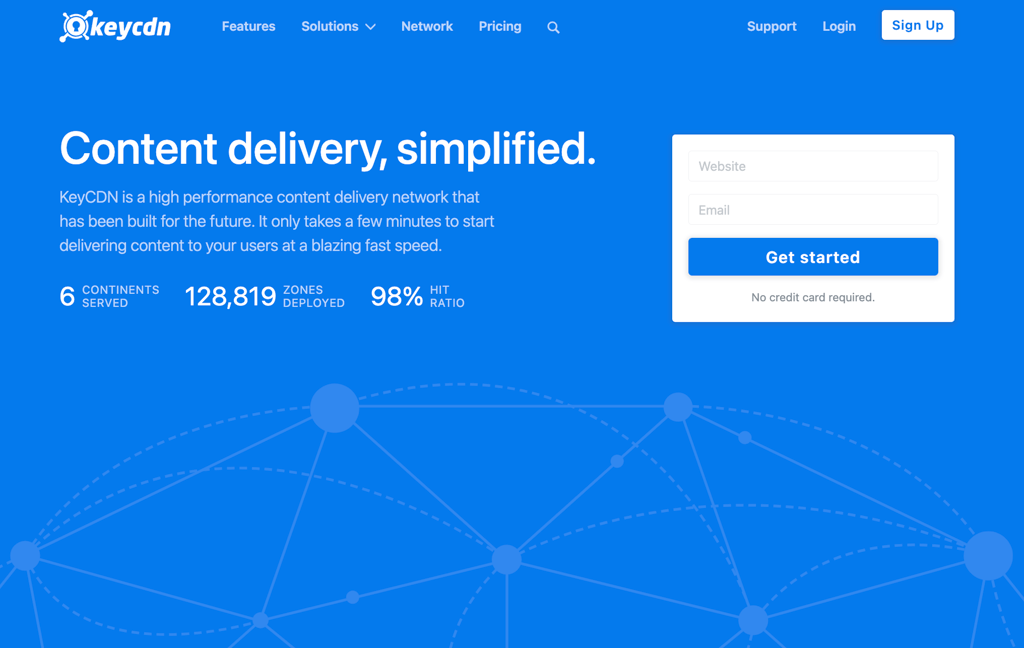
KeyCDN is a high-performance, easy-to-use CDN service that delivers fast and secure content worldwide. Its simplicity and affordability make it an excellent choice for individuals, startups, and small to medium businesses.
With this CDN, you can configure and manage different types of content delivery setups, such as Pull Zones for fetching content from your server and delivering it to users and Push Zones for pre-uploading content to KeyCDN’s servers.
KeyCDN also supports HTTP Live Streaming (HLS), which is excellent for websites that deliver video content. HLS breaks down video content into small, downloadable segments that can be served over HTTP, allowing for adaptive bitrate streaming.
Key Features
- Origin shield. Reduces the load on your origin server by fetching content from a designated shield server when it is not cached at the edge.
- HTTP and HTTP/2 support. Enhances delivery speed for both static and dynamic content.
- Complete compression methods. Uses various compression techniques, including GZip, HPACK, and Brotli, to reduce file sizes without compromising quality.
- Quick global updates. Ensures content configuration under zones is deployed across KeyCDN’s global network within minutes.
Drawbacks
- Minimum credit requirement. The minimum payment is $49, which might be a hurdle for small websites or individuals with low usage.
- Additional costs for advanced features. Some features, like Push Zones, incur extra charges.
Pricing
KeyCDN uses a regional-based pay-as-you-go pricing model, ranging from $0.01 to $0.1/GB. Note that its minimum usage fee is $4/month, while its minimum credit requirement is $49.
Beyond CDN: Extra Steps to Maximize WordPress Speed
While using the best CDN services is an excellent way to speed up WordPress sites, there are several other methods to optimize your website’s performance further:
- Optimize images. Optimize your website images by using compression tools like TinyPNG or ImageOptim to reduce file sizes without losing quality. Use modern formats like WebP for better compression rates compared to traditional formats like JPEG or PNG.
- Implement caching. Use caching plugins such as W3 Total Cache or WP Super Cache to store static versions of your pages. Server-side caching solutions, like Varnish or NGINX, can also significantly reduce load times by serving cached content directly from the server.
- Minify CSS and JavaScript. Minify your CSS and JavaScript files to reduce file sizes and eliminate unnecessary characters. This can decrease load times and improve site performance by reducing the amount of data that needs to be transferred.
- Use a Performance-Optimized Theme. Choose fast WordPress themes such as Astra, GeneratePress, or the default Twenty Twenty. These themes are designed to be lightweight and fast-loading, which can significantly improve your site’s performance.
- Regular updates and maintenance. Regularly update WordPress, your themes, and plugins to get the latest performance improvements and security patches. In contrast, outdated software can slow down your site and make it vulnerable to security threats.
Conclusion
In this article, we’ve provided the six best WordPress CDN services to improve your site’s speed, security, and overall performance. Among all options, here are our top two:
- Hostinger CDN. Ideal for users who prefer a complete package of hosting service and a CDN feature, offering seamless integration without requiring setup complexities.
- Cloudflare. Offers a free plan with essential features such as global CDN, DDoS protection, and WAF, suitable for users with a tight budget or just getting started.
Choose a CDN based on your specific needs, considering factors like budget, technical requirements, and desired features. Additionally, consider combining a CDN with other optimization strategies, such as image compression, caching, and minification, for better results.
By doing so, you can ensure that your WordPress site remains fast, secure, and reliable, providing the best possible experience for your visitors.
Best CDN for WordPress FAQ
This section answers the most common questions about the best WordPress CDN service.
What Are the Potential Drawbacks of Using a CDN With WordPress?
Using a CDN with WordPress can increase setup complexities, leading to compatibility issues with existing configurations. To minimize these issues, consider using a CDN built into your hosting provider, like on Hostinger’s managed WordPress plans.
How to Measure the Impact of a CDN on WordPress Speed?
You can measure the impact of a CDN on WordPress speed by using tools like Google PageSpeed Insights, GTmetrix, or Pingdom. These tools analyze load times and performance scores and provide detailed insights into whether the CDN positively impacts your site’s speed.
Who Should I Contact for Support if I Encounter Issues With a CDN?
If you encounter CDN-related issues, contact your CDN provider’s customer support team through their email, live chat, or other dedicated channels. For WordPress-specific problems, consider seeking help from the WordPress forums or your web hosting provider.
Where Can I Get a Free CDN for My WordPress Site?
You can try a free CDN for your WordPress site from Cloudflare, which offers a comprehensive free plan that includes basic CDN services, DDoS protection, and SSL. This makes it an excellent choice for budget-conscious users.
This article is a localized version of WordPress CDNs: 6 best choices to speed up your website, originally published in English.

Ariffud is a Technical Content Writer with an educational background in Informatics. He has extensive expertise in Linux and VPS, authoring over 200 articles on server management and web development. Follow him on LinkedIn.