How to build a church website that connects and grows your community
Oct 14, 2026
/
By Nurul S. & Miglė C.
/
10 min Read
A church website is a central hub for members and newcomers to stay informed and connect with your church’s mission.
In this article, we’ll walk you through the steps to create, optimize, and promote a church website that reflects your church’s values. We’ll also introduce the tools to help manage it effortlessly.
How to build a church website
Follow these eight simple steps to create a church website, from defining its purpose to promoting it.
1. Understand the church website’s purpose and goals
Before you start building your church website, consider its purpose. Knowing the purpose of your church website helps you decide which features to include, making the creation process quicker and more straightforward. Some church website purposes include:
- Share information. Include key details like sermon schedules, event calendars, and the church’s location.
- Inspire worshipers. Share stories from your congregation, offering inspiration and building a sense of connection among members.
- Showcase church activities. Add a photo gallery that illustrates the vibrant life of your church community.
- Donate or give. Allows members and visitors to contribute financially to the church through the website.
With the purposes in mind, set clear goals for your website. For example, increasing attendance, promoting events, and facilitating online giving. These goals will guide your website’s design, structure, and content.
Once you’ve identified your goals, the next step is to ensure that your website’s content and features help you achieve them.
If you want to increase attendance, make sure your homepage prominently shows the church’s service times, directions, and a welcoming message. If promoting events is a priority, consider adding an events calendar and regularly updating it with new information.
2. Choose a domain name and hosting provider
Selecting the right domain name and hosting provider is crucial when building your church website. They allow you to publish your website on the Internet and ensure its reliability.
Pick a domain name
Select a domain name that is easy to remember and reflects your church’s identity. Ideally, it should include your church’s name and use a relevant extension, like .org, .church, or the widely used .com.
For example, if your church is named Grace Fellowship, a domain like gracefellowship.com is an excellent choice. This makes it easy for both members and other visitors to find your website.
Once you have ideas, check if the domain is available using a domain checker.
Domain Name Checker
Instantly check domain name availability.
Choose a web hosting provider
Next, find a reliable web hosting provider to host your church website. This is where all of your website’s files and data will be stored. When choosing a host, focus on these key features:
- Reliability. Look for a provider with at least a 99.9% uptime guarantee so your website is always accessible.
- Storage and bandwidth. Get enough storage space and bandwidth to handle your website’s content and receive traffic without slowdowns.
- Security. Essential features like SSL certificates, regular backups, and a malware scanner help protect and recover your website from cyberattacks.
- Speed. Fast loading times keep visitors engaged and improve your site’s search engine rankings.
- Customer support. 24/7 support to help you quickly resolve any issues whenever they arise.
Thankfully, some platforms offer both web hosting and domain registration, such as Hostinger AI Builder.

Hostinger AI Website Builder lets you instantly create a website using AI and customize it using a drag-and-drop editor. It also includes Hostinger dashboard, a user-friendly hosting control panel. With it, you can easily create websites, renew domains, upgrade hosting plans, and monitor performance.
Aside from web hosting and free domain name, Hostinger AI Website Builder also offers the following features:
- AI-driven design assistance to create a professional-looking church website with ease.
- Mobile responsiveness to ensure that your website looks great on any device.
- SEO tools to help your website rank better on search engines.
- Built-in website analytics to monitor and improve site performance.
- Online store functionality to manage donations efficiently.
There are two pricing plans: Premium and Unlimited. Let’s take a look at how each compares.
| Plan | Price | Features |
| Premium | CA$ 3.49/month | Free web hostingAI website builderFree domain name for the first yearCustom emailsMarketing integrationsMobile editing |
| Unlimited | CA$ 4.99/month. | Everything in the Premium plan, plus:A full suite of AI tools, such as AI image generator, writer, blog generator, heatmaps, and SEO tools.eCommerce features with 0% transaction fees. |

3. Start creating your church website
The next step is creating your church website. From this point on, we’ll use Hostinger AI Website Builder as an example.
Hostinger AI Website Builder offers two ways to create a website – with AI or a pre-made template. We recommend the AI builder for a simpler and faster process.
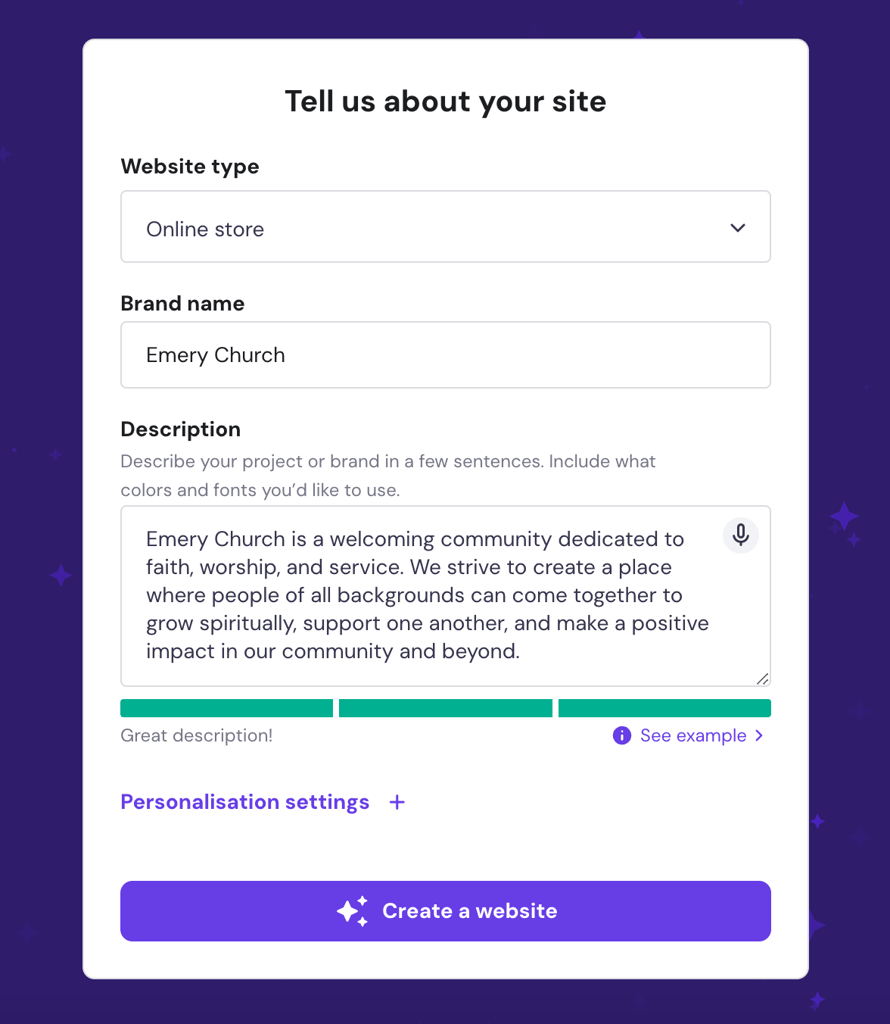
Enter your website type, church name, and description. To include the donation functionality, choose Online store as the website type.
Alternatively, you can also choose one of Hostinger AI Builder’s professional templates and customize it accordingly. We recommend these ones for church websites:
- Hanan. Perfect to show various church programs and highlight the church community.
- Unitis. The online store-like donation page allows donors to make the transfers easily.
4. Design your church website’s visual branding
Your church website’s visual branding includes the logo, typography, color schemes, and imagery. These elements should be consistent throughout the website to create a cohesive look.
Simply upload your logo to Hostinger AI Builder. But if your church doesn’t have a logo yet, don’t worry. Hostinger AI Builder has an AI Logo Maker that can instantly create a logo for you.
When designing a church logo, go for a straightforward typeface featuring your church’s name.
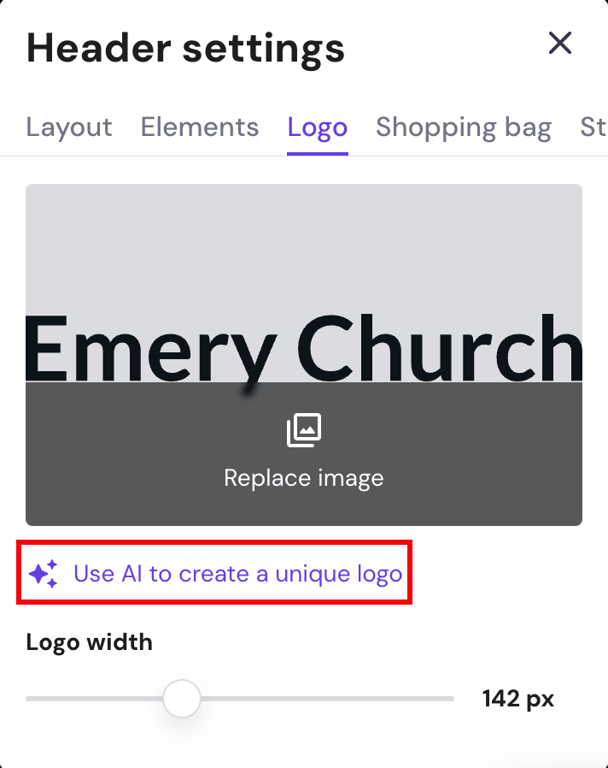
On the editor homepage, click the header → Edit header → Logo. Then, select Use AI to create a unique logo.
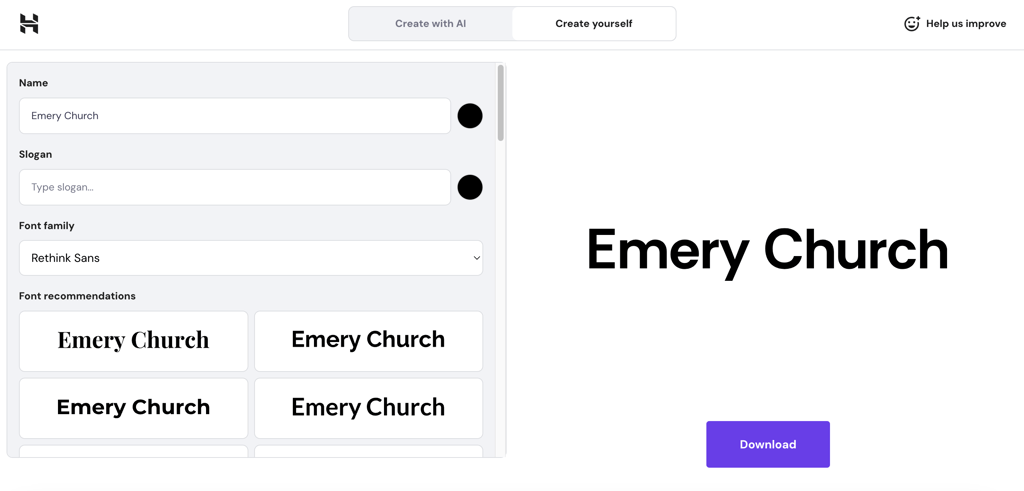
It will open the AI Logo Maker in a new window. Choose the Create yourself option to customize your typeface logo.
When choosing color schemes, choose visually appealing combinations that align with the church’s branding to convey the intended message. Use tools like Color Hunt to help pick the best color palette for the church website.

Alternatively, use these color scheme examples to guide you:
- Calm and peaceful. Use soft pastels like pale blues, light grays, and gentle lavenders to create a serene and peaceful atmosphere.
- Joyful and uplifting. Incorporate cheerful colors like sunshine yellow and vibrant teal to create an uplifting and joyful feel. This color scheme works well for churches emphasizing positivity.
- Modern and minimalistic. Choose a clean, contemporary look with neutral tones like crisp white and subtle beige.
For instance, Renewal uses vibrant colors to mirror dynamic and family-oriented values. The design caters to a diverse church community of all ages.

For typography, use easy-to-read and modern fonts, such as sans-serif or slab-serif fonts. Stick to a maximum of two fonts to maintain a cohesive and professional appearance.
Complete your church website design with images. Photos and videos grab visitors’ attention and offer them a closer look into your church community.
Use high-quality photos and videos that capture the spirit of your church. They can be of church events or members’ testimonials. A video background on the homepage also helps capture attention and interest.
Church websites like Passion City Church and Cedarcrest Church have videos highlighting their events. You can do the same with Hostinger AI Builder.
On the main page, click the Edit section. On the Background tab, choose Video or Replace video and add your own.
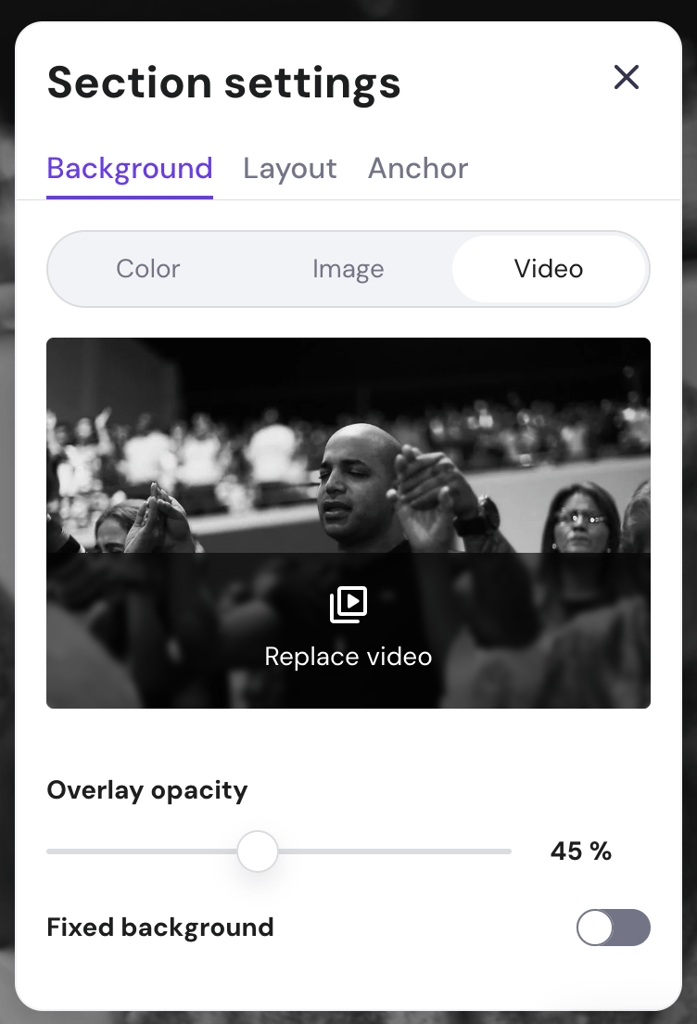
Remember to keep the video background duration short, between five to 10 seconds. This helps maintain visitors’ attention and ensures they’re not distracted from the main content.
5. Add pages and content
The homepage, About Us, Services and Events, Contact, Blog, and Donation pages are essential for a church website. They give visitors important information about your church and its activities. Let’s go through them one at a time.
Homepage
The homepage should be inviting, with a high-quality image or video to immediately grab visitors’ attention. When designing a homepage, think of it as guiding your visitors through a journey – what they see first, where they navigate next, and how they engage with your content.
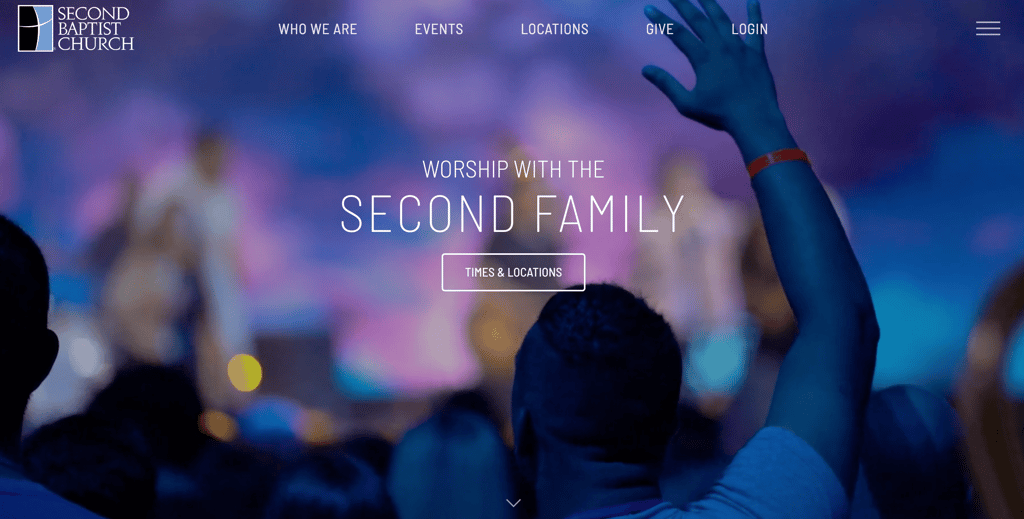
Add a clear call to action (CTA) that directs visitors to take specific actions, such as finding your church’s location or checking out upcoming events. For example, Second Baptist Church has a Times & Locations CTA button to help visitors find service schedules easily.
Services and events page
Use this page to share information on upcoming church events and services. Add essential information, such as their dates, times, locations, and other details that attendees should know.
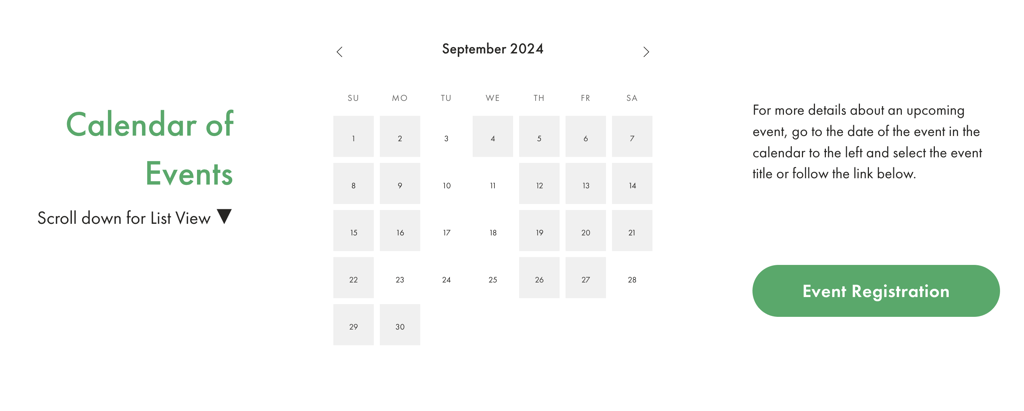
You can also display a calendar listing all the events for the month, making it easy for people to plan their attendance. The Sanctuary Church is a great example of using an event calendar and registration options.
Gallery page
Add a photo gallery highlighting your church’s latest activities and special events. This page helps visitors get a closer look at your church’s community.
Create separate albums for different occasions to help viewers navigate them easily. You can also add captions to provide context about each photo.
Using Hostinger AI Builder, you can upload photos in bulk. Start by adding a photo gallery to your church website by going to Add elements → Gallery.
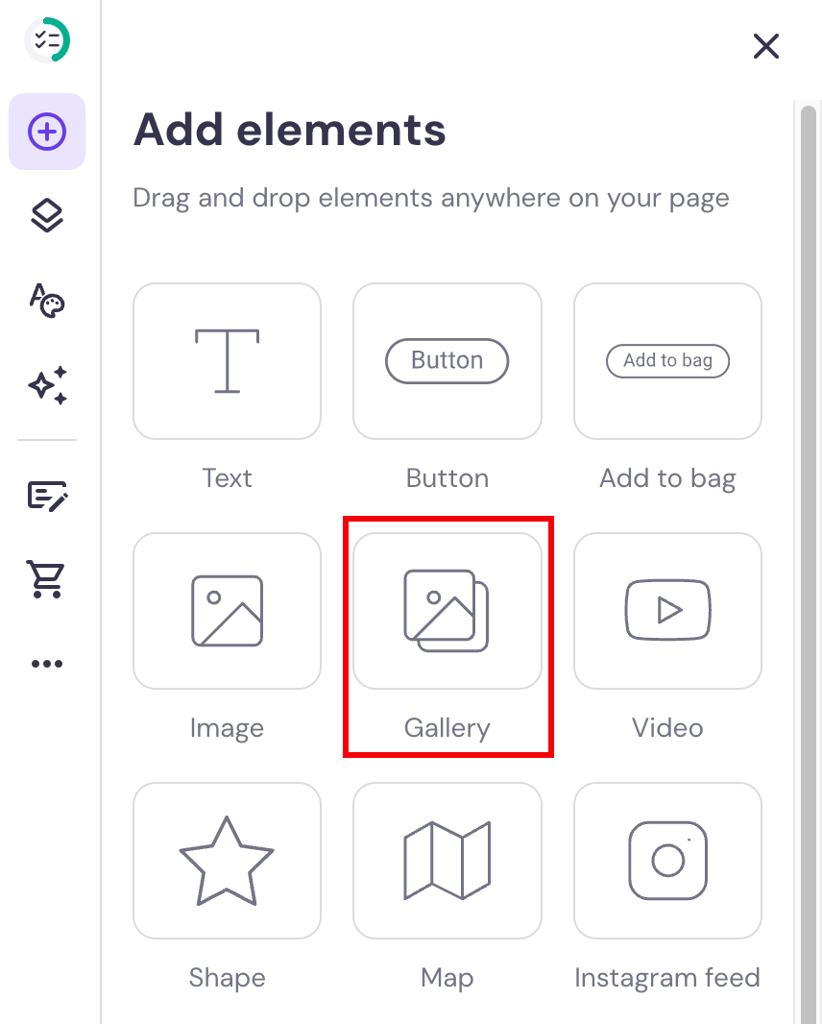
Simply drag and drop your images onto the gallery page and rearrange them accordingly.
About us page
Your About page should briefly overview your church’s history, mission statement, and values. Use storytelling, illustrations, and infographics to make it more interesting.
You can also introduce church leaders and staff members on this page. For a personal touch, add names and photos of pastors, staff, and other church members.

Finally, include ways for visitors to get involved with your church community. Add a button or direct visitors to volunteer, join small groups, or sign up for events.
Contact page
Make it easy for visitors to contact your church. Add clear contact details, such as an email address, phone number, and physical address. You can add a contact form so visitors can reach out and ask you questions.
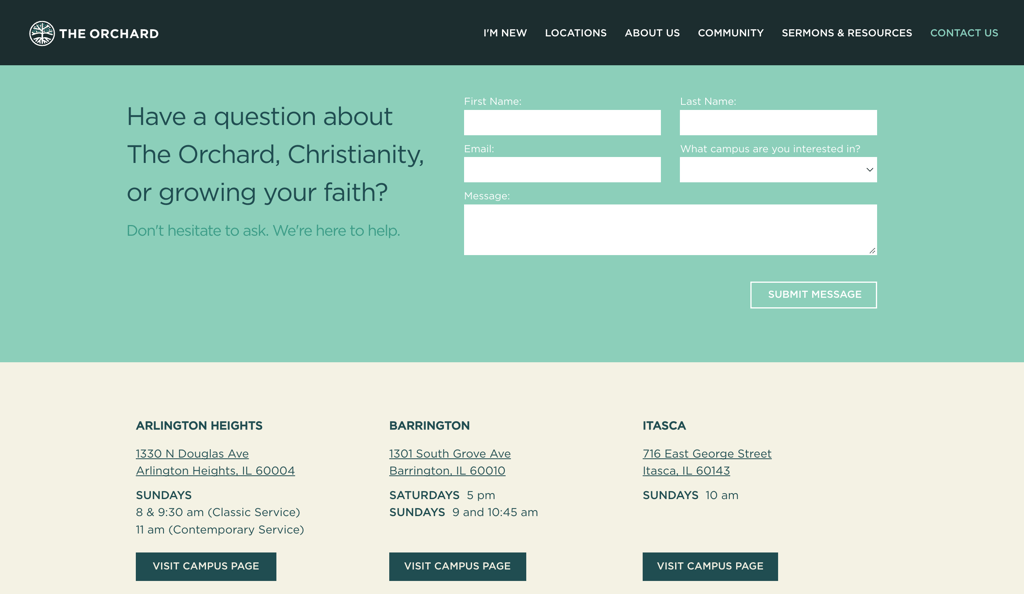
The Orchard’s contact page is an example of a simple layout with an image, contact form, and a list of the church’s locations. When creating your contact page, consider following this website layout.
Blog page
For the Blog page, create one that fosters community building. Here are some tips on writing engaging blog content:
- Share real stories. Highlight members’ testimonies, personal experiences, and success stories to build an emotional connection.
- Use engaging titles and visuals. Craft compelling titles and include images or videos to grab attention.
- Encourage interaction. To spark conversations and reach more audience, end each blog post with a call to action that encourages visitors to leave comments and share the post.
- Optimize for readability and SEO. Use clear headings, short paragraphs, and relevant keywords to make posts easier to understand and discoverable online.
Online donation page
Church websites usually have a Donate or Give page to facilitate online donations. This page can also include information on the donations’ purpose and impact on the community.
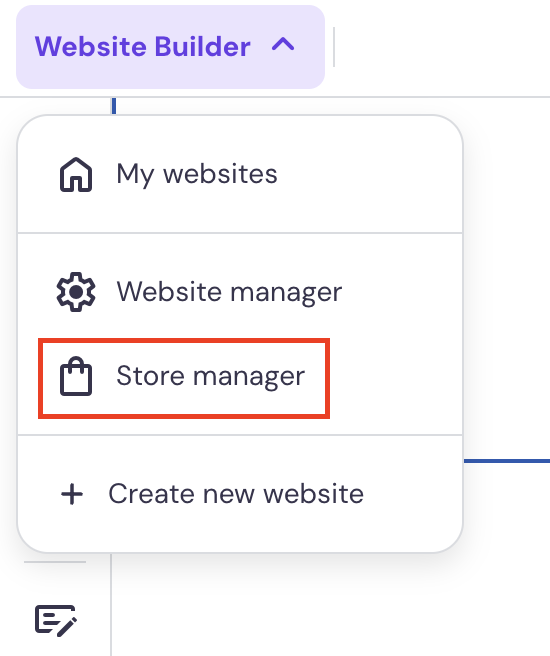
With Hostinger AI Builder’s Business plan, you can add a donation page with secure payment options. To do so, go to Store manager under the AI Builder dropdown.
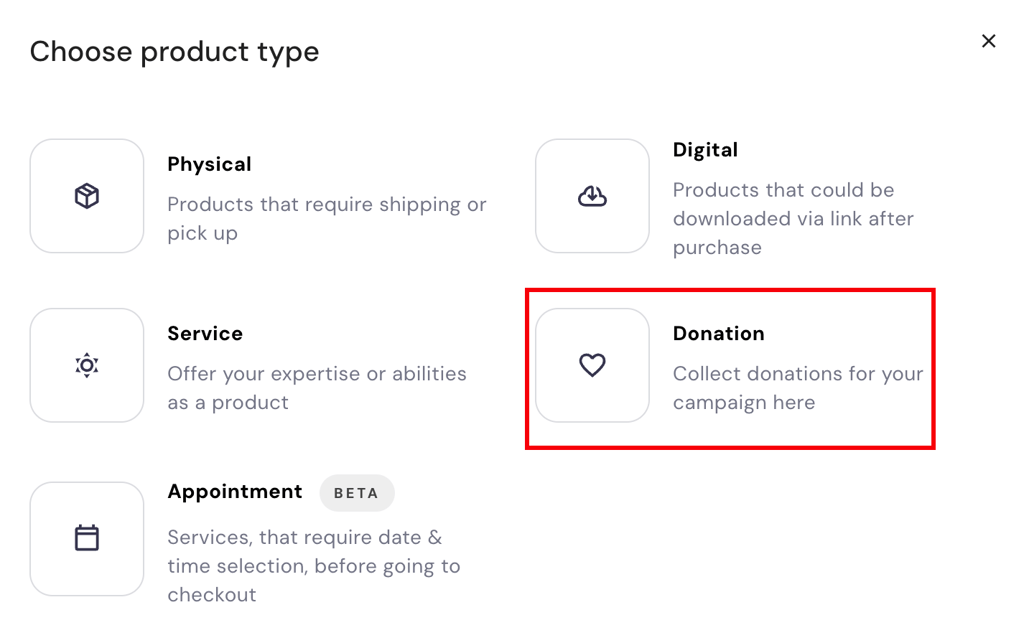
After that, go to the Products page, then choose Add product → Donation.
Next, add an image and a compelling description to encourage donations.
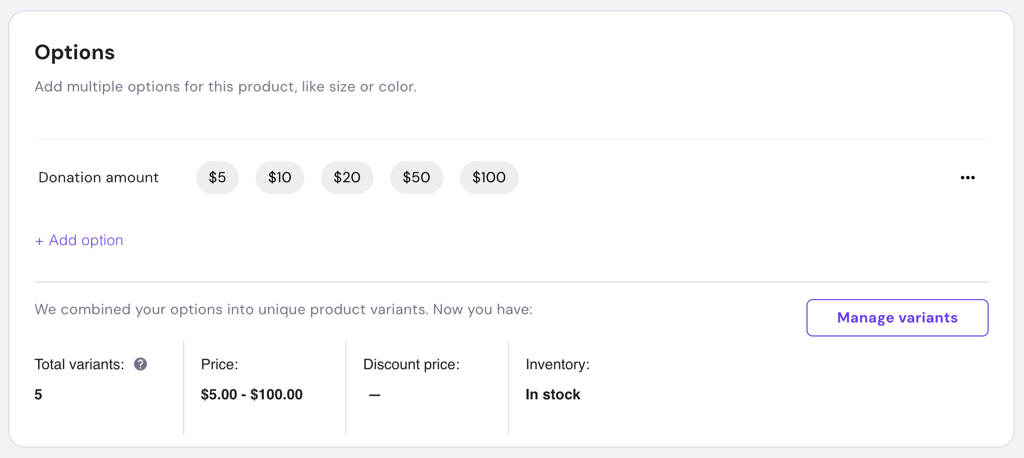
Scroll down until you see the Add option section. This is where you can add more than one donation transfer amount.
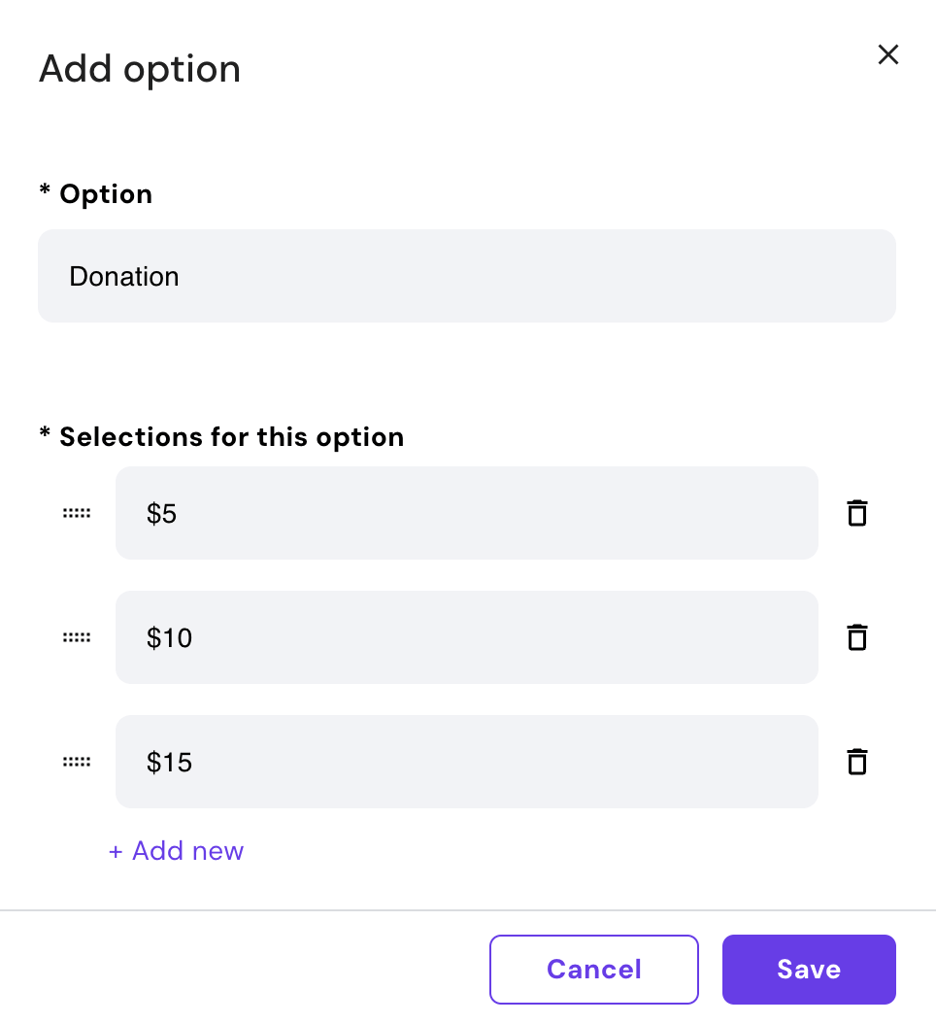
Click Add new to insert a new field and adjust the donation amount.
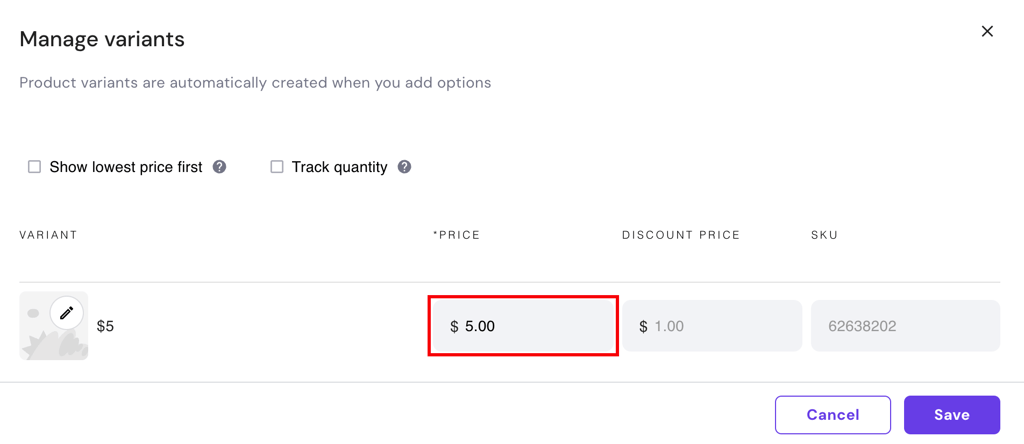
After that, click Manage variants to fill out the Price field for the system, and then click Save.
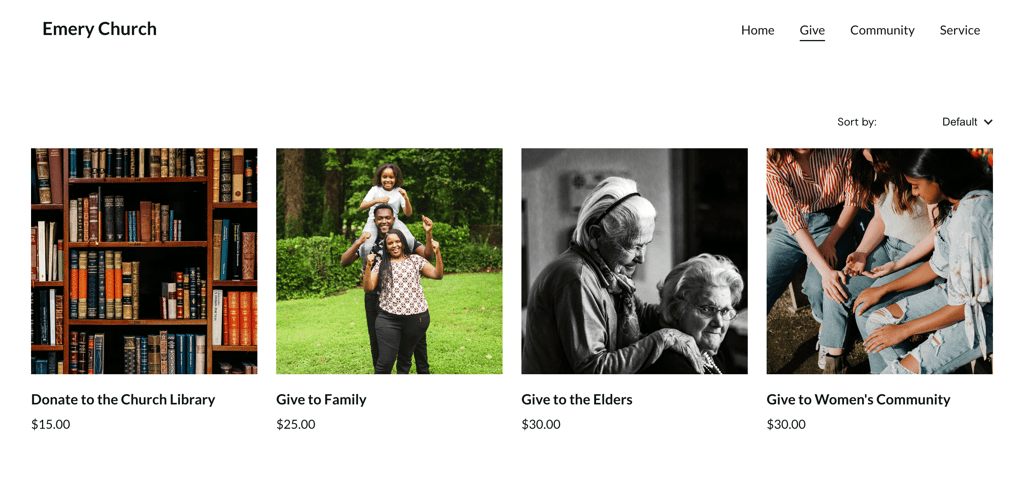
Repeat the steps to add as many donation options as needed. You can see the list of your donations as products on the website.
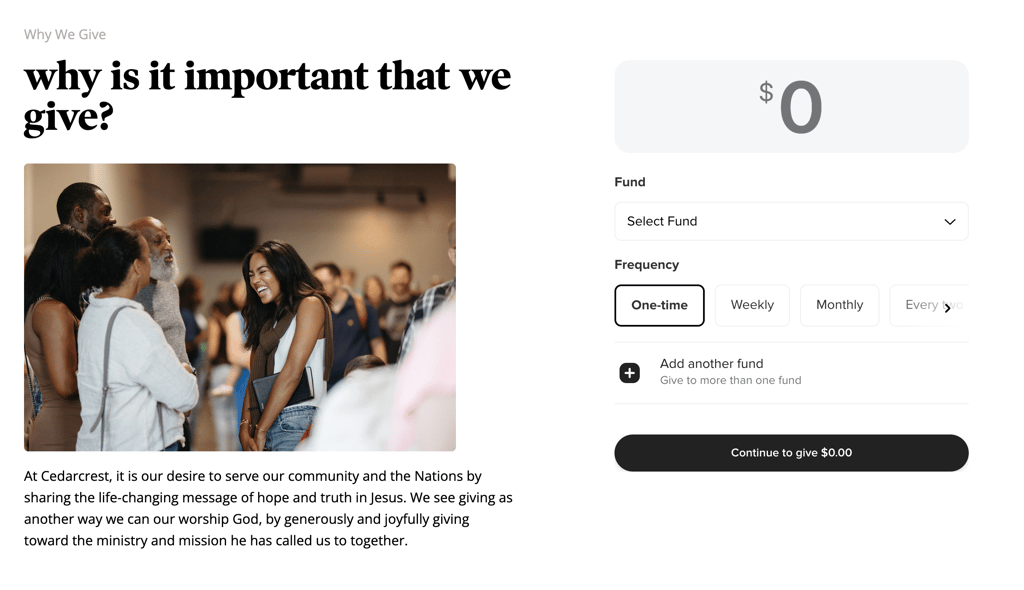
Take examples from other church websites, like Cedarcrest Church, to inspire your Donate or Give page layout.
6. Optimize your website for mobile and search engines
Optimizing your church website for mobile devices and search engines helps reach as many people as possible. This is helpful to grow your church community.
Mobile optimization
With many users accessing websites on mobile devices, your church website needs to look and function well on smaller screens.
To ensure a great mobile experience, test your site on various screen sizes, including smartphones and tablets. Make sure the design is responsive, navigation is simple, and content is easy to read.
Search engine optimization (SEO)
Around 93% of online experiences begin with a search engine. So, making your church website search engine-friendly is important for attracting new visitors.
Thankfully, Hostinger AI Builder offers built-in SEO tools. Start by going to Website settings → SEO settings. This will open the SEO tool for all pages within your church website.
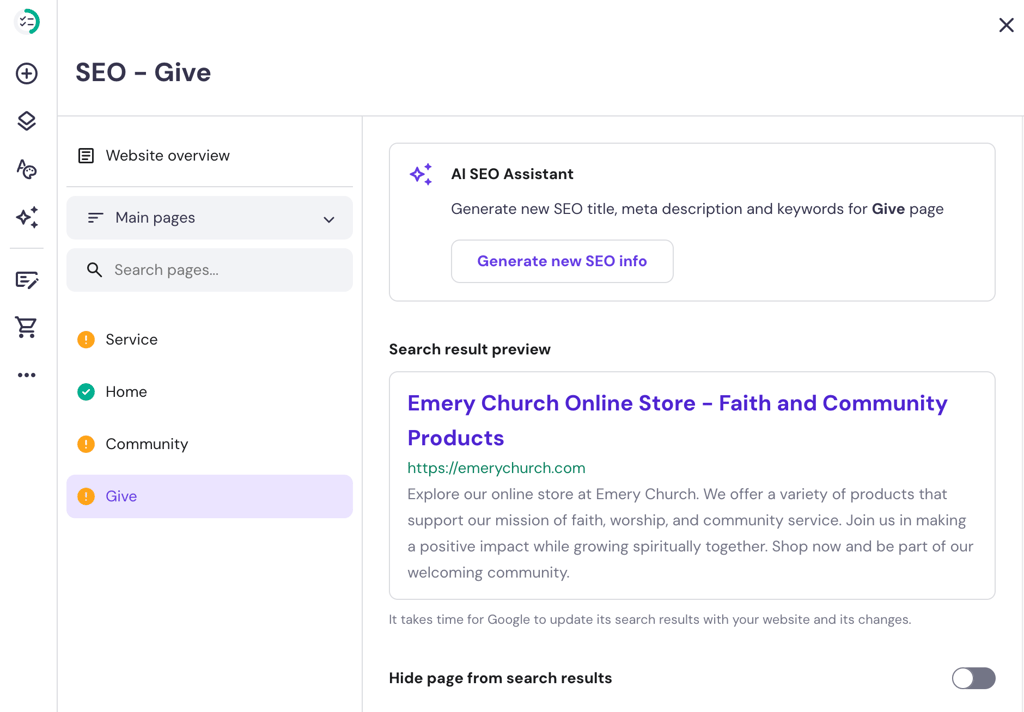
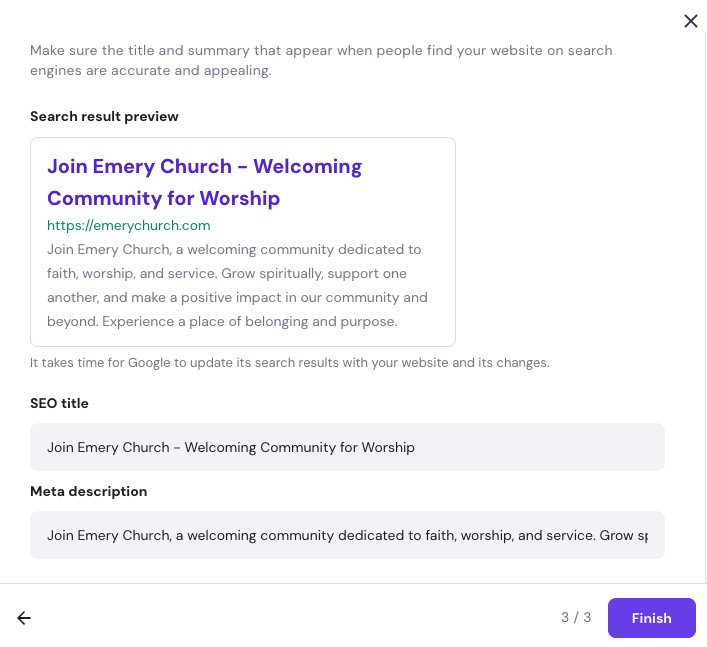
Click Generate new SEO info and add a short paragraph explaining the website’s purpose. Choose three focus keywords and review the meta title and description.
7. Review, test, and publish your church website
Before your church website goes live, thoroughly review and test everything to ensure it’s ready.
Conduct usability testing
Usability testing is a way to test the ease of use and functionality of your website. It’s essential to ensure a seamless user experience. Here’s how to do it effectively:
- Gather feedback. Invite a few church stakeholders to navigate the site and provide their input. Write down any issues or suggestions for improvement.
- Focus on key areas. Check how easily users can find information, navigate between website pages, and complete actions like submitting a contact form or making a donation.
- Make necessary changes. Implement the feedback to the church website.
Review SEO and web accessibility
To expand your reach and ensure inclusivity, perform a final SEO check and accessibility review:
- Use SEO tools. Tools like Google Search Console can help you identify and fix SEO issues. This includes missing meta descriptions or broken links.
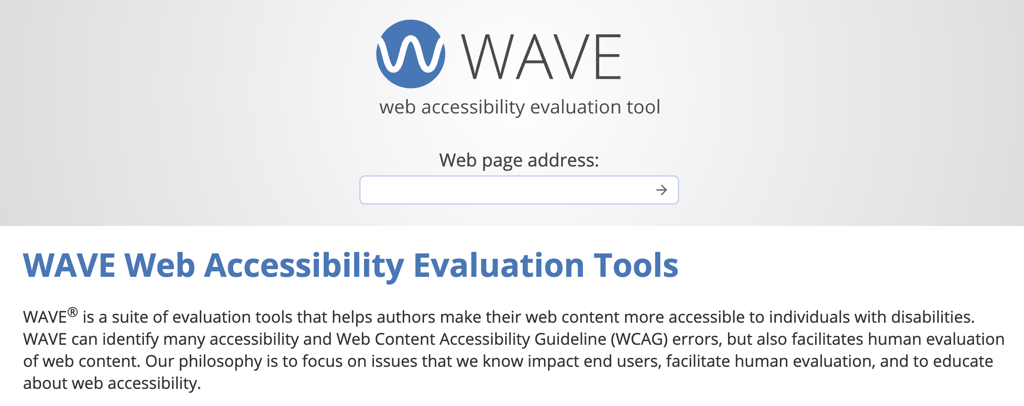
- Ensure web accessibility. Tools like WAVE help ensure your website is accessible to all, including those with disabilities. Just copy and paste your website URL, and it’ll give you a detailed report on any accessibility errors.
Verify functionality
Before you hit publish, double-check that all key features, links, images, and pages function correctly.
Publish your website
Publish your church website once everything has been reviewed, tested, and optimized. To do so, click Go live at the top right of the builder.
Download website launch checklist
8. Promote and grow your church website
Promoting your church website helps you reach as many people as possible. Develop a promotion strategy using social media, email marketing, and community announcements. Here are some simple promotion strategies:
- Add your website link in all digital communication, such as email signatures, social media bios, and online event invitations.
- Partner with other local churches or organizations to cross-promote each other’s websites.
- Encourage community members to share your church website with their friends and family or on social media platforms.
- Generate a QR code for donation that leads to your website. Add it to printed materials, such as brochures, flyers, and business cards.
- Create a Google Business Profile for the church. This will make it easier for people to find your church and access important information.
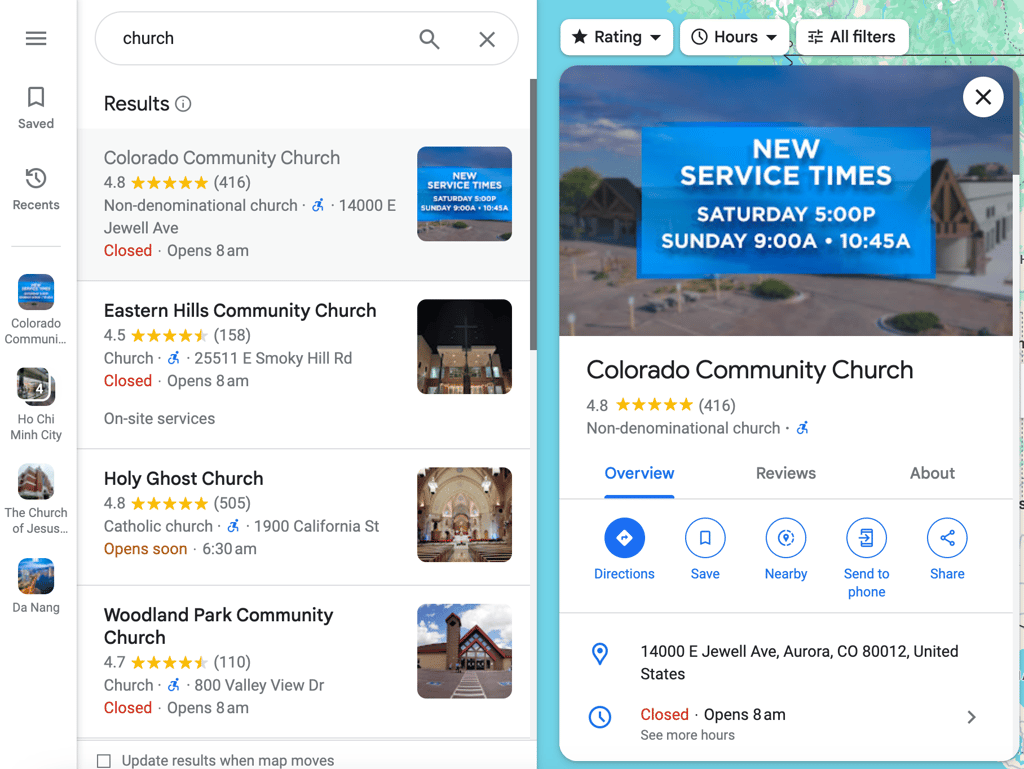
Take an example from Colorado Community Church. You can showcase the church’s address, opening hours, phone number, and website. You can also see the church’s reviews, photos, and posts on the Google Business Profile.

Monitor the effectiveness of your website promotion regularly and make tweaks as needed.
Suggested reading
Would you like your curch community to be able to interact with each other? Check out our guide on building a community web app for daily communication.
Conclusion
Creating a website for your church involves several key steps that contribute to a strong and engaging online presence. We recommend following specific milestones to keep your website project on track:
| Milestone | Tasks | |
| Week 1 | Define goals and plan features | Identify the website’s primary goals.Decide on essential features (for example, information pages, blog, gallery, contact page). |
| Week 2 | Choose a platform and design your website | Select a website builder or platformCreate a basic site layout and organize the content structure.Write content for each page and gather images.Add the chosen features, like the event calendar and donation page.Apply on-page SEO strategies. |
| Week 3 | Test and optimize the website | Test the website on different devices and browsers.Make necessary adjustments for better performance and user experience. |
| Week 4 | Launch and promote | Launch and announce the website through church services, social media, and newsletters.Begin regular updates and maintenance. |
We hope the tools and tips in this guide help you build a fantastic church website that serves your congregation and welcomes new worshipers. With Hostinger AI Builder, your church’s mission will reach everyone, anywhere.

How to build a church website FAQ
A church website allows you to share essential information, foster community, and facilitate online donations. It also serves as a hub for connecting current church members and welcoming new ones.
With Hostinger AI Builder, you can create a church website for $2.99/month without having to code or hire a professional web developer.
Usually, a church website needs a homepage, service times, an event calendar, sermon archives, contact information, and a donation page. These features make the site informative and engaging for members and visitors.
It depends on your needs. Usually, up to seven pages are sufficient. This includes the Home, About, Services, Events, Sermons, Contact, and Donate pages.
This article is a localized version of How to build a church website that connects and grows your community, originally published in English.

Nurul Siregar has over 3+ years of experience in the tech industry with a passion for writing about digital marketing. Nurul enjoys reading fiction novels and making digital illustration in her free time. Follow her on LinkedIn.

Miglė Cicėnaitė-Jocė is a Product Manager for Hostinger's Website Builder. She is on a mission to redefine website creation, focusing on the AI flow and its features, and is always eager for product feedback and market insights to improve the user experience. Follow her on LinkedIn.