Is WooCommerce free? A breakdown of WooCommerce cost factors
Oct 14, 2026
/
By Jordana A. & Marco C.
/
10 min Read
WooCommerce is a free, open-source plugin for WordPress that enables you to transform your website into a fully functional online store. With the core plugin, you can create and manage an online store, list products, accept basic payments, and handle orders.
However, running a WooCommerce store isn’t entirely free. You’ll need to factor in costs like web hosting, a domain name, and potentially paid extensions for extra functionality such as subscriptions, bookings, or advanced shipping options. This article breaks down what’s free, what costs extra, and how to budget for a WooCommerce-powered store.
What you get in WooCommerce for free
One reason WooCommerce is a top WordPress eCommerce plugin is its high customizability and scalability. Here’s what you get for setting up an online store in WordPress using the WooCommerce core plugin.
Product management
The open-source software lets you sell various product types, from simple and grouped products to variable products and digital downloads. This feature makes WooCommerce ideal for business-to-customer (B2C) eCommerce, specifically for building online retail stores and individual brand sites.
The product editor provides options to manage important details for each product, such as price, description, and images.
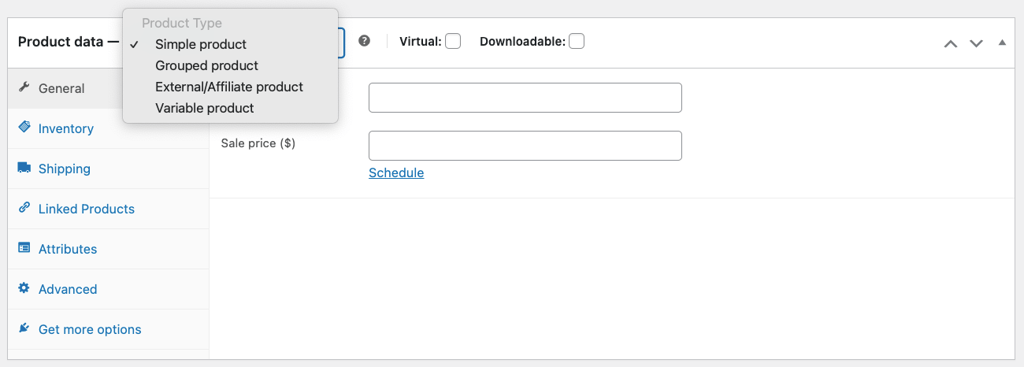
Additionally, WooCommerce includes an inventory management system to help you track stock levels and set stock status. You can also limit purchases to one item per order to create a sense of urgency for your products.
Meanwhile, the category system is useful for keeping your store organized.
Payment options
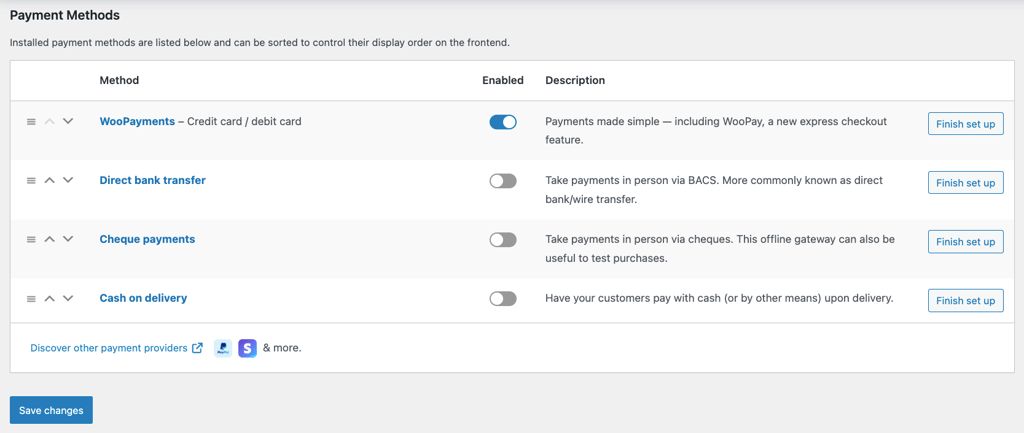
WooCommerce offers deep integration with popular payment gateways like PayPal and Stripe via extensions. It also has an in-house payment solution plugin, WooPayments, that accepts credit and debit card payments as well as local payment methods in various currencies.
Other supported payment methods include direct bank transfers, cheque payments, and cash on delivery.
Shipping methods
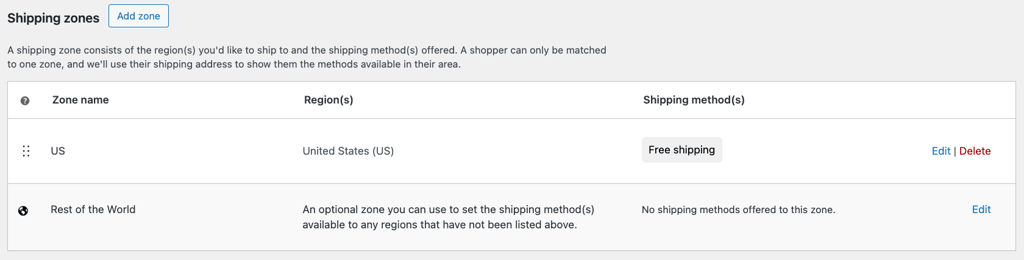
The eCommerce plugin has flexible shipping rates, allowing stores to set flat rates, offer free shipping, or calculate shipping rates manually. Stores can display a shipping calculator in the shopping cart to give customers a more accurate estimate.
Use shipping zones to offer selected shipping methods to certain regions. This feature allows you to set shipping rules based on customer location, enhancing your store’s accessibility.
Customization
WooCommerce provides a library of themes for different niches to kickstart your online business journey. If you can’t find the right one, browse the WordPress theme directory for more free theme choices.
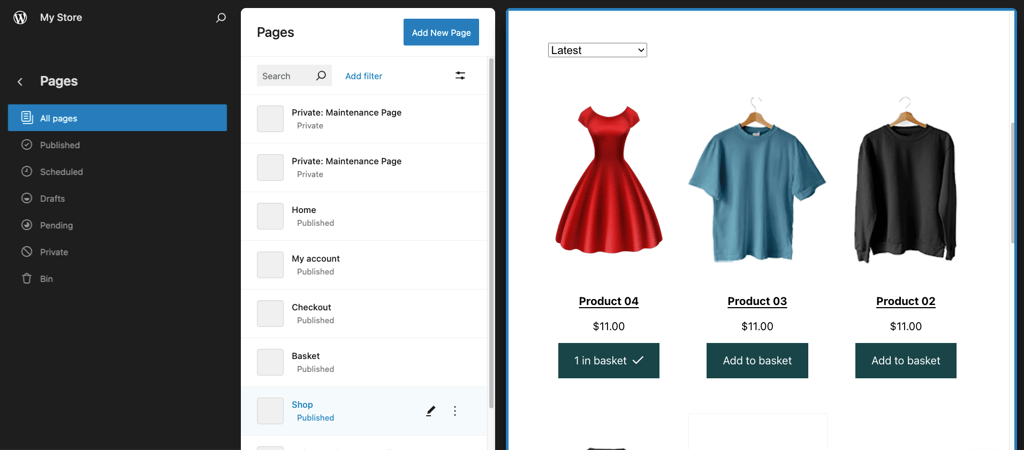
Easily customize your WooCommerce store’s appearance with the WordPress site editor. The block-based editor lets you create reusable block patterns from pre-made layouts and elements to reduce design time.
As WordPress is an open-source platform, you can access and modify the source code to meet your specific needs. Therefore, those who know how to code can customize store functions and designs using custom PHP code snippets like hooks and filters.
Marketing tools
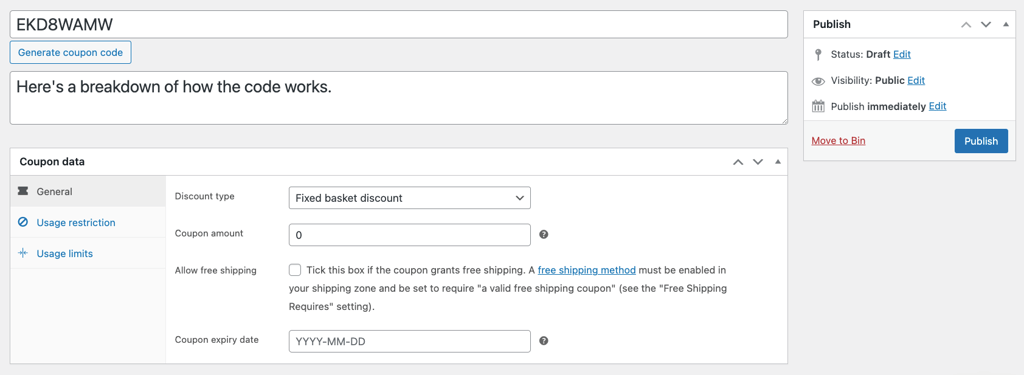
The built-in coupon feature lets you generate discount codes in WooCommerce and offer free shipping to entice customers to purchase.
Customize these coupons by setting minimum and maximum spending limits and restricting their use with other promotions. There’s also an option to exclude sale items from the discount, giving you greater control over your marketing strategies.
Additionally, WooCommerce integrates with third-party marketing tools and social platforms to implement other marketing strategies, such as email and omnichannel marketing.
Analytics and reporting
WooCommerce Analytics allows merchants to monitor their store’s performance. The built-in reporting and data analysis tool generates reports and provides advanced filtering and segmenting tools for identifying trends and customer behavior.
You can also effortlessly customize your WordPress dashboard to track important metrics.
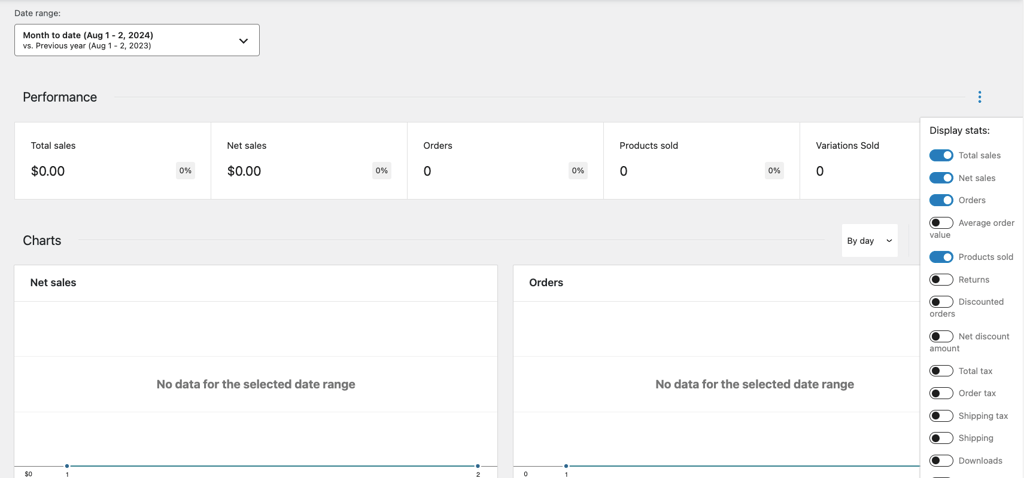
Here are some of the main metrics tracked by WooCommerce Analytics:
- Gross, net, and total sales
- Number of new orders placed
- Average order value (AOV)
- Items sold
- Refunds
- Total tax
WordPress functionality
Since WooCommerce is a WordPress plugin, you automatically gain access to WordPress’s native features as a content management system (CMS).
WordPress makes creating and managing product pages and static content like About Us and Contact pages easy. You can also use its blogging capabilities for content marketing to attract and engage with your customers.
The user management system allows store owners or administrators to assign roles and permissions, granting access to different parts of the website. This feature simplifies task distribution among team members and helps maintain your online store’s security.
Other beneficial WordPress features for WooCommerce stores include a media library for uploading and managing images and videos, built-in SEO tools for improving search engine rankings, and multilingual support to reach a global audience.
Check out our WordPress guide to learn more about how the platform works and how to make the most of it for your online business.
What you have to pay when using WooCommerce
Even though WooCommerce is free to download and utilize, the plugin requires paid resources to function. Let’s discuss the costs involved in developing a WooCommerce store.
Hosting service
WooCommerce runs on a self-hosted WordPress site, so you’ll need a hosting service to store your website’s files and make them accessible online.
Hosting costs for small to medium-sized websites can vary from $1 to $200/month, depending on your needs. When selecting a hosting plan, consider the following factors that influence pricing.
Web hosting type
Each hosting type allocates different bandwidth and server storage amounts, which are crucial for website performance. Choosing the right hosting type ensures your online store has the required server capacity to run effectively.
Shared hosting, the most affordable option, may suffice for small to medium-sized websites. However, business sites might opt for cloud or dedicated hosting for better uptime and resources to handle high traffic.
Read our tutorial on web hosting types to understand these differences and find the most suitable option for your business.
Web hosting provider
Most popular web hosting providers offer managed hosting services, which means they handle maintenance, updates, security, and backups for their users. A reliable web host is essential for smooth website operation and fast loading speeds, ensuring an optimal customer experience.
Here’s what to look for when choosing a web hosting company to host your WooCommerce store:
- WordPress or WooCommerce support. Choose providers that optimize servers for these platforms and offer features like one-click installation and automatic backups for easy setup and maintenance.
- Server location. Choose a hosting provider with data centers near your customer base. This will help reduce latency and ensure faster website load times, improving user experience.
- Backend access. Ensure you have direct access to manage files and configurations. Hostinger, for example, offers Secure Shell (SSH), File Transfer Protocol (FTP), and a File Manager for easy and secure access.
- Security features. A good web host should include SSL certificates, firewalls, regular backups, and malware protection in their hosting services to keep your site safe.
- Customer support. Get hosting with 24/7 support via multiple channels to resolve technical issues quickly, minimizing the risk of losing sales.
Explore our list of the top WooCommerce hosting providers to help you narrow down your choices and find the best fit for your needs.
Domain name
In addition to web hosting, a WordPress website requires a domain name to function. It serves as your store’s unique address on the internet, allowing customers to find and access your site.
Having a unique domain name is essential for building your brand’s identity and credibility, making your store appear trustworthy. You can also use it to create custom email addresses that match your brand, further enhancing your store’s professional image.
The cost of a website domain typically ranges from $10 to $20/year, depending on the following factors:
- Domain registrar fees. Domain registrars, companies that manage domain registrations, set their own prices. Some registrars offer discounts for the first year, while others have fixed plans with higher starting prices.
- Top-level domain (TLD). This is the extension at the end of your domain name. Popular TLDs like .com and .net tend to be more expensive than other less-used extensions.
- Domain privacy protection. This service keeps your personal information hidden from the public WHOIS directory when registering a domain to prevent identity theft, email phishing, and spam. It usually costs up to $15/year, but some providers offer it for free with specific hosting plans and domains.
- Domain registration duration. Most domain registrars require a minimum one-year registration but offer discounts for longer periods.
Domain Name Checker
Instantly check domain name availability.
Premium WooCommerce extensions and plugins (optional)
Extensions and plugins are tools that add extra features and functionality to your WooCommerce site. Extensions specifically scale WooCommerce functionality, while plugins modify the overall WordPress site.
Investing in premium extensions and plugins unlocks advanced features not available in the free versions. These features include enhanced security, better SEO tools, and improved payment and shipping options.
Furthermore, having more flexibility to customize your online store to your specific needs can provide a better user experience and increase sales.
Freemium and premium plugins sold on platforms like CodeCanyon usually cost between $2 and $1,000. Some require a one-time fee, while others offer monthly or annual subscriptions. Plugin pricing varies depending on the subscription period, plan tier, and any paid add-ons.
To give you a better idea, here are some of the best WooCommerce plugins with their starting prices:
- SeedProd ($39.50/year). A landing page builder for creating custom pages and sales funnels.
- Advanced Dynamic Pricing for WooCommerce ($60/year per website). It lets you set custom rules for various discount schemes.
- AIOSEO ($49.60/year). Offers advanced SEO modules for on-page analysis and audits.
- Tidio ($24.17/month billed annually). An automated customer service plugin with live chat and chatbot features.
- OptinMonster ($8/month billed annually). Offers a drag-and-drop popup maker to boost conversion rates.
The total cost for these five plugins starts at roughly $57.02/month. An average WordPress site can have anywhere from five or up to 20 plugins installed, so you might spend more to add the extra features your eCommerce website needs.
Premium themes (optional)
Paid WordPress themes offer more than just flexibility in customization over free ones. Often tailored for specific website types, they offer advanced features, updates, and dedicated support to keep your website functional, secure, and up-to-date.
You can buy a premium theme on marketplaces like ThemeForest and Creative Market or the respective developer’s website for $2 to $200/year. Here are the costs of several top WooCommerce themes:
- Astra (starts at $49/year). A multi-purpose theme that comes with built-in WooCommerce layouts, a site builder, and premium plugins for optimizing sales funnels, automating tasks, and more.
- Woostify (starts at $49/year). Offers starter sites to speed up customization and premium add-ons for additional features like intelligent product filters and pre-order settings.
- Goya ($29/year). A minimalist theme that offers AJAX WooCommerce tools to update website content without reloading, enhancing performance and user experience.
- Divi ($89/year). Provides various website packs for different niches, an intuitive site builder, email marketing tool integrations, and 24/7 support.
- TheGem ($59/year). Includes website elements for converting widgets like testimonials and counters and retina-ready designs for a sharp, consistent look on all devices.
Transaction fees (optional)
If your online store accepts online and card payments, you need to account for transaction fees in your WooCommerce pricing. Payment gateways charge these fees per transaction, usually as a percentage of the sale amount plus a fixed cost.
Each WooCommerce payment gateway has its pricing policies. For example, WooPayments and Stripe charge 2.9% + $0.30 per card or digital wallet transaction. Meanwhile, merchants using PayPal must pay 2.9% per domestic card payment, plus a fixed rate determined by their country of operation.
Transaction fees can reduce your profit margins, especially if your products have low margins. Make sure to include these fees in your pricing to ensure your business remains profitable.
How to minimize the cost of building a WooCommerce store
By now, you know that building an online store with WooCommerce still requires some investment. Follow our tips to reduce costs and maximize the value of your WooCommerce store.
Get hosting with a free domain name
Many hosting providers offer a free one-year domain with long-term or high-tier hosting plans. This bundle combines essential web services, making setting up a website more accessible and more cost-effective.
If you don’t have a custom domain yet, this deal reduces your initial website building costs, allowing you to focus on key areas like marketing. It also guarantees compatibility between the domain and hosting, minimizing potential technical issues.
As a hosting provider recommended by WordPress.org, Hostinger offers a free one-year domain worth $9.99, along with WHOIS domain privacy protection alongside every managed WooCommerce hosting plan.
Starting at CA$ 5.59/month, all plans also include free services like SSL for enhanced security, a content delivery network (CDN) to boost performance, a one-click WooCommerce setup, and smart WordPress auto-updates.
On-demand and daily backups, WooCommerce acceleration with LiteSpeed Cache, and a staging tool for safe testing are also available.
For the best value, we recommend purchasing the Cloud plan for a 48-month term at CA$ 11.19/month to get three additional months. This plan offers features for scaling professional websites, such as:
- Priority support. Get easy access to our expert eCommerce tech team for all your WooCommerce inquiries. General customer support is also available 24/7 via live chat or email.
- Dedicated IP address. Not sharing your IP address with other websites lowers the risk of their technical issues impacting your online store. It also helps minimize spam and improve email deliverability, ensuring smooth customer communication.
- AI features. Access our built-in AI tools for more effective content production, faster troubleshooting, and on-the-spot support.
Opt for Alternative TLDs
Some domain extensions like .com and .net are popular because they are widely recognized and trusted by users worldwide. This popularity drives up their cost as businesses compete for these sought-after domains.
Prices can be even higher for short, catchy names with niche keywords. If changing your brand name isn’t an option, consider using alternative TLDs to reduce costs.
For example, Hostinger offers weddingfloralhaven.com for $4.99 for the first year. Meanwhile, weddingfloralhaven.store and weddingfloralhaven.site only cost $0.99 for the same registration period.
Alternatively, sellers looking to boost brand visibility can take advantage of our domain bundle. This secures the chosen website domain with three popular extensions at a discounted price.
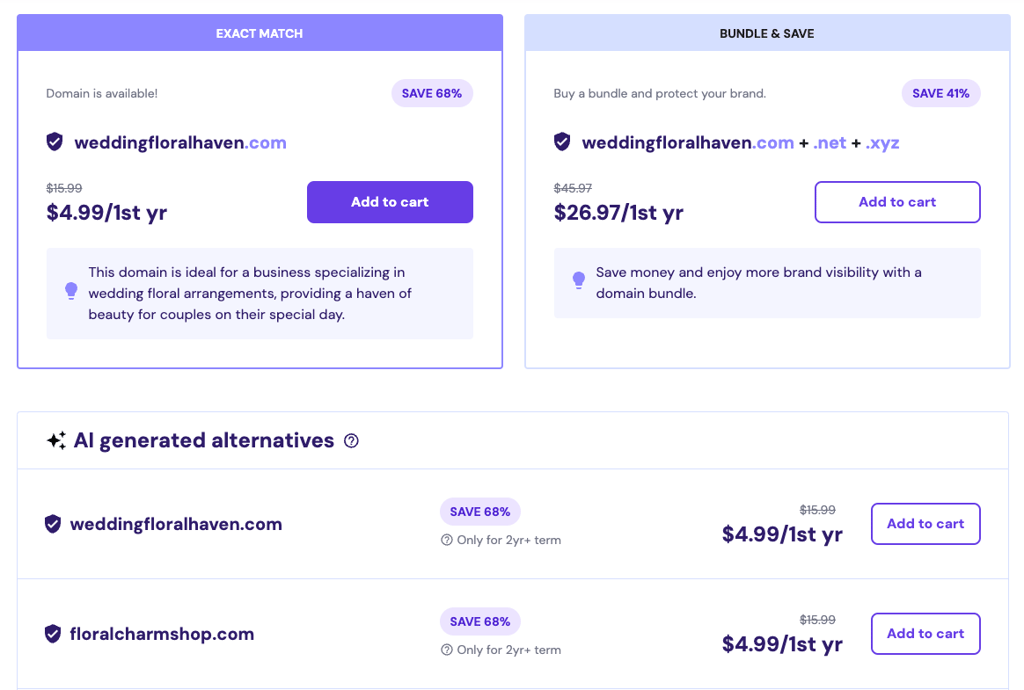
Like web hosting, registering your domain name for a longer term often costs less. Consider renewal costs when choosing a registrar to get the best value for your purchase and ensure you maintain ownership of this crucial part of your branding.
Limit paid plugins and extensions
Despite their benefits, installing too many plugins can increase WooCommerce pricing due to accumulating subscription fees. Moreover, each plugin adds to your site’s load time, potentially slowing it down and affecting the overall user experience.
Reducing the number of plugins will keep your store running optimally and help manage costs.
To limit paid plugins and extensions, look for free alternatives that offer similar functionality. Many free plugins provide essential eCommerce features without the added expense. Additionally, consider using all-in-one plugins that combine multiple features into one solution.
Take advantage of free trials to decide if premium plugins are necessary. Only invest in those that provide significant value and enhance your site’s performance.
Use free themes
Starting with a free theme is a great way to cut costs when setting up your WooCommerce store. While free themes may have limited features and customization options, they allow you to create a professional design without spending a lot of money.
This makes them ideal for new businesses or those testing the market without a big investment.
Here are some tips for finding a reliable free theme:
- Check user reviews. Look for themes with positive user reviews and ratings to ensure a good user experience and reliability.
- Inspect update frequency. Choose themes the developer regularly updates to ensure security and compatibility with the latest WordPress and WooCommerce versions.
- Use official repositories. To minimize security risks, download themes from the official WordPress theme directory or other reputable sources.
- Evaluate support options. Check if the theme developer offers support or a community forum for questions and assistance.
- Test responsiveness and loading speed. For an excellent user experience, make sure the theme looks good on all devices and loads quickly, preferably in under three seconds.
Check out our top free WooCommerce themes if you’re not sure where to start.
Keep an eye on sales and discounts
Many web services go on sale during major promotional events like Black Friday, Cyber Monday, or other seasonal sales. These events offer significant discounts, allowing you to purchase anything from hosting to premium plugins at a fraction of their usual price.
Planning your purchases around these sales can help you save money while allowing you to access advanced features and designs for your WooCommerce store.
To stay informed about upcoming sales and special offers, subscribe to newsletters from WordPress and WooCommerce developers. You can also set up alerts for your desired products to ensure you don’t miss any new deals.
By being proactive and taking advantage of discounts, you can optimize your store’s performance while keeping WooCommerce costs low.
Conclusion
WooCommerce allows business owners with limited budgets to establish an online presence easily and quickly. While WooCommerce isn’t completely free, as some might think, it still offers an affordable way to turn your WordPress site into a full-fledged online store.
The key to keeping costs down is to have a clear budget and know exactly what your business needs. Once you have the essentials, you can always expand your store as your business grows.
Ready to launch your WooCommerce store? Explore Hostinger’s optimized WooCommerce hosting plans built for speed and scalability.
Yes, you can create a WooCommerce store for free by downloading the plugin on your WordPress site. However, you will need to pay for web hosting and a domain name to set up WordPress. Additional costs might include premium themes, plugins, extensions, and transaction fees, depending on your business needs.
Hostinger AI Builder is one of the best WooCommerce alternatives because of its ease of use. It addresses WordPress and WooCommerce’s steep learning curve with AI tools that simplify eCommerce website creation for all skill levels. Additionally, this all-in-one eCommerce solution is budget-friendly. The Business plan offers hosting, a free domain, and access to AI functions and eCommerce features for CA$ 5.59/month. The site builder doesn’t charge any transaction fees.
This article is a localized version of Is WooCommerce free? A breakdown of WooCommerce cost factors, originally published in English.

Jordana is a Senior Content Writer with a background in Information Systems. She has over five years of experience in WordPress and is casually dabbling with PHP and MySQL. Her passion for writing and technology drives her to create tutorials for anyone wanting to build their online presence. Follow her on LinkedIn.

Marco Chiesi is the Head of WordPress at Hostinger, with over 20 years of experience as a software engineer in the web industry. He specializes in open-source technologies and the WordPress ecosystem, where he has contributed in different areas: Plugin Developer (with over 10 million downloads), WordCamp speaker and organizer, Meetup organizer, Translator, and Core Contributor. He is passionate about leading his team to create innovative solutions for Hostinger's web hosting product, which hosts over 5 million WordPress installations. Follow him on LinkedIn.