How to Make a Restaurant Website in 8 Easy Steps
Oct 14, 2026
/
By Linda D. & Miglė C.
/
12 min Read
A well-planned restaurant website captures and extends the character of your establishment. It also effectively transforms your online presence into a true reflection of what guests can expect in person.
In addition to showcasing your brand and menu, an excellent restaurant website can help simplify the process for customers to make reservations or place orders online. This setup improves your services’ accessibility and convenience.
This guide will cover eight steps for how to create a restaurant website, from initial planning and design to search engine optimization and marketing. We’ll also share tool recommendations for creating an attractive and functional restaurant website.

How to Make a Restaurant Website
Let’s have a look at the step-by-step guide to creating a website for a restaurant.
1. Plan Your Website
Careful planning is crucial for creating a successful restaurant website. It establishes clear goals, such as enhancing brand visibility or facilitating online orders. By knowing what you want to accomplish, you set a focused direction for all design and development efforts.
Next, identify your target audience. Whether they are millennials looking for a trendy spot, families searching for a comfortable eat-out, or business professionals seeking a quick service – you should tailor the website to meet their needs.
In addition to demographic analysis, here are other factors how to effectively identify your target audience:
- Behavioral patterns – Analyze the dining habits of your target audience. Would they appreciate online reservations? Are they likely to order takeout or delivery?
- Psychographic considerations – Look at the lifestyle, values, and interests of your potential diners.
- Engagement strategies – Consider how to engage your target audience through the restaurant website. This might involve interactive elements, like a blog with culinary tips, newsletter signup for special offers, or integration with review platforms.
Conducting a competitor analysis can also provide invaluable insights. This process involves exploring other successful restaurant websites to understand what elements resonate with customers and what strategies are effective.
To do competitor analysis, start by listing direct competitors. These are other restaurant websites within your niche and geographical location.
Expand the list to include restaurants whose sites represent current web design and service standards, even if they are not direct competitors. You can find them by typing related:example.com on Google’s search bar or using website finders, such as SiteLike.
For each competitor’s website, evaluate elements such as:
- Design and layout – How visually appealing is the website? What kind of imagery and color schemes are used?
- Navigation – How easy is it to find important information? What is the layout of the menu, contact information, and reservation system?
- Content – What type of content is prominent? Do they use blogs, featured dishes, chef’s bio, or customer testimonials?
- Functionality – What functionalities are integrated, such as online reservations, ordering systems, or customer feedback forms?
- Mobile experience – How well does the website perform on mobile devices?
By thoroughly planning and researching, you can ensure your restaurant website not only attracts but also serves your intended audience effectively while standing out in a competitive market.
2. Choose the Right Website Builder and Domain Name
Selecting the ideal restaurant website builder and a memorable domain name is critical for launching your restaurant site.
A website builder simplifies the creation and management of your site. It allows you to realize your vision with an intuitive interface and beginner-friendly tools.
A well-chosen domain name enhances brand visibility and identity, making it easier for potential customers to find and remember your restaurant.
Together, these elements support your efforts to attract and serve your audience effectively while strengthening your brand identity.
Choosing a Website Builder
Your website builder should cater to your restaurant’s specific needs, allowing you to easily create a visually appealing and functional site without requiring extensive technical skills.
Consider factors such as ease of use and design flexibility.
For convenience, incorporating specific restaurant website functionalities, like online menus and reservation systems, should be easy. Design-wise, choose a builder that offers responsive design templates to ensure your site looks great on desktop and mobile devices.
If one of your site goals is to improve brand awareness and online presence, look for a website builder offering built-in SEO tools. And if you’re accepting online orders, ensure your website-building platform has robust security measures.
Hostinger AI Builder is a leading website builder for restaurant sites. We have a range of attractive and functional restaurant-themed templates.
Our restaurant website creator stands out with its AI tools. With these tools, you can set up your website in just a few steps, making the process easier.
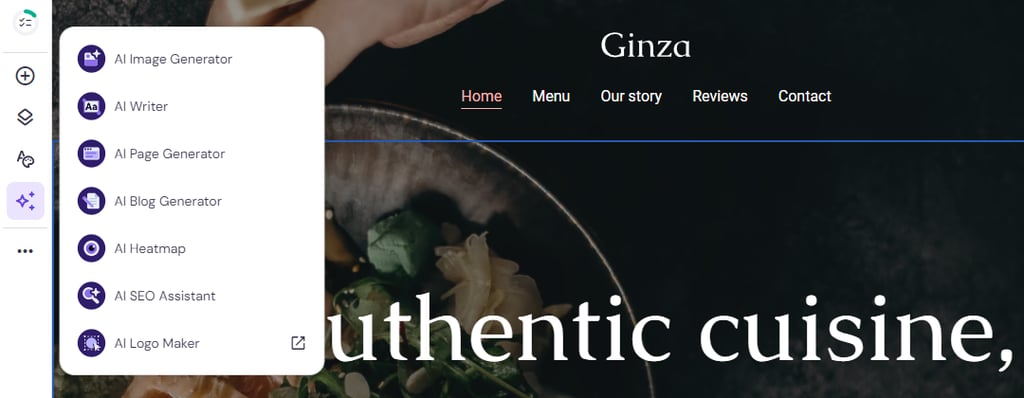
Additionally, we offer specific features, such as:
- Reservation system integration – Options to integrate systems that allow customers to make reservations directly on your website.
- Pre-built online menu page – Quickly upload and display restaurant menu options on your website.
- Shopping cart functionality – Enables customers to select multiple items from your online menu for purchase.
- Online payments for online orders – Allows customers to pay for their orders directly through the website using various payment methods such as credit cards, debit cards, or digital wallets, like PayPal.
- Social media integration – Easily link your social media accounts to your website for seamless customer interaction.
Regarding security, Hostinger AI Builder has a solid system. In addition to server-side security measures, like 24/7 server monitoring and firewall protection, our platform comes with free lifetime SSL certificates.
Choosing a Domain Name
Your domain name acts as your online address and is a vital component of your brand. Ideally, it should match your restaurant name or reflect a unique aspect of your cuisine.
When brainstorming for a good domain name, keep it short and simple to improve memorability and avoid spelling mistakes. You might also want to consider .com alternatives, like .online, .icu, or .restaurant. Here’s why:
- Availability – As one of the most popular domain extensions, finding an available .com that matches your restaurant’s name without modifications can be challenging. Alternative extensions may offer more options that are still catchy and relevant.
- Branding opportunities – Alternative extensions can be a part of your branding. .restaurant, .cafe, .bar, or .kitchen can add a creative element to your domain name. It’s also making it more memorable and immediately indicative of your business type.
- Innovation – Using a non-traditional domain extension can convey a modern image, helping your restaurant stand out. It can also be particularly appealing to a more digitally savvy audience who may perceive alternative extensions as interesting.
- Cost – Alternative domain extensions often cost less than their .com counterparts, mainly when the .com version is considered premium and sold at a higher price.
When you have decided on a domain name, check for its availability using the following tool:
Domain Name Checker
Instantly check domain name availability.
If it’s available, you can proceed to purchase and register it with a domain registrar.
On average, a domain name costs $9.99/year.
With Hostinger, you can get a free domain name for a year. All you need is an eligible plan – Premium, Business, or any cloud hosting option, provided the subscription is for 12 months or longer. These plans also include the Hostinger AI Builder platform.
Once you decide on your site-building platform and secure a domain name, you’re set to build your own website.

3. Design Your Restaurant Website
Generally, designing a website involves choosing a template and customizing the looks. This process will help align the web design with your brand, effectively highlighting your unique selling points and establishing desired user perception.
When exploring pre-built templates, look for one that closely matches your restaurant’s personality and aesthetic. Therefore, you won’t need extensive modifications. For example, your Japanese-style restaurant can use our Hostinger AI Builder’s Ginza template.
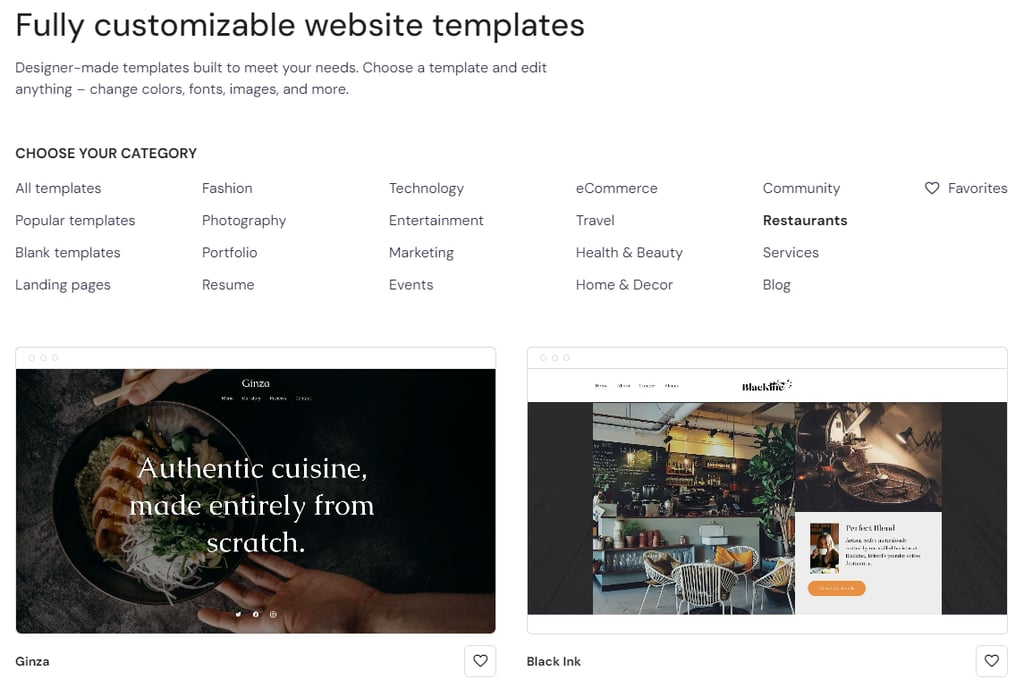
The template you choose should make it easy for visitors to navigate and find information. A cluttered or outdated design can detract from your restaurant’s image and discourage potential diners.
Additionally, your restaurant template should include designated areas where you can display online menus clearly and attractively. Whether it’s on a separate page or part of the homepage, this section should be easily accessible and formatted to handle items and descriptions neatly.
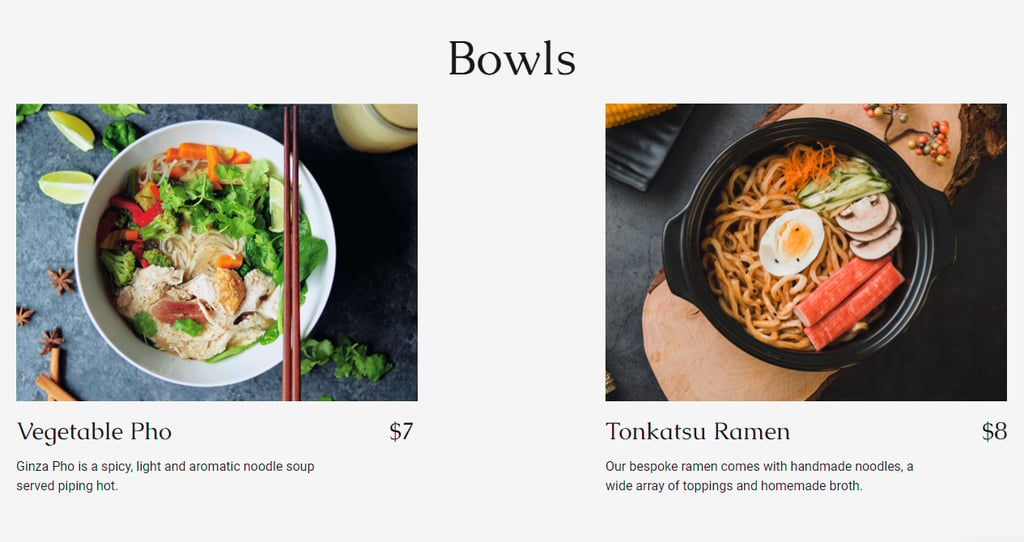
Throughout your entire site, maintain consistent use of colors, fonts, and layout styles that reflect your brand. This helps reinforce your brand identity and contributes to a cohesive user experience.
4. Set Up Essential Pages
Setting up essential web pages, like Home, About, and Menu, requires attention to detail. These pages are where you organize your content, so you’ll need to ensure they’re in good shape to provide visitors with a user-friendly experience.
Let’s have a look at some must-have pages for a restaurant website:
- Home – As your first impression, this web page should capture visitors’ attention with striking visuals and inviting copy. Highlight your best dishes and include snippets of what visitors can find on other pages.
- Menu – This web page is central to any restaurant website. Include clear categories, enticing descriptions, and high-quality images of your dishes.
- About – It tells your restaurant’s story and introduces the team behind it. Share your philosophy, your establishment’s history, or any unique aspects that set you apart from competitors.
- Contact – This page should provide clear ways to contact your restaurant, including phone, email, and an embedded Google Maps showing your location. Consider adding a contact form for inquiries, which can also be helpful for future marketing efforts.
Having enticing content for each web page is essential.
Each page should combine a compelling narrative with visual elements. Use language that reflects your brand’s voice – whether it’s formal or friendly. Then, add visual elements that complement the text.
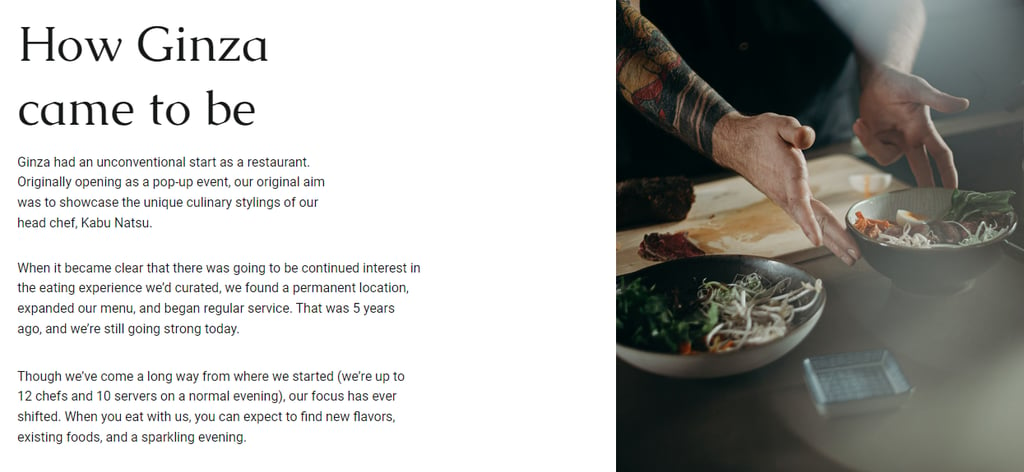
For example, on the About page, consider incorporating a photograph of your head chef, the team, or your signature dish next to the narrative. This visual cue enhances the page’s aesthetic appeal and helps build an emotional connection to your story.
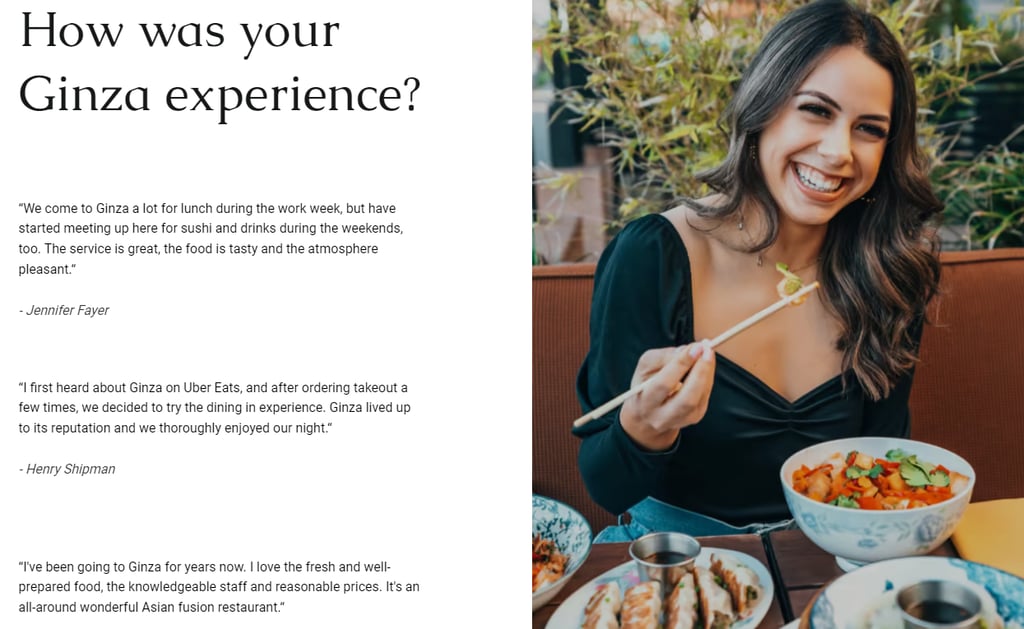
In another example below, the Review page features a photograph of a happy customer. It suggests a positive dining experience and adds credibility to the restaurant’s reputation.
Ensure that all essential information, like menu, opening hours, location, contact details, and reservation system, is easy to find. Additionally, use clear headings, an intuitive navigation bar, and strategic calls-to-action that can guide visitors through your site.
With Hostinger AI Builder’s pre-built template, you can jump from one page to another to edit the content to match with your restaurant’s brand, concept, and offerings.
Want to see this whole process in action? This video walks through building a restaurant site from scratch – planning, AI generation, page customization, online ordering setup, and launch.


For instance, here’s how to edit content on our ready-made Menu page:
- From your navigation bar, click Menu to head to the web page.

- Let’s start with configuring the header. Click on it, and you’ll find a pop-up settings window. Header settings provides options for customizing the layout and styling, as well as incorporating a logo.
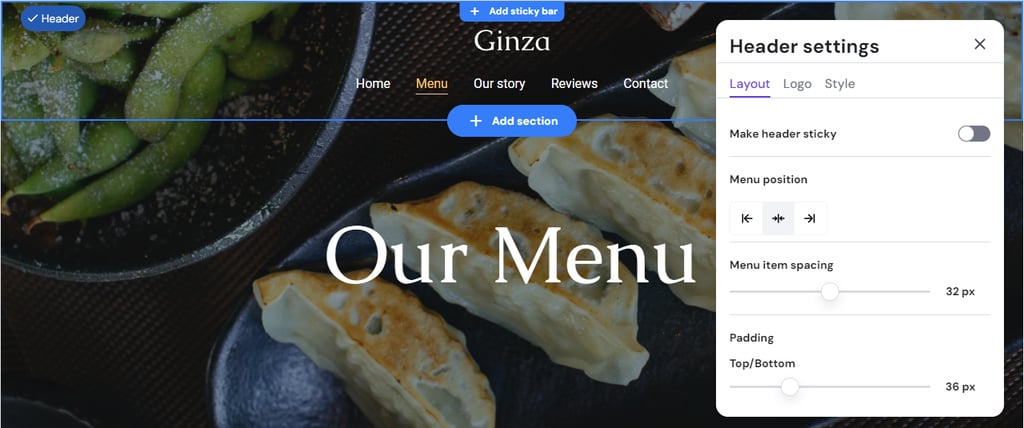
- Once you have your header ready, click on any section → Edit Section to change and adjust existing design elements.

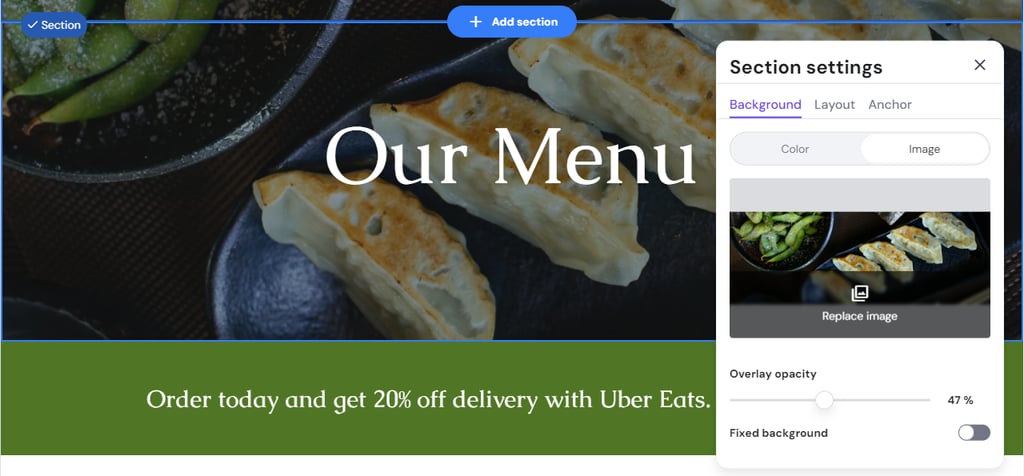
- A pop-up window will appear, and here, you can start editing your section’s background, layout, and anchor. For example, you can replace the default image with one of your best dishes’ to highlight your specialty.
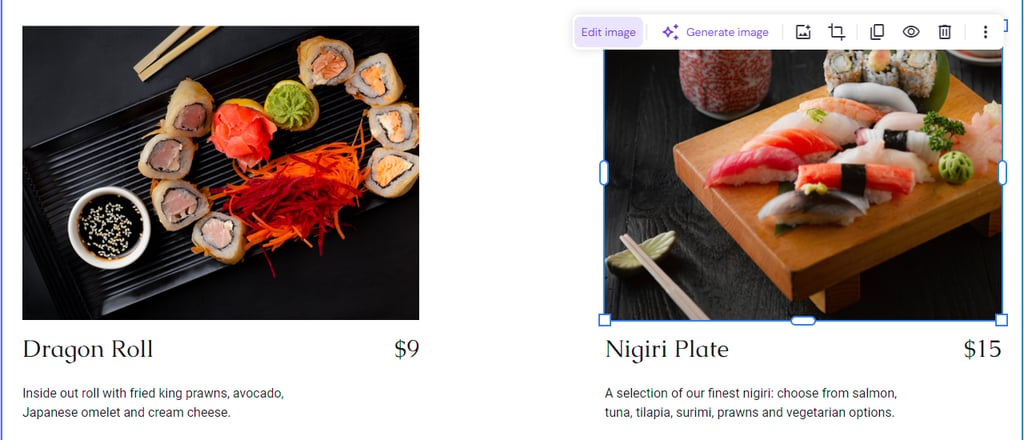
- To edit visual elements, click on one and choose the edit button. For example, in the menu offerings section, start changing the image by clicking on it → Edit image.
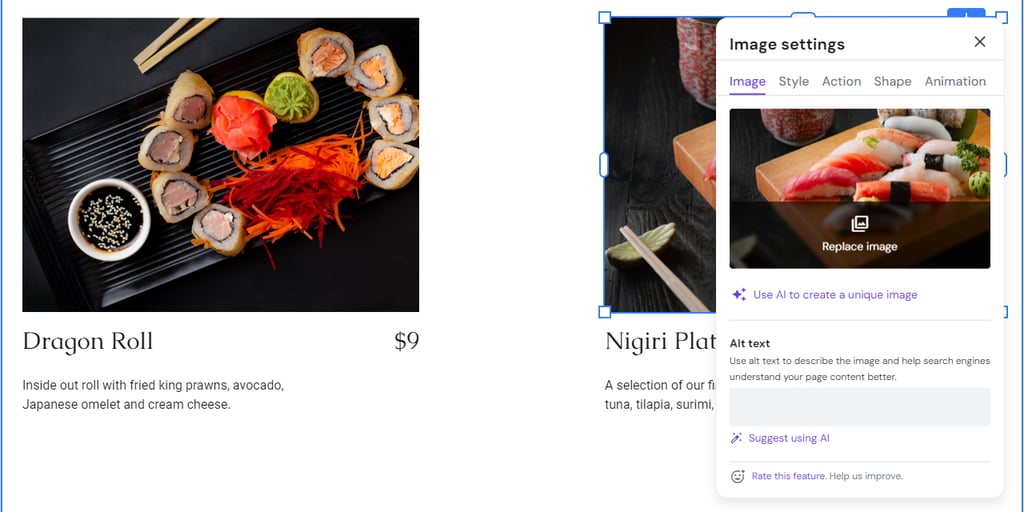
- Image settings lets you replace the image, change the style, action, and shape, and add an animation.
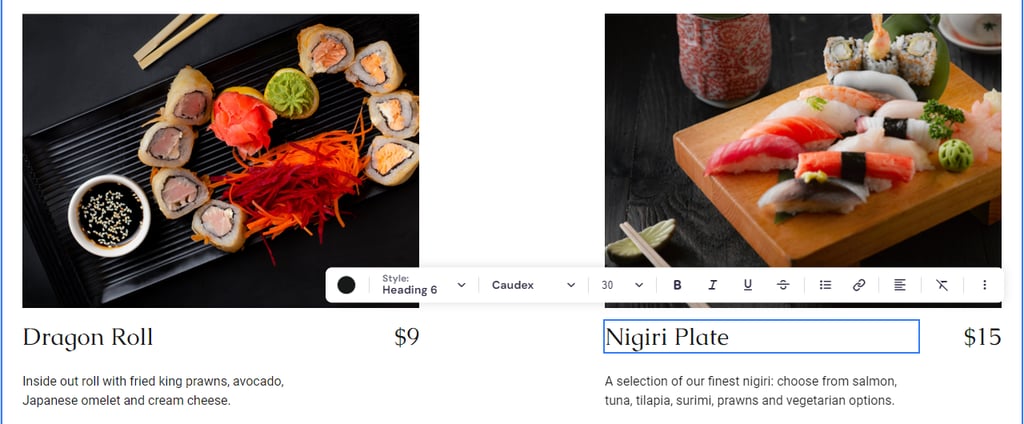
- To edit texts, click on any copy → Edit text.
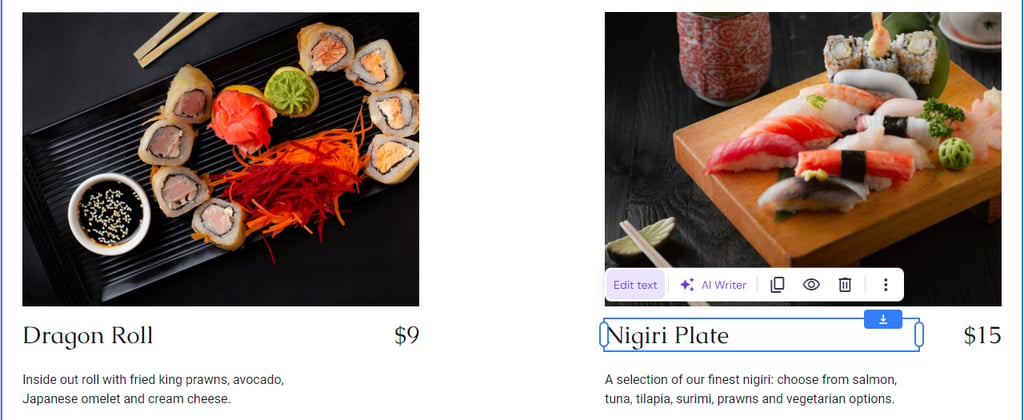
- Then, you will see a toolbar where you can change fonts, adjust sizes, and other aspects.
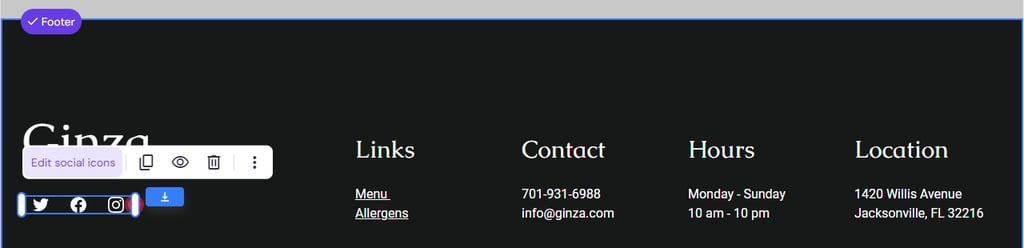
- On the footer, adjust the contact details. You can also add your social media links by clicking on the social media subsection → Edit social media icons.
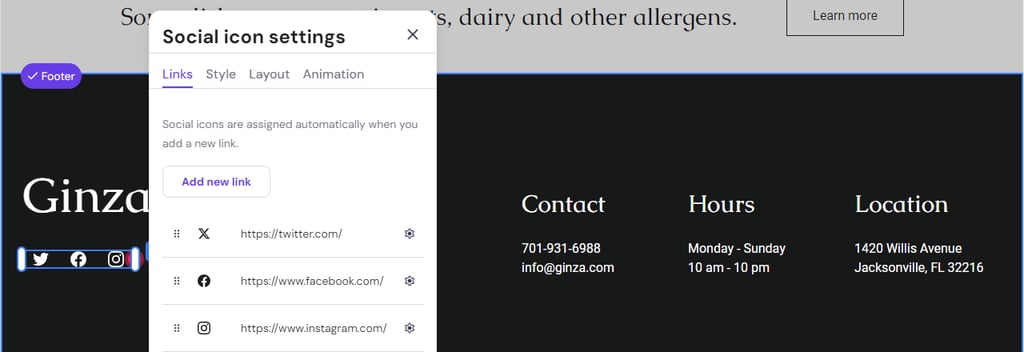
- Once you can access Social icon settings, start editing the links, style, and layout, as well as apply an animation.
And that’s how you set up your Menu page.
If you ever feel stuck, feel free to use our AI tools.
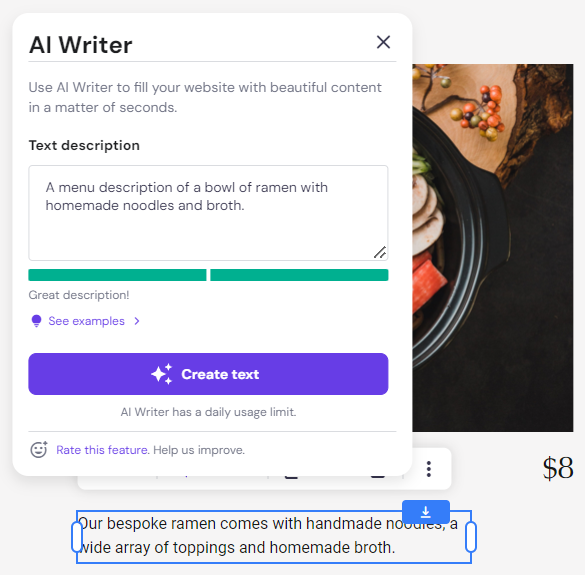
For example, AI Writer can help you write enticing menu descriptions. All you have to do is click on any existing text → AI Writer. Then, write a brief description of your intended copy and click Create text.
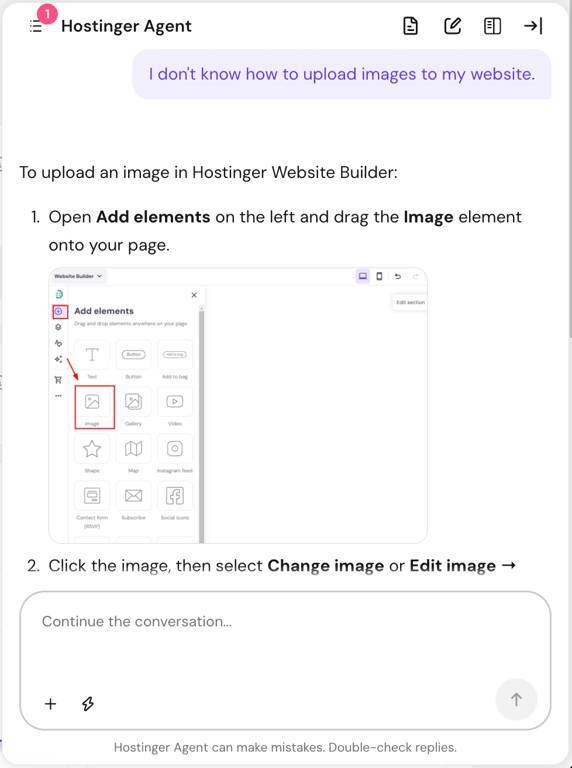
We also have Hostinger Agent, our own AI assistant, to help streamline your process. Just click the bottom right corner button and type in your question to get started.
5. Incorporate High-Quality Photos
Images are often the first thing visitors will notice on your restaurant website. They set expectations regarding the quality of food and the ambience of your restaurant.
Sharp, well-composed photos can entice website visitors as they successfully showcase your dishes’ appeal and the unique character of your venue. In contrast, poor-quality photos may turn potential diners away as they create a negative first impression.
Therefore, keep in mind that you should use eye-catching visuals for your restaurant’s web design.
To capture stunning product photos, use natural lighting to highlight the colors and textures of your dishes. Keep the focus on the food by arranging your plates against a clean, simple background. Also, experiment with different angles to showcase any details.
Photos of the restaurant’s interior and exterior can give potential customers a preview of the dining experience they can expect. Moreover, pictures of your restaurant during busy hours, your kitchen in action, and special events can create a connection with your audience.
On top of all, ensure that the style and quality of images are consistent across your website. This consistency reinforces your brand and contributes to a coherent user experience.
6. Add Essential Features of a Restaurant Website
Essential restaurant-specific features include online reservation and ordering systems.
Online reservation systems allow customers to book tables directly through a restaurant website. Meanwhile, online ordering systems enable customers to place food orders online.
By making these options available, your restaurant site meets modern diners’ expectations for convenience. Your restaurant can also minimize errors, improve seating efficiency, and ensure a smoother customer experience.
With Hostinger AI Builder, you don’t have to worry about adding these features.
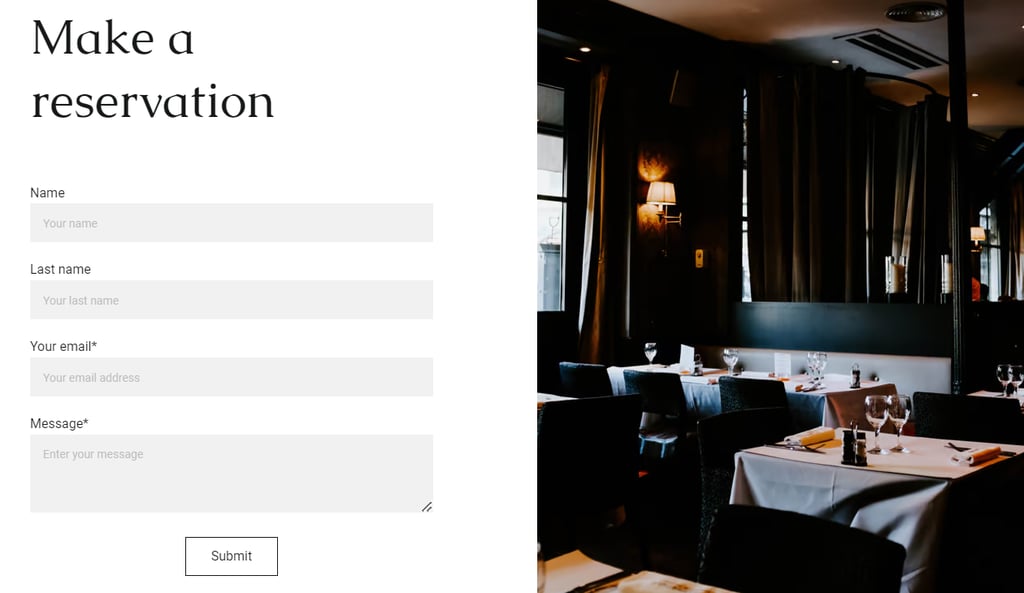
Our pre-built templates include online reservation functionality. The Ginza template’s homepage features a dedicated Book a table section featuring a Book now button, which redirects visitors to the Contact page.

On the said page, visitors will then find the Make a reservation form.
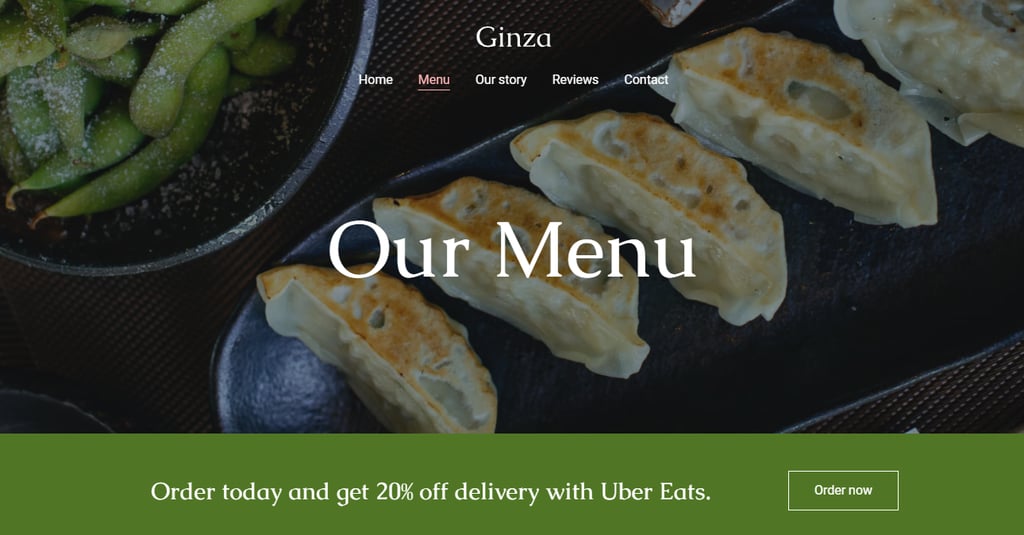
For online ordering, Hostinger AI Builder comes integrated with Uber Eats. Website visitors can see the designated Uber Eats online ordering banner featuring an Order now button on Ginza’s Menu page:
7. Optimize for SEO
Effective search engine optimization (SEO) strategies ensure your site appears at the top of search results when people search for dining options in your area.
For restaurants, where competition can be fierce, appearing in the top Google search results can significantly increase your chances of attracting new customers.
Let’s explore some of the best SEO practices to improve your search rankings, globally and locally:
- Keyword integration – Identify keywords that potential customers might use to search for restaurants like yours. Common keywords might include best [type of food] restaurant in [city] or [cuisine] near me. Incorporate these keywords naturally into your web pages, especially in titles, meta descriptions, headers, and content body.
- Quality content creation – Regularly update your site with high-quality, relevant content. It can include blog posts about the story behind your restaurant, head chef interviews, or upcoming events.
- Optimize visual content – Ensure that all images and videos on your site are optimized for fast loading. To boost your site’s SEO, incorporate relevant keywords in your file names and alt texts.
- Set up Your Google Business Profile – For local SEO, a Google Business Profile account lets people locate your restaurant easily. When setting up an account, include critical information like location, business hours, and the restaurant’s menu.
- Register for local listings – Ensure your restaurant is listed in local online directories and on review sites like Yelp and TripAdvisor. Be consistent in your business name, address, and phone number across these platforms to improve your local SEO performance.
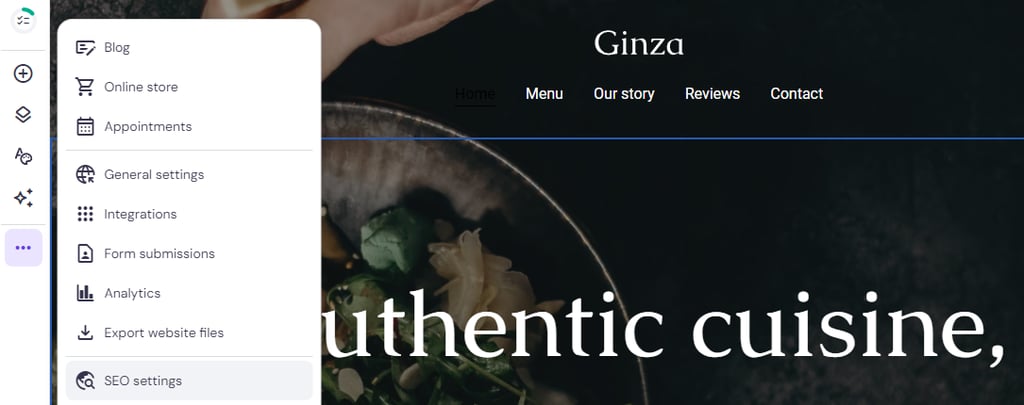
For easier implementation, you can use Hostinger AI Builder’s built-in SEO features. The tools let you set a focus keyword, create SEO titles, and write meta descriptions.
Navigate to Website settings → SEO settings to start configuring.
8. Launch and Promote Your Site
Launching and promoting your restaurant website effectively is crucial for ensuring it reaches your target audience and drives traffic.
Before going live to the public, share your new website link with a select group of people, such as family, friends, or loyal customers. This step helps identify any bugs and improve the user experience.
Once it’s live, maximize your reach by integrating promotional efforts.
You can start with social media and post engaging website snippets, such as highlights from your menu or upcoming events. To drive traffic to your web pages, include direct links on your social media content.
Form partnerships with local businesses or influencers to extend your reach and attract new site visitors. Their endorsements can significantly boost your online presence and draw in a broader audience.
With Hostinger AI Builder, you can integrate and manage paid advertising on Google, TikTok, and Instagram, among others, with our newest addition – the Marketing tool.
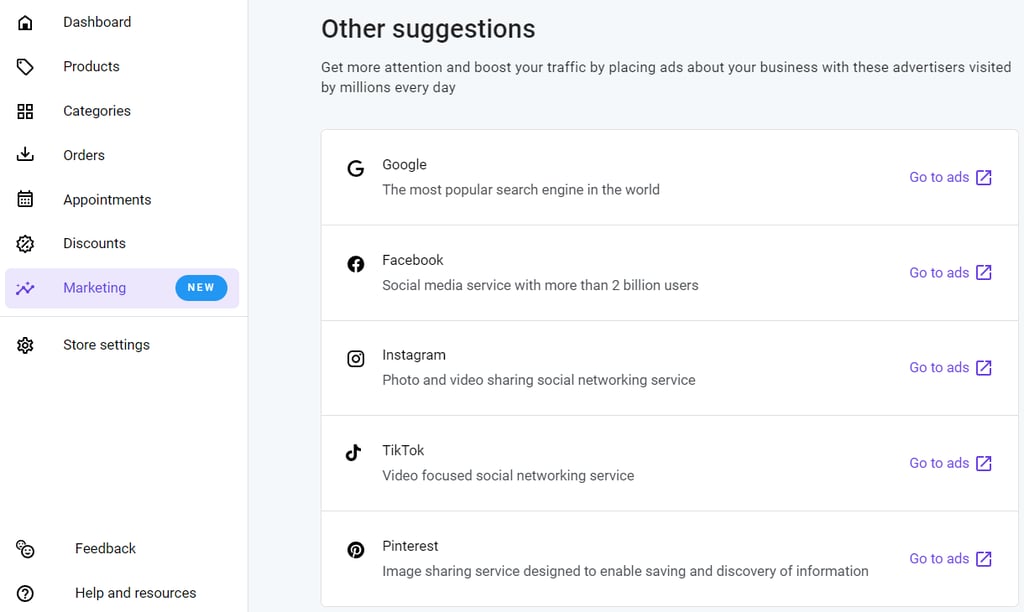
To access this marketing tool, you need to activate the eCommerce functionality first. Head to the dropdown menu on the top left corner → select Store manager. Then, follow the instructions to set up your online store.
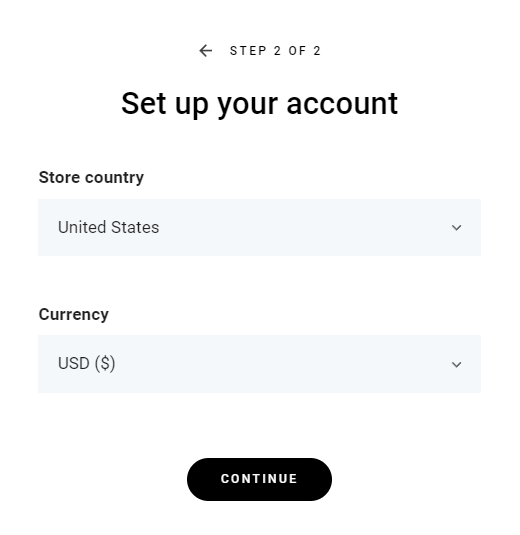
You can also create a QR code for easier reach and marketing campaigns. With Hostinger AI Builder, it will be easy and completely free.
Don’t forget to keep your site engaging with regular updates like new menu items, events, blog posts, and promotions. You should also consistently optimize your restaurant site for search engines to ensure it remains competitive.
Conclusion
An excellent restaurant website should effectively combine aesthetics with functionality. It should not only showcase your brand and culinary expertise but also facilitate easy navigation and interaction for visitors.
Here’s a short recap of how to build a restaurant website in eight steps:
- Plan your restaurant website – Set clear goals, know your target audience, and conduct competitor analysis.
- Choose a platform and domain name – You can use the intuitive Hostinger AI Builder platform and get a free domain for a year.
- Design your restaurant website – Select a template that aids visitors in navigating and finding information quickly. Maintain consistent colors, fonts, and layout styles throughout to reinforce brand identity.
- Set up essential pages – Home, Menu, About, and Contact are some of the must-haves for restaurant websites.
- Incorporate high-quality photos – Images on your restaurant website have the power to attract or deter potential diners.
- Add essential features – Key features, like online reservation and ordering systems, cater to modern diners’ preferences, offering convenience and efficiency.
- Optimize for search engine optimization – Effective SEO strategies help websites rank high in search results, reaching more potential diners.
- Launch and promote your new website – Share your site link to friends and family to gather feedback, then create excitement for the official launch through various channels.
Your website is an ongoing project that reflects your restaurant’s growth and changes. Therefore, continuous improvement and updates are vital to keeping it relevant and engaging.
We hope this article has been helpful in helping you create a restaurant website. If you still have any questions or concerns, please don’t hesitate to let us know. Good luck!
How to Make a Restaurant Website FAQ
Let’s answer some of the most common questions about building a restaurant website.
Does a Restaurant Need a Website?
Absolutely. A website serves as your restaurant’s digital storefront, allowing you to showcase your menu, share your story, and attract more customers. It also enables online reservation and ordering, which is essential for modern dining establishments.
How Much Does It Cost to Build a Website for a Restaurant?
The cost can vary widely. However, with Hostinger’s Premium and Business plans, you can start from just a few dollars per month, CA$ 4.19 and CA$ 5.59, respectively. As your restaurant website grows, upgrade to our cloud hosting plans starting from CA$ 11.19.
How Can I Integrate Customer Reviews and Testimonials on My Restaurant Website?
You can integrate reviews and testimonials by using widgets from review sites like Yelp or TripAdvisor, embedding them directly onto your site. Alternatively, you can create a dedicated section where you manually update and showcase customer feedback.
This article is a localized version of How to Make a Restaurant Website in 8 Easy Steps, originally published in English.

Linda is a seasoned Content Writer specialized in website creation. With her passion for the written world and obsession with helping others, her goal is to deliver resourceful content pieces for all skill levels. When she’s not writing, Linda likes to cross stitch and watch films. Follow her on LinkedIn.

Miglė Cicėnaitė-Jocė is a Product Manager for Hostinger's Website Builder. She is on a mission to redefine website creation, focusing on the AI flow and its features, and is always eager for product feedback and market insights to improve the user experience. Follow her on LinkedIn.