What is Apache web server and how does it work
Jun 11, 2026
/
By Domantas G.
/
5 min Read
Apache is a free and open-source web server software that allows users to deploy their websites on the internet. It is one of the oldest and most reliable web server software maintained by the Apache Software Foundation, with the first version released in 1995
In Hostinger, for instance, our hosting infrastructure runs on LiteSpeed, another popular web server. This particular setup greatly improves the strengths of both servers, allowing us to serve optimum performance for our users.
Read more to find out more about Apache, its comparison with other web servers such as NGINX and Tomcat, as well as its pros and cons.
What is a web server?
File servers, database servers, mail servers, and web servers use different kinds of server software. Each of these applications can access files stored on a physical server and use them for various purposes.
The job of a web server is to serve websites on the internet. To achieve that goal, it acts as a middleman between the server and client machines. It pulls content from the server on each user request and delivers it to the web.
The biggest challenge of a web server is to serve many different web users at the same time — each of whom is requesting different pages. Web servers process files written in different programming languages such as PHP, Python, Java, and others.
They turn them into static HTML files and serve these files in the browser for web users. When you hear the word web server, think of it as the tool responsible for proper server-client communication.

How does Apache web server work?
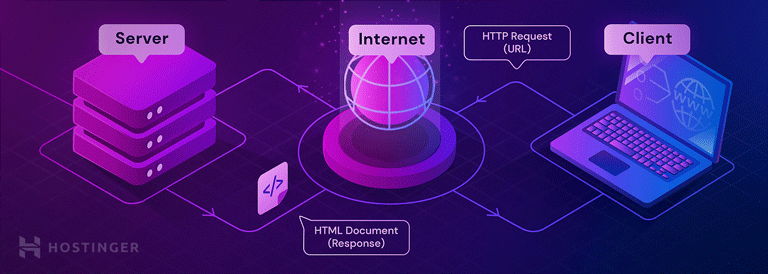
Although we call Apache a web server, it is not a physical server but rather a software that runs on an HTTP server. Its job is to establish a connection between a server and the browsers of website visitors (Firefox, Google Chrome, Safari, etc.) while delivering files back and forth between them (client-server structure). The Apache software is also compatible with any operating system, from Windows to Unix.
When a visitor wants to load a page on your website, for instance, the homepage or your “About Us” page, their browser sends a request to your server, and Apache returns a response with all the requested files (text, images, etc.).
The server and the client communicate through the HTTP protocol, and the Apache web server is responsible for the smooth and secure communication between the two machines.
Apache is highly customizable, thanks to its open-source infrastructure. Due to this, web developers and users can adapt its source code according to the type of website they’re creating.
In addition, Apache provides plenty of modules that allow server administrators to turn additional functionalities on and off. The Apache web server has modules for security, caching, URL rewriting, password authentication, and other features.
To configure Apache, you’ll need to access .htaccess. This Apache configuration file is supported by all Hostinger web hosting plans.
Apache HTTP server vs other web servers
In addition to the Apache web server, there are many other popular options. Each web server application has been created for a different purpose. While the Apache web server is the most widely used, it has quite a few alternatives and rivals.
Apache vs NGINX

Nginx is a free, open-source software. Compared to Apache, it is a more recent web server application released in 2004.
Nginx was created to solve the so-called c10k problem, meaning that a web server that uses threads to handle user requests is unable to manage more than 10,000 connections at the same time.
- Since Apache uses the thread-based structure, owners of high-traffic websites may encounter performance problems. Nginx is one of the web servers that address the c10k problem and probably the most successful one.
- Nginx has an event-driven architecture that doesn’t create a new process for each request. Instead, it handles every incoming request in a single thread. This master process manages several worker processes that perform the actual processing of requests. The event-based model of Nginx distributes user requests among worker processes in an efficient way, therefore leading to much better scalability.
- If you need to manage a high-traffic website, Nginx is an excellent choice, as it can do that by using minimal resources. It cannot be a coincidence that it’s used by many high-visibility websites such as Netflix, Hulu, Pinterest, and Airbnb.
- However, for small and medium players, Apache comes with a handful of advantages over Nginx, such as its easy configuration, lots of modules, and a beginner-friendly environment.
Interested in a Detailed Comparison?
Check out our Nginx vs Apache article!
Apache vs Tomcat

Tomcat is a popular web server also developed by the Apache Software Foundation. Similar to Apache, Tomcat is an HTTP server. However, its core functionality is to power Java applications instead of static websites. Tomcat can run several different Java specifications such as Java Servlet, JavaServer Pages (JSP), Java EL, and WebSocket.
- Tomcat has been created specifically for serving dynamic web content that runs on Java apps, while Apache is a general-purpose HTTP server. You can use Apache together with different programming languages (PHP, Python, Perl, etc.) with the help of the appropriate Apache modules (mod_php, mod_python, mod_perl, etc.).
- Although you can use a Tomcat server to serve static web pages as well, it’s less efficient for that purpose compared to the Apache server. For instance, Tomcat pre-loads the Java Virtual Machine and other Java-related libraries you won’t need on most websites.
- Tomcat is also less configurable than other web servers. For example, to run WordPress, the best choice is a general-purpose HTTP server such as Apache or NGINX.
Apache pros and cons
An Apache web server can be an excellent choice for running your website on a stable and versatile platform. However, it also comes with some disadvantages to which you need to pay attention.
Pros:
- Open-source and free, even for commercial use.
- Reliable, stable software.
- Frequently updated security patches.
- Flexible due to its module-based structure.
- Easy to configure, beginner-friendly.
- Cross-platform (works on both Unix and Windows servers).
- Optimal deliverability for static files and compatibility with any programming language (PHP, Python, etc)
- Works out of the box with WordPress sites.
- Huge community and easily available support in case of any problem.
Cons:
- Performance problems on extremely traffic-heavy websites.
- Too many configuration options can lead to security vulnerabilities.
So, what is Apache?
One of the most popular web servers, Apache, allows you to run a secure website without too much of a headache. It is free and open-source, making it a frequent choice for solopreneurs and small businesses who want a presence on the web.
The Apache HTTP server accepts requests from web browsers, such as Google Chrome and Microsoft Edge, and turns programming scripts into web pages whose contents are visible to visitors.
You can install a WordPress website on an Apache web server without any customization. Besides, the Apache server works seamlessly with many other content management systems (Joomla, Drupal, etc.), web frameworks (Django, Laravel, etc.), and programming languages. This makes it a solid pick for all types of web hosting platforms, such as VPS or shared hosting.
Hopefully, this article provides all the answers you need to know regarding what is Apache. Leave any comments below if you still have any questions about this web server!
Learn More Basics About Website Hosting and Development
What is Web Hosting
What is cPannel
What is a Domain Name
How to Choose a Web Hosting Provider
How to Choose a Web Hosting Plan
This article is a localized version of What is Apache web server and how does it work, originally published in English.

Domantas leads the content and SEO teams forward with fresh ideas and out of the box approaches. Armed with extensive SEO and marketing knowledge, he aims to spread the word of Hostinger to every corner of the world. During his free time, Domantas likes to hone his web development skills and travel to exotic places.