How to diagnose and fix a hacked website: A complete guide for 2026
Mar 10, 2026
/
Jordana A.
/
11 min Read
The rapid evolution of technology coincides with the rising number of cybersecurity threats. With 30,000 websites falling victim to hackers every day, there’s no guarantee your website won’t be next.
If your website has already been breached, make sure to fix it at the soonest opportunity. This way, you’ll minimize the damage which may include lost brand reputation and revenue, lawsuits, and plummeting search rankings.
This article will cover the symptoms of a hacked website and how to fix it. You will also learn a few different ways to secure your website from future attacks and the best way to communicate the security mishap to your visitors.

How to Check if Your Website Has Been Compromised
Before taking action to clean your website, you need to confirm whether it has been breached.
The signs indicating that a website has been hacked vary and may even be invisible, depending on the type of attack. The following is a list of common indications that a site has been compromised:
- Alerts about hacking from browsers and search engines.
- Links redirecting to shady websites.
- High volumes of traffic from other countries.
- Defaced or broken webpages.
- Slower load time than usual.
- Google blocklist warnings.
- Sent emails end up in spam.
- Website takedown by hosting provider.
- Unsavory advertisements.
- White screen of death.
- Random code fragments appearing on the header or footer.
Plenty of website checkers like Sucuri SiteCheck, DeHashed, and Have I Been Pwned? are available to confirm your suspicions. We recommend checking your website with more than one tool for more accurate results.
10 Steps to Fix a Hacked Website
Once you have confirmed that your website has been hacked, take action to fix it. The following steps will guide you through the process of recovering and fixing your hacked website.
1. Stay Calm and Don’t Panic
There’s no reason to panic – hacked websites are generally recoverable. Reacting emotionally without calmly evaluating the situation may lead to more harm than good.
Therefore, remain composed and proceed to the next step.
2. Change Your Passwords and Review Access
Brute-force attacks are some of the most common cybersecurity threats. Hackers attempt to guess the admin account’s password using various combinations of letters and numbers.
Changing all of your passwords will revoke hackers’ access to your website and prevent them from compromising other accounts and causing more damage.
Here’s a checklist of the accounts the passwords of which you’ll need to reset at the soonest opportunity:
- Hosting account.
- FTP accounts (primary and secondary).
- Content management system admin account.
- Databases (do so via the database connection file).
- Email accounts associated with the hacked website.
Important! If you have other accounts with the same login credentials as your hacked website, change them immediately. This applies to social media accounts, private email accounts, and other personal accounts. Keep in mind that you shouldn’t reuse passwords in the first place.
Besides changing all your passwords, we also recommend reviewing website user access privileges. If hackers manage to enter the site using an admin account, they will have full access to all the administration features.
If the hacked website is hosted on WordPress, check the existing user roles and permissions by accessing Users from the admin dashboard. Review accounts with super admin and admin roles as they have the highest level of access privileges.
Follow the same procedure on platforms that grant access to multiple users, such as your hosting control panel and FTP account.
Set the appropriate permissions to your website files, particularly those in the root directory (public_html) like the wp-admin folder and wp-config.php file via the web host’s File Manager. Doing so will prevent unauthorized users from accessing, modifying, and executing existing files.
Pro Tip
Take advantage of a password generator to manage your passwords and store password backups.
3. Create a Backup of Your Website
Your website might have been hacked, but it’s still functional and has all the important data. By downloading a website backup, you’ll be able to re-upload this website version and redo the cleanup process should it fail the first time.
Important! Keep the post-hack backup file separate from the older versions. The non-corrupted backup files will serve as your Plan B should the recovery process fail.
Expert Tip
Try to store your website backup files at least in two different places – one on the cloud and one on a portable hard drive.
Go for a system that can automatically create full incremental backups. It is important that the service is capable of detecting changes made after backups so that it will only sync those parts rather than going for a complete backup every time.
Based on these criteria, any cloud storage should do the trick.

4. Trace Back Your Actions
Most hack attempts happen after a website undergoes some changes, creating new vulnerabilities to exploit. By tracing back your actions, you should be able to identify the source of the security issues much faster.
Narrow down the time window by checking your web logs for a sudden spike of traffic. Then, inspect your access logs and error logs through your hosting control panel to identify any suspicious activity or errors that occurred within the suspected time frame.

After figuring out the time the hack occurred, examine all the changes you made before it. In WordPress, malicious code usually enters the site through new files introduced by plugins, themes, and WordPress core installations.
Pro Tip
Hostinger users can find Access Logs under the Website section of hPanel. To access error logs, navigate to PHP Configuration in the Advanced directory.
5. Investigate Recent Breaches Online
Even popular software may suffer from security breaches. Keeping yourself up-to-date with cyber security news will help you find the vulnerabilities much easier and remove faulty software before it can wreak havoc on your website.
Here are some of the best cybersecurity websites our security experts recommend:
- Hacker News ‒ provides hacking news.
- WP Hacked Help Blog ‒ offers WordPress security tips on hacked website repair.
- Daniel Miessler ‒ publishes articles and tutorials about website security and technology in general.
- IT Security Guru ‒ focuses on cyber security, cyber crime, and ransomware.
- Security Weekly Blog ‒ provides weekly updates on cyber security in the form of live streams.
Expert Tip
One of the best ways to keep up with security breaches online is to set customized alerts.
Depending on the type of news you are after, you can configure IFTTT or design scripts to receive notifications whenever a new topic is getting popular in the cybersecurity community.
Besides that, remember to follow all the top security professionals and alert feeds of websites like SANS Internet Storm Center and Have I Been Pwned.
6. Talk With Your Hosting Provider
If your hacked website runs on shared hosting, the source of the security issues might originate from another website on the same shared server. In this case, cyber attacks could also target your hosting account.
Contact your hosting company to check whether the other websites on the same server have also been attacked.
Most web hosts also provide users with access to web logs, allowing you to monitor website visits. If server access logging is disabled by default, get in touch with your hosting provider or enable it manually.
As a reminder, make sure to opt for secure web hosting to prevent your site from hacking incidents. Here at Hostinger, we include anti-malware protection such as Monarx in our shared plans.

7. Investigate with Google Blocklist and Spam Blocklist
If Google detects suspicious or dangerous activity on a website, the search engine will likely block it. When a website gets blocklisted, it won’t appear on search results to protect visitors from potential malware.
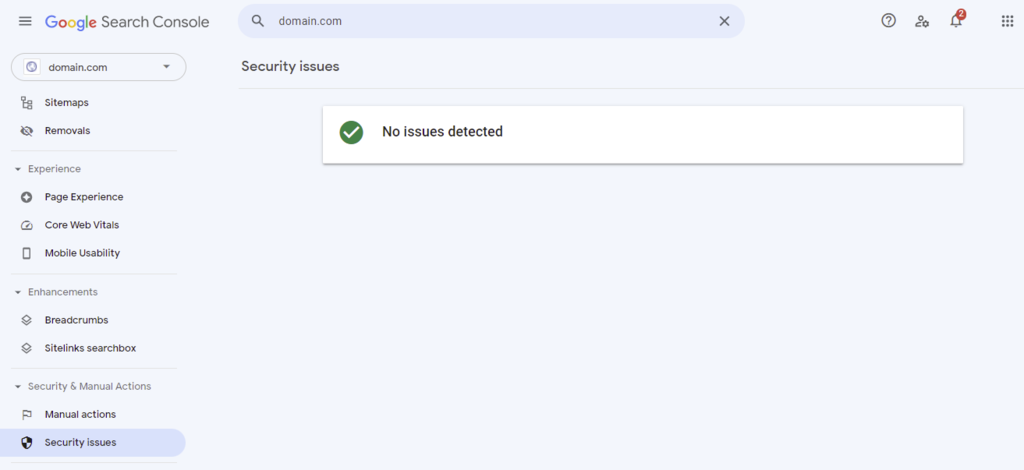
Check whether your website ends up on Google Blocklist using Google Search Console. The warning will appear in Security Issues under the Security & Manual Actions section.
Google Safe Browsing is another tool you can use to check your website’s status. It will let you know whether the site is safe to visit.
If you don’t have access to the DNS zone editor, examine your website traffic via Google Analytics. Having a sudden drop in traffic will be a solid confirmation that Google has blocklisted your website.
Besides Google Blocklist, your website might also appear on the anti-spam database. Internet service providers, mailbox providers, and anti-spam platforms use spam blocklists to prevent spam emails from entering their system. Emails from IP addresses listed on this blocklist will be blocked or end up in the spam folder.
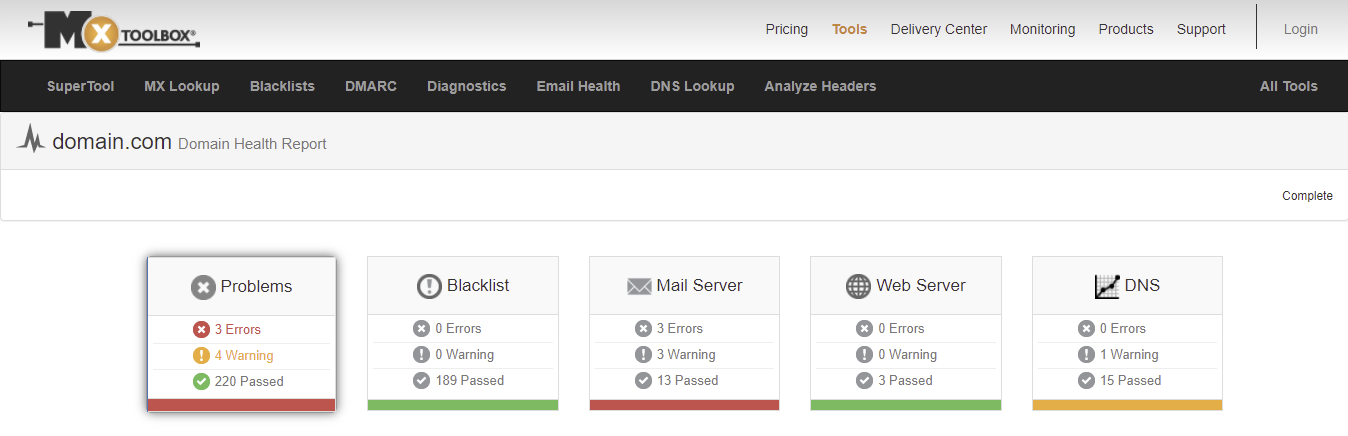
Clarify whether your domain is listed on the spam blocklist using domain health checkers like MxToolBox and Domain DNS Health Checker. Besides giving insights into the domain’s status, these tools can pinpoint issues related to your web server, mail server, and DNS.
8. Reset Your .htaccess File
.htaccess is a file containing high-level configuration setups for a website hosted on the Apache Web Server. For this reason, .htaccess is a popular target of cyber attacks.
Some of the most common .htaccess file exploits include:
- Redirection from search engines to malware.
- Redirection from error pages to malware.
- Malware attachment to PHP files.
- Information disclosure.
- Browser fingerprinting.
- Watering hole attacks.
Disabling and restoring your .htaccess file to its original version might help troubleshoot the security issue. Additionally, change its file permissions so that only certain users can access it.
Pro Tip
Hostinger users can locate and modify the .htaccess file via hPanel’s File Manager.
9. Examine Your Website and Fix the Vulnerability
Security vulnerabilities aren’t always visible to administrators. We recommend using website scanning tools to double-check your entire website for vulnerabilities and fix them.
Use a Scanning Plugin or Tool
WordPress users have access to various free and premium security plugins, most of which can scan your website for compromised files and detect any malicious code.
We recommend using plugins when recovering a hacked WordPress website, as they help avoid misconfigurations that will worsen the situation. However, ensure they are reputable and up-to-date.
Here are some of the most popular freemium WordPress security plugins to consider:
- Sucuri Security ‒ provides server-side and remote scanning, post-hack security actions, and file integrity monitoring.
- Wordfence ‒ comes equipped with real-time firewall rules and malware signature updates.
- Jetpack ‒ offers malware scanning, real-time backups, and spam filtering.
- BulletProof Security ‒ provides setup wizard autofix, malware scanner, login monitoring, and force strong passwords tools.
- WPScan ‒ supports scheduled security scanning for known vulnerabilities of the WordPress core, plugins, and themes.
Meanwhile, the following scanning tools are compatible with other CMSs besides WordPress:
- HostedScan Security ‒ performs vulnerability scanning on networks, servers, and websites.
- Intruder ‒ a cloud-based scanner that supports internal, external, and cloud vulnerability scanning.
- Detectify ‒ offers automated asset monitoring and testing supported by an ethical hacker community.
- ImmuniWeb ‒ provides various website security tests adhering to GDPR and PCI DSS standards.
- SiteGuarding ‒ supports search engine blocklist monitoring, daily file scanning, file change monitoring, and malware detection and cleanup.
Make sure to follow the best WordPress security practices to protect your site.
Expert Tip
Make sure the scanner manages to detect all the web applications that are part of your site. If the crawler is not able to crawl all the existing web applications, that leaves room for vulnerabilities.
Another key feature to look for is how easy it is to integrate it with external tools. This is necessary if you want to automate most of the process.
Scan Your Files and Database Tables Manually
Another way to detect and remove malware from your site involves scanning the website files manually. You can do so with PC antivirus software like McAfee and ESET or your operating system’s built-in antivirus program ‒ Microsoft Defender for Windows users and XProtect for Mac users.
Follow these steps to scan website files manually:
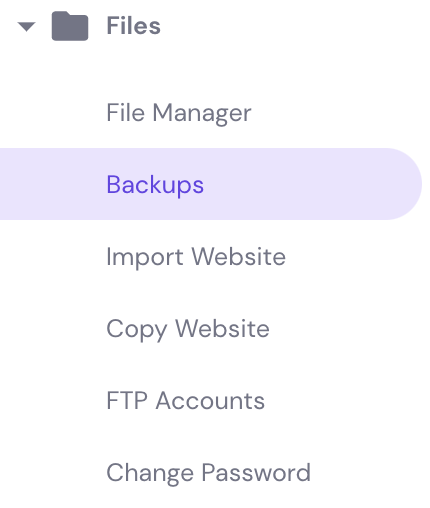
- Download all the files via your hosting control panel. Hostinger users can download website files through the Backups menu in hPanel.
- Perform a full scan of the files with your chosen antivirus software.
- Resolve all the detected issues.
- Upload the clean website files to the server.
Next, clean up your database tables through phpMyAdmin. Remove any records containing suspicious code as well as new records you don’t create. The easiest way to start is from tables that manage existing pages and posts (wp-posts and wp-options tables in WordPress).
Hire a Cyber Security Expert
Website owners who don’t have technical knowledge may find the previous methods difficult. If this is the case, it’s best to entrust your hacked website to a cyber security expert. This method may be more costly than the other two, but it guarantees a successful cleanup and restoration of your website.
Luckily, tons of cyber security agencies and specialists offer cleanup services to global customers. Some of the best cyber security companies include Palo Alto Networks, and Bugcrowd. Alternatively, find a cyber security expert on job search websites like LinkedIn and hire them as an independent contractor.
When choosing a cyber security company or expert to work with, make sure to:
- Check the company or expert’s reputation and portfolio.
- Allocate a realistic budget to afford high-quality services.
- Check the company or expert’s reviews.
- Consider if you have easy access to a reliable support team.
Pro Tip
Don’t fall for low prices as this usually indicates poor quality work, which can cause more issues on your site.
Restore a Backup
If the previous methods seem too time-consuming or costly, you can restore the website backup file instead. This method will remove any data and changes made since the backup was created, so we recommend resorting to this only if you can afford the data loss.
For this reason, this method is best for fixing websites that don’t undergo frequent changes or are built for testing purposes.
Pro Tip
After restoring the website backup, clear the browser cache and flush the local DNS cache to see the changes.
10. Scan Your PC with Antivirus Software
The last step is to scan your computer for malware to make sure that whatever infected your website doesn’t compromise your machine as well.
We recommended McAfee and ESET earlier as premium software. The following are some of the best free antivirus solutions to choose from:
Pro Tip
Make sure to update your antivirus software before running a scan.
How to Prevent Your Website From Being Hacked in the Future
Congratulations, you should have recovered the hacked website by this point. Unfortunately, there’s no guarantee that it won’t be compromised again in the future. That said, there are ways to minimize the risk of cyber attacks.
Here are several basic tips to protect your website from various types of malware:
- Use cheap web hosting providers wisely.
- Remove outdated software you no longer need.
- Use strong passwords.
- Conduct website security audits regularly.
- Perform regular backups of your website.
- Install an SSL certificate.
- Limit login attempts.
- Enable two-factor authentication.
Download WordPress Security Checklist
We’ve also compiled a security checklist to help WordPress users improve their site’s security measures.
Download WordPress security checklist
The practices may vary depending on your chosen content management system, but their purpose remains the same ‒ to protect your data and the target audience’s well-being.
How to Communicate a Security Incident to Your Visitors
Aside from relying on the products and services you provide your visitors with, they also expect your brand to be able to protect their data. If your website is hacked, you risk losing trust and harming your brand’s credibility.
That said, being transparent about security incidents is significantly better than hiding them from your target audience. Doing so might cause an outcry and hurt your brand, but you will warn them of the threat and minimize the damage on their end.
Plus, if you’re subject to the GDPR law, you’re legally obligated to disclose any data breaches that might jeopardize your customers’ data security.
If your site is compromised, make a formal announcement informing your audience about the data breach. If you have an email list, send a formal email containing the same information to your subscribers. Make sure it’s plain and clear so that the customers with limited technical knowledge can still understand it.
The content of the announcement should explain the full extent of the breach, particularly the types of data that were leaked. Next, break down the remedial actions taken to mitigate the damage. The goal is to assure the audience that you take full responsibility for the incident and act with their best interests in mind.
End it with suggestions on how to protect your audience’s personal data that might be affected by the data breach:
- Update any exposed login credentials and security questions across all platforms.
- Monitor accounts and credit reports.
- Sign up for two-factor authentication.
- Remove home address.
- File a report to search engines if any of their private information shows up on search results.
Conclusion
The rapid evolution of cyber attacks is a major threat to any website on the web. If your website has been hacked, it’s best to take immediate action and mitigate the damage.
Here’s a recap on how to fix a hacked website:
- Change your passwords and review user access.
- Create a backup of the website.
- Trace back your actions to determine the exposed vulnerabilities.
- Investigate recent breaches online.
- Talk to your hosting provider to see if other users have also been affected.
- Investigate with Google Blocklist.
- Reset your .htaccess file.
- Examine the website and fix the vulnerabilities.
- Scan your computer with antivirus software.
We hope this article has helped you recover your hacked website. If you’re a Hostinger user, feel free to contact our support team if you have any security questions or concerns.
Hacked Website FAQ
Can a Hacked Website Be Recovered?
Yes, you can recover a hacked website by purging the malware and restoring a backup file. However, the process is rather technical. We recommend hiring a cyber security expert if you’re not confident in your technical skills to prevent further damage to the website.
How Do Hackers Get Into a Website?
In most cases, hackers gain access to websites through social engineering (persuading users to perform certain actions), brute-force attacks (cracking users’ passwords), and software vulnerabilities (code injection and malware). For more details, check out our article on how websites are hacked.
Can a Hacker Be Traced?
Often, seasoned hackers generally work over Tor, VPNs, or a public network to conceal their identity.
In most cases, hackers get caught because they make careless mistakes, use the same code on multiple hacks, and brag about their actions on online forums.
All of the tutorial content on this website is subject to Hostinger's rigorous editorial standards and values.

Jordana is a Senior Content Writer with a background in Information Systems. She has over five years of experience in WordPress and is casually dabbling with PHP and MySQL. Her passion for writing and technology drives her to create tutorials for anyone wanting to build their online presence. Follow her on LinkedIn.