What is a domain name?
Mar 10, 2026
/
Brian
/
5 min Read

A domain name is a human-friendly website address on the Internet, like google.com or wikipedia.org. It acts as a shortcut to complex IP addresses or long strings of numbers that computers use to locate websites on the web. By typing words instead of numbers into a browser, people can quickly reach websites and online services.
Domain names are structured hierarchically. They include different parts such as extensions (like .com or .org) and unique identifiers chosen by the website owner. You can purchase domains through different registrars, and their prices vary depending on availability, popularity, and extension.
Understanding how domain names work, why they matter, their structure, and the steps to get one for your website will help you build a strong online presence and choose the right address for your website.
How does a domain name work?
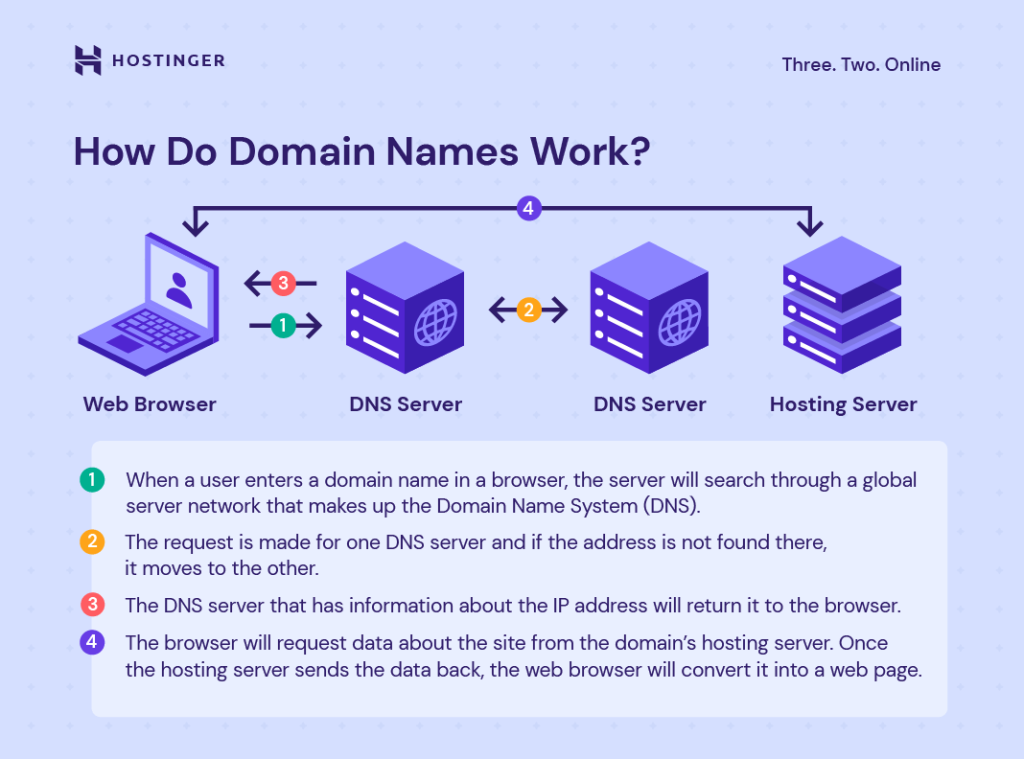
A domain name works by connecting the word-based address you type into your browser with the actual IP address of a website’s server. This process is handled by the Domain Name System (DNS).
When you enter a domain name like hostinger.com, the DNS translates it into a numerical IP address so your browser can locate and load the website. Without this system, users would need to memorize numbers instead of names to browse the web.
Why are domain names necessary?
Domain names make the internet easier to use and help businesses grow online. Here are the key reasons why they’re essential:
- Memorability. Words are far easier to remember than numbers. A domain name like apple.com is much simpler to recall than its numeric IP address.
- Branding. A custom domain strengthens credibility and communicates professionalism. It shows visitors that you’re serious about your online presence.
- Trust and authority. A unique domain makes a website look reliable and helps build customer trust compared to using a free subdomain.
- Accessibility. Domains allow global reach. Anyone with internet access can type your address and find your site instantly.
- Marketing benefits. A keyword-rich domain can improve search engine visibility, making it easier for potential visitors to discover your site.
For more details, read our article on why you need a domain name for your brand or business.
Structure of a domain name
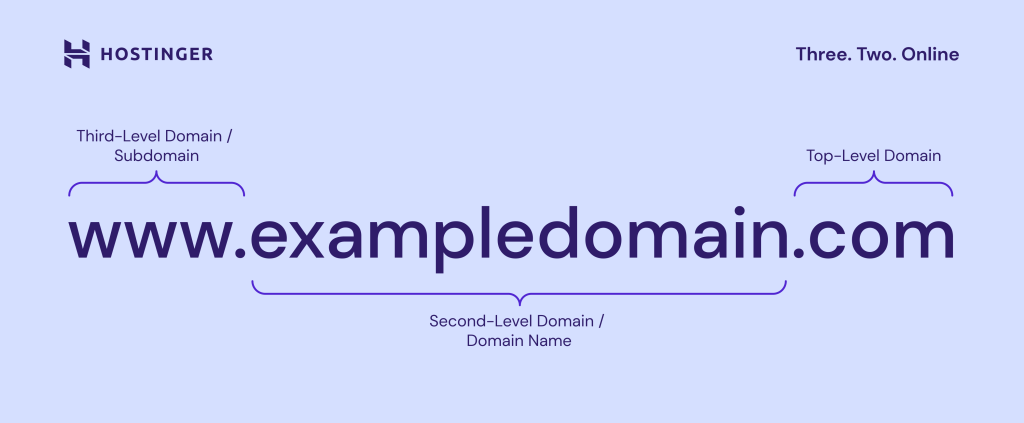
Every domain name is made up of different parts that work together like pieces of an address. Just like a home address has a street name, city, and country, a domain name has its own levels of hierarchy.
Top-level domain
The top-level domain (TLD) is the part of a web address that comes after the last dot. For example, in google.com, the .com is the TLD.
There are a few main types of TLDs you’ll see online:
- Generic TLDs (gTLDs): These are open for anyone to register. Popular examples include .com, .net, and .org. Industry-specific options like .tech or .shop are also becoming more common.
- Country code TLDs (ccTLDs): These two-letter extensions represent specific countries or regions. For instance, .in is for India, .uk for the United Kingdom, .eu is for the European Union, and .de for Germany. Many businesses use them to target local audiences.
- Sponsored TLDs: These are reserved for certain groups or purposes. Examples include .gov for U.S. government sites, .edu for accredited universities, and .mil for the U.S. military. Some, like .travel, are available to organizations in a specific industry.
All TLDs are managed by the Internet Corporation for Assigned Names and Numbers (ICANN). The organization approves new extensions, oversees domain registries such as Verisign (which manages .com and .net), and accredits registrars like Hostinger to sell domain names.
The TLD you choose affects how people perceive your site. For example, .com is usually seen as professional and global, while a country-specific TLD can make your site more relevant to local visitors. ill instantly know what your site offers, even if they’ve never heard of your brand before.
Did you know?
According to the latest domain name statistics, almost half of the world’s domains use the .com extension.
Second-level domain
The second-level domain (SLD) is the part directly before the TLD. In www.hostinger.com, “hostinger” is the SLD. This is the customizable part of the address and often represents a brand or project name.
Good second-level domains are short, memorable, and connected to your brand or purpose. For example:
- spotify.com → “spotify” is the SLD.
- bbc.co.uk → “bbc” is the SLD.
If your first choice is taken, you can look up the current owner through WHOIS lookup tools or register the same name with a different extension.
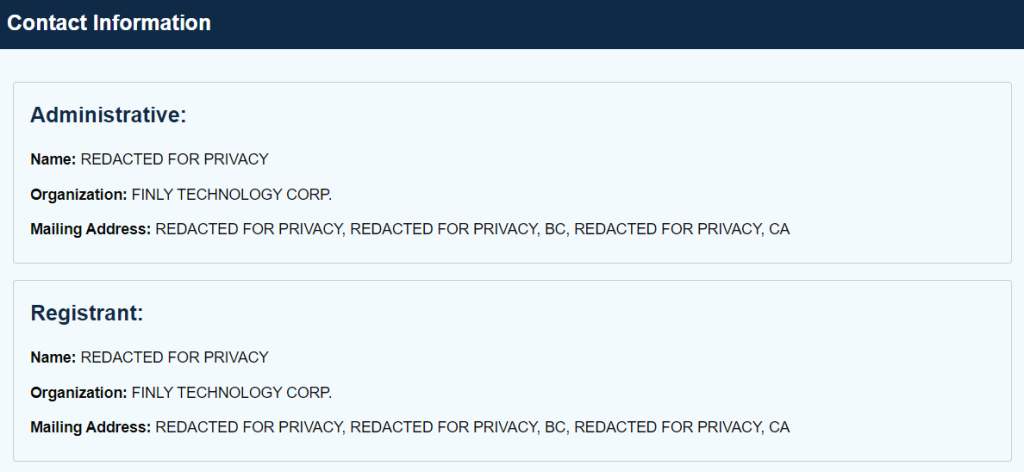
In such cases, you can request the domain registrar to provide the contact information of the domain name owner.
If the owner isn’t interested in selling the domain or the price exceeds your budget, you should register your domain name with a different TLD.
Third-level domain
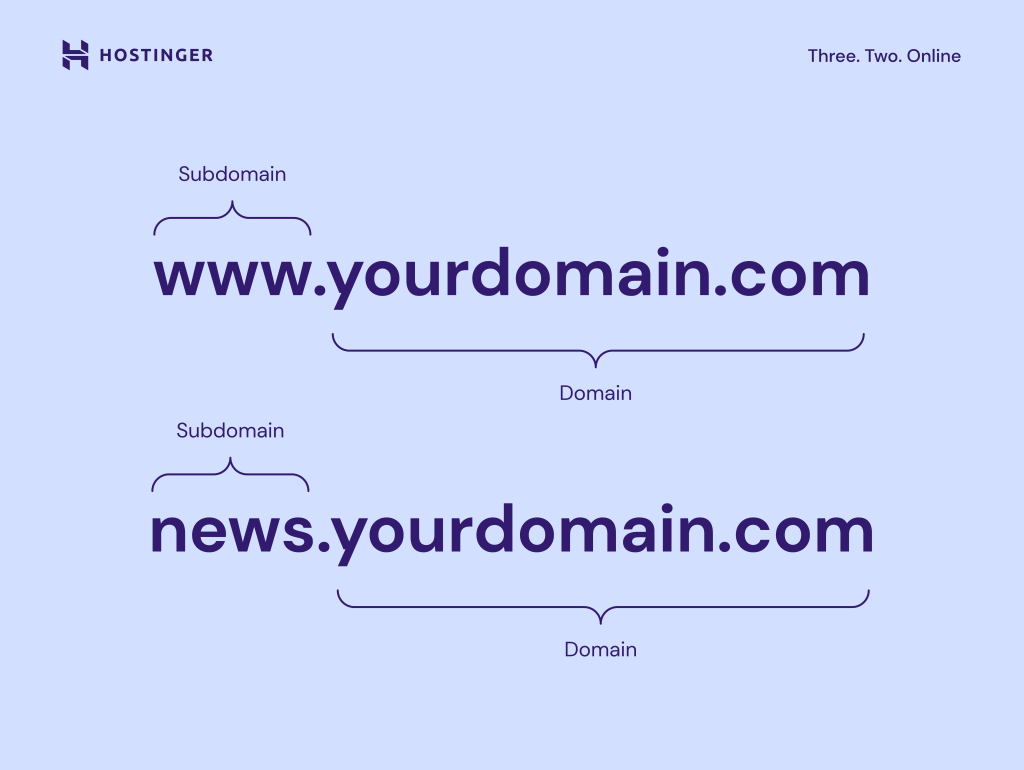
The third-level domain, also called a subdomain, comes before the SLD. Traditionally, www was the most common subdomain, but today many websites work without it.
Subdomains are now often used to organize content or create separate sections of a site. Examples include:
- blog.yourwebsite.com – for articles and updates
- store.yourwebsite.com – for an online shop
- support.yourwebsite.com – for documentation and help resources
Large websites also use subdomains for localization. For example, Wikipedia has en.wikipedia.org for English and de.wikipedia.org for German.
If you’re feeling overwhelmed with choices, an ai domain name generator can quickly provide options that balance length, keywords, and extension.
What is a domain name extension?
A domain name extension is another way of referring to a TLD. It’s the suffix after the dot, such as .com, .org, or .info. Extensions can reflect the purpose of the website, like .edu for educational institutions, or indicate location, like .ca for Canada.
What is the difference between a domain name and a URL?
A domain name is just the website’s address, like hostinger.com. A URL (Uniform Resource Locator) includes the full web path, such as https://hostinger.com/tutorials.
The domain is a key part of a URL, but the URL also contains additional information like the protocol (https) and file path (/tutorials).
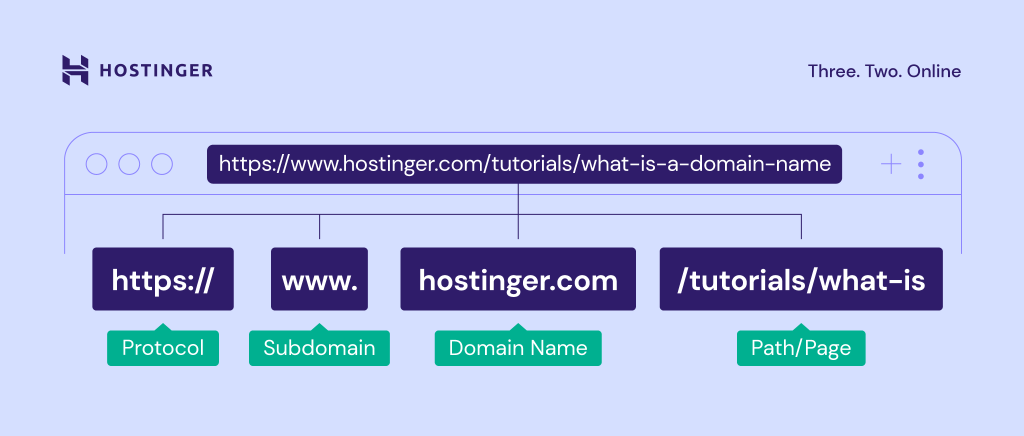
In other words, a domain name is a crucial URL component, but it’s not the entire address. Meanwhile, a URL provides the exact location of the web page being accessed.
How to get a domain name
The process of getting a domain name involves checking availability, choosing the right extension, and registering it with a domain registrar. Prices depend on the domain’s popularity and length.
Start by searching for your preferred domain name, and checking which extensions are available:
Domain Name Checker
Instantly check domain name availability.
For a complete step-by-step guide, see our tutorial on how to buy a domain name.
How to register your domain name
To register a domain name, select a registrar, search for your desired domain, and complete the purchase. Registration typically lasts one year, and you’ll need to renew it to keep ownership. Many hosting providers, including Hostinger, let you register a domain while setting up web hosting.
Can I get a free domain name?
Yes, it’s possible to get a free domain name. Some web hosting plans, like Hostinger’s Premium, Business, and Cloud web hosting plans, include a free domain for the first year. Alternatively, you can register a free subdomain, but it won’t have the same credibility as a custom domain.
How do I check the owner of a domain name?
You can check domain ownership through a WHOIS lookup tool. This search reveals the registrar, registration date, and sometimes contact details of the domain owner. However, many owners use domain privacy protection to hide personal information.
What is the best domain for my website?
The best domain name reflects your brand, is easy to remember, and uses the right extension for your target audience. A well-chosen domain can help you stand out and improve trust with visitors.
For a deeper guide, see our article on the best domain name for your website. It explains how to align your domain with your business goals and create a lasting digital identity.
All of the tutorial content on this website is subject to Hostinger's rigorous editorial standards and values.

Brian is a Content Writer who loves telling complex stories in a simple way. He has written all types of content, including tutorials, blog posts, landing pages, social media posts, white papers, infographics, and YouTube scripts. Follow him on LinkedIn.

Comments
October 19 2021
Wow, that was an amazing article about the domain.
October 19 2021
Happy to hear it was helpful!
December 21 2021
Hi Vakare, It was great article which cover all the aspects of choosing a decent domain name i will surely follow these steps for choosing name for my business as i am going to open my new business soon and will keep in mind these steps surely. Also the tool Namobot help me a lot in this process. But your article gave me ease. Thanks a lot for this helpful article.
December 22 2021
Hi Wilson, thanks and good luck with your new business!
October 13 2023
What a nice tip ?
October 27 2023
Hello there! Glad you found the tip useful! If you have more questions or need help, feel free to ask ?