How to create affiliate links in WordPress
Mar 10, 2026
/
By Larassatti D.
/
10 min Read

An affiliate link is a unique URL that tracks referrals from a specific partner to your website. When someone clicks that link and completes an action, you can attribute the result to the right affiliate and compensate them accordingly.
For affiliate campaign owners, creating these links lays the foundation for a successful program. Well-configured affiliate links make it easy to accurately track referrals, calculate commissions reliably, and pay partners with confidence.
Here’s how to create affiliate links in WordPress:
- Set up the SliceWP plugin. Install and prepare the affiliate system on your WordPress site.
- Add affiliates. Create and manage affiliate accounts so partners can start promoting your site or products.
- Configure affiliate links. Define how affiliate links are generated and shared.
- Track affiliate links. Monitor clicks, conversions, and performance to see what’s working and what doesn’t.
Aside from creating affiliate links, set clear rules for link usage, encourage promotion across the right channels, and review performance regularly to keep your affiliate marketing program running smoothly and effectively.
What is an affiliate link?
An affiliate link is a unique URL assigned to each partner in your affiliate marketing program. It contains tracking identifiers that attribute clicks and sales back to the correct affiliate.
A simple affiliate link looks like this:
https://www.yoursite.com/?affiliate_id=12345
In the above example, affiliate_id is the identifier that ties the referral, whereas 12345 is the unique affiliate ID. It can include additional identifiers to specify other parameters, such as the type of affiliate marketing campaigns you’re running.
Once an affiliate partner joins your program, generate a unique affiliate link for them. After that, here’s how an affiliate link usually works:
- The affiliate shares their unique affiliate link on their platforms.
- A potential customer clicks on the link to visit your online store.
- The tracking system registers the click.
- The customer completes a purchase on your site.
- The tracking system records the affiliate commission at your set rate.
Note that using affiliate software to generate and manage them may incur some costs. The pricing usually depends on the tracking tool you choose. For example, a software-as-a-service (SaaS) tracking tool typically costs more than using a WordPress affiliate plugin.
How to create affiliate links using a WordPress plugin
If you created your online store using WordPress, installing an affiliate plugin is the simplest way to create, manage, and track your affiliate links. It’s more affordable than most affiliate marketing software, and there are many free options, too.
In this section, we will show you how to create affiliate links using SliceWP, a top-rated free WordPress affiliate plugin.
1. Set up the SliceWP plugin
As always, you need to install and activate the plugin from the official WordPress plugin repository. Note that the plugin requires at least PHP 5.6 and WordPress 5.0.
Once activated, complete the initial setup wizard by going to the SliceWP menu from your WordPress dashboard:
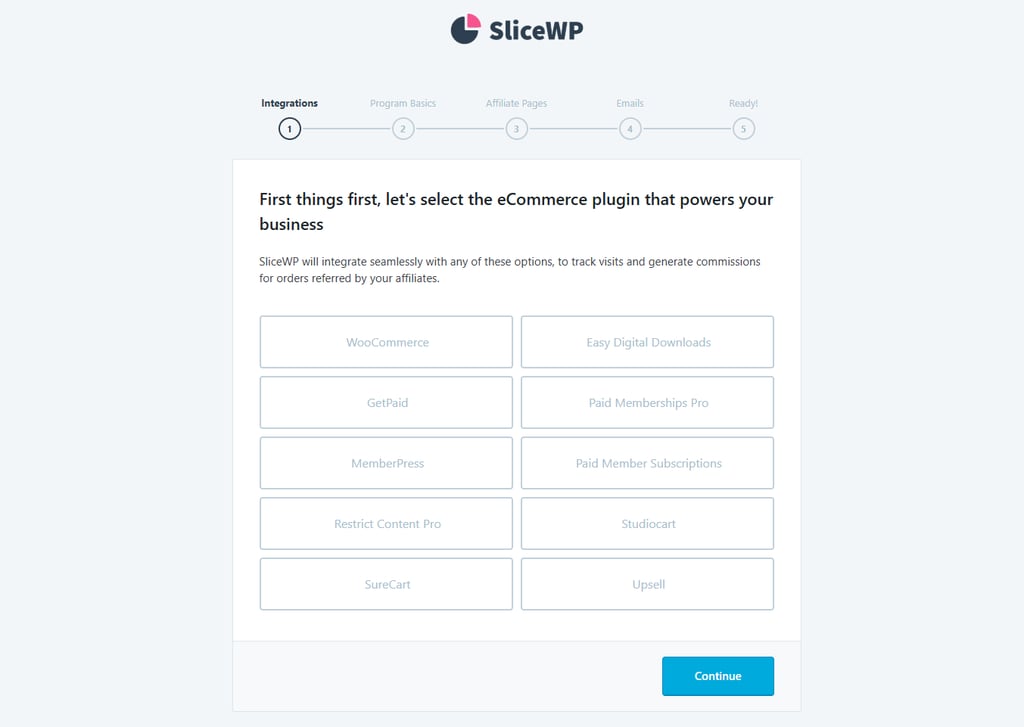
- Select the ecommerce plugin you used to build the online store, and click Continue.
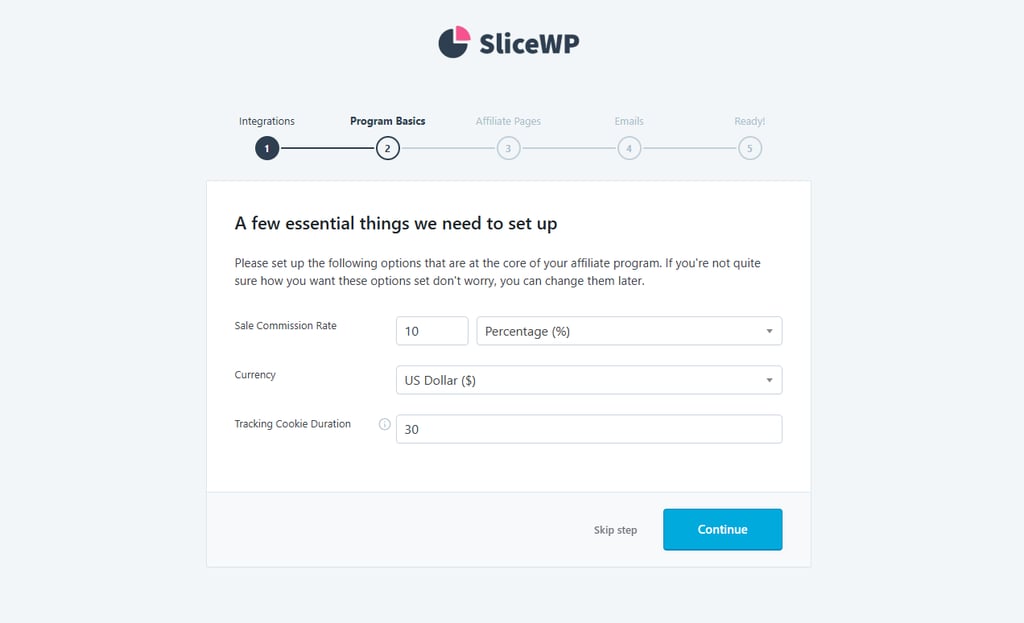
- Decide on the commission rate you prefer, the desired currency, and the tracking cookie duration (how long the affiliate gets credited for a user’s actions after clicking the link). Click Continue once done.
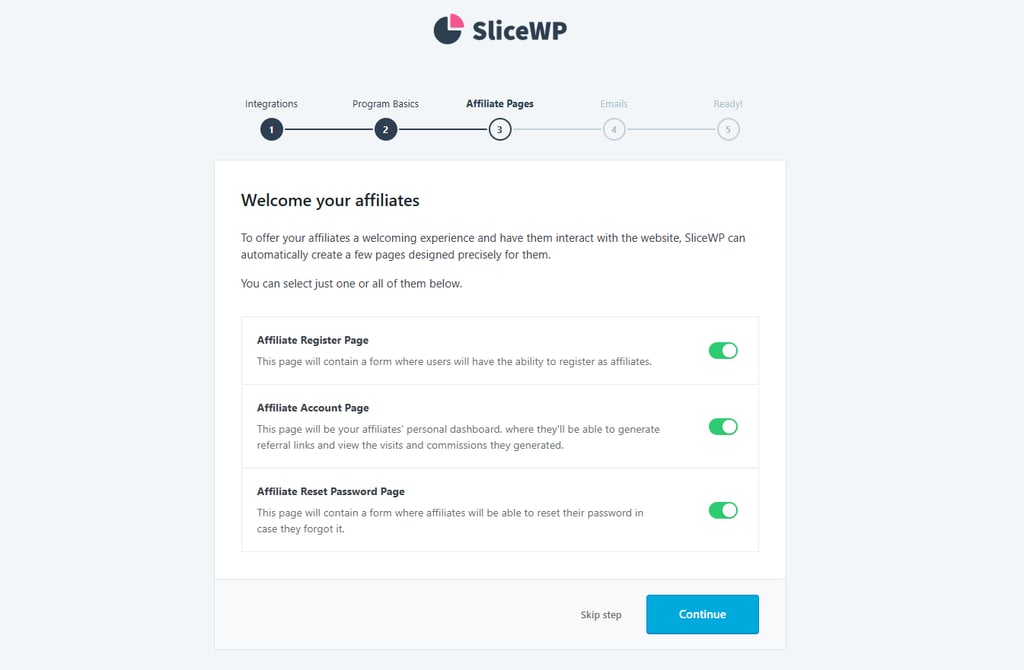
- Leave the toggle buttons on for SliceWP to automatically activate the Affiliate Register, Affiliate Account, and Affiliate Reset Password pages on your site’s navigation menu. Hit Continue.
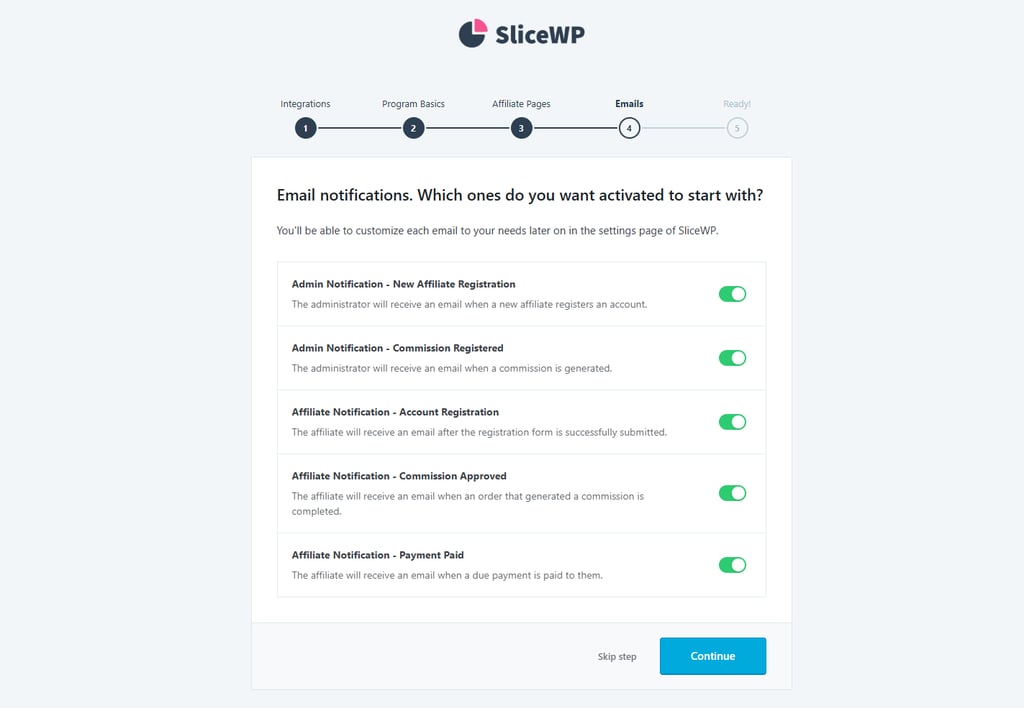
- Choose the type of email notifications you and your affiliates will receive by clicking on the toggle button or leaving them as is. Click Continue again.
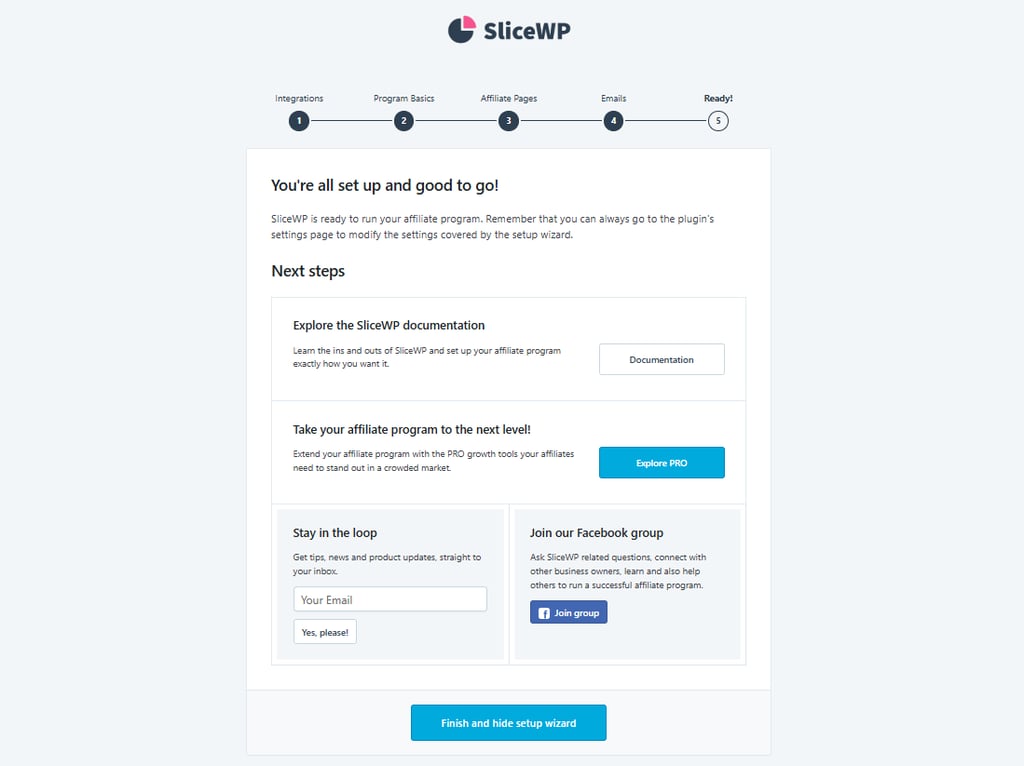
- Click Finish and hide setup wizard. That’s it!
To customize the automated email notification message, navigate to SliceWP → Settings and open the Email Notifications tab. Click Customize on the type of email notifications you want to tweak.
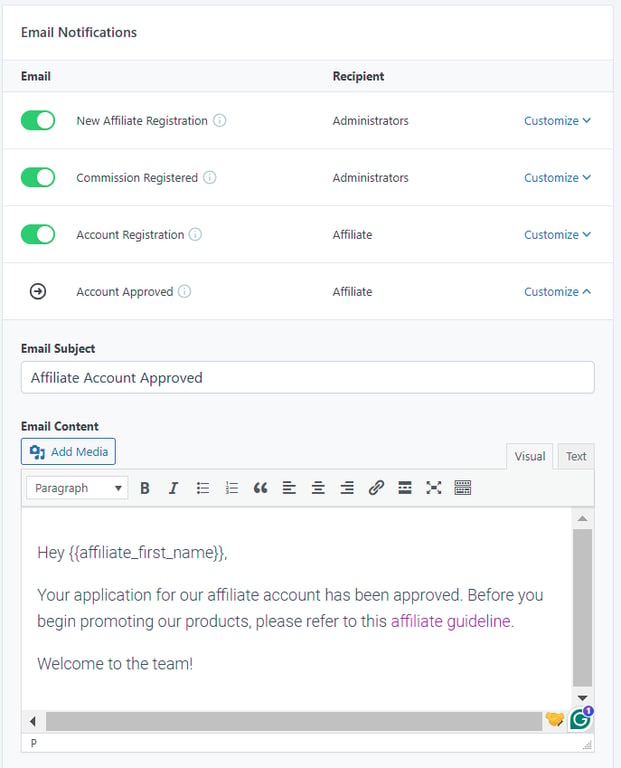
Finish by clicking Save Settings to apply the changes.
2. Add affiliates
Potential candidates can submit their affiliate applications through the Affiliate Register page, which is accessible from your site’s navigation menu. There, they will find a registration form to complete.
To check the received applications, go to SliceWP → Affiliates. Click the Review button to see their full application.
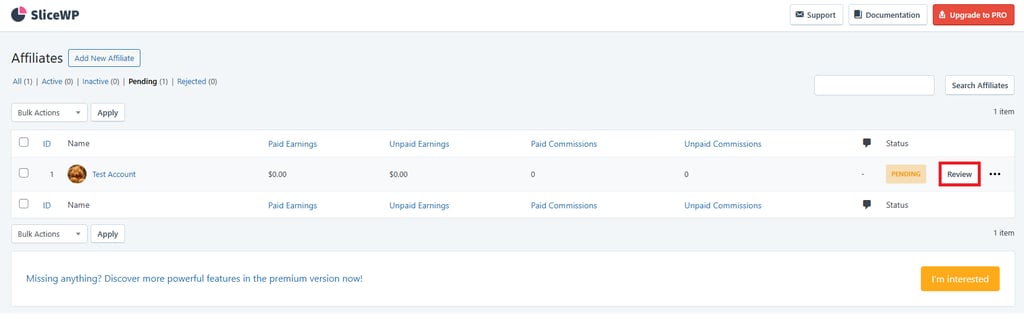
Pick an option from the Application Status drop-down menu, and hit the Approve or Reject button.
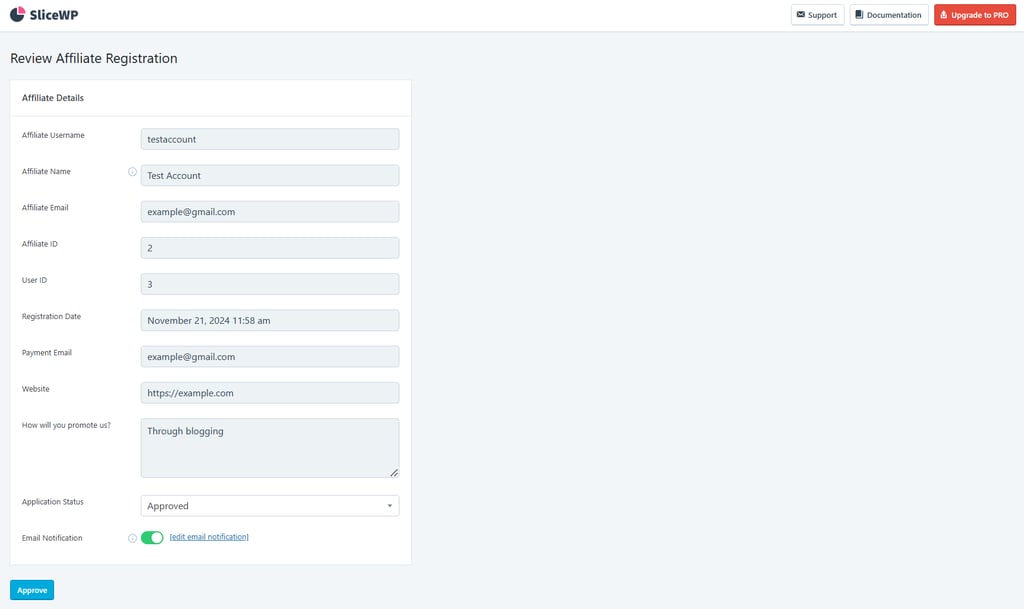
Make sure to accept candidates who align with your brand values. Carefully review their website and social media platforms to assess their content, audience engagement, and overall compatibility with your business.
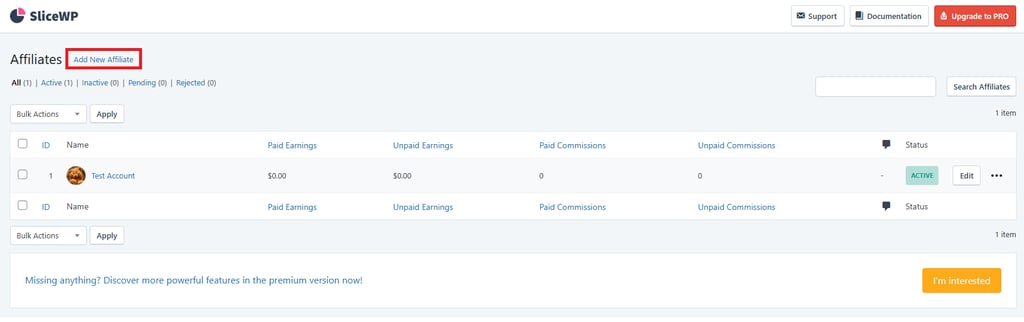
Alternatively, you can add affiliates by accessing the same Affiliate dashboard and clicking the Add New Affiliate button.
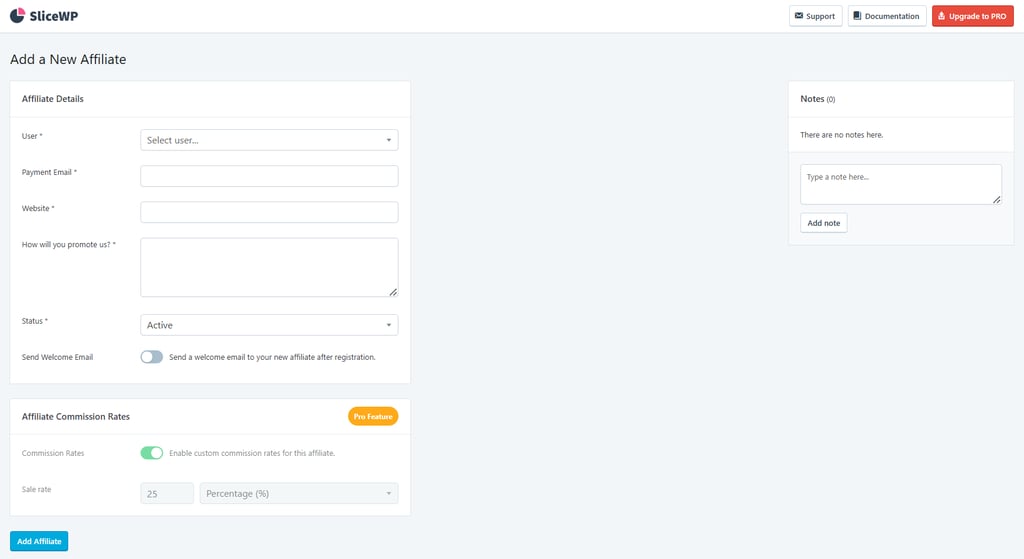
Then, fill in the affiliate details. Make sure you’ve added and customized the WordPress user roles for the affiliate, as this is required for the User field. Click Add Affiliate to finish.
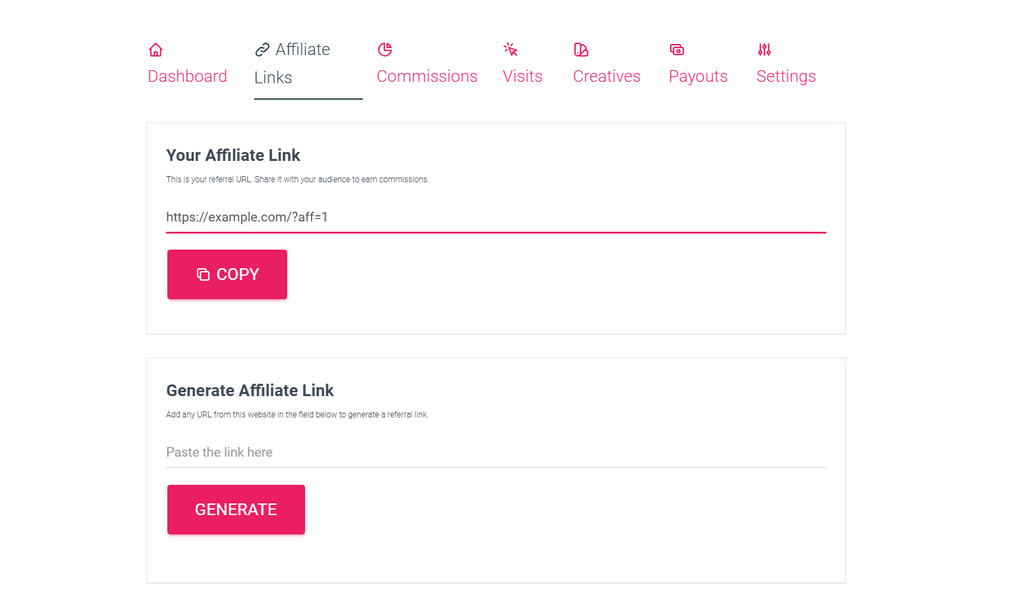
Once the affiliate’s status becomes active, they can access the Affiliate Account page on your website.
Under the Affiliate Links tab, your affiliates can find their unique links and generate new ones using specific product page URLs.
Here’s how to prepare before inviting new affiliates:
- Clearly outline the terms and conditions of your affiliate program, including the commission rate, cookie duration, payout schedules, and how you will transfer the commission. Note that with SliceWP, you have to manage payouts manually.
- Explain how affiliates can track the performance of their affiliate links. We’ll show you how it works in SliceWP in the next step.
- Provide information about your brand’s suggested marketing communication strategy. You can also share helpful YouTube videos or blog posts with practical marketing tips.
- Prohibit misleading or aggressive marketing communications that could harm your brand’s reputation.
- Provide a variety of marketing materials that your affiliates can easily use. You can share your brand’s creative assets with the affiliates by going to SliceWP → Creatives.
- Encourage ethical affiliate marketing by asking affiliates to disclose their partnership with your brand.
- If necessary, consider preparing an affiliate agreement to ensure legal compliance and establish clear dispute-resolution processes.
You can include all this information in a single affiliate guideline document. Then, put it where it’s easily accessible for new affiliates or send it via the initial email notification.
➡️ Check out our picks of the best affiliate marketing programs to inspire how you build your own.
Expert tip
💡 Since administrators can’t access the affiliate dashboard, we recommend creating a test affiliate account to test and verify that everything works as expected from a site visitor’s perspective.
3. Configure affiliate links
SliceWP automatically generates an affiliate link when you add an affiliate, which they can use right away to promote products.
By default, SliceWP’s affiliate URL structure will include an aff identifier and an affiliate ID. The link will look like https://example.com/?aff=1. You can customize it if you prefer a cleaner URL or have specific preferences.
With the free version, you can customize the aff part. To do so, go to SliceWP → Settings. Find the Affiliate URL Settings section under the General tab, and change the default Affiliate Keyword.
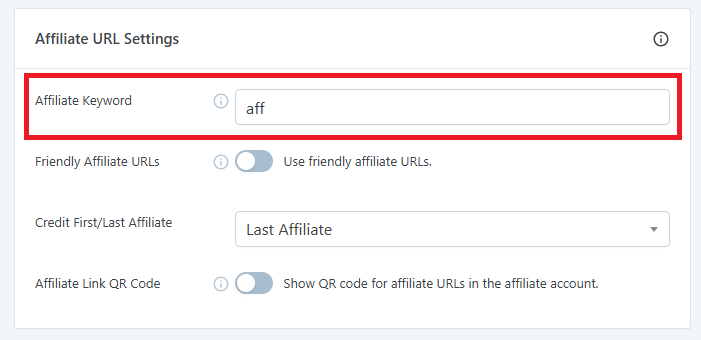
If you activate the Friendly Affiliate URLs option, the URL type will change to https://example.com/?aff/1, which makes it a little neater.
Alternatively, SliceWP’s Pro version lets you use custom strings instead of the affiliate ID. For instance, you can include the affiliate’s name in the URL so the link looks like https://www.example.com/?aff=JaneDoe.
4. Track affiliate links
Once the affiliates get their links, they can begin promoting your products on various platforms. Go to SliceWP → Dashboard to monitor total revenue from affiliate sales.
To track how many sales are made from each affiliate, access SliceWP’s Affiliate menu from your WordPress dashboard. You’ll see the list of affiliates and the commission you should pay.
Note that you need to manage commission payouts manually with SliceWP. So, remember to schedule time to organize and distribute payments for your affiliates. You can do this by going to the Payouts and Commissions menus on your WordPress dashboard.

What are other ways to create affiliate links?
If you don’t want to use a plugin to manage affiliates, you can create affiliate links through several other methods:
Use an affiliate network
Affiliate networks like ShareASale, CJ Affiliate, and Rakuten act as intermediaries between you and potential affiliates. They give you a centralized dashboard to set commission rates, manage partnerships, and generate unique tracking links for each affiliate.
Getting started usually means signing up as a merchant (sometimes called an advertiser). You’ll define key terms, such as your commission structure, cookie duration, and program terms.
Once that’s done, the network handles the rest. Every affiliate who joins your program automatically gets their own tracking link.
The big upside here is reach. These networks already have large pools of affiliates actively looking for programs to join, which can help you grow faster. Most also include built-in fraud detection and consolidated reporting, so you’re not stitching data together yourself.
The main downside is cost. Affiliate networks typically charge an upfront setup fee, plus a percentage of every commission you pay out. That makes them a strong option for growth, but not always the most budget-friendly starting point.
➡️ To make an informed decision more easily, check out our list of the best affiliate networks.
Use a dedicated affiliate tracking platform
SaaS affiliate tracking tools like Tapfiliate or Post Affiliate Pro run independently, so you’re not locked into WordPress or any specific platform to run an affiliate marketing program. They integrate with most ecommerce systems and payment gateways through APIs or ready-made connectors.
If you’ve ever used a plugin, the setup will feel familiar: you create a campaign, define your commission rules, and the platform generates unique tracking links for each affiliate.
Where these tools really shine is in day-to-day operations. Most include automated payouts, real-time performance dashboards, and link customization features like branded short URLs.
Once your affiliate program has some momentum, this can save a lot of manual work. That’s what makes this option suitable for managing a growing group of affiliates and more complex payouts.
Pricing typically starts around $25-90/month, depending on the platform and feature tier. If you want to explore your options, our roundup of the top affiliate marketing tools breaks it down in more detail.
Generate affiliate links manually
If you’re just starting your affiliate marketing program or just testing the waters, you can create affiliate links manually by adding query parameters to your product or landing page URLs.
To create one, you can simply take any page URL on your site and add a ?ref= parameter with a unique identifier for each affiliate. This doesn’t change where the link points. Visitors will still land on the same page, while your analytics tool captures the referral value in the background.
For example, if your affiliate’s name is Alex, the affiliate link will look like this:
https://yoursite.com/shop/wireless-headphones/?ref=alex
You can also layer in UTM parameters to track affiliate traffic more clearly:
https://yoursite.com/shop/wireless-headphones/?ref=alex&utm_source=affiliate&utm_medium=blog
To monitor this traffic, you’ll need an analytics tool that can filter by URL parameters. Google Analytics 4 is the most common choice.
You can connect it to WordPress using Google Analytics plugins like MonsterInsights or Site Kit by Google, then filter reports by the ref value to see which affiliates are sending traffic. Tools like Matomo or server log analysis work just as well if you’re already using them.
To make links easier to share, you can also use a redirect plugin like Pretty Links. This lets you turn long, parameter-heavy URLs into clean, branded links like https://yoursite.com/go/alex-headphones.
That looks more professional and is much easier for affiliates to use in emails or social posts.
The trade-off of this method is automation, or rather, the lack of it. Manual links don’t track commissions for you. You’ll need to reconcile referrals yourself by matching analytics data with your ecommerce sales records.
This can work fine for a handful of partners, but once you’re managing more than five to ten affiliates, it gets messy fast. At that point, switching to a dedicated plugin like SliceWP or a standalone tracking platform is the smarter move.
Best practices for managing affiliate partners
A strong affiliate program is about more than just generating links. Who you partner with, how you structure commissions, and how consistently you communicate all play a big role in long-term results.
Below are eight best practices that help you attract the right affiliates, keep them motivated, and build a program that can grow without becoming hard to manage.
Recruit quality affiliates
Focus on affiliates whose audiences match your target customers and brand values. Before approving an application, take a few minutes to review their website, social channels, and overall content quality.
Pay close attention to engagement, not just follower count. A smaller but highly engaged audience often converts better than a large, passive one.
It also helps to be upfront. Clearly outline your affiliate requirements on your website so people understand the type of content and promotion methods you expect. This filters out poor-fit applicants, saving time on both sides.
Offer competitive commission rates
Commission rates matter more than many store owners expect. Affiliates tend to prioritize programs that feel worth their effort, so it’s smart to research what similar programs in your niche are offering and stay competitive.
Tiered commissions can work especially well. For example, you might offer 10% on the first 50 sales in a month, then bump it to 15% for the rest. This gives affiliates a reason to keep pushing once they see early traction.
Share marketing and creative assets
Affiliates are more likely to promote your products when you make it easy for them. Provide ready-to-use assets, such as banners, product images, and pre-written social media copy.
If possible, go a step further with short training videos or walkthroughs that explain your product, brand voice, and what messaging tends to convert best. Keep everything in one place so partners can quickly grab what they need.
Maintain close communication
Strong affiliate programs are built on relationships. Regular communication helps affiliates feel supported and in the loop.
Send occasional newsletters or direct updates about new products, seasonal promotions, and content ideas that are performing well.
Just as important: respond quickly when affiliates reach out with questions. That responsiveness builds trust and often leads to better long-term retention.
Monitor performance and give feedback
Check affiliate performance regularly, not just to track results, but also to spot issues early and ensure promotions align with your brand guidelines.
When something can be improved, offer specific, constructive feedback. For affiliates who are doing exceptionally well, consider bonuses or higher commission tiers. Both correction and recognition go a long way in keeping partners engaged.
Pay affiliates on time
Few things damage an affiliate program faster than late payments. Paying on schedule builds trust and signals that your program is professional and reliable.
Set a clear payout schedule and stick to it. Offering multiple payment options, such as bank transfer, PayPal, or Payoneer, also makes your program more accessible to affiliates in different regions.
Stay compliant with data and privacy regulations
Affiliate programs come with legal responsibilities. In the US, the Federal Trade Commission requires affiliates to disclose their relationship with a product when promoting it. If you work with affiliates in the EU, GDPR affects how you collect and handle personal data.
Spell out disclosure requirements in your affiliate terms and provide example wording affiliates can use. Clear guidance reduces risk and makes compliance easier for everyone.
Keep improving the program
Strong affiliate programs evolve. Check in with your affiliates at least once a quarter and ask what’s working, what isn’t, and where they feel friction.
Combine that feedback with your performance data to refine commissions, refresh creative assets, and improve onboarding. Programs that listen and adapt tend to retain better partners and scale more smoothly over time.
How to make your affiliate links reach your target audience
Creating affiliate links is only half the job. What really drives results is how those links are shared and where they show up. Even the best tracking setup won’t perform well if affiliates are promoting in the wrong places or relying only on a single channel.
As a program owner, it’s worth being intentional about this. Encourage affiliates to promote your links on channels that match both their audience and your product.
For some, that might be long-form blog content or SEO-driven reviews. For others, email newsletters, YouTube videos, or social media posts will make more sense. The goal isn’t to push everyone into the same mold, but to ensure each affiliate uses channels that actually convert.
It also helps to encourage diversification. Affiliates who rely on just one platform are more vulnerable to algorithm changes, account issues, or traffic drops. Supporting multiple promotion methods gives your program more stability over time. Just be sure to emphasize the importance of staying within your brand guidelines.
If you want a deeper look at the affiliate side of this equation, our guide on promoting affiliate links breaks down the most effective channels and strategies affiliates use today.
The more you align your tracking setup, affiliate guidance, and promotion channels, the easier it becomes to turn affiliate links into consistent, scalable revenue for both you and your partners.
All of the tutorial content on this website is subject to Hostinger's rigorous editorial standards and values.

Larassatti Dharma is a content writer with 5+ years of experience in the web hosting industry. She has populated the internet with over 100 YouTube scripts and articles around web hosting, digital marketing, and email marketing. When she's not writing, Laras enjoys solo traveling around the globe or trying new recipes in her kitchen. Follow her on LinkedIn