77 AI Prompts for Web Developers to Streamline the Development Process
Dec 02, 2025
/
By Matleena S.
/
10 min Read
As a software developer, you create digital experiences that not only appeal to the aesthetic sense of the viewer but also provide a seamless browsing experience.
The development process often has challenges, complexities, and time constraints. However, there is a way to streamline your workflow, make it more efficient, and save you valuable time. All of this can be achieved through AI, the technology that is fast becoming a game-changer in the web development scene.
This guide will introduce you to AI-powered tools like ChatGPT, Jasper, and Gemini and help you leverage them to simplify your web development process.
What Are AI Prompts?
AI prompts are text inputs given to AI tools or chatbots to perform specific tasks or generate certain outputs. These prompts could range from code generation instructions, debugging requests, or even design suggestions.
AI prompts are revolutionizing how web developers approach their work. By automating routine tasks and providing creative solutions, they free up developers to focus on more complex aspects of a project.
How Do AI Prompts Help With Web Development
AI prompts assist you in various stages of web development, from design and coding to testing and debugging. Some of the key reasons include:
- Streamlining web development with AI. ChatGPT prompts help you automate repetitive tasks, optimize code generation, and eliminate manual work.
- Improving efficiency with AI prompts. Boost your efficiency by leveraging AI prompts that provide intelligent suggestions and insights, along with optimized workflow recommendations.
- Boosting productivity with AI prompts. Unleash your productivity potential with ChatGPT prompts, automating tasks, and streamlining workflows to achieve more in less time.
For example, you can prompt an AI tool to “Generate HTML code for a sign-up form” or “Test this website for responsive design issues.” It’s even possible to create a website completely with AI.

Best AI Prompts for Web Developers
Thanks to their natural language processing abilities, the best AI chatbots, like ChatGPT, Jasper, and Gemini are great for providing AI-driven suggestions for web development. Integrating them into your workflow can simplify tasks and significantly improve your productivity.
AI Prompts for Shortcuts
While working in a coding environment, shortcuts simplify complex tasks, reduce time spent on manual work, and increase productivity. You can use AI tools to create shortcuts for various programming languages, develop cheat sheets, and formulate the most-used commands or phrases.
1. Coding Shortcuts
For different IDEs (Integrated Development Environments) and text editors, you can ask:
- “Show me a list of keyboard shortcuts for Atom editor.”
- “What are essential keyboard shortcuts for JetBrains PyCharm?”
- “Can you list down the key shortcuts for Eclipse IDE for Java development?”
- “What are the keyboard shortcuts for Visual Studio IDE when working with C#?”
- “Provide me with a list of keyboard shortcuts for Sublime Text when coding in HTML and CSS.”
- “List shortcuts for HTML coding.”
- “Can you suggest some keyboard shortcuts for Xcode in iOS app development?”
2. Cheat Sheets
For different programming languages and frameworks, try these types of ChatGPT prompts:
- “Generate a cheat sheet for JavaScript array methods.”
- “I need a cheat sheet for Python pandas library.”
- “Can you create a cheat sheet for SQL commands?”
- “Give me a cheat sheet for Swift’s basic syntax.”
- “Create a cheat sheet for Python regular expressions with common patterns and syntax.”
- “I need a cheat sheet for React component lifecycle methods and their usage.”
- “Generate a cheat sheet for Git commands and their descriptions.”
3. Most Used Commands or Phrases
For various tools, command-line interfaces, and libraries, you can ask:
- “List the most commonly used Docker commands.”
- “What are frequently used npm commands in Node.js development?”
- “Give me a list of essential commands for managing a Kubernetes cluster.”
- “What are the most used commands for TensorFlow library in Python?”
- “What are the commonly used command-line tools and commands for Ruby on Rails installation and development?”
- “List the frequently used SQL queries for querying a PostgreSQL database.”
- “Give me the essential commands for managing virtual environments in Python with pipenv.”
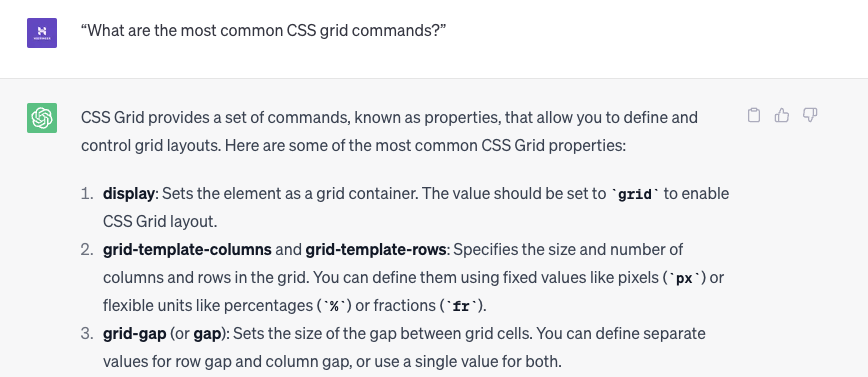
- “What are the most common CSS grid commands?”
These prompts can be customized for any language, tool, or environment you’re working with. AI tools, like ChatGPT, are designed to handle a broad spectrum of programming-related queries and provide specific responses to help you in your development process.
AI Prompts for Coding
AI prompts can be a powerful ally in writing code. From code generation and completion to code conversion and review, AI-powered coding assistance can help you tackle various tasks in your next web project.
1. AI-Powered Code Generation
For different programming tasks and functionalities, you can ask:
- “Generate a basic Python function to calculate the factorial of a number.”
- “Can you write a JavaScript function to sort an array of objects by a property?”
- “Show me how to create a RESTful API endpoint in Node.js Express.”
- “Generate a basic Java class that models a car with properties like make, model, and year.”
- “Create a PHP function that validates an email address based on a specific regex pattern.”
- “Can you write a Python script to scrape data from a website and save it to a CSV file?”
2. Code Completion
For assisting with half-written code or to get suggestions on how to proceed, you can use the following types of ChatGPT prompts:
- “I have this JavaScript function to fetch data from an API, but I’m stuck on error handling. Can you help me complete it?”
- “I’m writing a Python script to read a CSV file. Here is what I’ve done so far. How do I proceed?”
- “I started creating a MySQL query to retrieve data from a database, but I’m having trouble with the WHERE clause. Can you assist?”
- “I’m working on a React component and need help with autocompleting the import statement for a specific package. Can you assist?”
- “I’m writing a SQL query and want to autocomplete the table names based on the database schema. How can I achieve that?”
- “Help me complete this C# method for calculating the sum of an integer array.”
3. Code Conversion
For converting a code snippet from one language to another, you can ask:
- “Convert this JavaScript function into Python.”
- “How would this Ruby code look in Java?”
- “Translate this C# code snippet into PHP.”
- “Convert this Java code that uses traditional for loops into a Python equivalent using list comprehensions.”
- “Translate this PHP script that interacts with a MySQL database into Node.js with MongoDB.”
- “Can you convert this MATLAB code into Python code for image processing?”
4. Code Review
For asking AI to review your code for possible errors, improvements, or best practices, you can ask:
- “Can you review this Python script for any potential bugs or optimizations?”
- “Is this JavaScript code following best practices?”
- “Review my PHP code for SQL injection vulnerabilities.”
- “Can you review this HTML/CSS code and provide feedback on its structure and styling practices?”
- “I’ve written a JavaScript function for form validation. Can you review it for any potential security vulnerabilities?”
- “Review my Java code for a binary search algorithm and suggest any optimizations or improvements.”
5. Other Coding Requests
For various other code-related tasks, use these kinds of ChatGPT prompts:
- “Show me how to implement exception handling in Java.”
- “How to manage state in React using Redux?”
- “Demonstrate file I/O operations in C++.”
- “What’s the best way to perform multi-threading in Python?”
- “What are the best practices for error handling and logging in a Node.js Express application?”
- “Show me how to implement a basic authentication system using JWT (JSON Web Tokens) in Python.”
- “Help me understand how to perform database migrations in Laravel framework.”
- “Explain how to deploy a Laravel application on an Ubuntu server using Git.”
- “Suggest ideas for a fun CSS animation for a basic web page.”
- “Write HTML API documentation template.”
- “Suggest a programming language for a software development project that I can easily edit.“
Learn More About Using AI to Leverage Your Coding Experience
How to Use GitHub Copilot: Setting Up and Learning Various Useful AI Coding Methods
6. AI-Generated Code Snippets For Web Developers
Here are some examples of AI-generated snippets of code that can be helpful for web designers and web developers:
- Random color generator. This snippet generates a random color code in hexadecimal format, which can be useful for generating dynamic color schemes or backgrounds:
```javascript
function generateRandomColor() {
  var letters = '0123456789ABCDEF';
  var color = '#';
  for (var i = 0; i < 6; i++) {
    color += letters[Math.floor(Math.random() * 16)];
  }
  return color;
}
```- Responsive menu. This code snippet creates a responsive navigation menu with a hamburger icon that expands and collapses the menu on smaller screens:
```html
<nav>
  <div class="menu-icon">
    <i class="fa fa-bars"></i>
  </div>
  <ul class="menu">
    <li><a href="#">Home</a></li>
    <li><a href="#">About</a></li>
    <li><a href="#">Services</a></li>
    <li><a href="#">Contact</a></li>
  </ul>
</nav>

<style>
  /* CSS for responsive navigation menu */
  @media (max-width: 768px) {
    .menu-icon {
      display: block;
    }
    .menu {
      display: none;
    }
    .menu.active {
      display: block;
    }
  }
</style>

<script>
  // JavaScript for responsive navigation menu
  document.querySelector('.menu-icon').addEventListener('click', function () {
    document.querySelector('.menu').classList.toggle('active');
  });
</script>
```- Form validation. This snippet demonstrates basic form validation by checking if the name, email, and message fields are empty. It can be extended to include more complex validation rules:
```javascript
function validateForm() {
  var name = document.forms['myForm']['name'].value;
  var email = document.forms['myForm']['email'].value;
  var message = document.forms['myForm']['message'].value;

  if (name == '' || email == '' || message == '') {
    alert('Please fill in all fields.');
    return false;
  }

  // Additional validation logic can be added here

  return true;
}
```- Slideshow with automatic transitions. This code snippet creates a simple slideshow with automatic transitions between slides. Each slide is displayed for 5 seconds before transitioning to the next one:
```html
<div class="slideshow-container">
  <div class="slide fade">
    <img src="slide1.jpg" alt="Slide 1">
  </div>
  <div class="slide fade">
    <img src="slide2.jpg" alt="Slide 2">
  </div>
  <div class="slide fade">
    <img src="slide3.jpg" alt="Slide 3">
  </div>
</div>

<script>
  var slideIndex = 0;
  showSlides();

  function showSlides() {
    var i;
    var slides = document.getElementsByClassName('slide');
    for (i = 0; i < slides.length; i++) {
      slides[i].style.display = 'none';
    }
    slideIndex++;
    if (slideIndex > slides.length) {
      slideIndex = 1;
    }
    slides[slideIndex - 1].style.display = 'block';
    setTimeout(showSlides, 5000); // Change slide every 5 seconds
  }
</script>
```
These examples demonstrate the versatility of artificial intelligence tools like ChatGPT in assisting with various code-related tasks. You can adapt these prompts to your specific programming languages, frameworks, or development scenarios to receive tailored assistance.
AI Prompts for Site Structure
Building a well-organized site structure is critical to user experience and SEO. Well-crafted AI prompts can assist in creating efficient site structures and wireframes:
- “Help me outline the site structure for an eCommerce store. What are the essential pages I need?”
- “What elements should I include in the wireframe for a blog homepage?”
- “How should I structure the navigation menu for a multi-service digital agency website?”
- “Suggest the best layout for a responsive single-page application.”
- “What are the key sections I should include in a wireframe for a mobile app landing page?”
- “I need a basic wireframe layout for a nonprofit organization website. Can you guide me?”
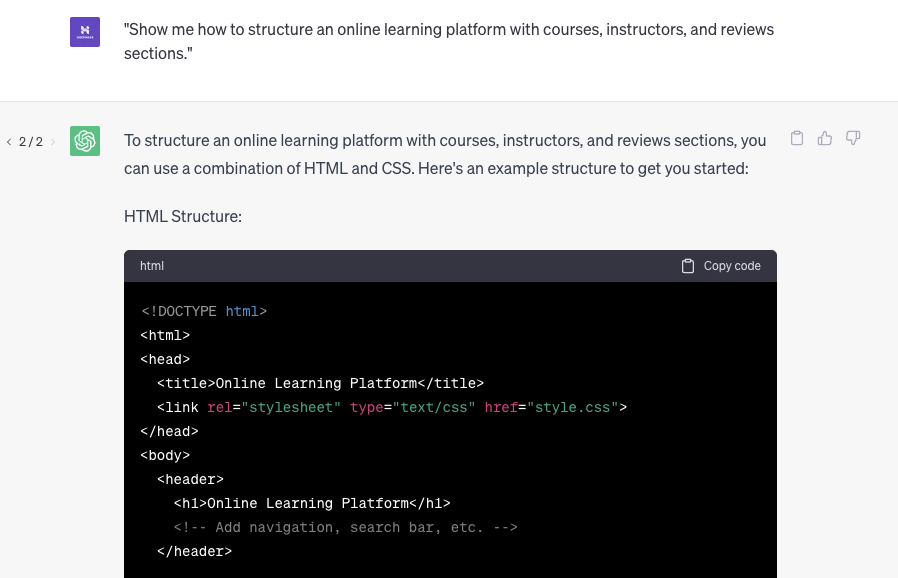
- “Show me how to structure an online learning platform with courses, instructors, and reviews sections.”
- “List web browser compatibility for modern web development architecture.”
- “Suggest ways in which a CSS grid can help with website performance.”
- “Provide tips on a functional CSS framework for search engine optimization.”
AI Web Development Prompts for Testing and Debugging
Testing and debugging are crucial parts of the development process. AI prompts can help automate these tasks, providing fast and accurate results.
Consider using these types of ChatGPT prompts for the best results:
- “Can you guide me in testing this Python function for edge cases and potential errors?”
- “I’m encountering a runtime error in my JavaScript code. Could you help me identify the issue and suggest a solution?”
- “How can I write unit tests for this Java class to ensure its functionality?”
- “I’m having trouble debugging my HTML and CSS layout. Can you provide some insights on what might be causing the issue?”
- “What are the best practices for testing API endpoints in a Node.js application?”
- “Help me identify and fix performance bottlenecks in my PHP script.”
- “I’m getting unexpected results in my SQL query. Can you review it and help me troubleshoot?”
Remember that it’s important to provide specific context and details about the language, framework, or problem you’re facing to get more accurate and relevant assistance from the AI.
Suggested Reading
AI for Websites
Best AI Prompts for Web Designers
How to Make a Website From Scratch
How to Make a Small Business Website
How to Make a Website Mobile-Friendly
How to Build a Website With ChatGPT
How to Build a Site With Gemini
Tips for Effective AI Prompt Engineering
Best Practices for Using AI in Web Development
AI offers many benefits for web development, but it’s crucial to understand how to utilize it effectively. Here are some best practices:
Understand the Limitations of AI Prompts in Web Development
When incorporating AI prompts into your web development process, it’s essential to have a realistic understanding of their capabilities. While natural language processing AI can significantly accelerate your workflow, it is not a one-size-fits-all solution. As a web developer, your expertise and creative problem-solving skills are indispensable, complementing the assistance provided by artificial intelligence. AI can enhance your development process by providing suggestions tailored to your specific needs, but it’s not a miracle solution that can do no wrong.
Validate and Verify AI-Generated Code for Reliable Web Development
AI can generate code, but it’s crucial to validate and verify the output. Although AI is proficient, there is always the possibility of errors or vulnerabilities in the generated code. As a responsible web developer, it’s your responsibility to thoroughly review and test the AI-generated code. By doing so, you can ensure the code meets the required standards, functions correctly, and adheres to best practices for web development overall.
Balance Creativity and Reliance on AI Suggestions
As you leverage AI prompts to streamline your web development process, it’s important to strike a balance between AI assistance and your creative coding skills. AI prompts can provide valuable suggestions but should not replace your creativity and problem-solving abilities. Treat AI assistance as a tool that augments your own expertise, enabling you to accomplish tasks more efficiently and effectively.
Incorporate Programming Prompts Into Existing Workflows for Optimal Web Development
Integrating AI prompts into your existing web development workflows can yield significant benefits. AI helps you automate repetitive tasks and devote more time to more complex and creative aspects of web development. Whether it’s generating code, optimizing website performance, or suggesting ideas for responsive menus, AI prompts can enhance your productivity and enable you to deliver high-quality web projects more efficiently.
Maintain Development Skills and Avoid Over-Reliance on AI
While AI prompts can speed up your processes, it’s essential to continuously nurture and develop your coding skills. Over-reliance on AI can lead to a decline in your proficiency and adaptability as a web developer. By dedicating time to honing your coding abilities, staying updated with programming languages and frameworks, and practicing problem-solving, you can leverage AI prompts as powerful development tools while maintaining your expertise and independence in web development.
Conclusion
Incorporating AI prompts into your web development workflow can revolutionize your productivity and efficiency. By automating repetitive tasks, providing coding assistance, and suggesting site structure improvements, AI can save valuable time and energy. However, it’s essential to use AI as a tool to enhance your skills, not replace them. As we embrace the benefits of AI in web development, it’s critical to understand its limitations, verify its outputs, and maintain our unique human touch in the creative process.
AI Prompts for Web Developers FAQ
Find answers to some of the most common questions about ChatGPT prompts for web development.
Can AI Prompts Create Full Websites?
AI can certainly assist in creating websites by generating code, suggesting site structures, and aiding in debugging. However, it currently lacks the ability to fully grasp the nuanced requirements of a complete website project. Human intervention is still necessary for complex problem-solving and creativity.
Can Artificial Intelligence Replace Web Developers?
No, artificial intelligence is a tool that can aid web developers but cannot replace them. While AI can automate certain tasks, it lacks the creative problem-solving ability and nuanced understanding of requirements that human developers possess.
How Accurate and Reliable Are the Suggestions Provided by AI Prompts?
AI prompts provide accurate and reliable suggestions based on their training data. However, a human web developer should always validate and verify their outputs to ensure they meet the project’s requirements and standards.
What Are the Benefits of AI-Assisted Web Development?
Prompts for AI web development improve productivity, code quality, and development processes. AI tools help automate tasks, provide suggestions, and enhance error detection for efficient coding.
Are There Different AI Prompts for Front-End and Back-End Development?
Yes, AI prompts differ for front-end and back-end development. They cater to specific needs, aiding with design, accessibility, UI components, database management, API integration, and algorithms in each domain.
This article is a localized version of 77 AI Prompts for Web Developers to Streamline the Development Process, originally published in English.

Matleena is a seasoned Content Writer with 5 years of content marketing experience. She has a particular interest in emerging digital marketing trends, website building, and AI. In her free time, Matleena enjoys cups of good coffee, tends to her balcony garden, and studies Japanese. Follow her on LinkedIn

Comments
0 responses