How to make a small business website in 10 steps
May 27, 2026
/
Astari S. & Marco C.
/
9 min Read

To make a small business website, you need to set up the basics first – a domain name, hosting plan, and website-building platform. From there, build the site around your brand, add the pages customers expect, and include the right features for people to contact you, book a service, or buy from you.
Your website should make it easy for visitors to understand what your business offers and what to do next. It can show your products or services, contact details, opening hours, location, and brand story in one place. It also helps your business appear in search results, build trust with new customers, and support more sales or inquiries.
Here are the 10 main steps to create a small business website:
- Choose a hosting plan.
- Get a domain name
- Pick a website building platform.
- Design the website around your brand.
- Create product, service, or booking pages.
- Add ecommerce or booking functionality if needed.
- Add accurate contact information.
- Test the website before launch.
- Optimize the website for search engines.
- Market the website.
1. Select a reliable hosting plan
Start by choosing a web hosting plan from a trusted provider. Web hosting stores your website’s files and data, so visitors can access your site online.
Before choosing a hosting provider, consider these factors:
- User-friendly setup and use. Check out the type of control panel the hosting provider offers.
- Storage and bandwidth limit. Estimate how much storage your website will require. Considering the expected traffic volume will also help prevent website crashes.
- Site security. Ensure your hosting provider offers built-in security features such as an SSL certificate and anti-DDoS protection to keep your site secure.
- Site performance. Page loading speed is essential for improving search engine optimization and overall user experience.
- Customer support. In order to ensure the success of your business website, it is essential to choose the best hosting services that offer reliable support.
Once you’ve compared your options, pick a web hosting plan that fits your website type, expected traffic, and budget.
2. Get a domain name
You’ll also need to choose a domain name – the website address customers type into their browser to visit your site. A good domain name should be short, unique, easy to remember, and relevant to your business.
Avoid numbers, hyphens, and complicated spellings, as they can make your domain harder to share or type correctly.
For convenience, consider getting your hosting plan and domain name from the same provider. This makes setup easier because your domain and hosting are managed in one place.
At Hostinger, selected hosting plans include a free domain name for the first year. Use our domain name checker to see whether your preferred domain is available.
Domain Name Checker
Instantly check domain name availability.
3. Choose a platform for building your website
Next, choose the platform you’ll use to build and manage your small business website. The right option depends on your technical skills, budget, website goals, and how much control you want over the design and functionality.
Here’s a quick comparison of the main website platform types:
| Platform type | Best for | Main advantage | Main limitation |
|---|---|---|---|
| Website builder | Beginners and small teams | Fast setup without coding | Less advanced customization |
| WordPress | Content-heavy or flexible websites | More control and plugin options | Higher learning curve |
| Hostinger Horizons (vibe coding platform) | Custom business functionality | Build interactive features with prompts | Requires clear prompts and testing |
When choosing the best platform for building a website, consider the following factors:
- Ease of use. Pick a platform that matches your skill level. Website builders are usually easier for beginners, while CMS platforms often require more setup and configuration.
- Cost. Compare the available options to see whether the platform fits your small business website budget. Some platforms include hosting, templates, and ecommerce tools, while others require separate purchases.
- Support. Choose a platform that offers reliable help through live chat, tutorials, documentation, or community forums.
If you’re a beginner, Hostinger offers a website builder for small businesses that lets you launch a site without any technical expertise. You can choose a pre-made template, adjust the layout with an intuitive drag-and-drop editor, and start selling with the built-in ecommerce features.
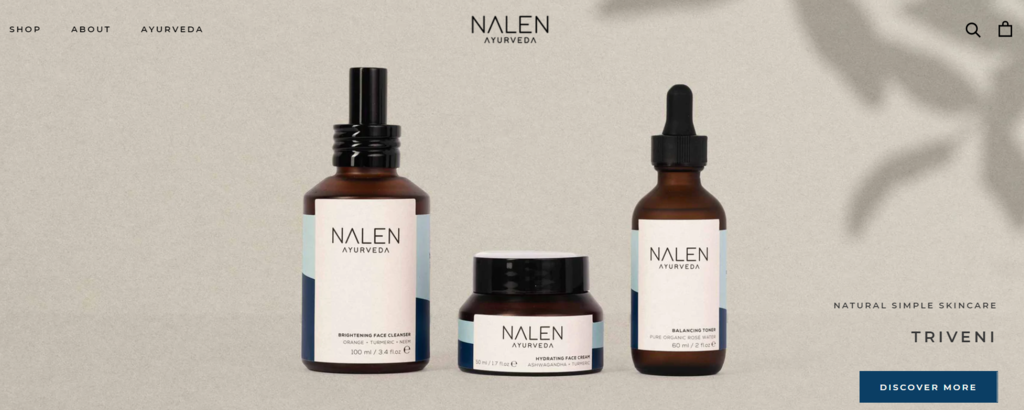
An online store example built with Hostinger is Nalen Ayurveda. The website uses a subtle layout, responsive pages, and background colors that match the product packaging, creating a calm visual style that reflects the brand.
For a business website with more interactivity, custom features, or backend logic like user account registration, consider Hostinger Horizons. It’s a vibe coding platform that lets you build and improve your website through prompts, without needing to write code yourself. You can also connect your site to a database or payment processing service in a few simple steps.

If you want your business website to have more interactivity, custom features, or a backend logic like user account registrations, go with Hostinger Horizons vibe coding platform.
You still won’t need any technical expertise to build a fully functioning business website with it, simply build and iterate your website through prompting. Connecting with a database or a payment processing services is also achievable in several simple steps.
Aside from website builders, a content management system (CMS) gives you more advanced customization and control over your website setup.
WordPress is one of the most popular CMS platforms for creating different types of websites, including portfolios, blogs, service websites, and ecommerce stores. However, it has a steeper learning curve because you may need to install plugins, manage updates, or add custom CSS to modify your website theme.
The WordPress software itself is free, but you’ll need a separate hosting account and domain name.
At Hostinger, both are included in our WordPress hosting packages. All plans also come with a one-click WordPress installer, a free SSL certificate, and the LiteSpeed Cache for WordPress plugin to help improve site speed.
4. Customize your website design
Your website design shapes how visitors understand your business, so it should look professional, be easy to navigate, and reflect your brand from the first page they see.
The website design process includes experimenting with color schemes and typographies. Make sure the color and font selection fit your small business idea. After customizing all visual elements, proceed to set up key landing pages such as the homepage, About Us page, and other essential pages.
Each website creation platform provides different ways to design and customize your website.
Website builders often provide pre-made templates for your site and a drag-and-drop editor that makes editing a site easy. For instance, Hostinger comes with a wide variety of professional website templates tailored for all business types.
Meanwhile, WordPress provides 9,000+ themes in the official WordPress themes repository. You can also sort each theme by layout, features, and subject to find the perfect one for your small business website.
Here are some of the things to consider when customizing the website design:
- Header. Displayed at the top of the web page, it often consists of a logo, business name, and menu bar. With an easy-to-navigate header, you can encourage visitors to explore further.
- Footer. Indicates that the user has reached the bottom of the page and provides links to other site pages. For example, most online stores include links to the Privacy and Terms and Shipping pages.
- Visual hierarchy. Use a well-planned structure for your web page’s elements so visitors can quickly scan page information, encouraging them to take action. One way to incorporate visual hierarchy is by creating a layout based on a user reading pattern.
- Mobile responsiveness. Make sure to check whether your site is mobile-friendly. Note that 52% of website traffic comes from mobile devices.
5. Make an effective product page
Designing a product page is an integral part of creating an online business website. Optimized product pages may convert website visitors into purchasing a featured product.
Here are some elements to include when optimizing product pages:
- Featured image. The quality of your product images can either excite or turn customers away, as it will be the first thing customers see when browsing your products. Make quality photos of your products to help shoppers envision your products’ look in real life.
- Product video. Showing off your products using videos gives customers the feeling of getting an in-person demo. With a personalized video, people are more likely to spend a longer time on the site, which may result in a higher conversion rate.
- Persuasive product descriptions. Write a compelling product copy by adding fitting keywords that relate to your brand. List the product’s key features, emphasizing its main benefits to prompt sales.
- Click call-to-action (CTA). Pick a contrasting color for the CTA button to make it stand out. Also, avoid putting too many elements that may distract your visitors.
- Reviews and comments. 90% of online buyers read product reviews before purchasing a product. An honest review acts as social proof that adds credibility and helps build trust between businesses and customers.
Outdoor Voices’ product pages check all the boxes by providing visually appealing product images, a well-written product description, and a prominent CTA button.

6. Add ecommerce functionality
In order to facilitate seamless online transactions, you’ll need to add ecommerce features to your site. This includes providing inventory and order management along with several payment methods to ensure a smooth checkout.
Here are some ways you can add ecommerce functionality to your site.
Install Plugins
WordPress site users can use a reliable ecommerce plugin like WooCommerce to add ecommerce functionality to their site. Most WooCommerce themes already include layouts for product, checkout, and shopping cart pages. Additionally, it offers add-ons for ecommerce features such as shipment tracking, product list, and multiple payment options.
Also, if you’re planning to use your business website as an online store, it’s better to consider more powerful hosting plans, for example, WooCommerce optimized packages that will guarantee seamless and secure transactions.
See our guide on creating an online store with WordPress using WooCommerce for assistance and tips.
Integrate payment gateways
For those who don’t need advanced ecommerce features, payment gateway integration is a great option. Once your customer places an order, the payment gateway will verify their card information and ensure their account balance is sufficient to make the payment.
Among the benefits of a payment gateway includes faster and more convenient payment as well as better security.
For example, Hostinger supports several payment gateways, including PayPal, Stripe, and Visa. Using a straightforward customer relationship management (CRM) system, you can send customized emails and discounts code to maintain customer satisfaction. It also lets users connect with popular ecommerce marketplaces.
7. Add accurate contact information
Accurate contact information helps customers call, visit, message, or request a quote from your small business website. Making yourself available to customers improves the brand’s reputation and gives it a competitive edge. This can be achieved by creating a dedicated contact page on your site.

Brands to life is a great example. It has a straightforward design and features all the necessary information – a physical address, phone number, and email. A contact form with an option to upload a file is also available for customers who wish to make inquiries.
Adding contact forms can help automate mailing list-building processes and protect your business email from phishing attacks and scams. If you own a WordPress website, install a user-friendly form builder plugin to build a custom form that fits your overall site’s design.
8. Test your website before launch
To ensure a positive user experience, website owners must test the site’s usability. This involves testing the different elements of the site, such as:
- Broken URLs testing. Ensure your internal and external links work properly and direct users to the correct pages. Take advantage of broken link checkers tools such as Sitechecker and Semrush that automatically do the job for you.
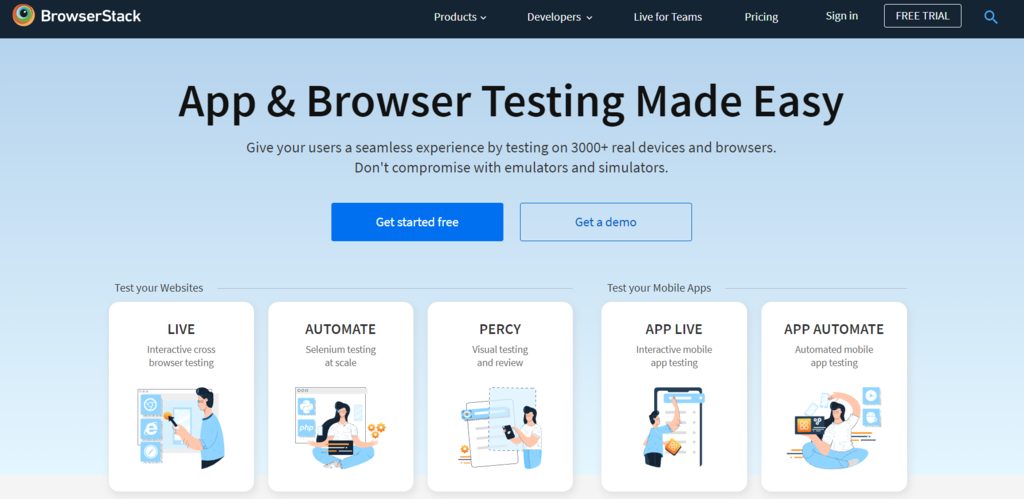
- Browser and device compatibility testing. It ensures the site’s performance and design are consistent across all web browsers, operating systems, and devices. Moreover, it helps identify browser-specific issues to facilitate easy debugging. Some of the best cloud-based cross-browser testing tools are BrowserStack and Testim.
- Speed testing. As site speed significantly influences search engine rankings, it’s essential to run a proper website speed test to help increase its traffic, reputation, and conversion rate. Before doing the test, enable caching and set up a content delivery network (CDN) on the website.
- Readability testing. Aside from the technical aspect and design, the site’s content should also be informative and well-written. Always cross-check your content copy’s style, grammar, and structure before publishing it. For error-free writing, use grammar checker tools like Grammarly or ProWritingAid.
9. Optimize your small business website for SEO
Performing search engine optimization (SEO) on your small business website can help increase its visibility and rank higher on search engines. An SEO-friendly site is more likely to leave a lasting impression on new customers and entice them to learn more about your business.
Here are some suggestions to help improve your website’s SEO:
- Add image alt text. This text helps search engine crawlers to index the site’s images properly. Alt text also improves the site’s accessibility when images fail to load correctly on web pages and serves as an alternative description for visually-impaired users.
- Include internal links. Internal linking benefits include extending link equity, reducing bounce rate, and organizing your site’s structure. This eventually helps to make your site rank higher on Google or other search engines.
- Target the right keywords. Keyword research is an essential part of SEO strategy. Use tools like SEMrush and Ahrefs to identify keyword difficulty and search volume. The main goal is to find a relevant topic for your industry with high traffic potential.
- Optimize your image. Image optimization allows site owners to save a significant amount of bandwidth and storage space, making the site load faster. This not only enhances the user experience but also positively impacts SEO.
- Optimize for local SEO. If your business serves a specific area, include your city, neighborhood, or service area on relevant pages. You can also create a Google Business Profile to help your business appear in local search results and Google Maps.
10. Market your website
After successfully launching and optimizing your small business website, it’s time to promote it to drive traffic and engagement. Below are some popular website promotion methods to try out:
- Blogging. Share product-related insights and practical tips with your customers through regular blog posts. This way, you can demonstrate your expertise while improving the site’s ranking on online searches. It’s also possible to gain profit by monetizing your blog.
- Email marketing. 64% of small businesses rely on emails to retain and acquire customers. Send personalized emails and newsletters to keep your customers informed about your business. Be sure to use a professional business email address when sending out emails. You can create one by using Google email hosting or other business email services.
- Paid marketing. This is an ideal option for businesses with an extra budget. Essentially, you buy ad space, then circulate your ads across multiple websites and social media channels. Conduct prior research on each channel to maximize investment returns. If you use Hostinger Website Builder, you’ll be able to run Performance Max campaigns right from your website dashboard, thanks to the Google Ads app integration.
- Social media integration. Social media platforms are powerful for engaging customers and driving traffic to your site. Place social media sharing buttons on the most visited web pages, like landing pages and blog posts.
Use AI to market your small business website
Once your small business website is live, the next step is to bring the right visitors to it. This is where AI for small business can help – by turning your website pages, products, services, and customer questions into practical promotion ideas.
For example, they can help you write social media posts, plan email campaigns, create product descriptions, research customer pain points, and generate blog ideas based on what your audience is searching for. This is especially useful if you run a small team and don’t have a dedicated marketing specialist.
Start with the channels that matter most to your business. For a local business, create posts for your Google Business Profile and plan content around location-based searches. For an online store, improve product descriptions, promotional emails, and campaign ideas. For a service business, turn common customer questions into helpful website content that builds trust and supports SEO.

Astari is a digital marketing expert, with a focus on SEO and WordPress. She loves to share her wealth of knowledge through her writing, and enjoys surfing the internet for new information when she's not out in the waves or hiking a mountain. Her mission is to learn something new every day, and she firmly believes that there is no such thing as too much knowledge.

Marco Chiesi is the Head of WordPress at Hostinger, with over 20 years of experience as a software engineer in the web industry. He specializes in open-source technologies and the WordPress ecosystem, where he has contributed in different areas: Plugin Developer (with over 10 million downloads), WordCamp speaker and organizer, Meetup organizer, Translator, and Core Contributor. He is passionate about leading his team to create innovative solutions for Hostinger's web hosting product, which hosts over 5 million WordPress installations. Follow him on LinkedIn.