How to Build a Site With Gemini: Making a Website From Scratch Using Google’s AI Chatbot
Mar 10, 2026
/
Matleena S.
/
9 min Read

Whether you are a beginner or an experienced web developer, Gemini can be a valuable tool for creating a fully-functional website for your next project.
Gemini simplifies the website creation process by assisting users with web design, code generation, and content creation.
In this tutorial, you will learn how to build a website from scratch using Gemini, Google’s AI chatbot.
What Is Gemini?
Gemini is a large language model (LLM) chatbot developed by Google AI. It is trained on a massive dataset of text and code, which allows it to generate text, translate languages, write different kinds of creative content, and answer questions.
Gemini can perform many kinds of tasks, including following instructions, completing requests thoughtfully, and answering questions in a comprehensive and informative way. It can also be used to write code, guide you through the website-building process, or act as your personal assistant.
How to Build a Site With Gemini
Our step-by-step guide will explain how to build a professional and fully functional website using Gemini.
1. Choose a Reliable WordPress Host + A Domain Name
The success of your website largely depends on the hosting platform you choose. A reliable WordPress host ensures your site runs smoothly, loads quickly, and remains accessible to visitors. Alongside hosting, securing an appropriate domain name is crucial as it serves as your website’s unique address on the internet.
When selecting a hosting provider, consider factors such as server performance, uptime guarantee, customer support, and affordability. Hostinger offers a user-friendly platform perfect for both beginners and experienced users. With a range of hosting plans to choose from, we cater to various websites, from small personal blogs to large eCommerce sites.

Keep an eye out for hosting bundles that come with a free domain name. For example, a free domain name registration is included when you buy a hosting plan for one year or longer at Hostinger. You can choose from a variety of free domain extensions, including .net and .store.
Start by brainstorming for potential domain names and checking their availability:
Domain Name Checker
Instantly check domain name availability.
2. Set Up Your Hosting and Install WordPress
Next, it’s time to set up your hosting account and install WordPress.
After you have purchased hosting, log in to hPanel and follow the onboarding instructions to set up your hosting plan.
Once you are done, it’s time to set up WordPress for your website:
- Log in to hPanel.
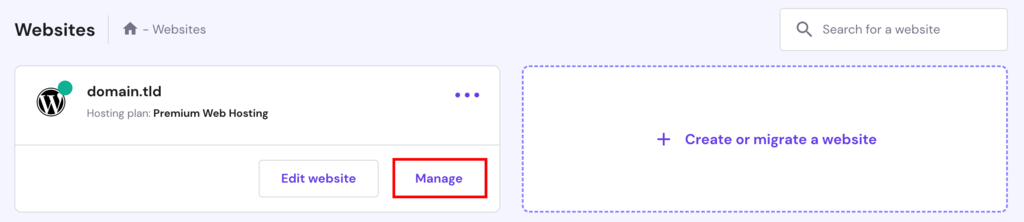
- Navigate to the Websites section, select your website, and click Manage.
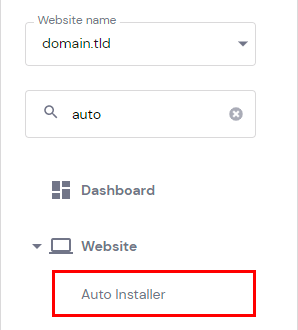
- Select Auto Installer in the side menu.
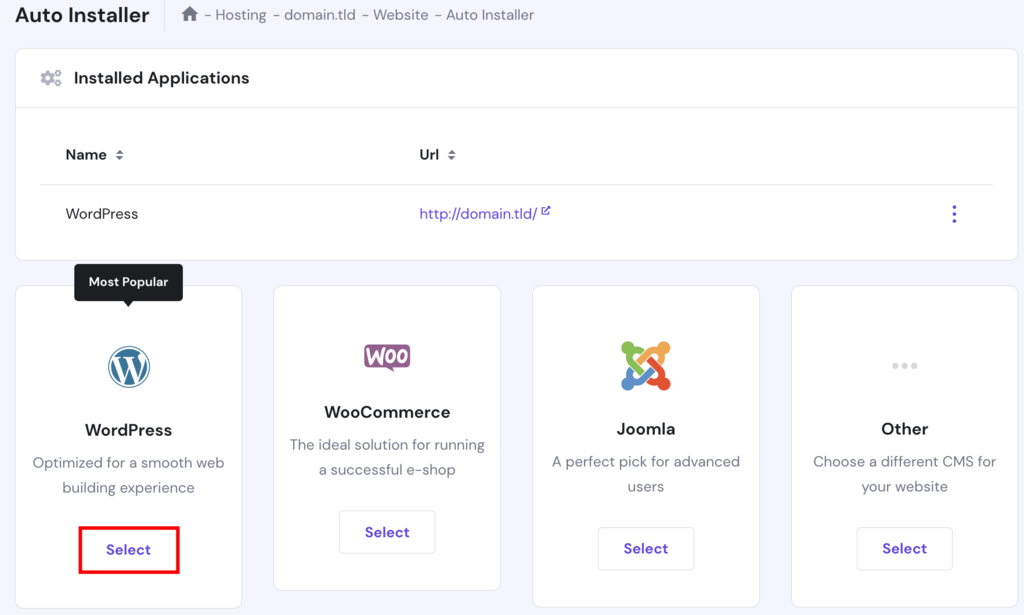
- Choose WordPress from the list of available applications and click Select.
- Customize your installation settings, such as selecting the domain you registered and setting up your desired admin username and password.
- Click Install to begin the installation process. Hostinger’s Auto Installer will take care of the technicalities, making sure WordPress is installed correctly on your hosting account.
Once the installation is complete, you can access your WordPress dashboard by visiting your domain followed by /wp-admin (e.g., yourdomain.com/wp-admin). From here, you can start customizing your website, installing themes, and creating content.
Suggested Reading
How to Launch a WordPress Website
Best WordPress Plugins
How to Install WordPress Plugins
3. Sign Up For Gemini
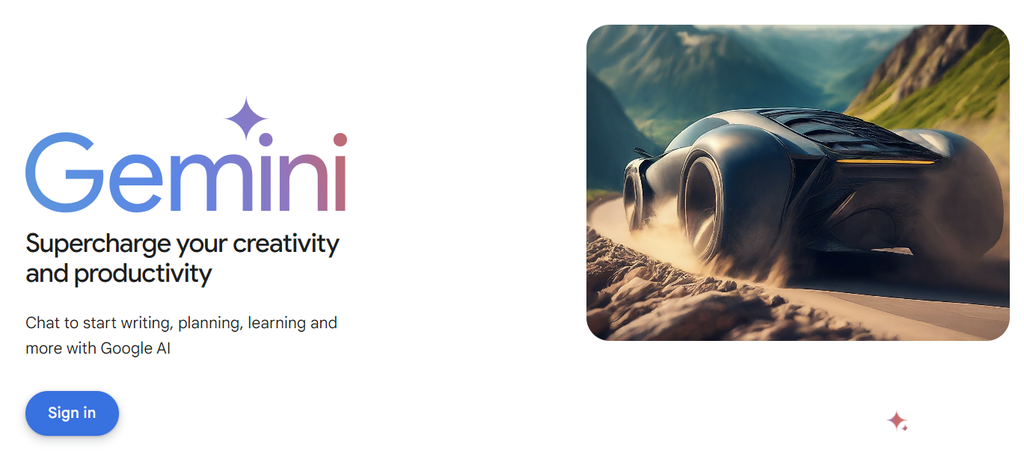
Head over to Google’s Gemini landing page and sign up for an account:
- Visit Gemini at gemini.google.com and click Sign in.
- Use your Google account or create a new one to sign up for Gemini.
- Once signed in, familiarize yourself with Gemini’s user interface. The platform has an intuitive and user-friendly environment to assist you throughout the website-building process.
Gemini can help you with various aspects of website development and content creation, from theme selection to color scheme creation, widget selection, code generation, and more.
4. Design Your WordPress Website With Gemini
With WordPress installed and a Gemini account set up, it’s time to delve into the creative process of designing your website. Gemini simplifies website design in many ways, including:
Website Design With Artificial Intelligence
Gemini can help you select an appropriate theme for your website. Use prompts like:
- “Help me select a theme for my WordPress website.”
- “Suggest best themes for an art portfolio website.”
- “List the best free WordPress themes available for a small local eCommerce store.”
- “How do I install a WordPress theme?”
Layout Customization
Gemini helps you to customize and modify your website layout, enabling you to create a unique and engaging user experience. Use prompts like:
- “Give me suggestions for header options for a minimalist resume website.”
- “What are some popular website layouts?”
- “What are the pros and cons of different website layouts?”
- “How can I choose the right website layout for my business?”
Personalized Color Schemes
Gemini’s color customization suggestions empower you to choose the perfect palette that resonates with your audience. Use prompts like:
- “Can you help me choose a color scheme for my website?”
- “I’m looking for a color scheme that is both visually appealing and relevant to my business. Can you help me find some colors that work well together?”
- “I’m not sure what colors I should use for my website. Can you give me some suggestions based on my business and target audience?”
- “I’m looking for a color scheme that is calming and relaxing. Can you help me find some colors to create a peaceful atmosphere on my website?”
Typography Selection
Fonts play a crucial role in website aesthetics. Gemini offers suggestions for a wide selection of fonts, enabling you to find the right typography that complements your content and enhances readability. Use prompts like:
- “Can you help me choose fonts for my website?”
- “I’m looking for fonts that are both readable and visually appealing. Can you help me find some fonts that work well together?”
- “I’m not sure what fonts I should use for my website. Can you give me some suggestions based on my business and target audience?”
- “I’m looking for fonts that are modern and stylish. Can you help me find fonts to make my website look professional?”
Consider using Gemini’s design capabilities to craft a website that not only looks stunning but also aligns perfectly with your brand identity and goals.
5. Use Gemini to Write Site Code
This is where vibe coding comes into play — a trend in development where you describe what you want in natural language, and AI writes the code for you. Gemini makes vibe coding possible by handling repetitive tasks and generating clean, working code based on your prompts. You don’t need to worry about syntax or frameworks — just explain your idea, and let the AI handle the implementation.
Interactive Widgets
Enhance user engagement with interactive elements generated by Gemini. Easily add contact forms, social media widgets, and more without delving into the complexities of coding. Use prompts like:
- “I’m not sure how to code, but I have an idea for an interactive widget for my website. Can you help me write the code to make it happen?”
- “I’m looking for a way to make my website more interactive. Can you help me write some code for a quiz or a game?”
- “I’m looking for a way to make my website more engaging. Can you help me write some code for a chatbot or a live chat feature?”
JavaScript Generation
Gemini’s JavaScript assistance feature allows you to add dynamic elements to your website without manually writing code. This streamlines the process of implementing animations and other interactive elements. Use prompts like:
- “I’m looking for a way to make my website more visually appealing. Can you help me write some JavaScript code for an animated banner or a slideshow?”
- “I’m looking for a way to make my website more responsive. Can you help me write some JavaScript code to make it work well on mobile devices?”
- “I’m looking for a way to make my website more accessible. Can you help me write some JavaScript code to make it easier for people with disabilities to use?”
By using Gemini to write site code, you can focus on building your website’s features and functionalities without getting caught up in coding tasks.
6. Craft Engaging Content Using Gemini
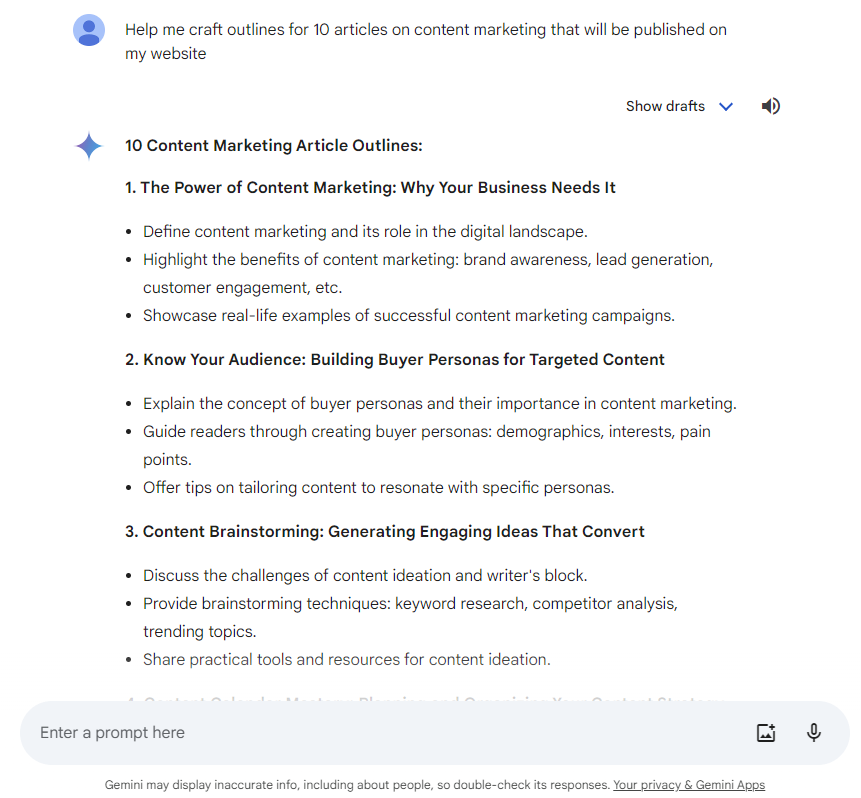
Compelling content is the backbone of any successful website. Gemini empowers you to create engaging and informative content with ease. Here’s how to leverage its content creation capabilities:
Content Generation With AI for WordPress
Gemini assists in crafting engaging content for your WordPress website. From generating blog post ideas to helping you create a content strategy, the AI chatbot helps you deliver valuable and compelling information to your audience. Use prompts like:
- “I’m not sure how to write content for my website, but I have a clear idea of what I want. Can you help me with the writing?”
- “I’m looking for a way to make my website’s content more engaging and informative. Can you help me with the content strategy?”
- “Help me create outlines for 10 articles that will be published on my website.”
Enhancing SEO Using Gemini
Boost your website’s visibility on search engines with Gemini’s SEO optimization tools. Gain insights into keywords, meta tags, and other SEO elements to improve your website’s search engine ranking. Use prompts like:
- “I’m not sure how to optimize my website for search engines. Can you give me some pointers?”
- “I’m looking for ways to get more traffic to my website from search engines. What are some SEO tips you can give me?”
- “I’m trying to improve my website’s ranking for the keywords [insert keywords]. Can you help me with that?”
7. Optimize Your Website With Gemini
A well-optimized website is crucial for providing a seamless user experience and improving search engine rankings. Gemini offers a range of optimization tools to enhance your website’s performance, such as:
Testing and Debugging
Ensure your website functions flawlessly with Gemini’s testing and debugging suggestions. Identify and fix any issues that may affect user experience and overall website performance. Use prompts like:
- “Can you help me test my website for bugs?”
- “I’m having trouble debugging my website. Can you help me?”
- “I’m not sure how to test my website for performance issues. Can you give me some pointers?”
- “I’m trying to find a bug in my website. Can you help me with that?”
Technical SEO
Gemini provides SEO recommendations to boost your website’s visibility in search engine results. Implement SEO best practices and stay ahead of the competition. Use prompts like:
- “Can you help me with the technical SEO for my website?”
- “I’m not sure how to optimize my website for search engines from a technical perspective. Can you give me some pointers?”
- “I’m looking for ways to improve the loading speed of my website. Can you help me with that?”
- “I’m trying to make my website more mobile-friendly. Can you help me with that?”
Speed Optimization
Improve your website’s loading speed with Gemini’s speed optimization suggestions. Fast-loading websites not only enhance user experience but also contribute to better search engine rankings. Use prompts like:
- “Can you help me improve the loading speed of my website?”
- “I’m not sure how to make my website load faster. Can you give me some pointers?”
- “I’m looking for ways to reduce the size of my website’s images. Can you help me with that?”
8. Use Google Gemini to Market Your Site
With your website built and optimized, it’s time to reach your target audience and drive traffic to your site. Gemini offers valuable marketing assistance to help you achieve your website’s goals, including:
Competition Analysis
Gain a competitive edge by analyzing your competitors’ strategies with Google Gemini.
For example, if you’re running an online store selling handmade jewelry, the tool can help you identify your competitors’ best-performing products, pricing strategies, and marketing campaigns.
This helps you position your products and offers more effectively to stand out in the market. Use prompts like:
- “What are my competitors’ social media presence and engagement levels?”
- “What are my competitors’ customer reviews?”
- “What are my competitors’ overall online reputation?”
- “What are my competitors’ pricing strategies?”
- “What are my competitors’ marketing campaigns?”
- “What are my competitors’ target audiences?”
Personalized Marketing Strategies
Use Gemini to make your marketing approach more tailored and personalized to your target audience.
For instance, if you’re running a travel blog, Gemini can analyze your audience’s preferences and interests based on their interactions with your content.
Gemini can then suggest personalized travel itineraries, destination recommendations, and travel-related tips to engage your audience on a deeper level. Use prompts like:
- “How can I target my marketing campaigns more effectively with personalized marketing?”
- “How can I create personalized content that resonates with my target audience?”
- “How can I measure the effectiveness of my personalized marketing campaigns?”
Ad Copy and Social Media Posts
Google Gemini can also be used as a social media AI tool to help you create compelling ad copy and engaging social media posts.
Let’s say you’re promoting a new software tool for small businesses. Gemini can generate persuasive ad copy that highlights the software’s unique features and benefits.
Use Gemini to craft attention-grabbing social media posts with catchy headlines and visuals to drive more clicks and shares. Use prompts like:
- “Can you help me write ad copy that will persuade people to buy my product?”
- “Can you help me write social media posts that will engage my audience and get them to share my content?”
- “Can you help me write ad copy that highlights my product’s unique features and benefits?“
AI can help you convert website visitors into leads and customers by designing effective landing pages for your business.
Suppose you’re running a webinar to showcase your graphic design services. Google Gemini can assist you in creating a visually appealing landing page that clearly communicates the webinar’s value and prompts visitors to register.
By optimizing the landing page with Google Gemini, you can increase the conversion rate and generate more leads for your business. Use prompts like:
- “Can you help me optimize my landing pages so that I can get more leads and conversions?”
- “Can you help me identify the key elements of a landing page that contribute to conversions?”
- “Help me create a visually appealing landing page for a spring sale ad campaign.”
Conclusion
AI-driven website development is here to stay. Gemini empowers both beginners and experienced developers to effortlessly create impressive websites by simply asking the AI the right questions.
By optimizing your website with Gemini’s suggestions, you ensure an exceptional user experience and improved search engine rankings. Additionally, Gemini’s marketing suggestions enable you to reach a wider audience and promote your website effectively.
More on AI
How to Build a Website With ChatGPT
Best AI Content Generators
Best Free AI Website Builders
Design Websites With AI
Best AI Web Development Tools
How to Use AI for Websites
How to Build a Site With Gemini FAQ
Find answers to frequently asked questions about building a website with Gemini.
What Are the Key Features of Gemini That Helps With Web Development?
Gemini can generate code snippets in a variety of programming languages, including HTML, CSS, and JavaScript. It can also help web developers with tasks such as SEO, debugging, and performance optimization.
How Do I Integrate Google Gemini to My WordPress Website?
You can either use WordPress plugins like AI Chatbot by AYS or Google Gemini API to integrate Gemini with your WordPress website.
What Can Gemini Do?
Gemini can generate and translate text, write different types of creative content, answer your questions, and help with your work. It can also help you with building a website.
Can Google Gemini Build a Website?
Google Gemini is an AI chatbot designed to assist users in website development and content creation. While it doesn’t build websites entirely on its own, it provides valuable tools and guidance throughout the website-building process.
Can You Use AI to Build a Website?
Yes, with the help of Gemini, an advanced AI chatbot, you can streamline various website development tasks, such as design, code generation, and content creation.
What Can You Do With Gemini?
Gemini offers a range of functionalities, including designing website layouts, generating code snippets, crafting engaging content, and optimizing website performance.
Can Google Gemini Write Code?
Yes, Google Gemini can generate code snippets for website development, making it easier for users to create interactive elements and structures for their websites.

Matleena is a seasoned Content Writer with 5 years of content marketing experience. She has a particular interest in emerging digital marketing trends, website building, and AI. In her free time, Matleena enjoys cups of good coffee, tends to her balcony garden, and studies Japanese. Follow her on LinkedIn