Kubernetes tutorial for 2026: Learning the basics of effective container management
Mar 10, 2026
/
Ariffud M.
/
13 min Read
Kubernetes, often abbreviated as K8s, is a top choice for container orchestration due to its scalability, flexibility, and robustness. Whether you’re a developer or a system administrator, mastering Kubernetes can simplify how you deploy, scale, and manage containerized applications.
In this article, you’ll learn the basic concepts of Kubernetes, explore its key features, and examine its pros and cons. We’ll guide you through setting up a Kubernetes environment, deploying your first application, and troubleshooting common issues.
By the end of this tutorial, you can fully leverage Kubernetes for efficient container management.
Download free docker cheat sheet
What is Kubernetes?
Kubernetes is a powerful open-source platform for container orchestration. It provides an efficient framework to deploy, scale, and manage applications, ensuring they run seamlessly across a cluster of machines.
Kubernetes’ architecture offers a consistent interface for both developers and administrators. It allows teams to focus on application development without the distraction of underlying infrastructure complexities.
This IT tool ensures that containerized applications run reliably, effectively managing deployment and scaling while abstracting the hardware and network configurations.
How does Kubernetes work?
Kubernetes operates through a control plane and core components, each with specialized roles in managing containerized applications across clusters.
Nodes
Nodes are the individual machines that form the backbone of a Kubernetes cluster. They can be either master nodes or worker nodes, which are crucial in running multiple containers. Nodes can operate on both physical and virtual private servers.
Pods
Pods are the smallest deployable units on this platform, serving as the basic building blocks of Kubernetes applications. A pod can contain one or more containers. Kubernetes schedules these containers together on the same node to optimize communication and load balancing.
Services
Services make the applications accessible online and handle load balancing. They provide a consistent way to access containerized services and abstract the complexities of network connectivity.
API server
The API server is the front end for the Kubernetes control plane, processing both internal and external requests to manage various aspects of the cluster.
Replication sets
These maintain a specified number of identical pods to ensure high availability and reliability. If a pod fails, the replication set automatically replaces it.
Ingress controllers
Ingress controllers act as gatekeepers for incoming traffic to your Kubernetes cluster, managing access to services within the cluster and facilitating external access.
These components collectively enable Kubernetes to manage the complexities of containerized workloads within distributed systems efficiently.
Key features of Kubernetes
Kubernetes offers a robust set of features designed to meet the needs of modern containerized applications:
Scaling
Kubernetes dynamically adjusts the number of running containers based on demand, ensuring optimal resource utilization. This adaptability helps reduce costs while maintaining a smooth user experience.
Load balancing
Load balancing is integral to Kubernetes. It effectively distributes incoming traffic across multiple pods, ensuring high availability and optimal performance and preventing any single pod from becoming overloaded.
Self-healing
Kubernetes’ self-healing capabilities minimize downtime. If a container or pod fails, it is automatically replaced, keeping your application running smoothly and ensuring consistent service delivery.
Service discovery and metadata
Service discovery is streamlined in Kubernetes, facilitating communication between different application components. Metadata enhances these interactions, simplifying the complexities associated with distributed systems.
Rolling updates and rollbacks
Kubernetes supports rolling updates to maintain continuous service availability. If an update causes issues, reverting to a previous stable version is quick and effortless.
Resource management
Kubernetes allows for precise resource management by letting you define resource limits and requests for pods, ensuring efficient use of CPU and memory.
ConfigMaps, Secrets, and environment variables
Kubernetes uses ConfigMaps and Secrets for secure configuration management. These tools help store and manage sensitive information such as API keys and passwords securely, protecting them from unauthorized access.
Kubernetes pros and cons
Weighing Kubernetes’ strengths and weaknesses is crucial to deciding whether it is the right platform for your container management needs.
Advantages of Kubernetes
Kubernetes offers numerous benefits, making it a preferred option for managing containerized applications. Here’s how it stands out:
Scalability
- Effortless scaling. Kubernetes can automatically scale up by deploying additional containers as demand increases without manual intervention.
- Zero downtime. During deployments, Kubernetes uses a load balancer to distribute traffic across both existing and new containers, ensuring continuous service.
High availability
- Automatic failover. If a container or node fails, Kubernetes automatically redirects traffic to functional containers or nodes, minimizing downtime.
- Load balancing. Built-in load balancing spreads incoming traffic across multiple pods, enhancing performance and ensuring service availability.
Flexibility and extensibility
- Custom resources and operators. Kubernetes lets you create custom resources and operators, extending its core functionality to meet specific business needs better.
- Best of breed ideas. The open-source nature and strong community support foster a rich ecosystem of extensions and tools. This enables continuous improvement of your Kubernetes environment with various add-ons, from monitoring solutions to external access tools.
Disadvantages of Kubernetes
While Kubernetes is a robust platform, it has certain drawbacks you should consider:
Complexity
The steep learning curve of Kubernetes can be a hurdle, particularly for new users. Expertise in managing Kubernetes clusters is essential to unlocking its capabilities.
Resource intensiveness
Kubernetes demands significant server resources, including CPU, memory, and storage. For smaller applications or organizations with limited resources, this can lead to more overhead than benefits.
Lack of native storage solutions
Kubernetes doesn’t include built-in storage solutions, posing challenges for applications requiring persistent or sensitive data storage. As a result, you need to integrate external storage solutions, such as network-attached storage (NAS), storage area networks (SAN), or cloud services.
How to set up Kubernetes
Setting up Kubernetes is crucial for managing containers effectively. Your hosting environment plays a pivotal role. Hostinger’s VPS plans offer the resources and stability needed for a Kubernetes cluster.

Please note that the following steps apply to all nodes you’ll use to deploy your applications.
1. Choose a deployment method
- Local environment. Ideal for learning, testing, and development, deploying Kubernetes on a local machine can be done using tools like Minikube and Kind (Kubernetes in Docker). This method is quick and convenient for individuals and small teams, although it may require more resources than other methods.
- Self-hosted Kubernetes. This method involves setting up and managing your own Kubernetes cluster from scratch. It offers more control and flexibility but requires significant time and expertise, making it suitable for larger organizations with complex infrastructure needs or specific compliance requirements.
- Managed Kubernetes services. For most production workloads and larger-scale projects, consider opting for a managed service like Amazon EKS, Google Kubernetes Engine (GKE), or Azure Kubernetes Service (AKS). These services are known for their ease of use and robustness, providing scalability and reliability without the administrative overhead.
Choosing the right environment
- If you’re starting and seeking a hassle-free experience for learning and development, a local environment is advisable.
- If you can commit the necessary time and expertise, self-hosted Kubernetes is appropriate for complete control and a tailored setup.
- Managed services are best suited for most production scenarios, offering scalability and reliability with minimal administrative effort.
2. Configure the environment
We’ll guide you through setting up a Kubernetes environment on Hostinger using an Ubuntu 24.04 64-bit operating system. Follow these steps:
- Log in to your VPS via an SSH client like PuTTY. Once logged in, ensure your VPS is up to date with this command:
sudo apt-get update && sudo apt-get upgrade
- Kubernetes relies on a container runtime, such as Docker. Install Docker on your VPS by running the following:
sudo apt install docker.io
- Activate and start Docker as a system service with these Linux commands:
sudo systemctl enable docker
sudo systemctl start docker
- Disable swaps on all nodes to enhance Kubernetes performance:
sudo swapoff -a
sudo sed -i '/ swap / s/^(.*)$/#1/g' /etc/fstab
- Use tee to load the required kernel modules for Kubernetes:
sudo tee /etc/modules-load.d/containerd.conf <<EOF
overlay
br_netfilter
EOF
sudo modprobe overlay
sudo modprobe br_netfilter
- Add the necessary kernel parameters for Kubernetes networking:
sudo tee /etc/sysctl.d/kubernetes.conf <<EOF
net.bridge.bridge-nf-call-ip6tables = 1
net.bridge.bridge-nf-call-iptables = 1
net.ipv4.ip_forward = 1
EOF
- Apply all the changes by reloading the system settings:
sudo sysctl --system
3. Install containerd runtime
After setting up the environment, proceed to install containerd, a container runtime that manages the lifecycle of containers and their dependencies on your nodes. Here’s how to do it:
- Run the following command to install the necessary packages for containerd:
sudo apt-get install apt-transport-https ca-certificates curl software-properties-common
- Use curl to add the Docker repository to your system:
curl -fsSL https://download.docker.com/linux/ubuntu/gpg | sudo gpg --dearmour -o /etc/apt/trusted.gpg.d/docker.gpg
sudo add-apt-repository "deb [arch=amd64] https://download.docker.com/linux/ubuntu $(lsb_release -cs) stable"
- Update your system’s package list and install containerd:
sudo apt update
sudo apt install containerd.io
- Set containerd to use systemd as the cgroup manager with these commands:
containerd config default | sudo tee /etc/containerd/config.toml >/dev/null
sudo sed -i 's/SystemdCgroup = false/SystemdCgroup = true/'/etc/containerd/config.toml
- Apply the changes by restarting and enabling the containerd service:
sudo systemctl restart containerd
sudo systemctl enable containerd
4. Install Kubernetes
After preparing the environment, you can begin installing the essential Kubernetes components on your host. Follow these detailed steps:
- Retrieve the public signing key for Kubernetes package repositories:
curl -fsSL https://pkgs.k8s.io/core:/stable:/v1.30/deb/Release.key | sudo gpg --dearmor -o /etc/apt/keyrings/kubernetes-apt-keyring.gpg
- Run the following command to add the appropriate Kubernetes apt repository:
echo 'deb [signed-by=/etc/apt/keyrings/kubernetes-apt-keyring.gpg] https://pkgs.k8s.io/core:/stable:/v1.30/deb/ /' | sudo tee /etc/apt/sources.list.d/kubernetes.list
- Update your package lists and install the Kubernetes components:
sudo apt-get update
sudo apt-get install kubelet kubeadm kubectl
- Prevent automatic updates of these components by pinning their versions:
sudo apt-mark hold kubelet kubeadm kubectl
- Optionally, enable the kubelet service to start immediately with this command:
sudo systemctl enable --now kubelet
Now that you’ve successfully installed Kubernetes on all your nodes, the following section will guide you through deploying applications using this powerful orchestration tool.
How to deploy applications on Kubernetes
With all necessary components now installed and configured, let’s deploy your first application on your nodes. Be mindful of which nodes each step is implemented on.
1. Start a Kubernetes cluster (master node)
Begin by creating a Kubernetes cluster, which involves setting up your master node as the control plane. This allows it to manage worker nodes and orchestrate container deployments across the system.
- Start your cluster with the following kubeadm command:
sudo kubeadm init
- If successful, you should see this output:
[init] Using Kubernetes version: v1.30.0
[preflight] Running pre-flight checks
[preflight] Pulling images required for setting up a Kubernetes cluster
...
Your Kubernetes control-plane has initialized successfully!
- Note the IP address and token from the kubeadm join line, as you’ll need these when adding your worker nodes to this cluster:
kubeadm join 22.222.222.84:6443 --token i6krb8.8rfdmq9haf6yrxwg
--discovery-token-ca-cert-hash sha256:bb9160d7d05a51b82338fd3ff788fea86440c4f5f04da6c9571f1e5a7c1848e3- If you encounter issues during the startup, you can bypass pre-flight errors with this command:
sudo kubeadm init --ignore-preflight-errors=all
- After the cluster starts successfully, create a directory for cluster configuration and set the proper permissions:
mkdir -p $HOME/.kube
sudo cp -i /etc/kubernetes/admin.conf $HOME/.kube/config
sudo chown $(id -u):$(id -g) $HOME/.kube/config
- Use the following kubectl command to verify the cluster and nodes’ status:
kubectl get nodes
- Here’s the expected output:
NAME    STATUS     ROLES          AGE   VERSION
master  NotReady   control-plane  176m  v1.30.0
2. Add nodes to the cluster (worker nodes)
Switch to the server you wish to add as a worker node. Ensure you have completed all preparatory steps from the How to Set Up Kubernetes section to confirm the node is ready for integration into the cluster.
Follow these steps:
- Use the kubeadm join command with the IP address and token previously noted:
kubeadm join 22.222.222.84:6443 --token i6krb8.8rfdmq9haf6yrxwg
--discovery-token-ca-cert-hash sha256:bb9160d7d05a51b82338fd3ff788fea86440c4f5f04da6c9571f1e5a7c1848e3
- Repeat this process for each server you want to add as a worker node to the cluster.
- Once all nodes are added, return to your master node to check the status of all nodes. Use the kubectl command:
kubectl get nodes
- You might see the following output:
NAME          STATUS   ROLES           AGE     VERSION
master        Ready    control-plane   176m    v1.30.0
worker-node1  Ready    worker          5m      v1.30.0
3. Install a Kubernetes pod network (master node)
A pod network allows different nodes within a cluster to communicate with each other. There are several pod network plugins available, such as Flannel and Calico. Follow these steps to install one:
- If you choose Flannel as your pod network, execute the following command:
kubectl apply -f https://github.com/flannel-io/flannel/releases/latest/download/kube-flannel.yml
- If you prefer Calico, use this command instead:
kubectl apply -f https://raw.githubusercontent.com/projectcalico/calico/v3.25.0/manifests/calico.yaml
- After installing the pod network, ensure that no unnecessary taints are preventing scheduling on control-plane nodes:
kubectl taint nodes --all node-role.kubernetes.io/control-plane-:NoSchedule-
4. Verify and deploy the application (master node)
Now it’s time to deploy your application, which is packaged as a Docker image using Kubernetes. Follow these steps:
- Check if your cluster and all system pods are operational:
kubectl get pods -n kube-system
- You should see output similar to this:
NAME                                READY   STATUS              RESTARTS   AGE
coredns-7db6d8ff4d-4cwxd              0/1     ContainerCreating   0          3h32m
coredns-7db6d8ff4d-77l6f              0/1     ContainerCreating   0          3h32m
etcd-master                        1/1     Running             0          3h32m
kube-apiserver-master              1/1     Running             0          3h32m
kube-controller-manager-master     1/1     Running             0          3h32m
kube-proxy-lfhsh                      1/1     Running             0          3h32m
kube-scheduler-master              1/1     Running             0          3h32m
- Deploy your application by pulling your Docker image into the cluster. Replace your_kubernetes_app with your deployment name and your_docker_image with the actual Docker image:
kubectl run your_kubernetes_app --image=your_docker_image
- To confirm that your application has been successfully deployed, run the following:
kubectl get pods
- You’d expect to see:
NAME                  READY   STATUS    RESTARTS   AGE
your_kubernetes_app   1/1     Running   0          6m
Congratulations on deploying your application on the cluster using Kubernetes. You are now one step closer to scaling and managing your project across multiple environments.
Kubernetes Best Practices
Adhering to best practices developed within the Kubernetes community is crucial for fully leveraging its capabilities.
Optimize resource management
Efficient resource management is crucial to enhancing your applications’ performance and stability. By defining resource limits and requests for different objects, like pods, you establish a stable environment for managing containerized applications effectively.
Resource limits cap the CPU and memory usage to prevent any single application from hogging resources, while resource requests guarantee that your containers have the minimum resources they need.
Finding the right balance between these limits and requests is essential for achieving optimal performance without wasting resources.
Ensure health checks and self-healing
One of Kubernetes’ core principles is maintaining the desired state of applications through automated health checks and self-healing mechanisms.
Readiness probes manage incoming traffic, ensuring a container is fully prepared to handle requests. They also prevent traffic from going to containers that are not ready, enhancing user experience and system efficiency.
Meanwhile, liveness probes monitor a container’s ongoing health. If a liveness probe fails, Kubernetes automatically replaces the problematic container, thus maintaining the application’s desired state without needing manual intervention.
Secure configurations and Secrets
ConfigMaps stores configuration data, while Secrets securely contains sensitive information such as API keys and passwords, ensuring that this data is encrypted and accessible only to authorized users.
We also recommend you apply these security best practices:
- Limit API access. Restrict API access to trusted IP addresses to enhance security.
- Enable RBAC. Use Role-Based Access Control (RBAC) to restrict permissions within your cluster based on user roles, ensuring users have access only to the resources necessary for their roles.
- Regular updates. Keep all components of your Kubernetes cluster updated to protect against potential security vulnerabilities.
Furthermore, Hostinger offers enhanced security features to protect your VPS. These include a cloud-based firewall solution that helps safeguard your virtual server from potential internet threats.
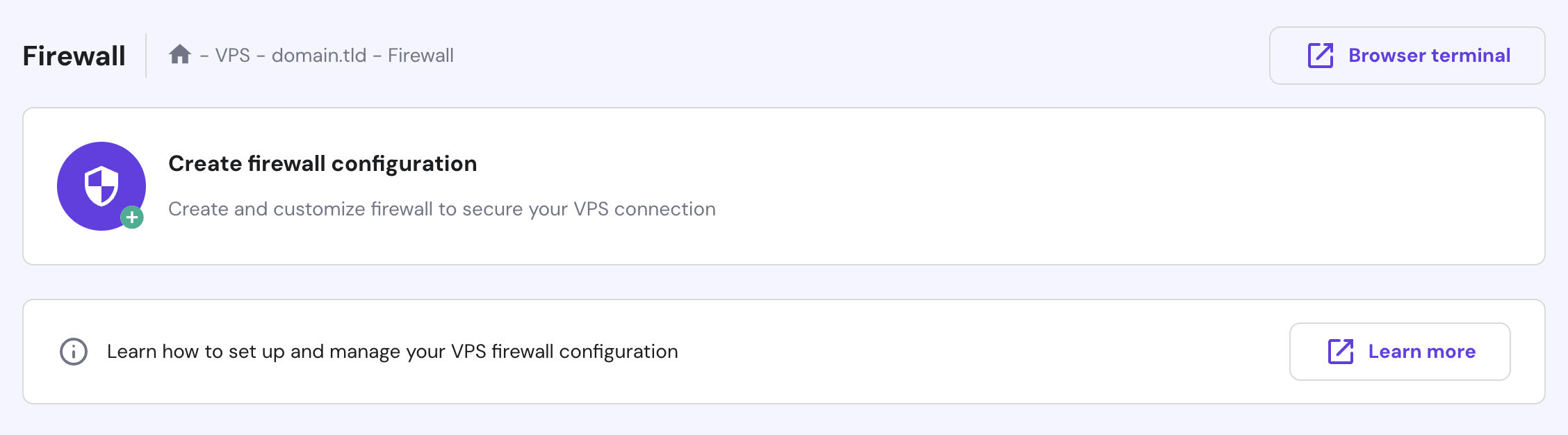
Additionally, our robust malware scanner provides proactive monitoring and security for your VPS by detecting, managing, and cleaning compromised and malicious files.

You can activate both features via the Security menu on hPanel’s VPS dashboard.
Execute rolling updates and rollbacks
Kubernetes excels with its rolling update strategy, which allows for old containers to be gradually phased out and replaced by new versions.
This approach ensures seamless transitions and zero-downtime deployments, maintaining uninterrupted service and providing a superior user experience even during significant application updates.
Use Minikube for local development and testing
If you prefer to develop your applications locally before deploying them to the server, consider using Minikube. It’s a tool for setting up Kubernetes single-node clusters on local machines, and it’s perfect for building, testing, and learning.
Follow these steps to get Minikube started on a Debian-based machine:
- Download the latest Minikube binary:
curl -LO https://storage.googleapis.com/minikube/releases/latest/minikube_latest_amd64.deb
- Install Minikube using the Debian package:
sudo dpkg -i minikube_latest_amd64.deb
- Start Minikube on your machine:
minikube start
- Create a sample deployment with kubectl:
kubectl create deployment hello-minikube --image=kicbase/echo-server:1.0
- Expose the deployment to port 8080, which effectively creates a service:
kubectl expose deployment hello-minikube --type=NodePort --port=8080
- Launch your service:
kubectl get services hello-minikube
minikube service hello-minikube
Now, you can access your application by typing http://localhost:8080/ in the browser.
Troubleshooting common Kubernetes issues
Here, we’ll cover some common Kubernetes issues and how to address them effectively:
Pod failures
Pod failures occur when these components do not function as expected, disrupting the availability and performance of your applications. Common reasons for pod failures include:
- Resource constraints. Pods may fail due to insufficient CPU, memory, or other resources on the node, leading to resource exhaustion.
- Misconfigurations. Errors like specifying an incorrect image name or mounting the wrong volumes can cause failures.
- Image issues. Problems such as missing dependencies or image pull failures can prevent pods from running correctly.
Here are steps to troubleshoot pod failures:
- Use the kubectl describe pod [pod_name] command to get detailed information about the pod’s state, including events, logs, and configuration specifics. Look for error messages that might indicate the cause of the failure.
- Check the pod’s resource requests and limits in its configuration to ensure they align with what is available on the node.
- Execute kubectl logs [pod_name] to review the logs of the pod’s containers, which often contain clues about errors or operational issues.
- Ensure that the pod’s image references, environment variables, volume mounts, and other settings are correct.
- Resolve any network-related issues, such as DNS configuration or connectivity problems that might be affecting the pod.
- If the node itself is experiencing issues, resolve these or allow Kubernetes to reschedule the pod to a healthy node.
Networking problems
Networking issues in a Kubernetes cluster can disrupt communication between pods and services, impacting your applications’ functionality. Here are some common network-related problems:
- Service connectivity. Failures in service communication can stem from misconfigured service definitions, inappropriate network policies, or underlying network problems.
- DNS resolution. Problems with DNS can disrupt service discovery and communication between pods, as these often rely on DNS to identify each other.
- Network partitioning. In distributed systems, such disruptions can isolate nodes, leading to data inconsistency and service disruptions.
Here’s how to address networking issues:
- Ensure that service names and ports are correctly configured. Use kubectl get services to inspect service details.
- Check that your network policies are set correctly to control traffic flow between pods. Policies should be configured to either allow or deny traffic as required.
- Confirm that DNS settings within Kubernetes and at the cluster level are correct. Use tools like nslookup or dig to test DNS resolution within your cluster.
- If using network plugins like Calico or Flannel, review their configurations and logs for potential issues.
- Utilize kube-proxy to handle network communication between services and pods efficiently.
- Enhance security by implementing network policies that restrict traffic. They protect your cluster from unauthorized access and unwanted network connections.
Persistent storage challenges
In Kubernetes, managing persistent storage is crucial for running stateful applications. However, improper management can lead to data loss, application disruptions, and degraded performance. Here are some common issues in this area:
- Resource allocation. Underestimating storage needs can lead to data loss, while overprovisioning can result in unnecessary expenses.
- Mismatches between persistent volume (PV) and storage class. Misconfigurations between PVs and storage classes can cause compatibility issues, complicating the attachment of the correct storage to your pods.
- Data loss. This can occur due to various reasons, including pod crashes, deletions, or hardware failures.
Here’s the guide to solving persistent storage challenges:
- Regularly review your application’s storage needs and adjust resource requests and limits accordingly. Use metrics and monitoring tools to identify under- or over-provisioned resources.
- Confirm that your PVs and storage classes are appropriately matched. Review your storage class configuration to ensure it meets desired characteristics like performance and access modes.
- Explore data recovery options such as snapshots to recover lost or corrupted data. Consider backup solutions that integrate well with your storage provider to facilitate data restoration.
- Automate the backup process to ensure consistent and regular data protection. Implement automated backup solutions or scripts that run at scheduled intervals.
- Opt for storage solutions that can scale quickly to meet increasing demands. Implement storage systems that can dynamically expand as your containerized applications require more storage.
Cluster scaling and performance
Scalability is a crucial feature of Kubernetes, enabling applications to adapt to varying workloads. However, as your applications grow, you might encounter scaling challenges and performance bottlenecks, such as:
- Resource contention. Competition among pods for resources like CPU and memory can lead to performance issues, with constrained pods failing to function optimally.
- Network congestion. Increased traffic may saturate network bandwidth, resulting in communication delays and performance degradation.
- Inefficient resource management. Inappropriate setting of resource requests and limits can lead to wastage.
Here are key strategies to optimize performance and scaling:
- Regularly assess resource requests and limits for your pods and adjust these values based on application needs and resource availability.
- Use HorizontalPodAutoscaler (HPA) to dynamically scale pods based on resource utilization or custom metrics. This allows your applications to manage traffic surges automatically without manual intervention.
- Monitor network traffic and apply network policies to manage traffic flow effectively. Consider using advanced container network interfaces (CNI) and plugins to enhance network performance.
- Employ kube-controller-manager for automated scaling of nodes based on resource demands, enhancing responsiveness to workload changes.
- Review and refine your containerized application code to ensure efficient resource utilization. Follow container orchestration best practices to boost performance.
- Periodically remove unused Docker images, containers, services, and volumes to free up resources. Use commands like docker system prune for Docker and kubectl delete for Kubernetes resources to maintain a clean environment.
Conclusion
Kubernetes is a powerful tool that simplifies the management and deployment of applications, ensuring they run smoothly on servers across local and cloud environments.
In this Kubernetes tutorial for beginners, you’ve learned about its core components and key features, set up a clustered environment, and deployed your first application using this platform.
By adhering to best practices and proactively addressing challenges, you can fully leverage this open-source system’s capabilities to meet your container management needs.
Kubernetes tutorial FAQ
This section answers some of the most common questions about Kubernetes.
What is Kubernetes used for?
Kubernetes is primarily used for container orchestration. It automates the deployment, scaling, and management of containerized applications, ensuring efficient resource utilization, enhanced scalability, and simplified lifecycle management in cloud-native environments.
Is Kubernetes the same as Docker?
No, they serve different purposes. Docker is a platform for containerization that packages applications into containers. Kubernetes, on the other hand, is a system that manages these containers across a cluster, supporting Docker and other container runtimes.
How do I start learning Kubernetes?
Begin by understanding the basics with the official Kubernetes tutorial and documentation. Then, set up a Kubernetes cluster, either locally or with a cloud provider. Apply what you’ve learned by deploying and managing applications. Join online forums and communities for support and further guidance.
Is Kubernetes suitable for small projects? Is it mainly for large-scale applications?
While Kubernetes offers robust features ideal for managing complex, large-scale applications, it can be overkill for smaller projects due to its complexity in setup and ongoing maintenance. Smaller projects might consider simpler alternatives unless they require the specific capabilities of Kubernetes.

Ariffud is a Technical Content Writer with an educational background in Informatics. He has extensive expertise in Linux and VPS, authoring over 200 articles on server management and web development. Follow him on LinkedIn.