AI Assistant vs. AI Agent: What’s the Difference?
Sep 11, 2026
/
By Ksenija
/
13 min Read
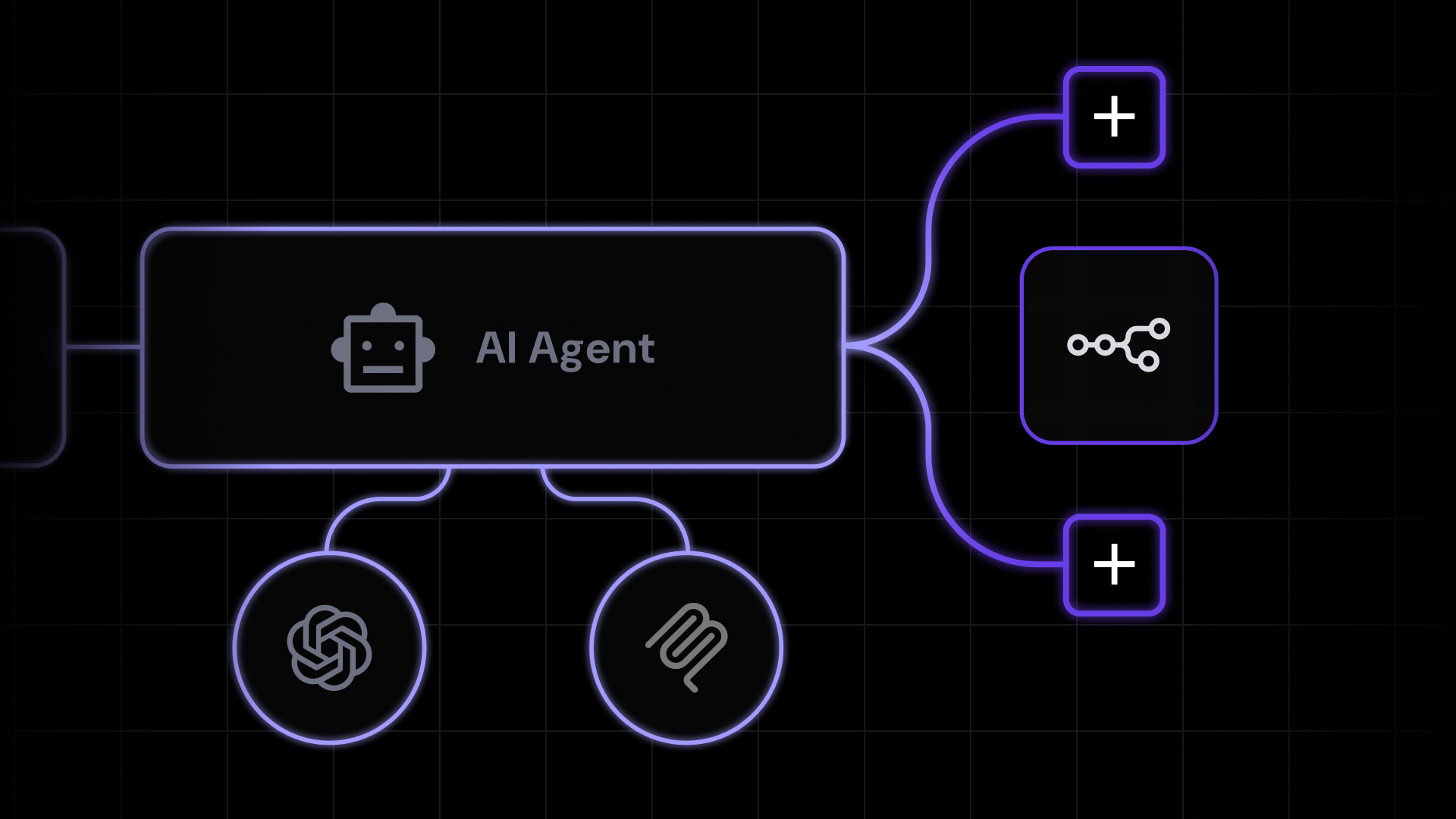
An AI assistant responds to prompts, while an AI agent pursues goals. Assistants generate answers, drafts, and summaries one request at a time.
Agents receive an objective, plan the required steps, use external tools, and continue working until the goal is complete or human input is required.
Many modern AI products combine both approaches, which makes the distinction less obvious at first glance.
A chatbot may answer questions like an AI assistant while also searching the web, using external tools, or automating parts of a workflow.
Understanding how assistants and agents differ makes it easier to choose the right approach for the task you want to accomplish.
Practical differences between an AI assistant vs. AI agent:
Feature | AI assistant | AI agent |
Primary purpose | Answer questions and generate content on request | Complete goals through connected actions |
Autonomy | Low. Waits for the next instruction | High. Decides the next step within the goal |
Human involvement | Continuous. User drives every turn | Minimal. Human sets the goal and reviews the outcome |
Planning ability | None or shallow within a single reply | Breaks goals into subtasks and orders them |
Memory | Short session memory, sometimes limited long-term memory | Persistent workflow state across steps and sessions |
Tool integration | Optional, usually a single call at a time | Central. Uses APIs, databases, and business systems |
What is an AI assistant?
An AI assistant is an application built around a large language model (LLM) that helps users complete tasks through natural language conversations.
Instead of interacting with the underlying model directly, users communicate with the assistant by asking questions, giving instructions, or describing what they want to accomplish.
Familiar examples include ChatGPT, Microsoft Copilot, Google Gemini, and Anthropic’s Claude.
The distinction between the assistant and the LLM is similar to the relationship between a car and its engine.
The engine generates the power, but it isn’t something you drive on its own. The car turns that engine into a usable product by adding the steering wheel, pedals, dashboard, and other components needed to operate it.
Likewise, the LLM provides the reasoning and language generation, while the AI assistant adds the interface and features that make the model useful in everyday work.
The defining characteristic of an AI assistant is that the user remains in control of the workflow.
Every task begins with a prompt, and every next step depends on another instruction from the user. The assistant can answer questions, summarize documents, generate content, or help solve problems, but it doesn’t independently decide what to do after completing the current request.
How an AI assistant works
An AI assistant combines a large language model (LLM) with software that manages conversations, user inputs, files, and optional tools. The assistant coordinates the interaction, while the LLM performs the reasoning and generates the response.
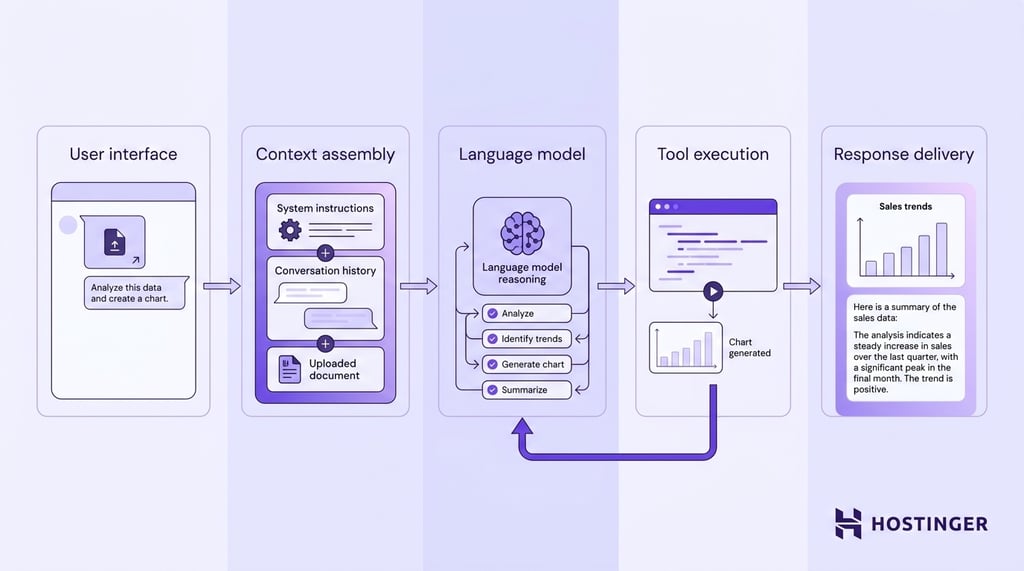
Let’s say you give it this prompt:
“Review this quarterly sales report, identify the three biggest sales trends, create a chart showing revenue by month, and summarize the findings in plain English.”
Although the interaction feels like a single conversation, several components work together behind the scenes.
User interface
The interaction begins in the assistant’s interface. Besides the prompt itself, the assistant receives the uploaded sales report, the previous conversation, and any instructions already associated with the chat.
The interface doesn’t analyze that information; it simply collects everything needed for the request.
Context assembly
Before the LLM sees the request, the assistant builds a single context containing several pieces of information:
- System instructions that define how the assistant should behave
- The current prompt
- Relevant conversation history
- The uploaded sales report
- Any additional information retrieved by the application
This combined context becomes the input sent to the language model. If the conversation becomes too long, the assistant may summarize or discard older messages so everything fits within the model’s context window.
Language model
The LLM receives the assembled context and reasons about the request. In this example, it recognizes that the user wants four things: analyze the report, identify the main trends, generate a chart, and write a plain-language summary.
The model generates the response one token at a time. If no external tools are required, the generated text becomes the final answer.
Tool execution
Not every request can be completed with language generation alone. In this example, creating a chart requires running code.
The LLM determines that a code execution tool is needed and returns a structured instruction instead of immediately producing the final response.
The assistant receives that instruction, executes the code, captures the resulting chart, and sends the result back to the LLM.
The model then incorporates the chart into its final answer, along with the written summary.
The same process applies to other tools. Depending on the request, the assistant may perform a web search, generate an image, search uploaded files, or retrieve information from connected applications before asking the LLM to continue.
Response delivery
Once all required steps are complete, the assistant presents the completed response to the user.
The conversation remains available for follow-up questions, but the workflow ends there.
The assistant doesn’t analyze future reports, schedule reminders, or decide what to do next unless instructed.
What can an AI assistant do?
An AI assistant is good at tasks that can be completed through conversation. The user asks a question, requests a piece of work, reviews the response, and decides what should happen next.
Every interaction follows that pattern, even when the conversation continues for many prompts.
Common AI assistant tasks include:
- Creating and improving content. Drafting emails, reports, articles, presentations, marketing copy, or social media posts. The assistant can also rewrite existing content to change the tone, improve readability, shorten or expand the text, or adapt it for a different audience.
- Exploring ideas. Brainstorming product names, campaign concepts, article outlines, interview questions, or alternative approaches to a problem. Because the interaction is conversational, users can refine ideas through multiple follow-up prompts.
- Understanding information. Summarizing long documents, explaining technical concepts, comparing alternatives, answering questions, or extracting key points from reports, meeting notes, and research papers.
- Supporting technical work. Generating code, explaining programming concepts, debugging errors, writing documentation, or helping to interpret technical output. Similar workflows also apply to spreadsheets, formulas, and structured data.
- Working with multiple content types. Modern AI assistants can combine text generation with capabilities such as web search, file analysis, image generation, and code execution. Rather than switching between separate applications, users can complete many everyday tasks within a single conversation.
Specialized products such as AI email assistants follow the same interaction model. They focus on a specific task (drafting, replying to, or refining emails), but still rely on the user to review the output and decide the next step.
Across all of these examples, the interaction model remains the same. The assistant provides information, suggestions, or generated content, while the user decides what to ask next, which responses to keep, and when the task is complete.
Advantages of AI assistants
AI assistants are designed for interactive work. They perform best when you want to explore ideas, create content, solve problems, or analyze information through conversation while remaining in control of every step.
Key advantages include:
- Ease of use. Most AI assistants require nothing more than a chat interface. Users can start asking questions immediately without designing workflows, configuring integrations, or learning a new system.
- Fast feedback and iteration. Every response becomes the starting point for the next question. Instead of restarting the task, users can ask the assistant to rewrite, expand, simplify, or explain its previous answer until it meets their needs.
- Versatility across many tasks. The same assistant can write an email, summarize a report, explain a technical concept, translate a document, generate code, or analyze uploaded files simply by changing the prompt.
- Supporting human decision-making. AI assistants provide suggestions, drafts, and explanations, but users decide which outputs to accept, modify, or ignore.
What is an AI agent?
An AI agent is a software application that combines a large language model (LLM) with planning, memory, tools, and workflow logic so it can pursue a goal across multiple steps.
While the LLM provides reasoning and language generation, the surrounding application enables the model to plan work, use tools, maintain context, and complete tasks across multiple steps.
The defining characteristic of an AI agent is autonomy within a task. Instead of requiring a new prompt after every response, the agent continues working toward the requested outcome by deciding what to do next based on the current state of the workflow.
Human input is only required when the task is complete, additional information is needed, or the workflow reaches a predefined boundary.
Unlike an AI assistant, which waits for the user’s next instruction after every response, an AI agent owns the workflow between the initial request and the outcome.
You can use this kind of agent ready-made – agentic AI at Hostinger provides specialists you run without building the workflow yourself.
How an AI agent works
An AI agent operates as a reasoning loop. At its core sits a language model, but that model is wrapped in additional machinery that lets it plan, remember, and take action in the real world.
The result is a system that can accept a broad objective and work toward it without a person guiding every move.
Consider a request such as:
“Review last month’s support tickets, group them by root cause, and draft a report highlighting the top three issues.”
No single reply can satisfy that request.
The agent must reach into a ticketing system, process potentially hundreds of records, apply reasoning to categorize them, and then produce a written deliverable.
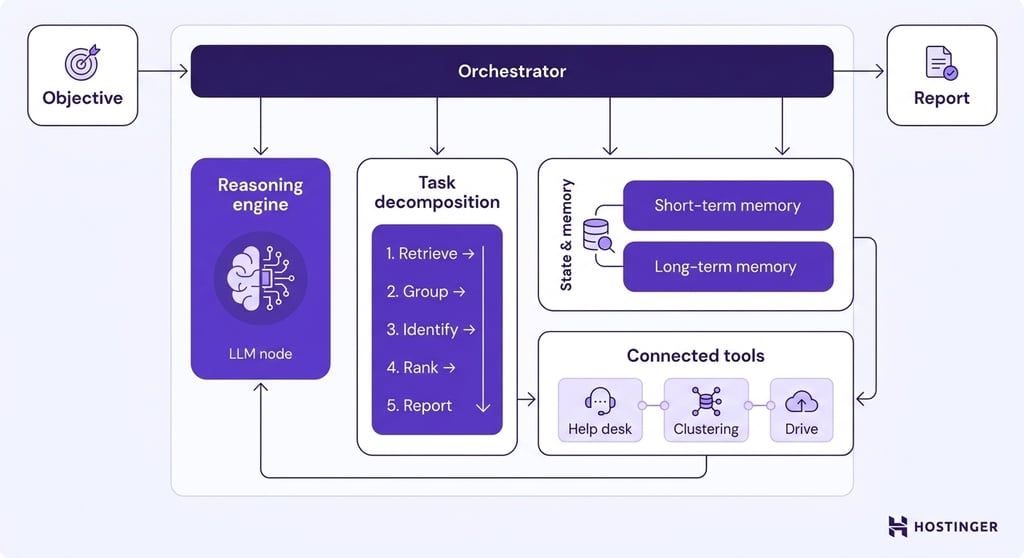
Several distinct components make that possible.
Reasoning engine
The LLM acts as the reasoning engine. It interprets the user’s objective, understands what information is needed, and decides which step should happen next.
In this example, the model recognizes that producing a useful report first requires retrieving the support tickets, then grouping them by common issues, identifying recurring root causes, and only then writing the final summary.
As new information becomes available, the LLM evaluates the results and determines the next action.
If the retrieved tickets are missing category labels, the model may decide that they need to be classified before the analysis can continue.
Task decomposition
Before carrying out any work, the agent converts the user’s objective into a sequence of smaller tasks.
For the support ticket example, that plan might include:
- Retrieving last month’s support tickets.
- Grouping tickets by common themes.
- Identifying recurring root causes.
- Ranking the issues by frequency and severity.
- Generating the final report.
The plan is not fixed. As new information becomes available, the agent can add, remove, or reorder steps.
If the ticketing system returns incomplete data, for example, the agent may insert an additional data-cleaning step before continuing the analysis.
State and memory
Because the workflow spans multiple actions, the agent needs to remember what has already happened.
Short-term memory stores the current state of the agentic workflow, including completed steps, retrieved data, intermediate results, and any decisions made along the way.
Without that information, the agent would have to repeat the same work every time it moved to the next step.
Some agents also maintain long-term memory, allowing them to remember user preferences, reporting formats, or business-specific information across multiple sessions.
Long-term memory improves consistency but must be kept up to date. Outdated information can cause the agent to make decisions based on assumptions that are no longer correct.
Connected tools
The LLM can reason about what should happen next, but it cannot directly access databases, send emails, or query business applications.
Instead, it tells the surrounding application which tool should be used and what information it needs.
The application executes that request, retrieves the result, and sends it back to the LLM so the reasoning process can continue.
In the support ticket example, one tool retrieves records from the help desk platform, another groups similar tickets together, and a third saves the completed report to a shared drive.
Orchestrator
The orchestrator is the control layer that keeps the entire workflow moving. Individual components each perform a specific job: the LLM reasons, the tools execute actions, and the memory stores information.
The orchestrator ensures those components work together in the correct order.
Returning to the support ticket example, the orchestrator first sends the user’s request to the LLM.
When the model decides it needs ticket data, the orchestrator retrieves that data from the help desk system and passes the results back to the model.
If the LLM next requests a clustering tool, the orchestrator runs it and returns the grouped tickets. The same pattern repeats until the report is complete.
Because every action passes through the orchestrator, it can also apply workflow rules. It may require human approval before sending the finished report, stop the workflow if a tool repeatedly fails, or record every action for monitoring and auditing.
What can an AI agent do?
The agent can retrieve information, make decisions based on what it finds, update business tools, and continue until the workflow reaches a defined outcome.
Common use cases include:
- Marketing – Researching competitors, combining search and analytics data, identifying content opportunities, and turning the findings into an SEO brief or campaign plan.
- Sales – Enriching lead records, reviewing previous CRM activity, drafting personalized outreach, updating the pipeline, and scheduling the next follow-up.
- Customer support – Retrieving account and order data, checking internal policies, preparing a grounded response, updating the support ticket, and escalating the case with the relevant context attached.
- Website operations – Monitoring uptime and performance, investigating detected issues, creating incident summaries, and routing recommended fixes to the appropriate person or system.
- Finance and administration – Extracting information from invoices, validating it against purchase records, routing approvals, updating accounting systems, and flagging exceptions for review.
- Business reporting – Pulling data from several applications, calculating key metrics, compiling recurring reports, and distributing them to the relevant stakeholders.
The important pattern across these AI agent examples is that the agent carries out a task through several connected steps without stopping after one response.
Advantages of AI agents
Planning, tool use, and workflow execution allow AI agents to solve problems that would require multiple prompts in a traditional AI assistant.
Those capabilities provide several practical advantages:
- Complete work from start to finish. Instead of stopping after generating a response, an AI agent can break a goal into smaller tasks, execute them in the required order, and adjust the workflow as new information becomes available.
- Work across multiple business systems. Agents can retrieve customer information from a CRM, query an analytics platform, update a database, send an email, and record the results without requiring users to move between applications manually.
- Maintain context throughout a workflow. Every completed step, retrieved document, and intermediate result becomes part of the workflow state. The agent can continue from where it left off instead of repeating previous work.
- Automate repetitive operational processes. Tasks such as invoice processing, lead qualification, report generation, customer onboarding, or support-ticket routing can run consistently without requiring the same sequence of prompts every time.
- Handle many workflows consistently. Once a workflow has been tested, the same agent can apply the same business rules across hundreds or thousands of similar requests. Human effort shifts from executing routine tasks to reviewing exceptions and improving the workflow itself.
The difference between an AI assistant and an AI agent
The defining difference between an AI assistant and an AI agent is how much independent work the tool performs after receiving a task.
An assistant returns a response and waits. An agent runs a plan and returns an outcome.
Under the hood, the difference is architectural: an assistant is a model plus a chat interface, while an agent is a model plus a planner, memory, tools, and an orchestrator that ties them together.
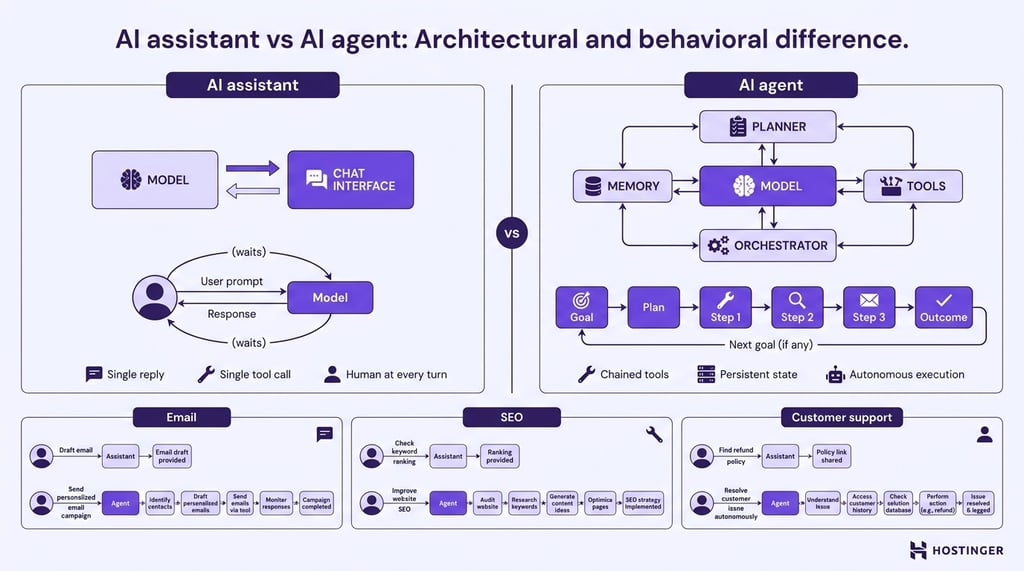
Those architectural differences become more obvious when you look at how each system behaves while completing real work:
- Every interaction starts from a different place. You ask an assistant a question or give it a prompt. You give an agent an objective, then let it determine how to reach it.
- The result isn’t the same kind of output. An assistant returns information, such as an answer, a summary, or a draft. An agent returns a completed outcome, whether that’s updating a CRM record, scheduling a meeting, or resolving a support ticket.
- Progress follows a different rhythm. After answering, an assistant hands control back to the user. An agent keeps moving through the workflow until it reaches the goal, encounters a stopping condition, or requires human approval.
- Unexpected situations are handled in different ways. When an assistant runs into missing information, it usually asks for another prompt. An agent can retrieve additional data, retry failed actions, choose an alternative path, or escalate the issue if human input is required.
- Success is measured by different criteria. A good assistant produces a useful response. A good agent completes the assigned task accurately, safely, and within the limits it was given.
The line has blurred at the edges. Many AI assistants now include agent-like features such as tool use and multi-step reasoning, and many AI agents also expose a chat interface.
That overlap is a design choice, not a redefinition. What still separates them is the amount of independent execution between the request and the result.
Three side-by-side scenarios make the gap concrete:
Email. An assistant writes a follow-up when asked: “Write this follow-up.” An agent researches the lead, checks the CRM for prior conversations, drafts the email, schedules a follow-up sequence, and notifies the salesperson when a reply arrives.
SEO. An assistant suggests keywords. An agent pulls keyword data, reviews competitor pages, generates a content brief, hands it to a writing step, publishes the draft to the CMS, and reports rank changes weekly.
Customer support. An assistant drafts a response. An agent retrieves the customer’s account from the billing system, checks recent ticket history, drafts the response grounded in that data, updates the ticket status, and either sends the reply or hands it to a human for approval.
Common limitations of AI assistants and AI agents
AI assistants and AI agents have different limitations, and understanding them helps you decide where human oversight is still needed.
Key limitations of AI assistants:
- Dependence on well-written prompts. Vague or incomplete instructions often lead to vague, incomplete, or irrelevant responses because the assistant can only work with the information it receives.
- Risk of hallucinations. AI assistants may generate incorrect facts, citations, code, calculations, or references while presenting them confidently.
- Limited business context. Unless company documents, policies, or other information are provided during the conversation, the assistant has no knowledge of your business.
- Limited conversation memory. Very long conversations may exceed the model’s context window, causing earlier information to be summarized or omitted.
Key limitations of AI agents:
- Greater security and permission risk. Because agents can interact with business systems, excessive permissions increase the potential impact of mistakes or unintended actions.
- Dependence on clearly defined goals. Ambiguous objectives can lead agents down inefficient or incorrect execution paths because they optimize for the instructions they receive.
- Increased complexity and error propagation. Mistakes made early in a workflow can influence later decisions, making long-running processes more difficult to troubleshoot and recover.
- Greater privacy and data governance requirements. Connecting CRMs, databases, APIs, and other business systems requires careful management of access, sensitive data, and regulatory compliance.
Human oversight remains important for both technologies, especially when outputs affect customers, finances, legal matters, or other high-impact decisions.
An AI assistant can produce an incorrect response, while an AI agent can act on incorrect reasoning across multiple steps and systems.
AI agents for business owners
You don’t need to build your own AI agent to start benefiting from agentic AI. If your goal is to automate common business tasks rather than develop a custom AI system, pre-built agents provide the fastest path to adoption.
Hostinger Agent follows that approach. Rather than offering a single general-purpose assistant, it gives you a team of specialized AI experts working together. Each focused on a different business function, including strategy, SEO, marketing, content, customer communication, legal guidance, and sales outreach.
Pre-built agents are not the only option. If your business requires workflows beyond what ready-made agents provide, AI agent builders can reduce the amount of custom development involved.
They offer visual tools and reusable components for designing, testing, and managing agent workflows instead of building every part of the architecture from scratch.
Workflow automation platforms provide another approach. For example, you can build an AI agent with n8n by connecting an LLM to APIs, databases, and business applications through a visual workflow that coordinates each step automatically.
The trade-off is flexibility. Pre-built agents work well for the business tasks they were designed to support, while custom-built agents give you greater control over integrations, workflow logic, and how the system behaves.
The right choice depends on whether you need a ready-to-use solution or an AI agent tailored to your own business processes.
AI assistant vs. AI agent: Which one should you use?
Choosing between an AI assistant and an AI agent starts with one question:
Do you want help completing the work, or help completing the task?
If you expect to stay involved throughout the process, an AI assistant is usually the better fit.
If you want software to continue working after your initial request, an AI agent becomes the stronger choice.
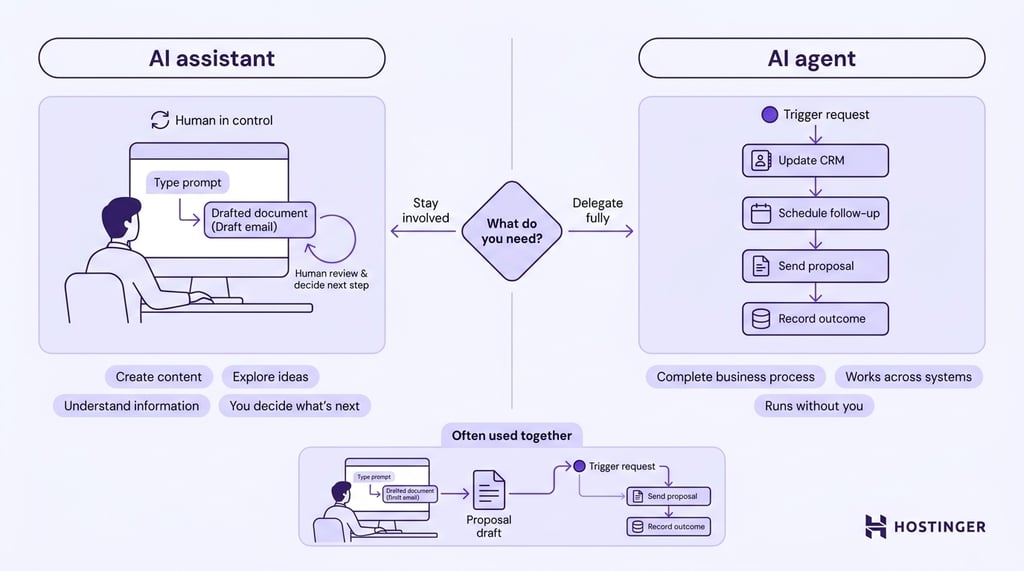
Choose an AI assistant when you need to:
- Create or improve content. Draft emails, rewrite documents, translate text, generate code, or adjust writing for a different audience or tone.
- Explore ideas. Brainstorm marketing campaigns, article outlines, product names, or alternative approaches to a problem through an interactive conversation.
- Understand information. Summarize reports, explain technical concepts, compare options, or answer questions about documents you’ve provided.
- Keep control of every step. When you want to review the output, refine the prompt, and decide what happens next yourself, an AI assistant provides guidance without taking further action.
Choose an AI agent when you need to:
- Complete a business process. Automate workflows that involve several decisions and actions before reaching the final outcome.
- Work across multiple systems. Retrieve information from one application, update another, and continue the workflow without manual handoffs.
- Reduce repetitive operational work. Delegate recurring processes such as report generation, customer onboarding, invoice processing, or lead qualification.
- Respond to changing information. Adjust the remaining workflow when new data, errors, or unexpected situations arise instead of following a fixed sequence of steps.
Many businesses combine assistants and agents within the same workflow. An AI assistant might draft a customer proposal or prepare a project summary, while an AI agent delivers the document, updates the CRM, schedules follow-up tasks, and records the outcome in the appropriate business systems.
The assistant contributes the language and reasoning. The agent carries the work through to completion.
This article is a localized version of AI Assistant vs. AI Agent: What’s the Difference?, originally published in English.
All of the tutorial content on this website is subject to Hostinger's rigorous editorial standards and values.

Ksenija is a digital marketing enthusiast with extensive expertise in content creation and website optimization. Specializing in WordPress, she enjoys writing about the platform’s nuances, from design to functionality, and sharing her insights with others. When she’s not perfecting her trade, you’ll find her on the local basketball court or at home enjoying a crime story. Follow her on LinkedIn.