AI agents vs. LLM: What’s the difference?
Sep 11, 2026
/
By Ksenija
/
12 min Read
An LLM is a language model that interprets a prompt and generates text, code, or other structured outputs.
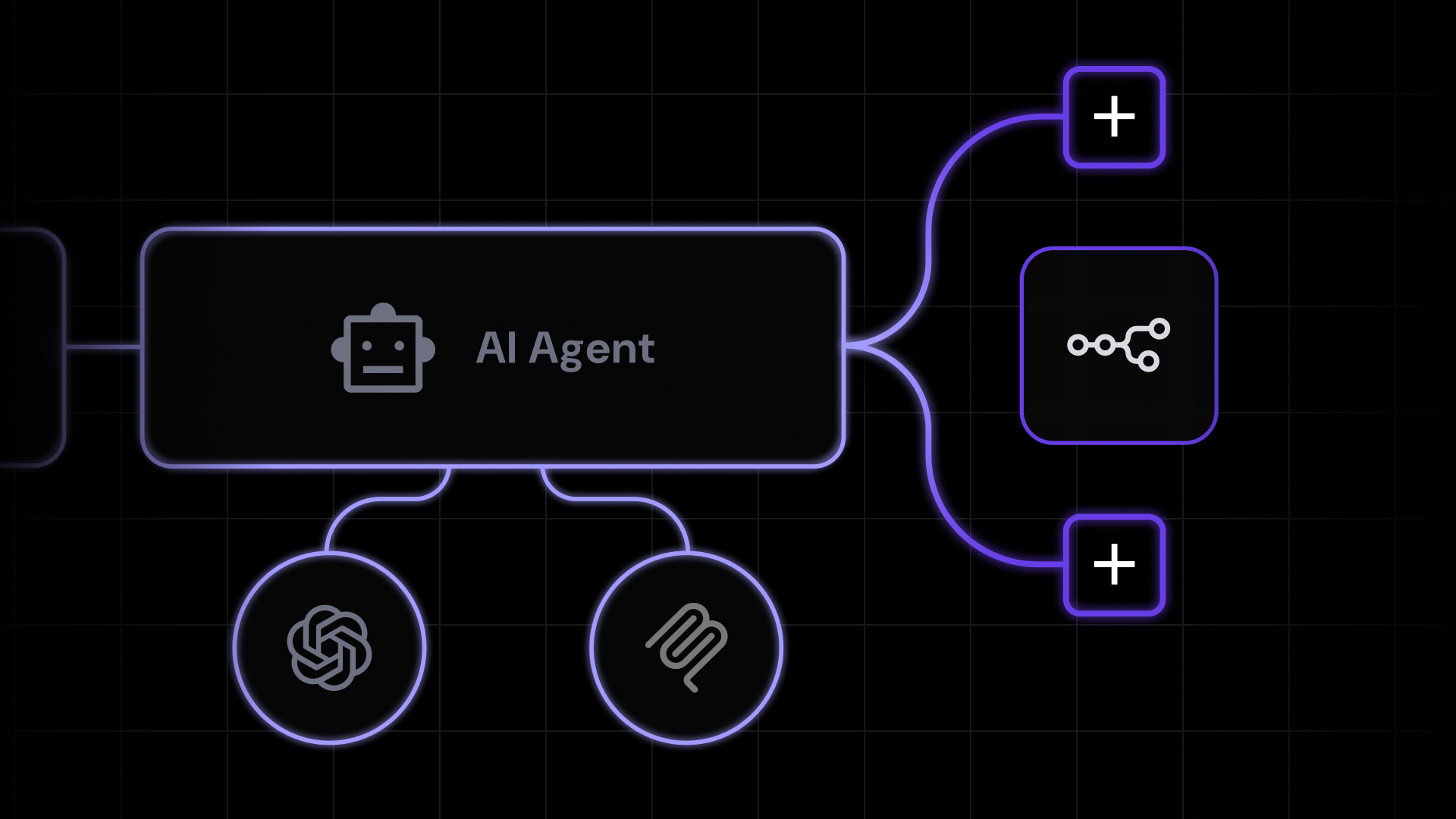
An AI agent builds on an LLM by adding planning, tool use, memory, and workflow execution, allowing it to complete multi-step tasks autonomously.
The main difference is what happens after the model generates a response. An LLM stops once it has answered the prompt.
An AI agent uses that response to decide what to do next, interact with external systems, and continue working until it reaches the requested goal.
AI agents vs. LLM at a glance:
| Feature | LLM | AI agent |
| Primary purpose | Understand and generate language | Complete multi-step tasks |
| How it works | Responds to a single prompt at a time | Plans, acts, evaluates, and adjusts until a goal is met |
| Autonomy | Reactive — waits for input | Goal-driven — pursues an objective |
| Planning | None built in | Breaks goals into ordered steps |
| Memory | Limited to the current context window | Persistent memory across a workflow |
| Tool access | None on its own | Calls APIs, browsers, databases, and applications |
| External integrations | Requires another application to connect | Connects directly to CRMs, email, calendars, and more |
What is an LLM?
A large language model is an AI model trained on massive amounts of text to recognize patterns in language and generate human-like responses.
It serves as the language generation engine behind applications such as ChatGPT, Claude, and Gemini, allowing them to answer questions, write content, summarize information, translate text, and generate code.
An LLM’s role is to interpret a request and generate a response. Capabilities such as planning, long-term memory, tool use, and multi-step task execution belong to the application built around the model, not the LLM itself.
How an LLM works
An LLM works by learning patterns in language and using those patterns to generate new text.
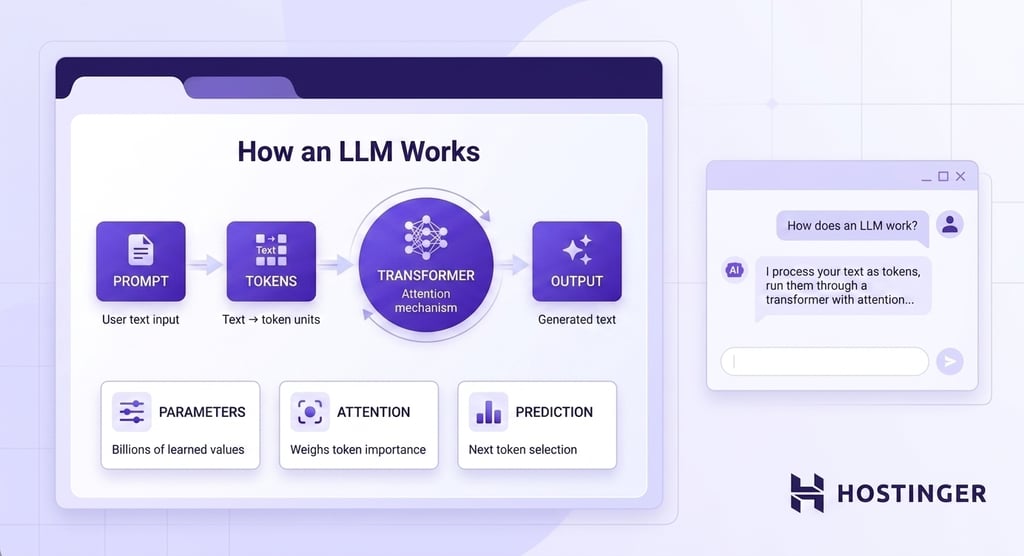
During training, the model processes massive amounts of books, articles, websites, code, and other written content.
Rather than memorizing complete answers, it learns statistical relationships between words, phrases, and ideas by adjusting billions of internal values called parameters.
Those parameters capture the patterns the model relies on when responding to new prompts.
When a user submits a prompt, the model first converts the text into smaller units called tokens.
A token may represent a whole word, part of a word, punctuation, or another piece of text.
Breaking text into tokens allows the model to process language as structured data rather than raw sentences.
TITLE
Most LLM-based tools have a token limit per request, known as the context window. Keeping your prompts concise and removing unnecessary filler helps you stay within limits and often produces more focused responses.
The tokens then pass through a neural network architecture called a transformer.
A transformer analyzes every token in relation to the others, allowing the model to understand how different parts of the prompt influence one another.
Unlike older language models that processed text one word at a time, transformers evaluate the relationships between all tokens in the prompt simultaneously, making it easier to understand context, long sentences, and complex instructions.
The transformer’s core component is the attention mechanism. Attention assigns greater importance to the words and phrases that matter most for generating the next token.
For example, if a prompt asks:
Explain how AI agents differ from LLMs.
The model recognizes that AI agents, LLMs, and differ are much more important than words such as how or from.
Attention allows the model to focus on the parts of the prompt that carry the most meaning while still considering the surrounding context.
After analyzing the prompt, the model begins generating a response. It predicts the most likely next token based on the prompt, the tokens it has already generated, and the language patterns learned during training.
Each newly generated token becomes part of the context for predicting the next one. The process repeats until the response is complete.
Although the output can appear thoughtful or conversational, the model is not retrieving a stored answer or following a predefined script.
Every response is generated from scratch by repeatedly predicting the next token based on probability and context.
What can an LLM do?
An LLM can perform any task that can be expressed as a language problem.
It can write an email, summarize a report, explain a technical concept, or generate code simply because each task can be expressed as predicting the most appropriate sequence of text.
Common LLM applications include:
- Writing and rewriting content – Drafting emails, blog posts, reports, product descriptions, and other documents, or rewriting existing text in a different tone, style, or format.
- Summarizing information – Condensing long articles, meeting notes, research papers, or conversations into concise summaries while preserving the key points.
- Answering questions – Explaining concepts, answering factual questions, or responding to queries based on the information provided in the prompt.
- Translating and adapting text – Translating between languages, simplifying technical writing, or adjusting content for different audiences and reading levels.
- Generating and explaining code – Writing code from natural language instructions, explaining existing code, identifying bugs, or suggesting improvements.
- Brainstorming ideas – Generating outlines, marketing ideas, product names, interview questions, or alternative approaches to a problem.
The same LLM performs every task using the same underlying mechanism.
Changing the prompt changes the objective, while the model applies the language patterns learned during training to generate an appropriate response.
A user asks:
“Write a polite reply explaining that the meeting has been moved to Thursday.”
The LLM generates the email and stops once the response is complete. It doesn’t send the email, update the calendar, or notify the attendees because those actions require software that can interact with external systems.
An AI agent builds on the LLM by connecting it to tools and workflows that can carry out those additional steps.
Advantages of LLMs
LLMs are powerful because they can perform many language tasks with minimal setup. Their simple architecture makes them easy to integrate into applications while remaining flexible enough to handle a wide range of language-based tasks.
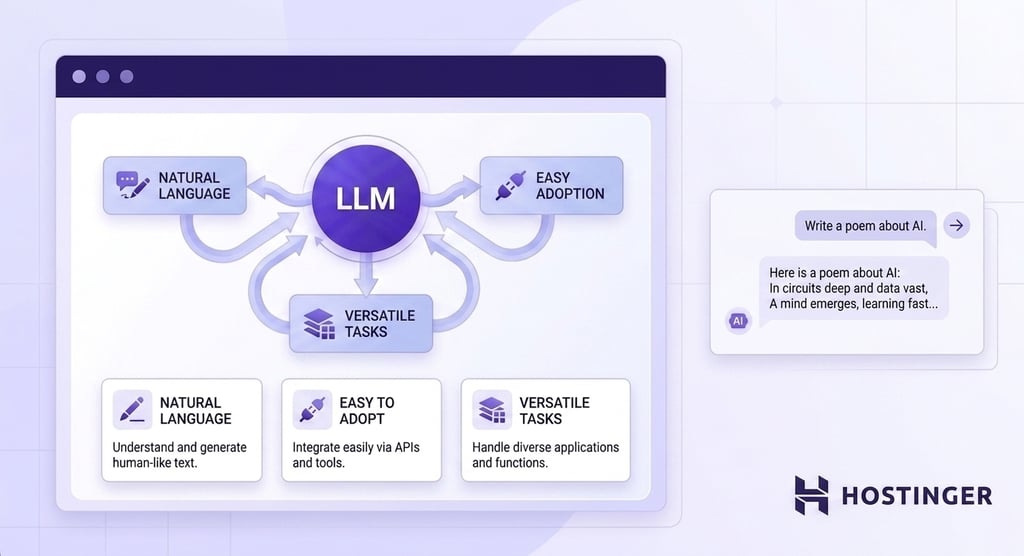
Key advantages of LLMs include:
- Excellent at understanding natural language. LLMs learn patterns across billions of examples of human writing, allowing them to draft content, answer questions, explain concepts, summarize information, and adapt their writing style to different audiences and contexts.
- Easy to adopt. Most applications only need access to an LLM API and a well-designed prompt to start generating useful responses. There is no need to build workflow orchestration, configure tools, or manage multiple AI components.
- Versatile across language tasks. The same model can write emails, generate code, translate text, summarize reports, brainstorm ideas, and edit documents. Changing the prompt changes the task without requiring a different model.
Limitations of LLMs
The same simplicity that makes LLMs easy to use also limits what they can do on their own. Without additional software, they cannot interact with external systems, maintain long-term context, or work toward a goal beyond a single response.
LLMS’s most prominent limitations:
- No task independence. An LLM can generate instructions, code, or recommendations, but it cannot send an email, update a CRM, query a database, or complete other real-world actions without another application connecting it to those systems.
- No persistent memory. An LLM only works with the information available in the current conversation or context window. Long-term memory requires the surrounding application to store and retrieve previous interactions.
- No built-in access to external systems. An LLM cannot retrieve live business data, browse internal documents, call APIs, or interact with software unless those capabilities are added through external tools.
- Occasional inaccurate information generation. LLMs may produce incorrect facts, fabricate details, or cite sources that don’t exist while presenting the response confidently. Human review remains important whenever accuracy has significant consequences.
What is an AI agent?
An AI agent is an application that combines a large language model (LLM) with additional software components that allow it to complete tasks autonomously.
While the LLM provides the ability to interpret instructions and generate responses, the surrounding application adds capabilities such as planning, memory, tool access, and workflow execution.
Those components work together to achieve a specific goal. Instead of stopping after generating a response, AI agents can decide what to do next, retrieve information from external systems, interact with software, evaluate the results of their actions, and continue working until the task is complete or requires human input.
Common AI agent examples include sales assistants, research assistants, SEO assistants, and customer support agents.
The LLM generates the reasoning and written content, while the agent decides which steps to perform, calls the necessary tools, tracks progress, and completes the workflow.
How an AI agent works
An AI agent works by combining an LLM with software components that manage planning, memory, tool execution, and workflow state.
The LLM provides the reasoning needed to interpret the user’s goal and decide what to do next, while the surrounding application coordinates the work and carries out the required actions.
Imagine a business owner asking an AI agent:
“Analyze my website traffic, identify the pages losing the most organic traffic, suggest improvements, and email me a summary.”
Completing that request requires much more than generating text. The agent must plan the work, retrieve data from external systems, remember previous results, and decide what to do after each step.
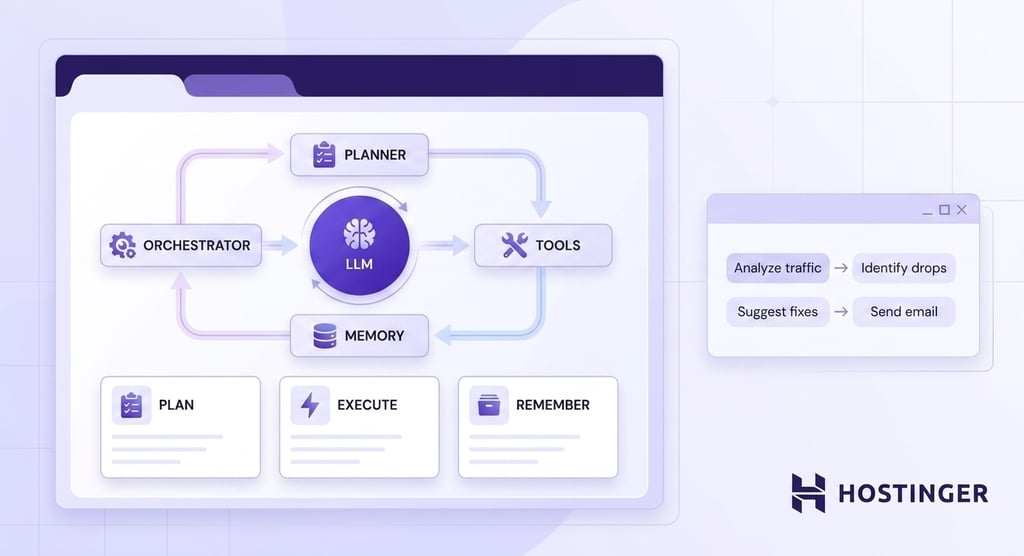
Different components are responsible for different parts of that workflow.
LLM
The LLM interprets the user’s goal and reasons through the problem. In this example, it recognizes that the request involves several objectives: retrieving website analytics, identifying traffic declines, recommending improvements, and preparing an email summary.
As information becomes available, the LLM also evaluates the results and decides what should happen next.
If the analytics reveal that several blog posts have lost traffic, the LLM determines that those pages should be analyzed before drafting recommendations.
Planner
The planner converts the user’s request into a sequence of smaller tasks.
For this workflow, the plan would look like this:
- Retrieve website analytics.
- Identify pages with declining organic traffic.
- Analyze possible reasons for the decline.
- Generate optimization recommendations.
- Draft a summary email.
Some agents create the entire plan before starting, while others revise it as new information becomes available.
If the analytics reveal a technical issue instead of a content problem, the planner may adjust the remaining steps accordingly.
Memory
Memory stores the information gathered throughout the workflow.
After retrieving the analytics, the agent remembers which pages lost traffic, which keywords declined, and which recommendations have already been generated.
Without memory, the agent would need to retrieve and analyze the same information every time it moved to the next step.
Memory also preserves the workflow state, allowing the agent to resume where it left off if additional reasoning is required.
Warning! AI agent memory can carry over outdated or incorrect information between sessions. If an agent's memory is not periodically reviewed or cleared, it may base future decisions on stale data, leading to inaccurate outputs.
Tools
Tools allow the agent to interact with systems outside the language model.
In this example, one tool retrieves Google Analytics data, another accesses Google Search Console, and the third one sends the completed email.
The tools perform the actions, while the LLM decides when each tool should be used and how the returned information affects the rest of the workflow.
Orchestrator
The orchestrator coordinates the entire process.
It sends the initial request to the LLM, executes each tool call, stores intermediate results in memory, and determines which component should act next.
Once the recommendations have been generated and the email drafted, the orchestrator invokes the email tool to deliver the final report before ending the workflow.
Together, these components create a continuous reasoning loop. The LLM decides what should happen next, while the orchestrator coordinates the agentic workflow and manages how information moves between the other components.
Tools perform the required actions, memory preserves the current state, and the planner updates the remaining tasks as new information becomes available.
The cycle repeats until the requested outcome has been achieved.
What can an AI agent do?
AI agents are designed to complete goals that require reasoning, multiple decisions, and interactions with external systems.
Unlike an LLM, which stops after generating a response, an AI agent can continue working across several steps.
Let’s take a sales flow as an example. A sales agent begins by researching a prospect and retrieving previous interactions from a CRM.
Based on that information, it drafts a personalized outreach email, schedules a follow-up meeting, updates the customer record, and prepares the outreach package for a sales representative to review.
A single business objective becomes a coordinated workflow spanning multiple applications.
The same principle applies across many business processes. Whenever a task requires retrieving information, making decisions, using software, and coordinating several steps, an AI agent can manage the entire workflow from start to finish.
Common AI agent use cases include:
- Research – Gather information from multiple sources, compare findings, verify claims, and produce structured reports instead of simply summarizing a single document.
- Customer support – Retrieve customer records, search internal documentation, interpret company policies, update support systems, and draft responses within the same workflow.
- SEO – Analyze search performance, identify technical and content issues, recommend optimization opportunities, and prioritize improvements across multiple pages.
- Marketing – Coordinate campaign planning, audience research, content creation, performance analysis, and publishing across different marketing channels and tools.
- Reporting – Collect data from multiple business systems, calculate metrics, generate summaries, create visualizations, and distribute reports automatically.
- Scheduling – Check calendars, find suitable meeting times, send invitations, update schedules, and notify participants without requiring manual coordination.
- CRM management – Create or update customer records, qualify leads, assign follow-up tasks, and track customer interactions throughout the sales process.
- Workflow automation – Connect multiple applications, APIs, and business systems so information flows automatically between them without requiring users to complete each step manually.
Advantages of AI agents
The biggest advantage of an AI agent is its ability to move from a user request to a completed outcome.
Instead of stopping after a single response, it can coordinate multiple steps, interact with external systems, and adapt its workflow as new information becomes available.
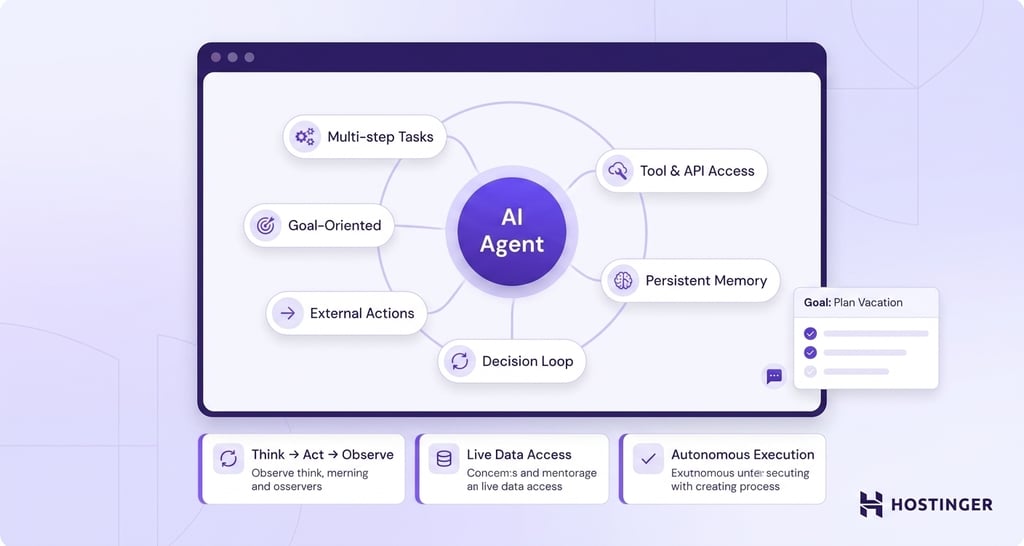
The main advantages of AI agents are:
- Multi-step task execution. An agent breaks a broad goal into smaller tasks, executes them in sequence, and adapts the workflow as new information becomes available. A standalone LLM can propose a plan, but it doesn’t execute and manage a multi-step workflow on its own.
- Tool and API access. Agents call web search, databases, CRMs, spreadsheets, and internal APIs. This lets them work with live data rather than only the information locked in the model’s training set.
- Persistent workflow context. Agent frameworks track previous actions, retrieved documents, intermediate results, and workflow state across multiple steps. LLMs rely on the surrounding application to provide previous context and don’t maintain persistent task state on their own.
- Autonomous decision loops. An agent runs a think-act-observe cycle. It decides which tool to call, reads the result, and picks the next step. That loop is the core of agentic AI and is what separates it from a single model call.
- Action in external systems. Agents connect language generation with real-world actions. While an LLM can draft an email or produce SQL code, an agent can send the email, execute the query, update a CRM, or publish content as part of the same workflow.
- Goal-oriented output. Users specify the desired outcome, while the agent determines how to achieve it. A standalone LLM can suggest the necessary steps, but the user is responsible for carrying them out or prompting the model through each stage. An agent plans the workflow, executes the required actions, and continues until the goal is complete.
Limitations of AI agents
The capabilities that make AI agents more autonomous also make them more complex. Every additional reasoning step, tool integration, and workflow introduces trade-offs that affect cost, implementation, security, and maintenance.
AI agents’ most noticeable limitations include:
- Higher operational cost. Every reasoning step is another model call. A five-step agent can consume five to twenty times the tokens of a single LLM query for the same starting prompt.
- Failure modes are harder to debug. When an agent picks the wrong tool, misreads a result, or loops on itself, tracing the root cause requires inspecting the full action trail, not just a single response.
- Permission and security risk. Agents that can send emails, process payments, or modify records require carefully scoped permissions. Poorly configured access increases the risk of unintended or unauthorized actions.
- Setup complexity. Agents need tool definitions, prompt structures, memory logic, and guardrails. A plain LLM only needs a prompt.
AI agents for business owners
You don’t have to build your own AI agent to benefit from this technology. If your goal is to automate common business tasks rather than develop a custom AI system, ready-to-use agents can help you get started much faster.
Hostinger Agent is one example. It gives you a team of specialized AI experts – a business AI agent, content marketing AI agent, SEO AI agent, AI marketing agent, legal AI agent, AI customer service agent, and AI sales agent – each pre-trained for a specific business area.
Instead of configuring an LLM, designing workflows, and integrating external tools yourself, you pick the expert that matches the task and describe what you need in plain language. Each one comes with ready-to-use skills, so rather than crafting the perfect prompt, you follow guided steps to a finished result.
Because the agents work as one team that shares your business context, you don’t have to manually stitch their work together.
You might shape a marketing strategy with the business AI agent, have the SEO AI agent identify target keywords, use the content marketing AI agent to produce the content, and let the AI marketing agent build the promotion plan — each step building on the last, without starting from a blank slate.
Pre-built AI agents offer a faster path to adoption, but they also involve trade-offs.
If your business needs highly customized workflows, proprietary system integrations, or fully automated processes across multiple applications, you’ll likely need to build your own AI agent architecture.
If you decide to build your own solution, AI agent builders can simplify the process by providing visual tools for designing and managing workflows.
Workflow automation platforms another option. For instance, you can build an AI agent with n8n by connecting an LLM to business applications, APIs, and other automation tools through a visual workflow.
If your objective is to automate common business tasks more quickly, however, pre-built agents provide a much faster way to get started.
LLM vs. AI agent: Which one should you use?
The right choice depends on how much work needs to happen between the user’s request and the final outcome.
If generating text solves the problem, an LLM is often the simpler and more efficient option. If completing the task requires planning, decisions, external systems, or multiple steps, an AI agent becomes a better choice.
Choose an LLM when you need to:
- Draft, edit, or rewrite content. Writing emails, summarizing meeting notes, translating documents, improving existing copy, or generating code are all tasks that begin with a prompt and end with a response.
- Analyze or explain information. LLMs are well-suited to answering questions, explaining technical concepts, comparing ideas, interpreting documents, or extracting key information from text you provide.
- Brainstorm and refine ideas. Whether you’re exploring marketing angles, creating an article outline, naming a product, or improving a business proposal, an LLM lets you iterate quickly by refining prompts and evaluating different responses.
- Keep the decision-making in your hands. When you want to review every response, adjust the direction, and decide what happens next yourself, an LLM provides suggestions without taking further action.
Choose an AI agent when you need to:
- Turn a business objective into a completed workflow. Instead of helping you write an outreach email, an AI agent can research the prospect, personalize the message, schedule a follow-up, and update your CRM.
- Connect information that lives in different systems. Many business processes require data from several applications before a decision can be made. An agent can retrieve that information, combine it, and use it to complete the next step.
- Reduce repetitive operational work. Workflows that employees repeat every day, such as creating reports, processing requests, or updating records, can often be delegated to an agent who follows the same process consistently.
- Respond to changing conditions. Business workflows rarely follow the same path every time. An agent can evaluate the outcome of each step and adjust the remaining work when new information changes the situation.
Best practices for using LLMs and AI agents
Successful AI projects depend as much on good implementation as on choosing the right model or agent.
These practical steps can help you improve reliability, reduce risk, and get more consistent results:
- Define clear objectives. AI performs best when the goal is specific. Instead of asking an LLM to “improve this article,” explain what you want to improve, such as readability, structure, or SEO. Likewise, an AI agent completes workflows more reliably when the desired outcome is clearly defined.
- Provide enough context. Neither LLMs nor AI agents know your business unless you provide the necessary information. Company policies, customer data, reference documents, and previous conversations all help produce more accurate and relevant results.
- Review important outputs. AI can generate incorrect information or make poor decisions when working with an incomplete context. Review content carefully before publishing it, and verify outputs that affect customers, finances, legal matters, or other high-impact business processes.
- Limit access to business systems. If an AI agent can send emails, update CRM records, or access internal databases, give it only the permissions required for the task. Restricting access reduces the impact of mistakes and improves security.
- Start with low-risk workflows. Automate repetitive internal tasks before relying on AI for customer-facing or business-critical processes. Expanding gradually makes it easier to identify issues and build confidence in the workflow.
- Refine prompts and workflows over time. AI systems rarely produce perfect results on the first attempt. Review the outputs, identify where the process can be improved, and update your prompts, instructions, or workflows accordingly.
This article is a localized version of AI agents vs. LLM: What’s the difference?, originally published in English.
All of the tutorial content on this website is subject to Hostinger's rigorous editorial standards and values.

Ksenija is a digital marketing enthusiast with extensive expertise in content creation and website optimization. Specializing in WordPress, she enjoys writing about the platform’s nuances, from design to functionality, and sharing her insights with others. When she’s not perfecting her trade, you’ll find her on the local basketball court or at home enjoying a crime story. Follow her on LinkedIn.