What are agentic workflows?
Sep 11, 2026
/
By Ksenija
/
14 min Read
Agentic workflows are AI-driven processes where an AI agent plans, executes, evaluates, and adjusts a series of actions until it completes a goal.
Unlike a chatbot that stops after generating a response, an AI agent continues working by deciding what to do next, using external tools, and verifying whether each step produced the expected result.
For example, a customer support agent can retrieve account information, check recent orders, and determine whether a refund meets company policy.
The agent then notifies the customer, logs the interaction in a CRM, and completes the request without requiring a new prompt after each step.
Every action informs the next one, allowing the workflow to adapt as new information becomes available.
Recent advances in large language models, tool calling, AI agents, and orchestration frameworks have made agentic workflows practical.
Language models provide the reasoning capabilities, tool calling connects agents with external systems, and orchestration frameworks coordinate every step of the process.
Combining these technologies allows AI to automate complex tasks that require planning, execution, and decision-making across multiple stages.
Agentic workflows vs. AI agents
Think of an AI agent as one component within a larger system. The agent analyzes the current situation, decides what to do next, and determines whether it needs additional information or external tools.
The workflow provides the structure that connects those decisions into a sequence of actions, preserves context between steps, and determines when the objective has been achieved.
Agentic workflows vs. AI agents quick overview:
| Feature | AI agent | Agentic workflow |
| Primary role | Reasons, plans, and makes decisions | Coordinates the entire process from start to finish |
| Scope | Performs a specific task | Combines tasks into a complete workflow |
| Tool use | Decides which tools to use | Connects tool calls, execution, and results |
| Memory | Uses available context while reasoning | Maintains workflow state throughout execution |
| Execution | Focuses on the current task | Continues until the objective is completed |
| Composition | A workflow may use one or more AI agents | Contains AI agents, tools, memory, and orchestration logic |
| Example | Deciding how to respond to a customer request | Retrieving customer data, applying company policies, generating a reply, updating the CRM, and sending the response |
How agentic workflows work
Agentic workflows complete tasks through a continuous cycle of planning, action, evaluation, and refinement.
Consider an agentic AI workflow that creates an SEO content strategy. The workflow doesn’t jump straight to writing a list of keywords.
It first identifies the business objective, researches competitors, analyzes search intent, groups related topics, checks ranking opportunities, and reviews the results before recommending a content plan.
Each action generates new information that influences the next decision, allowing the workflow to adapt as it progresses.
1. Interpret the request
Every agentic workflow begins by passing the user’s request to an AI agent.
Before planning or taking any action, the agent interprets the request and converts it into a structured objective that the workflow can execute.
The first step is to determine what the user is trying to accomplish. The agent identifies the desired outcome, extracts explicit requirements from the prompt, detects constraints such as deadlines or budgets, and determines which information is already available.
Modern language models perform this analysis by reasoning over the prompt and any additional context supplied by the application, such as previous conversations, uploaded documents, or business data.
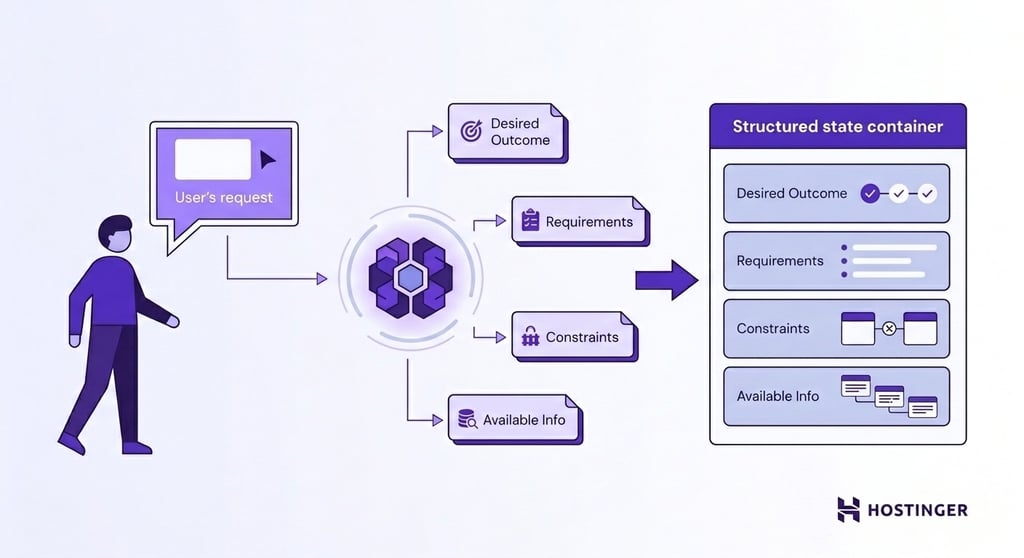
A request such as “Create an SEO content strategy for an online pet store” defines the deliverable but leaves several important questions unanswered.
Before planning the workflow, the agent needs to determine:
- Which products should the strategy prioritize?
- Which geographic market should the content target?
- Who are the store’s main competitors?
- Is the primary goal to increase organic traffic, generate sales, or build brand awareness?
The prompt rarely contains every answer. The agent identifies which details are already available and which ones still need to be collected.
Depending on the workflow, the next step might involve querying a CRM or product database, retrieving analytics data, searching the web through an API, reading internal documentation, or asking the user for clarification.
After gathering enough context, the workflow records everything it has learned in its current state.
The state acts as a shared source of information for the rest of the workflow. It stores the original objective, collected context, completed tasks, intermediate results, and any remaining work, allowing every subsequent step to build on previous decisions.
2. Decompose the tasks
With enough context available, the workflow moves from understanding the problem to deciding how to solve it.
The AI agent creates an execution plan by breaking the objective into smaller tasks, determining the order in which they should run, and identifying the tools or other AI agents each task requires.
Breaking a complex objective into smaller pieces is known as task decomposition.
Instead of treating “Create an SEO content strategy” as one large request, the agent divides it into individual tasks, such as:
- Research competitors.
- Collect keyword data.
- Group keywords by search intent.
- Identify content gaps.
- Recommend topic clusters.
- Generate a content calendar.
Each task has a clear purpose and produces an output that the next task can use. The workflow doesn’t generate the content calendar until it has finished the keyword research because the recommendations depend on that data.
The workflow also identifies task dependencies. A dependency exists when one task relies on the output of another.
For example, the workflow can’t cluster keywords until it has collected them, and it can’t prioritize content opportunities until the keyword clusters are complete.
Mapping these dependencies prevents the workflow from executing tasks in the wrong order.
3. Call tools and act
After the AI agent creates an execution plan, the application starts working through the tasks one by one.
Each task is sent to the AI agent together with the current workflow state, which contains the objective, collected context, and the results of previous steps.
The agent uses that information to determine whether it can complete the task immediately or needs additional data.
Some tasks only require reasoning. For example, the agent might group keywords by search intent or generate a content brief using information already stored in the workflow state.
Other tasks require information that the language model doesn’t have access to, such as live search rankings, customer records, or website analytics.
When external information or an external action is required, the agent generates a tool call. A tool call is a structured request that tells the application which tool to use and what information to retrieve or which action to perform.
The application executes the request, receives the result from the external system, and adds the new information to the workflow state before passing control back to the agent.
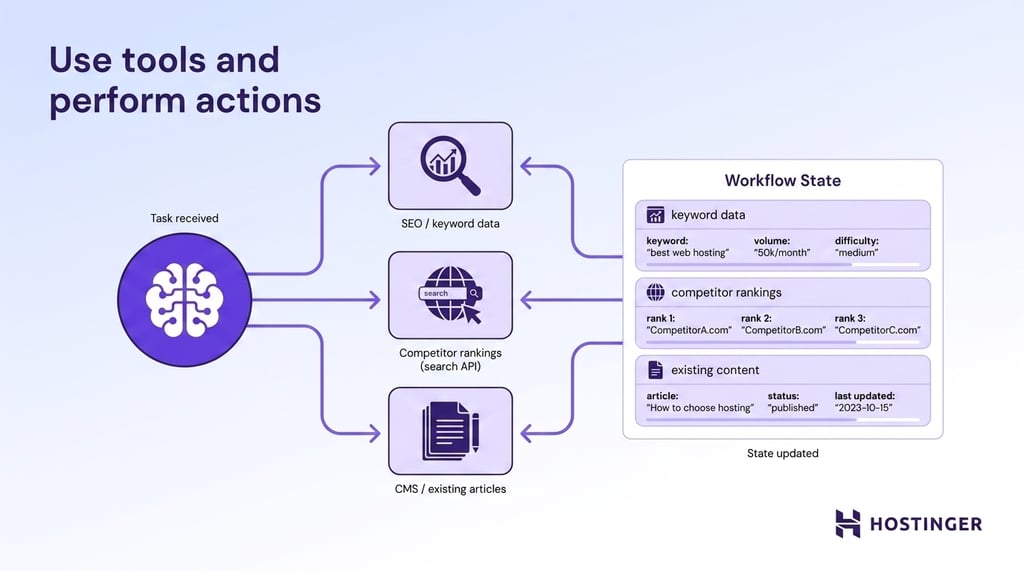
Imagine the workflow is creating an SEO content strategy. The agent first determines that it needs keyword data and competitor rankings before recommending content topics.
The application retrieves keyword metrics from an SEO platform, collects competitor rankings through a search API, and reads existing articles from the company’s CMS.
Each result becomes part of the workflow state, allowing the agent to identify content gaps and decide what to do next.
4. Reflect on the output
Completing a task does not guarantee that the result is correct or complete.
Before moving forward, the application passes the updated workflow state back to the AI agent for another reasoning pass.
The agent reviews the latest output against the original objective, task requirements, and available evidence.
This evaluation process is known as reflection. Reflection helps the agent detect missing information, inconsistent data, failed tool calls, calculation errors, or outputs that do not meet the expected quality.
Let’s say the agent is preparing an SEO content strategy. The workflow state contains keyword metrics, competitor rankings, and website analytics.
During reflection, the agent notices that competitor data covers only two websites, even though the plan requires five.
The agent marks the analysis as incomplete and requests another search before the strategy moves forward.
Reflection also catches failed external actions. An API might return partial data, a database query might produce no results, or an email service might reject a request.
The agent reviews the response and records the issue in the workflow state so the next step can address the problem.
5. Loop until the goal is met
After evaluation, the system chooses one of three paths: continue, revise, or stop.
A successful result moves execution to the next planned task. An incomplete result sends the task back for more research, another tool call, or a revised output. A blocked result asks the user for input or escalates the task to a human.
Completion happens only when the agent confirms that the original requirements have been satisfied.
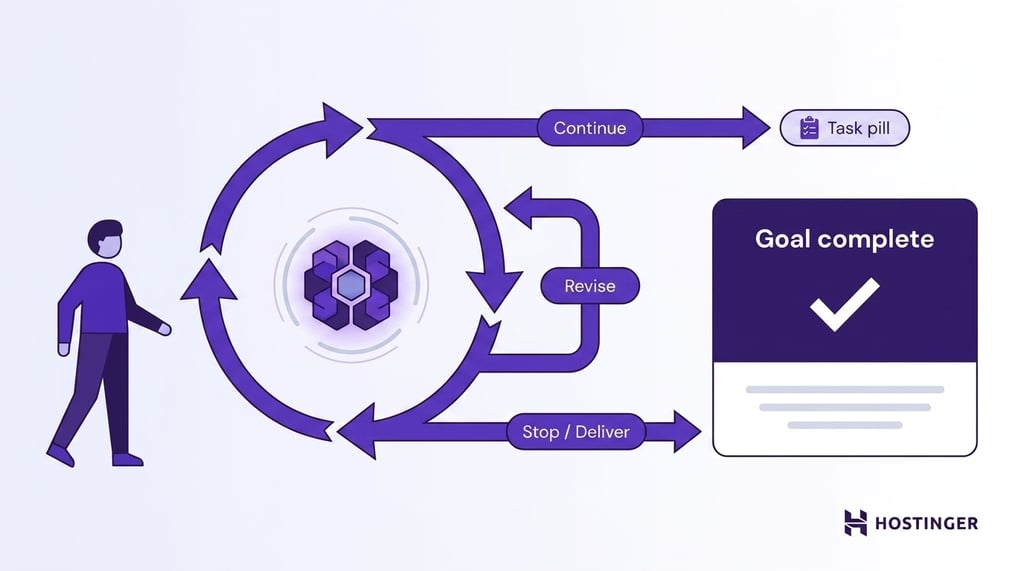
For the SEO strategy, that means the research is complete, keyword groups are validated, content gaps are identified, priorities match the business goal, and the final plan is ready to deliver.
The application then returns the final output to the user and closes the workflow.
The key difference from a one-shot AI prompt is the loop: the agent plans, acts, checks the result, and repeats the cycle until the task is complete or human input is needed.
Rather than building and maintaining that loop yourself, you can run these processes with ready-made agentic AI solutions that handle the planning, tools, and orchestration for you.
The technical architecture of an agentic workflow
The technical architecture of an agentic workflow combines a reasoning engine, a planner, workflow state, an orchestrator, memory, tool interfaces, and an execution engine into a single system.
Each component performs a distinct role, and together they enable the workflow to execute complex, multi-step tasks.
Large language model (LLM)
The large language model (LLM) is the reasoning engine of an agentic workflow. It interprets user requests, generates execution plans, decides when to use tools, evaluates intermediate results, and produces the final output.
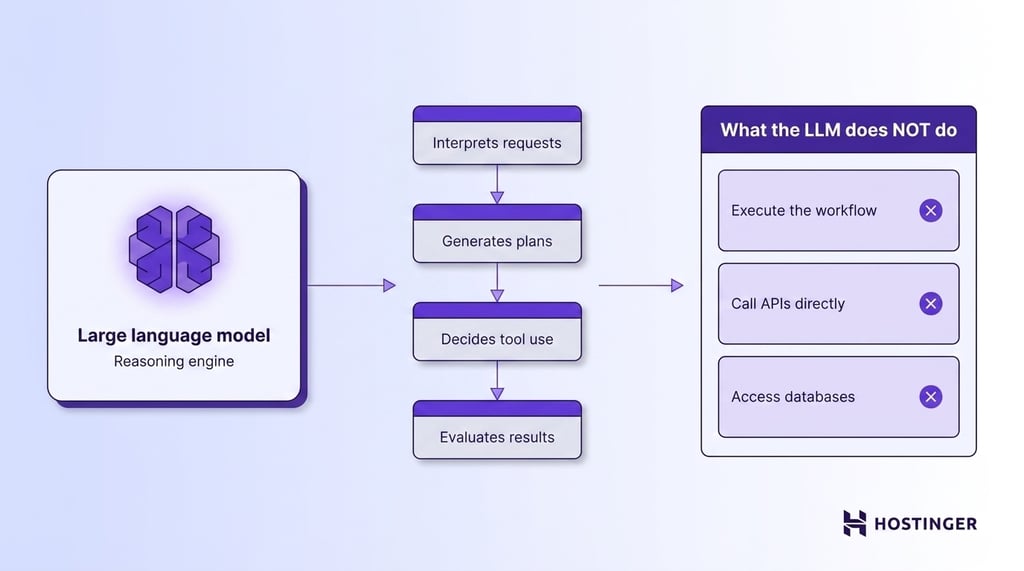
An LLM does not execute the workflow or communicate directly with external systems. Every interaction with databases, APIs, business applications, or other software happens through additional architectural components.
The model’s responsibility is reasoning: given the current workflow state, it determines what should happen next.
Modern workflows may use a single LLM throughout execution or combine several models. For example, one model might generate code, another reviews the output, and a smaller model classifies requests before they enter the workflow.
Planner
The planner converts a high-level objective into an executable plan. Depending on the framework, the planner can be implemented as a dedicated software component, an additional LLM call, or a combination of deterministic logic and AI reasoning.
The planner decomposes complex objectives into individual tasks, identifies dependencies between those tasks, and determines the order in which they should be executed.
More advanced planners also support dynamic replanning, updating the execution plan whenever new information changes the original objective or invalidates previous assumptions.
Workflow state
The workflow state is the shared data structure that connects every step of the workflow. It stores the information generated during execution and provides each component with the context needed to continue working.
A typical workflow state includes the original objective, completed tasks, intermediate results, tool outputs, retrieved documents, user inputs, pending actions, and any decisions made by the AI agent. Every reasoning step reads from the current state and writes new information back to it.
Orchestrator
The orchestrator manages workflow execution. It determines which task runs next, invokes the appropriate component, updates the workflow state, and decides when execution should continue, repeat, or stop.
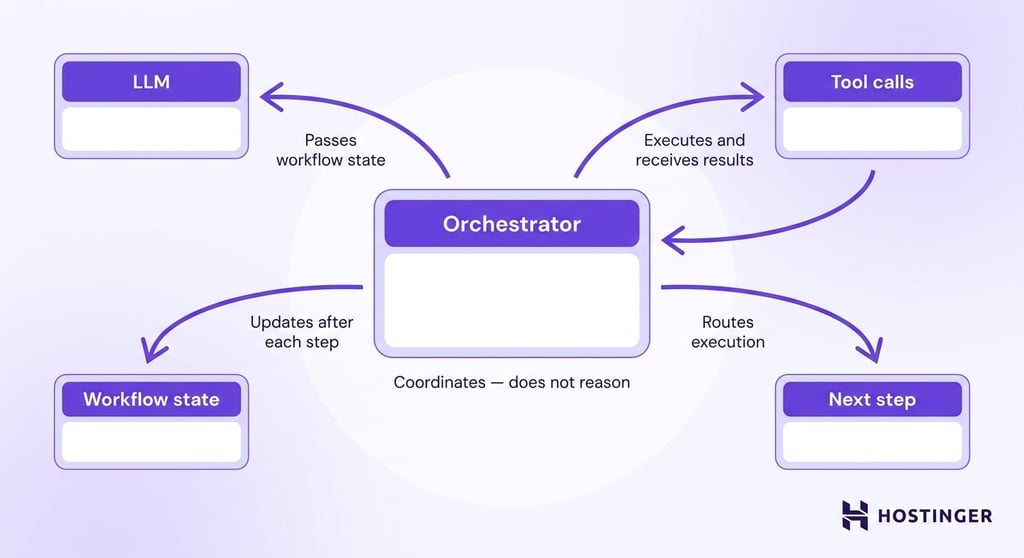
The orchestrator does not perform reasoning. Its responsibility is to coordinate the execution flow.
It passes the current workflow state to the LLM, executes tool calls, receives the results, updates the state, and routes execution to the next step defined by the workflow.
Every modern agent framework includes some form of orchestration layer. LangGraph uses graph-based execution, CrewAI coordinates specialized agents, and Microsoft’s Semantic Kernel orchestrates AI functions through planners and plugins.
Although the implementation differs, each framework solves the same coordination problem.
Tool interface
The tool interface provides a standardized way for the AI agent to interact with external systems.
Every tool defines the inputs it accepts, the action it performs, and the data it returns.
When the LLM determines that it needs external information or must perform an action, it generates a structured tool call.
The application validates the request, executes it against the appropriate service, and returns the result to the workflow state.
Tool interfaces connect agentic workflows to APIs, SQL databases, vector databases, search engines, CRM platforms, email services, content management systems, spreadsheets, and countless other business applications.
Standardized interfaces allow developers to replace or extend integrations without changing the reasoning logic inside the LLM.
Memory layer
The memory layer preserves information beyond the current reasoning step. Different types of memory serve different purposes, allowing workflows to retain context during execution and across multiple sessions.
Working memory stores the current workflow state while execution is in progress. Persistent memory stores long-term information such as customer preferences, previous conversations, project history, or business-specific knowledge that remains useful after the workflow finishes.
Many implementations also include vector databases as part of the memory layer. Rather than storing conversations sequentially, vector databases organize information according to semantic similarity.
The application can retrieve relevant documents, previous interactions, or knowledge articles by meaning instead of exact keywords, giving the LLM access to context that would otherwise exceed its context window.
Retrieval layer (RAG)
Retrieval-Augmented Generation (RAG) extends the LLM with external knowledge. Rather than relying entirely on information learned during training, the application retrieves relevant documents before asking the model to generate a response.
A typical RAG pipeline converts documents into vector embeddings, stores them in a vector database, performs similarity search for each request, and injects the retrieved documents into the LLM’s context.
The model then reasons over both the user’s request and the retrieved information.
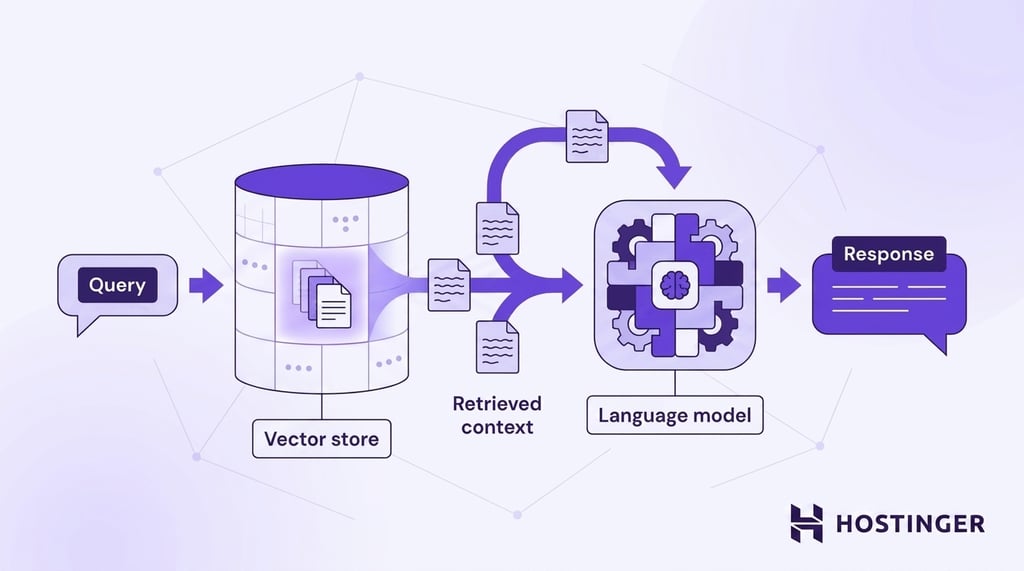
Separating knowledge retrieval from the language model keeps information current without retraining the model.
Internal documentation, support articles, product catalogs, compliance policies, and technical manuals remain searchable even as they change over time.
Execution engine
The execution engine runs the workflow according to the plan and orchestration rules. It manages task execution, retries failed operations, handles timeouts, coordinates parallel branches, and determines when a workflow has reached its completion criteria.
Long-running workflows rarely execute as a simple sequence of steps. Some tasks wait for external responses, others run simultaneously, and failed operations may require retries or alternative execution paths.
The execution engine manages those runtime decisions while preserving a consistent workflow state.
Separating execution from reasoning makes the system more reliable. The LLM focuses on decision-making, while the execution engine ensures every task runs in the correct order, handles failures predictably, and completes the workflow safely.
Multi-agent coordination
Multi-agent coordination distributes work across several AI agents while keeping them synchronized through a shared workflow state.
Each agent receives a specialized role and contributes its output to the overall workflow.
A coordinator assigns tasks, routes information between agents, resolves dependencies, and combines individual outputs into a final result.
One agent might perform research, another generate content, a third validate technical accuracy, and a fourth review compliance with business policies.
Real-world examples of agentic workflows
Businesses use agentic workflows across content, marketing, sales, customer support, analytics, legal operations, and internal knowledge management.
AI agent examples in this section demonstrate how an agentic workflow coordinates planning, tool use, memory, and evaluation to complete a business task.
SEO content workflow
Imagine an ecommerce company preparing to launch a new category of outdoor furniture. The objective is to grow organic traffic, but the execution requires far more than generating article ideas.
The workflow begins by creating a research plan. Keyword data comes from an SEO platform, competitor rankings from search results, historical traffic from Google Analytics, and existing articles from the CMS.
After collecting enough information, the AI agent groups keywords by search intent, identifies gaps in the current content strategy, estimates business value for each opportunity, and prioritizes which topics should be published first.
Before producing the final roadmap, the application reviews its recommendations against the original objective.
If competitor research is incomplete or keyword clusters overlap, another research cycle begins. Planning, retrieval, reflection, and memory all contribute to the final strategy.
Patterns used: Planning, tool calling, memory, reflection.
Customer support workflow
A refund request gives the AI agent a different kind of problem: the answer depends on policy, customer history, and the details of a specific order.
The agent cannot produce a reliable response from the message alone.
Order records, payment status, delivery details, previous support conversations, and refund rules provide the context for the decision.
The application retrieves those details from the ecommerce platform, CRM, help desk, and policy database before the agent evaluates the request.
If the order qualifies for a refund, the application prepares the refund action, updates the support ticket, and logs the outcome in the CRM.
The agent drafts a customer response that explains the decision clearly and matches the company’s tone.
A validation step checks the reply against the refund policy before the message is sent.
Patterns used: Tool calling, persistent memory, reflection, business rule validation.
Sales outreach workflow
An AI agent can automate campaign planning, audience research, and personalized outreach in a single workflow.
The process starts by defining the ideal customer profile and the campaign objective. Company records from the CRM are combined with public information such as recent funding announcements, hiring activity, product launches, industry news, and previous conversations.
Bringing those sources together gives the marketing AI agent enough context to rank opportunities based on relevance instead of treating every prospect equally.
Personalization comes next. The agent identifies the business challenge most relevant to each company, drafts outreach tailored to that context, and recommends the best sequence of follow-up emails.
Reflection reviews every message for factual accuracy, verifies that company-specific details are correct, and removes unsupported claims before the campaign is launched.
Unlike the customer support workflow, where decisions follow company policies, sales workflows focus on prioritization and personalization.
The quality of the outcome depends on combining information from multiple sources before the first email is ever written.
Patterns used: Planning, tool calling, memory, reflection.
Reporting workflow
Generating a weekly business report starts by collecting performance data from every system included in the analysis.
Analytics platforms, advertising dashboards, CRM software, financial systems, and ecommerce platforms each contribute to the picture.
After the data is collected, the AI agent identifies significant changes, compares results against business targets, and investigates relationships between metrics.
A decline in revenue, for example, becomes more useful when the workflow links it to lower website traffic, reduced advertising spend, or a drop in conversion rates.
The final report combines key metrics with explanations, risks, and recommended actions.
Before the report is delivered, a validation step checks that calculations are consistent across data sources and that every conclusion is supported by the available evidence.
Patterns used: Tool calling, memory, reflection, data validation.
Legal review workflow
Answering an employee’s question or reviewing a contract begins by retrieving the relevant information.
The application searches internal documentation, technical manuals, company policies, previous contracts, approved clause libraries, and regulatory guidance before passing the results to the AI agent.
For an employee question, it generates an answer supported by company documentation.
During contract review, it compares clauses against internal policies, highlights unusual language, identifies missing provisions, and cites the relevant references for every issue it flags.
A reflection step verifies that each conclusion is supported by the retrieved evidence and that no relevant documents were overlooked.
If the available information is incomplete or contradictory, the application performs another retrieval or routes the task to a human reviewer.
Patterns used: Retrieval-augmented generation (RAG), tool calling, persistent memory, reflection.
Challenges of implementing agentic workflows
Agentic workflows are one of the fastest-growing automation trends, but greater autonomy also introduces technical and operational challenges that require careful design and oversight, such as:
- Hallucinations and reasoning errors. Language models can reach incorrect conclusions or generate inaccurate information. A mistake early in the workflow can influence every subsequent decision unless validation steps detect and correct it.
- Incorrect tool selection. AI agents choose tools based on the current objective and available context. Ambiguous instructions or missing information can lead to unnecessary API calls, irrelevant data retrieval, or failed actions.
- Poor context management. Missing requirements, incomplete workflow state, or outdated information can cause the agent to make decisions based on the wrong assumptions. Maintaining an accurate workflow state keeps every step aligned with the original objective.
- Memory limitations. Long-running workflows eventually exceed a model’s context window. External memory systems and retrieval mechanisms preserve important information, but developers still need strategies for deciding what information remains relevant over time.
- Security and permission management. Connecting AI agents to business systems increases operational risk. Access controls, authentication, and audit logs ensure agents can perform only the actions they are authorized to execute.
- Cost and latency. Every reasoning step, tool call, and validation pass consumes tokens and increases execution time. More autonomous workflows usually produce better results, but they also require more computing resources.
- Monitoring and debugging. Multi-step workflows are harder to troubleshoot than single prompts because failures can originate from reasoning, tool calls, external systems, or workflow logic. Detailed execution logs help identify where problems occur.
- Human oversight and governance. Legal, financial, and strategic decisions still require human review. Approval checkpoints reduce risk while allowing AI agents to automate the research, analysis, and preparation that precede those decisions.
Best practices for building effective agentic workflows
Start with a well-defined business goal. Every workflow should solve a specific problem, such as qualifying sales leads, reviewing contracts, or generating SEO content plans.
A clear objective gives the AI agent measurable success criteria and prevents it from pursuing unnecessary tasks or retrieving irrelevant information.
Break complex work into smaller stages. Long, open-ended workflows become difficult to validate because every decision depends on the previous one.
Separating research, analysis, decision-making, and execution into individual stages makes failures easier to identify, simplifies testing, and allows individual steps to be improved without redesigning the entire workflow.
Packaging a recurring stage as a reusable AI agent skill takes this further, letting the same defined procedure be reused across workflows and updated in one place instead of rebuilt each time.
Pro tip
Use a simple input/output contract for each stage — define what data enters the step and what it must return before building it. This makes individual stages independently testable and easier to swap out as your workflow evolves.
Give each AI agent a single responsibility. Specialized agents produce more predictable results because each one focuses on a narrow objective.
A research agent gathers information, a writing agent generates content, and a review agent verifies quality. Clear responsibilities also make multi-agent systems easier to debug when something goes wrong.
Connect the workflow to external data sources. Language models cannot retrieve current business data on their own.
CRM systems, analytics platforms, document repositories, search APIs, and internal knowledge bases provide up-to-date information that improves decision-making and reduces hallucinations.
When connecting AI agents to external data sources, apply the principle of least privilege — grant each agent access only to the data it needs for its specific task. Overly broad permissions increase the risk of sensitive data being retrieved, logged, or included in model outputs unintentionally.
Build verification into important decisions. High-impact workflows should never assume that every generated answer or tool call is correct.
Validation steps can confirm calculations, verify facts, check compliance with business rules, or require human approval before the workflow performs actions such as approving refunds, signing contracts, or sending customer communications.
Monitor workflow performance continuously. Observing only the final output rarely reveals where problems occur.
Track intermediate steps such as tool failures, retrieval accuracy, execution time, completion rate, and retry frequency to identify bottlenecks and improve reliability.
Measure cost alongside quality. A workflow that produces excellent results but consumes excessive time, API calls, or model tokens may not be practical in production.
Evaluating response quality together with execution time and operating cost helps identify the most efficient implementation.
Keep people involved where decisions carry significant consequences. AI agents can prepare recommendations, summarize evidence, and automate routine work, but legal, financial, medical, and strategic decisions still benefit from human oversight.
Review checkpoints reduce the risk of costly mistakes while preserving the efficiency gains of automation.
Improve the workflow using production data. Real usage quickly exposes edge cases that are impossible to anticipate during development.
Failed executions, user feedback, approval rates, and correction patterns reveal where the workflow needs additional context, better planning, stronger validation, or different tool integrations.
Pro tip
Maintain a structured feedback log that captures the workflow version, the input that caused the failure, the step where it broke, and the fix applied. Over time, this log becomes a regression test suite that prevents the same issues from reappearing after updates.
How to start using agentic workflows in your business
You don’t need to build an AI system to start using agentic workflows in your business. For many teams, the fastest approach is to use AI agents that already handle the planning, reasoning, tool use, and execution required for common business tasks.
Hostinger Agent is designed around that idea. Each skill focuses on a specific area of work, including SEO, content creation, marketing, sales, customer communication, legal assistance, and business strategy.
You define the objective, and the agent carries out the work through an agentic workflow behind the scenes.
Building a custom workflow is still an option, but it comes with significantly more responsibility.
Many development teams use AI agent builders and orchestration frameworks to accelerate the process, but they still need to choose language models, design the workflow, connect APIs, manage memory, maintain infrastructure, and monitor the system as it evolves.
That level of control is valuable when your business depends on highly specialized processes, but it also requires engineering time and ongoing maintenance.
All of the tutorial content on this website is subject to Hostinger's rigorous editorial standards and values.

Ksenija is a digital marketing enthusiast with extensive expertise in content creation and website optimization. Specializing in WordPress, she enjoys writing about the platform’s nuances, from design to functionality, and sharing her insights with others. When she’s not perfecting her trade, you’ll find her on the local basketball court or at home enjoying a crime story. Follow her on LinkedIn.