How to use PHP to insert data into MySQL database
Mar 09, 2026
/
By Domantas G. & Ignas R.
/
7 min Read
Managing data within a MySQL database is crucial for web applications and websites. While there are several methods available, one powerful approach is by using PHP to interact with the database. By leveraging the capabilities of MySQLi and PHP Data Objects (PDO) extensions, users can seamlessly insert data into MySQL databases with enhanced security and performance.
In this tutorial, we will show you how to insert data into a MySQL database using PHP scripts and provide you with the necessary knowledge and techniques to effectively utilize PHP for data insertion.
Download glossary for web beginners
Create a Table for the Data
The first step is to create a table for the data. If you have already created one, scroll down to the next section. If not, follow these steps:
- Open phpMyAdmin on your hosting control panel.
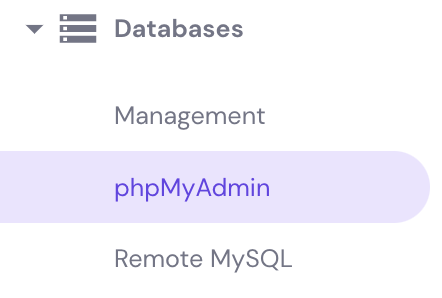
- Open u123456789_mydatabase and navigate to the Create table section.
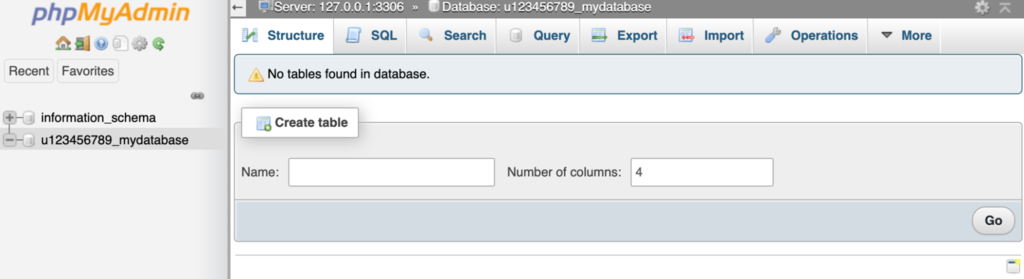
- Name the table Students and write 4 in the Number of columns field. Click the Go button near the bottom of the page.
- A new page will appear. Enter the necessary information for the table.
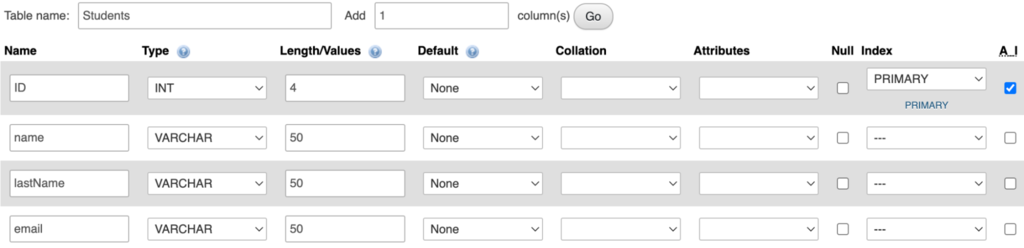
- Click Save to create a new table.
Here are a few explanations of the columns used:
- Name – The column name. It will appear at the top of the table.
- Type – The data type. You can set various values, including int, varchar, and string. For example, select varchar to enter a string type name, which uses letters, not numbers.
- Length/Values – The maximum entry length for a particular column.
- Index – To enumerate table entries, which is required when configuring table relationships. We recommend always having one ID column when creating a table. We used the Primary index for our ID field and marked A_I, which means Auto Increment. It automatically lists the entries (1,2,3,4…).
For more information about table structure and its available settings, refer to phpMyAdmin’s official documentation.
How to Insert Into MySQL Database Table
There are two methods to INSERT data into MySQL database – the PHP MySQLi method and the PHP Data Object (PDO) method.
Inserting Data Using MySQLi Method
First, establish a connection to a database. When connected, proceed with the INSERT MySQL query. Here is a full PHP code example with the basic connection and insert methods:
<?php
$servername = "localhost";
$database = "u123456789_mydatabase";
$username = "u123456789_myuser";
$password = "PasSw0rd123@";
// Create a connection
$conn = mysqli_connect($servername, $username, $password, $database);
// Check the connection
if (!$conn) {
     die("Connection failed: " . mysqli_connect_error());
}
echo "Connected successfully";
$sql = "INSERT INTO Students (name, lastName, email) VALUES ('Tom', 'Jackson', 'tom@jackson.tld')";
if (mysqli_query($conn, $sql)) {
     echo "New record created successfully";
} else {
     echo "Error: " . $sql . "<br>" . mysqli_error($conn);
}
mysqli_close($conn);
?>Important! If you are setting up a database for remote use, the hosting won’t be on the same server as the database. You must set up remote MySQL access first and use its server address instead of localhost.
Lines 2-12 of the code are for the actual connection to the MySQL database. The following line looks like this:
$sql = "INSERT INTO Students (name, lastName, email) VALUES ('Tom', 'Jackson', 'tom@jackson.tld')";The INSERT INTO is a statement that adds data to the specified MySQL database table. In the example above, we are adding data to the table Students.
Between the parenthesis, the table column names specify where we want to add the values (name, lastName, email). The script will add the data in the specified order. If we write (email, lastName, name), the script will add the values in the wrong order.
The next part is the VALUES statement. Here, we specify values in the previously selected columns. Our example would be name = Tom, lastName = Jackson, email = tom@jackson.tld.
Additionally, users must set SQL queries between quotes. In our example, everything written in quotes after $sql = is an SQL query.
Meanwhile, lines 14-15 of the code check if the query works and displays a success message:
if (mysqli_query($conn, $sql)) {
     echo "New record created successfully";
The final part, lines 16-18, displays a different message in case the query fails. It shows an error SQL message instead:
} else {

echo "Error: " . $sql . "<br>" . mysqli_error($conn);

}
Inserting Data Using the PHP Data Object (PDO) Method
To use this method, establish a database connection first by creating a new PDO object.
Since the connection to the MySQL database is a PDO object, you must use various PDO methods to prepare and run queries.
Methods of objects are called like this:
$the_Object->the_Method();
PDO allows users to prepare, evaluate, and correct the SQL code before executing. It can prevent a malicious person from performing a simplified SQL injection attack by typing SQL code into a form.
// User writes this in the username field of a login form
john"; DROP DATABASE user_table;
// The final query becomes this
"SELECT * FROM user_table WHERE username = john"; DROP DATABASE user_table;
As a syntactically correct SQL code, the semi-colon makes DROP DATABASE user_table a new SQL query and deletes the user table. Fortunately, prepared statements do not allow the “ and ; characters to end queries. Thus, a malicious instruction to DROP DATABASE would not work.
Important! You should always use prepared statements when sending or receiving data from the database with PDO.
To use prepared statements, you must write a new variable that calls the prepare() method of the database object. The result will look like this:
<?php
$servername = "localhost";
$database = "u123456789_mydatabase";
$username = "u123456789_myuser";
$password = "PasSw0rd123@";
$sql = "mysql:host=$servername;dbname=$database;";
$dsn_Options = [PDO::ATTR_ERRMODE => PDO::ERRMODE_EXCEPTION];
// Create a new connection to the MySQL database using PDO, $my_Db_Connection is an object
try {
 $my_Db_Connection = new PDO($sql, $username, $password, $dsn_Options);
 echo "Connected successfully";
} catch (PDOException $error) {
 echo 'Connection error: ' . $error->getMessage();
}
// Set the variables for the person we want to add to the database
$first_Name = "Tom";
$last_Name = "Jackson";
$email = "tom@jackson.tld";
// Here we create a variable that calls the prepare() method of the database object
// The SQL query you want to run is entered as the parameter, and placeholders are written like this :placeholder_name
$my_Insert_Statement = $my_Db_Connection->prepare("INSERT INTO Students (name, lastName, email) VALUES (:first_name, :last_name, :email)");
// Now we tell the script which variable each placeholder actually refers to using the bindParam() method
// First parameter is the placeholder in the statement above - the second parameter is a variable that it should refer to
$my_Insert_Statement->bindParam(":first_name", $first_Name);
$my_Insert_Statement->bindParam(":last_name", $last_Name);
$my_Insert_Statement->bindParam(":email", $email);
// Execute the query using the data we just defined
// The execute() method returns TRUE if it is successful and FALSE if it is not, allowing you to write your own messages here
if ($my_Insert_Statement->execute()) {
 echo "New record created successfully";
} else {
 echo "Unable to create record";
}
// At this point, you can change the data of the variables and execute again to add more data to the database
$first_Name = "John";
$last_Name = "Smith";
$email = "john.smith@domain.tld";

// Execute again now that the variables have changed
if ($my_Insert_Statement->execute()) {
 echo "New record created successfully";
} else {
 echo "Unable to create record";
}
In lines 24-26, we use the bindParam() method of the database object. There is also the bindValue() method, which works differently:
- bindParam() – evaluates data when the execute() method is reached. The first time the script reaches an execute() method, it sees that $first_Name corresponds to “Tom”, binds that value, and runs the query. When the script reaches the second execute() method, it sees that $first_Name now corresponds to “John”, binds that value, and reruns the query with the new values. Note that we defined the query once and reused it with different data at different points in the script.
- bindValue() – evaluates the data as soon as bindValue() is reached. Since the value of $first_Name was set to “Tom” when the bindValue() was reached, it will be used every time an execute() method is called for $my_Insert_Statement.
Notice that we reuse the $first_Name variable and assign it a new value the second time. If you check your database after running this script, you have both defined names, despite the $first_Name variable equalling “John” at the end of the script.
The bindParam method accepts parameters by reference, not by value. Users only need to call bindParam once, and the script will insert updated values into the database.
You can read more about passing parameters in the PHP manual.
Confirming the Success
If the query that we ran and INSERT into MySQL database was successful, we would see the following message:
Connected Successfully
New record created successfully
Troubleshooting Common Errors
Sometimes, the new record will show an error with the SQL insert. Luckily, there are ways to fix these MySQL errors.
MySQLi
If a MySQLi error message appears, we can attempt various fixes.
For example, if we have one syntax error in our code, we will see the following error:
Connect successfully

Error: INSERT INTO students {name, lastName, email} VALUES ('Tom', 'Jackson', 'tom@jackson.tld')

You have an error in your SQL syntax; check the manual that corresponds to your MySQL server version for the right syntax to use near '{name, lastName, email} VALUES ('Tom', 'Jackson', 'tom@jackson.tld')' at line 1"
As you can see, the first part of the code is good and the script established the connection successfully. However, the SQL query failed.
"Error: INSERT INTO Students {name, lastName, email} VALUES ('Tom', 'Jackson', 'tom@jackson.tld') You have an error in your SQL syntax; check the manual that corresponds to your MySQL server version for the right syntax to use near '{name, lastName, email} VALUES ('Tom', 'Jackson', 'tom@jackson.tld')' at line 1"This is because a syntax error caused the script to fail. The error was here:
$sql = "INSERT INTO Students {name, lastName, email} VALUES ('Tom', 'Jackson', 'tom@jackson.tld')";We incorrectly used curly brackets instead of simple parentheses, causing the script to throw a syntax error.
PDO
To receive error messages for troubleshooting, the user must set the error mode to display all exceptions. That’s what’s written in line 12 of the PDO connection. Since all exceptions are enabled, any specific issue will be displayed.
Users should only use all exceptions when developing a script. It can expose the database and table names, which the user should hide from malicious parties.
In the case above, where curly braces were used instead of parentheses, the error looks similar to this:
Fatal error: Uncaught exception 'PDOException' with message 'SQLSTATE[42000]: Syntax error or access violation: 1064 You have an error in your SQL syntax; <code>check the manual that corresponds to your MySQL server version for the right syntax to use near '{name, lastName, email} VALUES ('Tom', 'Jackson', 'tom@jackson.tld')' at line 1"Other Potential Issues:
- Specifying incorrect columns like non-existent columns or a spelling mistake.
- One type of value being assigned to another type of column. For example, if we tried to assign the number 47 to a Name column, we would get an error because it is supposed to be a string value. But if we assigned a number between quotes, for example, “47”, it would work because our number would be a string to the column.
- Accessing remote MySQL database without Remote MySQL set up.
All those errors can be easily fixed by following the error message guidelines or checking the error log.

Conclusion
PHP programming language allows users to easily add new MySQL database data with a few lines of code.
In this tutorial, we have shown how to use PHP to insert data into your MySQL database using MySQLi, INSERT statement, and PDO. We have also showcased how to troubleshoot common connection errors.
We hope that you found this tutorial useful. If you have any questions, let us know in the comments below.
Learn More About PHP
How to Install phpBB on Your Website
How to (Safely) Make A PHP Redirect
11 Best PHP Frameworks
How to Create phpinfo File
How to Modify the PHP Max Upload Size
This article is a localized version of How to use PHP to insert data into MySQL database, originally published in English.

Domantas leads the content and SEO teams forward with fresh ideas and out of the box approaches. Armed with extensive SEO and marketing knowledge, he aims to spread the word of Hostinger to every corner of the world. During his free time, Domantas likes to hone his web development skills and travel to exotic places.

Ignas takes great satisfaction in helping people tackle even the most complex technical issues. His current goal is to write easy-to-follow articles so that these issues will not happen at all. During his free time, Ignas likes to play video games and fix up things around his house.


Comments
14 responses