What is cloud hosting? Understanding its benefits and when you should use it
Mar 10, 2026
/
Brian
/
7 min Read
If you’re looking to take your business site to new heights, switching to cloud hosting is undoubtedly the right choice. Compared to shared hosting, it offers greater stability, faster performance, and better security.
How does cloud hosting work exactly? Is it the right hosting solution for my project? Find all the answers in this guide!
What is cloud hosting?
Cloud hosting is a type of web hosting that provides superior server uptime and performance for high-traffic websites. It’s the perfect choice for entrepreneurs looking to scale their operations or web professionals who manage multiple projects for clients.
How does cloud hosting work?
Before launching a website, you need a web server to store all its files and connect the site to the internet.
While it’s possible to use your personal computer as a server, advanced technical skills are required to set it up. Not to mention, your computer will have to run non-stop so that your site stays online.
Another option is to build and manage your own data centers. However, given the high cost and effort involved, this approach isn’t viable for small to medium-sized businesses.
This is where managed cloud hosting comes as a solution. In this setup, you essentially rent virtual servers from a third-party provider to host your website.
The cloud provider will handle all the technical stuff, like server maintenance and protection. This way, you can focus solely on scaling your business.
Cloud hosting offers a much easier and more affordable solution than running your own physical servers. You have the flexibility to choose a plan based on your needs and budget.
Cloud hosting vs traditional web hosting
Now, how does cloud hosting differ from traditional web hosting? From a technical standpoint, both solutions work similarly—you rent virtual space within a physical server to store your site data.
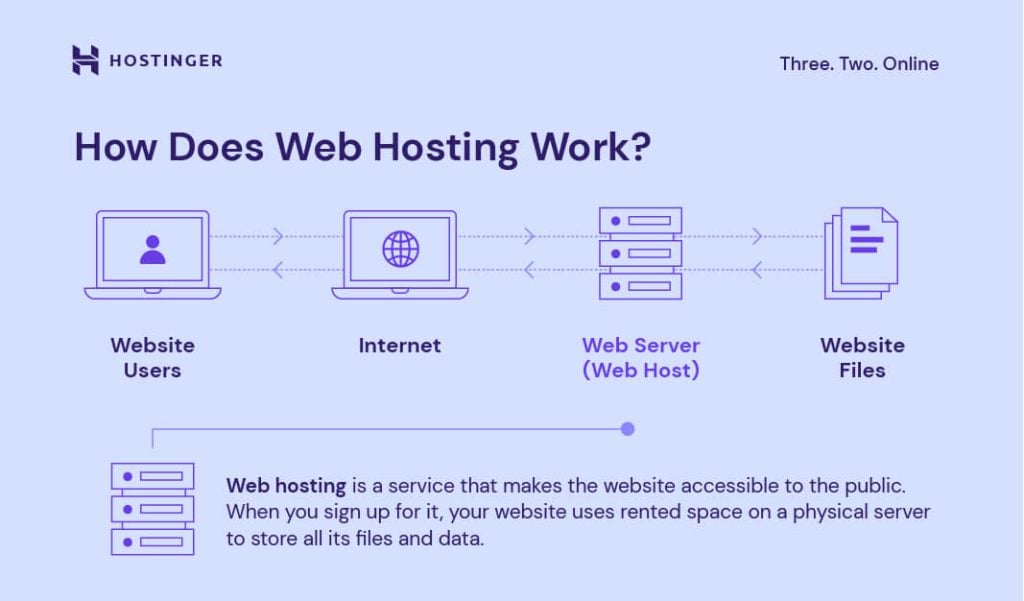
The only difference is the amount of computing power and features you will get.
For example, our cloud hosting plans offer 20x more resources than traditional web hosting, giving you more room for growth.
You will also get more PHP workers to handle hundreds of user requests simultaneously. In other words, your site will perform flawlessly, no matter how busy it gets.
What’s more, our cloud servers come with a dedicated IP address. Unlike a shared IP in traditional web hosting, your site won’t be affected by any performance or security issues on other sites.
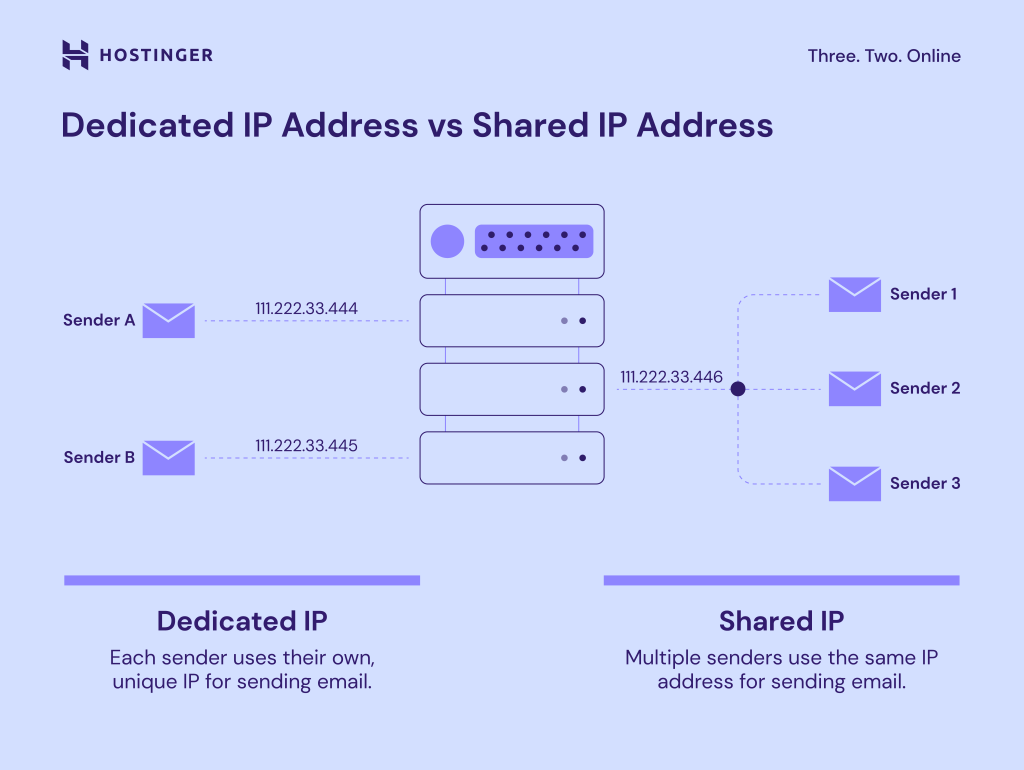
Using a dedicated IP address also improves email deliverability. This is because many email providers use IP reputation to determine whether emails from a domain are legitimate.
In traditional hosting, your site could end up sharing the same IP address with malicious websites. It just takes one problematic site engaging in spam or phishing to cast a shadow over all the sites sharing that IP address.
A dedicated IP allows you to build a positive reputation for your domain. It improves the chances of your emails reaching your recipients without being flagged as spam.
Benefits of cloud hosting
Whether you’re planning to host your first website or upgrade from a traditional hosting plan, our managed cloud hosting offers plenty of benefits:
- User-friendly. Since our cloud hosting solution is fully managed, you don’t need any technical knowledge. It offers an easy-to-use control panel called hPanel for managing domains, monitoring performance, fixing issues, and more.
- Superior uptime and speed. Our cloud plans come with a content delivery network (CDN) proven to speed up your site by 40%. Users can still retrieve your site’s content from the closest CDN server even when the origin server is down.
- WooCommerce optimized. Install WordPress and WooCommerce in one click, and start selling online in no time. Our cloud servers have enough power to handle hundreds of products and thousands of visitors per month.
- Scalability. You can easily upgrade your plan to get more CPU cores, RAM, and storage space in just a few clicks.
- Greater security. Thanks to a dedicated IP address and advanced DDoS protection, your site will be less prone to security issues and cyber threats. We also provide automatic daily backups to keep your data safe.

Who should use cloud hosting solutions?
Cloud hosting is the perfect choice for anyone who needs stable and reliable website performance but lacks the necessary skills or budget to maintain their own server.
Cloud hosting offers more PHP workers and computing resources, so your site can better deal with traffic spikes during promos or seasonal events. Plus, it offers a dedicated IP for better security, making it ideal for eCommerce stores.
Moreover, it’s suitable for websites that need more processing power, bandwidth, and disk space to handle large fragments of data. Those include content-rich news portals, discussion forums, SaaS platforms, and aggregator sites.
Last but not least, our managed cloud hosting solutions are great for web professionals who manage multiple clients and projects.
With hPanel, you can access your clients’ accounts from your own dashboard, organize websites with custom tags, and invite your team to collaborate on projects.

It’s also super easy to monitor everything that matters to you and your clients, such as site performance and security.
Which cloud services should you choose?
Hostinger offers three plans ranging from RM49.00/month to RM299.90/month, depending on your chosen package and subscription duration.
To help you choose the right plan, here’s a comparison of our cloud hosting options:
| Features | Startup | Professional | Enterprise |
| Pricing | RM49.00/month (for the 48-month term) | RM69.99/month (for the 48-month term) | RM139.90/month (for the 48-month term) |
| Number of websites | 100 | 200 | 300 |
| Number of email accounts | 100 | 100 | 100 |
| RAM | 3 GB | 6 GB | 12 GB |
| NVMe SSD storage | 100 GB | 200 GB | 300 GB |
| CPU cores | 2 | 4 | 6 |
| PHP workers | 100 | 200 | 300 |
| Visitors per month | 200,000 | 300,000 | 400,000 |
All our hosting plans include a 30-day money-back guarantee, giving you certainty while exploring our cloud hosting services. If you choose a Cloud Startup plan, visit the Hostinger coupons page to claim your discounts.
Comparing cloud hosting with other types of web hosting
Cloud hosting is a great choice, but it’s not for everyone. Some users may need advanced customization, while others prefer a more affordable option.
To help you choose the right hosting plan, we’ll discuss other popular hosting service types and how they compare to cloud hosting.
Cloud hosting vs shared hosting
In a shared hosting environment, one server stores data from multiple websites. While it’s similar to cloud hosting, shared hosting offers much less bandwidth, storage capacity, and processing power.
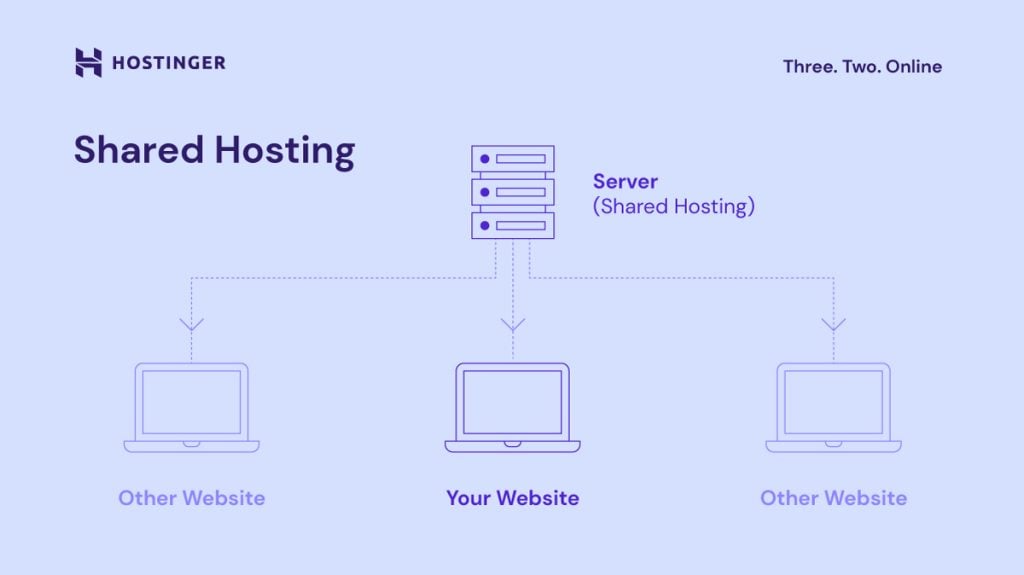
Unlike cloud hosting, you will also get a shared IP address instead of a dedicated one. This means your site will be more susceptible to security issues and spam reports.
Given its limited resources and the fact that server maintenance costs are divided between users, shared hosting is usually the most affordable hosting option. As such, it’s an excellent choice for small businesses and personal websites.
Pros
- Affordable. At $1-15/month, shared hosting is the least expensive hosting option. In comparison, many cloud hosting providers charge between $10-200/month. Check out our web hosting cost guide for more information.
- Beginner-friendly. No coding skills are required to get your website up and running.
- Easy maintenance. The web host handles the technical aspects of maintaining a website so that you can focus more on optimization.
Cons
- Limited resources. Your site might slow down or even crash during traffic spikes due to limited bandwidth, processing power, and storage capacity.
- Prone to security risks. If one site hosted on the shared server is compromised, the others may be affected.
- Shared IP address. You’ll share an IP address with other sites. This can hamper your email deliverability, as providers like Gmail and Yahoo tend to associate shared IPs with spam.
Cloud hosting vs VPS hosting
Virtual private server (VPS) hosting uses a technology called virtualization to separate a physical machine into multiple virtual servers.
Each virtual machine has its dedicated CPU, RAM, and storage, providing even more power and stability to run resource-intensive websites and applications.
VPS hosting also offers root access, which allows you to customize the server settings to your liking. This feature is not available with managed cloud or shared hosting services.
However, VPS hosting is often self-managed by the user, making it more suitable for tech-savvy individuals.
Pros
- Stable performance. Since each user gets dedicated resources, traffic surges on one website will not affect the others.
- Highly customizable. In terms of server configuration, virtual private servers offer more flexibility than managed cloud-based services.
- Dedicated IP address. VPS and cloud hosting providers offer a dedicated IP address for better protection. Having a dedicated IP address also improves your site’s credibility.
Cons
- Not beginner-friendly. Users must possess the required skills and knowledge to manage VPS hosting.
Cloud hosting vs dedicated server hosting
Dedicated hosting is the most powerful type of hosting. It gives you complete control over an entire server—from installing custom software to using all the available resources.
That said, it is significantly more expensive than shared, cloud, and VPS hosting. As a result, it’s more geared towards large organizations with a big budget.
Pros
- Unbeatable performance. Dedicated hosting offers the best site performance since you get the power of an entire physical server.
- Unlimited resources. With a dedicated server, you will have all the necessary resources to grow a large-scale website.
- Complete control. Users can fully control the hosting environment, including customizing the operating system and installing server-wide software.
Cons
- High cost. Compared to other hosting plans, dedicated servers have the highest cost. Expect to spend between $80-500/month or more just for maintenance.
- Advanced skills required. Server management knowledge is necessary to operate and maintain a dedicated server.
Conclusion
Cloud hosting is essentially a faster, stronger, and more secure alternative to shared hosting.
It offers far more computing resources for top-notch performance and better security measures to protect your site’s sensitive data.
Given its superior power, cloud-based web hosting is perfect for:
- Business sites driving thousands of visitors per month
- eCommerce stores selling hundreds of products
- News portals with a lot of pages and multimedia content
- Social networks and forums with a large user base
- Aggregator platforms that handle and process thousands of data
The best part? You can still get the user-friendliness of traditional web hosting with our managed cloud hosting services.
Using hPanel, you can perform all sorts of hosting management tasks, from registering custom domains and creating email accounts to monitoring site performance.
What is cloud hosting FAQ
What are the best cloud hosting providers?
There are many excellent cloud hosting providers available, such as Hostinger. Every provider offers a range of services and features, including flexible pricing models, scalable cloud infrastructure, and reliable performance, to meet the needs of businesses of all sizes. So, check the different plans available before choosing.
How do I choose a cloud hosting provider?
When choosing a hosting provider, consider factors such as pricing, performance, scalability, reliability, security, and customer support. Assess your specific business needs and goals, and compare the offerings of multiple providers to find the best cloud hosting. Look for customer reviews and testimonials to gauge user experiences and satisfaction.
How do I set up a cloud hosting account?
To set up a cloud hosting account with Hostinger, choose a plan, create your account, and select the payment method. Once the payment is complete, you will be taken straight to the onboarding page. Simply follow the instructions, and that’s it—your cloud hosting account is ready.
What are the steps to migrate to cloud hosting?
Migrating to Hostinger’s cloud hosting is free and easy. All you have to do is buy one of our cloud plans and send a migration request via hPanel, and our team will take care of the rest. Website migration usually takes 24 hours to complete, but your site will still be online during the process.
All of the tutorial content on this website is subject to Hostinger's rigorous editorial standards and values.

Brian is a Content Writer who loves telling complex stories in a simple way. He has written all types of content, including tutorials, blog posts, landing pages, social media posts, white papers, infographics, and YouTube scripts. Follow him on LinkedIn.


Comments
March 09 2020
Regarding your cloud hosting - is it public cloud hosting or private cloud hosting. If private - does it use dedicated or shared hardware.
March 12 2020
Hi Catherine, Check out Hostinger's different Cloud Hosting Plans (https://www.hostinger.com/cloud-hosting) and see which one works best for you :)
March 16 2020
Hi good morning I just wanna know if any for your hosting plans I can deploy Laravel projects?
March 19 2020
Hi Juan, You sure can! Our Automatic Script Installer will help you install the latest version of the Laravel PHP framework with ease and you will be all set and ready to develop your website using the framework. :)
March 30 2020
Hello i have question for Is the backup space deducted from the storage space? If the discount is, how much space can I use?
April 21 2020
Hello Hussain, your storage does not increase due to your backups. So you will have the exact amount of storage as shown when purchasing the plan.
April 12 2020
Hey there, Can Cloud Hosting use SSH? LIKE VPS can install softwares by self? On the other hand, does Cloud Hosting have root privilege?
April 13 2020
Hey! You can use SSH on all cloud hosting plans, however, you will have root privileges only on VPS.
August 05 2020
Hi, Where are the locations of the cloud servers. And can I chose the location I need?
August 25 2020
Hey there Anas! :) Yes you can - you can pick the location when you setup the plan! :) As for the server locations, Our servers are deployed in 7 different regions: UK, US, Brazil, Netherlands, Singapore, Indonesia and Lithuania. You can check that out here!
August 24 2020
Do u provide extra malware protection for WordPress sites...
November 06 2020
Hey Deepak! :) You can check our security measures here.
September 14 2020
hi!. If I publish my website, and it does not receive any visitors (_bandwidth, not used_), do I have to pay at the end of the month?
November 11 2020
Hey Ben. The price is paid for the usage of the server itself, regardless of bandwidth used. Our Cloud Plans have unlimited bandwidth so we don't take bandwidth into account at all.
September 17 2020
Hi, Does cloud server includes cPanel accounts and WHM panel or you have your own cPanel where I can set up independent websites or it is just addon websites?
November 11 2020
Hey Cesar. Our Cloud Hosting plans come with our custom hPanel, and all the extra domains you add are addon websites. They are independent of each other, in a separate panel section, with separate features, but you don't get separate cPanel login for them.
October 13 2020
Hi, can I create subdomains using the cloud hosting plan and these subdomains inherit the SSL from the main domain? cloud hosting can be use as a shared hosting too?
February 02 2021
Hi, Adrian! Yes, you can create subdomains for free with your Cloud plan; here's how ;) Then to install SSL, each domain/subdomain is a new website, so it requires a new SSL.
November 24 2020
Is the Cloud Hosting being used in the same way as regular VPS? Can I just install preferred Linux distribution on it and run Minecraft server?
February 09 2021
Hello, Rafal! For Cloud hosting plans here on Hostinger, the server-side settings are managed by us (similarly as for Shared hosting service), while VPS plans are fully managed by the user. So if you're looking to run Minecraft server, you'd be looking at VPS plans ;)
December 06 2020
Hey, Can I run WP and have a hpanel for free on a Cloud hosting server?
February 09 2021
Hi there! Yes, Wordpress can be easily installed on a Cloud plan from Autoinstaller ;)
December 13 2020
Can i host a nodejs and mongdb in the cloud?
February 09 2021
Hi there! So in this case, as you need nodejs as well, I'd suggest a VPS plan. You can check them at hostinger.com/vps-hosting :)
June 22 2021
Is cloud hosting suitable for displaying home furniture and high-quality images, a lot of visitors, more than 5 thousand per day.
September 16 2021
Hi Ahmed! The correct plan for you really would depend on the website's setup and optimization. The best way to look at this would be to check the current usage of your website (disk space, RAM, CPU, processes, etc.) Then compare that to which of Cloud plans offer that at hostinger.com/cloud-hosting If you'll need any further help on choosing the best plan for you, don't hesitate to contact our Customer Success team!
August 26 2021
can we hosting spring boot application (java) in cloud hosting
September 20 2021
Hi there! I've looked at Spring Boot requirements and I see that it looks like you would not be able to host it on a Cloud plan on Hostinger, but I would suggest having a look at VPS :)
September 20 2021
What backend frameworks or technologies does cloud hosting support?
September 21 2021
Hi, Hostinger Cloud plans support anything that is based on PHP, similar to Shared hosting. If you need root access though, you should go for a VPS plan instead. You can check further comparison of VPS vs Shared here (in regards to what is supported, think of Cloud as Shared plans). If you'll have specific questions about your framework, don't hesitate to reach out to our Customer Success team!
January 28 2022
Hi Will I experience any issues with a Cloud hosting plan because of my location (South Africa). Given you do not have servers near my region.
February 04 2022
Hi Joshua, to ensure the best speed, I would suggest to setup a CDN, which will store a copy of your content in cache and deliver the content from the server, located the closest to you.
January 29 2022
Thank you for such a fine effort. What neat work!
April 29 2022
It is well explained , thank u
November 04 2022
Hi, Can I use Cloud hosting together with CDN?
November 18 2022
Hey! You absolutely can, you can check out this article to learn how to setup a CDN for your website!
May 06 2024
What is the exact backup plan you provide with your professional cloud hosting program?
May 08 2024
Hi, Akshita! Our Professional Cloud Hosting plan includes a robust backup solution to ensure your data is safe. It features automatic weekly backups and the option for daily backups, allowing you to restore previous versions of your website whenever needed. These backups are kept for a specific period, ensuring you have access to previous data points to safeguard against data loss or corruption ?
June 06 2024
We are interested in your managed cloud hosting. We do not have in house technical experts. Will you migrate our website (one Woocommerce + one html website) from godaddy to hostinger without us doing any work such as: configure on server settings, upload your website files, and point your domain to the server as we do not know how. Furthermore, our emails are hosting under Yahoo. Will you migrate it over to yours.
June 13 2024
Hello! Transferring domain from GoDaddy to Hostinger is straightforward. Simply follow a few steps outlined in our tutorial. If you have any questions, our Customer Success Team is ready to help!
July 28 2024
Hi there, Can anyone reply my quary, I saw On your Cloud hosting packages, different packages different prices, But one thing i want to know is storage which Is limited to 200gb or 250 gb maybe. Is there any other cloud hosting package you provide that offers Unlimited Storage. It could be suitable for e commerce or bigger sites that run huge Storage capacity?
July 31 2024
Hi there! At Hostinger, we provide hosting plans with specific storage limits for web, cloud, and VPS. If you ever need more space, upgrading your plan is a breeze ;)