Mar 12, 2026
Alma & Marco C.
16min Read

A book blog is a home for your reviews, recommendations, and reading opinions. It’s a space built entirely around your personal taste and the readers who share it.
Most people start these blogs to track their to-read lists or join a community, but it’s also a great way to sharpen your writing and potentially turn a passion project into something that earns money over time.
Starting a blog is simpler than it seems once you break it into steps:
Your target audience is the specific group of readers your book blog serves – the people who get excited about the same books or genres you do. That could be young adult fantasy fans, business book readers, romance lovers, audiobook listeners, or literary fiction enthusiasts.
It’s much easier to write a review when you know exactly who you’re recommending the book to. You can start narrowing that down by looking at:
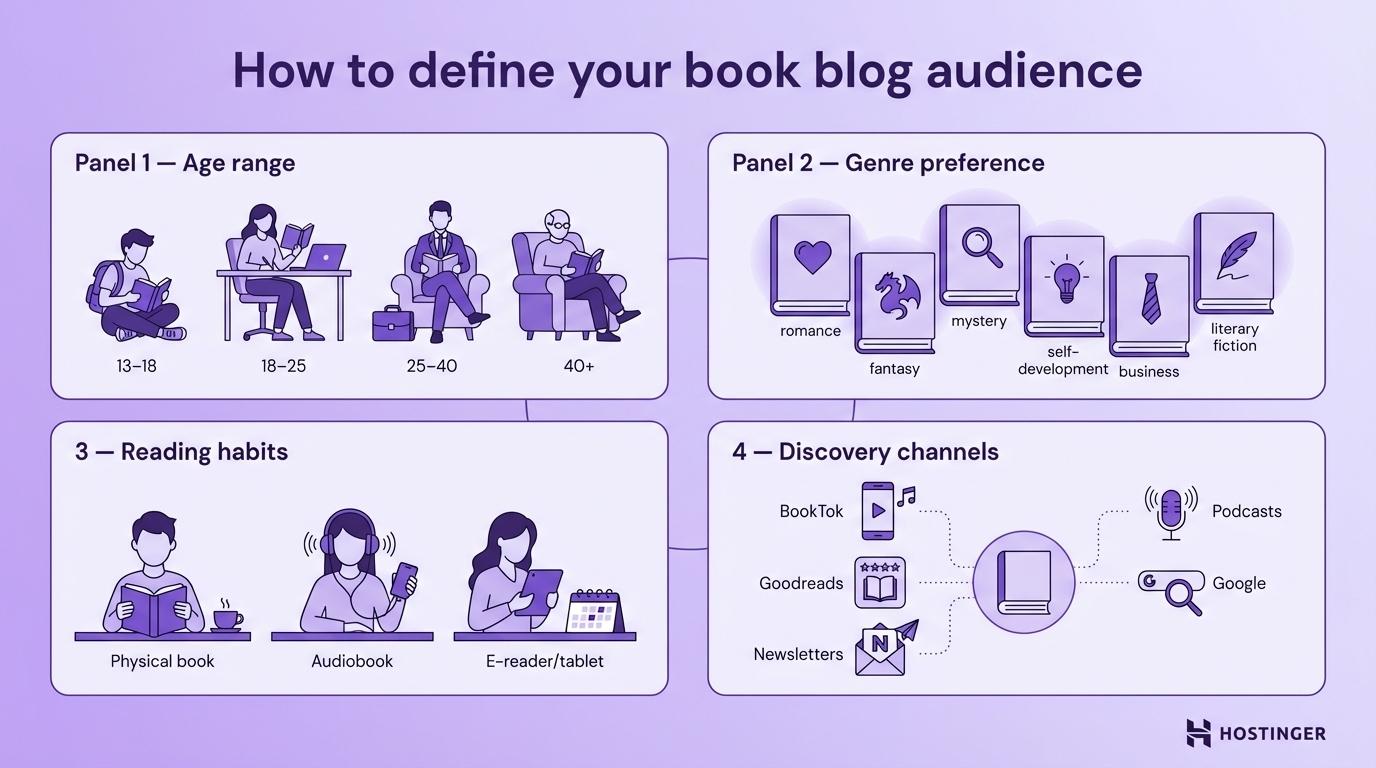
When you define your audience this precisely, your tone becomes clearer. Your content becomes sharper. Even your design choices get easier. And that’s when your blog starts feeling focused.
Below are two common audience types and the content choices that usually fit them.
If you’re writing for younger readers:
If you’re writing for older or general readers:
You don’t have to get this perfect immediately. But the sooner you figure out who you’re talking to, the faster your blog will actually start to grow – and eventually support ways to make money online.
Your niche is the specific segment of the book world your blog is focused on. It’s what makes your blog recognizable.
If you try to review every single book that hits the shelves, it’s easy to get lost in the noise of thousands of other general sites. But when you get specific, like psychological thrillers by female authors, unreliable narrators in literary fiction, or diverse fantasy authors, you’ll find it’s much easier to stand out and build a following.
There are four different ways to define your book blog niche:
Your niche should be narrow enough that readers see you as the go-to person for that topic, but broad enough that you won’t run out of books to talk about by next year.
The easiest way to choose a blog niche is to look for where your own reading tastes meet what other people are actually searching for. If you don’t genuinely love what you’re reading, you’ll burn out. But if you find that overlap, it’s much easier to stay excited about your blog for the long haul.
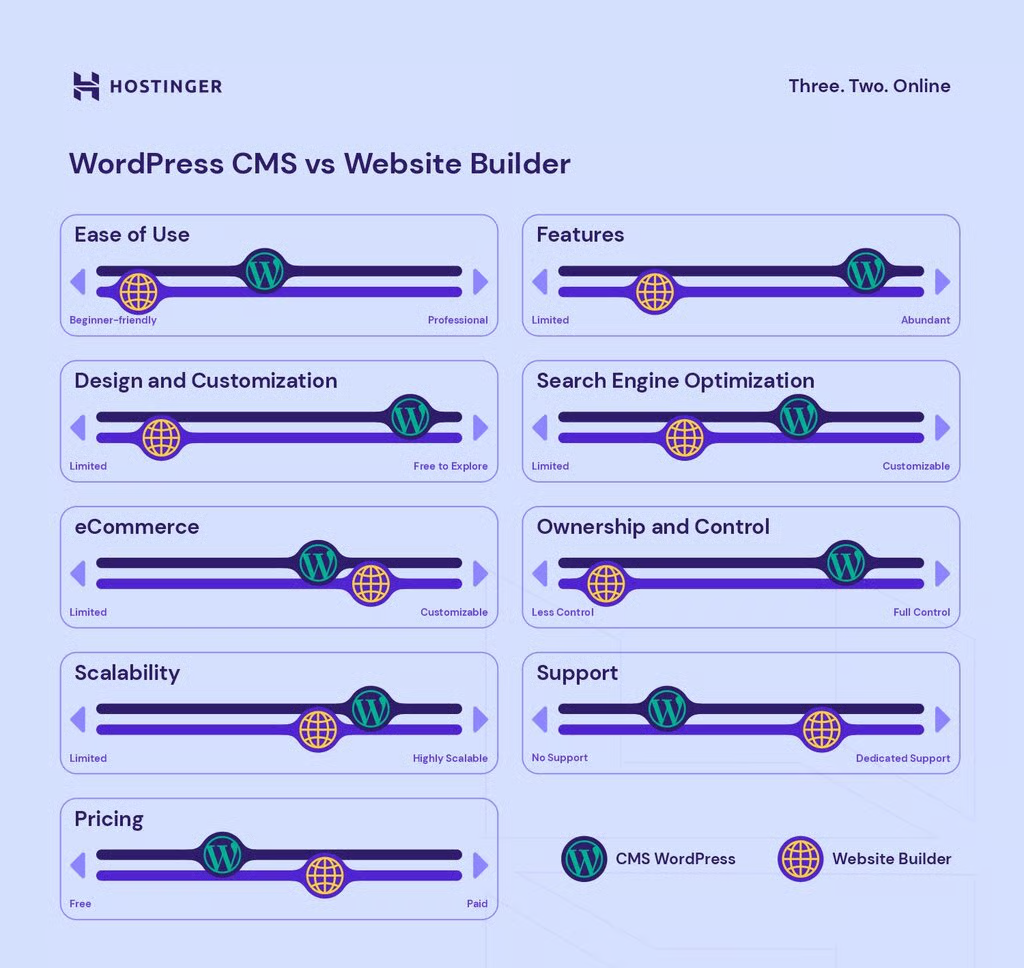
A blogging platform is the system you use to build, publish, and manage your book blog. For most book bloggers, it comes down to two options: content management systems (CMS) or dedicated website builders.
If you want a site that you truly own and can grow with for years, WordPress is the best bet. It’s the gold standard for SEO and gives you total control over how your blog looks and functions. You’ll need to set up your own hosting, but it’s the right choice if you want to build a serious, long-term brand.
Opting for Hostinger’s CMS hosting is an ideal option for those looking for a CMS-optimized hosting solution.
Pro Tip
If you’d rather skip the technical learning curve, a website builder like Hostinger’s is much faster. It uses a drag-and-drop editor and handles all the hosting and security for you. It’s perfect if you want to focus entirely on your writing without worrying about what’s happening on the back end of the site.
Neither choice is perfect. It really comes down to what you value more: the flexibility to customize every single detail or the convenience of getting your site live in under an hour.
Want more options? See our guide to the best blogging platforms for a wider comparison.

Your domain name is your blog’s permanent web address. It’s what readers type into a browser, and you’ll feature it on social media profiles, in email signatures, and in media kits. A simple example is www.hostinger.com.
For a book blog, the best domain is usually a close match to your blog name, because that’s what people will remember and search for. A domain name generator can help you find clean alternatives if your first choice is taken or you want more ideas.
A good domain name is short, easy to spell, and easy to say out loud. Avoid hyphens and numbers because they increase typos, and choose .com when it’s available because it’s the most familiar extension for most readers.
Additionally, a few checks can save you from problems later:
Once you’ve settled on a name, the next step is registration. The process is straightforward: choose a registrar, confirm availability with a domain checker, complete the purchase, and verify ownership via email.
Check out our guide on how to buy a domain name for the full step-by-step process, including what to do if your first choice is taken.
Your theme shapes your blog’s first impression and can affect how readers feel about your content. It’s essentially the decor of your digital reading room.
Think about the vibe you’re going for. If you’re building a cozy, personal blog, you might use warm colors and soft fonts to make it feel like a quiet library nook. But if you’re doing sharp, analytical critiques, a more minimal, high-contrast look might fit better. The goal is to match the look of your site to the voice of your writing.
Your theme sets that expectation before anyone reads a single sentence.
A good theme does three things well. It loads quickly, works smoothly on mobile, and makes navigation feel effortless.
The design also needs to support the text, not compete with it. You can have a beautiful, aesthetic site, but if the font is too small or the lines are too crowded, people won’t stay to read. Look closely at the font size, line spacing, and layout options. Your style should enhance the reading experience, not make it harder.
Personalizing your blog is how you turn a generic website into a space that feels like you. It’s the difference between “another review site” and a blog that feels like it has a clear voice, taste, and a unique point of view.
A simple logo is a good place to start. It doesn’t need to be complicated, but it should be consistent with your style and readable – something that still looks clear in a small header or a social profile image.
You can hire a designer, create your logo from scratch, or use a logo maker to build one. When designing it, consider your blog’s tone (minimalist, literary, playful) and ensure it reads clearly in both color and black-and-white.

Once you’ve got your logo, you can use those same colors and fonts across your entire site. If your logo has a specific shade of green or a certain font style, try using those same elements for your buttons, headers, and links. It’s a simple way to make your site feel cohesive and easy to recognize.
It’s also helpful to pick a pair of fonts that work well together. Maybe a bold one for your headlines and a cleaner, simpler one for the actual reviews. When your design matches your logo, it tells your readers you’ve put care into the space they’re spending their time in.
Personalization isn’t just about the colors and images you pick; it’s also about the person behind the screen. To really make your blog feel like a professional space, you’ll want to set up a few core pages that give your site some backbone before you hit publish on that first review:
Since some of these pages (Privacy policy, Disclaimer, Terms and conditions, and Refund or exchange policy) touch on legal matters, it’s always a good idea to check the rules in your specific area.
In the United States, for example, the FTC endorsement guides explain how to disclose when you’re being compensated. It might feel a bit formal, but getting these pages right early on means you can focus entirely on the books once you launch. When in doubt, consult a lawyer before finalizing your legal pages.
Publishing a handful of posts before you officially launch helps your first visitors land on a real blog, not a blank homepage. These first few reviews also act as your portfolio – they’re what authors and publishers will look at to see if your style is a good fit for their books.
If you’re not sure what to publish first, start with what you already know: review the last book you finished, write a genre-based recommendation list, or cover a recent release people are actively searching for.
You don’t need a massive budget to keep your blog updated, either. Here are three reliable ways to find your next read:
Once you have posts live, organize them with blog taxonomy, which uses categories and tags to help readers browse and helps search engines understand your archive. Think of it as your digital filing system.
Taxonomy type | What it does | Examples |
Categories | Broad topics that group posts | Fiction, non-fiction, fantasy, romance, mystery & thriller |
Tags | Specific descriptors inside a post | Unreliable narrator, slow burn, enemies-to-lovers, found family, book-to-film adaptation |
Taking a few minutes to set this up now will save you a huge headache later. It makes your site much easier for people to browse, and it helps search engines understand exactly what your blog is about. Plus, it’s a great way to keep your older reviews from getting buried and forgotten.
A plugin is a small add-on for WordPress that extends what your website can do, like adding SEO tools, spam filtering, backups, or a contact form. If you’re using a website builder instead of WordPress, you won’t need to worry about these, as most of this stuff is already built in.
The most important rule with plugins is to keep the count lean. Installing too many can slow your site down, which affects both the reader experience and your search engine rankings.
If you install too many plugins, chances are it’s going to slow down your WordPress site, which is also going to reduce your traffic and conversions over time.
Expert Tip

Here are WordPress plugins that are especially useful for book bloggers. Think of this list as a toolkit rather than a mandatory checklist. You don’t need all of them – just pick the ones that add the specific features you need for your blog:
Start with what you’ll actually use, and add the rest only when the feature becomes part of your workflow.
Publishing makes your blog live. Promotion is what actually brings readers to it.
A new blog won’t generate much organic traffic on its own, so building a readership usually requires active outreach – especially in the first 6–12 months, while search engines are still learning what your site is about.
A good promotion plan mixes a few channels that fit your time and strengths. Here are the most effective options for book bloggers, along with how each one works best:
Promotion channel | What to do | Works best when |
Social media | Share each post with a clear hook, a short excerpt, and a strong visual | You can post consistently and engage with readers |
Word of mouth | Tell friends, family, and colleagues, and ask for a first share | You’re brand new and need early visits |
Online book clubs | Join discussions genuinely, then share posts only when they’re relevant | You’re an active member, not just promoting |
Guest blogging | Write for established blogs in adjacent niches to earn exposure and backlinks | You can pitch consistently and publish regularly |
Email updates | Send subscribers a digest of new posts, reviews, and recommendations | You have readers who opted in and want updates |
Sharing buttons | Add one-click share buttons at the end of posts | Readers already like your content and want to share |
Collaborations | Partner with other book creators on content, swaps, or joint posts | You have a clear theme or series to promote |
Paid ads | Promote a proven post or lead magnet with targeting (Google/Meta) | You have a specific goal and budget to test |
Early on, the most efficient mix is consistent social posting plus genuine participation in book communities. Readers discover new blogs through people and groups they already trust, and those two channels grow the fastest when you show up regularly, driving traffic to your website over time.
Growth doesn’t come from guessing what readers like. It comes from watching what they actually engage with – and adjusting from there.
Instead of relying on intuition, look at the posts people spend time on, the ones they share, and the ones that bring new visitors to your site. Once you know what’s resonating, you stop creating randomly and start creating strategically. Tools like Google Analytics help you see those patterns clearly.
You can add Google Analytics to WordPress in three ways: using a plugin, connecting via Google Tag Manager, or adding a code snippet directly.
Once it’s connected, the next step is knowing what to pay attention to. There are three metrics worth monitoring consistently:
Book blogging grows through repetition and adjustment. You publish, observe what resonates, and refine. Within six months, your data will teach you more about your audience than any strategy session ever could – if you’re paying attention.
The easiest way to monetize a book blog is to build on the content you already write. Reviews, reading lists, and recommendations can turn into income through links, ads, sponsorships, and your own products.
As a practical benchmark, don’t expect meaningful income before reaching 5,000–10,000 monthly visitors. Traffic creates leverage and makes most monetization methods work better.
Here are the most reliable ways to monetize a book blog:
As a beginner, I would start off with AdSense and affiliate marketing. Just do both and generate money from both of them. Whatever performs better, double down on that. The other tip I have for you is just to make sure you have five, ten thousand plus visitors a month before you worry about monetizing through AdSense or affiliate marketing.
Expert Tip
As your readership grows, making money blogging expands into additional formats, such as memberships, premium content, and higher-value brand partnerships.
Building a successful book blog isn’t about doing one big thing right. It’s about a few simple habits that you repeat consistently from the start.
Readers don’t just follow book reviews. They follow taste, voice, and perspective. The more your personality comes through in your writing, the more reason people have to return to your blog specifically.
That doesn’t mean oversharing – it means being clear about what you read, how you evaluate books, and what kind of experience readers can expect from you.
And your About Me page helps with that.
It doesn’t need to be long or too detailed; just let people get a sense of you and your personality.
The strongest “personal” blogs rely on repeatable signature elements. These are things readers start to recognize without thinking about it. That can be a unique sign-off message, a specific photo style, a recurring series, or even a nickname for your regular readers.
Over time, those small patterns create familiarity. And familiarity builds loyalty.
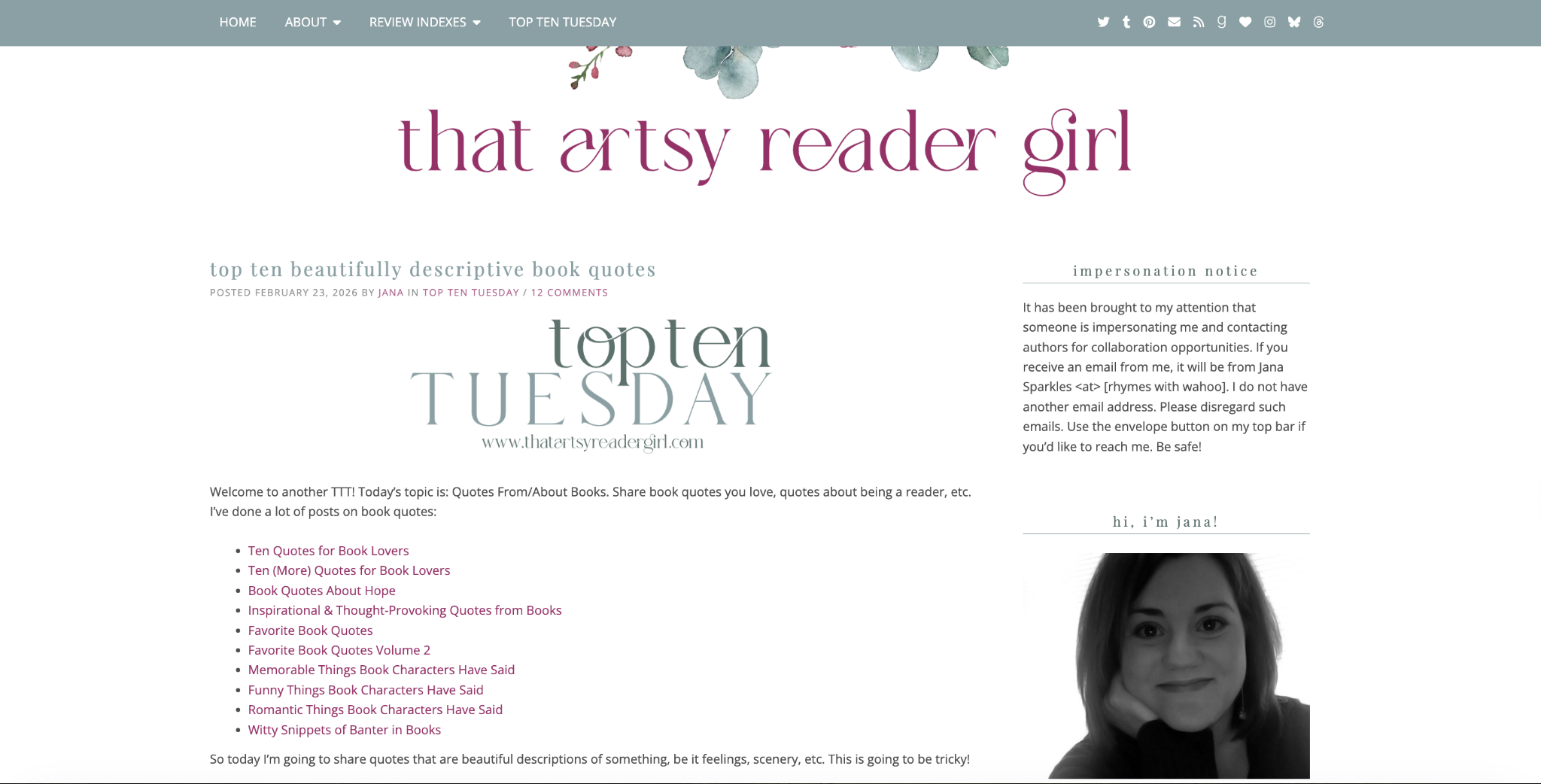
That Artsy Reader Girl is a good example of how consistency builds a strong blog identity. Jana posts her “Top Ten Tuesday” series every single Tuesday, and over time, that regular feature becomes something readers expect and associate with her blog.
Combined with her clean, artsy visuals and friendly, conversational writing style, those weekly list posts give the blog a familiar, personal feel.
Your headline determines whether your post gets read.
Write headlines that are specific and direct. Use numbers when they help set expectations, and make the value obvious – what the reader gets by clicking. “Books I Loved This Month” is unclear, but “7 Books I Read in January (and Couldn’t Put Down)” is scannable and sets expectations immediately.
An attention-grabbing headline is also an emotionally provoking one. Strong, accurate adjectives like “overlooked,” “underrated,” or “essential” add pull, as long as the post actually delivers.
Make a bold promise in the post title that persuades readers they will gain valuable information by reading the post. Be as daring as possible while still being truthful about what you wrote in the post.
Eight out of ten people read your headline, but only two out of ten will click through and read the rest. So think about different headlines, and talk to people you know. Tell them about your headlines and see which ones resonate more with your friends.
Expert Tip
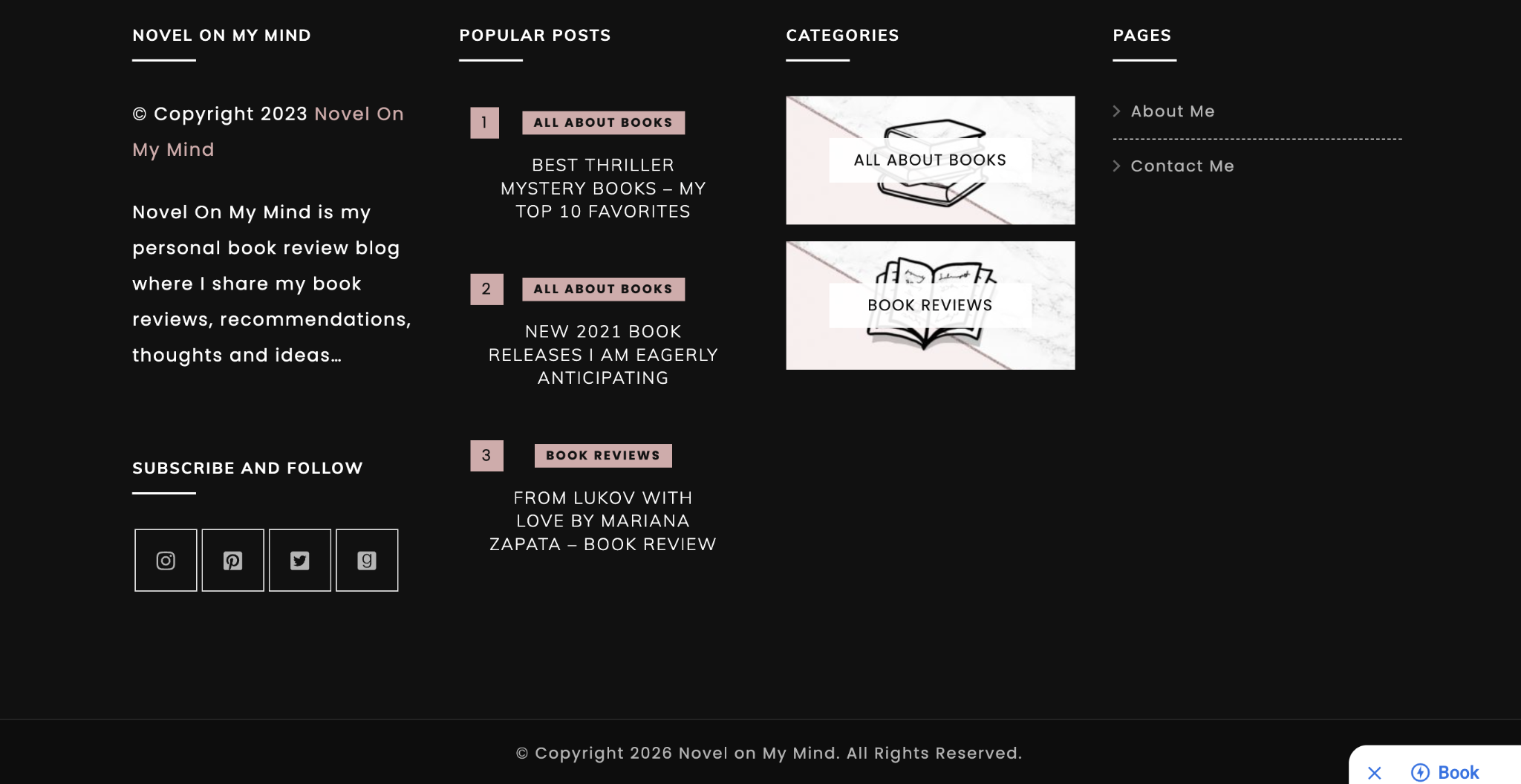
Novel On My Mind’s popular posts are good examples of clear, emotionally driven headlines – “New 2021 Book Releases I Am Eagerly Anticipating” and “Best 2023 Book Releases – 23 New Titles I’m Looking Forward to.”
Consistency matters more than frequency. A blog that publishes two posts every month on a set schedule builds more trust than a blog that posts five times in one week and then stays silent for over a month. When readers see that a site hasn’t been updated in a long time, they usually stop visiting.
To stay consistent, choose a schedule that you can realistically follow and make it predictable for your audience. Using repeatable formats can make this easier to manage. This could be:
Simultaneously, keep track of new book releases and popular trends in your specific genre. Providing a mix of familiar content and information about new books helps keep your readers interested.
Create a content schedule. Make sure that you set out time each and every single week to create content and stick with it. In my Google Calendar, I put in blocks of time to write content, publish, and edit.
Expert Tip
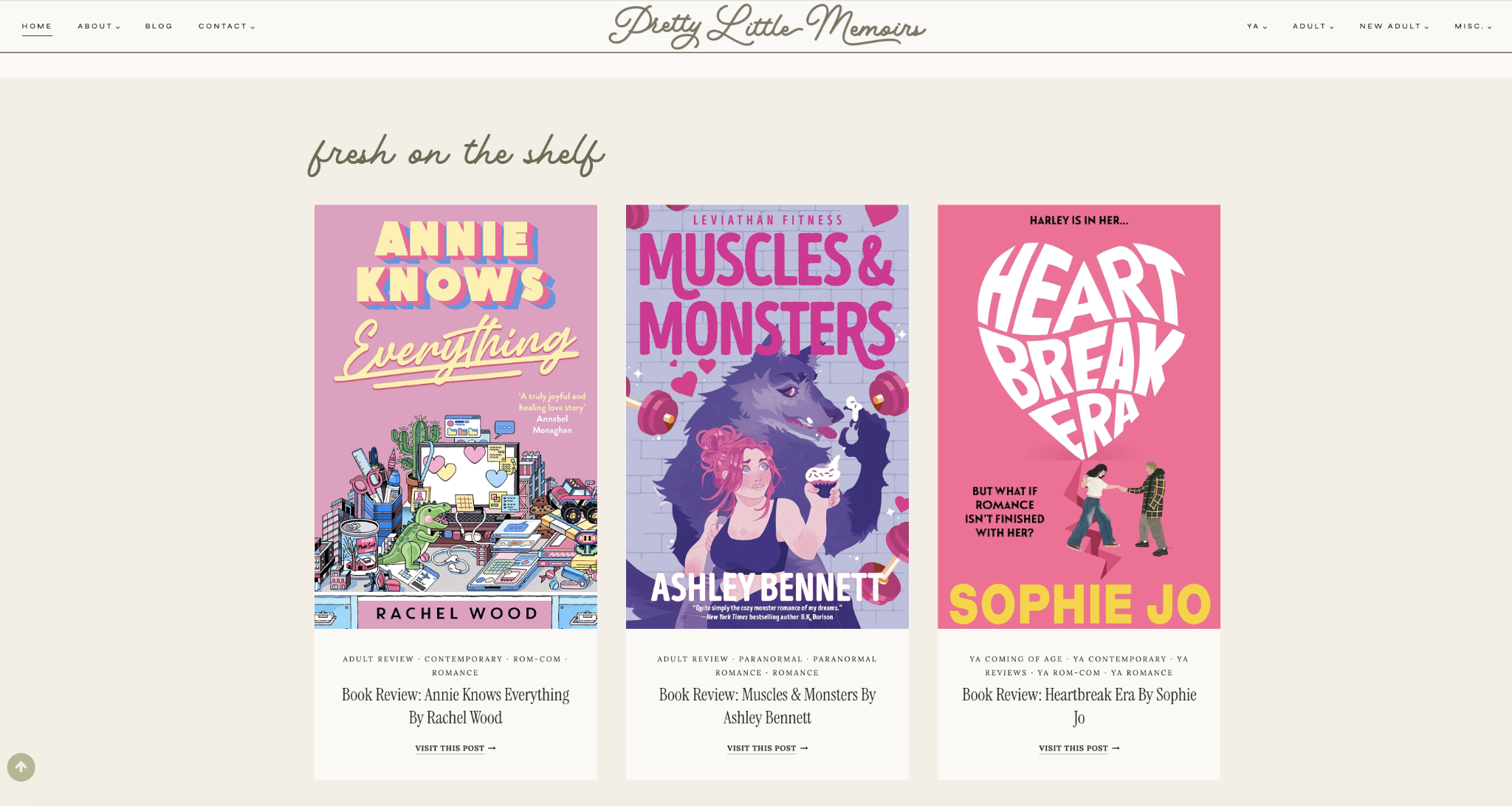
Pretty Little Memoirs shows how consistency builds trust over time. Becca has been blogging since 2012, and her “fresh on the shelf” section makes it easy for returning readers to immediately see what’s new. That visible stream of recent posts, combined with her long publishing history, shows that the blog is active and regularly updated.
Always display your posts in reverse chronological order, with the newest content at the top.
Most visitors look at your homepage to see if your blog is still active. Seeing a recent post at the very top shows them that you are still publishing and that the site has energy. If your newest articles are hidden or buried at the bottom, readers might assume you have stopped writing and leave the site.
While most blogging platforms set this order automatically, you should still check your settings when you choose a website theme. This is especially important if you pick a magazine-style layout that uses different sections for featured or popular posts, as these can sometimes hide your most recent work.
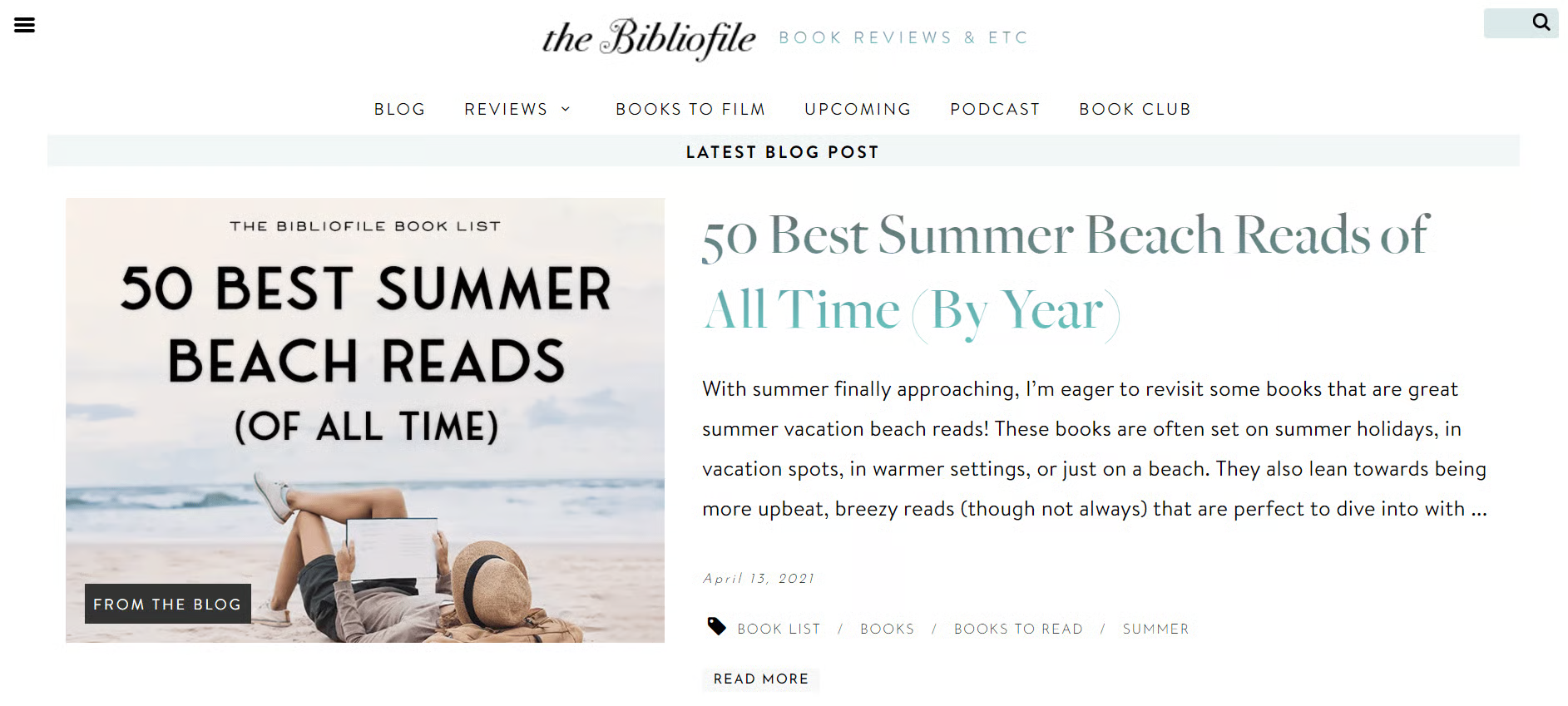
The Bibliofile does this well. The homepage leads with the latest post. Scrolling down the page, you will find other sections featuring the latest episode of its book podcast, blog posts on the newest book releases, the latest book review post, and a section for recently reviewed books.
Not everyone starts a book blog to earn. Many people begin because they love reading, want to improve their writing, or simply want a creative outlet.
But if income is part of your long-term goal, you’re not limited to one type of site.
If you want to stick with blogging, niches like food, travel, fitness, personal finance, tech, home & living, and parenting work well because readers actively search for recommendations, comparisons, and how-to content.
If you’d rather build something other than a blog, there are profitable website ideas you can consider, such as:
Regardless of what you choose, the process is the same: choose an audience, create content that solves their problems or interests them, bring in traffic through search or social, and monetize with ads, affiliate links, products, services, or sponsorships.
Start with one model that fits your skills and energy. You don’t need five websites. You need one focused project that you’re willing to grow consistently.
Momentum beats diversification in the early stages.
All of the tutorial content on this website is subject to Hostinger's rigorous editorial standards and values.

Alma is an AI Content Editor with 9+ years of experience helping ideas take shape across SEO, marketing, and content. She loves working with words, structure, and strategy to make content both useful and enjoyable to read. Off the clock, she can be found gaming, drawing, or diving into her latest D&D adventure.

Marco Chiesi is the Head of WordPress at Hostinger, with over 20 years of experience as a software engineer in the web industry. He specializes in open-source technologies and the WordPress ecosystem, where he has contributed in different areas: Plugin Developer (with over 10 million downloads), WordCamp speaker and organizer, Meetup organizer, Translator, and Core Contributor. He is passionate about leading his team to create innovative solutions for Hostinger's web hosting product, which hosts over 5 million WordPress installations. Follow him on LinkedIn.

Becoming an entrepreneur starts with identifying a problem and building a solution people are willing to pay for. Many successful businesses begin...

Making money on Pinterest involves using the platform to turn visual content into traffic, product sales, affiliate commissions, and brand...

People make money with ChatGPT by using it to create content, automate tasks, and build services that solve real business problems. Companies and...