Website maintenance cost: Hiring a professional vs self-maintenance
May 22, 2026
/
Simon L. & Saulius L.
/
9 min Read

Website maintenance costs typically range from $5 to $5,000 per month.
This wide range depends heavily on your site’s complexity, size, and whether you handle the work yourself or hire a professional.
These costs ensure your site remains secure, functional, and up-to-date, protecting your investment and reputation.
Here are the nine core areas that make up your total maintenance budget:
- Domain name. The address of your website, such as yourdomain.com, requires an annual renewal fee.
- Web hosting. The service that stores your website files and makes them accessible online, paid monthly or annually.
- SSL certificate. This security protocol encrypts data transmission, assuring visitors that your site is safe for transactions and logins.
- Email services. Professional email addresses tied to your domain name, like you@yourdomain.com, convey trust and professionalism.
- Tech support. Access to technical support is essential for quickly resolving issues such as site crashes or security breaches.
- Website design. Costs related to using premium themes, templates, or hiring a designer for aesthetic and functional updates.
- Plugins and extensions. These add-ons offer extra functionality, such as contact forms or security features, typically available with a premium subscription.
- Ecommerce features. Online stores require additional tools, such as payment gateways, inventory management systems, and shipping calculators.
- Marketing and SEO. These recurring costs cover promoting your brand and improving your search engine visibility.
Here is an overview of the average website maintenance costs for different types of websites:
| Website type | Monthly website maintenance cost |
| Personal websites | $5–25/month |
| Professional blogs | $25–75/month |
| Small to medium business websites | $35–500/month |
| Multimedia entertainment websites | $300–2,500/month |
| Corporate websites | $200–4,500/month |
| Ecommerce websites | $750–5,000/month |
The exact cost of website maintenance varies depending on the size and functionality of your site. For example, a simple personal website will be more affordable to maintain since it requires fewer features and less storage than a large ecommerce site.
Let’s break down each of these essential maintenance costs and how they add up.
1. Domain name
A domain name is your website’s unique address, and its maintenance cost is primarily the annual renewal fee, typically ranging from $10 to $129 per year.
Registration for a new domain often costs between $1 and $100, but always check the renewal price, as it’s usually higher.
Here’s a quick look at the average yearly domain name costs. Keep in mind that prices are estimates and vary between domain registrars:
| TLD | Registration (first year) | Renewal (yearly) | Transfer |
| .com | $9.99 | $19.99 | $9.99 |
| .co.uk | $7.99 | $11.99 | $0.99 |
| .info | $2.99 | $28.99 | $20.99 |
| .net | $14.99 | $17.99 | $14.99 |
| .xyz | $29.97 | $41.97 | $12.99 |
The cost depends on which extension you choose, such as .com vs. .net, and its level of popularity. After the initial purchase, you must renew the domain name before it expires to keep ownership.
For added security, budget for domain privacy protection. This feature protects your personal information from being publicly listed in the WHOIS database. This service can cost $2–$20 per year, although some providers, like Hostinger, offer it for free with a domain name.
Learning how to choose a domain name is an important first step to deciding which extension to go with and how much your actual domain costs will be.
Domain Name Checker
Instantly check domain name availability.
2. Web hosting
Web hosting is the necessary service that makes your website accessible to visitors worldwide. Costs range from $2 to over $300 per month, depending on the type of hosting you choose.
There are different types of web hosting available. Choose one based on your business goals and your website’s needs:
- Web hosting: Ideal for simple portfolios and blogs. It’s the most cost-effective option because you share the server’s resources with many other sites. Expect to pay around $3–$30/month.
- VPS hosting: Great for medium-sized websites that need dedicated resources. This gives you more control and stability than shared hosting, typically costing $5–$50/month.
- Cloud hosting: Perfect for traffic-heavy websites that require high uptime and scalability. Data is stored on a cluster of servers, often costing between $7 and $65/month.
- Dedicated hosting: Suitable for large, established businesses that require superior performance and complete control. You get an entire server to yourself, making it the most expensive option, priced at $80–$ 300 per month.
- WordPress hosting: Optimized specifically for WordPress sites, offering additional tools for easy management, usually priced between $3–$25/month.
As you can see, the cost of web hosting varies widely based on your resource needs. It also depends on the subscription length. Opting for a longer contract of up to 48 months usually locks in a lower monthly rate compared to paying month-to-month.

3. SSL certificate
An SSL (Secure Sockets Layer) certificate is an essential security feature that protects data between a server and a browser.
It is non-negotiable for sites that process sensitive user information, like credit card details or passwords.
While these certificates can cost up to $1,000 annually, most reputable web hosting companies offer a free SSL certificate with all their plans, which significantly reduces your maintenance costs.
Most small sites don’t need a paid SSL since free certificates work perfectly fine. However, paid certificates offer specific benefits, such as a warranty, dedicated customer support, and Extended Validation (EV) certificates, which provide the highest level of assurance for customers.
If you do need to purchase one separately, costs vary:
- Single-domain SSL. Protects one specific domain, priced between $7–$860/year.
- Wildcard SSL certificate. Protects a main domain and multiple subdomains, usually costing $50–$1,000/year.
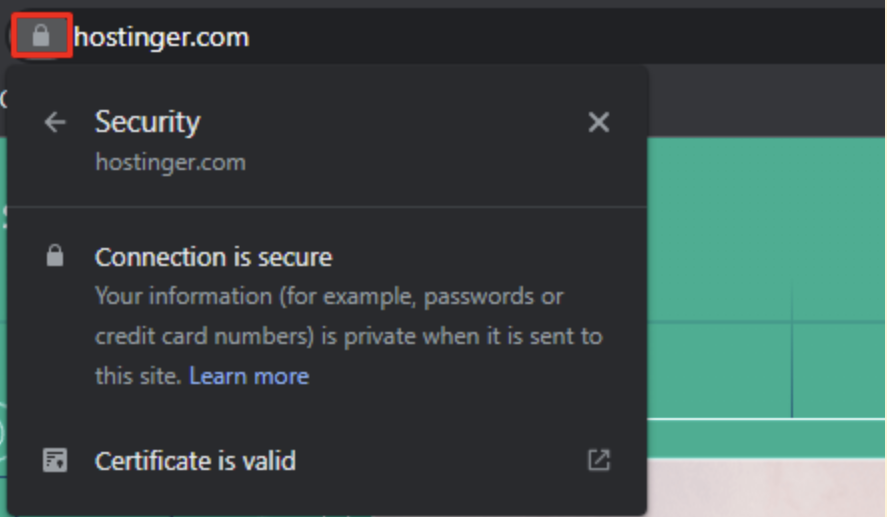
You don’t need to know the technical details of what SSL is to see it in action. To check if a website has active SSL encryption, look for the padlock icon in the browser’s address bar. This simple visual cue assures visitors their connection is secure.
4. Email services
Professional email hosting enables you to create custom email addresses, such as hello@yourdomain.com.
These email services cost approximately $1–$6 per user per month. A domain-based email address promotes your brand, looks more professional, and builds customer trust compared to using a generic Gmail or Outlook account.
Google Workspace offers a premium email service for $6/month per mailbox. Microsoft 365 is another popular option, with its plans starting at around $6 per user/month when paid annually.
However, you can minimize this cost by looking for a hosting provider that includes free domain-based email accounts with their hosting plans. Hostinger does this, and it’s a common bundling practice that helps small businesses save money.
The final cost depends on the number of mailboxes you need and your subscription length. Committing to a longer period often lowers the monthly per-mailbox price.

5. Tech support
Reliable tech support is an important yet often overlooked maintenance cost that can range from $2 to $300 per month, depending on the level of service you require.
Having access to a support team lets you quickly resolve unexpected issues, such as website crashes or broken forms, before they negatively impact your traffic or customer experience.
Tech support comes in different types:
- Basic support. Typically included with your hosting plan (live chat, email ticketing). This is usually sufficient for personal or small business websites.
- Premium/dedicated support. Ideal for larger, more complex websites, such as ecommerce stores. This level provides immediate, personalized assistance and is available as an optional paid add-on.
- Knowledge database. Free, self-service resources, such as tutorials and guides, enable you to resolve issues independently.
- AI assistants. Some hosting providers offer free AI assistants, such as Hostinger’s Kodee. These tools are trained on extensive knowledge bases and can provide instant, automated answers, troubleshoot simple issues, and guide you to tutorials 24/7, significantly reducing the need to wait for a human agent.
Your need for tech support budget depends on your technical skills and the size of your site. If you prefer to be completely hands-off, budgeting for priority support is a smart choice.
6. Website design

Website design maintenance costs vary significantly, ranging from $3 to $17 per month for self-designed sites to $500 to $5,000 per year for regular updates from a professional web designer.
Good design is a visual representation of your brand and is important for creating a positive first impression and improving SEO.
The most budget-friendly option, ideal for small to medium-sized sites, is to create a website yourself. Here are your options, even if you don’t know how to design a website.
- Premium themes. Paid themes or templates typically offer more features and better support than free ones. They usually cost a one-time fee between $30 and $200.
- Website builders. Platforms like Hostinger’s AI website maker come with drag-and-drop features and make self-design intuitive, even for beginners. The builders are trained on website design best practices, so you get a site that looks good and works well.

Alternatively, a professional can create a custom-coded website tailored to your exact needs, but this significantly increases maintenance costs.
- Custom design. The initial project cost for a basic, custom-built website can range from approximately $1,000 to $5,000 or more, depending on the scope and complexity of the website.
- Maintenance contracts. A yearly maintenance contract for design updates, performance optimization, and bug fixes can cost between $500 and $5,000/year. This approach is necessary for large, high-traffic websites, but mid-sized businesses also commonly use maintenance contracts.
For a full cost breakdown, check out our guide on how much it costs to make a website.
7. Plugins and extensions
Plugins and extensions expand your website’s functionality, and while many free options exist, premium versions can add $4–$49 per month to your maintenance budget.
These add-ons are widely used on platforms like WordPress to introduce features that don’t come standard.
It’s always smart to start with free plugins where possible, and as your website grows, invest in premium options for more robust features and dedicated support.
Here are a few common plugin types and their typical premium costs:
- Security plugins. Help secure your website with essential features like a firewall, malware scanner, brute-force protection, and login protection.
- Page builders. Provide an easy drag-and-drop interface directly into your site editor, allowing you to create complex, customized page layouts without needing to write code.
- Backup and migration plugins. Vital for creating automated, scheduled backups of your entire site and database, allowing for one-click restoration in case of an error or hack.
- SEO plugins. Provide tools for content analysis, generating XML sitemaps, and optimizing meta descriptions to help your site rank higher.
- Performance plugins. Optimize site speed by creating static versions of your pages and deferring non-essential code, which is important for both user experience and search engine ranking.
The plugins you choose will directly influence your maintenance costs, so install only what you truly need.
8. Ecommerce features
Ecommerce sites have additional required maintenance costs for features like payment processing and inventory management, typically ranging from $30 to $300 or more per month for regular-sized online stores.
If you run an online business, these extra tools are essential for handling sales and customer transactions.
Here are the critical features that contribute to maintenance costs:
- Ecommerce platform: Many website builders offer ecommerce plans with all the essential features you need to start selling. For example, Hostinger’s ecommerce website builder lets you sell a wide range of products and accept over 100 payment methods.
- Payment gateways. Services like Stripe and PayPal offer secure transactions and help build customer trust. Most charge per-transaction fees (typically 2.9% + $0.30 per transaction), with some requiring monthly fees for advanced features.
- Inventory management. Tools to track and manage in-stock products, which can be free (freemium) or cost up to $300/month for advanced features.
The cost for these features scales with your business. The more products and services you sell, and the higher your traffic, the more you will pay for advanced versions of these tools.
9. Marketing and SEO
Budgeting for marketing and SEO (Search Engine Optimization) is an ongoing, essential cost that can range from $0 to $500 or more per month, depending on how much you outsource.
These strategies are necessary to drive traffic to your website, maintain visibility, and ensure your content is up-to-date and relevant.
Consider these digital marketing strategies as part of your recurring maintenance budget:
- Website optimization. Premium tools, such as Ahrefs, provide in-depth analysis of keywords, site health, and competitor rankings to help improve your website’s ranking on search engines. These tools can cost anywhere from $99 to $999 per month.
- Content marketing. This involves consistently creating high-quality, relevant content like articles and videos to attract, engage, and retain your target audience. If you outsource, expect to pay a freelancer or agency, with rates ranging from around $50 to $3,000 per project.
- Email marketing. This involves using a service provider and platform to keep your audience informed about your business activities and promotions. The value of what email marketing is comes from its power as a direct, personalized channel. It’s an essential tool for nurturing your leads directly in their inbox. Platforms like Hostinger Reach help manage campaigns and subscriber lists.
- Social media marketing. This covers the time and resources needed to manage and promote your brand across social platforms to target your audience. An average company can spend $100 to $5,000/month or more covering tools, ads, and a social media manager.
- Paid advertising. This covers the recurring ad spend and management fees for running campaigns on platforms like Google Ads or social media, delivering immediate, targeted traffic to your offers.
You don’t need to implement everything at once. Small website owners can begin with basic SEO and content marketing strategies, then scale up as their business expands.
Should I maintain the website myself or hire a developer?
You have two main paths for website maintenance, each with a different cost structure. The best choice depends on your budget, time, and technical skills.
Hiring a professional
The average cost for professional website maintenance ranges from $200 to $4,500 per month, offering expertise and efficiency in exchange for a higher rate.
Hiring a professional saves you time and effort, ensuring that complex technical aspects are handled correctly.
- Website maintenance agency. Agencies cost more, typically ranging from $200 to $4,500/month, because they dedicate a team to your site. They provide fixed maintenance packages that often include regular software updates, security audits, and performance optimization.
- Freelance expert. A freelance professional typically charges $25–$150/hour, depending on their experience and specialization, offering more flexibility than agencies but making you rely on one person for all tasks.
This option is ideal for businesses that prefer to focus on operations rather than technical upkeep.
Self-maintaining a website
The cost of a do-it-yourself approach is significantly lower, typically under $100 per month, making it a great option for budget-conscious website owners.
You only pay for necessary services, such as hosting and domain renewal, and avoid professional service fees.
- Budget control. You have the most cost-effective website maintenance service costs and complete control over your site’s configurations.
- Time and learning curve. Handling your own website’s technical aspects can be overwhelming and takes time to learn and implement correctly. However, a modern website builder can often handle the back-end maintenance for you, simplifying the process.
The DIY approach is best suited for small business websites or personal blogs if you’re willing to be hands-on with maintenance tasks.
How often is website maintenance required?
There is no single rule for maintenance frequency, but having a monthly website maintenance checklist is the best solution to ensure everything is secure, up-to-date, and running smoothly.
While some elements only need annual checks, such as domain name and hosting renewals, others require more frequent attention.
- Daily or weekly maintenance. This includes ensuring automated backups run daily (or hourly for high-volume sites), using continuous monitoring tools to detect downtime instantly, and promptly applying critical security updates as soon as they are released.
- Monthly maintenance. This should include checking for broken links, updating all core software, plugins, and themes, running security scans, and backing up your entire site.
- Quarterly maintenance. This is a good time for more in-depth tasks, such as reviewing your marketing and SEO analytics, testing your site’s speed, and optimizing content.
Routine maintenance prevents errors and security breaches. For example, regularly updating WordPress lets you fix bugs early, preventing a negative impact on performance.
Plan your website maintenance with confidence
Understanding the typical maintenance cost ranges is the first step toward effective business planning.
Creating a structured website maintenance plan is the next step, as it helps you control these costs, increase efficiency, and prevent expenses related to unexpected technical issues.
By scheduling recurring tasks like security checks, core updates, and content reviews, you can stay within your budget and ensure the long-term health of your online presence.
All of the tutorial content on this website is subject to Hostinger's rigorous editorial standards and values.


Simon is a dynamic Content Writer who loves helping people transform their creative ideas into thriving businesses. With extensive marketing experience, he constantly strives to connect the right message with the right audience. In his spare time, Simon enjoys long runs, nurturing his chilli plants, and hiking through forests. Follow him on LinkedIn.

As VP of Product at Hostinger, Saulius oversees Web Hosting Platform & Tools, Managed WordPress, and WebPro Experience. Saulius enjoys observing users through their daily life activities, looking for problems to solve, and building products that make users more efficient online, help them spend more time on the things they love, and leave all the rest for technology to solve. Follow him on LinkedIn.