What is HTTPS Port 443? Definition, uses, and setup
Mar 10, 2026
/
Noviantika G.
/
6 min Read
An HTTPS port is a network endpoint used to securely transmit encrypted web traffic between a browser and a website server. The most commonly used HTTPS ports are 443 and 8443, which allow communication over encrypted protocols like SSL (Secure Sockets Layer) and TLS (Transport Layer Security).
These ports are essential for protecting sensitive data and ensuring secure access to websites. In this guide, we’ll explain what HTTPS ports are, highlight how they differ from SSL certificates, and show how to enable or configure them on Windows, macOS, and Linux systems.
What Is an HTTPS Port
HTTPS ports are dedicated network ports that allow internet users to transmit data via a secure connection encrypted using an SSL/TLS certificate. The most common examples are ports 443 and 8443.
Differences Between SSL and HTTPS Port
The HTTPS protocol runs over an SSL certificate installed on a web server. Although both work alongside each other, they serve as two different core factors in establishing an encrypted connection.
An SSL certificate operates by authenticating a user’s identity when they attempt to send information. However, this technology is currently deprecated and replaced by TLS, which performs better than its predecessor.
The main difference between HTTP vs. HTTPS is that only the latter provides a secure channel where encrypted data is transmitted safely.
To identify whether a website uses an SSL certificate, look at its URL and check if it contains an HTTPS extension and a padlock icon next to the domain name.
Check out our tutorial to learn more about SSL/TLS vs. HTTPS.
Most Common HTTPS Ports
In this section, we will discuss the most commonly used HTTPS ports – 443 and 8443.
Port 443
The Internet Engineering Task Force (IETF) recognizes the TCP port number 443 as the default HTTPS protocol. It provides an encryption algorithm for exchanging information between web servers and browsers. HTTPS port 443 works by securing network traffic packets before the data transmission occurs.
As a dedicated port for web browsing, it uses an SSL/TLS certificate to encrypt the original text into an algorithm, then converts it to ciphertext before sending it to the server. This prevents unwanted eavesdropping and interception of data transmitted across the protocol.
Port 8443
Port number 8443 is an alternative HTTPS port and a primary protocol that the Apache Tomcat web server utilizes to open the SSL text service.
In addition, this port is primarily used as an HTTPS Client Authentication connection protocol.
The HTTPS port provides encrypted traffic by generating an authentication key pair for the user that is kept within the web browser. The server will then verify the authenticity of the private key before establishing a secure connection.
List of HTTPS Port Numbers
Here’s a list of some service names and transport protocol port registries from the Internet Assigned Numbers Authority (IANA):
| Port | Function |
| 443 | HTTPS |
| 631 | Internet Printing Protocol over HTTPS (IPPS) |
| 664 | DMTF out-of-band secure web services management protocol |
| 832 | NETCONF for SOAP over HTTPS |
| 1129 | SAPHostControl over SOAP/HTTPS |
| 1184 | LL Surfup HTTPS |
| 2381 | Compaq HTTPS |
| 4036 | WAP Push OTA-HTTPS |
| 4849 | App Server – Admin HTTPS |
| 5443 | Pearson HTTPS |
| 5989 | WBEM CIM-XML (HTTPS) |
| 5990 | WBEM Export HTTPS |
| 6443 | Service Registry Default HTTPS Domain |
| 6771 | PolyServe HTTPS |
| 7202 | Inter-Channel Termination Protocol (ICTP) for multi-wavelength PON (Passive Optical Network Systems) |
| 7443 | Oracle Applications Server HTTPS |
| 7677 | Sun App Server HTTPS |
| 8243 | Synapse Non-Blocking HTTPS |
| 8443 | PCsync HTTPS |
| 8991 | Webmail HTTPS service |
| 9295 | ARMCenter HTTPS service |
| 9443 | WSO2 Tungsten HTTPS |
| 9444 | WSO2 ESB Administration Console HTTPS |
| 16993 | Intel(R) AMT SOAP/HTTPS |
| 20003 | Commtact HTTPS |
Why Use an HTTPS Port
For website owners, utilizing a secure channel is essential. Here are four main reasons you should switch to an HTTPS port:
- Sensitive information protection. One of the benefits of using SSL is that it encrypts and authenticates data as it’s being transferred. It ensures data security in transit and protects it from man-in-the-middle (MITM) attacks.
- Keeps online transactions secure. eCommerce site owners must have an SSL certificate to encrypt financial data and adhere to the Payment Card Industry Data Security Standards (PCI DSS) requirements.
- Increases website’s rank on Search Engine Result Pages (SERP). HTTPS is an important metric for search engine optimization (SEO). Therefore, sites with an SSL certificate will rank better on search results.
- Improves customers’ trust and conversion rate. An HTTPS site assures visitors that their sensitive information is secure, making them more likely to revisit your site.
How to Enable Port 443 and Port 8443
While each operating system has different procedures, you can open or close a specific port through a firewall control panel or security architecture.
Enable Ports 443 and 8443 on Windows
Follow these steps to allow ports 443 and 8443 on the Windows firewall:
- Open the Control Panel.
- Select System and Security and click Windows Defender Firewall.
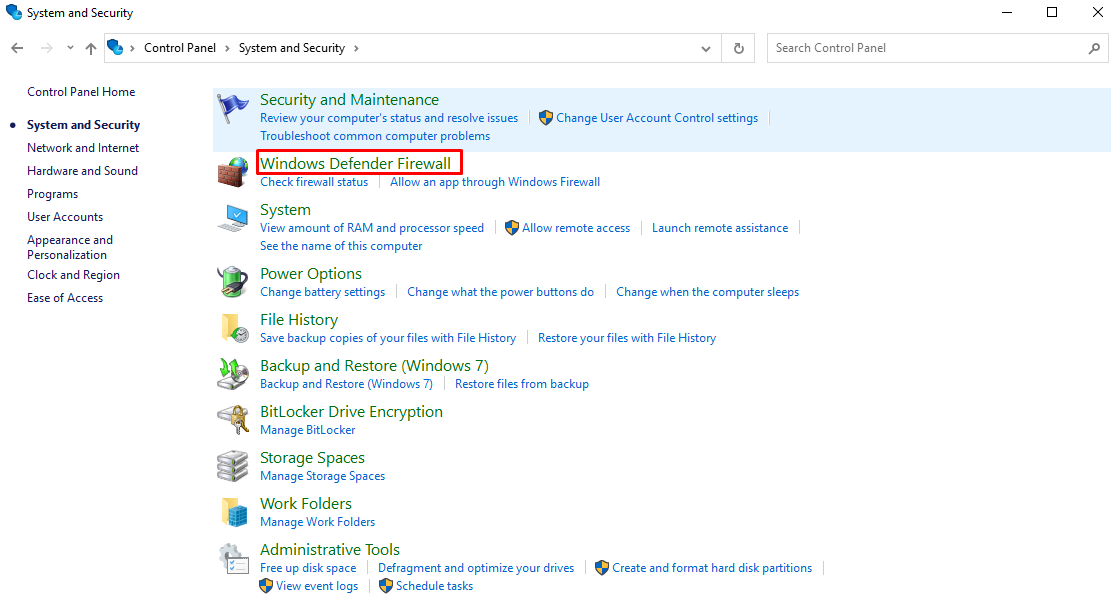
- Choose Advanced settings.
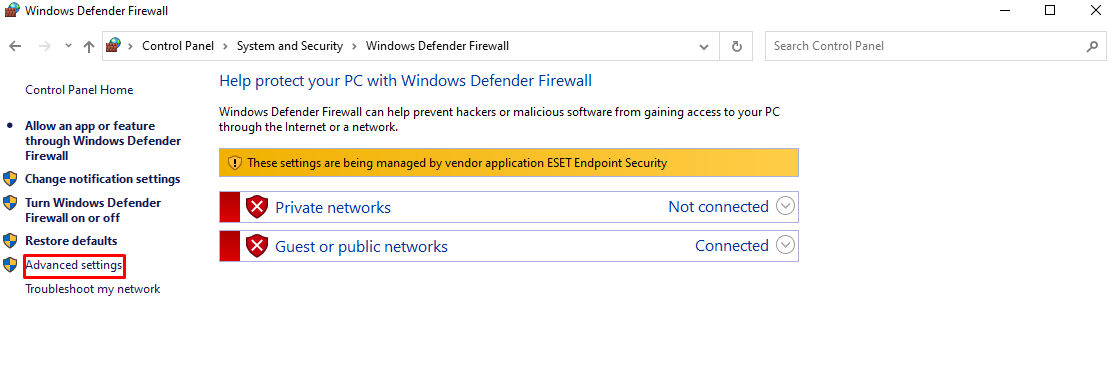
- The Windows Defender Firewall with Advanced Security window will open. Select Inbound Rules and, under the Actions tab, click New Rule…
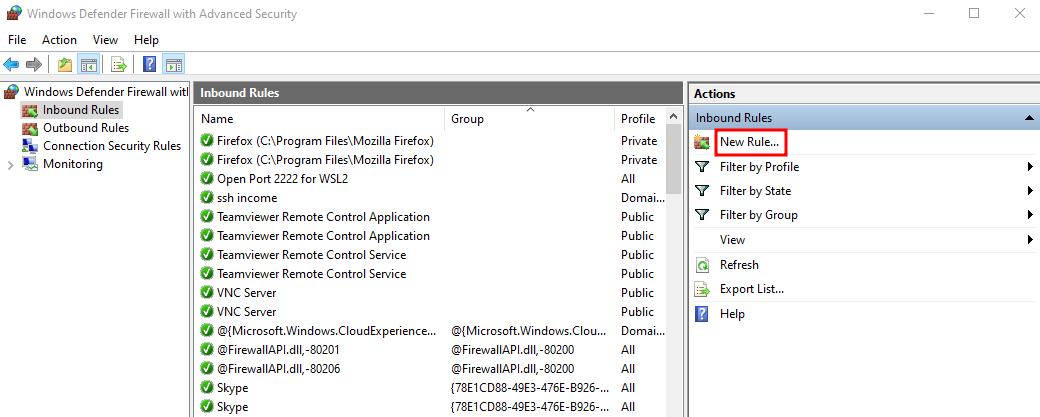
- The New Inbound Rule Wizard window will open. Select Port and click Next.
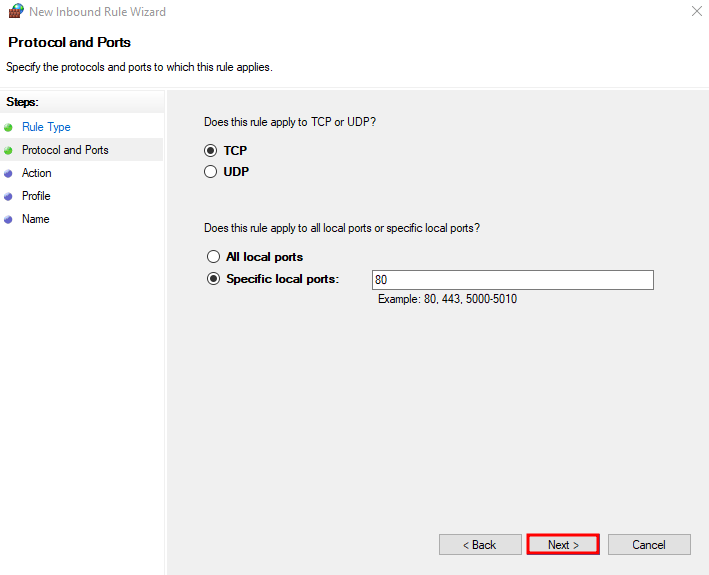
- Select TCP under the Does this rule apply to TCP or UDP? option and type in the port numbers 443 and 8443 next to the Specific local ports, separated by a comma. Once finished, click Next.

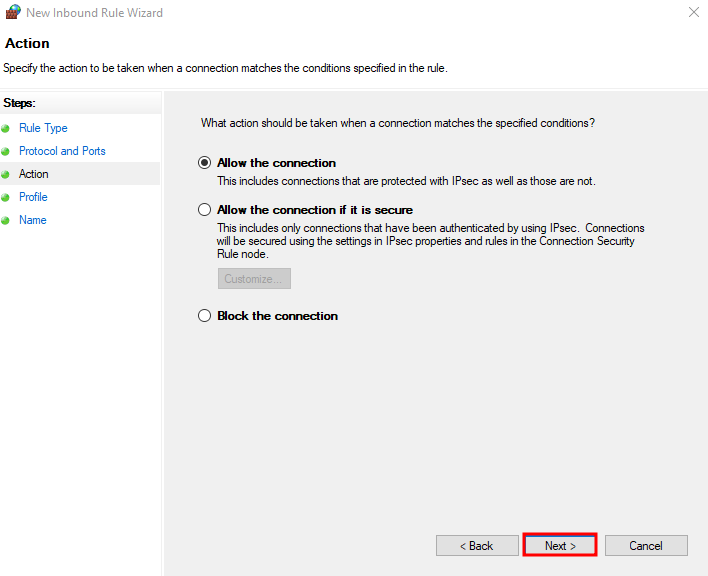
- Select the Allow the connection option and hit Next.
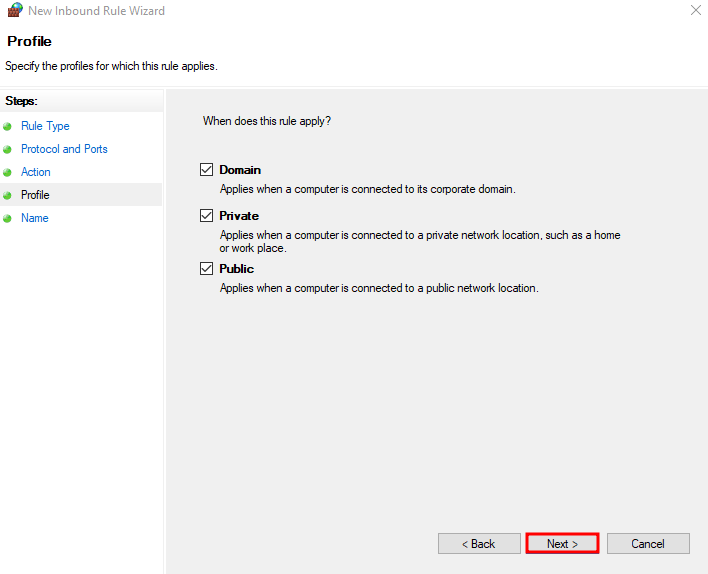
- Tick all the Domain, Private, and Public profiles and click Next.
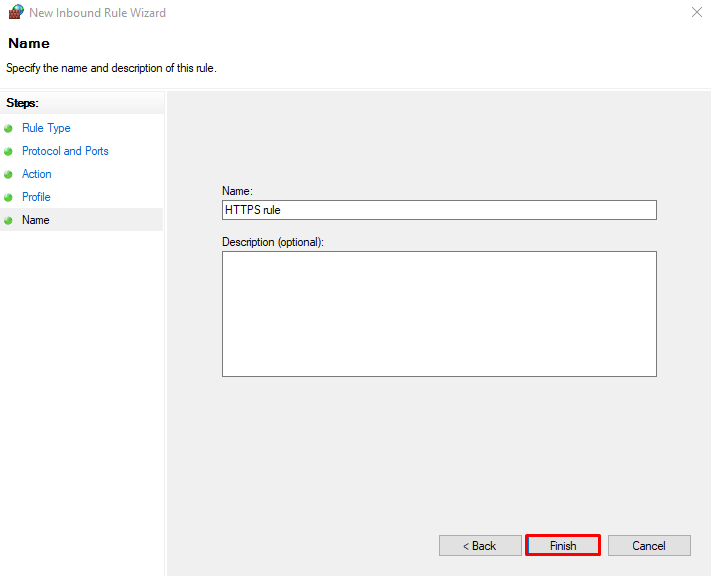
- Lastly, give the rule a name and add a description if you wish. Select Finish.
Enable Ports 443 and 8443 on macOS
Here’s how to authorize ports 443 and 8443 on macOS firewall:
- Open System Preferences and select Security & Privacy to check firewall status. It should be enabled by default.
- If the firewall is enabled, open the Terminal and log in as a root user.
- Next, open the packet filter configuration file by inserting the following command and pressing Enter:
sudo nano /etc/pf.conf
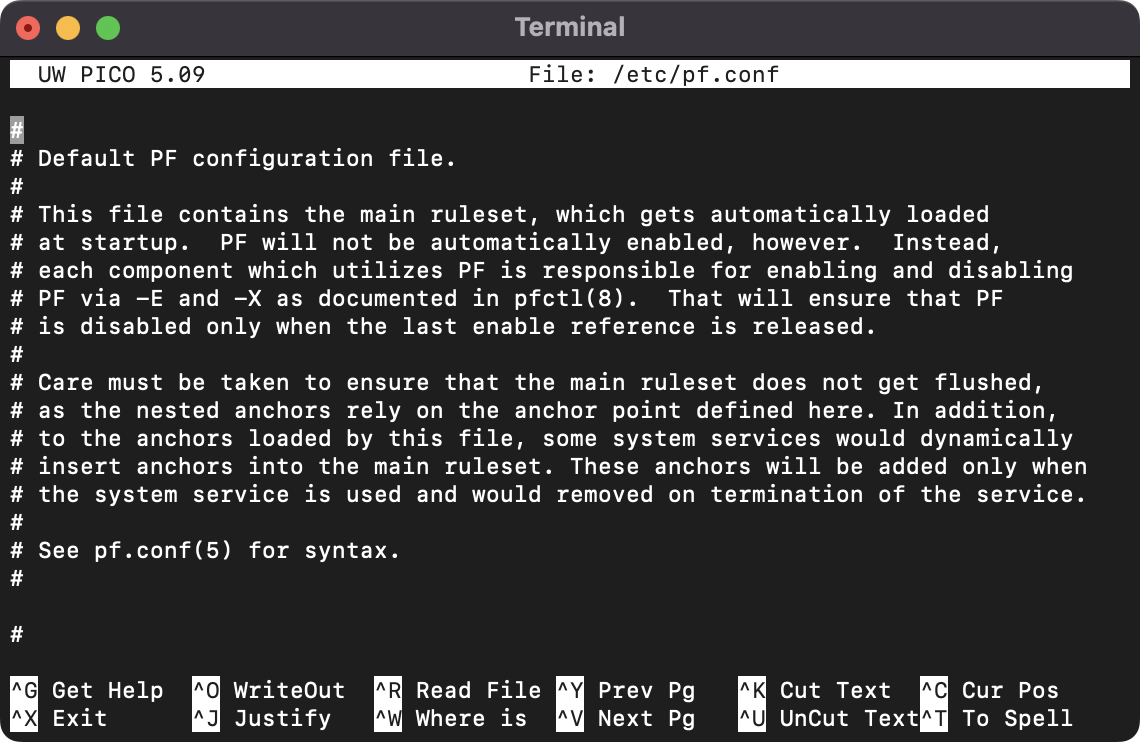
- Add these two following lines at the bottom of the pf.conf file to allow ports 443 and 8443:
pass in inet proto tcp from any to any port 443 no state
pass in inet proto tcp from any to any port 8443 no state
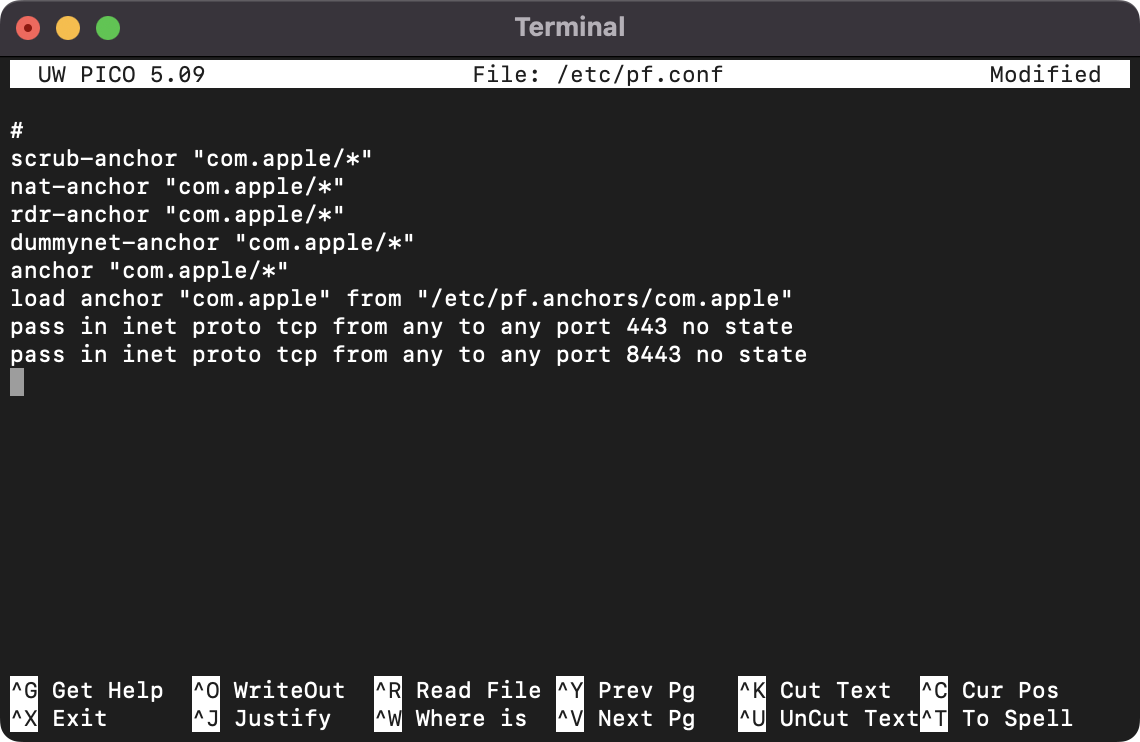
- Use the keyboard shortcut Control + O and hit Enter to save your changes. Press Control + X to close the text editor.
- Reload the firewall configuration file by running this command:
sudo pfctl -f /etc/pf.conf
- Lastly, type in the following command and hit Enter to restart the firewall itself:
sudo pfctl -e
Enable Ports 443 and 8443 on Ubuntu
There are two ways to open ports on Ubuntu – via UFW and iptables.
Enable Ports 443 and 8443 via UFW
Here’s how to enable HTTPS port 443 and port 8443 using UFW:
- Open the Terminal and log in as a root user.
- Update the system by running this command:
sudo apt update
- Upgrade the package list by typing in the following command and pressing Enter:
sudo apt upgrade
- Next, open port 443 by running this command:
sudo ufw allow 443/tcp
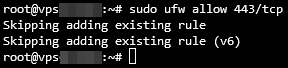
- Insert the following command to enable port 443:
sudo ufw allow 8443/tcp
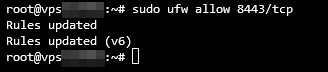
- Finally, run the last command below to verify the new rules:
sudo ufw status verbose
Enable Ports 443 and 8443 via iptables
Follow these steps to open HTTPS port 443 and port 8443 using iptables:
- Open the Terminal and access SSH as a root user.
- Update the system by typing in this command and pressing Enter:
sudo apt update
- Insert the following command to upgrade the package list:
sudo apt upgrade
- To save the new rules on iptables, you have to set up the iptables-persistent package. Install it by using the following command:
sudo apt install iptables-persistent
- Run this command to enable port 443. Note that it will not show you an output:
sudo iptables -A INPUT -p tcp --dport 443 -m conntrack --ctstate NEW,ESTABLISHED -j ACCEPT
If the output policy is not set to ACCEPT, add the following command:
sudo iptables -A OUTPUT -p tcp --sport 443 -m conntrack --ctstate ESTABLISHED -j ACCEPT

- Next, enable port 8443 by typing in this command. Similarly, it will not produce an output:
sudo iptables -A INPUT -p tcp --dport 8443 -m conntrack --ctstate NEW,ESTABLISHED -j ACCEPT
If the output policy is not set to ACCEPT, add this command:
sudo iptables -A OUTPUT -p tcp --sport 8443 -m conntrack --ctstate ESTABLISHED -j ACCEPT

- Lastly, run the following command to save the changes:
sudo netfilter-persistent save

Enable Ports 443 and 8443 on CentOS
Here’s how to open ports 443 and 8443 using iptables on CentOS:
- Open the Terminal and log in as root user.
- Open the iptables configuration file by running the following command:
sudo vi /etc/sysconfig/iptables
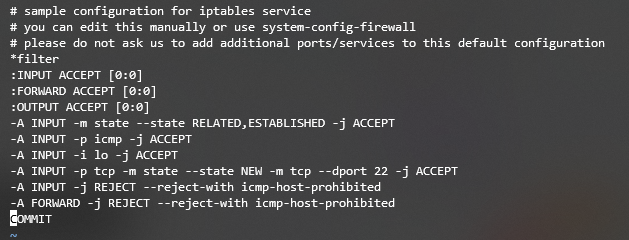
- Enter the Insert mode by using the keyboard shortcut Shift + I.
- Append the rule by inserting the following lines to the file:
-A INPUT -m state --state NEW -m tcp -p tcp --dport 443 -j ACCEPT
-A INPUT -m state --state NEW -m tcp -p tcp --dport 8443 -j ACCEPT
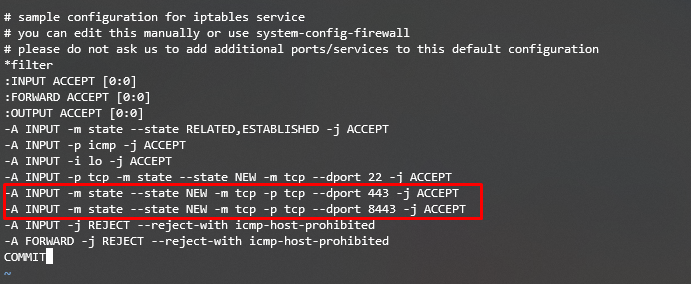
- Save and close the file by pressing Control + C -> Y -> Enter to confirm the changes.
- Restart the iptables service by running the command below:
sudo systemctl restart iptables

Conclusion
The HyperText Transfer Protocol Secure (HTTPS) port is a secure version of HTTP. It provides a communication channel that secures the data transferred between a server and a web browser using an SSL/TLS certificate that encrypts the web traffic and protects sensitive customer information in transit.
In computer networking, there are many ports assigned for specific purposes. However, the two most common ports used in secured web browser communication are port 443 and port 8443.
We hope this article has helped you understand HTTPS ports, their examples, and how to enable these network ports on different operating systems – Windows, macOS, Ubuntu, and CentOS.
If you have any further questions or suggestions, please leave them in the comments section below.

Noviantika is a web development enthusiast with customer obsession at heart. Linux commands and web hosting are like music to her ears. When she's not writing, Noviantika likes to snuggle with her cats and brew some coffee.